
Route a Bailey County Parcel From High Plains Search to Appraisal, Protest and Tax Payment
Start with Bailey Central Appraisal District when you need a property ID, appraisal owner, legal description, preliminary 2026 value, exemption, farm or ranch account, mineral interest, business-personal-property record, interactive map or property-tax balance.
Bailey County has an important local difference: its elected County Tax Assessor-Collector does not collect property taxes. Bailey CAD provides appraisal services and collects taxes for specific local entities, while the County Clerk controls recorded deeds, liens and official land records.
The official search currently labels displayed 2026 values preliminary until certification.
302 Main Street, Muleshoe, Texas 79347.
Jessica Rivera is listed by Bailey CAD and the Comptroller directory.
3% in October, 2% in November and 1% in December for collected entities.
Local portals, contacts and procedures reviewed July 2026.
What do you need to do with the Bailey County property account?
Use owner, address, property ID or Advanced Search and confirm the legal description and property type.
Follow the property-search stepsReview land, improvements, market value, appraised value and taxable value, then recheck after certification.
Understand the value fieldsReview acreage, land use, irrigation, productivity value and supporting agricultural or wildlife records.
Review rural-land guidanceIdentify the exact value, exemption, acreage, ownership, classification or improvement issue.
Prepare the protest packetConfirm the property, entity, tax year, discount, prior-year balance, payment amount and receipt.
Follow the payment workflowSearch recorded ownership and documents when the appraisal owner field is not enough.
Search legal land recordsSearch Bailey CAD without confusing an appraisal record with a legal title record
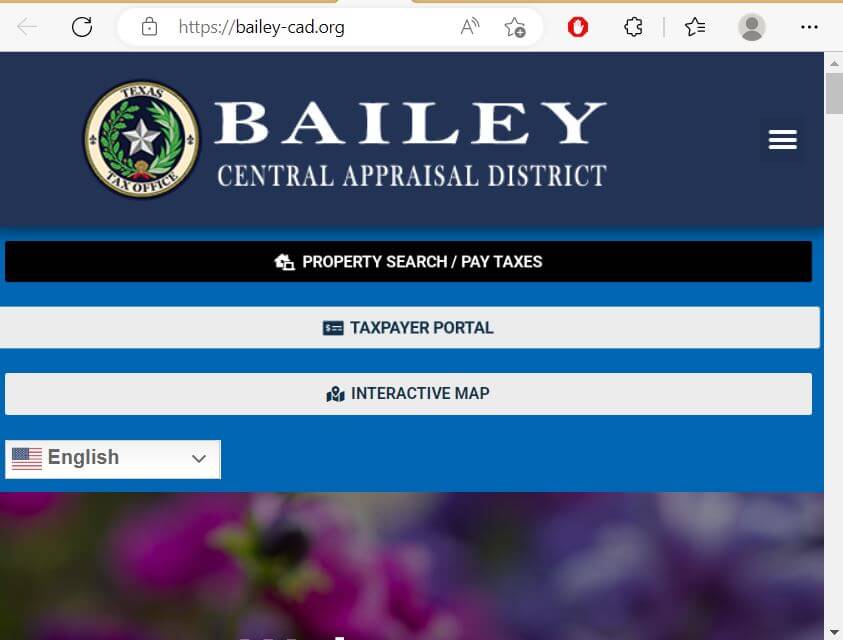
Use the Bailey CAD screenshot as a property-search guide
The existing article included the image below. It is preserved and moved into the search workflow where it helps users recognise the official account-lookup screen and understand what to check.
Choose the Bailey CAD filter that matches the property
| Search field | Best use | Verification step |
|---|---|---|
| Owner name | Homes, farms, businesses, trusts, estates and mineral owners. | Try the first or last name alone and compare all property types. |
| Street number and name | An addressed home or business in Muleshoe. | Remove the street number or suffix when the complete address fails. |
| Property ID | A notice, tax statement or prior property page supplies the identifier. | Confirm the owner, property type, year and legal description. |
| Owner ID | Locating multiple accounts carried under one appraisal-system owner identifier. | Do not assume every result represents the same property or interest. |
| Geographic ID | Matching the appraisal account with mapping or parcel references. | Do not treat the ID as proof of a surveyed boundary. |
| Abstract | Irrigated farmland, dryland acreage, ranch tracts and rural property. | Match abstract, survey, tract, acreage and deed information. |
| Subdivision | Property in a platted addition or named development. | Match lot, block and complete legal description. |
| Mobile-home park | Locating a manufactured-home account that may be separate from land. | Compare home ownership, land ownership and serial information. |
| Doing Business As | Business-personal-property accounts using a trade name. | Match the legal entity, business location and asset account. |
| Neighborhood | Comparable-property and equal-appraisal research. | Compare property class, size, age, condition and land use. |
| Protest and hearing fields | Searching protest status, informal date, formal date or hearing date. | Use the filing confirmation and official hearing notice as controlling. |
Understand what a Bailey CAD account proves—and what it does not
| Account field | What it identifies | What it does not prove | Best next step |
|---|---|---|---|
| Property ID | The appraisal and collection account in Bailey CAD’s system. | That every county or title record uses the same identifier. | Save it for CAD calls, protests and tax payments. |
| Owner name | The owner carried for appraisal and collection administration. | Complete legal title, heirship, mineral ownership or lien status. | Search County Clerk records when legal ownership matters. |
| Situs address | The physical location shown for the account. | The owner’s mailing address or complete legal description. | Compare the map, deed and mailing record. |
| Legal description | The lot, block, tract, abstract, survey or subdivision reference shown. | That the abbreviated text is sufficient for a deed or survey. | Review the recorded deed, plat and survey. |
| Acreage | The acreage carried for appraisal purposes. | Surveyed or legally guaranteed acreage. | Compare the deed and professional survey. |
| Property type | Whether the account is real, personal, mineral, mobile home or another category. | That all interests owned by the person are combined in one account. | Search each relevant property type. |
| Market value | Bailey CAD’s opinion of market value as of January 1. | A guaranteed sale price or final tax bill. | Compare property facts, market evidence and equal appraisal. |
| Appraised value | Value after an applicable appraisal limitation. | The amount remaining after every exemption. | Review taxable value for each entity. |
| Taxable value | Value remaining after exemptions for a taxing unit. | The current payment amount or delinquent payoff. | Review the tax-year details in the collection account. |
| Tax due | An unpaid amount displayed for the selected account or year. | That every year, penalty, fee or recent payment is included. | Expand the account and verify every tax year before checkout. |
Use the Bailey CAD interactive map as a locator, not as a survey
Separate preliminary market value, appraised value and taxable value
Bailey CAD’s opinion of what the property would sell for under normal market conditions as of January 1.
The value after an applicable appraisal limitation, such as a qualifying residence-homestead cap.
The value remaining after exemptions. It may differ for the county, school, city, hospital or water district.
Check which Bailey County entities Bailey CAD appraises and collects
| Taxing entity | Bailey CAD appraises? | Bailey CAD collects? | Owner action |
|---|---|---|---|
| Bailey County General Fund | Yes | Yes | Use the Bailey CAD tax account and payment portal. |
| Bailey County Farm-to-Market Road Fund | Yes | Yes | Verify that the fund appears on the property’s tax details. |
| City of Muleshoe | Yes | Yes | Check city taxable value and exemptions separately. |
| Muleshoe ISD | Yes | Yes, including listed Bailey and Lamb County accounts | Match the school account and county location before payment. |
| Muleshoe Area Hospital District | Yes | Yes for Bailey County accounts | Check the hospital-district line on the tax account. |
| High Plains Water District | Yes | Yes for Bailey County accounts | Verify district placement and taxable value. |
| Sudan ISD | Yes for Bailey County property | Not listed by Bailey CAD as a collected entity | Follow the payment instructions on the Sudan ISD tax bill. |
| Farwell ISD | Yes for Bailey County property | Not listed by Bailey CAD as a collected entity | Follow the payment instructions on the Farwell ISD tax bill. |
Search differently for a Muleshoe home, irrigated farm or boundary-area parcel
Search by street address, confirm City of Muleshoe and Muleshoe ISD, then verify the residence-homestead exemption.
Review acreage, land class, productivity value, well or irrigation-related improvements and High Plains Water District placement.
Compare land-use classification, acreage, agricultural history and market-value land segment separately.
Bailey CAD may appraise the property, but the school tax may require a separate collection route.
Confirm the school district, county location and payment office before assuming the Bailey CAD payment clears the school balance.
Determine whether the home and land are appraised together or under separate real- and personal-property accounts.
Search the mineral property type separately because a mineral account may not appear with the surface farm or ranch.
Search the deceased owner, estate, heirs and recorded deed history before relying on the appraisal owner field.
Search real estate and business-personal-property accounts separately and verify the rendition status.
Review Bailey County farm and ranch land beyond the total market value
Match the abstract, survey, tract, acreage, geographic ID, deed and map location.
Review irrigated cropland, dryland, pasture, homesite and other land classes independently.
Qualifying land can have a productivity value substantially below its market value.
Keep crop, grazing, lease, livestock, expense, harvest and sales records supporting qualifying use.
Review wells, center pivots, pumps, equipment and other improvements separately from the land valuation.
Changing qualifying land to a nonqualifying use can create additional tax consequences.
Prepare an agricultural or wildlife application packet
Search minerals, mobile homes and business assets separately
| Property situation | What to check | Useful evidence |
|---|---|---|
| Mineral interest | Property type, owner, mineral account, legal or lease information and tax year. | Division orders, royalty statements, production records and ownership documents. |
| Business personal property | Business name, DBA, situs, property ID, asset class, rendition and depreciation. | Asset list, acquisition date, original cost, condition and disposal records. |
| Agricultural equipment | Ownership, business use, situs, exemption status and whether equipment appears on a rendition. | Purchase, use, location and ownership records. |
| Mobile home on owned land | Whether the home is included with the land or maintained as a separate account. | Statement of Ownership, serial number, deed and photographs. |
| Mobile home on leased land | Home owner, mobile-home park, site address and landowner. | Statement of Ownership, lease, serial information and location records. |
| Dealer inventory | Correct inventory category, annual declaration and monthly statements. | Sales and inventory records and filed declarations. |
Fix a missing or confusing Bailey CAD search result
| Problem | Likely reason | Practical fix |
|---|---|---|
| Owner search returns nothing | The record may use initials, spouse, former owner, estate, trust or business name. | Search only the first or last name, then try owner ID or property ID. |
| Too many owner matches | The name is common or connected to several account types. | Add property type, street, abstract, subdivision or geographic ID. |
| Full address does not work | The database may use a different direction, abbreviation or street suffix. | Search only the street name, then add the number. |
| Rural farm is missing | The account may be indexed by abstract, survey, tract or geographic ID. | Use Advanced Search and the interactive map. |
| Mobile home is missing | The home may be carried as personal property or under a separate park-related account. | Use the property-type and mobile-home-park fields. |
| Mineral interest is missing | Mineral property can be separate from the surface land account. | Select the mineral property type and search the owner or property ID. |
| New buyer is not listed | The recorded deed may still be processing or ownership proof may be incomplete. | Confirm recording with the County Clerk and contact Bailey CAD. |
| 2026 value changed after saving it | The portal identifies 2026 values as preliminary before certification. | Compare dated copies and use the latest official account. |
| One tax entity does not appear in the cart | Bailey CAD may appraise but not collect for that taxing unit. | Check the taxing entity’s bill and payment instructions separately. |
Send each Bailey County property question to the office that controls it
Property search, value, exemptions, maps, agricultural appraisal, renditions, protests and taxes for listed collected entities.
Vehicle title, registration and other county tax-office duties. The official page states that this office does not collect property tax.
Deeds, liens, releases, plats, probate records, property transfers and certified copies.
| Your question | Correct starting point | Prepare before contacting |
|---|---|---|
| What is the 2026 appraisal value? | Bailey CAD | Property ID, tax year and disputed value field. |
| Why is an exemption missing? | Bailey CAD | Application, identification and submission proof. |
| Does my land qualify for agricultural appraisal? | Bailey CAD | Legal description, acreage, land-use history and supporting records. |
| How much tax is due for a Bailey CAD-collected entity? | Bailey CAD Collections | Property ID, tax year and current tax account. |
| How do I pay Sudan ISD or Farwell ISD tax? | Follow the specific school tax bill | School account, property ID, tax year and bill instructions. |
| Who legally owns the property? | County Clerk or title professional | Grantor, grantee, date range and legal description. |
| Where can I obtain a deed or lien? | County Clerk | Names, instrument information and copy type. |
| Who handles vehicle registration? | County Tax Assessor-Collector | Vehicle, title, insurance and identification documents. |
| Who adopts the property-tax rate? | Each local taxing unit | The taxing-unit list from the property account. |
Correct the source of the Bailey County account error
Check Bailey County exemptions before estimating the tax bill
Confirm the property is the owner’s principal residence and the exemption appears on the current account.
Review the additional exemption, school-tax ceiling and applicable payment, instalment or deferral rules.
Check qualification evidence, the additional exemption and any applicable school-tax ceiling.
Use the correct veteran or survivor application and attach the required VA documentation.
Review acreage, qualifying use, productivity value and land-use history.
The official forms library includes Freeport, goods-in-transit, charitable, religious, cemetery, solar and other applications.
Prepare these items before filing
File a Bailey CAD protest around one clear appraisal issue
Evidence packet checklist
Prepare for the Bailey County Appraisal Review Board hearing
Pay Bailey County property taxes through the correct Bailey CAD account
Early-payment discounts published by Bailey CAD
Early-payment discount
Early-payment discount
Early-payment discount
No early-pay discount, penalty or interest under the normal schedule
Use Bailey CAD’s tax cart for prior-year or partial payments
Bailey CAD publishes specific instructions for adding prior tax years and changing the subtotal when making a partial payment.
Use the Bailey County Clerk for deeds, liens and legal ownership history
Complete these checks before relying on a Bailey County property record
Match property ID, geographic ID, legal description, map location, acreage and property type.
Check current and prior years, partial payments, early-payment discounts and delinquent balances.
Review deeds, liens, releases, probate records and other instruments through the County Clerk.
Determine whether Bailey CAD or a separate school-tax office collects each taxing unit’s bill.
The seller’s homestead exemption, appraisal cap or senior tax ceiling may not transfer.
Confirm qualifying use, productivity value, application status and potential change-of-use consequences.
Check homes, barns, wells, pivots, pumps, mobile homes and other improvements against the property.
Look for mineral, mobile-home and business-personal-property accounts connected to the owner.
Keep the deed, title policy, survey, closing statement, tax receipt and exemption confirmation.
Important Bailey County appraisal and tax dates
Bailey County appraisal, collection and land-record offices
Muleshoe, Texas 79347
Phone: (806) 272-5501
Fax: (806) 272-3643
Email: baileyca@bailey-cad.org
Chief Appraiser: Jessica Rivera
Monday-Thursday:
8:00 AM-12:00 PM and 1:00 PM-5:30 PM
Friday:
8:00 AM-12:00 PM and 1:00 PM-3:00 PM
Muleshoe, Texas 79347
Phone: (806) 272-5501
Use for tax bills and payments for the entities Bailey CAD collects, early-payment discounts, prior-year accounts, partial payments and receipts.
Muleshoe, Texas 79347
Phone: (806) 272-3022
Fax: (806) 272-3020
Tax Assessor-Collector: Maria Gonzalez
Hours: Monday-Thursday 8:00 AM-5:00 PM; Friday 8:00 AM-1:00 PM.
Important: This office states that it does not collect property tax.
Muleshoe, Texas 79347
Phone: (806) 272-3044
Fax: (806) 272-3538
County Clerk: Irene Espinoza
Hours: Monday-Thursday 8:00 AM-5:00 PM; Friday 8:00 AM-1:00 PM.
No copies or marriage licences are issued after the published 4:15 PM cutoff.
Prepare the property ID, owner, address or legal description, property type, tax year and one exact question.
Confirm holiday closures, lunch closure, identification, accepted payment, filing method and whether the item must be postmarked.
Official Bailey County property resources
Use for current notices, office details, appraisal information, tax resources and official tools.
Open Bailey CADSearch owners, addresses, property IDs, advanced fields and taxes due.
Open Search and Pay TaxesAccess property details, electronic communication, documents and application management.
Open Taxpayer PortalUse the district’s electronic protest route when available for the property account.
Open Online ProtestUse for approximate parcel location, adjoining property and field-pattern context.
Open Interactive MapFind homestead, agricultural, wildlife, rendition, protest, deferral and special-exemption forms.
Open Bailey CAD FormsReview the ARB’s role, limits and local protest information.
Open ARB InformationReview annual reports, utility reports and local tax-information resources.
Open Tax InformationSee which taxing entities Bailey CAD appraises and which entities it collects.
Open Entity ListReview local proposed and adopted property-tax information during the tax-rate season.
Open Bailey Tax NoticesUse for deeds, liens, releases, public records and certified property documents.
Open Bailey County ClerkSearch recorded documents through the service linked by Bailey County Clerk.
Search Public RecordsHow this Bailey County guide was rebuilt

Independent review of Bailey County appraisal, collection and land-record resources
This improved version preserves the Bailey CAD search image and editor image from the existing page while replacing the brief original content with complete property-search instructions, 2026 value guidance, collection routing, early-payment discounts, prior-year payment steps, agricultural review, exemption preparation, protest evidence and deed research.
Official resources reviewed include Bailey Central Appraisal District, its eSearch tax-payment portal, Taxpayer Portal, forms, Appraisal Review Board page, entity-collection list, Bailey County Tax Assessor-Collector, Bailey County Clerk and the Texas Comptroller’s county directory.
AppraisalDistrict.org is an independent informational website and is not operated by Bailey Central Appraisal District, Bailey County or any local taxing unit.
10 common Bailey County appraisal and property-tax questions
1. What is the official Bailey County Appraisal District website?
The official website is bailey-cad.org. Use it for property search, tax payment, maps, forms, protests, the Taxpayer Portal and district contact details.
2. How do I search Bailey County property records?
Use the official Bailey CAD search. Search by owner, address, property ID or Advanced Search and confirm the property ID, legal description, property type and year.
3. Are Bailey CAD 2026 values final?
No. The official property-search portal currently states that displayed 2026 values are preliminary and subject to change before certification.
4. Why does a Bailey CAD owner or address search show no result?
The record may use a different name order, trust, estate, prior owner, rural legal description or abbreviated street. Search only the first or last name or only the street name, then try property ID, geographic ID, abstract or subdivision.
5. Does the Bailey County Tax Assessor-Collector collect property taxes?
No. The official county page states that the office does not collect property tax. Bailey CAD provides the collection and payment route for the taxing entities it lists as collected.
6. How do I pay Bailey County property taxes online?
Search the property through Bailey CAD, expand the correct account and select the green Pay Taxes option. Confirm the tax year, entity, discount or penalty, fee and receipt before checkout.
7. Does Bailey CAD offer an early-payment discount?
Bailey CAD currently publishes a 3% discount in October, 2% in November and 1% in December for the entities it collects. Confirm the live account before paying.
8. What is the Bailey County appraisal protest deadline for 2026?
Most protests are due by May 15 or by the 30th day after Bailey CAD mailed the Notice of Appraised Value, whichever is later. The date printed on the individual notice controls.
9. Where can I search Bailey County deeds and liens?
Start with the Bailey County Clerk and use its linked Online Records service. Request a certified copy when required.
10. Where is Bailey Central Appraisal District located?
Bailey CAD is located at 302 Main Street, Muleshoe, Texas 79347. The phone number is (806) 272-5501.