
Match the Bexar Appraisal Account Before You File, Protest or Pay
Start with Bexar Central Appraisal District when you need a Property ID, owner display, situs address, legal description, appraisal value, exemption, improvement detail, map or protest record.
Move to the Bexar County Tax Assessor-Collector for the bill, payment, receipt or payment plan, and use the County Clerk when you need the recorded deed, lien, plat or legal ownership document.
BCAD now links to a new Harris Govern property-search portal.
Still available for detailed owner, address and advanced searches.
Current-year classic-search information is labelled work in progress.
411 N. Frio Street, San Antonio, Texas 78207.
Portals, contacts and procedures checked July 28, 2026.
What do you need to do with the Bexar County property?
This browser-based helper does not request, store or transmit an owner name, address, Property ID, PIN or tax account number.
Search BCAD and verify the Property ID, situs address, legal description, year and property type.
Follow the search walkthroughUse map search for appraisal research, not as a deed, title report or legal survey.
Use map search safelyCarry the 12-digit tax account or CAD Property ID into the county tax-payment system.
Follow the payment stepsUse the County Clerk for land records, plats, foreclosures, liens and official document copies.
Search recorded documentsFile before the deadline and organise evidence around a specific value, exemption or data issue.
Prepare the protest fileConfirm the recorded deed, then verify the owner display and exemption on the correct BCAD account.
Use the new-owner checklistSearch by Property ID first, then verify the complete record
Prepare these details before opening BCAD
Recognise the BCAD search and online-service routes
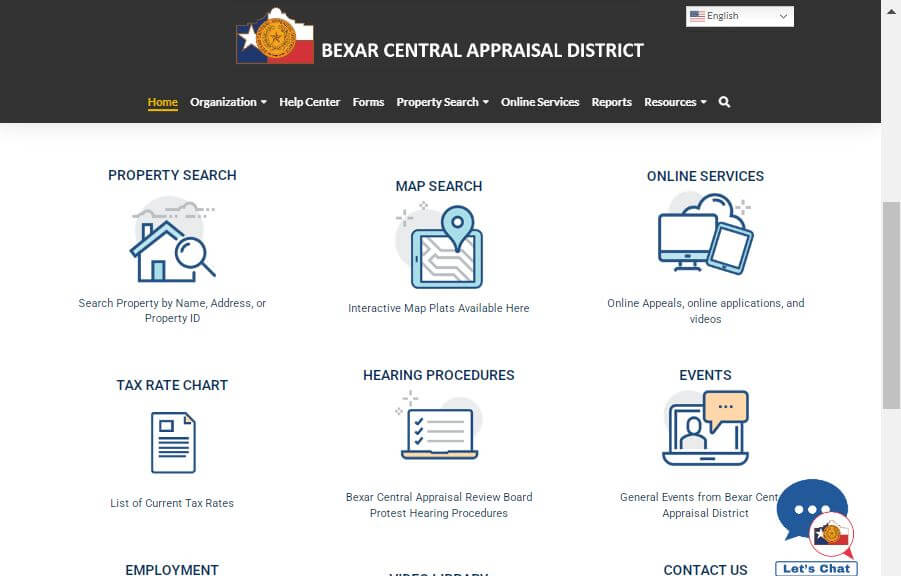
BCAD currently lists the Harris Govern property-search interface as its new search route.
Open new property searchSwitch to the classic portal for Geographic ID, DBA, subdivision, abstract, condominium and other advanced search controls.
Open classic property searchProperty search is for research. The registered Online Services Portal supports eligible exemptions, protests, notices and owner services.
Open BCAD Online ServicesUnderstand what the BCAD property record does—and does not—prove
| BCAD field | What it helps identify | What it does not establish | Best next action |
|---|---|---|---|
| Property ID | The appraisal account used by BCAD. | That it is the same as a deed instrument or tax-payment confirmation. | Save it for BCAD forms, calls and protests. |
| Geographic ID | A geographic or parcel reference linked to the appraisal record. | A surveyed legal boundary. | Compare it with the map and legal description. |
| Owner name | The owner currently displayed for appraisal administration. | Complete legal title or the absence of another ownership interest. | Check the recorded deed through the County Clerk. |
| Situs address | The physical location associated with the property account. | The complete legal description, acreage or boundary. | Compare the legal description and parcel map. |
| Legal description | The lot, block, subdivision, condominium, abstract or tract. | That the abbreviated display contains every deed term. | Match it with the deed or recorded plat. |
| Market value | BCAD’s January 1 estimate of market value. | The sale price, mortgage appraisal or final tax bill. | Review property data and comparable evidence. |
| Appraised value | The value after an applicable cap, limitation or special appraisal treatment. | That market value is correct or cannot be protested. | Compare market, appraised and taxable values. |
| Taxable value | The value remaining for a taxing unit after applicable exemptions. | The total bill without each adopted rate. | Review the tax statement and rate chart. |
| Exemptions | Homestead, age, disability, veteran or another approved exemption. | That every taxing unit applies the same exemption amount. | Review taxable values by unit. |
| Land and improvements | Land value, building area, class, age, use and appraisal characteristics. | That every measurement or condition detail is correct. | Document errors with photographs, plans or measurements. |
| Taxing units | County, city, school, healthcare, college and special districts attached to the property. | The final tax rate or amount due. | Check the official rate chart and tax bill. |
Fix a Bexar County address or owner search that returns nothing
| Search problem | Likely reason | Best correction |
|---|---|---|
| Full address returns nothing | Directional prefixes or street suffixes can prevent a classic-search match. | Enter only the street number and main street name. |
| Street name returns nothing | The record may use a different spelling or abbreviation. | Enter only the first few letters of the street name. |
| Owner name returns nothing | The property may be under a trust, estate, spouse, company, agent or prior owner. | Search the address, Property ID or surname only. |
| Too many owner matches | The name is common or the owner controls several properties. | Add the street number, subdivision, property type or Property ID. |
| New owner is not displayed | The recorded deed or BCAD ownership update may still be processing. | Confirm the Clerk instrument and provide its details to BCAD. |
| Condominium unit is unclear | Several units can share a building address. | Search by owner, Property ID, condominium name or unit legal description. |
| Vacant land has no useful address | The property may be indexed primarily by owner, Geographic ID, abstract or subdivision. | Use advanced search and BCAD map search. |
| Tax payment is not shown in BCAD | Payment posting belongs to the Tax Assessor-Collector, not BCAD. | Open the Bexar County tax account and verify the payment history. |
| Current-year value appears incomplete | BCAD labels current 2026 data as work in progress. | Read the portal timestamp and contact BCAD before relying on it. |
Follow the value from BCAD appraisal to the tax statement
BCAD’s estimate of what the property would sell for under normal market conditions as of January 1.
The value after an applicable cap, limitation or special appraisal treatment.
The value remaining for each taxing unit after applicable exemptions.
The collecting office applies adopted rates to the certified taxable values.
File through BCAD, then verify the approved exemption on the record
Do not assume the seller’s homestead, tax ceiling or capped value transfers automatically after closing.
Verify the BCAD exemption, then ask the Tax Office about quarter-payment and Bexar County’s 10-month payment plan.
Special appraisal depends on qualifying land use and documentation. Acreage or ownership alone is not sufficient.
Build a BCAD protest around a specific value or property-data problem
BCAD states that an owner does not need to receive an appraisal notice to submit a protest. Waiting for an Owner ID, PIN or other online credential does not extend the filing deadline.
Evidence preparation checklist
Use BCAD map search for parcel context—not legal boundary proof
BCAD map search supports Property ID lookup, text search, neighbourhood, subdivision, radius search, map printing and property-data analysis.
Build the complete Bexar County tax-rate stack
The 2025 BCAD rate chart lists separate rates for Bexar County, Road and Flood, San Antonio River Authority, Alamo Colleges, University Health, cities, school districts, water districts, emergency-service districts and special improvement districts.
| Taxing unit | 2025 actual rate | When it may apply | Important check |
|---|---|---|---|
| Bexar County | 0.276331 | County taxable property. | This is only one part of the total bill. |
| Road and Flood | 0.023668 | As shown for the property’s taxing-unit stack. | Review applicable homestead or disability treatment. |
| San Antonio River Authority | 0.018300 | Properties inside the authority’s taxing area. | Confirm the taxable value shown for the unit. |
| Alamo Colleges District | 0.149150 | Properties in the college district. | This line is separate from the school district. |
| University Health | 0.276235 | Properties within the health-system taxing territory. | Do not assume it is included in the county rate. |
| City of San Antonio | 0.541590 | Property inside San Antonio city limits. | Do not add it to an unincorporated property. |
| School district | Varies | Based on the exact ISD boundary. | BCAD serves multiple Bexar and cross-county school districts. |
| ESD, MUD, SID or PID | Varies | Only when the parcel lies inside the district. | Nearby homes can have different special-district rates. |
Simple Bexar property-tax estimator
Pay Bexar County property tax through the Tax Assessor-Collector
Pay at least half of the current base tax by November 30 and the remaining amount by June 30 under the county’s published rules.
Qualifying over-65 or disabled residence-homestead owners may pay in four instalments due in January, March, May and July.
Bexar County offers a 10-month plan for qualifying senior, disabled, disabled-veteran and eligible surviving-spouse homesteads.
Use the Bexar County Clerk when the BCAD owner display is not enough
The County Clerk Official Records Search is a free database containing land records, plats, foreclosures, personal-property records and other recorded documents. Uncertified copies can be printed directly from the public search.
100 Dolorosa, Suite 104
San Antonio, Texas 78205
Phone: 210-335-2216
Hours: Monday–Friday, 8:00 AM–5:00 PM
101 W. Nueva Street, Suite B109
San Antonio, Texas 78205
Deed Records: 210-335-2273
Recordings: 210-335-2581
Adjust the search to the property’s city, district and ownership type
Verify the city, school district, University Health, Alamo Colleges, River Authority and any special district before estimating taxes.
Check subdivision, Property ID, school district and any PID, SID, MUD or emergency-service district.
Do not substitute the City of San Antonio rate. Confirm the incorporated city and Alamo Heights ISD or other applicable ISD.
Verify whether the parcel is inside Helotes, San Antonio or an unincorporated area and check the exact school and emergency districts.
Nearby properties can lie in different city, school, county or special-district combinations.
No city rate may apply, but an ESD, water district or other special unit can still appear on the tax bill.
Search by address or Property ID first because the owner field may use an entity, trustee, agent or prior-owner format.
Review building area, class, completion status and new-improvement value. An appraisal cap does not protect newly added value in the same way as existing value.
Search the legal business name, DBA, location and account type. Equipment and inventory can be on a separate account from real estate.
Contact the Bexar County office that controls the issue
Use for appraisal records, values, exemptions, online services, maps, protests and property-data corrections.
411 N. Frio StreetSan Antonio, Texas 78207-4416
Mailing: P.O. Box 830248, San Antonio, TX 78283-0248
Customer service: 210-242-2432
Property information: 210-224-8511
Fax: 210-242-2454
Email: cacomms@bcad.org
Chief Appraiser: Rogelio Sandoval
Taxpayer Liaison Officer: Leroy Christopher White
Hours: Monday–Friday, 8:00 AM–5:00 PM
Use for tax bills, payments, receipts, delinquent balances, eStatements and payment plans.
Vista Verde Plaza Building233 N. Pecos La Trinidad
San Antonio, Texas 78207
Mailing: P.O. Box 839950, San Antonio, TX 78283-3950
Phone: 210-335-2251
Tax Assessor-Collector: Albert Uresti
Hours: Monday–Friday, 8:00 AM–4:45 PM; Wednesdays until 6:30 PM
Use for deeds, liens, releases, plats, foreclosures and recorded ownership documents.
100 Dolorosa, Suite 104San Antonio, Texas 78205
Administration: 210-335-2216
Deed Records: 210-335-2273
Hours: Monday–Friday, 8:00 AM–5:00 PM
Bexar County currently lists downtown, northeast, northwest, southside and Precinct 4 locations.
Appointments are not necessary and walk-ins are accepted. The Southside location offers drive-through tax-payment services.
Check current branch addresses and hoursOpen the exact BCAD or Bexar County resource
Start here for notices, contacts, property tools, forms, reports and current announcements.
Open BCADSearch current appraisal records through BCAD’s new Harris Govern portal.
Open new searchUse detailed owner, address, Property ID, GEO ID, DBA and advanced search fields.
Open classic searchResearch parcel location, neighbourhoods, subdivisions and nearby appraisal accounts.
Open map searchRegister for eligible exemption, protest, notice and electronic owner services.
Open Online ServicesDownload exemption, protest, rendition and property-tax applications.
Open BCAD formsFind tax statements, balances, payment history and online payment options.
Open tax searchSearch land records, plats, foreclosures, liens and recorded documents.
Open official recordsCross-check BCAD leadership, contact information and active local taxing units.
Open Bexar County directoryRelated AppraisalDistrict.org guides
Bexar County Appraisal District FAQs
What is the official Bexar County Appraisal District website?
The official Bexar Central Appraisal District website is bcad.org. Use it for property search, map search, online services, forms, exemption information, appraisal notices, protest guidance, tax-rate charts and BCAD contact information.
How do I search Bexar County property records?
Use BCAD’s new property search or official classic search. Search by Property ID, Geographic ID, owner name, street number and street name, business name, subdivision or other available criteria.
Why can I not find a Bexar County property by address?
The classic BCAD search advises users not to enter directional prefixes or street suffixes. Enter the street number and main street name, or try only the first few letters of the street. Then search by Property ID, owner name, subdivision or map location.
Does BCAD collect property tax payments?
No. BCAD appraises property and manages appraisal records, exemptions and protests. The Bexar County Tax Assessor-Collector handles property tax statements, balances, payments, receipts and payment plans.
How do I apply for a Bexar County homestead exemption?
Locate the correct BCAD property, review the current exemption status and use BCAD Online Services or the official residence-homestead application. Keep the filing confirmation and later verify the exemption on the property record.
What is the 2026 BCAD protest deadline?
For most owners, the deadline is May 15. If the Notice of Appraised Value was mailed after April 15, the deadline is 30 days from the date printed on the notice, whichever is later. Waiting for an Owner ID or PIN does not extend the deadline.
Can I file a BCAD protest without receiving a notice?
Yes. BCAD states that an owner does not need to receive a Notice of Appraised Value to submit a protest. Use the applicable deadline and contact BCAD promptly if you lack online credentials.
How do I pay Bexar County property taxes online?
Use the official Bexar County tax search and payment system. The county currently publishes free online eCheck payments and a 2.10% convenience charge for online credit-card payments. Verify the live fee before authorising payment.
Where can I search Bexar County deeds and liens?
Use the Bexar County Clerk Official Records Search. It includes land records, plats, foreclosures, personal-property records and other recorded documents. Uncertified copies can be printed from the public search.
Is a BCAD parcel map a legal survey?
No. BCAD map search is useful for approximate parcel location, neighbouring accounts, subdivisions and appraisal research. Use a recorded deed, plat and licensed survey when legal boundaries or acreage must be established.