
Follow a Bandera County Parcel From the Hill Country Map to the Correct Tax and Deed Record
Start with Bandera Central Appraisal District when you need a property ID, geographic ID, owner entry, legal description, acreage, appraisal value, exemption, agricultural classification, mobile-home account, mineral account or protest record.
Do not stop at the appraisal page. Use the Bandera County Tax Assessor-Collector for current property-tax bills, payments and receipts, and use the County Clerk when you need a recorded deed, lien, release, plat or certified real-property document.
Use the property ID or geographic ID when one is available.
The official search currently labels 2026 values preliminary.
1206 Main Street, Bandera, Texas 78003.
1212 Hackberry Street, first floor, Bandera.
Local portals and office details reviewed July 2026.
What do you need from the Bandera County property record?
Use owner, address, property ID, geographic ID, abstract, subdivision or an advanced filter.
Follow the search workflowCompare market value, appraised value, taxable values, property details and prior-year changes.
Understand the value fieldsConfirm the account, tax year, amount due, payment method and receipt through the official tax system.
Use the payment workflowIdentify whether the issue involves value, equal appraisal, acreage, improvements, exemption or ownership.
Build a focused protestThe district publishes separate agricultural, wildlife-management and beekeeping forms and guidance.
Review special-appraisal stepsSearch recorded instruments instead of treating the CAD owner field as a title report.
Research official recordsSearch Bandera County property records without selecting the wrong Hill Country parcel
Use the Bandera CAD screenshot to choose the correct official service
The current article contains the official Bandera CAD mobile-homepage screenshot below. It is preserved and paired with exact guidance so each button leads to the correct task.
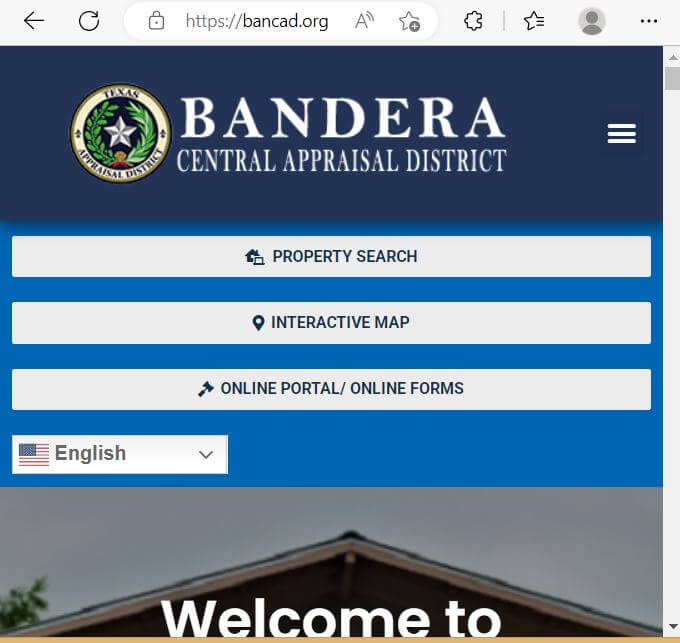
Choose the Bandera CAD field that best matches the property
| Search field | Use it when | What to verify |
|---|---|---|
| Property ID | You copied the identifier from a notice, account or tax document. | Tax year, property type and legal description. |
| Owner name | You know a person, estate, trust, company or partnership. | Last-name-first format, initials, spouse and former owner. |
| Street address | The property has an assigned physical location. | Direction, unit, city and geographic ID. |
| Geographic ID | You are matching an account to a parcel or map reference. | Recorded deed and survey before legal use. |
| Abstract | You are researching rural acreage identified by a survey or abstract. | Tract, survey, acreage and map location. |
| Subdivision or condo | You know the development, section, unit, lot or condominium name. | Lot, block, unit and property ID. |
| Mobile-home park | A manufactured home may be indexed by its park or community. | Owner, serial or label information, situs and land account. |
| Property type | You need to separate real, personal, mineral, auto or mobile-home accounts. | Whether connected land, home, mineral or business accounts are separate. |
| Neighborhood | You are reviewing the appraisal comparison group or equal appraisal. | Actual similarity in use, location, access, view, acreage and improvements. |
| Protest status or hearing date | You are following an informal review or ARB matter. | The formal notice as the controlling hearing schedule. |
Understand what each Bandera CAD field does and does not prove
| Field | What it identifies | What it does not prove | Best next action |
|---|---|---|---|
| Property ID | The appraisal account used by Bandera CAD. | That every county system uses the same identifier. | Use it in calls, forms, protests and tax-account matching. |
| Owner shown | The owner carried for appraisal administration. | Clear title, probate status or absence of liens. | Search County Clerk records and obtain title help when needed. |
| Situs address | The physical location carried in the account. | The mailing address or complete legal location. | Compare the map, rural addressing and recorded deed. |
| Legal description | The abbreviated abstract, survey, tract, lot, block or subdivision reference. | A complete legal description suitable for a deed or boundary dispute. | Obtain the recorded deed, plat and survey. |
| Acreage | The land area carried for appraisal purposes. | Legally guaranteed or professionally surveyed acreage. | Compare the deed and survey. |
| Property type | Real, personal, mineral, auto or mobile-home classification. | That all related interests are combined in one account. | Search connected surface, home, mineral and business accounts separately. |
| Market value | CAD’s opinion of value as of January 1. | A guaranteed sale price or final tax bill. | Compare sales, condition, access, view and equal-appraisal evidence. |
| Appraised value | Value after an applicable appraisal limitation or special appraisal. | The taxable value after every exemption. | Review taxable values for each taxing unit. |
| Taxable value | Value remaining after applicable exemptions. | The current bill, payment, penalty or receipt. | Open the Bandera County Tax Office account. |
| Exemption or ag status | Benefits or special appraisal applied to the account. | That every taxing unit provides the same benefit. | Review each taxing-unit line and application status. |
Use the Bandera CAD interactive map without treating it as a survey
Separate market value, appraised value and taxable value
Bandera CAD’s opinion of what the property would sell for under normal market conditions as of January 1.
The value after an applicable homestead cap, circuit-breaker limitation or agricultural productivity appraisal.
The value remaining after exemptions for the county, city, school district and applicable special districts.
The amount can change before the appraisal roll is certified. Save the date and preliminary-status notice.
Review acreage, homesite land, non-homesite land, house, guest house, barns, pools and other improvements separately.
Identify whether the change came from land, a structure, renovation, classification, exemption or appraisal limitation.
Understand the appraisal cap before assuming the market value is correct
A qualifying residence homestead’s appraised value generally cannot increase by more than 10% per year, plus qualifying new improvements.
Qualifying non-homestead real property valued at $5,320,000 or less may receive the temporary 20% appraisal limitation.
Agricultural and several other specially appraised property categories do not qualify for the non-homestead circuit breaker.
Read the Bandera CAD Notice of Appraised Value before filing
Confirm the property ID, owner, mailing address, situs address, property type and legal description.
Compare the current and prior-year values instead of reviewing only the total.
Review living area, year built, quality, condition, acreage, structures and listed amenities.
Check homestead, age, disability, veteran and other expected benefits.
Keep the property ID, notice and account information needed to register or submit an online form.
Use the exact date printed on the notice. A later mailing can produce a later filing deadline.
Fix common Bandera CAD search failures before contacting the district
| Problem | Likely reason | Practical fix |
|---|---|---|
| Owner name returns nothing | The account may use initials, spouse, estate, trust, business or former owner. | Search only the first or last name, then try property ID or owner ID. |
| Too many owner matches | The name is common or the search is too broad. | Add property type, street, subdivision, geographic ID or neighborhood. |
| Full address fails | The account may use different road, direction, suffix or rural-address formatting. | Use only the street name, as suggested by the official search. |
| Ranch tract has no address | The property may be indexed by abstract, survey, subdivision or geographic ID. | Use Advanced Search and the interactive map. |
| Manufactured home is missing | The home may have a separate mobile-home or personal-property account. | Select mobile home or personal property and search the owner or park. |
| Mineral account is missing | The mineral interest may be separate from the surface parcel. | Select mineral property and search by owner, property ID or legal information. |
| New buyer still sees the seller | The recorded deed may still be processing into the appraisal system. | Confirm recording with the County Clerk and save the instrument information. |
| 2026 value changed after saving it | The official portal currently labels 2026 values preliminary. | Keep the dated copy and recheck after certification. |
| Tax portal and CAD account differ | The appraisal and collection systems have different purposes and update schedules. | Match property ID, owner, legal description and tax year before paying. |
Local search tips for Bandera, Lakehills, Pipe Creek, Medina and rural acreage
Confirm the city, Bandera ISD, county, river-authority and applicable road-tax or special-district lines.
Check subdivision, lake-area location, water access, topography, mobile-home status and tax-office service through the Lakehills Annex.
Use property ID, geographic ID and subdivision when mailing and situs addresses are different.
Review acreage, agricultural appraisal, terrain, wells, septic, barns, access and Medina ISD jurisdiction.
Confirm county, school district, ESD, legal description and actual parcel location because service areas can cross county lines.
Review the Flying L Ranch Public Utility District line, subdivision details and the correct property account.
Confirm subdivision, unit, lot, mobile-home account, land ownership and whether the home is real or personal property.
Do not assume appraisal-map proximity proves legal access, usable frontage or a surveyed boundary.
Compare market acreage, productivity acreage, land-use history, stocking, wildlife or beekeeping evidence.
Search the legal owner and DBA, then review the business situs, rendered assets and depreciation information.
Search the deceased owner, estate and heirs, then review probate and recorded ownership documents.
Verify deed history, legal access, survey, water, septic feasibility, restrictions and delinquent taxes before closing.
Send each Bandera County property question to the office that controls it
| Your question | Correct starting point | What to prepare |
|---|---|---|
| What is the market or appraised value? | Bandera Central Appraisal District | Property ID, tax year and disputed value field. |
| Why is an exemption missing? | Bandera Central Appraisal District | Application, identification, qualification date and filing proof. |
| Does land qualify for agricultural appraisal? | Bandera Central Appraisal District | Acreage, use history, leases, production, livestock, wildlife or beekeeping evidence. |
| What property tax is due? | Bandera County Tax Assessor-Collector | Tax account, owner, property address and tax year. |
| Did my payment post? | Bandera County Tax Assessor-Collector | Receipt, confirmation, amount, payment date and tax year. |
| Who legally owns the land? | Bandera County Clerk or title professional | Grantor, grantee, date range, instrument and legal description. |
| Where can I obtain a deed, lien or plat? | Bandera County Clerk | Names, document type, recording date and copy requirement. |
| Who determines zoning, septic or development approval? | The applicable city, county or permitting authority | Property ID, jurisdiction, project and proposed use. |
| Who adopts the tax rate? | Each county, city, school or special taxing unit | The taxing-unit list from the property account. |
| Where can I request old statements or receipts? | Bandera County Tax Assessor-Collector | Property account number, requested year and preferred delivery method. |
Correct the Bandera County system that owns the inaccurate information
Verify Bandera County exemptions before estimating the property tax
Confirm that the property is the owner’s principal residence and that the current account shows the exemption.
Review the additional exemption, school-tax ceiling and possible instalment or deferral options.
Check qualification evidence, exemption status and any applicable school-tax ceiling.
Use the correct veteran or surviving-spouse form and include the required VA documentation.
Prepare ownership, occupancy, family-history and heirship evidence for an inherited principal residence.
Bandera CAD publishes forms for charitable, religious, Freeport, pollution-control and other property-specific categories.
What to prepare before filing
Prepare separately for agricultural, wildlife-management and beekeeping appraisal
Prepare acreage, qualifying-use history, grazing or production activity, leases, livestock records, photographs and maps.
Use the district’s wildlife application, five-year management plan, annual report, local guidelines and activity evidence.
Bandera CAD publishes separate beekeeping guidelines, a five-year plan and an annual update form.
Prepare differently for mobile homes, business personal property and mineral accounts
Confirm whether the home is classified as real property, personal property or a separate account from the land.
Gather statement-of-ownership, title, serial or label, park, situs and land-ownership details.
Search the legal owner and DBA, then verify business situs, equipment, inventory, furniture, acquisition year and rendition status.
Keep annual asset lists and disposal records.
Search the mineral property type separately and confirm owner, property ID, legal description, lease or operator information.
The surface owner may not own every mineral interest.
Prepare a Bandera CAD protest around one clear issue
Evidence checklist for Bandera County property
Prepare for a Bandera County Appraisal Review Board hearing
Move from the Bandera CAD appraisal account to the county Tax Office ledger
The appraisal account explains value and exemptions. The Bandera County Tax Office portal controls the current tax balance, payment status, receipt and delinquent collection information for the taxing units it serves.
Understand Bandera County delinquency, instalments and tax-office deadlines
Property taxes are generally delinquent on February 1 when not paid by the applicable January deadline.
Qualifying residence-homestead owners age 65 or older or disabled may be eligible for four instalments when statutory requirements are met.
When elected properly, one-half may be paid before December 1 and the remainder before July 1.
| Payment month | Typical penalty | Typical interest | Important action |
|---|---|---|---|
| February | 6% | 1% | Request the current payoff before paying. |
| March | 7% | 2% | Confirm whether a payment plan applies. |
| April | 8% | 3% | Check all delinquent years. |
| May | 9% | 4% | Save proof of any partial payment. |
| June | 10% | 5% | Ask about collection referral timing. |
| July | 12% | 6% | Additional collection charges may apply. |
Use the Bandera County Clerk for deeds, liens, releases and plats
Complete these checks before buying or inheriting Bandera County property
Match property ID, geographic ID, legal description, abstract, subdivision, acreage and map location.
A road or waterfront shown near the parcel does not automatically establish legal access.
Check current and delinquent balances, partial payments, penalties and attorney fees.
Review recorded instruments and use a title company or attorney for complete title work.
CAD acreage and online parcel boundaries are not substitutes for a professional survey.
The seller’s homestead exemption, appraisal cap or tax ceiling may not transfer to the buyer.
Confirm qualifying acreage, use history and potential change-of-use consequences.
Verify wells, shared-water agreements, septic condition, permits and actual utility availability.
Steep grades, flood areas, private roads and long driveways can materially affect utility and repair costs.
Review the river authority, PUD, ESD and other units shown on the account.
Confirm land ownership, home ownership, statement of ownership and real-or-personal classification.
Keep the deed, title policy, survey, closing statement, tax receipt and exemption-filing proof.
Use Bandera CAD reports when one property account is not enough
Review district reports for appraisal methods, schedules, values and property-category information.
Use district downloads for countywide research, comparison work and larger account lists.
Review the district’s residential real-property inventory and applicable rendition resources.
Use current rendition, depreciation and business-personal-property guidance.
Review local open-space, wildlife-management and beekeeping requirements.
Check which local taxing units offer partial exemptions rather than assuming every unit is identical.
Use historical rates for context, not as a substitute for the current tax statement.
Review proposed and adopted rate information during the annual rate-setting period.
Use the official request route when the public website does not contain the appraisal information needed.
Important Bandera County appraisal and tax dates
Bandera County appraisal, tax and recorded-property offices
Bandera, Texas 78003
Mailing: P.O. Box 1119, Bandera, Texas 78003
Phone: 830-796-3039
Fax: 830-460-3672
Email: info@bancad.org
Hours: Monday-Friday, 8:00 AM-5:00 PM.
Chief Appraiser: Maria Garcia, RPA, CCA
Bandera, Texas 78003
Mailing: P.O. Box 368, Bandera, Texas 78003-0368
Bandera office: 830-796-3731
Fax: 830-796-8140
Email: tax@banderacounty.org
Hours: Monday-Friday, 7:00 AM-4:30 PM.
Tax Assessor-Collector: Andrea K. Jankoski
Lakehills, Texas 78063
Phone: 830-612-2970
Hours: Monday, Tuesday and Thursday, 7:00 AM-4:00 PM.
Use for listed property-tax, vehicle-registration, titling and boat-registration services.
Bandera, Texas 78003
Mailing: P.O. Box 823, Bandera, Texas 78003
Office: 830-796-3332
Fax: 830-796-8323
Hours: Monday-Friday, 7:00 AM-4:30 PM.
County Clerk: Tandie Mansfield
Official Bandera County property resources
Use for district notices, contact information, property tools and appraisal resources.
Open Bandera CADSearch owners, addresses, property IDs, abstracts, subdivisions, mobile homes and advanced criteria.
Open property searchReview parcel location and surrounding appraisal-map context.
Open interactive mapAccess property details, electronic communications, documents and application workflows.
Open Taxpayer PortalFind homestead, rendition, protest, agricultural, wildlife and other appraisal forms.
Open official formsReview general exemption information, entity exemptions and homestead-cap guidance.
Open exemption informationAccess open-space, wildlife-management and beekeeping applications and guidelines.
Open agricultural resourcesReview local appeal procedures and prepare for the ARB process.
Open appeal informationSearch tax accounts, review balances and complete eligible online payments.
Open Tax Office portalReview locations, hours, property-tax services and vehicle-registration information.
Open Tax OfficeUse for deeds, liens, plats, certified copies and Official Public Records.
Open County ClerkVerify appraisal and tax-office contacts and active taxing units.
Open Comptroller directoryHow this Bandera County guide was rebuilt
The original Bandera CAD screenshot remains in the improved article and is now connected to exact search, map and portal instructions.
The rebuild adds field decoding, preliminary-value guidance, local scenarios, agricultural and beekeeping steps, mobile-home routing, tax payment, delinquency, deed research and buyer checks.
Local facts were checked through Bandera CAD, Bandera County Tax Assessor-Collector, Bandera County Clerk and Texas Comptroller resources.
AppraisalDistrict.org is not affiliated with or operated by Bandera CAD, Bandera County or the Texas Comptroller.
10 common Bandera County appraisal and property-search questions
1. What is the official Bandera County Appraisal District website?
The official website is bancad.org. Use it for property search, maps, forms, exemptions, agricultural appraisal, business personal property and protest information.
2. How do I search Bandera County property records?
Open the official Bandera CAD search. Search by owner, address or property ID, or use Advanced Search for abstract, mobile-home park, subdivision, condominium, geographic ID, property type and tax year.
3. Why does a Bandera CAD property search show no result?
The account may use a shorter address, different owner-name format, former owner, abstract, subdivision, mobile-home park or separate mineral or personal-property account. Simplify the search and remove unnecessary filters.
4. Does Bandera CAD collect property taxes?
No. Bandera CAD handles appraisal values, exemptions and protests. The Bandera County Tax Assessor-Collector handles property-tax bills, payments and receipts for the taxing units it serves.
5. How do I pay Bandera County property taxes online?
Use the official Bandera County property-tax portal. Confirm the account, owner, property, tax year and amount due, then save the payment confirmation and receipt.
6. How do I verify a Bandera County homestead exemption?
Open the complete property account and review exemptions and taxable values. If the expected exemption is missing, use Bandera CAD’s official forms or Taxpayer Portal and keep proof of submission.
7. What is the Bandera County property-tax protest deadline for 2026?
Bandera CAD states that written protests are generally due no later than May 15 or 30 days after the date on the Notice of Appraised Value. Follow the exact deadline printed on the notice.
8. How do I apply for agricultural, wildlife or beekeeping appraisal?
Use the Bandera CAD Agricultural Use page for the 1-d-1 application, local guidelines, wildlife plan and annual report, and beekeeping plan and annual update.
9. Where can I search Bandera County deeds and liens?
Start with the Bandera County Clerk. Official Public Records may be searched in the Clerk’s office or through TexasLandRecords.com.
10. Where is Bandera Central Appraisal District located?
Bandera CAD is located at 1206 Main Street, Bandera, Texas 78003. Its mailing address is P.O. Box 1119, Bandera, Texas 78003, and its phone number is 830-796-3039.