
Find Austin County Property Records Without Ending Up in the City of Austin or at the Wrong Tax Office
This guide is for property in Austin County west of Houston—not the City of Austin in Travis County. Start here for homes, ranchland, agricultural acreage, manufactured homes, business property and subdivision lots around Bellville, Sealy, Wallis and San Felipe.
Austin County also has an unusual local setup: Austin County Appraisal District both appraises property and operates the property-tax collection office. The elected County Tax Assessor-Collector handles vehicles and voter-registration services rather than property-tax payments.
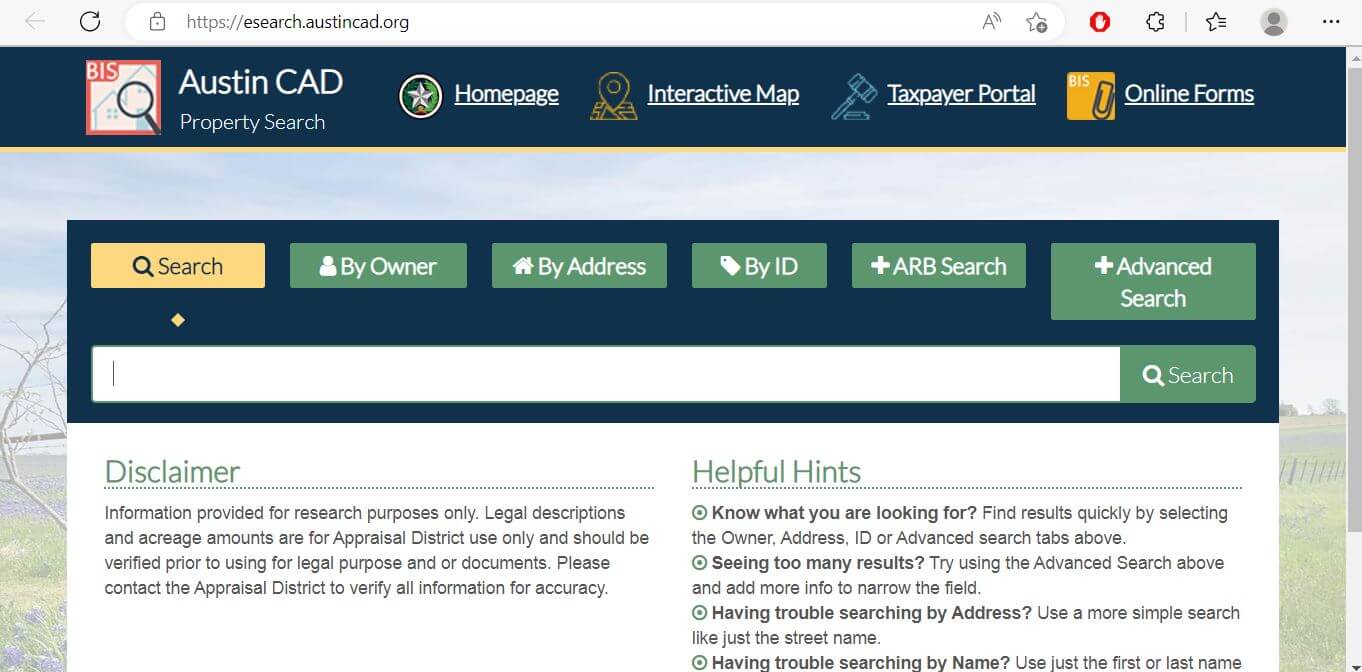
Use owner, address, property ID, owner ID or advanced criteria.
906 E. Amelia Street, Bellville, Texas 77418.
Monday-Friday, 8:30 AM-4:00 PM.
Use Austin County Clerk and the AVA free-search portal.
Local records and procedures reviewed July 31, 2026.
Confirm that you need Austin County—not the City of Austin
- Bellville
- Sealy
- Wallis
- San Felipe
- Brazos Country
- Industry, Cat Spring, New Ulm or rural Austin County
- The City of Austin
- Downtown Austin
- Most Austin addresses using Travis County
- Property associated with the Texas state capital
Choose your task and go to the office that controls it
906 E. Amelia Street, Bellville · (979) 865-9124
Open official property searchWhat do you need from the Austin County property record?
Use the property ID, owner ID, owner name or address, then verify the legal description.
Follow the search stepsReview land, improvements, market value, appraised value and taxable values.
Understand the value fieldsConfirm the account, year, balance and checkout total before paying.
Use the payment workflowIdentify whether the issue concerns value, condition, acreage, exemption or ownership.
Prepare the protest fileSearch deeds, liens, releases and other recorded documents.
Search recorded property recordsReview taxes, deed history, survey, floodplain, septic, addressing, access and permits.
Use the due-diligence checklistSearch Austin County property records without relying on the first similar result
Use the Austin CAD search screenshot to choose the right tab
Do not follow the old tax-office instruction shown in the legacy image
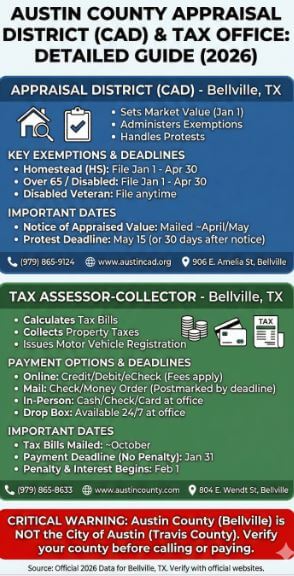
Austin County Appraisal District
906 E. Amelia Street
Bellville, Texas 77418
Austin County Tax Assessor-Collector
804 E. Wendt Street
Bellville, Texas 77418
The elected Tax Assessor-Collector remains an important county office, but its official page explicitly directs property-tax users to Austin CAD.
Choose the strongest Austin CAD search field for the property
| Search field | Use it when | Verify before relying |
|---|---|---|
| Property ID | You have an appraisal notice, tax statement or prior property detail. | Owner, legal description and selected tax year. |
| Owner ID | You need to connect an owner record to the taxpayer portal. | The correct property is attached to the owner. |
| Owner name | You know a person, trust, estate or business name. | Search spelling variations and former owners. |
| Street number and name | You know the physical property location. | Remove directions and street types when no result appears. |
| Abstract | You are researching rural acreage or an older legal description. | Survey, tract, deed and acreage information. |
| Subdivision | You know the subdivision, section, unit or development name. | Lot, block, phase and map position. |
| Mobile-home park | The manufactured home may be assessed separately from the underlying land. | Home owner, land owner, serial information and property type. |
| Geographic ID | You are matching the property to an appraisal-map reference. | It is not a legal boundary survey. |
| Property type | You need to narrow real estate, personal property, mobile-home or other account types. | One owner or location can have more than one account. |
| Neighborhood | You are researching similar appraisal accounts for value comparison. | Properties are also similar in use, size, age, condition and location. |
Understand what each Austin CAD record field does and does not prove
| Field | What it identifies | What it does not prove | Best next step |
|---|---|---|---|
| Property ID | The appraisal account in Austin CAD’s system. | That every county database uses the same number. | Use it for CAD and tax-office communication. |
| Owner shown | The owner carried for appraisal and tax administration. | Complete title, lien status or current deed history. | Search County Clerk land records. |
| Situs address | The physical location carried in the appraisal record. | Mailing address, legal access or boundary location. | Compare the map, deed and 911 address. |
| Legal description | An abbreviated lot, block, tract, subdivision or survey reference. | A complete legal description suitable for a deed. | Open the recorded instrument. |
| Acreage | The acreage carried for appraisal purposes. | Exact surveyed acreage or legal boundaries. | Compare deed, plat and survey evidence. |
| Market value | CAD’s opinion of market value as of January 1. | A guaranteed sale price or final tax bill. | Review sales and equal-appraisal evidence. |
| Appraised value | Value after an applicable appraisal limitation. | The value after every exemption. | Continue to each taxable-value line. |
| Taxable value | The value remaining after applicable exemptions. | The live balance, penalty or payment status. | Open the Austin CAD Tax Office account. |
| Property characteristics | CAD’s record of area, age, class, condition and improvements. | That every building detail is correct. | Document errors with measurements and photographs. |
| Exemptions | Benefits applied to the appraisal account. | That every taxing unit grants the same exemption. | Review taxable values by jurisdiction. |
Use the Austin CAD map for parcel research—not legal boundary decisions
Separate market value, appraised value and taxable value
Austin CAD’s opinion of the property’s market value as of January 1 for the selected appraisal year.
The value after an applicable homestead cap, circuit-breaker limitation or special appraisal.
The amount remaining after exemptions for each county, school, city, ESD, hospital, road or MUD jurisdiction.
Check every Austin County taxing unit attached to the property
Possible districts include Bellville, Sealy, Brazos, Columbus, Brenham and Burton ISD.
Possible city jurisdictions include Bellville, Sealy, Wallis, Brazos Country and the Town of San Felipe.
Austin County has ESD #1, ESD #2 and ESD #3. Confirm which district is shown on the account.
Bellville Hospital District can appear as a separate tax line.
Some development areas can include Austin County MUD #1 or MUD #2.
Farm-to-market road or special road-and-bridge values and exemptions may appear separately.
Read the Notice of Appraised Value before deciding what to protest
Confirm property ID, owner ID, owner name, address, property type and legal description.
Review each value component separately before focusing on the total.
Identify whether the increase came from land, a building, new construction, class or another change.
Check homestead, age, disability, veteran, agricultural, wildlife and other expected benefits.
The 2026 notice normally used May 15 or 30 days after mailing, whichever was later.
Keep the credentials or owner information needed to connect a qualifying homestead account to the taxpayer portal.
Fix common Austin CAD search problems before calling
| Problem | Likely reason | Practical fix |
|---|---|---|
| Owner name shows no result | The record may use a spouse, trust, estate, company, initials or former owner. | Search only the first or last name, then try owner ID or property ID. |
| Too many owner matches | The name is common or attached to multiple properties. | Add the street, subdivision, abstract, property type or geographic ID. |
| Full address fails | The record may omit the direction, street type, city or ZIP code. | Use only the street number and main street name. |
| Rural tract has no normal address | The parcel may be indexed through an abstract, survey or legal description. | Use Advanced Search and the interactive map. |
| Manufactured home is missing | The home and land may have separate appraisal accounts. | Search the owner, mobile-home park and property type. |
| New property still shows the builder | A deed or subdivision split may still be processing. | Search the builder, parent tract, subdivision and property ID from closing records. |
| Recently purchased property shows the seller | The recorded deed may not yet have completed processing into CAD. | Confirm recording with the County Clerk and keep the instrument number. |
| Tax search shows no unpaid balance | The account may be paid, inactive, under another year or filtered to unpaid records only. | Include paid and inactive accounts and verify the selected tax year. |
| Online protest is unavailable | The 2026 online protest period is closed. | Contact CAD immediately about any remaining statutory remedy and submit documents by an accepted method. |
Local search tips for Bellville, Sealy, Wallis and rural property
Confirm City of Bellville, Bellville ISD, county, ESD and hospital-district lines before estimating taxes.
Review commercial use, new construction, subdivision, MUD, Sealy ISD and City of Sealy jurisdiction.
Verify the city, school, ESD, county and appraisal owner because similar rural addresses can cross jurisdiction expectations.
Confirm the Town of San Felipe tax line, subdivision information and any historical or development restrictions.
Search by abstract, subdivision, geographic ID or legal description and verify acreage through a deed and survey.
Review market value and productivity value separately and preserve qualifying-use records.
Confirm prior agricultural qualification, the management plan and at least three qualifying wildlife practices.
Determine whether the home is appraised with the land or under a separate personal-property account.
Search the business or DBA and review assets separately from the real-estate account.
Send each Austin County property question to the correct office
| Your question | Correct starting point | What to prepare |
|---|---|---|
| What is my property’s appraised value? | Austin County Appraisal District | Property ID, selected year and disputed value field. |
| Why is an exemption missing? | Austin County Appraisal District | Application, qualification date, identification and filing proof. |
| How much property tax is due? | Austin CAD Tax Office | Tax account, property ID, owner and tax year. |
| Did my property-tax payment post? | Austin CAD Tax Office | Confirmation, amount, payment date and tax year. |
| Who legally owns the property? | Austin County Clerk or title professional | Grantor, grantee, date range, instrument number and legal description. |
| Where can I obtain a deed or lien? | Austin County Clerk | Names, document type, date range, volume/page or instrument number. |
| How do I renew vehicle registration? | Austin County Tax Assessor-Collector | Renewal notice, insurance, identification and applicable fees. |
| Can I build, move a home or install septic? | Austin County Planning and Development or applicable city | Deed, 911 address, site information and proposed development. |
| Who sets the tax rate? | Each applicable taxing unit | The complete taxing-unit list from the property account. |
Correct the system that controls the inaccurate information
Verify Austin County exemptions by taxing unit
The mandatory Texas school-district residence-homestead exemption is currently $140,000.
Austin CAD’s current local table lists a 3% general homestead exemption with a $5,000 minimum for the county.
The current local table lists an additional $50,000 over-65 exemption for Austin County.
The current table lists 1% local homestead options with minimums and additional over-65 amounts for ESDs.
Review additional exemptions, school-tax ceilings, quarter payments and possible tax deferral.
Use the application matching the disability rating and attach the required VA documentation.
Prepare these items before filing
Document qualifying use before applying for Austin County special appraisal
| Use | What to verify | Useful records |
|---|---|---|
| Livestock or grazing | Actual agricultural use, intensity, acreage and land-use history. | Livestock records, leases, receipts, water records and photographs. |
| Hay or crop production | Commercial activity, acreage, production history and management. | Seed, fertilizer, harvest, equipment and sales records. |
| Beekeeping | Local acreage, intensity and management requirements. | Hive records, purchases, photographs, inspections and management logs. |
| Wildlife management | Prior agricultural qualification and implementation of at least three qualifying wildlife practices. | Five-year plan, annual report, activity logs and photographs. |
| Change of use | Whether development or another change could trigger rollback-tax consequences. | Closing documents, development plans, leases and change dates. |
Separate taxable business assets from the building or land account
Furniture, fixtures, machinery, equipment, inventory, vehicles and other property used to produce income can have a separate business-personal-property account even when the business leases its location.
Understand the closed online period and any remaining protest options
A late protest is not automatically available merely because the normal deadline was missed. Texas law provides limited remedies for particular circumstances. Contact Austin CAD immediately and explain the exact reason, notice date and property action involved.
Build an evidence packet that explains the requested correction quickly
Use properties with similar location, use, size, acreage, age, condition and improvements.
Compare similar appraisal accounts using consistent measures rather than unrelated low values.
Include dated photographs, repair estimates, engineering reports and deferred-maintenance details.
Document incorrect area, year built, class, amenities, acreage or improvement information.
Use a recent closing statement, contract, independent appraisal or market analysis when relevant.
Include identification, occupancy, VA, disability, agricultural-use or wildlife-management records.
Recommended packet order
Pay Austin County property taxes through Austin CAD—not the vehicle office
Use installment, partial-payment and tax-certificate options correctly
| Option or status | Published rule | Practical action |
|---|---|---|
| Quarter-payment plan | Qualifying over-65 or disabled homestead accounts may pay January 31, March 31, May 31 and July 31. | Confirm qualification and mark payments correctly. |
| Partial current payments | Current payments of any amount are accepted after statements are mailed and before delinquency. | Track the remaining balance and final deadline. |
| Half-payment option | The first half-payment deadline is November 30. | Confirm eligibility and second-payment instructions with the Tax Office. |
| Tax deferral | Eligible over-65 or disabled homestead owners may defer collection while a lien and 5% annual interest remain. | Review long-term cost and estate consequences before filing. |
| Tax certificate | The published fee is $10 per certificate and prepayment is required. | Confirm the property and certificate purpose before ordering. |
| February delinquency | The published combined penalty and interest begins at 7% in February. | Request a current payoff rather than calculating from an old statement. |
| July attorney collection | Real-property accounts unpaid after June 30 can incur an additional 20% attorney-collection penalty. | Contact the Tax Office before June 30 when a balance remains. |
Use the Austin County Clerk for deeds, liens and certified records
Register for Austin County Property Fraud Alert
The County Clerk offers a free property-fraud alert service that can notify registered users when a matching name appears in a recorded document.
Complete these checks before buying or developing Austin County property
Match property ID, geographic ID, legal description, abstract, subdivision, map position and acreage.
Search paid and unpaid years and request a current payoff or tax certificate when needed.
Review recorded instruments and obtain a title examination for legal conclusions.
The seller’s homestead exemption, appraisal cap or tax ceiling may not transfer to the buyer.
Confirm the school, city, ESD, hospital, road and MUD jurisdictions.
Confirm qualifying use, history and rollback exposure before changing the land use.
New development generally requires an assigned address before permit approval.
Review OSSF, development-permit and floodplain requirements before construction.
Do not rely on appraisal-map lines when legal access, acreage or encroachments matter.
Important Austin County appraisal and tax dates
Austin County appraisal, property-tax, deed and vehicle offices
Bellville, Texas 77418
Phone: (979) 865-9124
Fax: (979) 865-3296
Email: austincad@gmail.com
Chief Appraiser: Greg Cook, RPA
Hours: Monday-Friday, 8:30 AM-4:00 PM.
Use this office for property appraisal, exemptions, protests, tax statements, payments and tax certificates.
Bellville, Texas 77418
Phone: (979) 865-8633
Fax: (979) 865-0183
Email: krinn@austincounty.com
Tax Assessor-Collector: Kim Rinn
Hours: Monday-Friday, 8:00 AM-4:30 PM.
Use this office for vehicle titles, registration, voter-registration services and related county-assessor tasks—not property-tax payment.
Bellville, Texas 77418
Phone: (979) 227-3144
General email: countyc@austincounty.com
Deed copies: ccvault@austincounty.com
County Clerk: Diane Day
Monday-Thursday: 8:00 AM-4:30 PM.
Friday: 8:00 AM-noon and 1:00 PM-4:30 PM.
Bellville, Texas 77418
Phone: (979) 865-5911
Use for development permits, septic, floodplain, culverts, private roads, subdivisions and property-division guidance.
Official Austin County property resources
Use for current notices, office information, appraisal guidance and tax links.
Open Austin CADSearch by owner, address, property ID, owner ID, abstract, subdivision and advanced criteria.
Open property searchLocate appraisal parcels and nearby accounts.
Open interactive mapAccess eligible homestead-property services and electronic communications.
Open Taxpayer PortalFind homestead, ag, wildlife, rendition, address-change and protest forms.
Open formsReview local taxing-unit exemptions, ceilings and exemption explanations.
Open exemption informationFind applications, guidelines, examples, leases and management resources.
Open ag resourcesSearch paid and unpaid tax accounts and continue to online payment.
Search property taxesReview payment help, calendar, penalties, certificates and collecting units.
Open Austin CAD Tax OfficeUse for vehicles, titles, voter-registration information and related services.
Open county assessor pageReview deed copies, recording rules, fees, e-recording and fraud alerts.
Open County ClerkSearch available recorded-property indexes and images.
Open AVAReview development, septic, floodplain, culvert and subdivision requirements.
Open permitsCross-check appraisal-district, county-assessor and taxing-unit information.
Open Austin County directoryReview current statewide residence-homestead and other exemption rules.
Open Texas exemption guidanceHow this Austin County guide was corrected and rebuilt

Independent research focused on preventing wrong-office mistakes
This version preserves the existing article images while correcting its most important routing error: Austin CAD, not the elected vehicle-registration office, collects Austin County property taxes.
The rebuilt guide also adds field-level search help, preliminary-value warnings, parcel-map limits, local exemptions, closed-protest guidance, payment safeguards, deed-search coverage, fraud alerts, agricultural evidence and buyer development checks.
AppraisalDistrict.org is an independent informational website and is not operated by Austin County Appraisal District or Austin County government.
10 common Austin County appraisal and property-tax questions
1. Is Austin County the same place as the City of Austin?
No. Austin County includes Bellville, Sealy, Wallis, San Felipe and surrounding rural areas west of Houston. The City of Austin is primarily in Travis County.
2. What is the official Austin County Appraisal District website?
The official website is austincad.org. Use it for property search, appraisal records, exemptions, maps, forms, protest information and property-tax collection links.
3. How do I search Austin County property records?
Use the official Austin CAD search. Search by owner, address, property ID or advanced criteria and verify the property ID, geographic ID, legal description and year.
4. Why does an Austin CAD search show no result?
The account may use a trust, estate, company, former owner, abbreviated address, abstract or parent tract. Search the surname or street name alone, then try property ID, owner ID, subdivision or abstract.
5. Who collects Austin County property taxes?
Austin County Appraisal District operates the property-tax collection office at 906 E. Amelia Street in Bellville. The County Tax Assessor-Collector at 804 E. Wendt handles vehicle and related services rather than property-tax collection.
6. How do I pay Austin County property taxes online?
Use the Austin CAD Tax Office search. Match the account and year, review the balance and fee, submit payment and save the confirmation.
7. What homestead exemptions are available in Austin County?
Qualifying homeowners receive the mandatory $140,000 school-district residence-homestead exemption. Austin CAD’s local table also lists county, ESD, city, hospital and school options that vary by taxing unit.
8. What was the Austin CAD protest deadline for 2026?
The normal deadline was May 15, 2026, or the 30th day after the appraisal notice was mailed, whichever was later. Online protests are now closed, and late remedies are limited to qualifying statutory circumstances.
9. Where can I search Austin County deeds and liens?
Use the AVA free-search portal linked by the County Clerk. Contact ccvault@austincounty.com for unavailable years or copy assistance.
10. Where is Austin County Appraisal District located?
Austin County Appraisal District is at 906 E. Amelia Street, Bellville, Texas 77418. The office phone number is (979) 865-9124.