Match the Matagorda Property, Taxing Units and Collector Before You Act
Use Matagorda County Appraisal District for appraised values, owner displays, property characteristics, exemptions, agricultural or timber appraisal, mineral accounts, maps and appraisal protests.
Use the Matagorda County Tax Assessor-Collector for bills, balances, receipts and payments collected by the county office. Coastal properties can include city, school, hospital, drainage, MUD, WCID, seawall, navigation or port taxing units, so verify the complete account before estimating or paying.
Owner, address, ID, ARB and advanced property search.
Real, personal, mineral, auto and mobile-home filters.
All MCAD-appraised properties can file eligible protests electronically.
2225 Avenue G, Bay City, Texas 77414.
Official resources reviewed July 28, 2026.
What do you need to do with the property?
This tool runs locally in the browser. It does not request, store or transmit an owner name, address, Property ID, Owner ID, PIN or tax account number.
Search MCAD and verify the owner, identifiers, legal description, property type and year.
Follow the property-search stepsUse the abstract, subdivision, Geographic ID and interactive map when an address is unreliable.
Use the map safelyUse the county payment instructions and verify the live balance rather than relying only on CAD data.
Follow the payment workflowUse the County Clerk when the appraisal owner field is not sufficient.
Search recorded documentsUse the Owner ID and case-sensitive PIN, then upload evidence promptly.
Prepare an eProtestConfirm the recorded deed, file the correct application and later verify the account.
Use the new-owner checklistSearch by Property ID first, then verify the complete account
Prepare these details before opening the portal
Use each visible Matagorda CAD search control for the right task
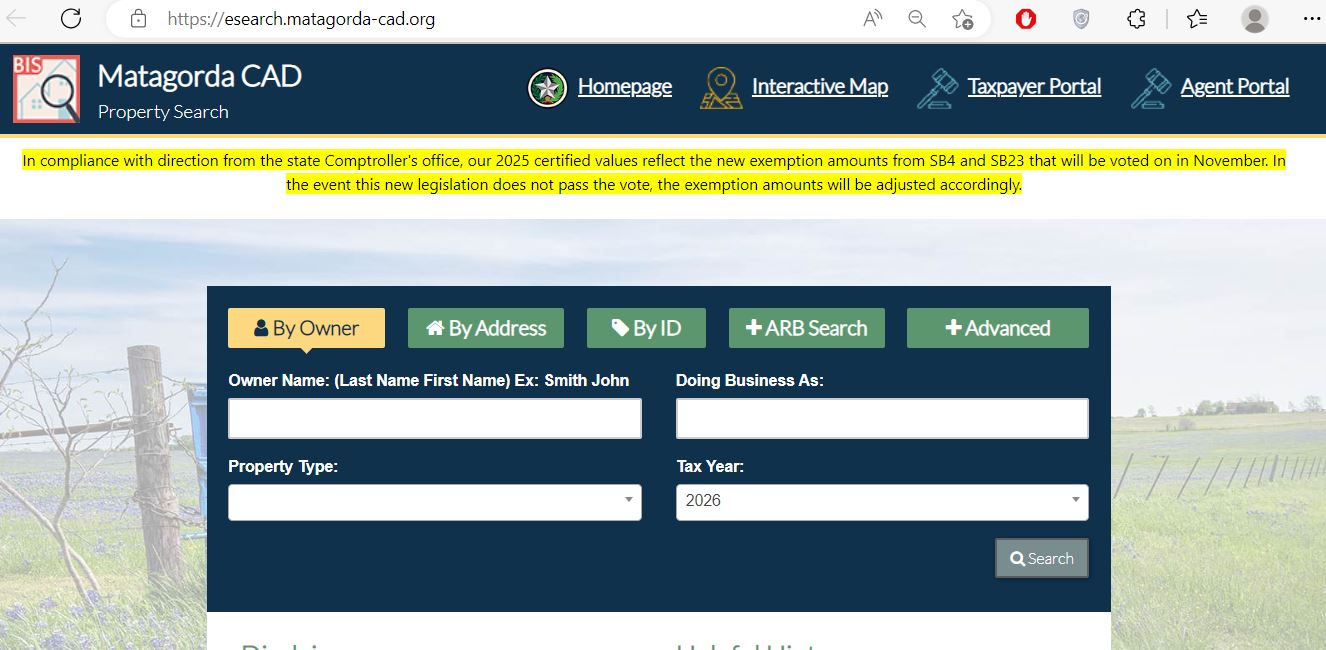
Use surname first and try only one part of the name when necessary.
Use the primary street, highway or county-road name.
Use Property ID, Owner ID or Geographic ID from a notice or prior record.
Review protest status, informal dates, hearing information and board fields.
Use abstract, subdivision, neighbourhood, property type or DBA filters.
Understand what Matagorda CAD data can—and cannot—confirm
| Record field | What it helps identify | What it does not establish | Best next action |
|---|---|---|---|
| Property ID | The appraisal account maintained by Matagorda CAD. | A deed instrument or payment confirmation. | Save it for CAD forms, calls, protests and tax searches. |
| Owner ID | The ownership profile associated with one or more appraisal accounts. | Legal title or authority to transfer the property. | Use it with the E-FILE PIN when registering for the portal. |
| Geographic ID | A geographic or parcel-related account reference. | A surveyed boundary or guaranteed acreage. | Compare it with the map, deed and recorded plat. |
| Owner name | The owner displayed for appraisal administration. | Complete legal title, mineral ownership or the absence of liens. | Search County Clerk property records. |
| Situs address | The assigned physical property location. | Legal access, shoreline rights or exact parcel boundaries. | Compare the map, legal description and survey. |
| Legal description | The lot, block, subdivision, abstract, survey or tract. | That abbreviated CAD text is sufficient for a deed or legal instrument. | Open the recorded deed, plat or survey. |
| Market value | The district’s estimate of market value as of January 1. | The sale price, insurance value or final property-tax amount. | Review property details and appraisal evidence. |
| Appraised value | The value after an applicable cap or special appraisal. | That the underlying market value cannot be protested. | Compare market, appraised and taxable values. |
| Taxable value | The value remaining for a taxing unit after its exemptions. | The bill without the unit’s adopted rate. | Match it with the official tax statement. |
| Taxing entities | County, city, school, MUD, WCID, drainage, hospital, port and other local units. | That every nearby property has the same rate stack. | List every entity before estimating tax. |
| Tax amount in CAD search | General tax-account context. | The live payoff amount, current penalties or payment posting. | Verify the amount through the Tax Office. |
Fix a Matagorda County search that returns nothing
| Search problem | Likely reason | Best correction |
|---|---|---|
| Full owner name fails | The account may use surname-first order, initials, a spouse, estate, trust or business. | Search only the first or last name. |
| Full address fails | Road suffixes, rural formatting or a mailing and situs mismatch can interfere. | Search only the main street, highway or road name. |
| Coastal property is unclear | The mailing address, subdivision, lot description and physical location may differ. | Use owner, subdivision, Property ID and interactive map. |
| Farm or ranch has no normal address | The tract may be indexed mainly by owner, abstract, survey or Geographic ID. | Use Advanced Search and map search. |
| Mineral account is missing | The search may be restricted to real property or use a different owner or lease-related name. | Select Mineral and search owner, ID, abstract or legal description. |
| Manufactured home is missing | The home and land may be separately appraised or owned. | Use Mobile Home and Advanced Search filters. |
| New owner is not displayed | The deed or CAD ownership update may still be processing. | Confirm recording with the County Clerk, then provide the instrument details to CAD. |
| Tax amount does not match the bill | The CAD search is not the Tax Office’s live collection database. | Call 979-244-7670 or use the official county payment route. |
| Portal registration is pending | Taxpayer Portal registration requires CAD approval. | Keep the registration confirmation and contact MCAD when approval is delayed. |
Send the question to the Matagorda County office that controls it
| Your task | Correct starting point | What that office controls |
|---|---|---|
| Owner display, value, land or improvement data | Matagorda CAD | Appraisal records, values, property characteristics and mapping. |
| Homestead, veteran, disability or other exemption | Matagorda CAD forms | Exemption applications, eligibility review and appraisal records. |
| Agricultural, timber or wildlife appraisal | Matagorda CAD | Special-appraisal applications and land-use qualification. |
| Appraisal protest or ARB hearing | Taxpayer Portal or Matagorda CAD | Electronic protest, informal review, evidence and formal ARB scheduling. |
| Tax bill, balance, payment or receipt | Matagorda County Tax Office | Billing, collection, penalties, interest and payment posting. |
| Deed, lien, release, plat or recorded ownership | Matagorda County Clerk | Official public records and certified document copies. |
| 911 address for an unaddressed rural tract | Matagorda County 911 Addressing | County addressing procedures, location details and entry-point requirements. |
| Boundary, access, easement or acreage certainty | Deed, plat, title records and licensed survey | Legal property description and professionally measured boundaries. |
Verify the live Matagorda County balance before sending payment
1801 7th Street, Bay City. Main line: 979-789-5100.
Monday 8:15 AM–4:30 PM; Tuesday–Friday 8:00 AM–4:30 PM.
The Tax Office currently publishes Monday–Friday service hours of 9:00 AM–3:30 PM for ownership changes.
Follow the Matagorda property value from January appraisal to tax bill
The district’s January 1 estimate of market value.
The value after an applicable cap or special-appraisal treatment.
The remaining amount after exemptions granted by a specific unit.
The collector applies adopted local rates and any applicable penalties or interest.
File the correct Matagorda CAD application and verify the result
Do not assume the seller’s exemption, appraisal cap or tax ceiling automatically transfers.
Use the matching exemption application and verify any applicable school tax ceiling.
Prepare the VA disability evidence and ownership information required by the selected application.
Treat the electronic protest as the informal appraisal meeting
Evidence checklist
Separate productivity appraisal from the land’s full market value
Matagorda County includes rice fields, pasture, ranches, timber, wildlife-use acreage, coastal farmland and mixed rural tracts. Qualifying land can receive a special appraisal based on productivity rather than full market value.
Prepare production history, lease records, irrigation information, acreage maps and receipts.
Keep stocking, grazing, fencing, water, lease and management evidence.
Document active management rather than relying only on the property’s wooded or rural appearance.
Use the map for parcel context—not legal shoreline or boundary certainty
The MCAD interactive map is useful for rural tracts, Matagorda and Sargent-area property, Palacios subdivisions, waterfront lots, MUD or WCID areas, farm acreage and parcels without a conventional street address.
Use the exact taxing-unit stack attached to the Matagorda property
MCAD currently publishes adopted rates through 2025. Use the Matagorda County Truth in Taxation portal for the 2026 rate-adoption process and the property account for the exact list of applicable taxing entities.
| Taxing entity | 2025 rate | When it may apply | Important check |
|---|---|---|---|
| Matagorda County | 0.336510 | Taxable property within Matagorda County. | This is only one part of the total rate. |
| Bay City ISD | 1.000690 | Property inside Bay City ISD. | Confirm the school boundary and exemptions. |
| Matagorda ISD | 0.707320 | Property inside Matagorda ISD. | The district publishes an additional local homestead percentage. |
| Palacios ISD | 0.948600 | Property inside Palacios ISD. | Verify its collector because it is not listed among the county’s consolidated units. |
| Tidehaven ISD | 0.857800 | Property inside Tidehaven ISD. | Verify taxable value and local homestead treatment. |
| Van Vleck ISD | 0.861770 | Property inside Van Vleck ISD. | Do not add a city rate to unincorporated property. |
| City of Bay City | 0.557720 | Property inside Bay City limits. | Confirm municipal boundaries through the property account. |
| City of Palacios | 0.600000 | Property inside Palacios limits. | Seawall, WCID or navigation entities may also apply. |
| Matagorda County Hospital District | 0.228750 | Property within the hospital district. | This line is separate from the county rate. |
Matagorda County property-tax estimate
Use the Matagorda County Clerk when the CAD owner field is not enough
The County Clerk provides property-record search for documents from 1955 to the present and historical index books covering 1837 through 1956. Use these records for deeds, liens, releases, plats and other recorded instruments.
Bay City, Texas 77414
Phone: 979-244-7680
Fax: 979-244-7688
Email: coclerk@co.matagorda.tx.us
County Clerk: Stephanie Wurtz
Monday–Friday:
8:00 AM–5:00 PM
Closed for lunch:
12:00 PM–1:00 PM
Property records contact: Gloria Calderon.
Adjust the lookup to the property’s community and taxing districts
Verify Bay City ISD, City of Bay City, county, hospital and any drainage, port or groundwater district attached to the account.
Check Palacios ISD, City of Palacios, seawall, navigation, WCID and other coastal districts rather than using a Bay City tax example.
Use the subdivision, lot, owner, Property ID and map. Beach Road MUD, Caney Creek MUD, WCID or drainage entities may apply.
Confirm Van Vleck ISD and whether the tract is outside municipal limits before adding a city tax rate.
Check Tidehaven ISD, county, hospital and special-district boundaries on the exact account.
Boling ISD crosses the county area and is not listed among the county tax office’s consolidated units. Follow the collector on the school statement.
Review market value, productivity value, qualifying acreage, irrigation, lease and agricultural-use history.
Confirm subdivision, access, utilities, MUD or WCID, drainage and seawall-related entities before estimating annual carrying costs.
Search the home and underlying land separately, then use the Tax Office for ownership-change processing.
Select Mineral property type and compare appraisal ownership with deeds, assignments and other recorded documents.
Search real estate and business personal property separately. Equipment, inventory and improvements may use different accounts.
Search the deceased owner, estate, heirs and prior account, then compare probate and recorded property documents.
Contact the Matagorda County office that controls the issue
Use for appraisal records, property data, exemptions, mapping, special appraisal, electronic communications and protests.
2225 Avenue GBay City, Texas 77414-5018
Phone: 979-244-2031
Email: mcad@matagorda-cad.org
Chief Appraiser: Katharine McGee
Hours: Monday–Friday, 8:00 AM–5:00 PM
- Chief Appraiser: Katharine McGee
- Office Manager: Laurie Medina
- Appraisal Manager: Allison Pe’Vey
- Deeds and ARB: Marta Gonzalez
- GIS, mapping and ARB: Mirna Sanchez
Use for tax bills, balances, payments, receipts, penalties and collection questions.
1801 7th StreetBay City, Texas 77414-5091
Main line: 979-789-5100
Property-tax accounts: 979-244-7670
Email: bcook@co.matagorda.tx.us
Tax Assessor-Collector: Becky Barrett Cook
Use for deeds, liens, plats, recorded ownership, historical indexes and certified copies.
1700 7th Street, Room 202Bay City, Texas 77414
Phone: 979-244-7680
Email: coclerk@co.matagorda.tx.us
County Clerk: Stephanie Wurtz
Open the exact Matagorda County property resource
Current notices, office details, appraisal information and online services.
Open Matagorda CADSearch owner, address, ID, ARB, advanced, real, personal and mineral records.
Search official recordsLocate rural, coastal, subdivision and special-district parcels.
Open interactive mapManage linked properties, electronic communications, documents, applications and protests.
Open Taxpayer PortalReview the Owner ID, PIN, evidence, comment and settlement rules.
Open eProtest informationFind exemptions, agricultural, timber, rendition, protest and special-appraisal forms.
Open MCAD formsReview 2026 reports, ARB procedures, certified rolls, rates and taxpayer publications.
Open tax informationUse the county’s bureau code, pay-by-phone details, fee information and account contact.
Open county payment pageSearch deeds, liens, releases, plats and other recorded property documents.
Search property recordsRelated AppraisalDistrict.org guides
How this Matagorda County guide was rebuilt

The county-specific Matagorda CAD search image now appears inside the property-search walkthrough. The existing editorial image remains here in the source-review section.
The article was rebuilt around current MCAD search, Taxpayer Portal, eProtest, map, forms, 2026 tax information, staff, consolidated tax collection, payment fees and County Clerk records.
Last reviewed July 28, 2026. Appraisal data, PIN procedures, forms, tax rates, collector arrangements, payment fees, staff and office schedules can change after publication.
Matagorda County Appraisal District FAQs
What is the official Matagorda County Appraisal District website?
The official website is matagorda-cad.org. Use it for appraisal records, property search, maps, forms, electronic communications, exemptions and protests.
How do I search Matagorda County property records?
Use the official Matagorda CAD property search. Search by owner, address, Property ID, Geographic ID or advanced criteria, then verify the complete account.
Why does a Matagorda CAD owner or address search return no result?
Use fewer words. Try only the owner’s first or last name or only the main street or road name. Rural, coastal, mineral and manufactured-home property may also be easier to find by ID, abstract, subdivision or map.
Can I file a Matagorda CAD protest online?
Yes. MCAD states that all properties it appraises are eligible to file excessive-appraisal or unequal-appraisal protests electronically. Registration uses the Owner ID and case-sensitive E-FILE PIN from the appraisal notice.
Does Matagorda CAD collect property taxes?
No. MCAD handles appraisal records, exemptions and protests. The Tax Assessor-Collector handles bills, payments, receipts and collection for the units served by the county office.
How do I pay Matagorda County property taxes online?
Start from the official Matagorda County payment page. The county lists bureau code 3281967 and pay-by-phone number 1-866-539-2020. Verify the live amount before paying.
How do I apply for a Matagorda County homestead exemption?
Locate the correct property account, use the official MCAD forms page, prepare the required identification and ownership evidence, keep proof of filing and later verify the exemption on the account.
What is the Matagorda CAD protest deadline?
Most Texas appraisal protests are due May 15 or 30 days after the district mails the Notice of Appraised Value, whichever is later. The deadline associated with the official notice controls.
Where can I search Matagorda County deeds and liens?
Use the County Clerk property-record search for records from 1955 to the present. The County Clerk page also links historical index books for records from 1837 through 1956.
Is the Matagorda CAD map a legal survey?
No. The map and appraisal legal descriptions are research aids. Use a recorded deed, plat and licensed survey when legal acreage, boundaries, easements, shoreline rights or access matters.