
Follow a Gray County Property From CAD Search to the Correct Tax, Protest or Deed Record
Start with Gray County Appraisal District when you need an owner lookup, property ID, geographic ID, legal description, appraisal value, exemption, agricultural record, business account, mobile-home record, interactive map or protest information.
Use the Gray County Tax Assessor-Collector for the live property-tax balance, online payment, receipt, delinquent account or payment posting. Use the County Clerk when you need a recorded deed, lien, release, plat or other instrument affecting ownership.
Use the property ID, owner ID or geographic ID when available.
815 N. Sumner Street, Pampa, Texas 79065.
Handled by the Gray County Tax Assessor-Collector.
Use County Clerk records for deeds, liens and releases.
Local links and procedures reviewed July 28, 2026.
Which Gray County property question are you trying to answer?
Use owner, address, property ID, owner ID, geographic ID, subdivision, abstract or mobile-home park.
Follow the search workflowCompare land, improvements, market value, appraised value, taxable value, exemptions and property characteristics.
Understand the value sequenceConfirm the property account, tax year, live amount due, processing charge and payment receipt.
Review the payment stepsSave the appraisal account, identify the exact issue and use the portal or paper form accepted by Gray CAD.
Prepare the protest fileThe Gray CAD owner field is an appraisal entry. Recorded ownership and liens belong to the County Clerk.
Search official property documentsQualifying property with at least 15% disaster damage may have a time-sensitive Form 50-312 filing route.
Review disaster-relief stepsUse the correct Gray County website for each action
Current alerts, property-search access, forms, map, protest information, reports and office details.
Open official Gray CADSearch by owner, address, property ID, ARB information or advanced criteria.
Search Gray CAD recordsAccess connected property information, electronic communications, applications and online appeals when available.
Check portal availabilityLocate parcels and compare map context with the full appraisal account.
Open Gray CAD mapDownload homestead, veteran, agricultural, wildlife, business, protest and disaster forms.
Open official formsReview certified values, certified rolls, annual reports and the 2025–2026 reappraisal plan.
Open reports and rollsReview proposed or adopted rates and subscribe to property-tax database notifications.
Open tax transparencySearch the live county collection account, amount due, payment history and online-payment options.
Open property-tax paymentsSearch deeds, liens, releases and other recorded property documents.
Open public records searchSearch Gray CAD without opening the wrong property or tax year
Use the original Gray CAD search image as a visual checkpoint
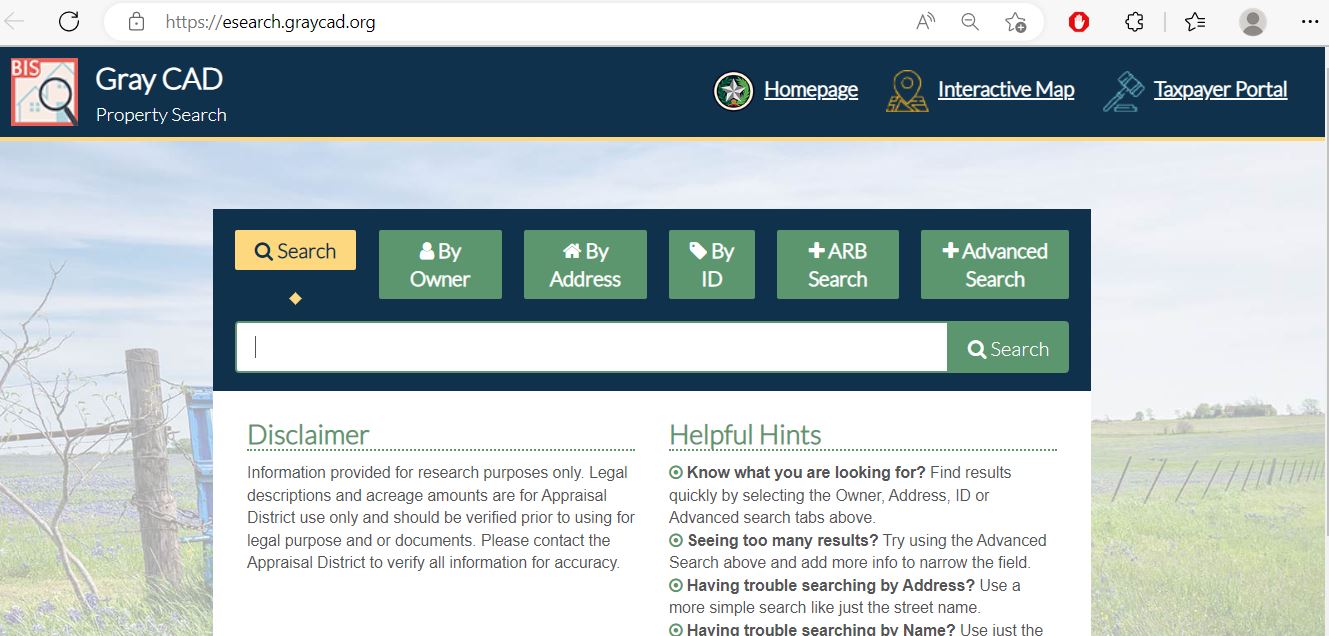
Use Owner, Address, ID, ARB Search or Advanced Search before changing spelling or assuming the account is missing.
Start with the last name, first name or street name alone when a detailed search fails.
The result list is only a starting point. Open the account to verify identifiers, legal description, values and exemptions.
Real property, mobile homes, business assets, agricultural land and mineral-related records can appear differently.
Current notices, preliminary records, certified records and tax bills may show different stages of the yearly process.
Take a screenshot or print a PDF before submitting a correction, exemption, protest or payment question.
Recognise the Gray CAD fields that help narrow a difficult search
Choose the strongest available field
Understand the Gray CAD account before taking action
| Account field | What it identifies | What it does not prove | Best next action |
|---|---|---|---|
| Property ID | The individual Gray CAD appraisal account. | That the Tax Office uses the exact same display format. | Save it for CAD, protest and payment questions. |
| Owner ID | The owner record connected to one or more properties. | That every property belonging to that person is included. | Use it to narrow owners with several accounts. |
| Geographic ID | A location or mapping reference assigned to the property. | A surveyed legal boundary. | Compare it with GIS, the deed and recorded plat. |
| Owner shown | The owner carried in the appraisal record. | Complete legal title or lien status. | Use County Clerk records for ownership conclusions. |
| Situs address | The physical address associated with the account when one is available. | The mailing address or full legal description. | Compare it with the map and legal documents. |
| Legal description | The lot, block, tract, subdivision, abstract or other property reference. | That the abbreviated CAD wording is sufficient for a deed. | Review the recorded instrument and survey. |
| Market value | Gray CAD’s opinion of market value as of January 1. | A guaranteed selling price or the final tax bill. | Compare sales, property condition and equal appraisal. |
| Appraised value | The value after an applicable appraisal limitation. | The taxable value for every local taxing unit. | Check the homestead cap or other applicable limitation. |
| Taxable value | The value remaining after applicable exemptions. | The live amount due, payment status or penalties. | Open the Gray County Tax Office account. |
| Exemptions and taxing units | Benefits and jurisdictions connected to the account. | That every property receives every listed countywide benefit. | Review each taxing-unit line and Truth in Taxation record. |
Use Gray CAD GIS for location context—not as a legal survey
Use a search method that matches the local property type
Search the street name or owner, then verify the subdivision, lot, school district, homestead exemption and tax year.
Confirm the city, school district and county taxing-unit combination before estimating the bill.
Use owner, property ID, geographic ID, abstract or legal description when no normal street address appears.
Use the MobileHomePark filter, owner, property ID and location because the home and land may have different records.
Search the legal business name, DBA, owner ID, agent ID and property type rather than the building address alone.
Use property type, owner, property ID, agent or abstract-related information instead of relying on the surface address.
Use the Condo filter and match the individual unit, property ID and legal description.
Search the buyer and seller, then verify the recorded deed before requesting an ownership update.
Search the parent property and recorded document when the new parcel is not yet visible.
Separate market value, appraised value and taxable value
Gray CAD’s opinion of what the property would sell for under normal market conditions as of January 1.
The value after an applicable homestead cap or other statutory appraisal limitation.
The value remaining after exemptions, calculated separately for applicable taxing units.
Check the Notice of Appraised Value before deciding what to file
Confirm that appraisal notices are being delivered to the correct person and address.
Match the property ID, owner ID, geographic ID, address and legal description.
Compare land, improvements, market value, appraised value and prior-year figures.
Verify homestead, age, disability, veteran, agricultural and other expected benefits.
Check acreage, building size, use, class, year built, mobile-home details and business information.
Use the date printed on the individual notice rather than assuming every property has the same deadline.
Fix a missing or incorrect Gray CAD property result
| Problem | Likely reason | Practical fix |
|---|---|---|
| Owner search returns nothing | The record may use a former owner, spouse, trust, estate, company or different name order. | Search only the first name, last name or one distinctive business word. |
| Too many owner results | The name is common or the owner has several accounts. | Add property type, owner ID, street, subdivision or geographic ID. |
| Address search fails | The situs address may be abbreviated or formatted differently. | Search only the street name, then use Advanced Search. |
| Rural land is missing | The property may be indexed by abstract, legal description or geographic ID. | Use owner, property ID, abstract, subdivision or map search. |
| Mobile home is missing | The home may be indexed separately from the land or under a park name. | Use MobileHomePark, owner ID and property type. |
| Business account is missing | The account may use a legal name, DBA or agent rather than the storefront name. | Search Doing Business As, agent ID and personal-property type. |
| New owner is not showing | The deed may not have completed appraisal-district processing. | Confirm the County Clerk recording and contact Gray CAD with the instrument number. |
| Portal will not open | Gray CAD has announced current technical difficulties. | Use the property search and forms pages, then call before a deadline. |
| CAD and tax balance differ | The appraisal and collection systems serve different purposes. | Match the property account and contact the office controlling the disputed field. |
| Map boundary looks wrong | CAD maps are appraisal tools and may not match a survey. | Review the deed, plat and professional survey before requesting a correction. |
Use Gray CAD, the Tax Office or County Clerk for the correct task
| Your question | Correct office | What to prepare |
|---|---|---|
| What is the appraised value? | Gray County Appraisal District | Property ID, tax year and disputed value field. |
| Why is an exemption missing? | Gray County Appraisal District | Application, identification, qualification date and filing proof. |
| How much property tax is due? | Gray County Tax Assessor-Collector | Property account, owner, tax year and tax statement. |
| Did my payment post? | Gray County Tax Assessor-Collector | Receipt, confirmation, amount, date and payment method. |
| Who legally owns the property? | Gray County Clerk or title professional | Grantor, grantee, date range, legal description and document number. |
| Where can I obtain a deed or lien? | Gray County Clerk | Names, instrument type, date and recording reference. |
| Is the GIS boundary legally correct? | Surveyor, title professional or County Clerk | Deed, plat, survey and geographic ID. |
| Who sets my tax rate? | Each applicable taxing unit | Taxing-unit list from the CAD record. |
| Where do I file a rendition? | Gray County Appraisal District | Asset list, acquisition dates, costs, location and business ownership. |
Prepare the correct Gray CAD exemption or special-appraisal application
Confirm ownership, principal-residence use, identification requirements and the year requested.
Review the additional exemption, school-tax ceiling, instalment options and possible deferral rules.
Prepare the required qualifying documentation and verify the benefit on applicable taxing-unit lines.
Use the appropriate veteran or surviving-spouse form and attach the required VA documentation.
Prepare use history, acreage, livestock, production, leases, maps and wildlife-management records.
Gray CAD publishes Freeport, goods-in-transit, vehicle, charitable, religious and other specialised forms.
Application preparation checklist
Check the temporary exemption for qualifying wildfire-damaged property
Build a Gray County protest around a specific appraisal issue
| Property type | Useful evidence | Common weak argument |
|---|---|---|
| Pampa residence | Comparable sales, equal-appraisal properties, repair estimates, photographs and measurements. | The tax bill is too high without identifying an appraisal error. |
| Rural or agricultural land | Acreage, land class, use history, leases, production records, livestock and maps. | Market value and productivity value should always be identical. |
| Business personal property | Asset list, cost, age, depreciation, inventory, disposal and obsolescence records. | Low business revenue without connecting it to asset value. |
| Mobile home | Ownership documents, serial information, condition photographs, location and comparable units. | Using the land value as the value of the home. |
| Oil, gas or mineral interest | Ownership interest, lease information, production, decline and valuation records. | Comparing the mineral account with a surface residence. |
Present the case to the Gray County ARB without creating a conflict
Begin with the property ID, tax year, protest reason and specific value or correction requested.
Place the most persuasive sale, factual error, photograph, estimate or land-use record at the front.
Add a one-sentence label explaining why each document supports the requested result.
Protect the deadline when Gray CAD’s online portal is unavailable
Pay Gray County property taxes through the Tax Assessor-Collector
Gray CAD determines appraisal values and exemptions. The Gray County Tax Assessor-Collector manages the collection account, online payment, posting, receipt, delinquency and payment questions.
| Payment route | Official guidance | What to keep |
|---|---|---|
| Online payment | Use the Gray Property Tax Payments link published by the county. | Checkout fee, confirmation and paid tax year. |
| Courthouse drop box | A drop box is located beside the Tax Office entrance at Room 101. | Copy of the payment, account details and delivery date. |
| Use the Tax Office mailing address and identify the account and tax year clearly. | Tracking, postmark evidence and a copy of the remittance. | |
| In-person help | Visit Room 101 at the Gray County Courthouse after confirming availability. | Printed receipt and account confirmation. |
| Electronic tax bill | The county publishes an electronic-delivery form for property-tax bills. | Submitted form and email confirmation. |
Use the Gray County Clerk for deeds, liens and official records
Confirm which Gray County taxing entities apply to the property
Not every active taxing unit applies to every property. Use the exact list shown on the appraisal and tax account.
County taxation applies to taxable property in Gray County.
Confirm school-district taxable value and homestead benefits.
Applies to property within the Lefors school-district boundary.
Check the school district shown on rural and McLean-area accounts.
Verify the property location and school-jurisdiction assignment.
Groom, White Deer, Miami, Wheeler and Fort Elliott districts can appear on qualifying accounts.
City of Pampa, Lefors or McLean taxation depends on municipal boundaries.
Panhandle Groundwater Conservation District No. 3 may appear where applicable.
The college district may appear as an active taxing unit on qualifying property.
Use Gray CAD reports for broader research and protest preparation
Review district activity, property categories and annual appraisal information.
Understand the district’s planned appraisal and inspection work.
Compare countywide and taxing-unit certified value totals by year.
Use broader roll files when individual search is insufficient.
Business owners can review the current depreciation schedule when preparing or checking personal-property value.
Gray CAD’s appraisal-information page includes an Oil and Gas FAQ and ARB presentation material.
Use published geographic-data resources for larger mapping projects.
Review official protest and appeal rights before a deadline-sensitive filing.
Use the district’s contact form when the normal property search does not provide the required record.
Important Gray County appraisal, filing and payment dates
Gray County appraisal, tax and recorded-property offices
Pampa, Texas 79065-5232
Mailing:
P.O. Box 836
Pampa, Texas 79066-0836
(806) 665-0791
Fax: (806) 665-1213
info@graycad.org
Hours: Monday-Friday, 8:00 AM-5:00 PM.
Chief Appraiser: Tyson Paronto
205 N. Russell Street, Room 101
Pampa, Texas 79065
Mailing:
P.O. Box 382
Pampa, Texas 79066-0382
(806) 669-8018
Property-tax email: property.taxgrayco@graycch.com
Tax Assessor-Collector: Christie Johnson
Call to confirm current lobby and transaction hours before travelling.
Pampa, Texas 79065
Mailing:
P.O. Box 1902
Pampa, Texas 79066-1902
(806) 669-8004
Fax: (806) 669-8054
deborah.laramore@graycch.com
County Clerk: Dee Dee Laramore
Hours: Monday-Thursday 8:00 AM-5:00 PM; Friday 8:00 AM-1:30 PM.
Prepare the property ID, owner ID, geographic ID, owner name, address, tax year and exact field in question.
Bring the notice, photographs, form confirmation, deed number or other supporting document.
Prepare the tax account, property owner, year, amount due, receipt and payment confirmation.
Do not send bank-card details or private payment information through ordinary email.
Prepare the grantor, grantee, date range, legal description, document type and known instrument number.
The Clerk’s office does not perform every type of property-title search for the public.
How this Gray County guide was rebuilt and reviewed

Independent research with local search, protest and payment guidance
This regenerated article preserves both images used on the existing page while replacing its brief explanations with a complete property-search workflow, screenshot guidance, account-field decoder, local property scenarios, disaster-relief instructions, portal-downtime plan, protest preparation, payment verification and County Clerk record process.
Official sources reviewed include Gray County Appraisal District, Gray CAD Property Search, Taxpayer Portal, interactive map, forms, reports, Appraisal Review Board information, Gray County Tax Assessor-Collector, Gray County Clerk and the Texas Comptroller county directory.
AppraisalDistrict.org is an independent informational website and is not operated by Gray County Appraisal District, Gray County or any taxing unit.
10 common Gray County appraisal and property-tax questions
1. What is the official Gray County Appraisal District website?
The official website is graycad.org. Use it for property search, forms, maps, protest access, reports, tax-rate resources and district contact information.
2. How do I search Gray County property records?
Open the official Gray CAD property search and choose Owner, Address, ID, ARB Search or Advanced Search. Confirm the property ID, owner ID, geographic ID, legal description, property type and tax year.
3. Why does Gray CAD show no property result?
The record may use a former owner, trust, business name, abbreviated address, abstract, subdivision or mobile-home park. Search with only the first or last name or only the street name, then try Advanced Search.
4. Is the Gray CAD Taxpayer Portal working?
At the July 28, 2026 review, Gray CAD displayed a notice that the portal was experiencing technical difficulties. Recheck the official homepage and use an accepted paper or alternative delivery method when a filing deadline is close.
5. Can I pay Gray County property taxes through Gray CAD?
No. Use the Gray County property-tax payment portal or contact the Tax Assessor-Collector. Gray CAD handles appraisal values, exemptions, maps and protests.
6. What is the Gray County property-tax protest deadline?
Most protests are due by May 15 or by the 30th day after the Notice of Appraised Value was delivered, whichever applicable date is later. Follow the deadline printed on the individual notice.
7. How do I apply for a Gray County homestead exemption?
Download the General Residence Homestead Exemption application from the official forms page, complete the ownership and residence information, attach the required identification or affidavit and retain proof of filing.
8. Is disaster-related property-tax relief available in Gray County?
A temporary exemption may be available for qualifying property with at least 15% damage in a governor-declared disaster area. Form 50-312 and evidence generally must be filed by the 105th day after the declaration date.
9. Does the owner shown by Gray CAD prove legal ownership?
No. The owner field is maintained for appraisal administration. Use the Gray County Clerk public-records search and official documents for deeds, liens and releases.
10. Where is Gray County Appraisal District located?
Gray CAD is located at 815 N. Sumner Street, Pampa, Texas 79065. The telephone number is (806) 665-0791, and published hours are Monday-Friday from 8:00 AM to 5:00 PM.