
Follow a Lubbock Property From High Plains Parcel Search to Paid Tax Receipt
Lubbock Central Appraisal District is unusually important because it does more than appraise property. LCAD maintains the appraisal record, administers exemptions and protests, issues annual property-tax bills and receives property-tax payments.
Use the same official property account to review values, Bills, Payment History, Map and Ag Rollback information. Use the Lubbock County Clerk separately when you need deeds, liens, easements, plats or certified land records.
2109 Avenue Q, Lubbock.
806-762-5000.
Monday–Friday, 8:30 AM–5:00 PM.
Tim Radloff.
LCAD collects property taxes.
Official sources checked July 2026.
What do you need from the Lubbock property record?
Use an owner, business, Property ID, CAD ID, address, subdivision, legal description or acreage.
Follow the search workflowCompare land, improvements, market value, assessed value, exemptions and taxing entities.
Understand value fieldsConfirm current and past balances, add the correct bill to the cart and save the confirmation.
Use payment micro-stepsProtect the notice deadline, identify the exact issue and upload focused supporting evidence.
Prepare a Lubbock protestEligible homeowners can begin a residence-homestead application from the property-detail page.
Follow the filing stepsUse recorded deeds and liens instead of treating the LCAD owner field as legal proof of title.
Search real-property recordsSearch Lubbock CAD property records without opening the wrong account
Choose the strongest Lubbock CAD search fields
Use Property ID, CAD ID or Owner ID for the cleanest single-account match.
Use a street-number range, street name, city or ZIP code to narrow location results.
Search an individual owner, business name, trust, estate or company record.
Use abstract, subdivision, block, tract, lot or an acreage range for land research.
| Information you have | Best field | How to use it | What to verify |
|---|---|---|---|
| Appraisal notice or tax bill | Property ID or CAD ID | Enter the identifier without added words. | Owner, situs, tax year and legal description. |
| Home address | Street number and street name | Remove city, ZIP code and punctuation first. | Correct unit, subdivision and school district. |
| Owner name | Owner Name | Begin broadly and add the first name if needed. | Mailing address and property location. |
| Business property | Business Name and Personal Property | Search the business and related owner names. | Situs, account type and rendition year. |
| Rural acreage | Abstract, subdivision or acres | Combine legal fields with an acreage range. | Tract, road, map location and land use. |
| Manufactured home | Manufactured Home property type | Search the owner and situs under this property type. | Whether land and home are separate accounts. |
Use the Lubbock CAD advanced-search screenshot step by step
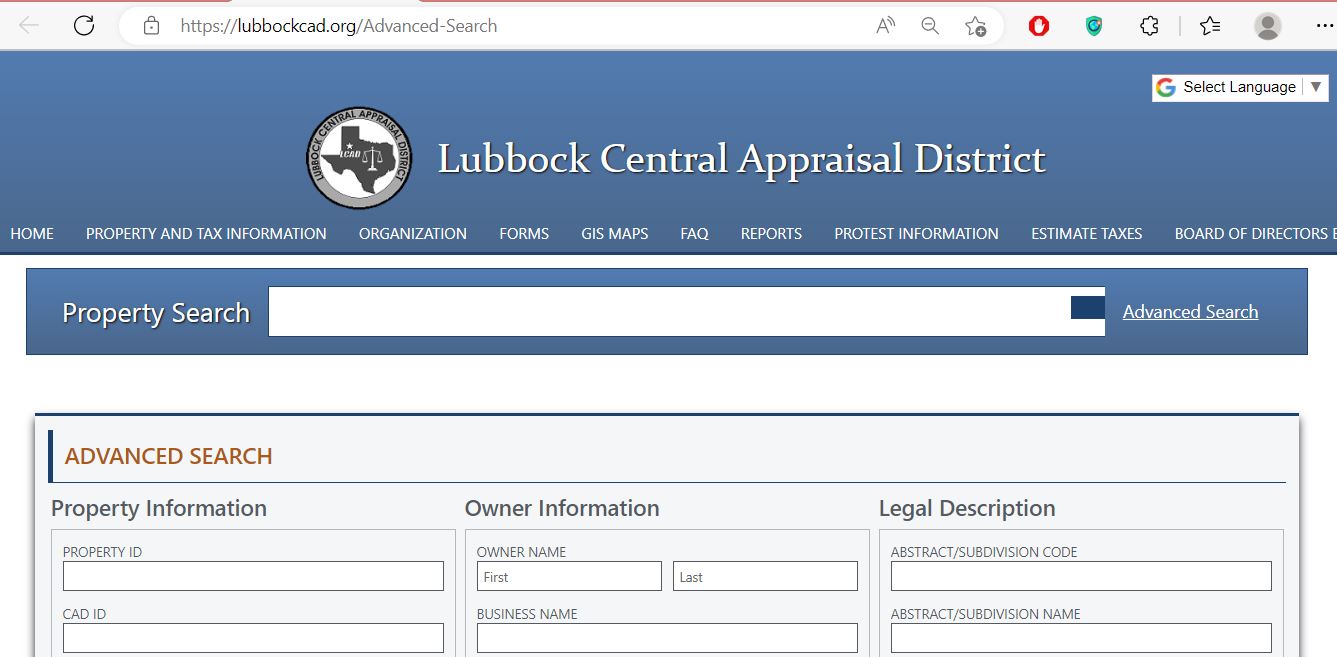
Use Property ID, CAD ID, street, city, ZIP, neighbourhood or property type.
Search an individual owner, business name or Owner ID.
Use subdivision code or name, block, tract, lot or acreage.
Choose active, inactive or all and select the correct tax year.
Match owner, situs, legal, property type, assessed value and market value.
Use Lubbock CAD maps for parcel context, not legal boundaries
The interactive GIS map is useful for locating parcels, comparing neighbouring property and checking city-edge or rural land. LCAD also publishes map sheets, a county section reference, a 2026 geodatabase and a 2026 shapefile for more advanced research.
Locate a parcel and compare roads, nearby accounts, neighbourhood context and land patterns.
Official files include Lubbock County sections and maps for communities such as Idalou, New Deal, Shallowater, Slaton, Wolfforth and Ransom Canyon.
The map library includes 2026 GDB and shapefile resources for users who work with GIS software.
Use the correct LCAD tab for the question you are solving
Owner, location, legal description, value, exemptions, entities and property characteristics.
Current and past tax amounts, balances, levy, penalty, interest and payment options.
Transaction date, effective date, amount paid and receipt number.
Parcel location and appraisal-map context, subject to map limitations.
Applicable agricultural-use change or rollback information connected with the account.
Understand what each Lubbock CAD field means
| Field | What it helps identify | What it does not prove | Next action |
|---|---|---|---|
| Property ID | The appraisal property record within LCAD. | That every external record uses the same identifier. | Use it for search, bills, exemption and protest questions. |
| CAD ID | Another district identifier useful in advanced research. | Legal ownership or exact boundary location. | Save it with the Property ID before calling. |
| Owner name | The owner carried for appraisal and tax administration. | Clear legal title or absence of liens. | Search County Clerk records when title matters. |
| Situs address | The physical property location used in the LCAD account. | The owner mailing address or legal description. | Compare it with the parcel map and deed. |
| Legal description | The abstract, subdivision, block, tract or lot carried by LCAD. | That the shortened description is adequate for a deed. | Verify the recorded document. |
| Property type | Real, manufactured-home, natural-resource or personal-property classification. | That no related account exists. | Search all relevant types. |
| Market value | LCAD’s opinion of market value as of January 1. | A guaranteed selling price or final tax bill. | Review comparable and condition evidence. |
| Assessed value | Value after an applicable cap, limitation or special appraisal. | The final taxable value for every entity. | Review exemption and entity lines. |
| Taxable value | Value remaining after exemptions for a taxing entity. | The current amount due or payment status. | Open Bills and Payment History. |
| Receipt number | A posted LCAD tax-payment transaction. | That every separate account was paid. | Match the receipt to the property and tax year. |
Separate market value, assessed value and taxable value
LCAD’s opinion of what the property would sell for under normal market conditions as of January 1.
The value after an applicable homestead cap, circuit-breaker limitation or special appraisal.
The value remaining after exemptions for each county, school, city or special district.
Use the LCAD 2026 tax estimator without treating it as a bill
Fix a missing or incorrect Lubbock CAD search result
| Problem | Likely reason | Practical fix |
|---|---|---|
| Owner name returns too many records | The surname is common or ownership is held by a business, trust or estate. | Add the street, city, Property ID, CAD ID or legal information. |
| Address returns no result | Directional, unit, city or suffix formatting differs. | Use the street number and street name only. |
| Wolfforth or city-edge property is missing | The mailing city and taxing jurisdiction may not match. | Search without the city and verify GIS and taxing entities. |
| Manufactured home does not appear | The search may be limited to Real Property. | Select Manufactured Home and search the owner and situs. |
| Business account is missing | Business personal property is separate from the building or land. | Select Personal Property and search the business name. |
| Rural acreage is difficult to locate | The account may use an abstract, subdivision, block, lot or acreage instead of a normal address. | Use Advanced Search and GIS. |
| Recently purchased property shows the seller | The deed may not have completed processing into LCAD. | Verify the Clerk recording and save the reception number. |
| Bill looks higher than expected | Exemptions, taxing entities, penalties, interest or prior payments differ. | Open Bills and Payment History and compare every entity. |
| GIS line and survey differ | The CAD map is not a legal survey. | Use the deed, plat and survey for legal boundaries. |
Local search tips for urban, suburban, rural and special-property accounts
Verify Lubbock ISD or Lubbock-Cooper ISD, city, hospital, county and High Plains Water entities.
Check the city, Frenship ISD and any public improvement district assessment separately.
Confirm city and school entities because a postal city does not always prove the exact taxing boundary.
Review the selected city, school district, county, hospital and water-district lines.
Use GIS and map files to verify parcel location, roads and neighbouring accounts before relying on the mailing address.
Check acreage, market value, productivity value, land use and Ag Rollback information.
Search the Manufactured Home type and determine whether the land and home have separate ownership or accounts.
Select Natural Resource and verify the owner, property type, legal description and tax year.
Review the real property, business-personal-property assets, inventory and any separate special assessment.
Use LCAD, the County Tax Office and County Clerk correctly
Use for property search, appraisal values, exemptions, agricultural appraisal, protests, property-tax bills, tax payments, receipts and delinquent property-tax questions.
Use for motor-vehicle registration, vehicle titles and other county Tax Office duties. This office does not collect Lubbock County property taxes.
Use for deeds, deeds of trust, liens, releases, easements, plats, reception numbers, certified copies and recorded document history.
Correct the record before the error causes another problem
Apply for a Lubbock homestead exemption without paying a filing company
The property must be owned and used as the applicant’s principal residence, subject to current statutory requirements.
Review the additional exemption, applicable school-tax ceiling and supporting identification.
Prepare the required Social Security disability-benefit evidence or other qualifying documentation.
Attach current Veterans Administration documentation for the exemption category claimed.
Use the correct surviving-spouse application and provide ownership, age or service-related evidence.
LCAD states that a late homestead exemption may be filed up to two years after the taxes become delinquent.
Review Lubbock agricultural valuation and rollback information
Open-space agricultural appraisal is based on qualifying agricultural use and history, not simply the number of acres owned. The property-detail page may also provide an Ag Rollback tab for applicable land-use change information.
| Land situation | What to review | Evidence to prepare |
|---|---|---|
| Crop or cotton production | Acreage, qualifying use, productivity value and history. | Production records, leases, maps, invoices and photographs. |
| Grazing or livestock | Intensity, acreage, carrying use and management history. | Livestock records, leases, feed or veterinary records and maps. |
| Mixed homesite and farmland | Qualified acreage versus residence or non-agricultural area. | Survey or map separating the different uses. |
| Use change or development | Ag Rollback information and possible additional tax. | Current qualification, proposed use, dates and development documents. |
| Lease-based farming | Actual use, lease terms and continuity. | Signed leases, payment records, production history and photographs. |
Search and render Lubbock business property separately from real estate
Income-producing tangible personal property can include furniture, fixtures, equipment, machinery, computers, inventory, raw materials and work in process.
LCAD states that renditions are due on or before April 15.
A timely written request extends the deadline to May 15. The chief appraiser may grant another 15 days for good cause shown in writing.
LCAD warns that an account can be subject to a 10% penalty when a required rendition is not filed.
The normal deadline is April 30. LCAD describes a June 15 late-filing cutoff with a 10% penalty when a late application is approved.
Rendition information is generally confidential under the limits and exceptions described in the Texas Property Tax Code.
Prepare a Lubbock CAD protest around one documented issue
Evidence that directly supports a protest
Search, verify and pay a Lubbock County property-tax bill
| Payment route | Published instruction or fee | What to verify |
|---|---|---|
| Electronic check | $1.50 flat processing fee | Bank details, account, amount and confirmation number. |
| Credit card | 2.19% processing fee, $1 minimum | Total checkout fee before authorising payment. |
| Debit card | 1% processing fee, $1 minimum | Final total and confirmation. |
| Telephone payment | Call 1-800-231-6584 and provide the property QuickRef ID. | Property, year, amount and confirmation number. |
| Certified Payments website | Bureau Code 6729248 is required. | That the bureau and property information are correct. |
| Make checks payable to Lubbock Central Appraisal District and mail to P.O. Box 10568, Lubbock, TX 79408. | Property ID, tax year and mailing date. | |
| Drop box | Available at 2109 Avenue Q. Do not place cash in the drop box. | Include identifying information and keep payment proof. |
Use the Taxpayer Liaison Officer, payment agreement or deferral route correctly
Monica Buescher assists with district and ARB procedures, public access, complaints and communication concerns.
Call 806-776-2208 for procedural assistance. The TLO does not decide appraisal value.
An owner with delinquent residence-homestead taxes may qualify for a payout agreement. Contact LCAD Collections for current terms.
Qualified homeowners may defer residence-homestead taxes while they own and occupy the home.
Deferred tax, penalty and interest remain owed and become due after the property no longer qualifies under the statutory rules.
Use LCAD’s designated public-information request contact when identifiable records are not available online.
Use the Lubbock County Clerk for deeds, liens and legal document history
| Service | Published amount or rule | Practical note |
|---|---|---|
| Paper copy | $1 per page | Call with the document number or volume and page before ordering. |
| Certification | $5 additional per document | Confirm whether certification is required. |
| Online card payment | $2.50 or 2.95%, whichever is greater | The vendor adds this fee to the copy order. |
| Federal tax-lien search request | $10 per name per 10 years | The Clerk does not provide general name searches by telephone. |
| In-person recording | Photo identification is required | Check the current recording-fee schedule before presenting a document. |
Use LCAD reports when one property page is not enough
Review countywide appraisal activity, property categories and district operations.
Use it to understand valuation methodology and mass-appraisal practices.
Review the district’s planned appraisal and reappraisal activities.
Use countywide exemption data for context, not as a substitute for a property account.
LCAD publishes worksheets for cities, school districts, county, hospital and other taxing units.
Download county maps, 2026 geodatabase files and shapefiles for advanced analysis.
Complete these checks before buying or relying on a Lubbock property record
Match Property ID, CAD ID, situs, legal description, property type and GIS location.
Open current and past Bills and confirm levy, penalty, interest and balance.
Review transaction dates, amounts and receipt numbers rather than relying only on a seller statement.
Use County Clerk records and obtain a professional title examination for a transaction.
The seller’s homestead, tax ceiling and appraisal limitation may not transfer to the buyer.
Check the exact city, school, county, hospital, water and special-district lines.
Ask about applicable public-improvement-district assessments in affected developments.
Check the Ag Rollback tab and ask about use-change consequences before developing rural land.
Keep the deed, survey, title policy, closing statement, tax certificate and exemption filing confirmation.
Important Lubbock County appraisal and tax dates
Lubbock CAD, County Tax Office and County Clerk contacts
Lubbock, Texas 79411-1524
General mailing: P.O. Box 10542, Lubbock, Texas 79408-0542
Phone: 806-762-5000
Fax: 806-762-2451
Email: info@lubbockcad.org
Hours: Monday–Friday, 8:30 AM–5:00 PM.
Chief Appraiser: Tim Radloff
P.O. Box 10568
Lubbock, Texas 79408
Phone payment: 1-800-231-6584
Certified Payments Bureau Code: 6729248
Use the LCAD property account for bill lookup, payment and payment-history verification.
Monica Buescher
P.O. Box 10542Lubbock, Texas 79408
Direct phone: 806-776-2208
The TLO assists with district and ARB procedures, public access and complaints.
Lubbock, Texas 79401-3412
Mailing: P.O. Box 10536, Lubbock, Texas 79408-3536
Phone: 806-775-1344
Email: taxoffice@lubbockcounty.gov
Tax Assessor-Collector: Ronnie Keister
This office does not collect property taxes.
Lubbock, Texas 79401
Mailing: P.O. Box 10536, Lubbock, Texas 79408
Main phone: 806-775-1076
Real Property: 806-775-1062
County Clerk: Kelly Pinion
Lobby hours: Monday–Friday, 8:30 AM–4:30 PM.
- Confirm holiday closures and current hours.
- Bring the Property ID, CAD ID or document number.
- Ask which identification is required.
- Confirm accepted payment methods.
- Ask whether the task can be completed online or by mail.
Lubbock County property resources
Find LCAD appraisal, exemption, bill, payment and map information.
Open LCAD searchSearch Property ID, CAD ID, owner, business, city, ZIP, legal, acreage and property type.
Open Advanced SearchLocate parcels and compare nearby property and land patterns.
Open GISFind exemption, rendition, collection, protest and special-appraisal forms.
Open LCAD formsReview online protest, hearing, affidavit and ARB guidance.
Open protest guidanceEstimate 2026 taxes using property value, taxing units and selected exemptions.
Open tax estimatorReview appraisal, collections, tax-rate worksheets and taxing-unit files.
Open tax informationReview local proposed-rate and Truth-in-Taxation property information.
Open Lubbock tax noticesSearch deeds, deeds of trust, liens, releases and recorded real-property documents.
Search Clerk recordsHow this Lubbock County guide was improved

Independent research with practical official-portal instructions
This regenerated version preserves the advanced-search and editor images from the existing article while adding complete property-search steps, screenshot guidance, GIS help, tab decoding, tax-estimator instructions, local scenarios, online exemption filing, protest evidence, payment verification, business-property deadlines and deed-search guidance.
The article was cross-checked against Lubbock Central Appraisal District, the Texas Comptroller Lubbock County directory and Lubbock County Clerk real-property guidance.
AppraisalDistrict.org is an independent informational website and is not operated by LCAD, Lubbock County or the Texas Comptroller.
10 common Lubbock CAD questions
1. What is the official Lubbock CAD property search?
Use the Lubbock Central Appraisal District website. Search by owner, address or property identifier, or use Advanced Search for detailed filters.
2. Does Lubbock CAD collect property taxes?
Yes. LCAD issues property-tax bills and receives property-tax payments. The Lubbock County Tax Assessor-Collector does not collect property taxes.
3. How do I find a property when the address search fails?
Try only the street number and street name. Then use Property ID, CAD ID, owner, business, legal description, subdivision, acreage or GIS search.
4. How do I pay Lubbock County property taxes online?
Find the property, open Bills or Property Bills, verify the amount, add the bill to the cart and complete payment through Certified Payments. Save the confirmation number.
5. What payment fees does LCAD publish?
LCAD currently publishes a $1.50 electronic-check fee, a 2.19% credit-card fee with a $1 minimum and a 1% debit-card fee with a $1 minimum. Confirm the checkout fee before paying.
6. How do I file a homestead exemption online?
Locate the property, select HS Exemption, complete Form 50-114, upload identification and supporting evidence, sign, submit and save the confirmation.
7. What is the Lubbock CAD protest deadline?
The normal deadline is May 15 or 30 days after the appraisal notice was mailed, whichever is later. The deadline printed on the individual notice controls.
8. Can LCAD maps be used as a legal survey?
No. Use LCAD GIS for appraisal research and parcel context. Use a deed, plat, title examination and professional survey for legal boundaries.
9. Where can I search Lubbock County deeds and liens?
Use the Lubbock County Clerk Online Document Search and search by grantor, grantee, document type, reception number or date range.
10. Who is the Lubbock CAD Taxpayer Liaison Officer?
Monica Buescher is the Taxpayer Liaison Officer. The direct phone is 806-776-2208. The TLO assists with procedures and complaints but does not determine property value.