
Navigate a Nueces County Parcel From Coastal Map to Verified Tax Record
Use Nueces Central Appraisal District to research homes, condominiums, coastal property, farms, commercial parcels, manufactured homes and business personal property in Corpus Christi, Port Aransas, Robstown, Bishop, Agua Dulce, Driscoll, Banquete and nearby communities.
This guide explains how to search the official appraisal account, verify a coastal or condominium parcel, understand preliminary 2026 values, apply for an exemption, file an online appeal, pay property taxes and locate the controlling deed or lien record.
361-881-9978 for appraisal, exemption and protest questions.
361-888-0230 for bills, payments and receipts.
201 N. Chaparral Street, Corpus Christi, Texas 78401.
The official portal displayed 2026 values as preliminary at review time.
Links, contacts and procedures reviewed July 2026.
Which Nueces County property task are you trying to complete?
Use Owner, Address, ID or Advanced Search, then verify the property, legal description and selected tax year.
Follow the search workflowMatch the unit, subdivision, geographic ID and legal description instead of relying only on a building address.
Review coastal search tipsConfirm the account, year, balance, online payment fee and receipt through the official county payment route.
Review payment stepsPrepare identification, ownership, occupancy and supporting documents before starting the application.
Prepare the exemption filingSave the account, identify the exact appraisal issue and preserve proof that the protest was filed on time.
Build the protest fileThe appraisal owner field is not a substitute for a deed, lien search, certified copy or title examination.
Search official property recordsSearch Nueces CAD by owner, address, property ID or advanced criteria
Use each Nueces CAD search tab for the correct type of lookup
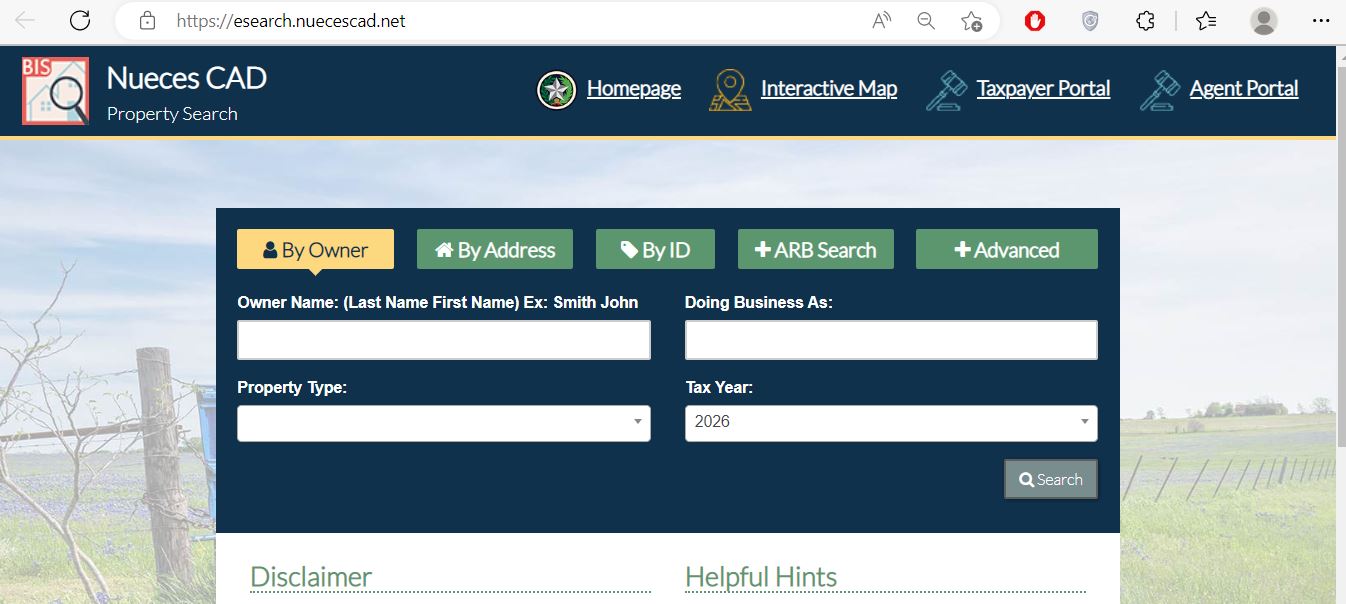
Start with the surname and add more of the name only when needed.
Use the street number and main street name without unnecessary text.
Enter the property ID from a notice, prior property card or tax record.
Use protest status, hearing dates or other appraisal-review information.
Search subdivision, condo, abstract, geographic ID, neighbourhood or property type.
Use the Nueces CAD interactive map without treating it as a survey
The map can help locate coastal parcels, subdivisions, condominium developments, rural tracts and properties whose appraisal address differs from the address used by navigation services.
Understand what each Nueces CAD account field tells you
| Field | What it helps identify | What it does not prove | Best next action |
|---|---|---|---|
| Property ID | The primary appraisal account used by Nueces CAD. | That every county or legal-record system uses the same identifier. | Save it for calls, protests, forms and tax matching. |
| Geographic ID | An additional parcel identifier connected to appraisal mapping. | A surveyed boundary or guaranteed acreage. | Compare it with the interactive map, deed and plat. |
| Owner shown | The owner carried in the appraisal roll. | Legal title, lien status or every ownership interest. | Search County Clerk official records when ownership matters. |
| Situs address | The physical address maintained for appraisal purposes. | The mailing address, unit format, deed description or emergency address. | Compare it with the legal description and map. |
| Condo or subdivision | The development or recorded grouping used to narrow a search. | The correct legal unit, parking interest, storage unit or common-area interest. | Match the unit and legal description with the deed. |
| Legal description | A lot, block, subdivision, survey, abstract, tract or condominium reference. | A complete description suitable for a legal transaction. | Open the recorded deed and plat. |
| Market value | CAD’s opinion of market value as of January 1. | A guaranteed sale price or final tax bill. | Compare sales, equal-appraisal evidence and property condition. |
| Appraised value | Value after an applicable appraisal limitation. | Taxable value for every taxing unit. | Review exemption and taxable-value lines. |
| Taxable value | Value remaining after exemptions for a taxing unit. | The live bill, payment status, penalty or interest. | Use the Tax Assessor-Collector account. |
| Land and improvements | Appraisal details for the land, buildings and other improvements. | That every area, class, condition or feature is accurate. | Document errors with measurements, photos, plans or reports. |
Separate market value, appraised value and taxable value
Nueces CAD’s opinion of what the property would sell for under normal market conditions as of January 1.
The value after an applicable appraisal limitation, such as a qualifying residence-homestead limitation.
The value remaining after exemptions for each county, city, school or special taxing unit.
What to do when Nueces CAD returns no property result
| Problem | Likely reason | Practical fix |
|---|---|---|
| Owner name returns nothing | The record may use a middle initial, former name, trust, estate, business or different name order. | Search only the surname or one distinctive business word. |
| Too many owner matches | The name is common or the search is too broad. | Add the first name, property type, street, property ID or geographic ID. |
| Address does not appear | The situs address may differ from the mailing or navigation address. | Use the street name only, then switch to owner, ID or map search. |
| Condominium unit is missing | Several units may share one street address or the account may use the condominium name. | Search Condo, subdivision, owner, property ID and legal description. |
| Mobile home is not found | The record may be indexed by owner, property ID or mobile-home park. | Use the MobileHomePark field and verify ownership documentation. |
| Rural tract has no normal address | The account may be indexed by abstract, subdivision, geographic ID or legal description. | Use Advanced Search and the interactive map. |
| Recently purchased property shows the seller | The recorded deed may still be processing into the appraisal roll. | Confirm recording with the County Clerk and save the document number. |
| Value appears outdated | The wrong tax year may be selected or the current value may still be preliminary. | Change the year and recheck the portal status. |
| CAD and tax balance differ | Appraisal and collection systems serve different purposes and update separately. | Use the County Tax Office record as the controlling payment account. |
Search coastal, condominium, urban and rural property more accurately
Coastal and condominium property
Use more than the street address when researching Port Aransas, island-area or multi-unit property.
- Match the condominium name and unit.
- Confirm the legal description and property ID.
- Review land and improvement values separately.
- Do not use the CAD map as a flood or boundary determination.
Inland, agricultural and rural property
Use the legal and geographic search fields for tracts near Robstown, Bishop, Agua Dulce, Driscoll and Banquete.
- Search by abstract, subdivision or geographic ID.
- Review acreage and land-use classification.
- Check agricultural qualification separately.
- Verify acreage through deed and survey records.
Search the address, then verify the city, school district, homestead exemption and improvement details.
Match the unit, condo name, legal description and property ID rather than relying on the building address.
Confirm the situs, school district and taxing units because mailing areas do not always describe tax jurisdiction.
Use abstract, subdivision, owner, geographic ID and map search when the street address is incomplete.
Search by owner, property ID and mobile-home park, then verify the home’s ownership documentation.
Review land, improvements, income information, property class and business-personal-property accounts separately.
Keep dated photographs, insurance documents, repair estimates and evidence of the property’s condition on the appraisal date.
Do not assume a residence-homestead exemption applies when the property is not the owner’s principal residence.
Search the deceased owner, estate and heirs, then review probate and recorded property documents.
Contact the office that controls the Nueces County record
| Your question | Correct office | What to prepare |
|---|---|---|
| Why did the appraised value change? | Nueces Central Appraisal District | Property ID, notice, selected year and value evidence. |
| Why is an exemption missing? | Nueces Central Appraisal District | Application, identification, qualification date and filing confirmation. |
| How much property tax is due? | Nueces County Tax Assessor-Collector | Property-tax account, year, owner and balance shown. |
| Did my payment post? | Nueces County Tax Assessor-Collector | Confirmation number, amount, date and payment method. |
| Who legally owns the property? | Nueces County Clerk or title professional | Grantor, grantee, date range, legal description and recording number. |
| Where is the recorded plat? | Nueces County Clerk | Subdivision, block, lot, unit and recording reference. |
| Is the parcel in a flood zone? | Official floodplain resources and a qualified professional | Parcel location, elevation information and applicable map panel. |
| Who sets the tax rate? | Each local taxing unit | The taxing-unit list from the CAD account. |
Correct the Nueces County system that owns the inaccurate field
Official mailing-address change steps
Prepare the Nueces CAD homestead or exemption application before opening it
Prepare the property account, ownership, acquisition date, occupancy date, principal-residence address and identification.
Review the additional school exemption, possible tax ceiling and any local-option benefit.
Use the correct exemption category and attach the required VA or eligibility documentation.
Prepare ownership affidavits, the prior owner’s death certificate, utility information and available court records.
Prepare a TDHCA ownership statement, purchase agreement, receipt or other permitted ownership evidence.
Nueces CAD’s help system allows supporting documents or images to be attached to an exemption request.
Online homestead application checklist
Use the correct record for land use and income-producing assets
Prepare land-use history, leases, production records, maps, photographs and evidence that the land meets qualification requirements.
Review equipment, furniture, inventory, machinery and other income-producing assets at the correct business situs.
Keep leases, income, expenses, vacancy, operating statements and property-condition information.
Use the applicable retail-manufactured-housing declaration and tax-statement forms where required.
Use the official split-or-merge form and provide deeds, surveys, plats and the affected property identifiers.
Review the current Nueces CAD schedules and do not reuse a prior-year schedule without checking for updates.
File a Nueces CAD protest around one clear appraisal issue
Evidence packet
Understand the Nueces Appraisal Review Board’s role
Confirm the date, time, location, participation method, property and protest reason.
Follow the hearing procedures for electronic, remote, mailed or in-person evidence.
Tell the panel the value or correction requested before explaining the evidence.
| Order | What to present | Purpose |
|---|---|---|
| 1 | Property ID, protest reason and requested value or correction | Define exactly what the panel must decide. |
| 2 | Incorrect property characteristics | Correct area, condition, class, unit, acreage or use errors. |
| 3 | Market or equal-appraisal evidence | Show why the proposed value is unsupported. |
| 4 | Photos, estimates, leases or reports | Document condition, income or other property-specific facts. |
| 5 | Short conclusion | Repeat the exact value or correction requested. |
Zuraya Leos, RPA
361-881-9978, extension 4280
zleos@nuecescad.net
Brian McCabe
Direct: 361-696-7683
CAD extension: 4159
tlo@nuecescad.net
The TLO helps with taxpayer access and procedural concerns but does not decide property value.
Use the Nueces County Tax Office for the live property-tax balance
| Method | Published instruction | What to save or verify |
|---|---|---|
| Credit or debit card | 2.15% processing fee or $2 minimum | Read the live checkout fee before authorising payment. |
| Online check or ACH | $0.50 published fee | Confirm routing, account and payment amount. |
| Personal check, cashier’s check or money order; no cash | Include the property-tax account number and retain mailing proof. | |
| Overnight delivery | 901 Leopard Street, Suite 301, Corpus Christi, Texas 78401 | Use trackable delivery and do not send cash. |
| In person | Courthouse or eligible branch location | Confirm hours, accepted payment types and required documents. |
Use the Nueces County Clerk for legal property records
| Item | Published information | Practical note |
|---|---|---|
| Real-property recording first page | $20 | Verify the current fee before filing. |
| Each additional page | $4 | Attachments can increase the total page count. |
| Additional indexed names | $0.25 for each name over five | Ask the Clerk to calculate the total when many parties are listed. |
| Document condition | Original signatures and proper notarisation required | Do not submit an unsigned or improperly acknowledged document. |
| Identification | Valid photo ID required for property-record filing | Confirm acceptable identification before visiting. |
| Payment restriction | No cash or out-of-state personal checks | Confirm accepted payment methods before filing. |
Complete these checks before relying on a Nueces County property record
Match the property ID, geographic ID, legal description, unit, subdivision and map location.
Check recorded deeds, deeds of trust, releases, liens, probate documents and plats.
Review current and delinquent balances and save the current Tax Office payoff or receipt.
The seller’s homestead benefit, appraisal limitation or tax ceiling may not transfer to the buyer.
Use official floodplain, elevation, insurance, survey and title resources instead of the CAD map alone.
Confirm the legal unit, parking, storage, common interests, assessments and association obligations.
Review square footage, class, condition, outbuildings, additions and recent storm repairs.
Identify the county, city, school, hospital, port or other special districts attached to the account.
Keep the deed, title policy, survey, tax certificate, closing statement and exemption confirmation.
Important Nueces County appraisal and property-tax dates
Nueces County appraisal, tax and property-record offices
Corpus Christi, Texas 78401
Phone: 361-881-9978
Fax: 361-887-6138
Email: info@nuecescad.net
Chief Appraiser: Debra D. Morin, RPA, RTA, CCA
Hours: Monday-Friday, 8:00 AM-5:00 PM.
901 Leopard Street, Room 301
Corpus Christi, Texas 78401
Property tax: 361-888-0230
Email: Nueces.Tax@nuecescountytx.gov
Mailing: P.O. Box 2810, Corpus Christi, Texas 78403
Tax Assessor-Collector: Kevin Kieschnick
Property-tax hours: Monday-Friday, 8:00 AM-5:00 PM.
901 Leopard Street, Room 201
Corpus Christi, Texas 78401
Phone: 361-888-0580
County Clerk: Kara Sands
Hours: Monday-Friday, 8:00 AM-4:00 PM.
Brian McCabe
Direct: 361-696-7683
CAD extension: 4159
Email: tlo@nuecescad.net
The TLO assists with access, procedural concerns and communications involving the board, staff or ARB.
Property-tax branch offices
115 S. Ash Street, Bishop, Texas 78343
Monday-Friday, 8:00 AM-4:00 PM; closed 12:00-1:00 PM.
710 W. Avenue A, Port Aransas, Texas 78373
Monday-Friday, 8:00 AM-4:00 PM; closed 12:00-1:00 PM.
710 E. Main Street, Robstown, Texas 78380
Monday-Friday, 8:00 AM-4:00 PM.
Official Nueces County property resources
Official appraisal information, announcements, forms, reports and contacts.
Open Nueces CADSearch owners, addresses, IDs, subdivisions, condominiums, mobile-home parks and ARB information.
Open property searchResearch parcel location, nearby accounts and coastal or rural property context.
Open interactive mapReview property communications and file eligible online appeals.
Open Taxpayer PortalComplete the official residence-homestead application and upload required identification.
Apply for homesteadFind exemption, protest, affidavit, agent, deferral and split-or-merge forms.
Open official formsSearch the tax account, review fees, pay online or obtain mailing instructions.
Open property-tax paymentSearch deeds, liens, plats and other recorded property documents.
Search County Clerk recordsRegister for free notifications when documents are recorded under a selected name.
Register for fraud alertsHow this Nueces County guide was rebuilt and checked

Independent research with complete official-task guidance
This regenerated version retains the property-search screenshot and editor image from the existing article while replacing the earlier brief guide with detailed search instructions, coastal and condominium guidance, account-field explanations, exemption preparation, protest steps, tax-payment fees, office routing, County Clerk requirements and property-fraud protection.
The review used official Nueces Central Appraisal District, Nueces County Tax Assessor-Collector, Nueces County Clerk and Texas Comptroller property-tax resources.
AppraisalDistrict.org is an independent informational website and is not operated by Nueces Central Appraisal District or Nueces County.
10 common Nueces County Appraisal District questions
1. What is the official Nueces County Appraisal District website?
The official website is nuecescad.net. Use it for property search, mapping, forms, homestead applications, taxpayer appeals, reports and contacts.
2. How do I search Nueces County property by owner name?
Open the official property search, select By Owner and begin with the surname. Add the first name only when needed, then confirm the property ID, legal description, situs address and tax year.
3. How do I find a condominium or coastal property?
Use Advanced Search to search the condominium, subdivision, owner, property ID, geographic ID or street. Confirm the legal unit because several accounts may share one building address.
4. Why does a Nueces CAD address search return no result?
The account may use a shortened street, different situs format, condominium name, mobile-home park, subdivision or legal description. Try street name only, owner, ID, Advanced Search or the map.
5. Are the 2026 Nueces CAD values final?
At the time of the July 2026 review, the official search portal stated that 2026 values were preliminary and subject to change before certification. Recheck the live account before relying on the value.
6. Where can I pay Nueces County property taxes?
Use the official county payment page. The county publishes a 2.15% card fee with a $2 minimum and a $0.50 online-check fee. Verify the live fee before paying.
7. Can I file a Nueces CAD protest online?
Yes, when the property and protest qualify. Nueces CAD now directs taxpayers to the Taxpayer Portal to review communications and file online appeals.
8. What is the Nueces County property-tax protest deadline?
Nueces CAD states that the deadline is generally May 15 or within 30 days after delivery of the Notice of Appraised Value, whichever is later. Follow the date on the individual notice.
9. How do I change my mailing address with Nueces CAD?
Use the official address-change ticket. Prepare the roll year, property or geographic ID, owner name on the deed, old address, new address and legal description.
10. Where can I find deeds, liens and property fraud alerts?
Use the Nueces County Clerk Official Public Records Search Portal. The Clerk also provides a free Property Fraud Alert Service.