
Chambers County Appraisal District property search, exemptions, protest and tax office guide
If you own a home, bay-area lot, rural acreage, industrial property, mineral account, business personal property, mobile home or investment parcel in Chambers County, the Chambers County Appraisal District record is the first place to verify your property ID, appraised value, exemptions, map details and protest options. This guide explains how to use the official Chambers CAD search system, where to apply for homestead online, how to prepare evidence before the May protest deadline, and when the Chambers County Tax Office is the right place for property tax bills and payments.
Quick navigation for Chambers County property owners
How to search Chambers CAD property records online
The official Chambers CAD search system gives several useful search options: Basic Search, By Owner, By Property, All Criteria and Advanced Search. It also lets users choose tax year, property type, tax-due-only results and sorting options. For most users, property ID is the cleanest search, but owner name and address search are helpful when you do not have the ID.
Chambers CAD property search visual guide
The image below helps you understand the Chambers CAD search layout before entering owner, property ID or address details. Use it as a process guide only. Always open the live official Chambers CAD portal to confirm current values, tax year, exemptions and protest status.
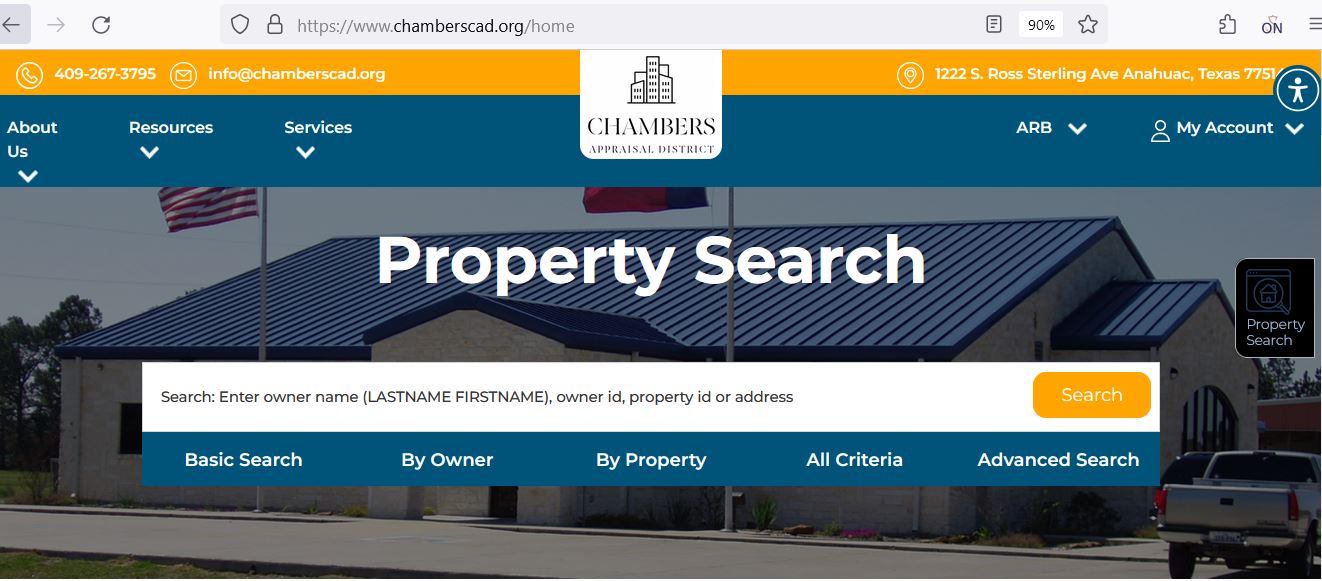
- Finding the correct search tab faster
- Understanding basic, owner, property and advanced search
- Helping mobile users avoid wrong-entry mistakes
- Preparing property details before calling Chambers CAD
- Final certified value
- Exact protest deadline
- Current tax balance
- Live exemption approval status
Chambers County Appraisal District contact details
Use Chambers CAD for property value questions, exemptions, appraisal records, ownership or deed records, mapping, agricultural-use applications, business personal property, industrial/mineral accounts, local appraiser questions and protest issues.
| Contact item | Official detail | How to use it |
|---|---|---|
| Office name | Chambers County Appraisal District | Use for appraisal value, property records, exemptions, maps and protest matters. |
| Phone | 409-267-3795 | Call with property ID, owner name, property address, tax year and exact question ready. |
| Fax | 409-267-6192 | Use only after confirming fax is accepted for your form, evidence or request. |
| info@chamberscad.org | Useful for non-urgent written questions and general information. | |
| Mailing address | PO Box 1520, Anahuac, Texas 77514 | Use for mailed forms, written requests and official correspondence. |
| Homestead contact | Mayra Soler, extension 110 | Use for homestead exemption questions after checking the online form route. |
| Mapping contact | Tiffany Christensen, extension 100 | Use for parcel map, Geo ID, ag-use and mapping questions. |
| Appraisal director | Natalie Whatley, extension 106 | Use for appraisal-direction questions when the issue needs escalation through proper channels. |
What you can verify on a Chambers CAD property record
A Chambers CAD record is useful for much more than a quick value lookup. It can help homeowners, business owners, investors, industrial account holders, mineral owners, agents and land buyers understand what the appraisal district currently has on file.
| Record item | What it means | What to check carefully |
|---|---|---|
| Property ID | Unique Chambers CAD account identifier | Use it on forms, phone calls, online protest, map lookup and tax office questions. |
| Owner name | Owner currently shown in appraisal records | Recent deed changes, business ownership, trusts or inherited property may need separate document review. |
| Geo ID | Geographic/property location identifier used in search and mapping | Useful for map lookup, rural property, subdivisions and hard-to-find accounts. |
| Legal description | Abstract, subdivision, tract, lot, block, lease or survey identity | Important for industrial property, rural land, mineral accounts, subdivision lots and deed matching. |
| Market value | CAD’s opinion of market value for the selected year | Compare against similar sales, property condition, industrial use, flood/coastal factors and property type. |
| Property type | Mineral, personal property, real estate or detailed category code | Use the correct type when searching or preparing protest evidence. |
| Land acres | Acreage data used for appraisal review | Check against deed, survey, legal description, ag/open-space records and any split history. |
| Exemption or special valuation | Homestead, over-65, disability, veteran, ag/timber or other treatment | Missing exemptions or special valuation issues should be corrected early. |
How to use the Chambers CAD interactive map
The official Chambers CAD site links an interactive map. This is useful when an address is unclear, when the property is rural, when parcel location matters, or when you need to match a legal description with a map area.
Chambers CAD homestead, over-65, disability and veteran exemption help
Before filing a protest, check whether your exemptions are correct. A missing residence homestead, over-65, disability, disabled veteran or survivor exemption can affect taxable value more than a small market-value adjustment.
Industrial, mineral, utility and business property in Chambers County
Chambers CAD has many property categories that go beyond ordinary residential parcels, including mineral accounts, industrial property, pipelines, utilities, commercial boats, heavy equipment, leased equipment and business personal property. The official district notes that mineral, utility and industrial accounts are appraised for the district by Capitol Appraisal Group Inc., while real estate and personal property accounts are appraised locally.
- Real estate
- Mineral accounts
- Business personal property
- Industrial and utility property
- Mobile homes and special inventory
- Property ID and owner ID
- Category code or property type
- Geo ID or legal description
- Asset list or rendition records
- Prior-year value and notice documents
- Using residential search logic for industrial accounts
- Ignoring category codes
- Mixing mineral and surface accounts
- Missing rendition or protest deadlines
- Calling the tax office for value disputes
How to prepare a Chambers CAD appraisal protest
A strong protest is based on evidence. Chambers CAD states the 2026 protest deadline is May 15, 2026, and only properties that received a 2026 Notice of Value are eligible to file an online protest. If online filing is not available, the district says a protest may be submitted by email, fax, postmarked by the deadline or delivered in person on the deadline.
Evidence checklist for Chambers County appraisal review
The best evidence is specific, dated and connected to your property. A general complaint about taxes is weaker than a clear record correction or value argument supported by documents.
- Recent comparable sales
- Photos of condition, storm, flood or repair issues
- Repair estimates or contractor invoices
- Closing statement or recent purchase price
- Independent appraisal or market analysis
- Asset list and rendition records
- Equipment age or condition documentation
- Lease or inventory records
- Category or property type correction proof
- Mineral, utility or industrial account documents
- Only saying taxes are high
- Unlabeled screenshots
- Old sales from another market period
- Comps from a different property type
- Photos without date or explanation
Chambers CAD vs Chambers County Tax Office
This is the most important distinction for users. Chambers CAD handles appraisal values, exemptions and protest matters. Chambers County Tax Office handles property tax bills, payments, receipts, tax office branches and collections.
| Your need | Correct office | What to do |
|---|---|---|
| Search appraised value | Chambers CAD | Use the official Chambers CAD property search portal. |
| Apply for homestead exemption | Chambers CAD | Use the online homestead option or official CAD forms. |
| File appraisal protest | Chambers CAD / ARB process | Use the online protest route or notice instructions before the deadline. |
| Pay property tax bill | Chambers County Tax Office | Use the official tax payment link or branch office service. |
| Tax bill, receipt or payment question | Tax Assessor-Collector | Call the correct branch with your property or account information. |
Anahuac Branch: 405 S. Main, Anahuac, TX 77514 · Phone: 409-267-2763
Mont Belvieu Branch: 10612 Eagle Drive, Mont Belvieu, TX 77523 · Phone: 409-267-2622
Winnie Branch: Temporary – 924 Hwy 124, Winnie, TX 77665 · Phone: 409-267-2650
Mailing Address: PO Box 519, Anahuac, TX 77514 · Fax: 409-267-8398
Branch Hours: 8:00 AM–4:30 PM
Official Chambers CAD forms, online homestead and protest tools
The Chambers CAD forms and service links are important because users may need a different route for homestead, protest, rendition, agent appointment, business personal property, ag/timber, industrial accounts or evidence submission.
- Online homestead form submission
- Residence homestead exemption
- Over-65 exemption
- Disabled person exemption
- Disabled veteran or survivor exemption
- Ag-use applications
- Timber or open-space questions
- Land acres review
- Legal description review
- Map and Geo ID questions
- Online protest
- Protest evidence
- Business personal property
- Industrial and mineral accounts
- Appointment of agent
Practical local tips for Chambers County property owners
These tips are designed for real property owners in Chambers County who need to save time and avoid common appraisal-district and tax-office mistakes.
- Check exemption status every year after purchase, marriage, death or mailing-address change.
- Use the online homestead form when available.
- Save your property ID from the Chambers CAD portal.
- Keep proof of exemption and protest submissions.
- Review property ID, Geo ID and legal description carefully.
- Use the interactive map with the search record.
- Document storm, flood, access or condition issues with dated photos.
- Review land acres and category code before protesting.
- Use advanced search filters for category and property type.
- Keep rendition and asset documents organised.
- Know whether your issue is local, mineral, industrial or utility-related.
- Do not wait until deadline day for protest filing.
Official property tax protest video resources
I did not embed a random YouTube video because a strong Chambers CAD-specific YouTube video was not clearly verified. To keep this WordPress replacement clean and avoid risky metadata, this article keeps structured data limited to FAQPage only. For hearing preparation, use official Texas Comptroller property tax video resources linked below.
How to Present Your Case at Appraisal Review Board Hearing for Small Businesses
Chambers County Appraisal District office map
Use this map for visiting the Chambers CAD office area in Anahuac. If you are bringing a protest, exemption, ag-use application, rendition or evidence packet, confirm the accepted filing method before travelling.
Official resources used for this Chambers CAD guide
Use these official pages for final confirmation before searching, filing, protesting, paying, mailing documents or visiting.
Chambers County Appraisal District official website Official Chambers CAD property search Official Chambers CAD interactive map Official Chambers CAD forms page Official Chambers CAD online protest page Official Chambers CAD contact page Official Chambers CAD property search/homepage tools Chambers County Tax Office official page Official Chambers County property tax payment search Texas Comptroller property tax resourcesChambers County Appraisal District FAQs
What is the official Chambers County Appraisal District website?
The official Chambers County Appraisal District website is chamberscad.org. Use it for property search, forms, interactive map, online protest, appraisal records, contact details and official CAD resources.
How do I search Chambers CAD property records online?
Use the official Chambers CAD property search page. You can search by basic keyword, owner, property, all criteria or advanced search depending on whether you have owner name, property ID, address, Geo ID, legal description, category or market value information.
What is the Chambers CAD phone number?
The official Chambers County Appraisal District phone number is 409-267-3795. Call with your property ID, owner name, property address, Geo ID and tax year ready.
What is the Chambers CAD mailing address?
The official Chambers CAD mailing address is PO Box 1520, Anahuac, Texas 77514. Use it for mailed forms and official correspondence after checking the form instructions.
Does Chambers CAD collect property tax payments?
No. Chambers CAD handles appraisal value, property records, exemptions, maps and protest matters. Chambers County Tax Office handles property tax bills, payments and receipts.
How do I apply for a Chambers County homestead exemption?
Search your Chambers CAD property record first, then use the online homestead submission link from the official CAD site or download the correct form from the official forms page. Keep proof of submission.
What is the Chambers CAD protest deadline for 2026?
Chambers CAD’s official notice states the 2026 protest deadline is May 15, 2026. Only properties that received a 2026 Notice of Value are eligible to file an online protest.
How do I protest my Chambers CAD appraised value?
Read your Notice of Value, note the deadline, and use the online protest route if eligible. If online protest is not available, follow Chambers CAD instructions for email, fax, mail or in-person delivery by the deadline.
What evidence helps in a Chambers County appraisal protest?
Helpful evidence includes comparable sales, property-condition photos, repair estimates, wrong acreage or square footage proof, land-use records, business personal property records, mineral or industrial account documents, and proof of any CAD record error.
Who handles Chambers County property tax bills and payments?
Chambers County Tax Office handles property tax bills and payments. The official Tax Office page lists Laurie G. Payton as Tax Assessor-Collector and provides Anahuac, Mont Belvieu and Winnie branch information.
Last editorial check: June 2026. Official details can change without notice; verify your exact property account, exemption status, protest deadline, evidence instructions and tax payment status directly with Chambers CAD or the Chambers County Tax Office before taking action.

Founded by Mahesh Kumar, AppraisalDistrict.org is built on the belief that public information should be accessible and accurate. We have replaced AI-generated ‘fluff’ and automated scraping with 100% manual human verification. With over 15 years of experience in real estate and digital journalism, we help you find the right data without the frustration of broken links.
Search Smarter, Estimate Taxes, Check Exemptions and Prepare for a Protest
Use this free tool before you visit a county appraisal district, property search portal, tax office, or exemption page. It helps you understand property value, taxable value, possible savings, protest value, and the next official step.
What do you need help with today?
Choose your main reason for visiting. The tool will show the best next step and quick estimate.
Use this tool to check your appraisal notice, exemption savings, protest value, and official next step.
Use the tax calculator before trusting only the sale price or mortgage estimate.
Property Search Helper
Use this when a county property search portal is confusing. It shows which search method is usually best.
Property Tax Estimate Calculator
Estimate annual property tax using appraised value, assessment ratio, exemptions, and combined tax rate.
Homestead and Exemption Savings
Estimate how much a homestead, senior, disability, veteran, or local exemption may reduce tax.
Appraisal Notice Review
Compare last year value with this year value and see whether the increase deserves closer review.
Property Tax Protest Savings
Estimate possible savings if your appraised value is reduced after protest, correction, evidence review, or appraisal review board hearing.
Property Tax Protest and Exemption Checklist
Use this checklist before you file a protest, apply for exemption, or call the appraisal district.
Before calling, write your property ID, owner name, property address, and question on paper. It saves time.
Do not call the CAD to pay tax bills unless the local article says they collect taxes. In many counties, the tax office collects payment.
Official Resource Finder
Enter county and state to create safe searches for official CAD pages, property search, tax payment, exemptions, maps, forms, and protest help.
CAD vs Tax Office
- Appraisal District: value, exemptions, ownership records, maps, protest.
- Tax Office: tax bill, payment, receipt, delinquent balance, penalty.
Best place to use this
Add this tool after the first major content section or before the FAQ area. It gives visitors a reason to interact before leaving the page.
Important estimate note
This tool gives educational estimates only. Final values, exemptions, tax rates, bills, payments, and deadlines must be confirmed with official county sources.