
Route an Atascosa County Property From Appraisal Search to the Correct Official Record
Start with Atascosa Central Appraisal District when you need a property ID, geographic ID, owner record, legal description, appraisal value, agricultural treatment, exemption, map, electronic communication or protest information.
Use the separate Atascosa County Tax Office for tax balances, payments and receipts. Use the County Clerk when you need deeds, liens, releases, plats, probate records or legal ownership history.
1020 Bensdale Road, Suite A, Pleasanton, Texas 78064.
1001 Oak Street, Jourdanton, Texas 78026.
The official site publishes a 2026 1-d-1 productivity schedule.
Local portals and procedures checked July 31, 2026.
What are you trying to do in Atascosa County?
Search by property ID, owner, address, abstract, subdivision or geographic ID.
Follow the property-search stepsVerify the account, year, live balance, payment method and receipt.
Use the tax-payment workflowPrepare identification, qualification evidence and proof of submission.
Review exemption stepsSeparate value, unequal appraisal, property data, classification and exemption issues.
Prepare the protest fileUse deeds, liens, releases, probate records and recorded legal descriptions.
Open the deed-search routeReview 911 addressing, subdivision, floodplain, driveway and septic requirements.
Use the development checklistSearch Atascosa CAD records with the strongest identifier available
Use the Atascosa CAD screenshot to choose the right search tab
The screenshot already published in the existing article is preserved below and placed inside the practical search workflow. The live tax-year selection, property data and search interface can change.
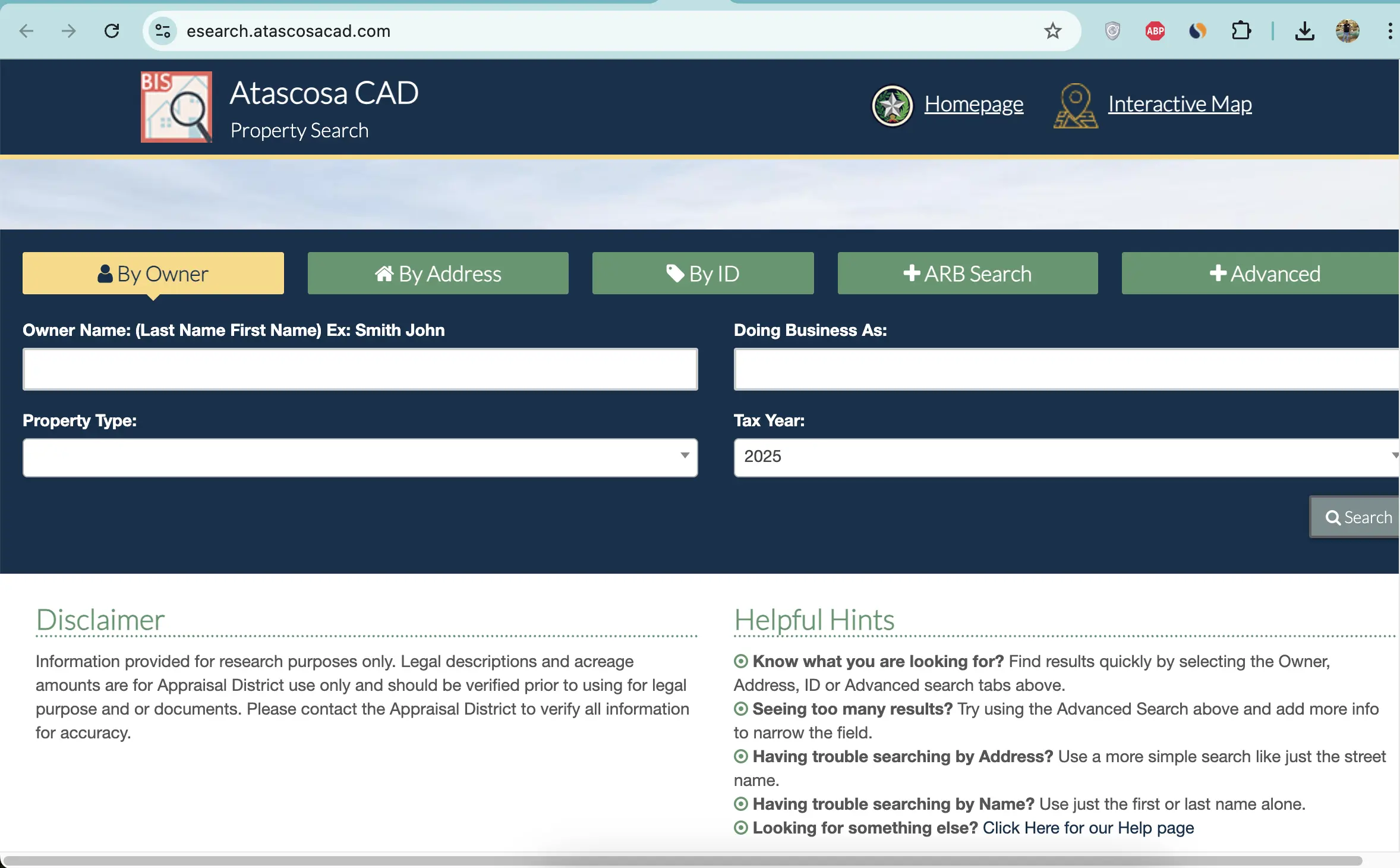
Choose the Atascosa CAD filter that fits the property
| Search field | Best use | Important check |
|---|---|---|
| Owner name | Find a person, trust, estate, ranch entity or business owner. | Try the last name alone and reasonable spelling variations. |
| Doing Business As | Find a store, contractor, dealer, ranch or trade name. | A DBA listing does not prove legal ownership. |
| Property ID | Reopen a known appraisal account. | Confirm the tax year and property type after opening it. |
| Owner ID | Locate accounts connected to a known owner identifier. | One owner can have several property types. |
| Geographic ID | Match an account to a parcel, map or geographic reference. | Do not use it as a surveyed boundary. |
| Abstract | Find rural acreage without a standard street address. | Compare survey, tract and acreage with recorded documents. |
| Subdivision | Locate a lot or tract in a named development. | Match lot, block, unit and legal description. |
| Mobile-home park | Find a manufactured-home account indexed by park. | The home and land can be separate accounts. |
| Property type | Separate Real, Personal, Mineral, Auto and Mobile Home records. | Search every type relevant to the owner or location. |
| ARB Search | Research protest, hearing and formal-review information. | The written hearing notice controls the schedule. |
Understand what each Atascosa CAD account field means
The district’s opinion of market value as of January 1.
The applicable value after agricultural loss, homestead cap or circuit-breaker treatment.
The value used with exemptions and taxing-unit rules to calculate taxes.
| Field | What it helps identify | What it does not prove | Next action |
|---|---|---|---|
| Property ID | The appraisal account in Atascosa CAD’s system. | That the Tax Office or Clerk uses the same identifier. | Use it for CAD forms, calls and protests. |
| Owner shown | The owner carried for appraisal administration. | Complete title, lien priority or deed history. | Search County Clerk records. |
| Situs address | The physical location carried by CAD. | The mailing address or assigned 911 address. | Compare it with the map and rural-address record. |
| Legal description | The abbreviated survey, abstract, tract, lot or subdivision reference. | A complete deed-quality description. | Open the recorded deed and survey. |
| Agricultural market value | The market value associated with agricultural land. | The land qualifies for productivity appraisal. | Compare with Ag Use Value and qualification records. |
| Ag Use Value | The productivity value carried for qualifying land. | Qualification will continue after a sale or use change. | Review the application, supplements and use history. |
| HS Cap Loss | A reduction created by an applicable homestead appraisal limitation. | The homestead exemption itself is correct. | Review exemptions and assessed value. |
| Circuit Breaker | A separate appraisal-limitation field where applicable. | An exemption or permanent value freeze. | Ask CAD which limitation applies to the account. |
| Acreage | The acreage carried for appraisal purposes. | Professionally surveyed or legally guaranteed acreage. | Verify with deed, plat and survey records. |
| Exemptions | Benefits displayed on the public account. | That every exemption is publicly displayed. | Contact CAD when an expected exemption is absent. |
Use the Atascosa CAD map for location research—not legal boundaries
Fix a missing Atascosa CAD account before assuming it does not exist
| Problem | Likely reason | Practical fix |
|---|---|---|
| Owner search returns nothing | The account may use initials, a spouse, trust, estate, company or prior owner. | Search the last name or one distinctive entity word. |
| Full address fails | The account may use a different suffix, direction, rural address or city. | Search only the main street name. |
| Rural tract has no address | The account may be indexed by owner, abstract, subdivision or property ID. | Use Advanced Search and verify the map. |
| Manufactured home is missing | The home may be separate from the land or indexed by mobile-home park. | Select Mobile Home and search owner, park and property ID. |
| Mineral account is missing | Mineral interests may be separate from surface real property. | Select Mineral and search owner, ID, abstract or geographic information. |
| Business property does not appear | The account may use a DBA, legal entity or individual owner. | Search the DBA, company and owner separately. |
| Recently purchased property shows the seller | The recorded deed may still be processing into the appraisal system. | Confirm recording with the Clerk and save the instrument details. |
| Acreage differs from the deed | The appraisal record may use an abbreviated or older description. | Prepare the deed, plat and survey before requesting correction. |
| Tax balance differs from CAD value page | The appraisal and collection systems serve different purposes. | Use the Tax Office search for the live payment balance. |
Atascosa County search tips for cities, rural acreage and special accounts
Confirm City of Pleasanton, Pleasanton ISD, county and groundwater-district treatment.
Check City of Jourdanton, Jourdanton ISD and Atascosa County tax lines.
Verify City of Poteet, Poteet ISD and any applicable county or groundwater units.
Check City of Lytle, Lytle ISD, subdivision status, new construction and rural-development permits.
Confirm the correct city, school district, property-tax collection account and rural-service requirements.
Some Atascosa County property can be served by Somerset ISD; use the individual account rather than a city assumption.
Review acreage, 1-d-1 value, livestock or wildlife use, fences, water, improvements and road entrance.
Search Mineral separately and verify ownership through recorded deeds, assignments or probate documents.
Determine whether the home and land are combined, separate or indexed through a mobile-home park.
Send each Atascosa County question to the office that controls the record
| Your question | Correct starting point | What to prepare |
|---|---|---|
| What is the appraised value? | Atascosa Central Appraisal District | Property ID, tax year and disputed value field. |
| Why is an exemption missing? | Atascosa Central Appraisal District | Application, identification and qualification evidence. |
| Is agricultural appraisal active? | Atascosa Central Appraisal District | Property ID, acreage, use history, supplements and supporting records. |
| What is the current tax balance? | Atascosa County Tax Office | Tax property ID, owner and tax year. |
| Did my payment post? | Atascosa County Tax Office | Receipt, confirmation, amount, payment date and account. |
| Who legally owns the property? | Atascosa County Clerk or title professional | Grantor, grantee, date range, instrument and legal description. |
| Where can I obtain a deed or lien? | Atascosa County Clerk | Names, document type, recording date and property description. |
| How do I obtain a rural address? | 911 Addressing and Rural Development | CAD parcel ID, entrance GPS coordinates or lot and subdivision. |
| Do I need a septic permit? | Atascosa County Environmental Health | 911 address, design, FEMA map, locator map and deed or tax ID card. |
| Who adopts the tax rate? | Each local taxing unit | The taxing-unit list from the property account. |
Use the Atascosa CAD form that matches the requested change
File exemptions with Atascosa CAD without paying an application fee
Confirm the property is the owner’s principal residence and the exemption appears on the current account.
Review the additional exemption, school-tax ceiling, instalment options and possible deferral.
Prepare eligibility evidence and review the additional exemption and possible tax ceiling.
Use the correct application and attach the VA documentation required for the claimed category.
Prepare heirship, death, occupancy and available ownership records when conventional title is incomplete.
Review charitable, religious, cemetery, disaster and other property-specific forms where applicable.
Homestead filing checklist
Use Atascosa CAD’s local supplements for qualifying rural land
The district publishes a 2026 1-d-1 productivity schedule, agricultural guidelines, wildlife forms and local supplements for certain livestock operations.
Prepare acreage, prior use, current operation, livestock or crop details and supporting documents.
Keep the management plan, annual report, activity records, photographs and receipts organised.
Atascosa CAD provides Agricultural Supplement A for exotic-breeding operations.
Atascosa CAD provides Agricultural Supplement B for qualifying horse-breeding operations.
Do not assume that the seller’s special appraisal automatically continues after the transfer.
Ask about additional taxes before converting qualified land to residential, commercial or another use.
Search special property types separately from the surface land
Select Mineral and search the owner, property ID, geographic ID, abstract or other available identifiers.
A mineral account does not establish who owns the surface tract or every mineral interest.
Select Mobile Home and search the owner, property ID, location or mobile-home park.
Determine whether the manufactured home and underlying land have separate owners or accounts.
The appraisal portal includes an Auto category; verify the account type before assuming it is a vehicle-registration record.
Use Clerk records for deeds, mineral assignments, probate documents and legal ownership history.
Match the business account to the DBA, owner and January 1 location
Try the legal entity, DBA, individual owner, agent and property ID.
Check where the assets were located or used on January 1 of the tax year.
Compare inventory, machinery, equipment, furniture and other income-producing property.
Keep invoices, asset lists, depreciation schedules, disposal records and photographs.
The normal Texas rendition deadline is April 15, subject to timely extension rules.
The real-property account does not automatically include business assets inside the building.
Prepare an Atascosa CAD protest around one account and one issue
Evidence packet checklist
Use the Atascosa CAD portal for property details and electronic communications
Pay Atascosa County property taxes through the Tax Office
| Route | Published information | Practical warning |
|---|---|---|
| Jourdanton lobby | 1001 Oak Street; lobby hours are 9:00 AM-5:00 PM. | Call before visiting near holidays or training closures. |
| Jourdanton drive-through | 8:00 AM-4:30 PM for quick transactions. | Title work and time-consuming services must go through the front office. |
| Lytle office | 1567 FM 3175; Monday and Wednesday, 8:00 AM-4:30 PM. | Closed from 12:00 PM-1:00 PM for lunch. |
| Drop box | Available on the front porch of the Jourdanton office. | Do not place title transactions in the drop box. |
| Use the current Tax Office payment instructions. | Mail early and preserve a reliable postmark or mailing receipt. |
Use the Atascosa County Clerk when legal ownership matters
| Service | Posted fee | What to verify |
|---|---|---|
| Record first page | $25 | Current statutory and indexing charges. |
| Each additional page | $4 | Total page count and attachments. |
| Indexing over five names | $0.25 per additional name | Count both grantor and grantee names. |
| Certified copy | $5 certification charge | Page-copy charges and whether certification is required. |
| Non-certified copy | $1 | Whether the fee is per page and the current delivery method. |
Use the CAD parcel ID before requesting permits or a 911 address
Prepare the CAD parcel ID, GPS coordinates at the road or gate entrance, or the lot, tract and subdivision.
Review the county’s subdivision application, fee schedule, road standards and division-of-land forms.
Check whether a Floodplain Development Permit is required before construction or site work.
Obtain an approved 911 address, licensed design, locator map, FEMA map and ownership record.
Review county driveway standards and the permitting process before creating commercial access.
Use the appropriate county right-of-way, utility, pipeline or road-bore permit.
Before submitting a septic application
Identify every taxing unit attached to the Atascosa County property
The county taxing unit can appear with city, school and groundwater taxes.
Charlotte, Jourdanton, Lytle, Pleasanton, Poteet, Somerset or Karnes ISD may apply by location.
Charlotte, Jourdanton, Lytle, Pleasanton, Poteet or Christine may appear on applicable properties.
Evergreen Underground Water Conservation District is listed as an active local taxing unit.
The Tax Office collects for several—but not necessarily every—active taxing unit listed by the Comptroller.
The individual appraisal and tax accounts control which units apply to one property.
Important Atascosa County property dates
Atascosa County appraisal, tax, deed and permitting offices
Pleasanton, Texas 78064
Mailing: P.O. Box 600, Pleasanton, Texas 78064
Phone: (830) 569-8326
Fax: (830) 569-8342
Email: ACAD@atascosacad.com
Chief Appraiser: Brandi Royal
Hours: Monday-Friday, 8:00 AM-5:00 PM.
Elizabeth Oliva
Email: Liz.Oliva@atascosacad.com
Use the liaison for appropriate communication about taxpayer rights, district procedures and unresolved service concerns—not to influence appraisal outcomes.
Jourdanton, Texas 78026
Phone: (830) 769-3842 or (830) 769-3142
Fax: (830) 769-2115
Email: taxoffice@atascosacounty.texas.gov
Tax Assessor-Collector: Loretta Holley
Jourdanton, Texas 78026
Phone: (830) 767-2511
Fax: (830) 769-1021
County Clerk: Theresa Carrasco
Hours: Monday-Friday, 8:00 AM-4:30 PM.
Jourdanton, Texas 78026
Phone: (830) 769-2748
Department Head: Britni Van Curan
Hours: Monday-Friday, 8:00 AM-5:00 PM.
Jourdanton, Texas 78026
Phone: (830) 769-2748
Cell: (830) 569-7661
Fax: (830) 769-2273
Hours: Monday-Friday, 8:00 AM-5:00 PM.
Official Atascosa County property resources
Use for current notices, contacts, district reports, forms and service links.
Open Atascosa CADSearch owner, address, ID, ARB and Advanced appraisal records.
Open property searchLocate parcels and compare surrounding appraisal-map information.
Open mapAccess property details, applications, documents and electronic communications.
Open portalFind exemptions, renditions, protests, deferrals, electronic-delivery and special-appraisal forms.
Open formsFind agricultural supplements and the request to combine or split properties.
Open local formsReview the 2026 1-d-1 productivity schedule and agricultural guidance.
Open agricultural informationUse the district’s 2026 public-information request process for appraisal records not available online.
Open public-information requestUse for property-tax payments, receipts, balances and vehicle services.
Open Tax OfficeSearch current and historical collection records before paying.
Open tax searchUse for deeds, liens, plats, probate records and official copies.
Open County ClerkSearch digital property-record indices and available document images.
Open property recordsHow this Atascosa County guide was rebuilt and reviewed

Independent review of appraisal, tax, deed and rural-development systems
This version preserves the search screenshot and editor image used in the existing article while adding complete account-search instructions, property-type guidance, value-field explanations, agricultural supplements, taxpayer-portal steps, tax-payment verification, deed research and rural permit preparation.
Official resources reviewed include Atascosa Central Appraisal District, Atascosa County Tax Office, Atascosa County Clerk, 911 Addressing and Rural Development, Environmental Health and Texas Comptroller property-tax resources.
AppraisalDistrict.org is an independent informational website and is not operated by Atascosa Central Appraisal District or Atascosa County.
10 common Atascosa CAD property-search questions
1. What is the official Atascosa County Appraisal District website?
The official website is atascosacad.com. Use it for property search, maps, forms, agricultural information, electronic communications and protest resources.
2. How do I search Atascosa County property records?
Open the official Atascosa CAD property search. Choose Owner, Address, ID, ARB Search or Advanced and verify the property type and tax year.
3. Why does an Atascosa CAD address search return no result?
The appraisal record may use a different street suffix, direction, rural address or city. Search only the main street name, then try owner, property ID, geographic ID, abstract or subdivision.
4. Does Atascosa CAD collect property taxes?
No. Atascosa CAD handles values, property data, exemptions, maps and protests. The Atascosa County Tax Office handles tax bills, payments, receipts and delinquent-tax questions.
5. How do I pay Atascosa County property taxes online?
Use the official Tax Office website or Atascosa Tax Property Search. Confirm the property, year, balance and fee before paying.
6. What was the normal Atascosa County protest deadline for 2026?
Most protests were due by May 15 or the 30th day after the appraisal notice was delivered, whichever date was later. The individual notice controls.
7. Does Atascosa CAD charge a fee to file a homestead exemption?
No. Atascosa CAD states that there is no charge associated with receiving or filing an exemption application with the district.
8. Can I use the Atascosa CAD map as a legal survey?
No. The map is useful for appraisal research, but legal descriptions, acreage, access and boundaries should be verified with recorded documents and a professional survey.
9. Where can I search Atascosa County deeds and property records?
Use the County Clerk property-records search. Online images are currently available for 2022 and later; older images may require an office visit.
10. Where is Atascosa Central Appraisal District located?
Atascosa CAD is at 1020 Bensdale Road, Suite A, Pleasanton, Texas 78064. Its mailing address is P.O. Box 600, Pleasanton, Texas 78064, and its phone number is (830) 569-8326.