
Verify the MCAD Parcel First—Then Trace Every Montgomery County Taxing Unit
Montgomery Central Appraisal District records can include the property account, Geographic ID, Tax Office ID, legal description, value history, improvements, land, exemptions, deed references, map links, taxing units and protest information.
The difficult part is often what happens after the search. Montgomery County contains fast-growing subdivisions, municipal utility districts, emergency-service districts, several cities and multiple school districts. One property can therefore require separate appraisal, tax-payment and deed-record checks.
Use the account number or Property ID when available.
109 Gladstell Street, Conroe, Texas 77301.
Call 936-756-3354 for appraisal-related help.
Call 936-539-7897 for county-collected taxes.
Local links and procedures reviewed July 2026.
What do you need from the Montgomery County property record?
Use the account number, owner or address and confirm the Property ID, Geographic ID, legal description and map.
Follow the search stepsReview the exemption section and taxable value for every county, city, school and special-district line.
Prepare an exemption filingConfirm completion percentage, effective year, square footage, garages, pools and additional structures.
Review a new-build accountSearch the County Tax Office first, then check whether a MUD or another unit sends a separate statement.
Route the tax billIdentify the exact value, property-data, exemption or equal-appraisal issue and follow the notice deadline.
Build a protest fileMCAD deed history is helpful, but the Clerk’s recorded documents control the public deed index.
Search deeds and liensSearch Montgomery CAD without opening the wrong property
Use the MCAD Property Search screen correctly
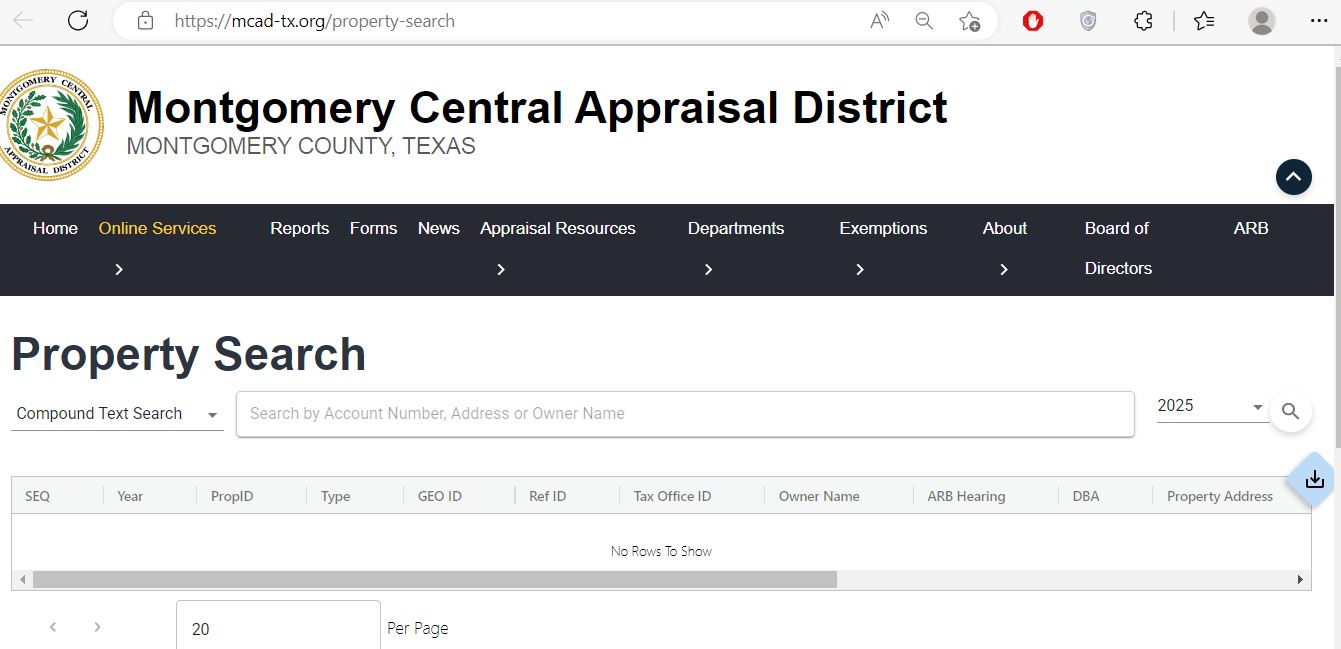
Compound Text Search is designed for account numbers, addresses and owner names.
Enter the cleanest identifier and avoid adding unnecessary address or owner details.
Confirm the appraisal year before reading the value, exemption or hearing information.
Compare PropID, GEO ID, Tax Office ID, owner, DBA and property address before opening the account.
Understand the MCAD account before relying on it
| Field | What it identifies | What it does not prove | Best next action |
|---|---|---|---|
| Property ID | The property’s primary identifier in the MCAD appraisal system. | That every collector or deed system uses the same number. | Save it for MCAD calls, exemption forms and protests. |
| Geographic ID | A geographic parcel reference connected to the appraisal account. | A surveyed property boundary. | Compare it with the map, deed and legal description. |
| Tax Office ID | The reference that may connect the appraisal account to a tax-collection record. | That the County Tax Office collects every special-district tax. | Use it in the applicable collector’s search. |
| Owner name | The owner carried by MCAD for appraisal administration. | Complete legal title, lien priority or deed validity. | Use County Clerk records when ownership matters. |
| Legal description | The subdivision, block, lot, tract, abstract or acreage reference shown by MCAD. | That the abbreviated wording is sufficient for a legal conveyance. | Compare it with the recorded deed and survey. |
| Current values | Land, improvements, special-use exclusion, market value, appraised value and limitation adjustment. | The final amount of property tax due. | Continue to exemptions, taxable value and the tax account. |
| Value history | Annual land, improvement, market and appraised-value changes. | Why a specific value changed. | Compare new construction, market area, exemptions and property facts. |
| Taxing units | The county, school, city, college, hospital, MUD, ESD or other units attached to the account. | That one office collects all listed taxes. | Verify the collector shown on each statement. |
| Improvement details | Main area, gross building area, class, effective year, exterior, foundation, HVAC and additional features. | That every characteristic is accurate. | Compare the record with the actual building and plans. |
| Deed history | Selected grantor, grantee, deed date, deed type and instrument reference information. | Clear title or a complete lien and ownership history. | Search the County Clerk’s official recorded documents. |
Fix common Montgomery CAD search problems
| Problem | Likely reason | Practical fix |
|---|---|---|
| Owner search returns no result | The account may use initials, a spouse, trust, estate, LLC, builder or former owner. | Search the last name only, one business word, address or Property ID. |
| Address is not recognised | The situs address may differ from the postal, MLS or navigation format. | Use the street number and main street name without city, ZIP code or unit. |
| New home is missing | The lot may still be under the builder, developer or parent account. | Search the builder, lot and block, subdivision or deed instrument. |
| Recently purchased home shows the seller | The deed may still be processing into the appraisal system. | Confirm County Clerk recording and save the document number. |
| Tax bill is absent from the county portal | The unit may use another collector or the search criteria may not match its account format. | Check the collector printed on the MUD or special-district statement. |
| Homestead exemption is missing | The filing may be absent, incomplete, pending, denied or associated with another year. | Contact MCAD with the Property ID and proof of filing. |
| Improvement value suddenly increased | Construction may have been completed, remeasured or added to the roll. | Review completion percentage, square footage, pool, garage and additional structures. |
| MCAD and tax statement use different values | The year may differ, a correction may not have reached the collector or exemptions may be applied differently. | Compare the year, Property ID, taxable-value line and certification date. |
Montgomery County search tips by area and property type
Confirm Conroe ISD or another school district, City of Conroe, hospital, college, ESD and possible MUD lines.
Review The Woodlands Township, school, college, county and applicable MUD or utility-district lines separately.
Check Magnolia ISD, city status, subdivision, MUD, road and emergency-service taxing units.
Use the subdivision, section, block, lot and map. Similar lake-area addresses can lead to the wrong parcel.
Confirm Willis ISD, city limits, MUD, ESD and whether the account includes new or additional improvements.
Check New Caney ISD, East Montgomery County districts, MUDs and the exact legal description.
Confirm city, school, emergency-service and utility-district lines rather than assuming a county-only tax account.
A Montgomery County address can use a Spring postal city while remaining in a Montgomery County school, MUD or ESD combination.
Search the legal description and map, then review homesite acreage, open-space qualification and non-qualifying improvements.
Separate market value, net appraised value and taxable value
MCAD’s opinion of the property’s market value as of January 1 for the appraisal year.
The appraised value after an applicable value-limitation adjustment or special-use exclusion.
The amount remaining after exemptions for each individual taxing unit.
Check whether a homestead cap or circuit-breaker limitation applies
A qualifying residence homestead’s appraised value generally cannot increase by more than 10% per year, plus qualifying new improvements.
Qualifying non-homestead real property valued at $5,320,000 or less may receive the temporary 20% annual appraisal limitation.
A limitation affects appraised value. An exemption reduces taxable value and may vary between taxing units.
Check a new Montgomery County home before trusting the first tax estimate
Check the MCAD account before submitting an exemption application
Confirm ownership, principal-residence use, property address and the year the exemption should begin.
Review the additional exemption, school-tax ceiling, possible ceiling transfer and instalment options.
Prepare qualifying disability evidence and review the possible school-tax ceiling.
Use the correct veteran or surviving-spouse application and include the required VA documents.
Prepare death, utility, ownership-interest and heirship documents when the occupant is not named in a recorded deed.
Review the temporary exemption form when the property is damaged in a qualifying governor-declared disaster area.
Prepare these items before filing
Review homesite acreage and productivity appraisal separately
Document the agricultural, timber or wildlife-management activity and its degree of intensity.
The residence and surrounding homesite may be valued differently from qualifying open-space land.
Prepare evidence showing the land’s qualifying use during the required historical period.
Compare market value with the lower special-use value applied to qualifying acreage.
Separate accounts, roads, easements and non-qualifying acreage may receive different treatment.
A change from qualifying use can create additional-tax consequences under current Texas law.
Search and prepare a Montgomery County business-property account
Read the MCAD Notice of Appraised Value before choosing the next step
Confirm the owner, mailing address, Property ID, Geographic ID, Tax Office ID and legal description.
Compare prior and proposed land, improvement, market, appraised and net-appraised values.
Review main area, gross area, effective year, class, garage, porch, pool and additional improvements.
Confirm every expected homestead, age, disability, veteran or special-use benefit.
Use the exact deadline printed on the individual notice.
Keep any PIN, owner code, barcode or portal instruction provided on the notice.
Build a Montgomery CAD protest around a specific, supported issue
Evidence checklist
Present the Montgomery County protest clearly and efficiently
Begin with the value or property-record correction you want the ARB to order.
Explain differences in subdivision, school district, MUD, age, size, quality, condition and lot type.
Mark incorrect square footage, effective age, completion status, pool, garage, land area or class.
Arrange photographs, estimates, sales and account comparisons in the order you will discuss them.
The ARB reviews appraisal issues rather than the tax rate adopted by a city, school or MUD.
Later appeal rights and deadlines generally depend on the ARB’s written determination.
Check who collects each Montgomery County tax line
The Montgomery County Tax Office collects for the county and many consolidated taxing units. Montgomery County also contains numerous active MUDs, utility districts, management districts and defined areas. Some may use a different collector.
| Tax line | Examples | What to verify |
|---|---|---|
| County | Montgomery County | Search the Montgomery County Tax Office portal using the account or CAD reference number. |
| School district | Conroe, Montgomery, Willis, Magnolia, Splendora or New Caney ISD | Confirm the correct school district and taxable value before comparing bills. |
| City or township | Conroe, Montgomery, Willis, Magnolia, Oak Ridge North, Shenandoah, Splendora or The Woodlands Township | Check whether the property is inside the legal boundary rather than relying on the postal city. |
| College or hospital | Lone Star College System or Montgomery County Hospital District | Confirm the unit and exemption amount shown in the property record. |
| Emergency-service district | Montgomery County ESD units | Match the numbered ESD and collector shown on the current statement. |
| MUD, UD, WCID or management district | A subdivision-specific municipal utility or special district | Do not assume the county portal includes it. Follow the collector and payment address printed on that unit’s bill. |
Search, pay and verify a Montgomery County Tax Office account
Monitor proposed Montgomery County tax rates before the bill is issued
The local truth-in-taxation database is updated during the tax-rate process and can show proposed rates, estimated taxes, hearings and taxing-unit contact information.
Correct the office that controls the inaccurate information
Use the Montgomery County Clerk for recorded ownership documents
Do not rely on one MCAD value before buying or budgeting
Match the Property ID, Geographic ID, legal description, address and map.
Review county-collected taxes and separately collected MUD or special-district bills.
Use County Clerk records and professional title work before closing.
The seller’s homestead, cap and tax ceiling may not continue for the buyer.
Confirm whether the current tax estimate reflects land only, partial construction or the completed home.
Identify the MUD, current rate, collector and any separately issued statement.
Review square footage, effective year, class, pool, garage and additional structures.
Use official floodplain, emergency-management and disclosure resources rather than MCAD value alone.
Keep the deed, title policy, survey, settlement statement, tax records and exemption confirmation.
Important Montgomery County dates to verify
Montgomery County appraisal, tax and recording offices
Conroe, Texas 77301-4236
Mailing: P.O. Box 2233, Conroe, Texas 77305-2233
Phone: 936-756-3354
Additional line: 936-441-2186
Fax: 936-539-8695
Email: inquiries@mcad-tx.org
Chief Appraiser: Sherry Hunter
Taxpayer Liaison: Ric Metts
Hours: Monday-Friday, 8:00 AM-5:00 PM.
Conroe, Texas 77301-2823
Phone: 936-539-7897
Fax: 936-760-6992
Email: tax@mctx.org
Tax Assessor-Collector: Tammy J. McRae
Use the Tax Office for county-collected statements, payments, receipts and balances.
210 West Davis, Highway 105
Conroe, Texas 77301
Phone: 936-539-7885
County Clerk: L. Brandon Steinmann
Main-office hours: Monday-Friday, 8:00 AM-5:00 PM.
East County and South County annex locations are also available for selected Clerk services.
Bring the Property ID, account number, Geographic ID, owner, address, legal description, appraisal year and supporting documents.
Confirm whether the task concerns appraisal, exemption, protest, county taxes, a separately collected MUD bill or a recorded deed.
Official Montgomery County property resources
Search appraisal accounts and review values, exemptions, improvements, land, maps and deed references.
Open official property searchReview official notices, departments, appraisal resources, exemptions, meetings and online services.
Open Montgomery CADFind homestead, age, disability, veteran, agricultural, rendition and protest forms.
Open official formsSearch county-collected balances by owner, address, account or CAD reference number.
Open the tax portalReview property-tax information, delinquent charges, workshops, locations and forms.
Open the official Tax OfficeReview proposed rates, estimated taxes, hearings and notification options.
Open Montgomery TaxesAccess recording information, property alerts, forms and Clerk locations.
Open Montgomery County ClerkSearch grantors, grantees, subdivisions, document types and recorded documents.
Search official recordsCross-check CAD contacts, Tax Office details and active Montgomery County taxing units.
Open the state directoryHow this Montgomery CAD guide was improved

Independent research focused on the complete property journey
This regenerated article preserves the useful MCAD search screenshot already published on the page while adding a unique growth-corridor animation, exact search steps, account-field explanations, new-construction checks, MUD tax routing, exemption preparation, protest evidence, payment verification and County Clerk deed research.
Official-source review included Montgomery Central Appraisal District, the Montgomery County Tax Assessor-Collector, Montgomery County Clerk, the official recorded-document search and current Texas Comptroller property-tax resources.
AppraisalDistrict.org is an independent informational website and is not operated by Montgomery Central Appraisal District, Montgomery County or the Texas Comptroller.
10 common Montgomery CAD property-search questions
1. What is the official Montgomery CAD property-search website?
The official Montgomery Central Appraisal District website is mcad-tx.org. Use its Property Search page to search by account number, owner name or property address and to review values, exemptions, taxing units, improvements, land, deed history and protest information.
2. How do I search Montgomery County property records?
Open the official MCAD Property Search, confirm the appraisal year and enter the account number, property address or owner name. Open each plausible result and verify the Property ID, Geographic ID, owner, legal description, property address and map before relying on the record.
3. Why does the Montgomery CAD search show no result?
The search term may be too detailed, the address may use a different format or the account may be listed under a trust, estate, company, spouse, builder or previous owner. Try the account number, owner last name only, street number and main street name or a shorter legal-description term.
4. Does Montgomery CAD collect property-tax payments?
No. Montgomery CAD determines appraisal values, administers exemptions, maintains property records and supports the protest process. The Montgomery County Tax Office and, for some special districts, another collector handle tax statements, payments, balances and receipts.
5. Where can I pay Montgomery County property taxes online?
Use the official Montgomery County Tax Office payment portal. Search by owner name, property address, account number, CAD reference number or fiduciary number, verify the account and tax year and then review the checkout total before submitting payment.
6. Why might a Montgomery County property have more than one tax bill?
Montgomery County contains many municipal utility districts, emergency-service districts, cities, school districts and other special taxing units. Not every unit necessarily uses the Montgomery County Tax Office as its collector, so the owner should verify the collector printed on each tax statement.
7. How do I check a Montgomery County homestead exemption?
Open the complete MCAD property account and review the exemption and taxing-unit sections for the correct year. If the expected exemption is missing, use the official MCAD Forms page and keep a copy of the application and proof of submission.
8. What is the Montgomery CAD protest deadline?
Most Texas property-tax protests are due by May 15 or within 30 days after the appraisal district mailed the Notice of Appraised Value, whichever is later. The deadline printed on the individual MCAD notice controls.
9. Does the owner name in MCAD prove legal ownership?
No. The MCAD owner field and deed-history section are appraisal references. Use the Montgomery County Clerk Official Records Search and professional title research when legal ownership, lien priority, easements or deed validity must be established.
10. Where is Montgomery Central Appraisal District located?
Montgomery Central Appraisal District is located at 109 Gladstell Street, Conroe, Texas 77301. The mailing address is P.O. Box 2233, Conroe, Texas 77305, and the main phone number is 936-756-3354.