
Open the South Texas Ranch Gate to the Correct Property, Tax and Deed Record
Start with Kleberg County Appraisal District when you need a property ID, geographic ID, appraisal owner, legal description, market value, exemption, agricultural appraisal, mineral account, mobile-home account, map or protest information.
Continue to Kleberg County Tax Assessor-Collector for the live bill, payment, receipt, penalty or delinquent balance. Use Kleberg County Clerk records when the question involves deeds, liens, plats, leases, easements, foreclosures or legal ownership.
Kleberg CAD published separate 2026 notice timing
The district states that real-property appraisal notices were mailed April 1, 2026. Its 2026 announcement scheduled business-personal-property appraisal notices for May 15, 2026.
The protest deadline is generally May 15 or 30 days after the notice was delivered, whichever is later. Use the exact deadline printed on the individual notice rather than assuming every account has the same filing date.
Property search, values, characteristics, exemptions, agricultural appraisal, business property, maps, forms and appraisal protests.
Open Kleberg CADTax statements, current and delinquent balances, online payments, receipts, penalties, motor vehicles and voter registration.
Open the Tax OfficeDeeds, liens, releases, plats, leases, restrictions, foreclosures, probate-related instruments and certified copies.
Open County ClerkProperty ID, geographic ID, abstract, owner entity or legal description.
502 E. Kleberg Avenue, Kingsville, Texas 78363.
Monday-Friday, 9:00 AM-4:00 PM.
Real, personal, mineral, auto and mobile-home accounts.
Local links and procedures reviewed July 2026.
What are you trying to do with the Kleberg County property?
Use Owner, Address, ID or Advanced Search, then confirm the property type and legal description.
Follow the official search stepsMatch property ID, geographic ID, abstract, acreage, map, deed and qualifying land use.
Review rural-property guidanceThe surface tract, mineral interest and mobile home may be carried in different accounts.
Understand property typesConfirm homestead, age, disability, veteran or agricultural treatment on the correct year.
Open the exemption centerUse the county tax portal for the live balance, payment, statement and receipt.
Follow the payment workflowCAD ownership is useful for appraisal research but does not replace a title search.
Search County Clerk recordsSearch Kleberg CAD without opening the wrong ranch, mineral or mobile-home account
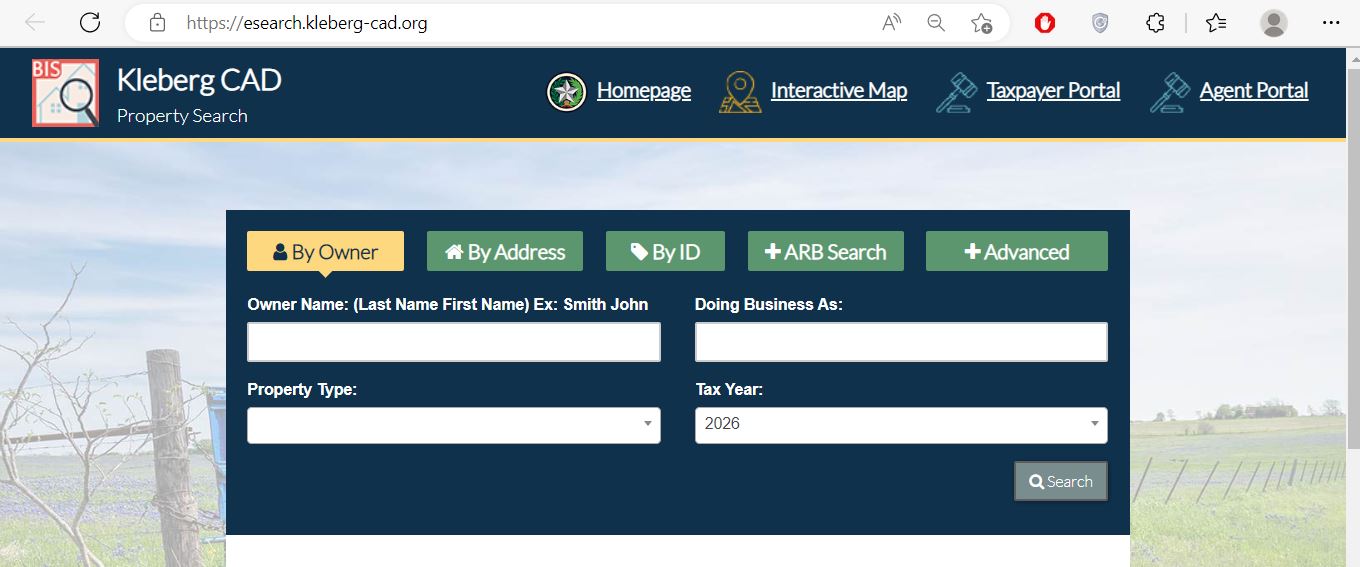
Use the Kleberg CAD screenshot as a portal-recognition guide
The property-search image already published in the existing article is retained below. The live interface and selected tax year may change, so use the image to recognise the search routes rather than as a current appraisal record.
Choose the search route that fits the information you have
What information is available?
Select the strongest detail you already have. The tool will return a county-specific search sequence.
Account-verification checkpoint
Do not continue to payment, protest or legal research until these items match.
Use Kleberg CAD filters for rural, mineral, business and mobile-home records
| Search field | Use it when | What to verify |
|---|---|---|
| Owner name | You know a person, spouse, trust, estate, ranch entity or business. | Search one name component and compare every matching property type. |
| Property ID | You have a notice, prior property card or tax record. | Match the legal description and tax year. |
| Geographic ID | You are matching an appraisal account with the GIS map. | It does not replace a deed, plat or survey. |
| Abstract | Rural land is described through a survey or abstract. | Match tract, acreage and deed information. |
| Subdivision | The property is a platted lot in Kingsville or another developed area. | Match lot, block, phase and legal description. |
| Mobile-home park | A manufactured home may be indexed separately from the land. | Search both the home owner and land owner. |
| Property type | You need to separate real, personal, mineral, auto and mobile-home accounts. | Related interests may have separate values and taxes. |
| Doing Business As | A business account is indexed under a DBA instead of the legal entity name. | Match the situs and business owner. |
| Neighborhood | You are researching appraisal grouping or equal-appraisal evidence. | A CAD neighborhood is not automatically a legal subdivision. |
| ARB fields | You need protest status, informal date, formal date or hearing information. | The written hearing notice controls the appointment. |
Search the correct Kleberg County account class
Land, homes, ranch tracts, commercial buildings and other real estate.
Business furniture, machinery, equipment, inventory and other taxable assets.
Oil, gas or mineral interests that may be separate from the surface tract.
Dealer and special-inventory accounts or related personal-property records.
A manufactured home that may be separate from the land or park account.
Understand what the Kleberg CAD record does and does not prove
| Field | What it identifies | What it does not prove | Next action |
|---|---|---|---|
| Property ID | The account in Kleberg CAD’s appraisal system. | That every county system uses the same identifier. | Use it when contacting CAD and matching the tax account. |
| Owner shown | The person or entity carried for appraisal administration. | Complete title, lien status or mineral ownership. | Search County Clerk records when ownership matters. |
| Property type | Whether the account is real, personal, mineral, auto or mobile home. | That every related taxable interest is combined. | Search other property types for related accounts. |
| Situs address | The physical location maintained by the appraisal district. | The mailing address, legal access or boundaries. | Compare it with the legal description and map. |
| Legal description | An abbreviated lot, block, tract, survey, abstract or subdivision reference. | A complete legal description suitable for a deed. | Obtain the recorded deed, plat or survey. |
| Acreage | The acreage carried for appraisal use. | Legally guaranteed or surveyed acreage. | Compare the deed, field notes and professional survey. |
| Market value | CAD’s opinion of market value as of January 1. | A guaranteed selling price or final tax bill. | Review sales, condition and equal-appraisal evidence. |
| Appraised value | Value after an applicable limitation or special appraisal. | The value after all exemptions. | Continue to each taxing-unit taxable value. |
| Taxable value | The value remaining after applicable exemptions. | The live amount due or payment status. | Open the county property-tax portal. |
| Map parcel | Approximate location and nearby appraisal accounts. | Surveyed boundaries, easements or legal access. | Use recorded records and a professional survey. |
Use the Kleberg CAD map for parcel context—not legal conclusions
Search tips for Kingsville, Ricardo, Riviera and ranch-country accounts
Check the City of Kingsville, school district, property characteristics and homestead exemption.
Confirm Ricardo ISD, the exact subdivision or tract and whether the address is city-style or rural.
Search the owner, property ID or legal description and verify Riviera ISD and rural land details.
Confirm the school district and exact parcel rather than relying only on a Kingsville mailing address.
Use the legal owner, entity name, property ID, abstract, map and property type to separate many related accounts.
Select Mineral and search the owner, lease information, property ID and tax year separately from the surface property.
Search the legal owner and DBA and check for a separate personal-property account.
Use the Mobile Home property type and park filter and determine whether the land has a separate account.
Review the exact taxing-unit list because South Texas Water Authority or groundwater-district treatment can depend on location.
Separate market value, appraised value and taxable value
Kleberg CAD’s opinion of the property’s market value as of January 1 for the tax year.
The value after an applicable appraisal limitation or qualifying special appraisal.
The value remaining after exemptions. It can differ among county, city, school and water-related units.
| Record item | What to check | Useful evidence |
|---|---|---|
| Land | Acreage, access, location, land class, productivity value and homesite portions. | Survey, deed, map, comparable land sales and use records. |
| Improvements | Building area, age, class, condition, use and removed structures. | Plans, measurements, photographs and repair estimates. |
| Market value | Comparable sales, property type, condition and location differences. | Closing records, adjusted sales and professional reports. |
| Appraised value | Homestead limitation, special appraisal, prior value and new improvements. | Prior property cards, exemption status and construction history. |
| Taxable value | Exemption and taxable value for each taxing unit. | Exemption approval, filing confirmation and corrected CAD record. |
Fix common Kleberg CAD search failures before calling
| Problem | Likely reason | Practical fix |
|---|---|---|
| Owner search returns nothing | The account may use a spouse, trust, estate, ranch entity, company or prior owner. | Use only the first or last name or one distinctive entity word. |
| Too many owner results | The owner has several real, mineral, business or ranch accounts. | Add property type, property ID, geographic ID, abstract or subdivision. |
| Complete address fails | The situs address may use a shortened or different format. | Use only the street name, as recommended by the official portal. |
| Rural tract has no address | The property may be indexed by owner, abstract, geographic ID or legal description. | Use Advanced Search and the interactive map. |
| Mineral account is missing | The search is limited to real property or uses another owner or lease name. | Select Mineral and search owner, property ID and lease variations. |
| Mobile home is not on the land account | The home may be assessed separately or indexed by park. | Select Mobile Home and use the MobileHomePark filter. |
| Recently purchased property shows the seller | The recorded deed may not yet be reflected in the appraisal system. | Confirm recording with the County Clerk and ask CAD what proof is needed. |
| CAD and tax portal do not match | The systems serve different purposes or display different update dates. | Match the account and tax year and contact the office controlling the disputed field. |
| 2026 value changed after viewing | The official portal states that 2026 values are preliminary before certification. | Save dated records and recheck after the appraisal action is completed. |
Send each Kleberg County question to the office that controls it
| Your question | Correct starting point | What to prepare |
|---|---|---|
| What is the appraised value? | Kleberg County Appraisal District | Property ID, property type, tax year and disputed value. |
| Why is an exemption missing? | Kleberg CAD | Application, identification, qualification date and filing proof. |
| Is agricultural appraisal active? | Kleberg CAD | Acreage, use history, leases, photographs and management records. |
| What is the live tax balance? | Kleberg County Tax Assessor-Collector | Tax account, owner, property address and tax year. |
| Did an online payment post? | Kleberg County Tax Assessor-Collector | Confirmation, receipt, amount, date and tax year. |
| Who legally owns the property? | Kleberg County Clerk or title professional | Grantor, grantee, recording date and legal description. |
| Is there a lien, lease or restriction? | Kleberg County Clerk | Names, date range, document type and property description. |
| What is the legal acreage or boundary? | Surveyor and recorded-property records | Deed, field notes, plat, prior survey and title evidence. |
| Who sets the tax rate? | Each listed taxing unit | The taxing-unit list from the appraisal account. |
| Is a foreclosure listing safe to buy? | County Clerk records and qualified legal or title assistance | Sale notice, title search, tax status, survey and access information. |
Correct the Kleberg County system that owns the inaccurate field
Verify the benefit on the complete Kleberg CAD account
Confirm the home is the owner’s principal residence and the exemption appears for the correct account and year.
Review the additional school benefit, tax ceiling and possible installment or deferral options.
Check qualification evidence, the additional exemption and any applicable school-tax ceiling.
Use the official veteran form and attach the VA documentation required for the claimed category.
Review qualifying use, intensity standards, acreage, history and productivity value.
Use the correct organisation form and prepare ownership, use and governing documents.
What to prepare before filing
Review Kleberg County acreage beyond one total value
Match the property ID, geographic ID, abstract, legal description, acreage and map location.
Qualifying agricultural or wildlife land may have a productivity value far below market value.
Kleberg CAD publishes local degree-of-intensity standards through its forms page.
A residence, commercial use, barn or nonqualifying acreage may be valued separately.
Save leases, livestock records, receipts, photographs, production evidence and management documentation.
A nonqualifying change may create additional taxes. Obtain written guidance before changing use or closing a sale.
Search and file for accounts that may be separate from the land
Taxable business assets can include inventory, furniture, fixtures, machinery, equipment, computers and other income-producing personal property.
Confirm the legal owner or DBA, situs, property ID, asset list and tax year. The normal rendition deadline is April 15, subject to a timely extension request.
A manufactured home can have a separate account from the underlying land. Search the home owner, land owner, property type and mobile-home park.
Before a sale or move, verify taxes, ownership, serial or label information and whether the home is treated as real or personal property.
File a Kleberg CAD protest around one clear appraisal issue
Evidence packet checklist
Prepare a short, property-specific ARB presentation
| Protest issue | Useful evidence | Weak approach to avoid |
|---|---|---|
| Market value | Adjusted comparable sales, closing evidence, condition and location differences. | Only objecting to the percentage increase. |
| Unequal appraisal | Similar CAD accounts with comparable characteristics and lower adjusted values. | Comparing unrelated property classes or locations. |
| Condition | Dated photographs, inspection reports, contractor estimates and repair scope. | A general statement that the property needs work. |
| Acreage or improvements | Survey, plans, measurements, permits and photographs. | Using only a listing or GIS screenshot. |
| Agricultural appraisal | Application, use history, leases, intensity evidence and management records. | Providing no evidence of qualifying use. |
| Mineral or business account | Ownership, lease, asset, production or appraisal-specific records. | Combining unrelated surface, mineral and personal-property accounts. |
Move from the Kleberg CAD account to the county tax ledger
The CAD search explains appraisal values and exemptions. The Kleberg County tax portal controls the live balance, delinquent amount, payment, statement and receipt.
Use the correct Kleberg County Clerk record system for the document date
Use the historical Kofile Quicklinks system for older real-property records.
Open historical real-property searchUse the current Public Search portal linked by the County Clerk.
Open current real-property searchDo not confuse a trustee foreclosure with a delinquent-tax sale
Usually arises from a deed-of-trust or lender foreclosure. Kleberg County Clerk posts filed foreclosure notices and states that sales are conducted on the first Tuesday at the courthouse’s west-side steps.
Arises from a tax lawsuit and court process. The sale terms, minimum bid, taxing units, deed and redemption issues can differ from a mortgage foreclosure.
Complete these checks before buying Kleberg County property
Match the property ID, geographic ID, legal description, map, deed and survey.
Check real, personal, mineral and mobile-home accounts when relevant.
Check all available years, delinquent amounts, payment status and current payoff.
Use the correct County Clerk portal for the document date and obtain title assistance.
The seller’s homestead exemption, appraisal limitation or tax ceiling may not transfer.
Confirm qualifying use and potential additional taxes before changing ownership or use.
Identify the county, city, school, water and groundwater entities tied to the property.
Compare the CAD building area, use, age and condition with the actual property.
Verify boundaries, access, easements and acreage before relying on appraisal mapping.
Important Kleberg County appraisal and payment dates
Kleberg County appraisal, tax and recorded-property offices
Kingsville, Texas 78363-1027
Mailing: P.O. Box 1027, Kingsville, Texas 78364-1027
Phone: (361) 595-5775
Fax: (361) 595-7984
Email: marlenep0623@sbcglobal.net
Appraisal leadership: Marlene Perez. The CAD website labels her Interim Chief Appraiser, while the current Comptroller directory lists her as Chief Appraiser.
Office hours: Monday-Friday, 8:00 AM-5:00 PM.
Lobby hours: Monday-Friday, 9:00 AM-4:00 PM.
700 E. Kleberg Avenue
Kingsville, Texas 78363
Mailing: P.O. Box 1457, Kingsville, Texas 78364
Property tax: (361) 595-8542
Motor vehicles: (361) 595-8541
Fax: (361) 595-8546
Email: vvaladez@co.kleberg.tx.us
Tax Assessor-Collector: Maria Victoria Valadez
700 E. Kleberg Avenue
Kingsville, Texas 78363
Mailing: P.O. Box 1327, Kingsville, Texas 78364
Phone: (361) 595-8548
Fax: (361) 593-1355
Email: sbarrera@co.kleberg.tx.us
County Clerk: Salvador “Sonny” Barrera III
Public schedule: Monday-Friday, 8:00-11:45 AM and 1:00-4:30 PM. The office closes during lunch.
Prepare the property ID, owner, property type, legal description, tax year and one clear question.
Call first to confirm holiday closures, accepted payment, required identification and whether the service can be completed online.
Open only the location needed for the task to reduce unnecessary mobile data and travel.
Official Kleberg County property resources
Use for announcements, official contacts, tax information and appraisal services.
Open Kleberg CADSearch Owner, Address, ID, ARB and Advanced appraisal fields.
Open property searchReview approximate parcel location and surrounding appraisal accounts.
Open the mapUse owner-facing electronic appraisal services when supported.
Open Taxpayer PortalFile an eligible electronic appeal and preserve confirmation.
Open Online ProtestAuthorised property-tax agents can access the separate electronic appeal route.
Open Agent PortalFind exemption, agricultural, wildlife, rendition, protest and correction forms.
Open official formsReview exemption reports, rates, appraisal guidance and taxpayer resources.
Open tax informationVerify property-tax balances, payments, receipts and collection contacts.
Open Tax Assessor-CollectorSearch the live tax account and continue to official payment.
Open tax payment portalStart deed, lien, plat, lease, foreclosure and certified-copy research.
Open County ClerkReview property-specific taxing-unit and rate-adoption information.
Open tax-rate portalHow this Kleberg County guide was rebuilt

The useful images from the existing article have been retained
The property-search screenshot and editor image remain in the improved article. The surrounding content has been rebuilt around complete tasks rather than a short list of links.
Added guidance includes 2026 notice timing, property-type routing, King Ranch and rural searches, mineral and mobile-home accounts, local taxing units, payment verification, County Clerk record-date ranges, foreclosure warnings and buyer due diligence.
Official resources reviewed include Kleberg County Appraisal District, the live property-search portal, Kleberg County Tax Assessor-Collector, Kleberg County Clerk and the Texas Comptroller county directory.
AppraisalDistrict.org is an independent informational website and is not operated by Kleberg County Appraisal District or Kleberg County.
10 common Kleberg County appraisal, tax and property-search questions
1. What is the official Kleberg County Appraisal District website?
The official website is kleberg-cad.org. Use it for property search, maps, forms, exemptions, appraisal information and protest services.
2. How do I search Kleberg County property records?
Use the official Kleberg CAD property search. Choose Owner, Address, ID, ARB or Advanced Search and verify the property type and tax year.
3. Why does an owner or address search return no result?
The account may use a shortened street name, prior owner, trust, estate, business or ranch entity. Try one owner-name component, the street name alone, property ID, geographic ID or Advanced Search.
4. Are Kleberg CAD acreage and map boundaries legally binding?
No. The official search states that legal descriptions and acreage are for appraisal-district use and should be verified before legal use. Obtain recorded records and a professional survey.
5. Does Kleberg County Appraisal District collect property taxes?
No. Kleberg CAD handles appraisal values, exemptions, maps and protests. Kleberg County Tax Assessor-Collector handles property-tax bills, balances, payments and receipts.
6. How do I pay Kleberg County property taxes online?
Use the official county tax portal. Match the account and year, review the convenience fee and save the confirmation and receipt.
7. What is the Kleberg County protest deadline for 2026?
Most protests are due by May 15 or 30 days after the appraisal notice was delivered, whichever is later. Use the exact deadline printed on the individual notice.
8. When were Kleberg CAD appraisal notices issued for 2026?
Kleberg CAD states that real-property notices were mailed April 1, 2026. Its announcement scheduled business-personal-property notices for May 15, 2026.
9. Where can I search Kleberg County deeds and liens?
Use Kofile for real-property records through August 1987 and the current Kleberg Public Search portal for September 1987 to the present. Both links are published by the County Clerk.
10. Where is Kleberg County Appraisal District located?
Kleberg County Appraisal District is at 502 E. Kleberg Avenue, Kingsville, Texas 78363. Its phone number is (361) 595-5775.