
Move From a Jim Wells CAD Search to the Correct Tax or Property Record
Jim Wells County property research can involve three different systems. Use the appraisal search for values and property details, the public portal for owner-specific services, and the Jim Wells CAD Tax Office portal for bills and payments.
The elected County Tax Assessor-Collector does not collect Jim Wells real-property taxes. Deeds, liens, mineral documents and recorded ownership history belong with the Jim Wells County Clerk.
Account number or property ID from a notice or tax statement.
1600 E. Main Street, Suite 100, Alice.
Monday-Friday, 8:00 AM-4:00 PM.
Use the Jim Wells CAD Tax Office portal.
Local links and procedures reviewed July 2026.
What are you trying to do with the Jim Wells County property?
Search by account, owner or address and confirm the complete property record.
Follow the search workflowAccess account-linked notices and electronic services made available for the property.
Prepare for portal accessSearch the collection account, confirm every year and save the payment receipt.
Follow payment stepsConfirm homestead, age, disability, veteran or special appraisal for the correct year.
Prepare an applicationIdentify the exact error and file before the deadline printed on the notice.
Prepare a protestUse official recorded documents when legal ownership, liens or mineral records matter.
Search official recordsSearch Jim Wells CAD using the shortest reliable search term
Use the Jim Wells CAD screenshot to identify the correct controls
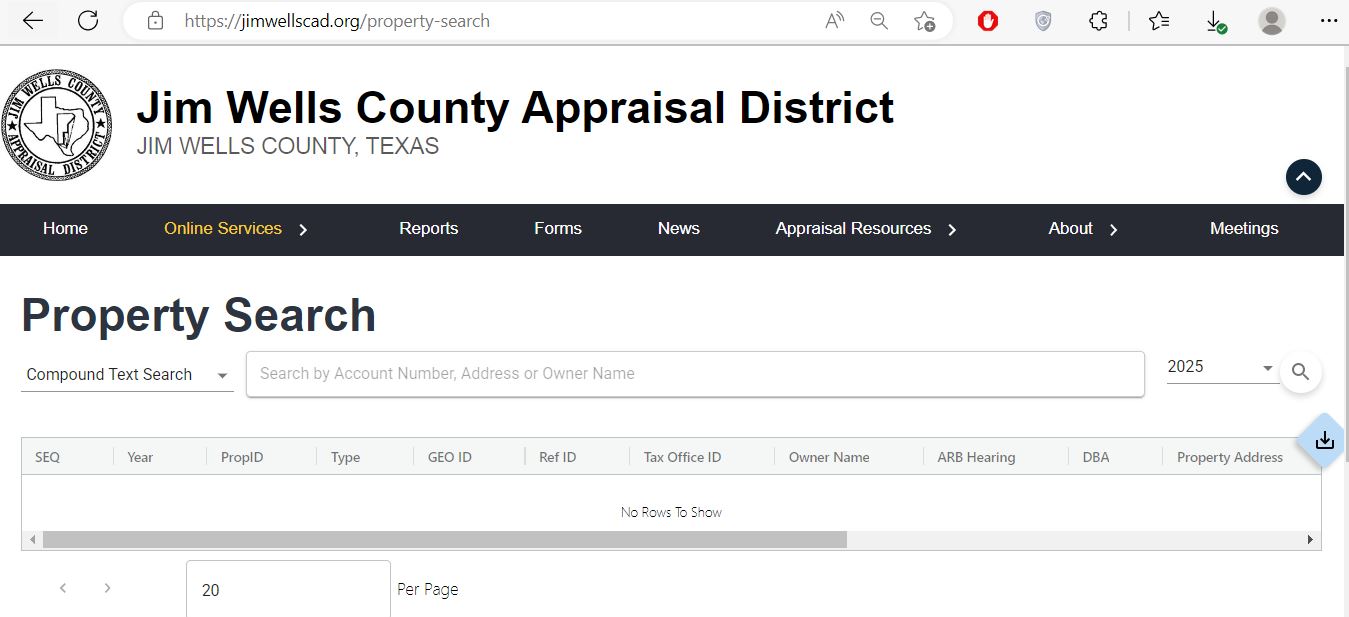
Enter an account number, address or owner name. Use fewer words when an exact search fails.
Check the selected year before comparing values, exemptions, ARB information or tax-office IDs.
Use the available download option or save a PDF after confirming that the result belongs to the correct property.
Understand the columns shown in Jim Wells CAD property search
Start with one strong search
| Field | What it helps identify | What it does not prove | Next action |
|---|---|---|---|
| Year | The appraisal or account year displayed. | That the value or balance applies to another year. | Match the notice, bill or filing year. |
| PropID | The property account in Jim Wells CAD. | That every linked system uses the same number. | Save it for CAD and portal questions. |
| Type | The property classification shown in search results. | That all characteristics or asset categories are correct. | Confirm the complete account detail. |
| GEO ID | A geographic or parcel-related identifier. | An exact surveyed boundary. | Compare legal documents and map context. |
| Ref ID | An additional system reference for the record. | Legal ownership or tax-payment status. | Include it when the office requests it. |
| Tax Office ID | The collection-side account reference where available. | The current amount due or payment posting. | Verify it in the CAD Tax Office portal. |
| Owner Name | The owner carried for appraisal and notice purposes. | Complete legal title, probate or lien history. | Use County Clerk records when title matters. |
| DBA | A business trade name connected to the account. | The legal entity or ownership of every business asset. | Compare with rendition and business records. |
| Property Address | The situs address used by the appraisal record. | Mailing address, exact boundary or complete legal description. | Compare the legal description and recorded deed. |
Use the Jim Wells public portal after locating the property account
The public portal is separate from the open property-search screen. Use it when Jim Wells CAD directs an owner to sign in for account-linked notices, electronic services or other portal functions.
Read market value, appraised value and taxable value separately
CAD’s opinion of the property’s market value as of January 1.
The value after an applicable appraisal cap, limitation or special appraisal.
The value remaining after exemptions for each taxing unit.
What to do when Jim Wells CAD returns no rows
| Problem | Likely reason | Practical fix |
|---|---|---|
| Owner is not found | The account may use a spouse, trust, estate, LLC, business or different name order. | Search the last name or one distinctive business word. |
| Address search fails | The situs address may use a shortened street, county road or rural description. | Use the street number and main name without suffixes. |
| No rows appear | The search is too specific or the wrong year is selected. | Remove words, check the year and search owner, address and account separately. |
| Ranch tract is missing | The property may be indexed by owner, account, legal description or geographic ID. | Search the owner or ID and compare legal-description information. |
| Business account is missing | The record may use a DBA or separate business-personal-property account. | Search the business name, DBA, owner and account number. |
| Recently purchased property shows seller | The recorded deed may still be processing into the appraisal system. | Confirm the deed with the County Clerk and save its document number. |
| Tax portal shows no balance | The wrong account, year, pay-status filter or account type may be selected. | Select Both for pay status, check inactive accounts and try the statement or tax-office ID. |
| Duplicate-looking accounts appear | Land, improvements, minerals or business assets may use separate records. | Compare property type, legal description, IDs and tax year before acting. |
Local search tips for Alice, Orange Grove, Premont and rural property
Search the street address, then confirm Alice ISD, city, county, water-authority and exemption information.
Confirm the City of Orange Grove, Orange Grove ISD and other special districts attached to the parcel.
Match the legal description and taxing units rather than relying only on the mailing city.
Use the property ID, owner and legal description when a normal street search is unreliable.
Review acreage, land-use classification, market value, productivity value and improvements separately.
Search the appraisal and tax systems by owner and account, then use recorded leases and assignments for title research.
Search the deceased owner, estate and heirs and gather deed, probate and heirship documents.
Check whether the land and home use separate accounts and whether a property-tax lien affects transfer.
Search both the legal business name and DBA and compare the account with the annual rendition.
Use appraisal map information for context—not legal boundaries
- Locate a rural tract in relation to roads.
- Compare nearby appraisal accounts.
- Check whether adjoining land uses another account.
- Identify separate improvements or access strips.
- Place a fence or building.
- Prove legal access or easements.
- Determine mineral ownership.
- Replace a professional survey.
Use Jim Wells CAD, the CAD Tax Office or County Clerk correctly
| Your question | Correct office or system | What to prepare |
|---|---|---|
| What is the appraised value? | Jim Wells CAD | Property ID, tax year and disputed value. |
| Why is an exemption missing? | Jim Wells CAD | Application, qualification date, identification and filing proof. |
| How much property tax is due? | Jim Wells CAD Tax Office portal | Account number, tax-office ID, statement number or owner. |
| Did my property-tax payment post? | Jim Wells CAD Tax Office | Confirmation, amount, payment date and tax year. |
| Who legally owns the property? | Jim Wells County Clerk or title professional | Grantor, grantee, date range and legal description. |
| Where can I find a deed, lien or oil-and-gas lease? | County Clerk Official Records Search | Names, subdivision, document type, date range or document number. |
| Who handles vehicle registration? | County Tax Assessor-Collector | Vehicle, title, registration and identification documents. |
| Who sets the property-tax rate? | Each local taxing unit | The taxing-unit list from the appraisal record. |
Correct the system that contains the inaccurate information
Confirm the recorded deed or probate document with the County Clerk, then provide Jim Wells CAD the ownership evidence it requests.
Contact Jim Wells CAD because appraisal notices and tax statements depend on the CAD mailing record.
Determine whether the issue belongs to CAD, county 911 addressing, a city or the postal service.
Prepare the deed, recorded plat, survey, property ID and geographic ID.
Use measurements, photographs, permits, plans, repair evidence or demolition records.
Contact the CAD Tax Office with the receipt, confirmation number, amount, account and year.
Prepare Jim Wells CAD exemption documents before filing
For a qualifying principal residence. Match the deed, identification and residence address before submitting.
Review the additional $60,000 school exemption, possible tax ceiling and eligible payment or deferral options.
Prepare qualifying disability evidence and confirm the additional exemption and school-tax ceiling.
Use the application matching the VA disability rating, total disability or surviving-spouse situation.
Prepare heirship, death, utility, occupancy and available court or deed documents.
Review charitable, religious, solar, Freeport, disaster and property-specific applications.
What to prepare
Prepare proof of qualifying agricultural use—not only acreage
Agricultural or wildlife appraisal is based on qualifying land use and local intensity standards. A rural address, large tract or a small number of animals does not automatically create qualification.
Document how the land was used during the required history period and identify any interruptions.
Keep herd records, crop records, grazing information, receipts, sales and photographs.
Prepare written leases, acreage maps, legal descriptions and areas excluded from agricultural use.
Prepare the management plan, annual report, qualifying practices and implementation evidence.
Review both values because special appraisal changes taxable calculation, not the underlying market-value record.
Ask how development, subdivision or discontinued agricultural use could create additional tax.
Search the correct account type before reviewing business or mineral taxes
Compare equipment, furniture, machinery, inventory, acquisition cost, age and business location with the rendition.
Review land, improvements, income-related evidence, occupancy, condition and comparable properties.
Search the owner and account, then use leases, assignments, probate and title documents for legal mineral ownership.
Rendition checklist
Prepare a Jim Wells County protest around one clear error
Evidence packet
Use the Jim Wells CAD Tax Office portal for the live balance
The collection search provides more options than the appraisal search. It can search account number, owner name, mailing address, owner ID, property address, appraisal-district number, statement number or legal description.
Use the Jim Wells County Clerk for recorded property documents
| Service | Published fee | Practical note |
|---|---|---|
| Real-property recording | $25 first page | Verify the document and total before mailing payment. |
| Additional recording page | $4 per additional page or part of page with visible marks | Count every page that contains recordable material. |
| Additional indexed name | $0.25 for each name above five | Long party lists can change the total recording fee. |
| Plat or map filing | $100 | The schedule states that approval is required before filing. |
| Plat copy | $5 hardcopy or digital | Confirm available format and delivery method. |
| Search fee | $10 | Online searching may allow preliminary research before ordering. |
| Certified copy | $5 | Confirm whether certification and per-page charges both apply. |
| Regular copy | $1 per page | Verify current copying and mailing charges. |
Complete these checks before relying on one Jim Wells County record
Match the property ID, geographic ID, tax-office ID, address and legal description.
Review paid, unpaid, inactive and delinquent accounts in the Tax Office portal.
Review deeds, deeds of trust, liens, releases, probate, easements and mineral documents.
Seller homestead exemptions, caps and tax ceilings may not continue after transfer.
Confirm the county, city, school, water, groundwater and emergency-services districts.
Check building size, condition, acreage, land use, mobile homes and other improvements.
Determine whether qualifying use will continue and whether a use change creates additional tax.
Surface ownership does not automatically establish ownership of every mineral interest.
Keep the deed, title policy, survey, closing statement, tax information and exemption confirmation.
Important Jim Wells County appraisal and property-tax dates
Jim Wells County appraisal, tax and property-record offices
Alice, Texas 78332
Mailing: P.O. Box 607, Alice, Texas 78333
Phone: 361-668-9656
Fax: 361-668-6423
Email: administration@jimwellscad.org
Hours: Monday-Friday, 8:00 AM-4:00 PM.
Chief Appraiser: G. Carlos Rodriguez, Jr.
Alice, Texas 78332
Mailing: P.O. Box 1051, Alice, Texas 78333-1051
Phone: 361-668-5720, press 3
Fax: 361-668-5754
Email: taxassessor-collector@co.jim-wells.tx.us
Hours: Monday-Friday, 8:15 AM-4:30 PM.
Tax Assessor-Collector: Mary Lozano
This office does not collect property taxes.
Alice, Texas 78332
Mailing: P.O. Box 1459, Alice, Texas 78333
Phone: 361-668-5702, press 3
Fax: 361-661-1372
Hours: Monday-Friday, 8:00 AM-12:00 PM and 1:00 PM-5:00 PM.
County Clerk: J.C. Perez III
Jim Wells County, Alice ISD, Ben Bolt-Palito Blanco ISD, Orange Grove ISD, Premont ISD, La Gloria ISD, Agua Dulce ISD, San Diego ISD, cities, groundwater districts, Alice Water Authority and local emergency-services districts may appear depending on the property.
Jim Wells County appraisal, tax and land-record resources
Access official property, appraisal, form and portal resources.
Open Jim Wells CADSearch by account, owner or address and choose the correct year.
Open property searchAccess owner-linked notices and available electronic services.
Open public portalFind exemption, rendition, agricultural and protest forms.
Open official formsCheck paid and unpaid accounts and submit property-tax payment.
Open Tax Office searchEstimate tax by value, jurisdictions and selected exemptions.
Open official estimatorReview local tax notices, proposed rates and taxing-unit information.
Open tax noticesReview office contacts, forms and recording-fee information.
Open County Clerk pageSearch deeds, liens, leases and other recorded property documents.
Open official recordsHow this Jim Wells County guide was rebuilt

Independent research with practical official-portal guidance
This version preserves the property-search screenshot and editor image used by the existing page while adding exact appraisal-search fields, public-portal preparation, official tax-payment filters, exemption updates, rural-property help, protest evidence, County Clerk search instructions and current recording fees.
The review used Jim Wells County Appraisal District, the Jim Wells CAD Tax Office portal, Jim Wells County Clerk, the county Tax Assessor-Collector and Texas Comptroller property-tax resources.
AppraisalDistrict.org is an independent informational website and is not operated by Jim Wells County Appraisal District or Jim Wells County.
10 common Jim Wells County Appraisal District questions
1. What is the official Jim Wells County Appraisal District website?
The official website is jimwellscad.org. It provides property search, forms, public-portal access, appraisal information and links to the CAD Tax Office.
2. How do I search Jim Wells County property records?
Open the official property search, select the correct tax year and search by account number, property ID, address or owner name. Use fewer words when an exact search shows no rows.
3. What information appears in the search results?
Results can include year, property ID, type, geographic ID, reference ID, tax-office ID, owner name, ARB hearing information, DBA and property address.
4. Why does an address search return no result?
The record may use a county-road format, abbreviated street name, rural description or different address. Try the street number and main name only, then search the owner or property ID.
5. Who collects Jim Wells County property taxes?
The Texas Comptroller states that the elected County Tax Assessor-Collector does not collect property taxes. Use the Jim Wells CAD Tax Office portal for property-tax search and payment.
6. How do I pay Jim Wells County property taxes online?
Use the official Tax Office search. Match the account and tax year, review the live fee and save the payment confirmation.
7. What is the normal appraisal protest deadline?
The normal deadline is May 15 or the 30th day after the appraisal notice was delivered, whichever is later. The deadline printed on the notice controls.
8. Where do I apply for a homestead exemption?
Use the official Jim Wells CAD forms page or public portal. Prepare the property ID, owner information, residence address, qualification date and required identification.
9. Where can I search Jim Wells County deeds and liens?
Use the Jim Wells County Official Records Search. Search by party name, subdivision, document type, document number or recorded date.
10. Is an appraisal map a legal survey?
No. Use appraisal maps for parcel research only. Use recorded documents and a professional survey for legal boundaries, access and ownership decisions.