
Follow a Hamilton County Property From Appraisal Search to Payment or Deed Record
Hamilton CAD’s search is deeper than a simple owner lookup. It includes property IDs, owner IDs, geographic IDs, abstracts, subdivisions, mobile-home parks, neighbourhoods and Appraisal Review Board search fields.
Hamilton Central Appraisal District also provides the county’s property-tax payment route. The separate county Tax Assessor-Collector does not collect property taxes, while the County Clerk maintains deeds, liens and recorded real-property documents.
Property ID, owner ID or geographic ID.
Subject to change and not yet certified in the search disclaimer.
401 E. Main Street, Hamilton.
Property taxes are paid through Hamilton CAD’s system.
Local links and procedures reviewed July 2026.
What do you need from the Hamilton County property record?
Use the owner, address, property ID or Advanced Search and verify the full account before relying on it.
Follow the official search stepsRural Hamilton County property may be easier to find by abstract, geographic ID or subdivision than by address.
Research rural landConfirm homestead, age, disability, veteran, agricultural or wildlife treatment for the correct year.
Review forms and evidenceSave the account, identify the exact error and use Hamilton CAD’s official protest route.
Build the protest packetSearch the account first, select the year, review the fee and preserve payment confirmation.
Follow the payment workflowThe appraisal owner is not a title opinion. Recorded-document research belongs with the Clerk or a title professional.
Review deed-record stepsSearch Hamilton CAD without opening the wrong property account
Use the existing Hamilton CAD image as a verification checklist
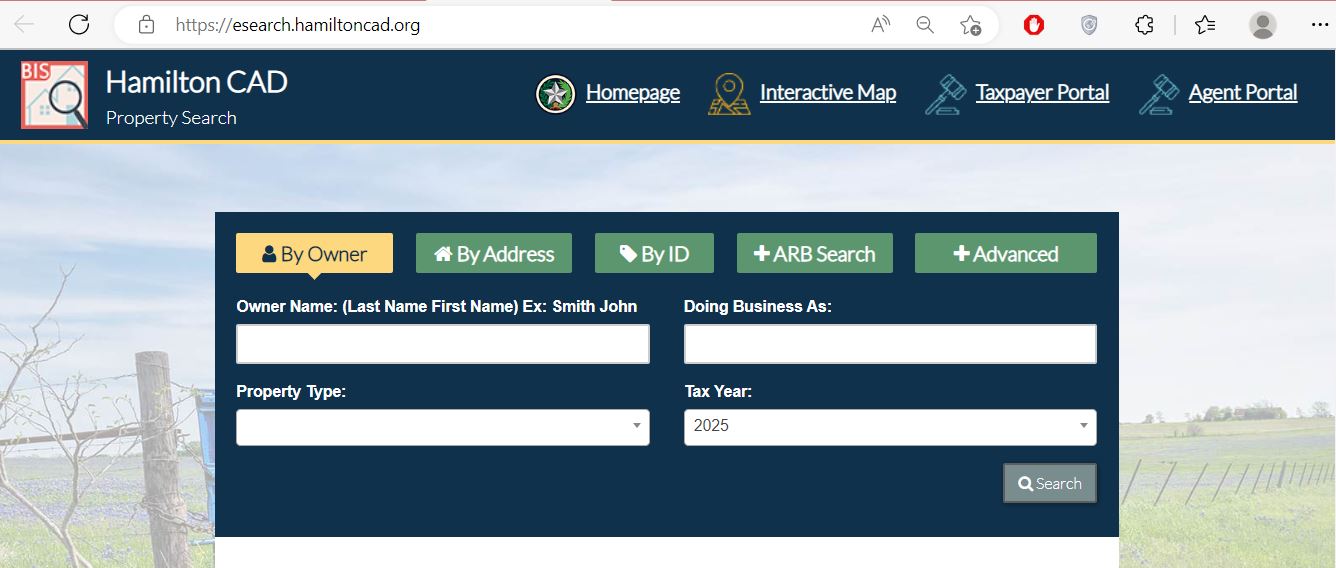
Confirm the property ID, geographic ID, owner and legal description.
Do not compare a 2025 certified account with a changing 2026 preliminary value.
Use CAD for appraisal, Pay Taxes for collection and the County Clerk for recorded documents.
Use Hamilton CAD’s hidden search fields when name or address is not enough
Available search routes
Useful for rural acreage described by an original survey or abstract rather than a subdivision address.
Helps narrow similar street names, phases, lots and unincorporated property.
Useful when several manufactured homes share a park or mailing address.
Searches a trade name when a personal-property account is not obvious under the legal owner.
Supports nearby-account research, especially for equal-appraisal comparisons.
Helps locate protest status, hearing dates, informal dates, formal dates and board information.
Understand what each Hamilton CAD field can prove
| Field | What it identifies | What it does not prove | Best next action |
|---|---|---|---|
| Property ID | The appraisal account in Hamilton CAD. | That every outside system uses the same identifier. | Save it for payment, protest and office contact. |
| Owner ID | An owner reference in the appraisal database. | Complete title or every ownership interest. | Use it to narrow appraisal records. |
| Geographic ID | A geographic or parcel-related reference. | A professionally surveyed boundary. | Compare the map, deed and survey. |
| Owner shown | The person or entity carried for appraisal and notice purposes. | Deed history, liens, probate status or clear title. | Research County Clerk records when legal ownership matters. |
| Situs address | The physical location used by the appraisal account. | A mailing address, 911 address or full legal description. | Compare the map and recorded property documents. |
| Legal description | An abbreviated abstract, subdivision, lot, block or tract reference. | A complete deed description or exact boundary. | Review the deed, plat and survey. |
| Market value | CAD’s opinion of value as of January 1. | A guaranteed sale price or final tax bill. | Compare property facts, sales and equal-appraisal evidence. |
| Appraised value | Value after an applicable appraisal limitation or special appraisal. | Taxable value for every taxing unit. | Continue to exemption and jurisdiction details. |
| Taxable value | Value remaining after exemptions for a taxing unit. | The live amount due, penalty or payment status. | Use the Pay Taxes workflow. |
| Acreage and map | Land information used for appraisal research. | Legal acreage, access or boundary location. | Use a recorded deed, plat and professional survey. |
Use Hamilton CAD’s interactive map without treating it as a survey
Read market value, appraised value and taxable value separately
The appraisal district’s opinion of market value as of January 1 for the selected year.
The value after an applicable homestead cap, circuit-breaker limitation or special appraisal.
The value remaining after exemptions for each applicable taxing unit.
What to do when Hamilton CAD shows no property result
| Problem | Likely reason | Practical fix |
|---|---|---|
| Owner name returns nothing | The account may use a first name, surname, trust, estate, spouse, LLC or abbreviated business name. | Search only one name or a distinctive company word. |
| Address is not recognised | The situs address may use rural-road, county-road, subdivision or abbreviated wording. | Search only the street name, then use Advanced Search. |
| Too many results appear | The owner or street search is too broad. | Add property ID, geographic ID, abstract, subdivision, neighbourhood or tax year. |
| Ranch or acreage is missing | The parcel may not use a normal street address. | Search the owner, property ID, geographic ID, abstract, legal description or map. |
| Mobile home does not appear | It may use a park, separate account or different property classification. | Use MobileHomePark, property type, owner ID or property ID. |
| Business account is missing | The account may use a doing-business-as name or agent. | Search DBA, agent ID, owner ID or business name. |
| Recently purchased property shows seller | The deed may still be processing into the appraisal system. | Confirm recording with the County Clerk and save the document information. |
| Tax amount is not visible | You may be viewing only the appraisal result rather than tax detail. | Open View Details and select the green Pay Taxes option. |
| 2026 value changes between visits | The 2026 roll is not certified and remains subject to change. | Save the viewing date and verify the latest account before acting. |
Local search tips for Hamilton, Hico, Evant and rural acreage
Search the street address, then confirm the city, Hamilton ISD, county, hospital district and exemptions.
Confirm whether the parcel includes City of Hico, Hico ISD, Hico ESD and other applicable jurisdictions.
Use the legal description and map because mailing addresses and school-district boundaries can cross local assumptions.
Check acreage, land class, agricultural productivity value, improvements and qualifying-use history separately.
Review the wildlife plan, annual report, qualifying practices and prior agricultural qualification.
Search the deceased owner, estate and heirs, then gather heirship, probate and residence evidence.
Check whether the home and land have separate accounts and verify the park, owner and identifying details.
Search the legal business and DBA names and compare the personal-property rendition with the account.
Confirm which appraisal district, school district and special districts actually tax the parcel.
Use Hamilton CAD, the County Tax Office or County Clerk correctly
| Your question | Correct office or system | What to prepare |
|---|---|---|
| What is the appraised value? | Hamilton CAD | Property ID, tax year and disputed value field. |
| Why is an exemption missing? | Hamilton CAD | Application, identification, qualification date and filing proof. |
| How much property tax is due? | Hamilton CAD property-search and payment system | Property ID, tax year and expected payment date. |
| Did my property-tax payment post? | Hamilton CAD collection staff | Confirmation, amount, payment date and tax year. |
| Who legally owns the property? | Hamilton County Clerk or title professional | Grantor, grantee, date range and legal description. |
| Where can I find a deed or lien? | Hamilton County Clerk records | Names, recording period and property description. |
| Who handles vehicle registration or voter registration? | Hamilton County Tax Assessor-Collector | Identification and documents required for that county service. |
| Who sets the tax rate? | Each taxing unit | The jurisdiction list from the property account. |
Correct the official record that contains the mistake
Confirm the recorded deed or probate document with the County Clerk, then provide Hamilton CAD the ownership evidence it requests.
Contact Hamilton CAD because appraisal notices and property-tax bills rely on the mailing information in the CAD system.
Hamilton County directs 911 physical-address questions to the Central Texas Council of Governments. CAD may need the corrected address after assignment.
Prepare the deed, recorded plat, survey and property identifiers before asking CAD to review the account.
Provide measurements, photographs, permits, plans, condition evidence or demolition documentation.
Contact Hamilton CAD with the confirmation number, amount, payment date, property ID and tax year.
Use Hamilton CAD forms for homestead, veteran and tax-relief applications
For a qualifying owner-occupied principal residence. Match the deed, identification and physical address before filing.
Review the additional exemption, school-tax ceiling and possible tax-deferral or instalment rights.
Prepare qualifying disability evidence and confirm any additional exemption or ceiling.
Use the application matching the VA disability rating, total disability or surviving-spouse situation.
Hamilton CAD provides inherited-homestead guidance for qualifying heirs who occupy the property.
The forms library includes charitable, religious, cemetery, solar, Freeport, disaster and other applications.
What to prepare before filing
Prepare land-use evidence for Hamilton County farm, ranch and wildlife property
Agricultural or wildlife appraisal depends on qualifying land use rather than acreage alone. Owning rural land, keeping a few animals or receiving agricultural mail does not automatically establish qualification.
Document the years, acreage and type of agricultural activity conducted on the tract.
Prepare livestock numbers, crop activity, grazing records, production evidence and customary management practices.
Keep grazing leases, feed receipts, equipment receipts, sales records and agricultural income documents.
Prepare the wildlife plan, annual report, qualifying practices, maps, photographs and implementation records.
Review both values separately because special appraisal does not erase the market value.
Ask how subdivision, development or ending agricultural use could create additional tax.
Search and review a Hamilton County business-property account
Prepare a Hamilton County protest around one clear appraisal issue
Evidence packet
Pay Hamilton County property taxes through the Hamilton CAD account
Hamilton Central Appraisal District provides the official property-tax payment route. Start with the property account so that the correct owner, year and balance are selected before payment.
Use the Hamilton County Clerk for deeds, liens and real-property records
| Item | Published guidance | Practical action |
|---|---|---|
| Office address | 102 N. Rice Street, Suite 107, Hamilton, Texas 76531 | Use the same address for physical and mailed Clerk business unless a form says otherwise. |
| Office hours | Monday-Friday, 8:00 AM-4:30 PM | Payments must be completed by 4:00 PM to process that business day. |
| Public searches | The Clerk does not conduct searches for the public | Visit, inspect available records or use a title professional. |
| Recording documents | Original or certified documents; no photocopies | Prepare, sign and notarise the document before arriving. |
| Standard real-property recording | $25 first page and $4 for each additional page for the published recording components shown by the office | Ask the Clerk to calculate the current total before mailing payment. |
| Card convenience fee | $3 per $100 increment through $500; 3% above $501 | Compare the fee with cash or cheque before paying. |
Complete these checks before relying on a Hamilton County account
Match the property ID, geographic ID, legal description, acreage and map location.
Review every year, payment status, delinquent amount and convenience fee.
Review deeds, liens, easements, probate documents, restrictions and releases.
Seller homestead exemptions, caps and tax ceilings may not continue after transfer.
Confirm county, school, city, hospital district and emergency-services jurisdictions.
Check building size, age, condition, acreage, improvements and land classification.
Determine whether qualifying use will continue and whether a use change can create additional tax.
Use title documents and a survey rather than relying on the CAD map.
Keep the deed, title policy, survey, closing statement, tax information and exemption filing proof.
Important Hamilton County appraisal and tax dates
Hamilton County appraisal, tax and property-record offices
Hamilton, Texas 76531
Mailing: P.O. Box 352, Hamilton, Texas 76531-0352
Phone: 254-386-8945
Fax: 254-386-8947
Email: cmccarn@hamiltoncad.org
Published hours: Monday-Thursday 7:30 AM-4:30 PM; Friday 7:30 AM-1:30 PM.
Chief Appraiser: Codi Ann McCarn
Hamilton, Texas 76531
Phone: 254-386-1230
Fax: 254-386-1233
Email: taxassessor@hamiltoncountytx.org
Tax Assessor-Collector: Terry Short
This office does not collect property taxes. Use Hamilton CAD for the property-tax account and payment.
Hamilton, Texas 76531
Main phone: 254-386-1203
County Clerk: 254-386-1204
Fax: 254-386-8727
Email: countyclerk@hamiltoncountytx.gov
Hours: Monday-Friday, 8:00 AM-4:30 PM. Payments must be completed by 4:00 PM for same-day processing.
County Clerk: Rachel Lamb Geeslin
Hamilton County, Hamilton ISD, Hico ISD, Evant ISD, Jonesboro ISD, Cranfills Gap ISD, Goldthwaite CISD, the cities of Hamilton, Hico and Evant, Hamilton Hospital District and Hico ESD may appear depending on the parcel.
Hamilton County appraisal, tax and land-record resources
Access search, map, forms, protest, reports, tax rates and contact information.
Open official Hamilton CADSearch owners, addresses, IDs, abstracts, subdivisions and other appraisal data.
Open property searchResearch parcel location, nearby accounts, roads and rural land.
Open interactive mapFile or manage an eligible Hamilton CAD protest.
Open eProtestFind homestead, agricultural, rendition, deferral and protest applications.
Open Hamilton CAD formsLocate the property, open View Details and select the green Pay Taxes button.
Search and pay taxesReview adopted local tax-rate information by year.
Open tax ratesRequest identifiable appraisal-district records not available through normal search.
Read open-record instructionsResearch deeds, liens, plats and other recorded real-property documents.
Open County Clerk informationHow this Hamilton County guide was rebuilt

Independent research with practical official-portal guidance
This version preserves both images used on the original Hamilton County page while replacing its shorter directory-style content with advanced-search instructions, field explanations, rural-land guidance, exemption preparation, protest evidence, tax-payment steps and County Clerk recording information.
The review used Hamilton Central Appraisal District, Hamilton County Tax Assessor-Collector, Hamilton County Clerk and Texas Comptroller resources.
AppraisalDistrict.org is an independent informational website and is not operated by Hamilton CAD or Hamilton County.
10 common Hamilton County Appraisal District questions
1. What is the official Hamilton County Appraisal District website?
The official Hamilton Central Appraisal District website is hamiltoncad.org. It links to property search, maps, forms, protests, tax rates and payment.
2. How do I search Hamilton County property records?
Open Hamilton CAD eSearch. Search by owner, address, property ID or Advanced Search, then verify the full account and tax year.
3. Why does an address search show no result?
The property may use a county-road format, subdivision, abstract, mobile-home park or no normal situs address. Search only the street name, then try the owner, property ID, geographic ID, abstract or map.
4. Are the 2026 Hamilton CAD values final?
No. The official portal states that 2026 appraisal-roll values are subject to change and are not certified. Save the date viewed and verify the current record before acting.
5. Who collects Hamilton County property taxes?
Hamilton CAD provides the property-tax search and payment route. The Texas Comptroller directory states that the Hamilton County Tax Assessor-Collector does not collect property taxes.
6. How do I pay Hamilton County property taxes online?
Search the property, open View Details, select the green Pay Taxes button, choose the tax year, review the amount and convenience fee, complete payment and save confirmation.
7. What is the Hamilton County protest deadline?
The normal deadline is May 15 or the 30th day after the Notice of Appraised Value was mailed, whichever is later. Follow the exact date printed on the notice.
8. Where do I apply for a homestead exemption?
Use the Hamilton CAD forms page. Include the identification and supporting documents required for the application.
9. Where can I find Hamilton County deeds and liens?
Use the Hamilton County Clerk’s real-property records. The office does not conduct public searches, so visit the office or use a qualified title professional for complete research.
10. Is the Hamilton CAD map a legal survey?
No. The map is for appraisal research. Verify boundaries and acreage through recorded documents and a professional survey.