Trace a Hall County Property From Panhandle Parcel to Tax and Deed Record
Hall County Appraisal District is the main local starting point for property IDs, geographic IDs, owner records, addresses, legal descriptions, agricultural acreage, market values, exemptions, taxing units and property-tax balances.
Hall County is unusual because the appraisal district states that it also collects for all participating taxing units. Use the Hall County Clerk—not the appraisal search—when you need a recorded deed, lien, release or certified land record.
Use the property ID or geographic ID whenever available.
Hall CAD performs appraisal and collection services.
112 S. 5th Street, Memphis, Texas 79245.
Hall CAD’s published ARB deadline is June 18, 2026.
Local links and procedures reviewed July 2026.
What do you need from Hall County property records?
Use owner name, property ID, geographic ID, address, legal description, abstract or subdivision.
Follow the search workflowThe search can display base tax due, but confirm the live payoff and payment method directly with Hall CAD.
Check tax and payment stepsReview land, improvements, agricultural classification, exemptions and taxable values before drawing a conclusion.
Understand the accountSave the account, identify the exact issue, collect evidence and preserve filing confirmation.
Build the protest packetThe CAD owner field is an appraisal record. Recorded deeds and liens are maintained by the Hall County Clerk.
Search recorded documentsCheck legal description, abstract, category code, land use, market value and productivity value separately.
Review agricultural landSearch Hall County appraisal and tax records correctly
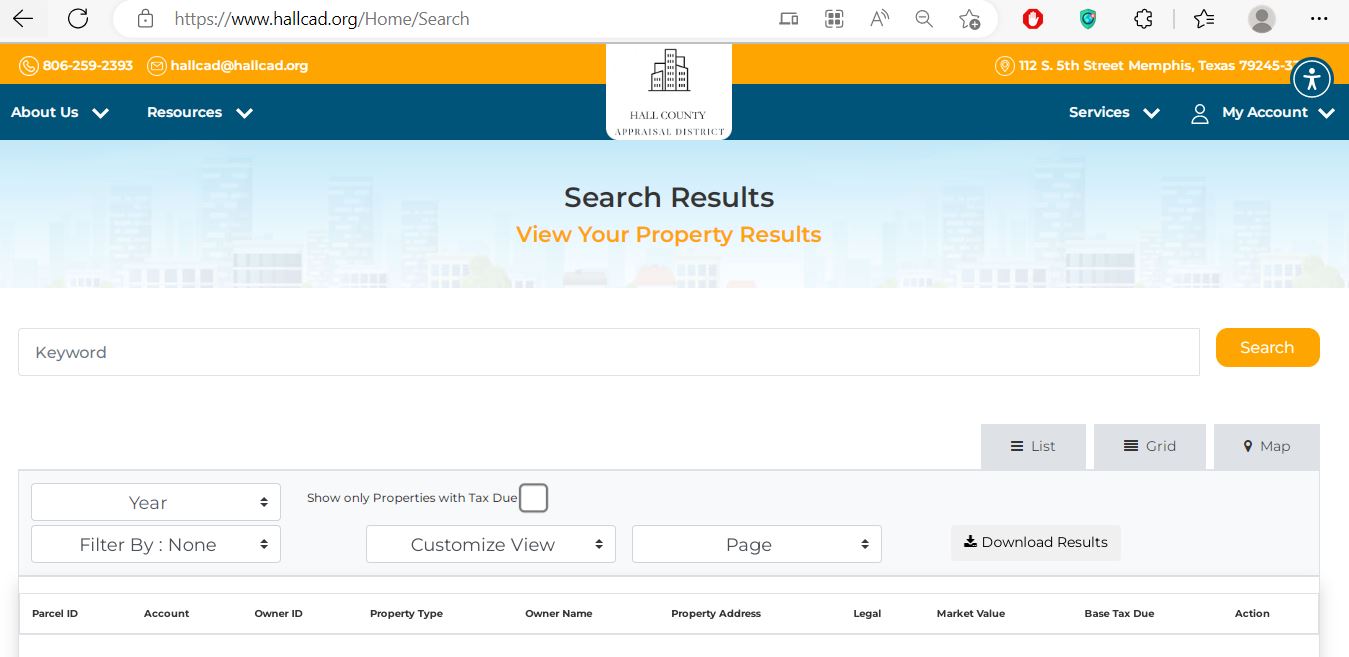
Use the Hall CAD search screenshot to find the important controls
Use the official interactive map for rural and agricultural property
Understand the Hall CAD property result before taking action
| Field | What it identifies | What it does not prove | Best next step |
|---|---|---|---|
| Parcel or property ID | The account identifier used by Hall CAD. | That another office uses the same number. | Save it before calling or filing. |
| Geographic ID | A geographic or legal parcel reference. | A surveyed property boundary. | Compare it with the map, deed and survey. |
| Owner name | The owner carried for appraisal and collection purposes. | Complete legal title or lien status. | Search County Clerk records when title matters. |
| Legal description | The lot, block, section, abstract, subdivision or tract reference shown by CAD. | That the abbreviated description is sufficient for conveyance. | Read the recorded deed and plat. |
| Property type | Whether the account is real, personal, mineral, agricultural or another category. | That every classification detail is correct. | Compare the category with actual use and improvements. |
| Acres | The acreage carried in the appraisal account. | Surveyed acreage or usable acres. | Check deed, survey and agricultural application. |
| Market value | Hall CAD’s market-value opinion as of January 1. | A guaranteed sale price or final tax bill. | Review evidence and taxable value. |
| Base tax due | A tax-due amount displayed in the search result. | The live payoff after penalties, payments or adjustments. | Confirm the amount and payment instructions with Hall CAD. |
| Exemptions | Homestead, age, disability, veteran or other benefits applied to the account. | The same exemption applies identically to every taxing unit. | Review each taxing-unit taxable value. |
| Category code | The appraisal classification, such as qualified agricultural land. | Continued qualification or protection from rollback tax. | Verify use, application status and change-of-use risk. |
Market value, appraised value and taxable value answer different questions
Hall CAD’s opinion of normal market value as of January 1 for the selected tax year.
The value after an applicable appraisal limitation or special valuation calculation.
The value remaining after qualifying exemptions for each taxing entity.
Hall County taxing entities that may appear
Hall County and the cities of Memphis, Turkey, Lakeview and Estelline.
Memphis-Lakeview ISD, Turkey-Quitaque ISD and portions of Childress ISD where applicable.
Hall County Hospital District and Mesquite Groundwater Conservation District where applicable.
Fix a missing, incorrect or confusing Hall County search result
| Problem | Likely reason | Practical fix |
|---|---|---|
| Owner name returns nothing | The account may use a middle initial, estate, trust, company or different name order. | Search the last name or one distinctive entity word. |
| Too many owner results | The name is common or the search is too broad. | Add the first name, property type, street, property ID or geographic ID. |
| Street address is missing | Rural land may be indexed by legal description rather than a situs address. | Search by owner, abstract, section, subdivision, property ID or geographic ID. |
| Recently purchased property shows seller | The deed may not yet have processed into the appraisal account. | Confirm recording with the County Clerk and save the instrument reference. |
| Acreage appears incorrect | The account may reflect an older deed, split, combination or appraisal record. | Compare the deed, survey, map and property account. |
| Agricultural value is missing | The application may be absent, denied, late or associated with another account. | Contact Hall CAD with the application, land-use evidence and property ID. |
| Tax due seems outdated | A payment, penalty, adjustment or posting may not be reflected in the viewed result. | Request the live payoff and receipt status from Hall CAD. |
| Map and legal description disagree | The map is an appraisal tool and may not represent a surveyed boundary. | Use the recorded deed, plat and professional survey. |
Hall CAD—not the county Tax Assessor—collects local property taxes
Check and apply for Hall County property-tax exemptions
Confirm the home is the applicant’s principal residence and that ownership and identification requirements are satisfied.
Review the additional exemption and any applicable school-tax ceiling or instalment option.
Prepare the required disability evidence and check whether a tax ceiling or payment option applies.
Use the correct veteran form and attach the required VA documentation.
Review Hall CAD’s heir-property information when the property was inherited but title has not been fully updated.
Use the appropriate Comptroller form and verify whether annual reapplication is required.
How to file
Verify Hall County agricultural and wildlife appraisal details
Hall County contains a large number of qualified agricultural parcels. A property record can show both a market value and a lower productivity-based value, so review the land section carefully.
Confirm whether the land is classified as qualified agricultural land, non-qualified land or another category.
Do not confuse the full market value with the productivity value used for qualifying open-space land.
Match acres, abstract, section, block and tract information with the deed and application.
Maintain evidence of agricultural intensity, management, leases, production, livestock or wildlife practices.
Do not assume the prior owner’s application automatically resolves every requirement for the new owner.
A conversion to non-qualifying use can create additional tax consequences. Obtain current advice before changing use.
Agricultural application checklist
File a Hall County property-tax protest before the controlling deadline
Evidence that can support a Hall County protest
Prepare for the Hall County Appraisal Review Board hearing
The ARB hears evidence from the property owner and appraisal district and can order account changes.
The official protest procedures describe in-person, telephone, video and affidavit participation routes.
Telephone, video or affidavit participation can require documents and affidavits before the hearing begins.
| Hearing stage | What to prepare | Common mistake |
|---|---|---|
| Opening statement | Property ID, protest ground and requested value or correction. | Beginning with a long story before stating the requested result. |
| Property facts | Correct acreage, use, condition, improvements and legal description. | Using unsupported opinions without documents. |
| Comparable evidence | A short table explaining location, size, use, condition and adjustments. | Submitting unrelated county-wide sales. |
| Agricultural evidence | Use history, intensity, leases, production, maps and management records. | Assuming acreage alone proves qualification. |
| Closing request | Repeat the exact value, exemption or correction requested. | Ending without a clear requested action. |
Send each Hall County property problem to the record owner
Use the Hall County Clerk for deeds, liens and official land records
| Item | Published detail | Practical action |
|---|---|---|
| Clerk | Pat Snider | Confirm the current office location before travelling. |
| Phone | (806) 259-2627 | Have names, date range and legal description ready. |
| Recording address | 512 W. Main Street, Suite 8, Memphis, Texas 79245 | Verify whether temporary courthouse-restoration arrangements affect access. |
| Recording fee | $15 first page and $4 for each additional page, as published on the records page | Confirm the total and any additional fee before filing. |
| Document requirements | Original signatures, acknowledgement, identifying heading, legible names and grantee mailing address | Ask the Clerk or a Texas lawyer about document preparation; clerks cannot provide legal advice. |
Complete these Hall County checks before relying on the seller’s tax record
Match property ID, geographic ID, legal description, acreage, map and physical location.
Ask Hall CAD whether current, delinquent, partial or collection balances exist.
Search deeds, liens and releases through the Hall County Clerk.
The seller’s homestead, age, disability or veteran benefits may not transfer.
Confirm whether qualifying use will continue and whether a change could create additional tax.
Compare buildings, acreage, category, use and condition with the actual property.
Identify the county, city, school, hospital and groundwater entities attached to the parcel.
Submit the new owner’s homestead, agricultural or electronic-communication requests when eligible.
Preserve the deed, title policy, survey, tax certificate, closing statement and application confirmations.
Important 2026 appraisal, protest and tax dates
Hall County appraisal, tax and deed offices
Memphis, Texas 79245-3300
Phone: (806) 259-2393
Fax: (806) 259-2384
Email: hallcad@hallcad.org
Hours: Monday-Friday, 8:30 AM-5:00 PM; closed for lunch 12:00 PM-1:00 PM.
Chief Appraiser: Gina Chavira, RPA, RTA, CCA, CTA
Use for: property search, appraisal, exemptions, agricultural valuation, protests and property-tax collections.
Memphis, Texas 79245
Phone: (806) 259-2125
Fax: (806) 259-3322
Email: hallcotac@gmail.com
Tax Assessor-Collector: Teresa Altman
Important: This office is not listed as the property-tax collecting unit. Contact Hall CAD for property-tax payment and balance questions.
Memphis, Texas 79245
Phone: (806) 259-2627
Fax: (806) 259-5078
Clerk: Pat Snider
Published hours: Monday-Thursday 8:30 AM-5:00 PM; Friday 8:30 AM-12:00 PM.
Use for: deeds, liens, releases, recorded plats and certified public records.
Hall CAD’s official information states that Pritchard & Abbott performs contracted appraisal work involving real property, mineral, utility, pipeline, industrial and related accounts.
When a specialised account is disputed, ask Hall CAD which appraiser or department should receive the evidence.
Official Hall County property resources
Search accounts, owners, addresses, legal descriptions, values and base tax due.
Open Hall CAD searchVerify rural parcel location and neighbouring appraisal parcels.
Open Hall CAD mapDownload homestead, disabled-veteran, rendition, agricultural and wildlife forms.
Open forms libraryFind 2026 protest procedures, taxpayer assistance, heir-property information and appraisal reports.
Open data and recordsRequest the unique property PIN used for eligible online account functions.
Request a PINSearch past, future and open Hall County protest hearings.
Search hearingsFind recorded deeds, liens, public records and office information.
Open Clerk informationReview recording requirements, published fees and document-return instructions.
Open recording guidanceVerify appraisal-district, Tax Assessor-Collector and taxing-unit information.
Open Hall County directoryHow this Hall County guide was rebuilt

Existing images preserved, weak guidance replaced
This regenerated article retains the Hall CAD search screenshot and editor image published in the original page. The short, repetitive sections have been replaced with search-field guidance, screenshot instructions, parcel verification, collection-office routing, agricultural scenarios, protest preparation, deed research, deadline help and correction workflows.
The official-source review covered Hall County Appraisal District, Hall County and District Clerk, Hall County Tax Assessor-Collector, the Texas Comptroller county directory and Hall CAD’s 2026 protest documents.
AppraisalDistrict.org is an independent informational website and is not operated by Hall County Appraisal District or Hall County.
10 common Hall County Appraisal District questions
1. What is the official Hall County Appraisal District property search?
Use Hall CAD’s official property search. It supports owner, property ID, geographic ID, address, legal description, abstract, subdivision and other search criteria.
2. Can I search Hall County property by owner name?
Yes. Begin with the owner’s last name. Add the first name only when the result list is too large. For an estate, trust or company, try the full entity name and then one distinctive word.
3. Why does my Hall County address search show no result?
Rural land may have no normal situs address, or the account may use an abbreviated street name or different city. Try the street number and main street name only, then switch to property ID, geographic ID, legal description, abstract or owner.
4. Does the Hall County Tax Assessor-Collector collect property taxes?
No. The Texas Comptroller directory states that the county Tax Assessor-Collector is not the property-tax collecting unit. Hall CAD states that it collects for all participating taxing units. Contact Hall CAD at (806) 259-2393.
5. What is the Hall County property-tax protest deadline for 2026?
Hall CAD’s official 2026 protest document identifies June 18, 2026 as the Hall County ARB deadline. Use a later date printed on an individual notice when a special statutory deadline applies.
6. How do I apply for a Hall County homestead exemption?
Download the residence-homestead form from Hall CAD Forms, complete it, attach the required identification and mail or deliver it to 112 S. 5th Street, Memphis, Texas 79245.
7. Where do I search Hall County deeds and liens?
Use the Hall County and District Clerk. The CAD owner entry helps with appraisal research but does not replace a deed or title examination.
8. What is the difference between market value and taxable value?
Market value is Hall CAD’s opinion of the property’s market value as of January 1. Taxable value reflects qualifying appraisal limitations and exemptions and may differ by taxing entity.
9. How can I protest Hall County agricultural land value?
Review the acres, category, market value, productivity value, qualifying use and legal description. File by the applicable deadline and provide land-use records, leases, maps, production evidence, photographs or comparable agricultural accounts.
10. Can Hall CAD maps be used as a legal survey?
No. The map helps locate appraisal parcels, but a recorded deed, plat, title examination and professional survey should control legal boundary decisions.