
Search, Verify and Pay Through the Correct Grimes CAD Account
Grimes County is unusual because Grimes Central Appraisal District handles both appraisal work and local property-tax collection. Use the same official property account to review values, exemptions, land, improvements, tax bills and payment history.
Use the Grimes County Tax Assessor-Collector for vehicle, voter-registration and other county tax-office services—not property-tax payments. Use the County Clerk for deeds, liens, plats and recorded legal ownership.
Search appraisal data, tax bills, payment history and receipts.
2.5% by card or $2.50 by e-check, subject to checkout confirmation.
Completed payments can take 3–5 business days to appear online.
360 Hill Street, Anderson, Texas 77830.
Official resources reviewed July 28, 2026.
Choose the property task you need to complete
This tool runs in the browser and does not request, store or transmit an owner name, property identifier, account number or payment information.
Use the main Grimes CAD search and verify the full property record.
Follow the search walkthroughOpen the property, select Bills and verify the year before paying.
Follow payment stepsUse the QuickRef, abstract, legal description and GIS map.
Use rural search stepsUse the EFile PIN on an eligible appraisal notice.
Prepare the protest fileUse the County Clerk property-record portal for recorded documents.
Search deed recordsUse the current official application, guidelines and evidence checklist.
Review special filingsSearch by QuickRef or Property ID before using a broad name search
Prepare these details before searching
Use the official search box before opening Advanced Search
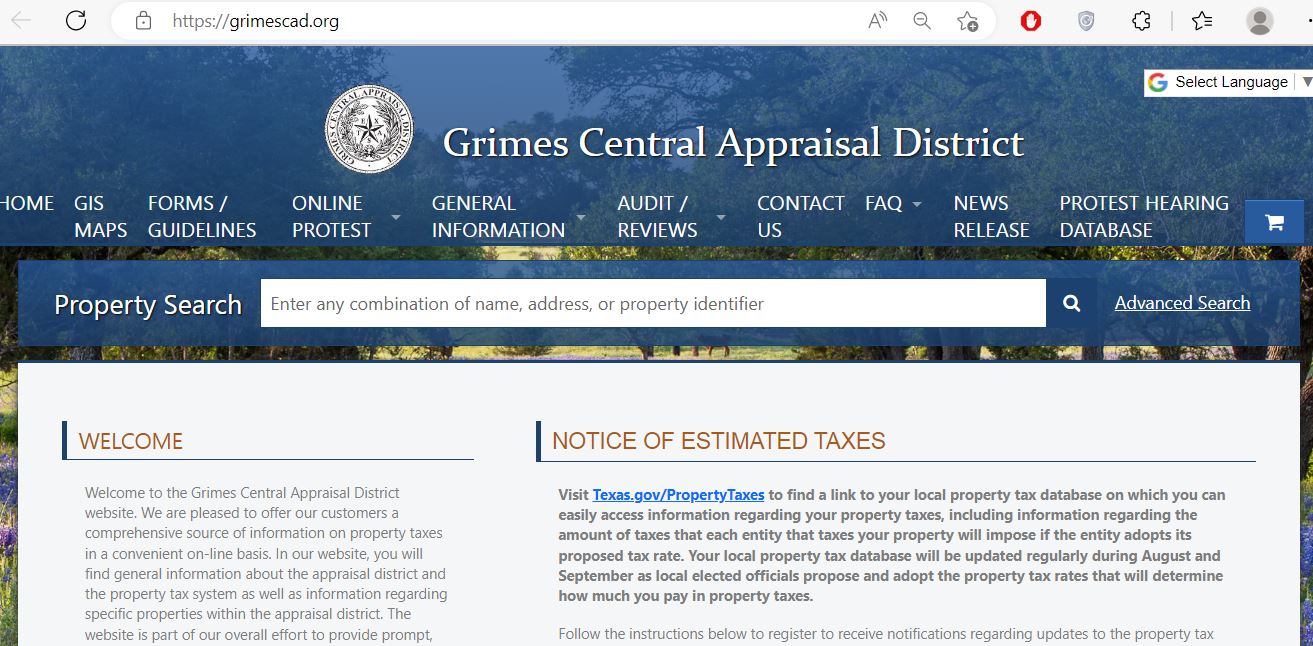
Enter a name, address, QuickRef or Property ID.
Add owner, business, road, city, ZIP or other available criteria.
Do not rely only on the search-result summary.
Review current and prior bills, amounts and payment history.
Preserve the account before filing or paying.
Understand what each Grimes CAD field can confirm
| Field | What it helps identify | What it does not prove | Best next action |
|---|---|---|---|
| QuickRef or Property ID | The unique Grimes CAD property account. | Legal title or that a tax payment posted. | Use it on forms, calls, protests and payments. |
| Account number | The local appraisal-account reference. | A recorded deed instrument. | Match it with notices and tax bills. |
| Owner name | The owner displayed for appraisal and collection administration. | Complete legal title or absence of liens. | Search County Clerk records. |
| Legal description | The abstract, survey, tract, lot, block or subdivision. | That abbreviated CAD text is sufficient for legal use. | Compare the deed, plat and survey. |
| Market value | The district’s January 1 estimate of market value. | The sale price or final tax bill. | Review appraisal evidence and protest rights. |
| Assessed value | The value after applicable appraisal limits or special appraisal. | That the market-value estimate is correct. | Compare market, ag, timber, cap and assessed fields. |
| Agricultural or timber use | The productivity value assigned to qualifying acreage. | Permanent qualification or qualification for every acre. | Review use history, land segments and current application. |
| Entities and exemptions | County, school, city, ESD and exemption treatment. | Every nearby property has the same taxing-unit stack. | Use the exact list when estimating tax. |
| Bills tab | Levies, penalties, interest, credits, payments and balances by year. | A just-submitted payment has already posted. | Save the receipt and allow stated processing time. |
| Transaction history | Payment date, effective date, amount and receipt number. | That an unrelated account was paid. | Match the receipt to the correct QuickRef and year. |
| Certified status | That the displayed appraisal value has reached certified status for that account. | That current-year tax rates have all been adopted. | Use Truth in Taxation for the rate-adoption stage. |
Fix an owner, address, rural-land or tax search that fails
| Problem | Likely reason | Best correction |
|---|---|---|
| Full owner name fails | The account may use a spouse, estate, trust, business, initials or prior owner. | Search the surname only and compare all plausible results. |
| Address search fails | A rural road, FM road, mailing address or situs address may use different formatting. | Search only the main road name or use QuickRef and GIS. |
| Farm or ranch has no address | The tract may be indexed by owner, abstract, survey, tract number or map location. | Use Advanced Search and the GIS map. |
| Mineral or business account is missing | The account may use an operator, entity, DBA or separate property type. | Search all ownership names and remove restrictive filters. |
| Manufactured home is missing | The home and land can have separate property accounts. | Search owner, address, related properties and mobile-home property type. |
| New owner is not displayed | The deed or appraisal ownership update may still be processing. | Confirm recording with the County Clerk and give CAD the instrument details. |
| Payment still appears due | Grimes CAD states that online payments can take 3–5 business days to appear. | Do not immediately pay twice; use the confirmation number when calling. |
| Payment cart contains the wrong property | A similar owner or nearby parcel was selected. | Remove it and verify QuickRef, owner, address and tax year. |
| Tax-sale account cannot be paid by card | Special statutory payment restrictions apply to property posted for tax sale. | Contact Grimes CAD for the allowed payoff method. |
Send the Grimes County question to the office that controls it
| Your task | Correct starting point | What that office controls |
|---|---|---|
| Owner display, value, acreage or improvements | Grimes CAD | Appraisal accounts, property characteristics and values. |
| Homestead, veteran, disaster or other exemption | Grimes CAD forms | Exemption applications and account updates. |
| Agricultural, timber, wildlife or beekeeping appraisal | Grimes CAD | Special-appraisal qualification and productivity values. |
| Appraisal protest or ARB hearing | Grimes CAD online protest or Notice of Protest | Informal review, protest processing and ARB scheduling. |
| Tax bill, balance, payment, receipt or delinquency | Grimes CAD | Property-tax billing, online payment, posting and collection. |
| Vehicle registration or voter registration | Grimes County Tax Assessor-Collector | County tax-office services other than property-tax collection. |
| Deed, lien, plat, probate or recorded document | Grimes County Clerk | Official public records and certified copies. |
| Legal boundary, easement or acreage dispute | Deed, plat, title records and licensed survey | Legal description and professionally surveyed boundaries. |
Pay through the Bills tab on the verified Grimes CAD property
Grimes CAD states that each property must be opened and paid separately online.
Make property-tax cheques payable to Grimes Central Appraisal District and include the identifying account information.
A qualifying homestead deferral postpones collection; it does not cancel the tax, penalty or interest.
Follow the Grimes County value from appraisal to payment
The estimated market value of the property as of January 1.
The value after applicable caps, agricultural use or timber treatment.
The value remaining for each taxing entity after its exemptions.
The levy plus applicable penalties, interest, attorney fees or credits.
Use the 2025 Grimes rates only with the property’s exact entity list
The latest complete adopted-rate table currently published by Grimes CAD is for tax year 2025. Use the Truth in Taxation database for the 2026 proposal and adoption process.
| Taxing entity | 2025 rate | When it may apply | Important check |
|---|---|---|---|
| Grimes County | 0.423077 | Taxable property in Grimes County. | This is not the complete combined rate. |
| Anderson-Shiro CISD | 0.924300 | Property inside Anderson-Shiro CISD. | Verify school boundary and taxable value. |
| Iola ISD | 0.854400 | Property inside Iola ISD. | Grimes ESD No. 1 may also apply. |
| Madisonville CISD | 0.855200 | The portion of the district inside Grimes County. | Cross-county accounts require exact verification. |
| Navasota ISD | 0.963200 | Property inside Navasota ISD. | Add the City of Navasota only inside city limits. |
| Richards ISD | 0.801500 | Property inside Richards ISD. | Do not use an Anderson-Shiro example. |
| City of Anderson | 0.131698 | Property inside Anderson city limits. | Do not add it to unincorporated land. |
| City of Bedias | 0.150632 | Property inside Bedias city limits. | Verify the city appears on the account. |
| City of Iola | 0.165647 | Property inside Iola city limits. | City and school boundaries are separate. |
| City of Navasota | 0.507800 | Property inside Navasota city limits. | Confirm city limits on the property record. |
| Grimes County ESD No. 1 | 0.015534 | Property inside the emergency-services district. | Verify the FDI entity code appears on the account. |
Grimes County property-tax estimate
Use the current 2026 Grimes CAD form and keep filing proof
Confirm ownership, principal residence, identification and the exact property account.
Review the exemption, tax ceiling and optional deferral separately.
Prepare dated photographs, repair estimates, insurance information and the date of damage.
Use the EFile PIN when the property is eligible
Because it is late July 2026, the ordinary protest deadline has passed for many accounts. Contact Grimes CAD promptly when the issue involves failure to receive notice, a clerical error, ownership, exemption or another possible late remedy.
Compare full market value with productivity value
Grimes County includes pasture, ranches, farms, timber, wildlife-use property and beekeeping acreage. Qualifying land can receive a productivity appraisal that is far below its market value.
Document acreage, livestock, grazing, fencing, water and management intensity.
Keep active management plans, receipts, photographs and annual reports.
Review the district’s current acreage, hive, intensity and documentation guidelines.
Search the business account separately from the real estate
Use the Grimes CAD map for context—not boundary proof
The GIS map is especially useful for Anderson, Navasota, Iola, Bedias, Richards, Shiro, Plantersville-area acreage, rural roads, subdivisions and tracts without a reliable street address.
Use the Grimes County Clerk when the CAD owner display is not enough
The County Clerk’s official property-record system provides access to historical Grimes County records extending into the mid-1800s. The Clerk also maintains liens, plats, foreclosures, probate-related records and other recorded instruments.
Anderson, Texas 77830
Phone: 936-873-4410
Email: countyclerk@grimescountytexas.gov
County Clerk: Barbara Kimich
Hours: Monday–Friday, 8:00 AM–4:30 PM
- Current and prior owner names
- Approximate recording date
- Instrument, volume or page number
- Abstract, survey or subdivision
- Document type
- Whether a certified copy is required
Adjust the lookup to the community and property type
Verify Navasota ISD, City of Navasota and Grimes County before using the 1.894077 example rate.
Check Anderson-Shiro CISD, City of Anderson and Grimes County on the exact account.
Verify Iola ISD, City of Iola when applicable and Grimes County ESD No. 1.
Check the city line, school district and whether ESD No. 1 appears on the account.
Confirm Richards ISD or Anderson-Shiro CISD rather than using the nearest mailing city.
The district crosses county boundaries. Match the Grimes County appraisal account before paying.
Review full market value, agricultural use, homesite acreage and every land segment separately.
Use the current application, management evidence and annual wildlife reporting materials.
Verify current district acreage, hive and intensity guidelines before assuming qualification.
Search the home, land and related properties because ownership can be split.
Search the DBA or entity separately and use the current rendition and depreciation schedule.
Search the deceased owner, estate and heirs, then compare probate and deed records with CAD.
Contact the Grimes County office or staff member who handles the issue
Anderson, Texas 77830
Mailing: P.O. Box 489, Anderson, TX 77830-0489
Phone: 936-873-2163
Fax: 936-873-2154
Email: gcad@grimescad.org
Chief Appraiser: Mark Boehnke
Hours: Monday–Friday, 8:00 AM–12:00 PM and 1:00 PM–5:00 PM
- Payment concerns: extension 221
- Collections Manager: Mary Flores, extension 223
- Customer service: extensions 222 and 227
- Commercial/BPP: Morgan Payne, extension 248
- Data systems: Rick Coonce, extension 225
- Chief Appraiser: Mark Boehnke, extension 224
- Madisonville CISD: Dawn Hart, extension 245
- Navasota south of Hwy 105 and west of FM 362: David Homeyer, extension 228
- Hwy 105 south and FM 362 east: Justin Mock, extension 246
- North of Hwy 105 and south of Hwy 30: Shane McKown, extension 242
- North of Hwy 30: Shannon Sanders, extension 241
Use for vehicle, voter-registration and other county tax-office services—not property-tax collection.
270 FM 149 WAnderson, Texas 77830
Phone: 936-873-4465
Fax: 936-873-4458
Email: maryann.waters@grimescountytexas.gov
Tax Assessor-Collector: Mary Ann Waters
Hours: Monday–Friday, 8:00 AM–4:30 PM
Open the exact Grimes County property resource
Property search, account details, notices and main district navigation.
Open Grimes CADLocate rural tracts, subdivisions, nearby parcels and map references.
Open GIS mapFind 2026 homestead, protest, BPP, ag, timber and other forms.
Open official formsUse the EFile PIN from an eligible appraisal notice.
File online protestReview hearing records and current protest status.
Open hearing databaseRead the Bills-tab workflow, fees, posting time and tax-sale warning.
Open payment instructionsSelect property value, taxing units and applicable exemptions.
Open tax estimatorReview current proposed and adopted local tax-rate information.
Open tax noticesSearch deeds, liens, plats, releases and other recorded documents.
Search property recordsRelated AppraisalDistrict.org guides
How this Grimes County guide was rebuilt

The county-specific Grimes CAD screenshot now appears inside the search walkthrough. The existing editorial image remains in this review section.
The page was rebuilt around current 2026 property records, 2026 forms, direct tax collection by Grimes CAD, payment fees, posting time, tax-sale restrictions, online protest, 2025 adopted rates, GIS research and County Clerk property records.
Last reviewed July 28, 2026. Appraisal status, forms, tax rates, exemption amounts, balances, payment fees, staff assignments and office hours can change after publication.
Grimes County Appraisal District FAQs
What is the official Grimes Central Appraisal District website?
The official website is grimescad.org. Use it for appraisal records, property search, GIS maps, forms, exemptions, online protest, tax rates, tax bills and property-tax payments.
How do I search Grimes County property records?
Use the property-search box on the official Grimes CAD homepage. Search by owner, address, QuickRef, Property ID, account information or Advanced Search criteria, then open and verify the complete account.
Are 2026 Grimes CAD values certified?
The live portal displays 2026 accounts and a status label on the property page. Some current records are marked Certified. Verify the status shown on the specific account.
Who collects Grimes County property taxes?
Grimes Central Appraisal District collects Grimes County property taxes. The official county and Texas Comptroller pages state that the Grimes County Tax Assessor-Collector does not collect property taxes.
How do I pay Grimes County property taxes online?
Search the property on grimescad.org, open the correct account, select Bills, verify the tax years and choose Pay My Bills or Make a Partial Payment.
What are the Grimes CAD online payment fees?
Grimes CAD currently states that card payments carry a 2.5% convenience fee and e-check payments carry a $2.50 fee. Verify the checkout fee before submitting payment.
How do I apply for a Grimes County homestead exemption?
Find the correct account, download the current 2026 Homestead Application, prepare the required identification and ownership documents, retain proof and verify the account later.
Can I protest a Grimes County appraisal online?
Eligible properties have an EFile PIN on the appraisal notice. Use the official online-protest page before the applicable deadline.
Where can I search Grimes County deeds and liens?
Use the Grimes County Clerk property-record portal. Contact the Clerk when a certified copy or older-record assistance is required.
Is the Grimes CAD GIS map a legal survey?
No. The GIS map is useful for appraisal research, rural parcel location and nearby-property context, but it is not a deed, title opinion, acreage guarantee or legal survey.