
Follow a Goliad County Parcel From Mission Country to a Verified Appraisal, Deed and Tax Record
Start with Goliad County Appraisal District when you need an appraisal owner, property ID, geographic ID, legal description, acreage, land or improvement details, market value, exemption, agricultural appraisal, business account, mineral record or protest information.
Move to the Goliad County Tax Assessor-Collector when the question becomes a tax statement, payment, receipt, penalty or delinquent balance. Use the County and District Clerk when legal ownership, deeds, liens, mineral conveyances or recorded documents control the answer.
Basic, owner, property, all-criteria and advanced search.
Real estate, personal property and minerals.
Certified appraisal-roll files are now published.
Handled by the Goliad County Tax Office.
Local resources reviewed July 31, 2026.
Which Goliad County property service do you need?
Use owner, property ID, geographic ID, address, legal description, abstract, subdivision or lease information.
Follow the search workflowCompare land, improvements, condition, exemptions, agricultural value and appraisal limitations.
Understand the value fieldsVerify the account, year, taxing units, amount, fee and confirmation before completing payment.
Follow the payment routeThe ordinary protest period has passed for most accounts, but limited statutory options may remain.
Review current protest helpPrepare homestead, agricultural, veteran, rendition, electronic-delivery or confidentiality documents.
Prepare the correct filingThe appraisal owner and parcel map do not replace deeds, liens, probate or mineral-title research.
Search recorded documentsUse the correct Goliad County portal for each live action
Search appraisal records by keyword, owner, property details, legal description, acreage, value or property type.
Open official property searchReview approximate parcel location, rural-road context, adjoining accounts and general map relationships.
Open Goliad CAD mapFind homestead, agricultural, rendition, protest, inventory and electronic-delivery forms.
Open GCAD formsSign in or register for account-based electronic protest services when the property and filing period qualify.
Open online protestSearch the official county tax system and verify the account, tax year and live amount before paying.
Search and pay property taxResearch deeds, liens, releases, subdivisions, mineral conveyances and other recorded documents.
Search official recordsSearch Goliad County property records without choosing the wrong account
Use the Goliad CAD screenshot to choose the strongest search route
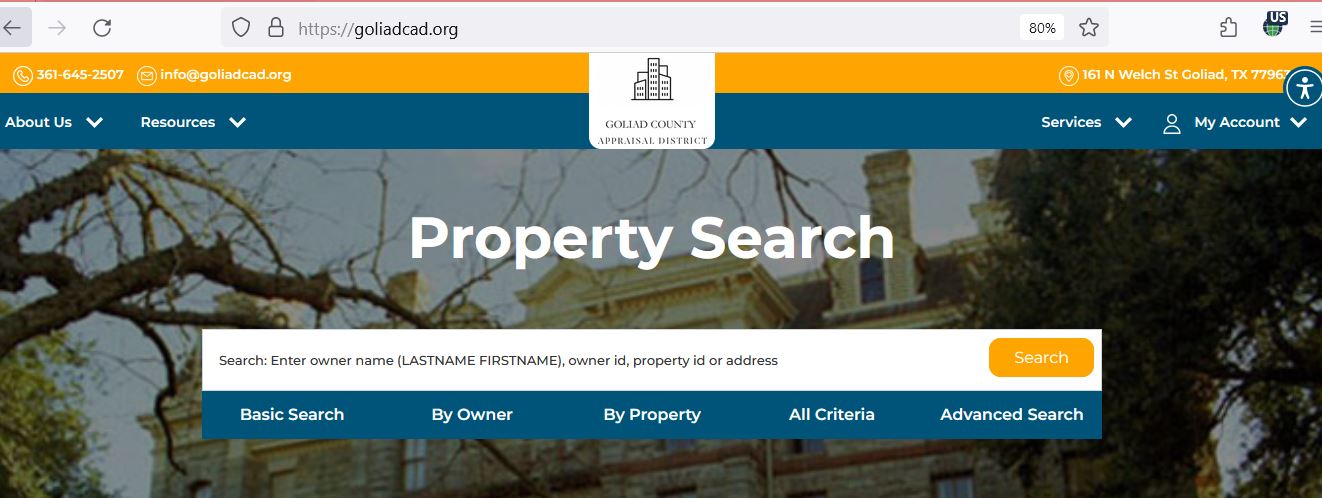
It accepts an owner name, owner ID, property ID or address in one keyword box.
This search includes the Geo ID, legal description, abstract, subdivision and lease fields.
Combine a field, category, acreage range, value range, tax year and property type.
Understand what each Goliad CAD field does—and does not—prove
| Field | What it helps identify | What it does not prove | Best next action |
|---|---|---|---|
| Property ID | The Goliad CAD appraisal account. | That the deed, mineral and tax systems use an identical number. | Use it for CAD questions and match it with the county tax account. |
| Geographic ID | A parcel-related geographic reference. | A surveyed boundary, easement or exact acreage. | Compare the interactive map, deed, plat and survey. |
| Owner shown | The owner maintained for appraisal administration. | Complete surface title, mineral title or absence of liens. | Search the County Clerk’s Official Records. |
| Situs address | The physical location carried by the district. | The mailing address or legal parcel boundary. | Compare the address with the map and legal description. |
| Legal description | Abstract, survey, subdivision, lot, block, tract or acreage references. | That abbreviated CAD wording is adequate for a deed. | Verify the recorded document and professional survey. |
| Lease name or number | A mineral, oil, gas or related appraisal account. | Mineral ownership, royalty decimal or payment entitlement. | Compare operator records, division orders and recorded mineral documents. |
| Market value | The district’s opinion of value as of January 1. | A guaranteed sale price or final tax amount. | Compare sales, condition and equal-appraisal evidence. |
| Appraised value | Value after an applicable appraisal limitation or special-use calculation. | That the market-value figure was reduced. | Check the homestead cap, circuit breaker or productivity value. |
| Taxable value | Value remaining after exemptions for a taxing unit. | The live balance, penalty, interest or payment status. | Open the Goliad County Tax Office system. |
| Tax due filter | Properties flagged with tax due in the search display. | A guaranteed current payoff or complete delinquency history. | Verify every year with the county Tax Office. |
Use the Goliad CAD map without treating it as a boundary survey
What to do when Goliad CAD returns no property result
| Problem | Likely reason | Practical fix |
|---|---|---|
| Owner name is not found | The account may use a spouse, trust, estate, ranch, business or former owner. | Search only the last name or one distinctive entity word. |
| Rural address fails | The situs, mailing and emergency-service addresses may differ. | Use the road name, owner, property ID, abstract or interactive map. |
| Recently purchased property shows the seller | The deed may still be processing into appraisal records. | Confirm County Clerk recording and retain the document number. |
| Mineral account is missing | The search may still be restricted to Real Estate. | Select Minerals and search the owner, lease name, lease number or property ID. |
| Business account is missing | The property may be indexed under a legal entity or personal-property category. | Select Personal Property and search the entity, owner or business location. |
| Manufactured home is not with the land | The home and land may have different owners or accounts. | Search each owner and property ID separately. |
| Tax amount is missing or unclear | The appraisal district does not control tax billing or collections. | Use the Goliad County Tax Office payment system. |
| A recent exemption or correction is absent | The public display may not yet reflect the district’s internal processing. | Call GCAD with the property ID and submission evidence. |
Search tips for Goliad, Fannin, Berclair, Weesatche and rural ranch land
Check City of Goliad, Goliad ISD, county, groundwater and river-authority lines on the individual account.
Search by owner, property ID, road or legal description when a normal street address does not work.
Use the abstract, survey, geographic ID, acreage and parcel map to distinguish similar tracts.
Review market value and agricultural productivity value separately and verify every qualifying tract.
Do not rely on the CAD map alone for water boundaries, access, flood risk or surveyed acreage.
Select Minerals and search the owner, lease name, lease number and appraisal year separately from the surface tract.
Confirm whether the record is real estate, personal property, utility, industrial or a combination.
Check whether the home and land share the same owner and whether separate property IDs exist.
Search the deceased owner, estate, heirs, probate history, affidavits and recorded deed documents.
Separate market value, appraised value and taxable value
Goliad CAD’s opinion of the property’s market value as of January 1.
The value after an applicable homestead cap, circuit breaker or special-use appraisal.
The value remaining after exemptions for each taxing unit.
Check these property facts before disputing value
Check the homestead cap or non-homestead circuit breaker before estimating tax
The appraisal limitation generally restricts annual appraised-value growth to 10%, plus qualifying new improvements, after the cap becomes effective.
The market-value field can still increase by more than 10%.
Qualifying non-homestead real property valued at $5.32 million or less may receive the temporary 20% appraisal limitation, plus new improvements.
Agricultural, timber and certain other specially appraised property is excluded.
A separate circuit-breaker application generally is not required when the property qualifies.
Eligibility depends partly on ownership during the required prior period.
A transfer can remove the previous owner’s limitation until the new owner qualifies.
Qualifying new-improvement value is added outside the percentage limitation.
The current non-homestead circuit breaker expires after the 2026 tax year.
Confirm the actual market, appraised and limitation lines before calculating savings.
Use Goliad CAD, the Tax Office or County Clerk for the right question
| Your question | Correct starting point | What to prepare |
|---|---|---|
| What is the appraised value? | Goliad County Appraisal District | Property ID, tax year and disputed value field. |
| Why is an exemption missing? | Goliad County Appraisal District | Application proof, identification and qualification date. |
| Does agricultural appraisal apply? | Goliad County Appraisal District | Acreage, use history, leases, production and map evidence. |
| Where do I pay property tax? | Goliad County Tax Assessor-Collector | Tax account, property ID, year, amount and payment method. |
| Did my payment post? | Goliad County Tax Assessor-Collector | Receipt, confirmation, transaction date and account. |
| Who legally owns the land? | Goliad County Clerk or title professional | Grantor, grantee, legal description and recording date. |
| Who owns the minerals? | County Clerk records plus mineral-title professional | Mineral deeds, probate, leases, assignments and division orders. |
| Is the boundary correct? | Surveyor plus deeds and plats | Recorded deed, survey, plat, easements and title file. |
| Who sets the tax rate? | Each local taxing unit | Property account and complete taxing-unit list. |
Correct the Goliad County record that controls the error
Prepare Goliad County homestead, senior, disability and veteran applications
Confirm ownership, principal-residence status, occupancy date and identification requirements.
Review additional exemptions, school-tax ceilings, quarterly payments and deferral provisions.
Prepare qualifying documentation and review applicable ceiling, payment and deferral options.
Use the correct veteran or surviving-spouse application and attach current eligibility evidence.
An heir may need deed, probate, heirship, ownership-percentage and occupancy documents.
Use the state forms library for charitable, religious, cemetery, disaster and other statutory applications.
Prepare these items before filing
Document qualifying Goliad County land use before filing
Document livestock, stocking, fencing, water, leases, management and the acreage supporting the operation.
Keep planting, harvest, sales, expense, lease and land-management records.
Prepare the management plan, qualifying practices, maps, photographs and annual activity records.
Verify acreage, use history and local degree-of-intensity requirements before relying on a general state description.
Provide a written lease, lessee details, use dates and evidence of actual qualifying activity.
Ask about rollback-tax consequences before converting qualifying land to residential, commercial or another nonqualifying use.
Evidence that can strengthen the application
Prepare a complete 2026 Goliad County business-property file
Most business-property renditions are normally due April 15.
A written request can generally extend the filing deadline to May 15, with another limited extension available for good cause.
A 10% penalty can apply when a required rendition is not filed timely.
Goliad CAD publishes a current 2026 business-personal-property depreciation schedule.
Report the closure, sale, move and new owner rather than ignoring a preprinted rendition.
Property owned or managed on January 1 can remain relevant even when the business closes later.
Search mineral accounts separately from the surface estate
The land and buildings can be owned separately from the mineral estate.
A mineral account can have a different owner, property ID, lease and taxable value.
Ownership decimal, reserves, production and expense issues can require specialized records.
Know what a Goliad CAD appraiser reviews at the property
Appraisers check the property, improvement size, construction quality, physical condition and visible changes.
New buildings, additions, demolitions and other changes can affect the current property record.
GCAD states that district appraisers will not ask to inspect the interior of a home.
An owner can schedule an interior inspection when an interior condition materially affects value.
Keep dated photographs, repair estimates, engineering reports and contractor statements.
Ask for official identification and call GCAD when an unexpected visitor claims to be an appraiser.
Check special deadlines before attempting a late Goliad CAD protest
Continue responding to hearing notices, evidence exchanges, informal-review communication and appeal deadlines.
The deadline can be 30 days after the notice was delivered. Preserve the notice and envelope or electronic-delivery record.
A special protest deadline may apply, but the ARB decides whether the required notice was properly sent.
Late filing can be considered only under limited rules and normally cannot continue after the ARB approves the appraisal records.
A statutory correction can address certain errors but does not automatically reopen an ordinary value protest.
Save the 2026 account, photographs, repairs, sales and comparable-property evidence now.
Prepare clearly when a timely Goliad County protest remains pending
State the property ID, property type, owner, legal description and appraisal year.
Explain whether the dispute concerns value, unequal appraisal, property facts, ownership, exemption or agricultural status.
State the requested value or correction before presenting supporting detail.
Number photographs, comparable properties, estimates, maps, leases and reports.
Provide copies of intended evidence as required and request the district’s evidence before the hearing.
Preserve the written order and promptly review any district-court, arbitration or SOAH deadline.
Register, request a PIN and connect the correct Goliad CAD property
Pay Goliad County property taxes through the official county route
329 W. Franklin Street
Goliad, Texas 77963
Mailing:
P.O. Box 800
Goliad, Texas 77963
361-645-3354
Fax: 361-645-8544
Tax Assessor-Collector: Michelle Garcia
Monday-Friday: 8:00 a.m.-5:00 p.m.
No motor-vehicle transactions are processed after 4:30 p.m.
Call before travelling when the property account, payment method or amount is uncertain.
Check every Goliad County taxing unit attached to the property
The county tax applies to property located within the county.
Verify the school-tax line, exemptions and any school-tax ceiling.
The city tax applies only when the property is inside the municipal taxing boundary.
Check the Goliad County Groundwater Conservation District line on the property.
Review the river-authority taxable value and tax amount separately.
Follow the current county statement and payment portal when older state-directory collection listings differ.
Use the Goliad County Clerk when legal ownership matters
127 N. Courthouse Square
Goliad, Texas 77963
Mailing: P.O. Box 50
Goliad, Texas 77963
County and District Clerk: Vickie Quinn
Monday-Friday: 7:00 a.m.-5:30 p.m.
Closed for lunch: noon-12:30 p.m.
Monetary transactions are not processed after 5:00 p.m.
Complete these checks before relying on a Goliad County property record
Compare the property ID, geographic ID, legal description, acreage and map location.
Determine whether separate mineral, royalty, utility or industrial accounts exist.
Check every available year and obtain a current payoff for delinquent property.
Review Official Records and obtain a title examination for a complete ownership conclusion.
The seller’s homestead, senior exemption, tax ceiling and appraisal cap may not transfer.
A transfer can remove the prior owner’s non-homestead appraisal limitation.
Confirm whether productivity appraisal continues and whether a use change can trigger rollback taxes.
Compare homes, barns, shops, manufactured homes, equipment and other structures.
Keep the deed, title policy, survey, closing statement, tax records and application receipts.
Use Goliad CAD’s certified rolls and appraisal reports for deeper research
GCAD publishes real and personal-property rolls in geographic, alphabetical and spreadsheet formats.
Review appraisal methods, market areas, schedules and the district’s valuation process.
Review the district’s planned reappraisal activity and property-review programme.
Use the current business-personal-property schedule when reviewing equipment and asset valuation.
GCAD published a 10% basic capitalization rate for qualifying low- or moderate-income housing property.
Access current hearing procedures, protest rights and taxpayer-assistance information.
Important Goliad County appraisal and property-tax dates
Goliad CAD, Tax Office and County Clerk contact details
Goliad, Texas 77963
Mailing:
P.O. Box 34
Goliad, Texas 77963
361-645-2507
Fax: 361-645-3200
info@goliadcad.org
Chief Appraiser: Troy Draper, RPA
Hours: Monday-Friday, 8:00 a.m.-4:30 p.m.
329 W. Franklin Street
Goliad, Texas 77963
Mailing: P.O. Box 800
Goliad, Texas 77963
361-645-3354
Fax: 361-645-8544
Tax Assessor-Collector: Michelle Garcia
Hours: Monday-Friday, 8:00 a.m.-5:00 p.m.
127 N. Courthouse Square
Goliad, Texas 77963
Mailing: P.O. Box 50
Goliad, Texas 77963
Clerk: Vickie Quinn
Hours: Monday-Friday, 7:00 a.m.-5:30 p.m.; lunch noon-12:30 p.m.
Assistant Chief Appraiser: Rita Sternadel, RPA
Appraiser: Mary Jane Garcia, RPA
Exemptions Specialist: Yesania Trevino
Use the official Contact Us page to route a message to an individual staff member.
Official Goliad County appraisal, tax and deed resources
Property search, notices, contacts, appraisal resources and tax-transparency information.
Open Goliad CADReview approximate parcel location and neighbouring appraisal accounts.
Open the mapDownload exemption, agriculture, rendition, inventory and protest documents.
Open formsRegister, sign in, request a PIN and access available property services.
Open online protestOpen 2026 certified rolls, depreciation schedules, ARB procedures and mass-appraisal reports.
Open data and recordsReview GCAD’s market, cost, income and mass-appraisal explanations.
Open appraisal guidanceSearch tax accounts and complete an official online payment.
Search and pay taxResearch deeds, liens, releases, mineral conveyances and other recorded documents.
Search official recordsCross-check district, tax office and active taxing-unit information.
Open Goliad County directoryHow this Goliad County guide was rebuilt

Independent local research with current office and filing details
This replacement preserves the useful property-search and editor images from the original article while correcting outdated office information and adding the missing 2026 certified-roll status, detailed search filters, map guidance, appraisal limitations, business-property changes, mineral-contractor routing, protest deadlines, tax-payment workflow, deed-fraud filing rules and current County Clerk hours.
The review used Goliad County Appraisal District, its property search, map, forms, online protest, contact, appraisal-process, protest-hearing and data pages; the Goliad County Tax Assessor-Collector and ACT Tax portal; the Goliad County Clerk and Official Records Search; and Texas Comptroller property-tax resources.
AppraisalDistrict.org is an independent informational website and is not operated by Goliad County Appraisal District, Goliad County or any local taxing unit.
10 common Goliad County Appraisal District questions
1. What is the official Goliad County Appraisal District website?
The official website is GoliadCAD.org. Use it for property searches, appraisal values, maps, forms, exemptions, agricultural valuation, protests and district records.
2. How do I search Goliad County property records?
Open Goliad CAD Property Search. Choose Basic Search, By Owner, By Property, All Criteria or Advanced Search and verify the property type and tax year.
3. Does Goliad CAD collect property taxes?
No. Goliad CAD determines appraisal values and administers exemptions and special valuations. The Goliad County Tax Office handles property-tax bills and payments.
4. Where do I pay Goliad County property taxes online?
Use the county-linked Goliad ACT Tax portal. Verify the owner, property, account and tax year before paying.
5. Can I file a Goliad CAD protest online?
Goliad CAD provides an online protest sign-in. Registration and a property PIN may be required. Online access does not extend the filing deadline.
6. What was the normal Goliad CAD protest deadline for 2026?
The normal deadline was May 15, 2026, or 30 days after delivery of the Notice of Appraised Value, whichever was later. The date printed on the individual notice controls.
7. What is the 2026 circuit-breaker threshold?
Qualifying non-homestead real property valued at $5.32 million or less may receive the temporary 20% appraisal limitation. Agricultural, timber and certain other specially appraised property is excluded.
8. What changed for business personal property in 2026?
Qualifying income-producing tangible personal property can receive an exemption of up to $125,000 in taxable value in each taxing unit. Business owners should still verify rendition duties with GCAD.
9. Where can I search Goliad County deeds and liens?
Use the Goliad County Official Records Search. Search by grantor, grantee, subdivision, document type, document number or recording date.
10. What is the Goliad CAD phone number and address?
Goliad County Appraisal District is at 161 N. Welch Street, Goliad, Texas 77963. Call 361-645-2507. The fax number is 361-645-3200.