Gonzales County, Texas · Homes, farms, ranches, timber, minerals, business property, protests and taxes
Verify the Gonzales CAD Parcel Before Acting on the Land, Lease or Tax Record
Gonzales County property research can involve a Gonzales residence, Nixon commercial site, Waelder acreage, Smiley home, Harwood farm, Cost ranch, Ottine timber tract, manufactured home, business equipment, pipeline or mineral lease.
Start with the appraisal account, match the legal description and property type, then use the Tax Office for collection information and the County Clerk for deeds, liens, easements and title history.
Property or Owner IDOwner or business nameStreet addressAbstract or subdivisionLease name or numberTax year
COME AND TAKE IT PARCEL LEDGERVERIFYING ACCOUNT
GONZALES CAD PROPERTY FILE2026
HOMERANCHMINERALBUSINESS
PARCEL VERIFIED
ID + LAND + LEASE MATCHED
SEARCH → MATCH → DOCUMENT → ACT
2026 appraisal-roll update:
Gonzales CAD’s Data and Records page listed certified 2026 real, personal and mineral appraisal rolls at the July 31, 2026 review. Verify the live account because ownership corrections, supplemental records and later adjustments can still affect an individual property.
2026 tax-bill timing:
the Gonzales County collection search was still offering tax years through 2025 at the review date. Certified appraisal values do not become a final 2026 tax bill until taxing units adopt their rates and the collector loads the new statements.
Start with official search and account matching. Continue for rural land, minerals, business property, protests, payments, deeds and office routing.
Official property search
Search Gonzales CAD with the identifier that fits the property
Recommended search order:
property ID or owner ID → owner name → simplified address → legal description, abstract or subdivision → lease number or lease name → Advanced Search.
Open the official Gonzales CAD property search
The district’s home page contains the current search system.
Open Gonzales CAD Property Search
Choose Basic Search for a quick lookup
Enter an owner name in LASTNAME FIRSTNAME order, owner ID, property ID or address.
Use By Owner for name and mailing details
Available fields include Owner ID, Owner Name, Care Of, street, city, state and ZIP code.
Use By Property for parcel details
Search Property ID, Geo ID, address, legal description, abstract, subdivision, lease number, lease name, agent or protest status.
Select the correct property type
Choose Real, Personal or Mineral rather than assuming every account appears under ordinary real estate.
Select the correct tax year
Use 2026 for the certified appraisal roll or choose an earlier year for ownership, exemption and value history.
Use Advanced Search when results are too broad
Combine a field, category, acreage range or value range to narrow a common owner or subdivision.
Open every plausible related account
One owner can have separate residence, land, business-personal-property, mineral and manufactured-home records.
Match the complete property identity
Compare Property ID, Geo ID, owner, situs, legal description, abstract, subdivision, lease and property type.
Save a dated copy before acting
Print the record or save a PDF or screenshot showing the property, year, values and exemptions.
The official results can include Parcel ID, account, Owner ID, property type, owner and property addresses, legal description, abstract, subdivision, lease information, acreage, market value and base tax due.
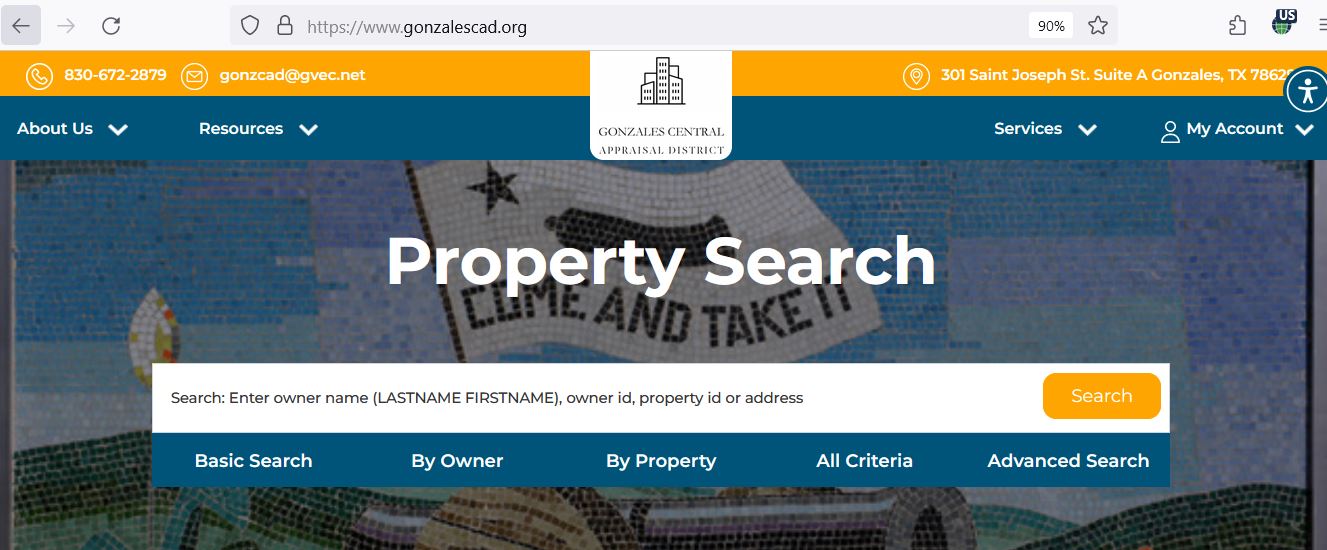
Existing official-search screenshot
Use the Gonzales CAD screenshot to choose the correct search tab
The current article contains a genuine Gonzales CAD property-search screenshot. It is retained below to help users recognise the search layout before opening the live record.
Gonzales CAD search layout. Always use the live official portal for the current owner, certified value, exemption, protest and tax-year information.
1
Basic Search
Best when you have an owner name, Owner ID, Property ID or ordinary street address.
2
By Owner
Use for a person, company, trust, estate or mailing-address search.
3
By Property
Use Property ID, Geo ID, legal description, abstract, subdivision, lease or physical address.
4
All Criteria
Combine owner and property information when one field produces too many results.
5
Advanced Search
Filter by field, category, land acreage or value range for research and comparison.
The screenshot is a navigation guide, not a current property record.
Open the live portal and save a newly dated account before filing, paying, buying or protesting.
10 essential record attributes
Check these 10 Gonzales CAD fields before relying on the account
1. Property ID and Geo ID
Use these identifiers for forms, office calls, map matching, protest filing and tax-account comparison.
2. Owner and Owner ID
The appraisal owner entry can differ from a complete deed, probate, trust or mineral-title history.
3. Property type
Confirm Real, Personal or Mineral before interpreting values, situs information or tax records.
4. Situs and mailing address
The physical property location can differ from the owner’s mailing address or rural postal format.
5. Legal description
Review the abstract, survey, subdivision, lot, block, tract, lease or other legal reference.
6. Acreage and land classification
Compare total acreage, homesite, agricultural, timber, wildlife and nonqualifying land segments.
7. Improvement details
Check building size, use, year built, class, condition, completion and additional structures.
8. Market and appraised value
Market value and the value after a cap or special-use appraisal can differ substantially.
9. Exemptions and special appraisal
Verify homestead, age, disability, veteran, agricultural, timber, wildlife or business treatment.
10. Tax year and taxing units
Confirm the appraisal year and every county, city, school, hospital, water or emergency-services district.
Parcel verification
Use the interactive map for rural tracts and nearby property
Search with the Property ID or Geo ID
An identifier is normally more reliable than a rural-road or lease address.
Compare parcel shape and surrounding land
Review roads, adjoining owners, subdivisions, rights-of-way and nearby land use.
Match the legal description
Confirm that the map, appraisal record and deed refer to the same abstract, survey, lot or tract.
Save the map for context
Keep a dated copy with the deed, survey, notice and protest evidence.
The CAD map is not a legal boundary, title record or survey.
Use a recorded deed, title examination and licensed surveyor when ownership, acreage, access or fence lines matter.
Search troubleshooting
Fix a Gonzales CAD search that returns no property
Change one search variable at a time
Problem
Likely reason
Practical fix
Owner name returns nothing
The record may use LASTNAME FIRSTNAME, a spouse, trust, estate or company.
Use the surname alone, Owner ID or Property ID.
Address search fails
The situs, mailing or rural-road format may differ.
Use the street name, Property ID, legal description or map.
Farm or ranch has no usable address
The parcel may be indexed by abstract, survey, tract or subdivision.
Use By Property, All Criteria or Advanced Search.
Mineral property is missing
The mineral owner and surface owner may differ.
Select Mineral and use the owner, lease number, lease name or abstract.
Business assets are missing
Business personal property has a separate Personal account.
Search the company, DBA, owner, situs or Personal property type.
Manufactured home is missing
The home and underlying land may have different owners or accounts.
Search both owners, the home information and the land parcel separately.
New owner does not appear
The County Clerk deed may not yet be processed by CAD.
Search the seller and provide the recorded instrument details to the deed clerk.
Too many results appear
The owner or street search is too broad.
Add the year, property type, subdivision, abstract, Geo ID or acreage range.
Tax balance differs from appraisal record
The appraisal and collection systems serve different purposes and update separately.
Match the property ID, owner, year and legal description before paying.
Property-search call script
I am researching tax year [year] for Property ID [number] or Geo ID [number]. The property is described as [address, abstract, subdivision, tract or lease]. The search currently shows [exact issue]. I need help confirming [owner, acreage, improvement, exemption, property type or value]. Which document or identifier should I provide?
Local property situations
Search tips for Gonzales, Nixon, Waelder and rural communities
City of Gonzales home
Search the property ID or street name, then verify city, Gonzales ISD and other taxing units.
Nixon or Smiley property
Confirm the city, Nixon-Smiley CISD, hospital district and emergency-services entries.
Waelder property
Check Waelder ISD, city limits, the legal description and the correct tax-payment account.
Harwood or Cost acreage
Use the owner, abstract, Geo ID, deed and parcel map when a postal address is unreliable.
Ottine or Belmont tract
Review acreage, roads, homesite, timber or agricultural treatment and related parcels.
Pilgrim or rural ranch
Search every tract and separate the residence, barns, qualifying land and mineral interest.
Cross-county school district
Cuero, Yoakum, Moulton or Shiner ISD can appear depending on parcel location—not mailing city.
Oil, gas or pipeline account
Use Mineral property type and lease details and keep surface ownership research separate.
Manufactured home
Use the mobile-home questionnaire and verify both the home account and underlying land.
Value interpretation
Read market, appraised and taxable value in the correct order
STEP 1Market value
Gonzales CAD’s opinion of market value as of January 1.
STEP 2Appraised or productive value
The value after an applicable cap, agricultural, timber or other special treatment.
STEP 3Taxable value
The value remaining for an individual taxing unit after its exemptions.
Review the component that explains the total value
Property component
What to inspect
Useful evidence
Residence
Living area, age, class, condition, additions, garage and completion.
Measurements, photographs, plans, repair estimates and comparable sales.
Farm or ranch land
Acreage, land class, homesite, access, water, improvements and qualifying use.
Deed, survey, leases, production records, photographs and land sales.
Timber or wildlife land
Qualifying acreage, management, history, intensity and productivity value.
Management plan, annual report, maps, receipts and forestry records.
Commercial property
Class, condition, occupancy, rent, expenses, location and functional utility.
Leases, rent roll, income, expenses, photographs and repair estimates.
Business personal property
Equipment, inventory, furniture, vehicles, leased assets, age and depreciation.
Rendition, asset register, invoices and disposal records.
Mineral property
Owner, lease, unit, interest, production and appraisal year.
Mineral deeds, assignments, division orders, probate records and lease documents.
Homestead and exemptions
Use the current Gonzales CAD form and include every required document
Residence homestead
Confirm ownership, principal-residence use, property ID and identification requirements.
Age 65 or disability
Review additional exemptions, tax ceilings, instalment options and possible tax deferral.
Disabled veteran
Use the applicable veteran or survivor application and include the required VA records.
Disaster-damaged property
Use the temporary exemption form when a qualifying disaster damages the property.
Manufactured home
Complete the questionnaire and include ownership or title information when requested.
Electronic delivery
Use the separate request when electing electronic appraisal communications.
Property ID and physical address
Owner name and ownership interest
Correct appraisal year
Texas driver licence or required identification
Occupancy or qualification date
Deed, heirship or trust records when relevant
Veteran, disability or age evidence
Complete copy and delivery proof
Find the correct property account
Confirm the property ID, owner, residence address and tax year.
Complete every applicable section
Do not submit only the signature page or omit ownership and qualification information.
Attach the required identification
The official forms page warns that homestead applications require the applicant’s driver licence or other legally required information.
Submit directly to Gonzales CAD
Completed forms can be mailed to P.O. Box 867, Gonzales, Texas 78629-0867.
Verify approval on the live account
Keep the filing proof and later confirm the correct exemption and appraisal year.
A homestead tax deferral is not tax forgiveness.
Gonzales CAD’s FAQ states that qualifying over-65 or disabled homeowners may arrange a deferral, but a lien remains and interest accrues. Obtain account-specific advice before using it.
Agricultural, timber and wildlife appraisal
Use Gonzales County guidelines rather than another county’s acreage rules
Open every related real-property account
A farm or ranch can include several tracts, a residence, barns, business equipment and mineral interests.
Match the tract to the deed and map
Confirm Property ID, Geo ID, abstract, survey, subdivision and acreage.
Separate the homesite and improvements
The residence, yard, barns and other structures remain separately appraised.
Open the official local guidelines
Use Gonzales County intensity, fencing and qualification guidance rather than another county’s rules.
Open Ag, Timber and Wildlife Forms
Document qualifying use and history
Prepare livestock, crop, hay, lease, fencing, water, receipt, photograph and production records.
Prepare the management plan when required
Timber and wildlife applications need property-specific management and supporting records.
Review annual wildlife reporting
Keep the management plan and annual report together with maps, photographs and activity records.
Ask about change-of-use consequences
Subdivision, development or termination of qualifying use can create additional tax exposure.
A seller’s agricultural or timber appraisal does not guarantee the buyer’s intended use will qualify.
Confirm new-owner filing requirements and possible additional taxes before closing.
2026 business personal property
Review the new-law notice before assuming no rendition is required
Gonzales CAD published a Business Personal Property “NEW LAW” notice and a 2026 depreciation schedule. Texas law now provides a $125,000 exemption for qualifying income-producing tangible personal property in an applicable taxing unit, subject to statutory requirements.
Do not assume the new exemption eliminates every filing duty.
Contact the Gonzales CAD business-personal-property appraiser and use the current local form or notice for the first qualifying year.
Business legal name and DBA
Personal-property account
January 1 business situs
Furniture, fixtures and equipment
Machinery, tools and vehicles
Inventory and supplies
Leased or consigned assets
Acquisition years and original costs
Locate the Personal property account
Do not use a landlord’s real-property account for tenant-owned equipment or inventory.
Prepare a January 1 asset list
Include property owned, managed, leased or controlled at the business location.
Review the 2026 depreciation schedule
Use the official schedule when checking equipment categories and age.
Open 2026 Business Data
File the current rendition or report
Most renditions are normally due April 15, with a timely written extension generally moving the date to May 15.
Preserve the filed package
Keep the rendition, asset list, extension request, certification and delivery confirmation.
Contact the local BPP appraiser
Kathryn Bradley Walker is listed at extension 206 for business-personal-property questions.
Use lease fields and keep surface ownership separate
Gonzales CAD states that mineral, utility and industrial accounts are appraised for the district by Pritchard & Abbott, Inc. Real estate and ordinary personal-property accounts are appraised locally.
Select Mineral as the property type
This prevents ordinary real-property records from crowding the results.
Search the mineral owner
The mineral-interest owner can differ from the surface owner shown on the land account.
Use the lease number or lease name
These fields can locate an account when no useful street address exists.
Match the abstract and legal description
Confirm the account concerns the intended tract, unit or lease.
Use the Pritchard & Abbott royalty-owner system when applicable
The login can require county, owner number and password from the Notice of Appraised Value.
Open Royalty Owner Login
Use recorded documents for ownership
Search mineral deeds, assignments, probate records and leases through the County Clerk.
A mineral appraisal account is not a mineral-title opinion.
Use a qualified title professional or Texas lawyer when ownership, royalty interests, lease rights or severances matter.
Use Gonzales CAD, the Tax Office or County Clerk for the correct record
Sending the question to the record holder prevents delays
Your question
Correct starting point
Prepare
What is the appraised value?
Gonzales Central Appraisal District
Property ID, appraisal year and disputed field.
Why is an exemption or ag appraisal missing?
Gonzales Central Appraisal District
Application, qualification date, evidence and filing proof.
How much property tax is due?
Gonzales County Tax Assessor-Collector
Tax account, owner, property, year and payment date.
Did my payment post?
Gonzales County Tax Office
Receipt, confirmation, amount, date and tax year.
Who legally owns the land?
Gonzales County Clerk or title professional
Grantor, grantee, recording period and legal description.
Who owns the mineral interest?
County Clerk records and mineral-title professional
Mineral deeds, assignments, probate and lease records.
Is the parcel boundary correct?
Licensed surveyor and title professional
Deed, plat, survey and CAD map.
What is the current tax rate?
Individual taxing unit and Truth in Taxation database
Property account, taxing units and current tax year.
Property-record corrections
Correct the system responsible for the inaccurate field
Incorrect owner name
Confirm the deed or probate instrument was recorded and provide its document information to the CAD deed clerk.
Incorrect mailing address
Use the official Change of Address form and retain a copy and delivery proof.
Incorrect acreage or legal description
Compare the deed, survey, plat, abstract, subdivision and parcel map before requesting a change.
Incorrect improvement details
Prepare measurements, photographs, permits, plans, demolition records or repair estimates.
Incorrect mineral owner or lease
Prepare the recorded mineral deed, assignment, probate document or lease information.
Incorrect tax balance
Contact the Tax Office with the property account, year and payment receipt.
A correction request does not automatically preserve a protest deadline.
File the appropriate protest or statutory correction request when the issue remains unresolved.
Appraisal protest
Register early and build the protest around one specific issue
Usual filing rule:
most protests are due by May 15 or 30 days after delivery of the Notice of Appraised Value, whichever is later. The exact notice date controls.
Save the appraisal notice and complete property record
Keep the Property ID, proposed value, prior value, property type, exemptions and deadline.
Identify the exact protest reason
Examples include market value, unequal appraisal, incorrect property details, denied exemption, ag or timber appraisal, business assets or mineral information.
Request the account PIN when needed
Use the official PIN request rather than guessing or sharing another property’s credentials.
Match the correct property and year
Confirm the owner, Property ID, legal description, property type and appraisal year.
Save proof of timely filing
Retain the confirmation, submitted protest, email, certified-mail receipt or stamped copy.
Request and review CAD evidence
Compare sales, equity properties, photographs, schedules and property characteristics with your documents.
Build a focused evidence packet
Use comparable sales, unequal-appraisal evidence, photographs, estimates, surveys, leases or asset schedules.
Attempt an informal resolution
State the exact requested value or correction and review any proposed agreement before accepting it.
Read the written ARB order
Preserve it and promptly review any available arbitration or court deadline.
Evidence matched to common Gonzales County protest issues
Issue
Useful evidence
Common mistake
Residence value
Adjusted comparable sales, measurements, photographs and repair estimates.
Arguing only that the tax bill is high.
Farm or ranch land
Survey, acreage, access, land class, use records and comparable land sales.
Treating every acre as identical.
Ag, timber or wildlife denial
Use history, management plan, annual reports, receipts, leases, maps and photographs.
Relying only on rural appearance.
Business personal property
Asset register, invoices, acquisition dates, disposal records and depreciation schedules.
Submitting only a requested total without identifying assets.
Mineral account
Recorded mineral instruments, lease details, division orders and ownership documents.
Using only the surface deed.
Appraisal Review Board
Prepare for the formal Gonzales County ARB hearing
Gonzales CAD published 2026 Appraisal Review Board hearing procedures and posted an ARB agenda covering June 23 through July 2, 2026. The individual hearing notice controls the owner’s date and time.
Search the correct property account
Compare the owner, property ID, address, legal description and tax year with the CAD account.
Review all available years
Check paid, unpaid, partial and delinquent balances rather than viewing only one statement.
Open the official online-payment route
Start from the county page or tax-search site rather than a text message, advertisement or copied payment link.
Review the vendor fee
Confirm the payment method, convenience fee, account and total before authorising the transaction.
Save the confirmation
Keep the property account, tax year, amount, date, payment method and confirmation number.
Verify that the payment posted
Reopen the account after processing and confirm the correct year received credit.
The appraisal record is not the collector’s payoff statement.
Use the live Tax Office account for payment, penalty, interest and receipt information.
Payment options and deadlines
Use the correct postmark, fee and instalment date
Official Gonzales County payment guidance
Payment route
Current guidance
What to save
Online card
Vendor fee listed as 2.35% at the review date.
Checkout total, confirmation and receipt.
Electronic check
Vendor fee listed as $1.
Bank confirmation and posted tax receipt.
In-person card
Vendor fee listed as 2.35%.
Printed payment receipt.
Mail
Must carry a valid USPS postmark by the applicable deadline.
Mailing receipt or postmark evidence.
Metered mail
The Tax Office warns that a metered stamp is not a USPS postmark.
USPS acceptance evidence.
Half payments
Published due dates are November 30 and June 30.
Eligibility confirmation and both receipts.
Quarter payments
Published dates are January 31, March 31, May 31 and July 31 for qualifying accounts.
Eligibility confirmation and every instalment receipt.
Main Gonzales payment office
427 Saint George Street, Suite 100
Gonzales, Texas 78629
Lobby and drive-through: Monday-Friday, 8:00 AM-4:30 PM
Waelder Saturday substation
1812 US Highway 90
Waelder, Texas 78959
Saturday, 8:00 AM-5:00 PM
Closed for lunch 12:30-1:30 PM
The Waelder substation can have special Saturday closures. Check the live county page before travelling.
Rates and taxing units
Do not use one combined Gonzales County rate for every parcel
School districts
Gonzales, Nixon-Smiley, Waelder, Cuero, Yoakum, Moulton or Shiner ISD can apply based on location.
Cities
City of Gonzales, Nixon, Smiley or Waelder can appear only inside the applicable boundary.
County and water district
Gonzales County and the Gonzales County Underground Water Conservation District can appear separately.
Hospital districts
Gonzales Healthcare Systems, Nixon Hospital District or Yoakum Hospital District can apply.
Emergency services
Gonzales County ESD Number 1 or Number 2 can appear based on parcel location.
Collector verification
Use the tax statement to confirm which office collects each unit, especially for cross-county districts.
The newest rates displayed by Gonzales CAD and the county page were 2025 rates at the July 31, 2026 review.
Do not present those rates as final 2026 rates.
Search grantor and grantee names separately
Try current and prior owners, spouses, trusts, estates, companies, lenders and spelling variations.
Review the indexed document type
Look for deeds, deeds of trust, releases, liens, easements, assignments, restrictions and mineral documents.
Match the legal description
A matching owner name alone does not prove the instrument concerns the intended tract.
Use Fraud Notify
The free service can email an alert when a new document is recorded using the registered name.
Register for Fraud Notify
Bring photo identification for an in-person filing
The Clerk requires valid photo identification when a real-property document is presented in person.
Selected fees from the Clerk’s posted schedule
Service
Posted amount
Practical note
Recording first page
$25
Verify the current fee before submitting.
Each additional page
$4
Confirm the complete page count.
Names after the first five
$0.25 each
Applies to additional indexed grantors or grantees.
Plain copy
$1 per page
Ask whether a plain copy satisfies the intended use.
Certification
$5
Certification is added to the copy charge.
Plat or map, first page
$50
Applies to qualifying sizes; verify current requirements.
The fee schedule linked by the county was still labeled 2024 at the review date. Confirm the current amount before mailing or presenting payment.
The CAD owner field and Clerk index are not a complete title examination.
Use a title company or qualified Texas lawyer when liens, easements, probate, mineral rights or ownership defects matter.
Buyer, owner and heir checklist
Complete these checks before relying on a Gonzales County account
Confirm the deed or probate document was recorded
Save the Clerk document number
Match Property ID and Geo ID
Compare abstract, survey, subdivision and acreage
Open every related real, personal and mineral account
Verify agricultural, timber or wildlife treatment
Check homestead and other exemptions
Review current and prior tax balances
Identify every taxing unit
Confirm the tax collector shown on the statement
Obtain a survey when boundaries matter
Save title, survey, land-use and tax documents
The seller’s current tax bill may not predict the buyer’s future bill.
Exemptions, caps, agricultural or timber treatment, mineral ownership, completed improvements and adopted rates can change after a sale.
Certified rolls and public data
Use the 2026 certified files for countywide research
2026 certified Geo roll
Real and personal appraisal-roll information arranged by geographic account.
2026 certified Alpha roll
Real and personal appraisal-roll information arranged alphabetically.
2026 certified Excel roll
Downloadable real and personal appraisal data for structured research.
2026 certified mineral roll
Separate compressed appraisal-roll data for mineral property.
2026 depreciation schedule
Supports business-personal-property valuation and rendition review.
2026 low-income housing data
The page publishes a current cap rate and qualifying property list.
2025 annual report
Provides appraisal-district operations and tax-base context.
2025 mass appraisal report
Explains appraisal methods, property categories and valuation procedures.
2025-2026 amended reappraisal plan
Describes the district’s planned appraisal and inspection activity.
Certified-roll files are useful for appraisal research, but they do not replace the live account when checking a later ownership correction, supplemental appraisal, exemption decision or payment balance.
2026 action calendar
Important Gonzales County appraisal and tax dates
Appraisal and qualification date
Ownership, condition, use, mineral interests, business assets and many exemption qualifications are generally evaluated as of January 1.
Most business renditions
Most 2026 business-personal-property renditions were due, subject to a timely written extension.
Many exemption and special-appraisal applications
The normal filing date applied to many homestead, agricultural, timber and wildlife applications, subject to statutory late-filing provisions.
Most appraisal protests
File by May 15 or 30 days after delivery of the appraisal notice, whichever is later.
Primary ARB hearing period
Gonzales CAD posted hearings and ARB business through late June and early July. Follow the individual notice.
Normal certification target
The appraisal roll is generally certified to taxing units by late July. Gonzales CAD listed its 2026 certified rolls by July 31.
Fourth qualifying quarter payment
July 31 is the county’s published fourth instalment date for eligible quarter-payment accounts.
2026 tax-rate adoption
Local taxing units publish proposed rates and adopt current-year rates through the Truth in Taxation process.
Tax statements generally begin
The Tax Office says statements are usually mailed during the first week of October.
Normal 2026 tax-year delinquency timing
January 31, 2027 falls on a Sunday. Under the Texas next-business-day rule, a normal payment should generally remain timely on Monday, February 1, 2027. Follow the statement.
The individual notice, statement or ARB order controls.
Corrected notices, supplemental accounts, special-payment arrangements and other circumstances can create different deadlines.
Verified local contacts
Gonzales County appraisal, collection and property-record offices
Gonzales Central Appraisal District
301 Saint Joseph Street, Suite A
Gonzales, Texas 78629
Call before travelling for a deadline-sensitive task.
Confirm holiday closures, accepted payment methods, identification requirements and whether the issue belongs to CAD, the Tax Office, County Clerk or mineral-account contractor.
Official action links
Official Gonzales County property resources
Gonzales CAD website
Official property search, news, contacts and appraisal information.
1. What is the official Gonzales County Appraisal District website?
The official website is gonzalescad.org. Use it for property search, forms, online protests, maps, certified rolls and district contacts.
2. How do I search Gonzales County property records?
Choose Basic Search, By Owner, By Property, All Criteria or Advanced Search. Use a Property ID, Owner ID, owner name, address, legal description, abstract, subdivision or lease information.
3. Are the Gonzales CAD 2026 appraisal rolls certified?
Gonzales CAD’s Data and Records page listed certified 2026 real, personal and mineral rolls at the July 31, 2026 review. Verify the live account for later corrections or supplemental changes.
4. How do I search a Gonzales County mineral account?
Select Mineral as the property type and search the owner, Property ID, lease number, lease name, abstract or legal description.
5. How do I apply for a Gonzales County homestead exemption?
Download the current form from Gonzales CAD Forms, attach the required identification, submit it directly to CAD and retain proof.
6. Where do I file a Gonzales CAD protest online?
Use the official Online Protest route. Register or request the property PIN before the deadline when access is needed.
7. What is the Gonzales CAD protest deadline?
Most protests are due by May 15 or 30 days after delivery of the Notice of Appraised Value, whichever is later. Follow the exact date on the notice.
8. How do I pay Gonzales County property taxes online?
Start with the official county tax search, verify the property and tax year, then follow the official payment link and save the receipt.
9. Where can I search Gonzales County deeds and liens?