Trace a Glasscock County Parcel From Surface Land to Mineral and Tax Accounts
Start with Glasscock County Appraisal District when you need a parcel ID, account, owner ID, geographic ID, property address, legal description, abstract, subdivision, acreage, market value, exemption or mineral lease record.
Property research in Glasscock County often requires more than one account. Surface land, mineral interests, business personal property, utilities and industrial assets may be appraised separately. Use the Tax Office for live tax balances and the County and District Clerk for deeds, deeds of trust and recorded ownership documents.
209 S. Myrl Street, Garden City, Texas 79739.
Use property ID or geographic ID when available.
Search lease name, lease number, owner and mineral property type.
Use Glasscock County Tax Assessor-Collector, not the appraisal district.
Local links and procedures checked July 2026.
What kind of Glasscock County account are you trying to find?
Use the owner, property ID, geographic ID, address, legal description, abstract or subdivision.
Follow the property-search stepsUse the lease name, lease number, owner, property ID or mineral property type.
Use the mineral-search workflowSearch the business owner, account, agent and property type before reviewing rendition information.
Review business propertyIdentify whether the issue involves surface property, minerals, personal property or more than one account.
Prepare the protest fileCheck the correct account, tax year, payment balance and receipt through Glasscock County.
Use the payment workflowUse the County and District Clerk when legal ownership, deeds of trust or recorded history matters.
Open the deed-search routeSearch Glasscock CAD records with the strongest available identifier
Use the Glasscock CAD screenshot to choose the right search route
The previous article included the official property-search screenshot below. It is preserved and placed inside the step-by-step section where it is useful. The live interface can change, so confirm every field on the official website.
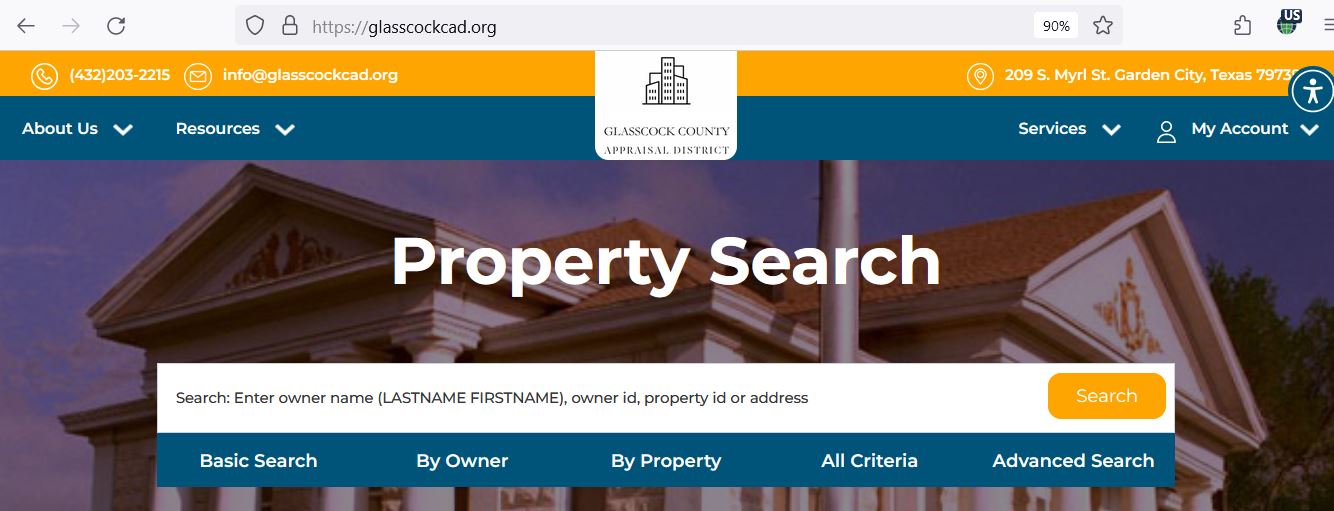
Choose the Glasscock CAD filter that matches your information
| Field | Best use | Important check |
|---|---|---|
| Owner name | Search a person, estate, trust, partnership, business or mineral-interest owner. | Use LASTNAME FIRSTNAME and try initials or entity-name variations. |
| Owner ID | Locate accounts tied to a known owner identifier. | One owner may have several property types or accounts. |
| Property ID | Reopen an account from a notice, prior record or tax document. | Confirm the tax year and property type after opening it. |
| Geographic ID | Match a parcel to map or geographic information. | Do not treat it as proof of a surveyed legal boundary. |
| Legal description | Find rural land with no normal street address. | Compare the full recorded deed before legal use. |
| Abstract | Locate acreage associated with a survey or abstract reference. | Confirm tract, section, block and acreage. |
| Subdivision | Locate a lot or tract in a named development. | Match lot, block, phase and legal description. |
| Lease name or number | Search mineral, oil-and-gas or related lease accounts. | The lease account may not identify surface ownership. |
| Agent | Find accounts represented by a tax agent. | An agent listing does not prove ownership. |
| Land acreage | Narrow rural or agricultural-property results. | CAD acreage should be verified against deeds and surveys. |
| Value range | Research groups of accounts or potential equal-appraisal comparisons. | Comparable value alone does not make properties truly comparable. |
| Protest status | Narrow accounts by available protest information. | Use the official hearing notice as the controlling status. |
Understand what the Glasscock CAD result does and does not prove
| Field | What it helps identify | What it does not prove | Next action |
|---|---|---|---|
| Parcel ID or account | The appraisal account used in the Glasscock CAD database. | That the Tax Office or another system uses an identical number. | Use it when contacting CAD and matching the tax record. |
| Owner name | The owner carried for appraisal administration. | Complete legal title, deed priority or lien status. | Search County and District Clerk records. |
| Property address | The situs location shown in the appraisal account. | A mailing address or complete legal description. | Compare it with the map and deed. |
| Legal description | The abbreviated legal or parcel reference used by CAD. | A complete deed-quality legal description. | Open the recorded instrument before legal use. |
| Abstract or subdivision | The survey, abstract, addition or subdivision associated with the account. | Exact tract boundaries or acreage. | Review deeds, plats and professional surveys. |
| Lease name or number | A mineral or oil-and-gas lease account reference. | Current surface ownership or the complete mineral estate. | Search related mineral accounts and recorded instruments. |
| Acres | The acreage carried for appraisal purposes. | Surveyed acreage or legally guaranteed boundaries. | Verify with deed and survey evidence. |
| Market value | CAD’s opinion of market value as of January 1. | A guaranteed sale price or final tax bill. | Review valuation evidence and taxable value. |
| Base tax due | Tax information displayed with the search result. | The live payoff, penalties, interest or payment status. | Verify through the Glasscock County Tax Office. |
| Property type | Whether the account is real, mineral, personal or another category. | That no additional related account exists. | Search every relevant property type. |
Use the Glasscock CAD map to locate the parcel—not to replace a survey
Search Glasscock County mineral interests separately from the surface tract
Use the personal-property account for income-producing business assets
Business personal property can include inventory, furniture, machinery, equipment and other tangible property used to produce income. The account may be separate from the land or building where the business operates.
Try the legal entity, DBA, owner name, account, property ID and agent.
Check where the assets were located or used on January 1 of the tax year.
Do not confuse the business-personal-property account with the real-estate account.
Compare inventory, machinery, furniture, equipment and other reported property.
Keep asset lists, invoices, depreciation schedules, disposal records and photographs.
The normal Texas rendition deadline is April 15, subject to timely extension rules.
Separate appraisal value from taxable value and the live tax balance
The appraisal district’s opinion of market value as of January 1 for the tax year.
The applicable value after a limitation or special appraisal, such as qualifying agricultural productivity appraisal.
The value after exemptions and the resulting taxes imposed by the applicable taxing units.
Fix a missing Glasscock CAD result before assuming the account does not exist
| Problem | Likely reason | Practical fix |
|---|---|---|
| Owner name returns nothing | The database may use LASTNAME FIRSTNAME, initials, a spouse, trust, estate or entity name. | Search the last name only and try reasonable ownership variations. |
| Street address fails | Rural property may not use a normal situs address. | Use property ID, geographic ID, abstract, legal description or owner. |
| Surface land appears but minerals do not | The mineral interest is a separate property type or owner account. | Select Mineral Property and search lease or owner information. |
| Mineral search shows many results | The owner has interests in multiple leases or accounts. | Add lease name, lease number, property ID, abstract or legal information. |
| Business assets are missing | The account may be classified as personal property rather than real property. | Select the personal-property category and search the business or owner. |
| Recently purchased land shows the former owner | The deed may still be processing into the appraisal system. | Confirm recording with the Clerk and provide the instrument information to CAD. |
| Acreage differs from the deed | CAD may have an abbreviated or older appraisal record. | Prepare the deed, plat and survey before requesting a correction. |
| Tax due differs from Tax Office | The systems may update differently or show different tax components. | Use the Tax Office for the live balance and payment status. |
| Search page does not load | JavaScript, browser settings or temporary maintenance may prevent access. | Return through the homepage, enable JavaScript, try another browser and call CAD if a deadline is urgent. |
Send each Glasscock County question to the office that controls the record
| Your question | Correct starting point | What to prepare |
|---|---|---|
| What is the appraised value? | Glasscock County Appraisal District | Property ID, tax year, property type and value field. |
| Why is an exemption missing? | Glasscock County Appraisal District | Application, identification, qualification date and supporting proof. |
| Is this the correct mineral account? | Glasscock CAD, with recorded documents as needed | Owner, lease, property ID, abstract, legal and tax year. |
| What is the current tax balance? | Glasscock County Tax Assessor-Collector | Tax account, property ID, owner and tax year. |
| Did my payment post? | Glasscock County Tax Assessor-Collector | Receipt, confirmation, amount, date and account. |
| Who legally owns the property? | Glasscock County and District Clerk or title professional | Grantor, grantee, date range, instrument number and legal description. |
| Where can I obtain a deed or deed of trust? | Glasscock County and District Clerk | Names, recording date, document type and legal description. |
| Who sets the tax rate? | Each local taxing unit | The taxing-unit list from the appraisal record. |
Correct the Glasscock County system that owns the inaccurate field
Check the Glasscock CAD account before estimating exemption savings
Confirm that the property is the owner’s principal residence and that the exemption appears on the current account.
Check the additional exemption, school-tax ceiling and available payment or deferral options.
Review eligibility documentation, the additional exemption and possible school-tax ceiling.
Use the correct application and attach the required VA documentation for the claimed category.
Review qualifying use, history, acreage, productivity value and the current application requirements.
Review Freeport, charitable, religious, pollution-control and other applicable forms when relevant.
What to prepare before filing
Prepare a Glasscock CAD protest around a specific account and issue
Evidence packet checklist
Move from the appraisal record to the Glasscock County tax account
The appraisal district determines value and administers exemptions. The Glasscock County Tax Assessor-Collector handles the live property-tax balance, payments, receipts and collection questions.
| Route | Official information | What to verify |
|---|---|---|
| Online tax information | Linked through the official Tax Assessor-Collector page. | Owner, property account, property type and tax year. |
| Certified Payments online | Bureau Code 7703537 is published by Glasscock County. | Provider, fee, account and total before submitting. |
| Certified Payments phone | 1-866-549-1010 is published by the county. | Bureau code and property account before payment. |
| In-person assistance | 209 South Myrl Street, Garden City. | Hours, accepted payment and receipt procedure. |
| P.O. Box 89, Garden City, Texas 79739. | Payee, amount, accepted payment and postmark requirements. |
Use the Glasscock County and District Clerk for recorded ownership
| Service | Published information | Practical step |
|---|---|---|
| First recording page | $25 per document | Confirm the current fee and any additional charges before filing. |
| Each additional page | $4 per page | Count every page and ask whether indexing fees apply. |
| Land-record questions | Patti Balcazar is listed for land-record and recording information. | Provide names, date range, document type and legal description. |
| Online records | The county directs researchers to iDocMarket. | Confirm provider charges and copy status before purchasing. |
Check all three active Glasscock County taxing units
The Texas Comptroller lists three active taxing units served through the Glasscock County property-tax system.
County taxing-unit code 087-000-00.
School-district taxing-unit code 087-901-02.
Underground water-district taxing-unit code 087-201-06.
| Taxing-unit entry | Displayed 2025 rate | How to use it |
|---|---|---|
| Glasscock County | 0.15000000 | Apply only to the taxable value for the county after confirming the current-year rate. |
| Glasscock County ISD I&S | 0.07080000 | Review with the school M&O component and applicable exemptions. |
| Glasscock County ISD | 0.69920000 | Confirm whether the published line represents the M&O portion and verify the current bill. |
Request appraisal notices by email without missing the confirmation step
Glasscock CAD provides a Request for Electronic Delivery of Communications with a Tax Official. The request can cover notices related to value changes and certain exemption actions for qualifying owner-occupied residential property.
Important Glasscock County appraisal and tax dates
Glasscock County appraisal, tax and land-record offices
Garden City, Texas 79739
Mailing: P.O. Box 155, Garden City, Texas 79739-0155
Phone: (432) 203-2215
Fax: (432) 203-2214
Email: info@glasscockcad.org
Chief Appraiser: Scott Smetana
Call before visiting to confirm current counter hours and holiday closures.
Garden City, Texas 79739
Mailing: P.O. Box 89, Garden City, Texas 79739-0089
Phone: (432) 354-2489
Fax: (432) 354-2661
Email: tinaflores@co.glasscock.tx.us
Tax Assessor-Collector: Tina Flores
Hours: Monday-Friday, 8:30 AM-4:00 PM.
Garden City, Texas 79739
Physical: 209 South Myrl Street, Garden City
Phone: (432) 354-2371
Fax: (432) 354-2616
Email: Rebecca.batla@co.glasscock.tx.us
County and District Clerk: Rebecca Batla
Contact: Patti Balcazar
Email: Patti.b@co.glasscock.tx.us
Prepare the grantor, grantee, document type, approximate recording date, instrument number and legal description.
Official Glasscock County property resources
Search property, access online protest, maps, forms and appraisal resources.
Open Glasscock CADFilter and download parcel, owner, mineral, legal, acreage and value results.
Open search resultsLocate parcels and compare surrounding appraisal-map information.
Open interactive mapDownload homestead, rendition, electronic-delivery and other property-tax forms.
Open Glasscock CAD formsUse for tax bills, payments, receipts, balances and vehicle services.
Open the Tax OfficeSearch the tax account and verify the live balance before paying.
Open tax informationFind deed, deed-of-trust, recording and official-public-record information.
Open the County ClerkCross-check appraisal district, Tax Office and active taxing-unit details.
Open the Glasscock County directoryReview the district’s current taxpayer-rights, exemption, rendition and appraisal information.
Open 2026 property-tax informationHow this Glasscock CAD guide was researched

Independent review of appraisal, mineral, tax and recorded-property systems
This improved version preserves the property-search and editor images used in the existing article while replacing the earlier brief content with practical search filters, mineral-account guidance, result-field explanations, troubleshooting, exemptions, protest preparation, payment verification, deed research and county-specific contacts.
Official resources reviewed include Glasscock County Appraisal District, Glasscock County Tax Assessor-Collector, Glasscock County and District Clerk and the Texas Comptroller’s Glasscock County property-tax directory.
AppraisalDistrict.org is an independent informational website and is not operated by Glasscock County Appraisal District or Glasscock County.
10 common Glasscock CAD property-search questions
1. What is the official Glasscock County Appraisal District website?
The official website is glasscockcad.com. It provides property search, interactive maps, forms, online protest access, appraisal information and public resources.
2. How do I search Glasscock County property records?
Use Basic Search, By Owner, By Property, All Criteria or Advanced Search. You can search owner name, owner ID, property ID, geographic ID, address, legal description, abstract, subdivision, lease name, lease number, acreage or value.
3. How should I search for a Glasscock County mineral account?
Select the mineral property type and search by owner, property ID, lease name, lease number, legal description, abstract or geographic ID. The mineral account may be separate from the surface-property account.
4. Does Glasscock CAD collect property taxes?
Glasscock CAD determines values and administers exemptions and special appraisals. Glasscock County Tax Assessor-Collector handles tax bills, payments, receipts and delinquent-tax questions.
5. Where can I pay Glasscock County property taxes?
Start from the official Tax Assessor-Collector page. The county provides tax-information and Certified Payments options using Bureau Code 7703537.
6. What is the Glasscock County property-tax protest deadline for 2026?
Most protests are due by May 15 or the 30th day after Glasscock CAD mails the Notice of Appraised Value, whichever date is later. The date printed on the individual notice controls.
7. How do I verify a homestead exemption in Glasscock County?
Open the complete appraisal account and review its exemption and taxable-value information. If the exemption is missing, download the official homestead application and submit the required identification or affidavit.
8. Can I use the Glasscock CAD map as a legal survey?
No. The map is useful for appraisal research, but it should not replace a recorded deed, plat, title examination or professional boundary survey.
9. Where can I search Glasscock County deeds and official property records?
Use the Glasscock County and District Clerk. The Clerk provides online records through iDocMarket and maintains deed records, deeds of trust and official public records.
10. Where is Glasscock County Appraisal District located?
Glasscock CAD is at 209 South Myrl Street, Garden City, Texas 79739. Its mailing address is P.O. Box 155, Garden City, Texas 79739-0155, and its phone number is (432) 203-2215.