
Trace an El Paso Property From Desert Parcel to the Correct Official Account
Start with El Paso Central Appraisal District when you need the property ID, geographic ID, appraisal owner, situs address, legal description, land and building details, appraised value, exemptions, appraisal notices or protest services.
EPCAD does not collect the property-tax payment. Use the El Paso Consolidated Tax Office for the live bill, balance, payment and receipt, and use the El Paso County Clerk for recorded deeds, liens and other real-property documents.
El Paso Central Appraisal District, commonly called EPCAD.
5801 Trowbridge Drive, El Paso, Texas 79925.
Name, address, property ID and geographic ID.
Notices, GIS, homestead, protest status and evidence.
Local portals and procedures checked July 31, 2026.
What do you need from the El Paso property account?
Use property ID, geographic ID, owner name or address, then verify the legal description and parcel.
Follow the property-search stepsSeparate market, appraised and taxable values and check every property characteristic.
Understand the value fieldsUse Apply for Homestead when available or call Deeds and Exemptions when the button is missing.
Use the exemption workflowTimely 2026 online filing is closed, but some late-protest or evidence routes may remain.
Review current optionsVerify the property, tax year, balance, fee and receipt before completing payment.
Follow the payment workflowAn EPCAD owner entry is not a substitute for the recorded deed or title examination.
Find recorded documentsSearch El Paso CAD records without opening the wrong account
Recognise the EPCAD search and Property Services workflow
This original recreation explains the live workflow without copying personal owner data. Portal colours and placement may change, but these are the fields and checks that matter.
Search the appraisal roll
Verify before acting
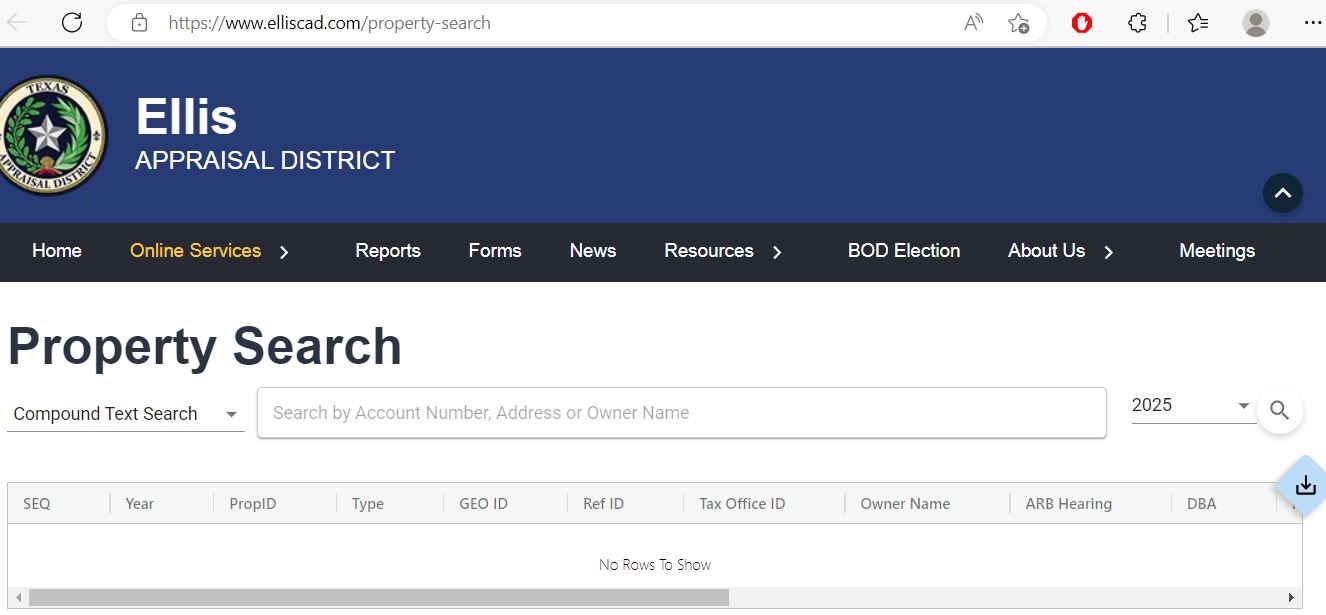
The old article image shows Ellis County—not El Paso County
The previous El Paso article included the image below. It is preserved because it was part of the existing page, but it must not be presented as an EPCAD screenshot.
Understand what an EPCAD property record does and does not prove
| Field | What it helps identify | What it does not prove | Best next action |
|---|---|---|---|
| Property ID | The EPCAD appraisal account. | That every tax or deed system uses the same identifier. | Use it for Property Services, forms and EPCAD calls. |
| Geographic ID | A parcel or location reference in the appraisal system. | A surveyed boundary. | Compare it with GIS, deeds, plats and surveys. |
| Owner shown | The owner carried for appraisal administration. | Complete title, liens or every ownership interest. | Use County Clerk records for legal ownership research. |
| Situs address | The physical property location when one is assigned. | The mailing address or complete legal description. | Compare unit, direction, ZIP code and map location. |
| Legal description | The lot, block, subdivision, survey or tract reference. | A complete deed-ready description. | Verify it with the recorded deed or plat. |
| Land value | The appraised contribution assigned to the land. | A separate sale price for the land. | Review neighborhood, access, terrain, zoning and use. |
| Improvement value | The appraised contribution of buildings and structures. | That square footage, class or condition is correct. | Compare the record with the actual improvements. |
| Market value | EPCAD’s opinion of market value as of January 1. | A guaranteed sale price or final tax bill. | Compare sales, equal appraisal and property condition. |
| Appraised value | Value after an applicable appraisal limitation. | Taxable value for every taxing unit. | Continue to exemption and taxable-value lines. |
| Taxable value | Value remaining after applicable exemptions. | The current amount due or payment status. | Open the El Paso tax-payment portal. |
Fix an EPCAD search that returns no result or the wrong property
| Problem | Likely reason | Practical fix |
|---|---|---|
| Owner search returns nothing | The account may use initials, a spouse, trust, estate, LLC or former owner. | Search only the surname or one distinctive business word. |
| Too many owner results | The name is common or incomplete. | Add a street name, property ID, GeoID or account detail. |
| Complete address fails | The portal may use an abbreviated suffix, direction, unit or alternate ZIP code. | Use only the street number and main street name. |
| Apartment or condominium is wrong | Several units share the same street address. | Match unit, property ID, GeoID and legal description. |
| New subdivision property is missing | The parcel, ownership or situs address may still be processing. | Search the parent tract, deed owner or geographic ID and contact EPCAD. |
| Recently purchased property shows seller | The recorded deed may not yet have completed appraisal-roll processing. | Confirm the deed recording and contact Deeds and Exemptions. |
| Desert-edge parcel has no normal address | The account may depend on legal description or geographic ID. | Use GeoID, Property ID, owner or legal-description information. |
| Mobile home is difficult to locate | The home and land may be represented differently or ownership documents may be incomplete. | Check EPCAD mobile-home guidance and property type. |
| 2026 values keep changing | EPCAD labels current-year information as work in progress. | Save the date viewed and rely on the latest notice or certified record. |
Local search tips for urban, suburban, Lower Valley and desert-edge property
Check street direction, subdivision, lot, building area, terrain and exemption status.
Newer streets and repeated model homes require careful property-ID and legal-description matching.
Review the city, school district, MUD and other special taxing units attached to the account.
Confirm city, school district, irrigation or water district and the correct parcel address.
Rural and Lower Valley property may be easier to match by legal description or GeoID than street address.
Match the unit, property ID, legal description and land-interest information rather than relying on the building address.
Confirm the real-property account separately from any business personal property account.
Check access, legal description, geographic ID, development status and recorded documents.
Review added improvements, completion percentage, quality, condition and new-construction value.
Separate market value, appraised value and taxable value
EPCAD’s opinion of what the property would sell for under normal market conditions as of January 1.
The value after an applicable homestead cap or other appraisal limitation.
The value remaining after exemptions. It may differ for each taxing unit.
Read the notice before deciding whether the issue is value, exemption or property data
Confirm property ID, owner, mailing address, situs address and legal description.
Compare prior and current land, improvement, market and appraised values.
Verify homestead, age, disability, veteran and other expected exemptions.
Check whether a homestead cap or circuit-breaker limitation appears.
Use the date printed on the notice rather than assuming every account had the same deadline.
Open the account to download notices, check status and access available actions.
Apply through Property Services or contact Deeds and Exemptions
The current state-mandated school-district exemption is $140,000 for a qualifying principal residence.
School districts currently provide an additional $60,000 exemption, along with a qualifying school-tax ceiling.
Use the correct veteran or survivor application and attach required VA documentation.
Eligible over-65 or disabled homeowners may use a deferral affidavit, but interest and later collection consequences require careful review.
Use EPCAD’s official mailing-address form rather than changing only the tax-office account.
File the official election separately with each tax official from whom electronic delivery is requested.
Build an El Paso appraisal protest around one clear issue
Evidence that fits common El Paso disputes
Timely online protest filing has closed—check late-protest options immediately
Convert evidence into formats EPCAD can retain and review
| Evidence type | EPCAD treatment | What to do |
|---|---|---|
| PDF, DOC, DOCX, TXT or RTF | Accepted document formats | Use clear filenames and combine related pages when practical. |
| JPG, JPEG, PNG, BMP or TIFF | Accepted image formats | Label the location, date and issue shown in each image. |
| CSV, XLS, XLSX and related spreadsheets | Accepted spreadsheet formats | Include headings and explain comparison calculations. |
| PPT or PPTX | Accepted presentation formats | Keep the presentation self-contained. |
| Video or audio | Not accepted | Convert useful still frames or factual information into accepted documents or images. |
| Google Drive, Dropbox or website links | Not accepted | Download the actual file and submit it directly. |
| HEIC, HEIF or Apple proprietary formats | Not accepted | Convert images to JPG or PNG before submission. |
| Phone-only photographs | Must be copied into EPCAD’s permanent record | Export the files in an accepted format before the hearing. |
Prepare for the El Paso Appraisal Review Board and protect the next deadline
The ARB is separate from EPCAD and resolves properly filed appraisal disputes.
A protest hearing may be requested in person, by video or by telephone, regardless of the initial filing route.
After the decision, preserve the certified Board Order and record the date received.
Use EPCAD’s 2026 taxpayer packet, hearing procedures, evidence guidelines and Texas Comptroller protest materials.
EPCAD links Spanish protest procedures and Texas Comptroller taxpayer resources for Spanish-speaking property owners.
File El Paso business renditions with account and asset details ready
Business personal property includes taxable assets used to produce income, such as furniture, fixtures, machinery, equipment, computers, vehicles and inventory.
Use the El Paso Consolidated Tax Office after checking EPCAD
| Payment route | Current official guidance | What to verify |
|---|---|---|
| Online card payment | Visa, Mastercard, American Express and Discover; 1.98% convenience fee. | Checkout total and correct tax year. |
| Online e-check | No convenience fee; $30 returned-check fee. | Use a checking account and confirm routing details. |
| Scheduled e-check | The portal permits future or recurring e-check payments. | Scheduled date, amount and available bank funds. |
| Multiple accounts | The shopping cart can include up to 50 accounts in one transaction. | Every property and year before entering payment information. |
| City of El Paso Tax Office, P.O. Box 2992, El Paso, Texas 79999-2992. | Postmark or carrier-receipt deadline and payment amount. | |
| Consolidated Tax Office | 221 N. Kansas, Suite 300, Monday-Friday 8:00 AM-5:00 PM. | Holiday closure, accepted payment and waiting time. |
| County tax offices | Current-year payments are accepted seasonally, generally October through January. | Location, current-year limitation and whether the tax bill is required. |
Use the El Paso County Clerk for deeds, liens and recording history
Suite 105
El Paso, Texas 79901
Phone: (915) 273-3532
Email: Recording@epcounty.com
Hours: Monday-Friday, 8:00 AM-5:00 PM.
Attention: Recording Division
500 E. San Antonio, Suite 105
El Paso, Texas 79901
Confirm current recording fees, identification requirements and acceptable payment before mailing.
Complete these checks before relying on an El Paso property record
Match property ID, GeoID, situs address, legal description and GIS location.
Use the County Clerk and a title professional instead of relying only on the EPCAD owner field.
Review current and prior years, payment history, overpayments and delinquent amounts.
The seller’s homestead, cap, age exemption or tax ceiling may not transfer.
Check city, school district, county, hospital, college, MUD, water and emergency districts.
Match EPCAD square footage, year, class, additions, garage, pool and condition with the real property.
Slope, mountain views, desert access, drainage and development status can affect comparability and use.
A commercial purchase may involve both a real-property account and separate business personal property.
Keep the deed, title policy, survey, closing statement, tax certificate and exemption confirmation.
Send the question to the El Paso office that controls the record
| Your question | Correct starting point | What to prepare |
|---|---|---|
| What is the appraised value? | El Paso Central Appraisal District | Property ID, tax year and disputed value field. |
| Why is homestead missing? | EPCAD Deeds and Exemptions | Application, identification, qualification date and submission proof. |
| How do I file or check a protest? | EPCAD / El Paso ARB Department | Notice, deadline, property ID and filing confirmation. |
| How much property tax is due? | El Paso Consolidated Tax Office | Property ID, tax account, owner and tax year. |
| Did my payment post? | El Paso Consolidated Tax Office | Receipt, confirmation number, amount and date. |
| Who legally owns the property? | El Paso County Clerk or title professional | Grantor, grantee, date range and legal description. |
| Where can I obtain a deed or lien? | County Clerk Recording Division | Names, recording date, instrument number and copy type. |
| How do I change the mailing address? | EPCAD | Property ID, owner information and official address-change form. |
| Where can I find open appraisal datasets? | EPCAD Open Government | Year, dataset type and technical storage capacity. |
Use EPCAD datasets only when a normal property search is not enough
EPCAD publishes appraisal-roll, real-estate, personal-property, export, schema and GIS resources for research and development use.
Useful for countywide analysis, but the current-year file can change during the appraisal cycle.
Supports larger property analyses that cannot be completed efficiently one account at a time.
Designed for development and research use, with privacy and interpretation limits.
Helpful for mapping, but not a substitute for a survey, deed or legal boundary determination.
Collective notice archives do not reflect every later account change or correction.
EPCAD warns that some compressed notice files require at least 100GB of free space after extraction.
Important El Paso appraisal and property-tax dates
Appraisal, exemption, protest, tax and recording offices
El Paso, Texas 79925
Main phone: (915) 780-2131
Fax: (915) 780-2130
Email: admin@epcad.org
Hours: Monday-Friday, 8:00 AM-5:00 PM.
Executive Director/Chief Appraiser: Dinah L. Kilgore, R.P.A.
Phone: (915) 780-2136
Use for homestead status, age exemption, ownership processing, missing online application and exemption documentation.
Phone: (915) 780-2123
Fax: (915) 792-0447
Hours: Monday-Friday, 8:00 AM-5:00 PM.
Use for protest status, hearings, late-protest questions and ARB procedure.
Phone: (915) 780-2182
Use for rendition accounts, PIN issues, extension status, asset reporting and online submission questions.
El Paso, Texas 79901
Phone: (915) 212-0106
Hours: Monday-Friday, 8:00 AM-5:00 PM.
Use for property-tax balances, payment, receipts, penalties and payment plans.
El Paso, Texas 79905
Phone: (915) 273-3430
Main-office hours: Monday-Friday, 8:00 AM-4:30 PM.
Tax Assessor-Collector: Ruben P. Gonzalez
El Paso, Texas 79901
Phone: (915) 273-3532
Email: Recording@epcounty.com
Hours: Monday-Friday, 8:00 AM-5:00 PM.
Prepare the property ID, GeoID, owner name, situs address, tax year, notice date and one clearly written question.
Confirm holiday closures, identification requirements, document format and payment method.
Official El Paso property resources
District information, news, deadlines, contacts and appraisal resources.
Open EPCADSearch by name, address, property ID or GeoID and open Property Services.
Open property searchProperty search, business renditions, protest services and Secure Send.
Open online servicesHomestead, veteran, deferral, agricultural, address-change and protest forms.
Open formsCurrent filing status, evidence rules, hearing schedule and appeal resources.
Open protest guidanceAccount-and-PIN submission, extensions and business asset guidance.
Open rendition servicesSearch balances, payments, overpayments and property-tax accounts.
Open tax searchOnline, mail, in-person, card, e-check and seasonal county-office guidance.
Open payment guidanceRecorded property documents, historic deed indexes and Recording Division help.
Open Recording DivisionAppraisal roll, real estate, personal property, export and GIS datasets.
Open EPCAD datasetsAscarate, Eastside, Fort Bliss, Northeast, Northwest, Ysleta and other offices.
View office locationsState guidance on protests, ARB hearings, late filings and appeals.
Open state guidanceHow this El Paso guide was corrected and expanded

Independent review of appraisal, tax and recording systems
This version preserves the images used on the existing article while openly identifying that the former property-search screenshot belonged to Ellis County rather than El Paso County.
The article was rebuilt around current EPCAD Property Services, 2026 protest status, evidence-format rules, homestead filing, business renditions, consolidated tax payments, County Clerk records, local search problems and practical next actions.
AppraisalDistrict.org is an independent informational website and is not operated by EPCAD, the El Paso ARB, El Paso County, the City of El Paso or the Texas Comptroller.
10 common El Paso appraisal and property-search questions
1. What is the official El Paso County Appraisal District website?
The official El Paso Central Appraisal District website is epcad.org. Use it for property search, exemptions, forms, renditions, appraisal notices, protests and evidence.
2. How do I search El Paso CAD property records?
Open EPCAD Property Search, select the correct year and search by owner name, address, property ID or geographic ID. Confirm the legal description and property identifiers before relying on the result.
3. Why does an EPCAD search show no result?
The account may use a different owner-name format, trust, estate, company, abbreviated street, unit number or geographic ID. Try a shorter owner name or address, then use property ID or GeoID.
4. How do I apply for an El Paso homestead exemption?
Find the property, open Property Services and use Apply for Homestead when available. Call Deeds and Exemptions at (915) 780-2136 if the button is missing or status is unclear.
5. What is the EPCAD protest deadline for 2026?
The normal deadline was May 15 or 30 days from the date on the Notice of Appraised Value, whichever was later. Timely online filing is now closed. Check Property Services and call the ARB Department at (915) 780-2123 about any possible late remedy.
6. What evidence formats does EPCAD accept?
EPCAD accepts common document, spreadsheet, presentation and image files such as PDF, DOCX, XLSX, JPG and PNG. It does not accept video, audio, cloud links, external website links or HEIC and HEIF files. Online evidence is limited to 25 files per account.
7. Does EPCAD collect property-tax payments?
No. EPCAD determines appraisal value and handles exemptions and protests. Use the El Paso Consolidated Tax Office for bills, balances, payments and receipts.
8. How do I pay El Paso property taxes online?
Use the official El Paso Property Tax Search. Verify the property and year, review any fee and save the confirmation and receipt.
9. Where can I search El Paso County deeds and liens?
Start with the El Paso County Clerk Recording Division and official county records-search resources.
10. Where is El Paso Central Appraisal District located?
EPCAD is located at 5801 Trowbridge Drive, El Paso, Texas 79925. The main number is (915) 780-2131, and published hours are Monday-Friday from 8:00 AM to 5:00 PM.