Trace a Culberson County Parcel Across Desert Land, Mineral, Tax and Deed Records
Start with Culberson County Appraisal District when you need a property ID, owner ID, geographic ID, legal description, acreage, appraisal value, exemption, agricultural classification, mineral account, tax balance or protest record.
Culberson County uses an unusual local arrangement: the appraisal district’s current website states that it also collects the participating county property taxes. Recorded ownership, liens and plats remain County Clerk records.
Use the property ID, owner ID or geographic ID when one is available.
The official search separates REAL, PERSONAL and MINERAL accounts.
1800 W. Broadway St., Suite 318, Van Horn.
Monday-Friday, 8 AM-4 PM; closed noon-1 PM.
Local portals and procedures reviewed July 2026.
What do you need from the Culberson County property record?
Use an owner, property ID, geographic ID, legal description, abstract, subdivision or address.
Follow the search workflowConfirm whether values are preliminary or certified and compare market, appraised and agricultural value.
Understand the value fieldsCheck the tax-due indicator and tax summary before opening Certified Payments.
Use the safe payment stepsIdentify whether the issue involves value, acreage, property facts, exemption, ownership or classification.
Build the protest fileUse owner, lease, property ID and mineral filters instead of relying on the surface-land account.
Review special accountsUse recorded instruments for legal ownership, liens, releases, plats and historical deed research.
Review Clerk guidanceSearch Culberson County appraisal and tax records without hiding the correct account
Use the Culberson CAD screenshot to choose the correct search route
The existing article’s official property-search image is preserved below. The live portal can change, so use the image to recognise the main search choices and then verify all information on the current website.
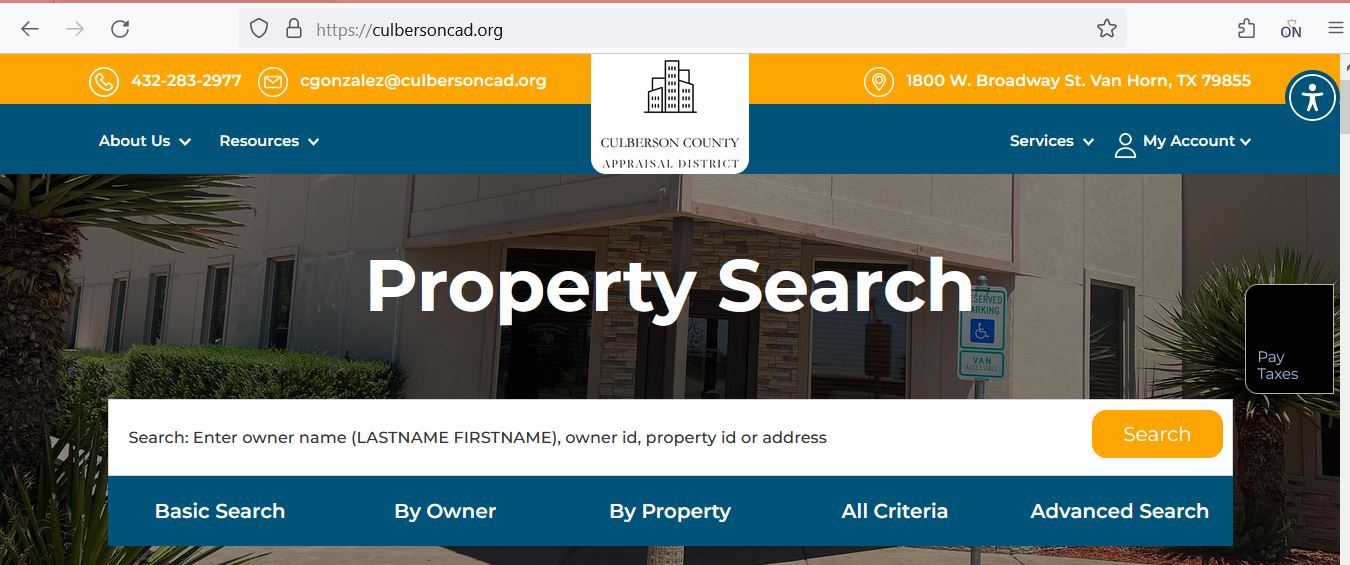
Choose the field that matches the kind of Culberson County property
| Search field | Use it when | What to verify |
|---|---|---|
| Property ID | You copied the account from a notice, statement or prior property page. | Tax year, property type, owner and legal description. |
| Owner ID | You need to locate accounts connected to one owner record. | Each parcel separately because an owner may have multiple surface or mineral accounts. |
| Owner name | You know a person, estate, trust, partnership or company. | Last-name-first format, initials, former owner and entity spelling. |
| Geographic ID | You are matching the property to a map or legal parcel reference. | Recorded deed and survey information before legal use. |
| Legal description | The tract has no standard address or is identified by block and section. | Abstract, survey, block, section, unit and parcel details. |
| Abstract | You are researching remote acreage or original-survey land. | The exact tract and acreage within the abstract. |
| Subdivision | You know a named rural subdivision or Van Horn addition. | Unit, parcel, lot, block and geographic ID. |
| Lease name or number | You are researching a mineral, pipeline, utility or industrial account. | Owner interest, operator, property type and tax year. |
| Property type | You need to separate REAL, PERSONAL and MINERAL accounts. | Whether multiple related accounts exist. |
| Tax due | You want the portal to show only accounts carrying a tax balance. | Every tax year and jurisdiction before paying. |
Understand the Culberson CAD account before using its numbers
| Field | What it tells you | What it does not prove | Next action |
|---|---|---|---|
| Parcel or Property ID | The account used by Culberson CAD. | That a deed or outside system uses the same identifier. | Use it when contacting CAD and paying through the official route. |
| Geographic ID | The geographic parcel reference carried in the appraisal record. | A surveyed boundary. | Compare the map, deed and survey. |
| Legal and additional legal information | Block, section, abstract, unit, parcel, subdivision or other parcel references. | That the abbreviated text is sufficient for a legal document. | Obtain the complete recorded deed. |
| Category code | How the property is classified for appraisal, such as rural improvements or farm and ranch land. | That the classification or use is correct. | Compare actual use, structures and special-appraisal status. |
| Total acres | The acreage carried for appraisal purposes. | Legally guaranteed or surveyed acreage. | Verify with the deed, plat and survey. |
| Value status | Whether displayed values are preliminary or certified. | That a preliminary value will remain unchanged. | Save the status line and recheck after certification. |
| Market value | CAD’s January 1 opinion of market value. | A guaranteed sale price or final tax bill. | Compare sales, use, access, terrain and equal-appraisal evidence. |
| Ag or timber value | The productivity-appraisal value applied to qualifying land. | That all acreage qualifies or that the use can change without consequences. | Review acreage, use history and application status. |
| Homestead cap or circuit-breaker loss | The amount excluded from appraised value by an applicable statutory limitation. | That market value or property facts are correct. | Review the underlying market value as well as the capped amount. |
| Taxing jurisdictions | The county, school, town and special districts attached to the account. | The live total due after penalties and payments. | Open the tax summary and payment history. |
Use the interactive map without treating a desert parcel outline as a survey
Separate market value, appraised value and taxable value
CAD’s opinion of value as of January 1, including land and improvements carried in the account.
The value after an applicable homestead cap, circuit breaker or productivity-appraisal rule.
The amount remaining after exemptions for each county, school, town or special district.
The amount may change before the appraisal roll is certified. Save the date and status line.
The appraisal roll has been certified for that year, although limited correction or appeal procedures may remain.
Use prior years to identify when land value, improvements, agricultural value or appraisal limitations changed.
Read the Culberson County Notice of Appraised Value before filing
Confirm the property ID, owner, property type, legal description and mailing address.
Compare land, improvements, market value, appraised value and prior-year values.
Check agricultural productivity value, qualifying acreage and any change in land classification.
Review homestead, age, disability, veteran and other expected benefits.
Keep the property ID, PIN and email information needed for the protest account.
Use the date printed on the notice rather than assuming every owner has the same deadline.
Request electronic delivery of qualifying appraisal notices
Beginning January 1, 2026, an owner of residential property occupied as the owner’s principal residence may submit a written request for email delivery of certain appraisal notices.
Fix common Culberson CAD search failures
| Problem | Likely reason | Practical fix |
|---|---|---|
| Owner name returns nothing | The account may use last-name-first format, initials, an estate, trust, company or prior owner. | Search only the last name, then try owner ID or property ID. |
| Address search fails | The property may use an abbreviated street, rural description or no situs address. | Use only the street number and name or switch to legal description. |
| Remote land is missing | The parcel may be indexed by abstract, block, section, subdivision, unit or geographic ID. | Use By Property, All Criteria and the interactive map. |
| Mineral account is not shown | REAL is selected or the mineral interest has a separate owner or lease account. | Choose MINERAL and search the owner, lease name or lease number. |
| Business account is not shown | The account may be PERSONAL property or use a legal business name. | Choose PERSONAL and search the legal entity or owner ID. |
| Recently purchased tract shows the seller | The deed may still be processing into the appraisal system. | Confirm recording with the County Clerk and save the document details. |
| Tax amount does not appear | The wrong year is selected, values are preliminary or the collection section has not loaded. | Change the year, open Collection Details and call CAD before paying. |
| Tax-due filter hides the property | The account may be paid, inactive or connected to another year. | Remove Show Only Properties With Tax Due and search again. |
| Acreage differs from a sales listing | The listing, deed, survey and CAD account may use different tract assumptions. | Compare the complete deed and a professional survey before purchase. |
Local search tips for Van Horn, ranch land, remote tracts and mineral accounts
Confirm the Town of Van Horn, Culberson-Allamore ISD, county, hospital and groundwater-district taxable values.
Match unit, parcel, subdivision, geographic ID and legal description instead of relying on a seller’s map pin.
Search block, section, abstract and additional legal information when no normal address exists.
Review acreage, category code, larger-tract field, agricultural value, improvements and multiple account IDs.
Compare market value with productivity value and verify qualifying use, acreage and application history.
Search MINERAL accounts separately by owner, property ID, geographic ID, lease name or lease number.
Confirm the operator, legal owner, situs, property type and Pritchard & Abbott appraisal information.
Search PERSONAL accounts and verify business assets, situs, rendition and depreciation category.
Search the deceased owner, estate and heirs, then review probate and recorded ownership documents.
Determine whether the home appears as real property, personal property or a separate account from the land.
Verify private ownership, access, easements and boundaries through title records rather than assuming adjacency creates access.
Confirm deed history, delinquent taxes, legal access, survey status, water availability and actual parcel location before paying.
Send each Culberson County property question to the office that controls it
| Your question | Correct starting point | What to prepare |
|---|---|---|
| What is the market or appraised value? | Culberson County Appraisal District | Property ID, year and the disputed value field. |
| Why is an exemption missing? | Culberson County Appraisal District | Application, identification, qualification date and proof of filing. |
| Does land qualify for agricultural appraisal? | Culberson County Appraisal District | Acreage, use history, leases, livestock or production evidence and maps. |
| What property tax is due? | Culberson CAD collection section | Property ID, owner, tax year and green tax statement. |
| Did an online payment post? | Culberson CAD | Certified Payments confirmation, amount, date, payer and tax year. |
| Who handles vehicles or voter registration? | Culberson County Tax Assessor-Collector | Identification and the vehicle or voter-registration documents. |
| Who legally owns the land? | Culberson County Clerk or a title professional | Grantor, grantee, recording period and legal description. |
| Where can I obtain a deed or plat? | Culberson County Clerk | Names, instrument information, date range and copy type. |
| Who appraises minerals, utilities and industrial property? | Culberson CAD with Pritchard & Abbott | Property ID, owner, operator, lease and tax year. |
| Who adopts the tax rate? | Each county, school, town or special taxing unit | The taxing-jurisdiction list from the property account. |
Correct the Culberson County record that owns the inaccurate information
Verify Culberson County exemptions before estimating the property tax
Confirm that the property is the owner’s principal residence and that the current account shows the exemption.
Review the additional exemption, school-tax ceiling and possible instalment or deferral options.
Check qualification evidence, exemption status and any applicable school-tax ceiling.
Use the correct veteran or surviving-spouse application and include required VA documentation.
Prepare ownership, occupancy and heirship evidence when the principal residence was inherited.
Use the correct property-specific form and include organisational and use documentation.
What to prepare before filing
Prepare differently for agricultural, mineral, utility and business property
Gather acreage, land-use history, grazing or production activity, leases, livestock records, photographs, maps and management evidence.
Compare market value with productivity value and verify that every qualifying acre is included.
Keep the qualifying management plan, annual report, activity records, photographs and maps tied to the exact property ID.
A management plan does not automatically qualify land that lacks the required prior open-space history.
Select MINERAL and search by owner, property ID, geographic ID, lease name or lease number.
Confirm the operator, ownership interest, producing property and tax year separately from the surface tract.
Culberson CAD states that Pritchard & Abbott appraises mineral, utility and industrial property for the district.
Prepare the property ID, legal owner, operator, asset description and appraisal year before requesting review.
Prepare a rendition listing taxable assets, location, acquisition year, cost and supporting depreciation information.
Save the rendition, extension request and confirmation.
Determine whether the property appears as REAL or PERSONAL and whether the home and land have separate owners or accounts.
Prepare title, statement-of-ownership and situs information when a correction is needed.
File a Culberson CAD protest around one clear issue
Evidence packet checklist
Use Culberson CAD’s current hearing procedures and public hearing search
Use Culberson CAD’s collection record before opening Certified Payments
| Check | Why it matters | What to save |
|---|---|---|
| Property ID | Remote tracts and similar legal descriptions can be easy to confuse. | Property-detail page and statement. |
| Tax year | The portal includes multiple years and payment history. | Year shown on the payment confirmation. |
| Property type | Surface, mineral and personal-property accounts can be separate. | Account description and property type. |
| Jurisdictions | The green statement can contain county, school, town and special-district taxes. | Statement or parcel-tax summary. |
| Penalties and interest | An old statement may not show the current payoff. | Live total due on the payment date. |
| Confirmation | The provider receipt is needed if posting is delayed or misapplied. | Screenshot, email and confirmation number. |
Use the Culberson County Clerk for deeds, liens, plats and historical ownership
Complete these checks before buying or inheriting Culberson County property
Match property ID, geographic ID, abstract, block, section, unit, parcel and acreage.
A parcel touching a road on a map does not automatically guarantee legal or practical access.
Search current and prior years, tax due, penalties, interest and payment history.
Contact the County Clerk and use a title company or attorney for a complete title examination.
CAD acreage and boundaries are not substitutes for a current professional survey.
Surface ownership does not automatically include every mineral interest.
Confirm qualifying acreage, use history and potential consequences of changing use.
Review county, school, town, groundwater and hospital-district lines.
Do not assume a remote parcel has a well, legal water source, electricity, wastewater service or nearby connection.
Verify private ownership and access when the tract is near public or protected land.
The seller’s homestead, agricultural status or appraisal limitation may not transfer.
Keep the deed, title policy, survey, tax statement, closing disclosure and exemption filing proof.
Use Culberson CAD reports when one property page is not enough
Review real and personal rolls in geographic, alphabetical or spreadsheet formats and separate mineral-roll files.
Use the reports to understand local valuation methods, schedules and appraisal processes.
Review workload, values, exemptions, district operations and appraisal statistics.
Useful for researching qualifying exempt properties and exemption administration.
Review the district’s planned appraisal activities and property-review cycle.
The district publishes a 2026 depreciation schedule useful for business-personal-property review.
Use the hearing procedures and presentation guide before appearing before the board.
Use historical rate information for context, not as a substitute for the current statement.
Review the district’s productivity-appraisal and farm-and-ranch taxpayer materials.
Important Culberson County appraisal and tax dates
Culberson County appraisal, collection and deed-record offices
Van Horn, Texas 79855
Mailing: P.O. Box 550, Van Horn, Texas 79855-0550
Phone: 432-283-2977
Fax: 432-283-0027
Email: cgonzalez@culbersoncad.org
Hours: Monday-Friday, 8:00 AM-4:00 PM; closed 12:00 PM-1:00 PM.
Chief Appraiser: Maricel “Chello” G. Gonzalez
Deputy Chief Appraiser: Andrea Ramirez
Deputy Tax Collector: Savannah Chacon
Use the main CAD number for appraisal accounts, tax balances, statements and payment-posting questions.
300 La Caverna Street
Van Horn, Texas 79855
Mailing: P.O. Box 668, Van Horn, Texas 79855
Phone: 432-283-2130
Fax: 432-283-1939
Email: aida.balcazar@co.culberson.tx.us
Tax Assessor-Collector: Aida O. Balcazar
Use this office for vehicle, voter-registration and county Tax Assessor-Collector services.
300 La Caverna Street
Van Horn, Texas 79855
Mailing: P.O. Box 158, Van Horn, Texas 79855
Phone: 432-283-2058
Fax: 432-283-2091
Email: tina.urias@co.culberson.tx.us
County Clerk: Tina Urias
Call before visiting for older real-property deed volumes or certified-copy requests.
Official Culberson County property resources
Search owners, property IDs, addresses, legal descriptions, abstracts, subdivisions, leases and tax due.
Open Culberson CADLocate rural tracts and compare surrounding parcel context.
Open interactive mapFind homestead, agricultural, wildlife, rendition and electronic-delivery forms.
Open official formsCreate or access an account for eligible electronic protest services.
Open protest portalReview public protest-hearing information and compare it with the formal notice.
Search protest hearingsAccess certified rolls, ARB procedures, annual reports, appraisal reports and schedules.
Open data and recordsUse only after confirming the property, tax year, total due and official Bureau Code 1179491.
Open payment providerUse for vehicle, voter-registration and county tax-office services.
Open Tax Assessor pageUse for deeds, liens, plats, certified copies and recorded-document questions.
Open County ClerkReview appraisal staff, board members, ARB members and local CAD details.
Open county appraisal pageVerify the chief appraiser, addresses, phone numbers and active taxing units.
Open Comptroller directoryCheck current county notices, including notices affecting older deed-record access.
Open Culberson CountyHow this Culberson County guide was researched and improved

Independent review of Culberson County appraisal, tax and deed workflows
This rebuild preserves the original property-search and editor images while adding complete guidance for rural land, property types, mineral accounts, appraisal values, tax collection, exemptions, protest evidence, deed access and local office routing.
Official resources reviewed include Culberson County Appraisal District, Culberson County government, the Tax Assessor-Collector, the County Clerk and Texas Comptroller property-tax guidance.
AppraisalDistrict.org is an independent informational website and is not operated by Culberson County Appraisal District or Culberson County.
10 common Culberson County appraisal and property-search questions
1. What is the official Culberson County Appraisal District website?
The official website is culbersoncad.org. It provides property search, maps, forms, online protest access, hearing information, appraisal reports and tax-payment routing.
2. How do I search Culberson County property records?
Use the official Culberson CAD search. Start with a property ID, owner ID or geographic ID. Otherwise search by owner last name, address, legal description, abstract, subdivision, lease name or lease number.
3. Why does a Culberson CAD property search show no result?
The wrong tax year or REAL, PERSONAL or MINERAL filter may be active. The parcel may also use a rural legal description or prior owner. Remove filters and try property ID, geographic ID, abstract or lease information.
4. Does Culberson County Appraisal District collect property taxes?
Culberson CAD’s current website states that the district began collecting Culberson County property taxes and now issues one green statement containing the participating county taxing entities.
5. How do I pay Culberson County property taxes online?
Search and verify the property through Culberson CAD, then use the official Certified Payments link with Bureau Code 1179491. Confirm the tax year, amount due, provider fee and payment confirmation.
6. How do I check a Culberson County homestead exemption?
Open the complete property record and review exemptions and taxable values. If an exemption is missing, use the official forms page, attach the required identification and keep proof of filing.
7. What is the Culberson County property-tax protest deadline for 2026?
Most protests are due by May 15 or by the 30th day after Culberson CAD mails the Notice of Appraised Value, whichever is later. The date printed on the notice controls.
8. How do I find a Culberson County mineral account?
Select MINERAL as the property type and search by owner, property ID, geographic ID, lease name or lease number. Mineral interests may be separate from the surface account.
9. Where can I obtain Culberson County deeds and land records?
Contact the Culberson County Clerk. Call before researching older documents because the county currently posts a notice concerning Real Property Deed Records Volumes 1-178.
10. Where is Culberson County Appraisal District located?
Culberson CAD is at 1800 W. Broadway Street, Suite 318, Van Horn, Texas 79855. Its mailing address is P.O. Box 550, Van Horn, Texas 79855, and its phone number is 432-283-2977.