
Use the Right Collingsworth County Account Before You Search, Protest or Pay
Collingsworth County Appraisal District maintains more than ordinary home records. Its official database includes real estate, mineral interests, business personal property, utilities and industrial accounts across Wellington, Dodson and rural areas connected to several school districts.
The most important local difference is payment routing: the Texas Comptroller states that the county Tax Assessor-Collector does not collect property taxes. Search the account through Collingsworth CAD, then call the CAD to verify the collecting office, payment method and receipt process.
The official search includes 2026 and earlier tax years.
Real estate, mineral and personal property filters.
800 West Avenue, Room 1, Wellington.
806-447-5172 for appraisal and collection routing.
Brittany Jameson.
806-447-2408 for deeds and recorded instruments.
What do you need from the Collingsworth County property system?
Search the property ID, owner or address and confirm the legal description, improvements and exemption status.
Follow the property-search stepsCheck acreage, abstract, land category, productivity value, improvements and agricultural qualification.
Use the agricultural checklistUse the property-type, lease, abstract and advanced filters instead of relying only on a street address.
Choose the correct account typeIdentify whether the issue is market value, unequal appraisal, classification, exemption or inaccurate property data.
Build a focused evidence packetThe county Tax Assessor-Collector does not collect property taxes, so obtain account-specific instructions from CAD.
Use the local payment checklistRecorded deeds, liens, mineral reservations, releases and plats control legal-document research.
Use the deed-record workflowSearch Collingsworth CAD without confusing the owner, year or property type
Use the official Collingsworth CAD screenshot to select the right search tab
The original article included the screenshot below. It is retained inside the search workflow and paired with exact guidance for each visible tab.
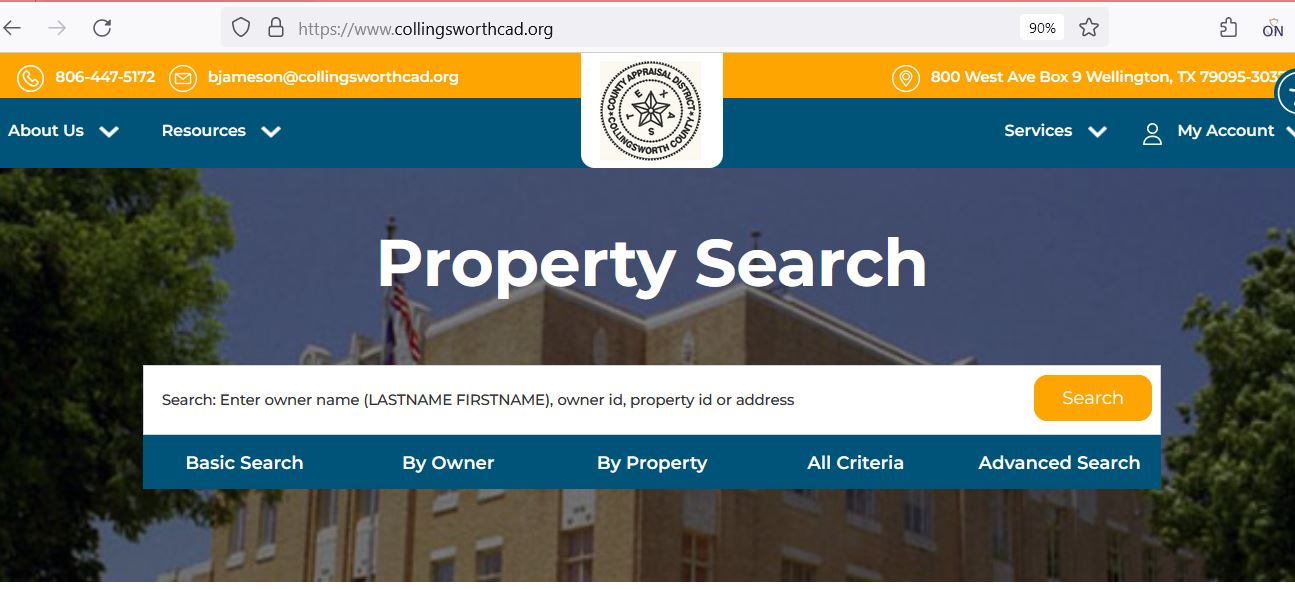
Check these fields before contacting Collingsworth CAD
| Attribute | What it tells you | What to do with it |
|---|---|---|
| 1. Parcel or property ID | The appraisal district’s primary property identifier. | Save it for forms, calls, protests and collection questions. |
| 2. Account number | An additional account reference shown in the results or details. | Confirm which number the collector or County Clerk expects. |
| 3. Owner ID | The owner record connected to one or more accounts. | Use it to locate related properties, but verify each account separately. |
| 4. Property type | Whether the account is real estate, mineral or personal property. | Never compare values until the property types match. |
| 5. Geo ID | A geographic reference connected to the parcel or account. | Compare it with the interactive map and legal description. |
| 6. Legal description | The abstract, survey, tract, lot, block or subdivision description. | Verify it against recorded deeds, plats and surveys. |
| 7. Lease information | A lease name or number connected to mineral property. | Match it with mineral deeds, leases, operator records and ownership documents. |
| 8. Acres | Acreage carried for appraisal purposes. | Confirm surveyed acreage before using it in a legal or purchase decision. |
| 9. Market and taxable value | Appraisal and exemption-related value information for the selected year. | Review the correct taxing-unit and property-type context. |
| 10. Base tax due | A tax-related figure displayed in the search grid. | Call Collingsworth CAD to verify the live balance, collector and payment instructions. |
Use a different workflow for real estate, mineral, personal and utility property
Homes, town lots, farmland, ranchland, commercial land and improvements.
- Check situs and legal description.
- Separate land from improvements.
- Review square footage and condition.
- Verify homestead or special appraisal.
Rural acreage that may receive productivity or open-space appraisal.
- Check abstract and acreage.
- Review qualifying use.
- Keep livestock, crop and lease records.
- Understand rollback exposure.
Royalty, working and other mineral interests that may be separate from the surface estate.
- Use lease name and number.
- Search owner and abstract.
- Review mineral-specific value evidence.
- Use County Clerk records for title.
Business assets, utilities, machinery, pipelines and other income-producing property.
- Confirm the legal entity and situs.
- Review category and asset records.
- Check the 2026 BPP exemption.
- File the required rendition.
Understand what the appraisal record does and does not prove
| Record field | Useful for | Does not replace | Next step |
|---|---|---|---|
| Owner shown | Appraisal notices, account searches and exemption administration. | A complete title examination. | Use the County Clerk for recorded ownership documents. |
| Situs address | Locating a home, business or improvement. | A legal description or guaranteed rural address. | Compare the map, deed and legal description. |
| Legal description | Identifying the abstract, survey, tract, lot or block. | The complete recorded deed or survey. | Obtain the relevant recorded instrument. |
| Market value | Understanding CAD’s January 1 value opinion. | A guaranteed sale price or current tax balance. | Compare appraisal evidence or contact the collector. |
| Productivity value | Reviewing qualifying agricultural or open-space land. | Proof that the land continues to qualify. | Keep current land-use evidence. |
| Exemption | Checking homestead, age, disability, veteran or other relief. | Approval for another property or year. | Confirm the exemption on the 2026 account. |
| Map parcel | Visual location and nearby-property context. | A legal survey or boundary determination. | Use a professional survey for boundary decisions. |
| Tax due | Identifying an account that may have an outstanding balance. | A live payoff, receipt or collector confirmation. | Call Collingsworth CAD before paying. |
Fix a missing Collingsworth CAD result before assuming the account is absent
| Problem | Likely reason | Practical fix |
|---|---|---|
| Owner name shows no result | The record may use initials, another name order, a spouse, estate, trust or company. | Search only the last name or one distinctive business word. |
| Full address fails | The record may use a different suffix, direction, city or rural-location format. | Use only the street number and main street name. |
| Farm or ranch has no normal address | The account may be indexed by abstract, legal description, Geo ID or owner. | Use By Property, All Criteria or the map. |
| Only the surface account appears | The mineral interest may be listed separately. | Select Mineral and search the owner, lease or abstract. |
| Business account is missing | It may be indexed under the legal entity, DBA, owner ID or personal-property type. | Search the business name and Personal Property filter. |
| New owner is not shown | The deed may still be processing from the County Clerk. | Confirm the recorded instrument and give CAD the filing reference. |
| A tract split is missing | The new parcel may not yet be publicly reflected. | Search the parent tract, prior owner and recorded plat or deed. |
| Tax-due filter hides the account | The account may not currently show a balance in that search view. | Remove “Show only Properties with Tax Due” and search again. |
| Online protest login fails | The user account or property PIN may not be connected. | Register, request a PIN and contact CAD before the deadline if access remains unavailable. |
Use the Collingsworth CAD interactive map without treating it as a survey
Separate market value, limited value and taxable value
CAD’s opinion of what the property would sell for under normal market conditions as of January 1.
The value after an applicable homestead cap, circuit-breaker limit or special appraisal.
The value after exemptions, used with each taxing unit’s adopted rate to calculate taxes.
A qualifying homestead’s appraised value generally cannot increase by more than 10% per year, excluding new improvements.
Qualifying non-homestead real property valued at $5.32 million or less may receive the temporary 20% circuit-breaker limitation.
Qualifying open-space land may be appraised from agricultural productivity rather than full market value.
Search differently for Wellington, Dodson and rural school-district property
Confirm City of Wellington, Wellington ISD, county, hospital, flood-control and water-district treatment where applicable.
Check City of Dodson, legal description, improvement details and the correct school district.
Use owner, abstract, survey, tract and map searches rather than depending on a street address.
Collingsworth County includes property connected to Wellington, Hedley, McLean, Memphis and Shamrock school districts.
Select the mineral filter and match the lease, abstract, owner and recorded mineral documents.
Check houses, barns, sheds, pens, mobile homes and other improvements separately from the land.
Search for a separate personal-property account and review the new 2026 $125,000 BPP exemption.
Use category and advanced filters because the account may not correspond to a normal surface address.
Compare CAD ownership with deeds, probate records, heir-property affidavits and current mailing addresses.
Send each Collingsworth County question to the office that controls it
| Your question | Correct starting point | Prepare before contacting |
|---|---|---|
| What is the appraised value? | Collingsworth CAD | Property ID, type, tax year and disputed field. |
| Why is my exemption missing? | Collingsworth CAD | Application, qualification date, identification and submission proof. |
| Where do I pay property tax? | Contact Collingsworth CAD first | Property ID, account, year, property type and tax-due record. |
| What is the live payoff? | Collector identified by Collingsworth CAD | All outstanding years and written payoff request. |
| Do I have a vehicle-registration issue? | County Tax Assessor-Collector | Vehicle title, registration or TxDMV documents. |
| Who legally owns the land? | County Clerk or title professional | Grantor, grantee, instrument number and legal description. |
| Who owns the minerals? | County Clerk records and mineral-title professional | Deeds, reservations, leases, probate and chain-of-title documents. |
| Who sets the tax rate? | Each local taxing unit | The complete taxing-unit list for the property. |
Correct the source of the inaccurate property information
Verify the exemption on the 2026 account before estimating taxes
Texas school districts provide a $140,000 general residence-homestead exemption.
School districts provide an additional $60,000 exemption, with possible tax-ceiling and payment protections.
Review qualification evidence and the additional school-district exemption.
Use the appropriate state form and current VA documentation for the claimed category.
Prepare affidavits, the prior owner’s death certificate, utility evidence and available court records.
Review charitable, religious, timber, public-use and other state exemption forms as applicable.
What to prepare for a homestead application
Use the new $125,000 business personal property exemption correctly
Furniture, fixtures, machinery, equipment, inventory and other income-producing tangible personal property.
The exemption is generally calculated for property at each separate location within a taxing unit.
Property owned by related entities operating as one unified enterprise may be aggregated under the statutory rules.
Special aggregation rules apply to income-producing personal property owned and leased by a person.
Business owners should not assume the exemption eliminates every filing or documentation requirement.
The property’s taxable treatment can differ based on situs, location, ownership and the taxing unit involved.
Business owner action list
Document qualifying use instead of relying only on acreage
- Confirm the owner and legal description.
- Review qualifying-use history.
- Keep livestock, crop, grazing and lease records.
- Document fences, water, stocking and management.
- Compare market value with productivity value.
- Ask about rollback consequences before changing use.
- Confirm that the land first qualifies for open-space appraisal.
- Prepare a written wildlife-management plan.
- Keep dated activity and expense records.
- Document habitat, water, food, census and predator-control practices.
- Retain photographs and maps.
- Report material use changes promptly.
File against the correct property type and support one clear issue
| Account | Useful evidence | Common mistake |
|---|---|---|
| Home or commercial building | Comparable sales, equal-appraisal accounts, photographs, measurements, repair estimates and closing records. | Arguing only that the tax bill is high. |
| Farm or ranch land | Deed, survey, land-use records, leases, productivity evidence, acreage and classification documents. | Using unrelated town-lot sales. |
| Mineral property | Lease information, ownership documents, operator records and mineral-specific valuation evidence. | Using only surface-property sales. |
| Business personal property | Asset schedules, invoices, age, condition, depreciation, disposal proof and rendition records. | Submitting an unlabeled total without asset detail. |
Connect the PIN, online protest and hearing-search tools
Create an official portal account using an email address and secure password.
Register for an accountConnect the property to the online account and preserve confirmation of the request.
Request a PINReview available hearing information, but follow the written hearing notice as the controlling schedule.
View protest hearingsUse Collingsworth CAD’s published records before requesting a custom file
The Data and Records page contains information that can answer many appraisal, tax-rate, methodology and certified-roll questions without a broad open-records request.
The page provides 2026 certified real and personal appraisal-roll files in geographic, alphabetical and spreadsheet formats.
Historical certified mineral-roll downloads are available for several prior tax years.
Use the reports to understand appraisal methodology and valuation processes.
Review district activity, workload and annual appraisal information.
Historical adopted rates are useful for prior-year research but do not establish 2026 rates.
Review hearing procedures and taxpayer-assistance materials before a formal hearing.
Confirm the property-tax collector before sending payment
Use the county tax office for vehicle and assessor-collector services—not appraisal disputes
- Vehicle title and registration routing
- TxDMV forms and information
- County Tax Assessor-Collector contact
- Other county services assigned to the elected office
- Property value and classification
- Homestead and other exemptions
- Agricultural appraisal
- Business personal property
- Appraisal protests and ARB matters
- Property-tax collector confirmation
Use the County Clerk for deeds, liens, mineral reservations and plats
Complete these checks before relying on a Collingsworth County account
Confirm property ID, Geo ID, legal description, abstract, acreage and map location.
Review mineral deeds, reservations, leases, probate documents and separate appraisal accounts.
Obtain collector instructions for every real, mineral and personal-property account involved.
The seller’s homestead exemption, cap, tax ceiling or agricultural appraisal may not transfer.
Confirm use history, productivity appraisal and possible rollback-tax exposure.
Compare CAD’s house, barn, shed, mobile-home and other improvement details with the property.
Verify whether the parcel is connected to Wellington, Hedley, McLean, Memphis or Shamrock ISD.
Use a survey, recorded easements and road-access documents—not only the CAD map.
Keep the deed, title policy, survey, closing statement, tax payoff, mineral documents and exemption proof.
Important Collingsworth County appraisal and tax dates
Collingsworth County appraisal, vehicle and property-record offices
Wellington, Texas 79095-3037
Mailing: 800 West Avenue, Box 9
Wellington, Texas 79095-3037
Main phone: (806) 447-5172
Fax: (806) 447-2198
Email: bjameson@collingsworthcad.org
Chief Appraiser: Brittany Jameson
Use for appraisals, exemptions, maps, protests, account PINs, property-tax collection routing and payment instructions.
Chief Appraiser Brittany Jameson: (806) 447-0728
Deputy Chief Appraiser Connie Granadoz: (806) 447-0729
Appraiser Juda Nation: (806) 447-0727
Use the main CAD number when unsure which staff member handles the account.
Wellington, Texas 79095
Phone: (806) 447-5606
Fax: (806) 447-2251
Email: sharon.chism@co.collingsworth.tx.us
Tax Assessor-Collector: Sharon Sherwood
Property-tax warning: this office does not collect property taxes.
Wellington, Texas 79095
Phone: (806) 447-2408
Fax: (806) 447-2409
Email: collingsworthclerk@co.collingsworth.tx.us
County Clerk: Jackie Johnson
Use for deeds, liens, releases, plats and other Official Public Records.
Call the destination office to confirm public-counter hours, holiday closures, identification, accepted payment and document requirements.
Property ID, account, owner ID, property type, tax year, address, legal description, lease information and a short written explanation of the task.
Official Collingsworth County property resources
Start with the official search, current notices, services and local tax information.
Open Collingsworth CADSearch 2026 real estate, mineral and personal-property accounts.
Open property searchCheck parcel location and surrounding appraisal-map context.
Open the mapDownload homestead, agricultural, veteran, rendition and other state forms.
Open formsRegister or sign in to use supported online protest services.
Open online protestRequest the unique online account PIN for a property.
Request a PINReview available hearing information and open-protest records.
View hearingsAccess certified rolls, appraisal reports, annual reports, tax rates and ARB procedures.
Open Data and RecordsUse for vehicle title and registration routing, not property-tax collection.
Open county tax officeUse for deeds, liens, releases, plats and Official Public Records.
Open County ClerkFind proposed and adopted tax-rate information during the local rate-setting period.
Open Texas tax transparencyCross-check CAD, county tax-office and taxing-unit information.
Open county directoryHow this Collingsworth County guide was improved

Independent review focused on complete user tasks
This version preserves the original property-search screenshot while rebuilding the page around exact 2026 tasks: account classification, owner and property search, rural and mineral troubleshooting, exemptions, the new business-personal-property rules, agricultural appraisal, protests, tax collection and recorded documents.
It also corrects a locally important routing issue that can otherwise send property owners to the wrong office: the county Tax Assessor-Collector does not collect property taxes.
AppraisalDistrict.org is an independent informational website and is not operated by Collingsworth County Appraisal District, Collingsworth County or the Texas Comptroller.
10 common Collingsworth County appraisal and property questions
1. What is the official Collingsworth County Appraisal District website?
The official website is collingsworthcad.org. Use it for property search, maps, forms, protests, PIN requests and appraisal records.
2. How do I search Collingsworth County property records?
Open the official search, select the correct tax year and property type, and search by property ID, owner ID, owner name, address, Geo ID, legal description, abstract, subdivision or lease.
3. Can I search Collingsworth County mineral property?
Yes. Select Mineral under Property Type and search by owner, property ID, lease name, lease number, abstract or legal description.
4. Who collects Collingsworth County property taxes?
The Texas Comptroller states that the county Tax Assessor-Collector does not collect property taxes. Call Collingsworth CAD at (806) 447-5172 to verify the collector and payment instructions for the account.
5. What is the 2026 protest deadline?
Most protests are due by May 15 or 30 days after CAD mails the Notice of Appraised Value, whichever is later. Use the deadline on the individual notice.
6. How do I obtain an online account PIN?
Use the official Request a Pin page, create or sign in to an account and provide the requested property information.
7. How do I apply for a homestead exemption?
Search the property first, download the form from the official forms page, attach the required identification or affidavits and retain proof of submission.
8. What changed for business personal property in 2026?
Texas now provides a $125,000 exemption for qualifying income-producing tangible personal property. Businesses should still review account, location, aggregation, exemption and rendition rules with CAD.
9. Where can I obtain deeds and liens?
Contact the Collingsworth County Clerk at (806) 447-2408.
10. Where is Collingsworth County Appraisal District located?
The office is at 800 West Avenue, Room 1, Wellington, Texas 79095. The mailing address is 800 West Avenue, Box 9, Wellington, Texas 79095-3037.