Guide a Colorado County Property Through Search, Tax Payment and Legal-Record Verification
Start with Colorado County Appraisal District when you need a property ID, owner record, situs address, legal description, market value, agricultural appraisal, exemption, appraisal notice, online protest or property-tax balance.
Colorado CAD both appraises property and collects property taxes. The County Tax Assessor-Collector handles vehicle and title services, while the County Clerk controls deeds, liens and recorded real-property documents.
Colorado CAD certified the 2026 appraisal values on July 16, 2026.
District appraisers may be inspecting properties for Tax Year 2027.
106 Cardinal Lane, Columbus, Texas 78934.
Colorado CAD published May 29, 2026 as the regular deadline.
Links, contacts and current notices checked July 31, 2026.
What do you need from the Colorado County property record?
Use owner, address, property ID or Advanced Search and confirm the legal description.
Follow the search workflowVerify the account and year, read the processing fee and save the payment receipt.
Use the payment checklistConfirm homestead, senior, disability, veteran or inherited-home treatment.
Prepare an exemption filingSeparate market value, unequal appraisal, property data, ownership and exemption issues.
Review protest and late optionsSearch deeds, liens, releases and recorded legal descriptions instead of relying on the CAD owner field.
Search recorded documentsReview taxes, title, floodplain, rural addressing, subdivision and septic requirements.
Use the property checklistSearch Colorado County records with the strongest available identifier
Use the Colorado CAD screenshot to choose the correct search route
The property-search image already used in the existing article is preserved below. It shows the official search choices and should be used as an orientation guide—not as a current property record.
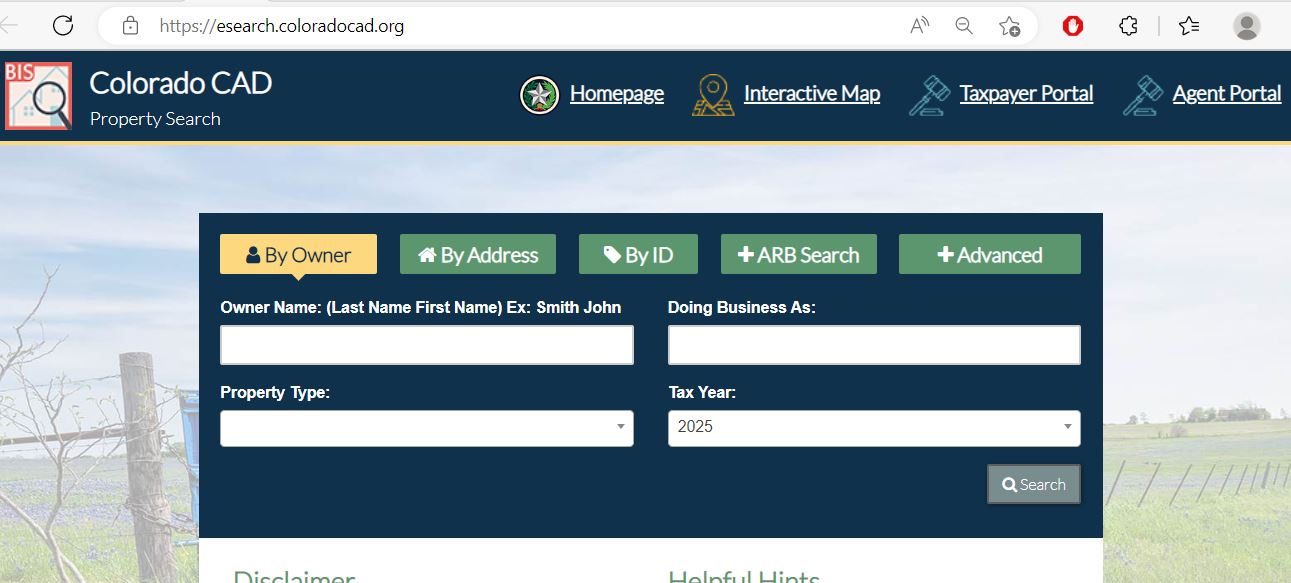
Choose the Colorado CAD filter that fits the property
| Search field | Use it when | Important check |
|---|---|---|
| Owner name | You know the person, trust, estate, partnership or company. | Try the last name alone and search reasonable spelling variations. |
| Doing Business As | The property may be indexed under a store, farm, dealer or trade name. | A DBA does not establish legal ownership. |
| Property ID | You copied the identifier from a notice, bill or saved account. | Confirm the property type and year after opening the result. |
| Geographic ID | You need to match the appraisal account to a parcel or map. | Do not treat it as proof of surveyed boundaries. |
| Address | You know the physical property location. | Use only the street name when the full address fails. |
| Subdivision | The property is within a named addition or development. | Match lot, block, section and legal description. |
| Property type | You need to separate real, personal, mineral or manufactured-home records. | One location may have several related accounts. |
| Advanced Search | An owner or address search returns too many results. | Add only one narrowing field at a time. |
| ARB Search | You are researching protest, hearing or ARB information. | The written hearing notice controls the schedule. |
Understand what the Colorado CAD account does and does not prove
| Field | What it identifies | What it does not prove | Next action |
|---|---|---|---|
| Property ID | The appraisal and collection account used by Colorado CAD. | That a deed or permit system uses the same number. | Use it for CAD calls, forms, protests and tax payments. |
| Owner shown | The owner carried for appraisal and tax administration. | Complete legal title, liens or deed history. | Search Colorado County Clerk records. |
| Situs address | The physical location carried in the appraisal account. | The mailing address or assigned rural address. | Compare the map and contact 911 Rural Addressing if needed. |
| Legal description | The abbreviated lot, block, tract, survey or subdivision reference. | A complete deed-quality legal description. | Open the recorded deed, plat or survey. |
| Acreage | The acreage carried for appraisal purposes. | Professionally surveyed or legally guaranteed acreage. | Verify through deed and survey records. |
| Market value | CAD’s opinion of market value as of January 1. | A guaranteed selling price or final tax bill. | Compare sales, condition and equal-appraisal evidence. |
| Appraised value | The applicable value after an appraisal limitation. | The value after every exemption. | Review taxable value for each taxing unit. |
| Productivity value | Special value assigned to qualifying agricultural, timber or wildlife land. | That qualification survives a sale or change of use. | Review the application and current qualifying use. |
| Taxable value | Value after applicable exemptions and reductions. | The exact payoff, penalty or payment status. | Open the collection details or contact Colorado CAD. |
| Tax information | The tax data displayed in Colorado CAD’s public system. | An exact same-day payoff in every situation. | Contact the collections department for an exact status. |
Use Colorado CAD’s map for parcel orientation—not legal boundaries
Verify a Colorado CAD appraiser before allowing an inspection
Separate market value, appraised value and taxable value
Colorado CAD’s opinion of what the property would sell for under normal conditions as of January 1.
The applicable value after a homestead cap, circuit-breaker limitation or qualifying special appraisal.
The value remaining after exemptions for each county, city, school or special district.
Check whether the 20% circuit-breaker limitation applies
Colorado CAD’s 2026 information explains that qualifying real property valued at $5 million or less may receive a 20% annual limitation on net appraised value.
Qualifying non-homestead real property valued at $5 million or less.
Residence homesteads already receiving the 10% limitation and land receiving agricultural-use special appraisal.
New improvements can be added outside the limitation; ordinary maintenance is treated differently.
Fix common Colorado CAD search failures before calling
| Problem | Likely reason | Practical fix |
|---|---|---|
| Owner name shows nothing | The account may use initials, a spouse, trust, estate, company or prior owner. | Search only the last name or one distinctive business word. |
| Too many owner results | The name is common or the owner has several tracts. | Add the address, property type, subdivision or property ID. |
| Full address fails | The database may use a different suffix, direction, city or rural-address format. | Search only the main street name. |
| Farm or ranch has no normal address | The tract may be indexed mainly by owner, property ID or legal description. | Search the owner or ID and verify the parcel on the interactive map. |
| Manufactured home is missing | The home may have a separate improvement-only or personal-property account. | Search all relevant property types and the owner name. |
| New owner is not shown | The recorded deed may still be processing into the appraisal system. | Confirm the Clerk instrument number and contact Colorado CAD. |
| Acreage differs from the deed | The appraisal account may use an abbreviated or older record. | Prepare the deed, plat and survey before requesting correction. |
| Tax amount appears outdated | Public tax information may update periodically rather than instantly. | Contact collections for an exact payoff or payment-posting status. |
| Search portal will not load | The vendor may be undergoing maintenance or the browser session may have expired. | Return through coloradocad.org, try another browser and call when a deadline is urgent. |
Local search tips for Columbus, Eagle Lake, Weimar and rural land
Check the city, Columbus ISD, county and any applicable groundwater or special-district taxable values.
Confirm City of Eagle Lake, Rice CISD, Rice Hospital District and applicable water or groundwater units.
Verify City of Weimar, Weimar ISD and county tax lines rather than using a countywide estimate.
Review agricultural use, productivity value, irrigation, water district, acreage and improvement accounts.
Check whether Glidden Fresh Water Supply District No. 1 appears on the account.
Review the parcel, Falls MUD treatment, deed restrictions and county development requirements.
Confirm acreage, agricultural classification, fences, barns, rural addressing, septic and floodplain status.
Use the timber special-appraisal forms and verify qualifying use and land history.
Search the legal entity, DBA, owner and property type. Industrial and mineral accounts may involve a contracted appraisal provider.
Send each Colorado County property question to the correct office
| Your question | Correct starting point | What to prepare |
|---|---|---|
| What is the market or appraised value? | Colorado County Appraisal District | Property ID, tax year and disputed value field. |
| Why is an exemption missing? | Colorado County Appraisal District | Application, identification and qualification evidence. |
| What is the exact property-tax balance? | Colorado CAD Collections | Property ID, owner and every relevant tax year. |
| Did my payment post? | Colorado CAD Collections | Receipt, confirmation number, amount, date and year. |
| Who legally owns the property? | Colorado County Clerk or title professional | Grantor, grantee, date range, instrument and legal description. |
| Where can I find a deed, lien or release? | Colorado County Clerk | Names, document type, date and property description. |
| How do I obtain a rural address? | Floodplain Management and 911 Rural Addressing | Parcel, owner, development information and entrance location. |
| Do I need a development or floodplain permit? | Colorado County Floodplain Management | Property location, project plan, floodplain information and proposed use. |
| Do I need a septic permit? | Colorado County OSSF Department | Property location, system design and proposed construction. |
| Where do I register a vehicle? | Colorado County Tax Assessor-Collector | Vehicle, title, identification and insurance documents. |
Use Colorado CAD’s specific taxpayer forms instead of sending a vague request
Verify every Colorado County exemption on the current account
Confirm that the property is the owner’s principal residence and the current account shows the exemption.
Review the additional exemption, school-tax ceiling, instalment option and possible deferral.
Check qualification evidence, additional exemption, instalment option and possible tax deferral.
Use the correct application and attach the VA documentation required for the claimed category.
Review Colorado CAD’s inherited-home guidance and prepare heirship, occupancy and ownership evidence.
Use the official forms page for charitable, religious, Freeport and other property-specific applications.
What to prepare before filing
Document the qualifying use of Colorado County rural land
Colorado CAD provides forms for 1-d and 1-d-1 agricultural appraisal, timber appraisal, wildlife management and agricultural-use history.
Keep planting, harvesting, irrigation, lease, input and production records connected to each tract.
Prepare livestock numbers, leases, fencing, water, receipts and evidence of the land’s agricultural use.
Keep the management plan, qualifying practices, annual activity records, photographs and receipts.
Use the correct timber application and verify the land’s qualifying use and ownership history.
Do not assume the seller’s special appraisal automatically continues after the deed changes.
Ask about additional taxes before converting qualified land to residential, commercial or another nonqualifying use.
Match the business account to its DBA, owner and January 1 location
Try the legal entity, DBA, individual owner, agent and property ID.
Check where the assets were located or used on January 1 of the tax year.
Compare inventory, furniture, machinery, equipment and other income-producing property.
Compare the district’s schedule with asset age, cost, condition, disposal and supporting records.
The normal Texas rendition deadline is April 15, subject to a timely extension request.
The building account does not automatically include the business assets operated inside it.
Use the current Colorado CAD status before filing a protest request
Protest evidence checklist
Pay Colorado County property taxes through Colorado CAD
| Option | Published guidance | What to verify |
|---|---|---|
| Full online payment | Available through Colorado CAD’s official payment provider. | Account, year, amount and processing fee. |
| Current partial payment | Colorado CAD states that current payments of any amount may be accepted after statements are mailed and before delinquency. | Remaining balance and whether the account will still become delinquent. |
| Four instalments | Qualifying over-65 or disabled residence-homestead owners may pay January 31, March 31, May 31 and July 31. | Exemption status and timely first instalment. |
| Delinquent arrangement | The district states that options may be available for delinquent taxes. | Current payoff, written terms and continuing charges. |
| Early-payment discount | Colorado CAD states that it does not currently offer early-payment discounts. | Current policy before relying on a discount. |
| Tax certificate | The district publishes a $10 prepaid tax-certificate fee. | Property ID, number of certificates and delivery method. |
Enroll in Colorado CAD electronic communications without missing the PIN step
Use Colorado County Clerk records when legal ownership matters
| Service | Posted amount | Important step |
|---|---|---|
| Plain Clerk record copy | $1 per page | Confirm page count and current fee before ordering. |
| Certified Clerk record copy | $5 certification plus $1 per page | Confirm that certification is actually required. |
| Official public-record filing | The posted recording chart begins at $25 for one page and adds $4 for each additional page. | Ask about headings, names, attachments and current statutory fees. |
Register for Colorado County Property Fraud Alert
The Colorado County Clerk offers an online subscription service that monitors registered names in the Recorder’s records and sends an alert when a matching document is recorded.
Check appraisal, title, floodplain, addressing and septic records
Match property ID, legal description, acreage, map position, deed and professional survey.
Review current, delinquent and partially paid balances and request an exact payoff when closing.
Review recorded documents and use a title company or attorney for a full examination.
The seller’s homestead exemption, cap, tax ceiling or special appraisal may not transfer.
Review county floodplain maps and permit requirements before building or placing improvements.
Use the county’s 911 Rural Addressing and Development Permit application for unincorporated property.
A permit and approved plan are required to construct, alter, repair, replace or operate an on-site sewage facility.
Confirm county plat, access, drainage and development requirements before dividing rural land.
Identify groundwater, water-control, MUD, hospital and fresh-water districts attached to the parcel.
Check every taxing unit attached to the Colorado County property
Colorado County and applicable cities such as Columbus, Eagle Lake and Weimar.
Columbus ISD, Rice CISD, Weimar ISD and other cross-county school treatment where applicable.
Coastal Bend Groundwater Conservation District or Colorado County Groundwater Conservation District.
Colorado County WCID No. 2, Glidden FWSD No. 1 or another applicable unit.
Rice Hospital District, Falls MUD or another property-specific district.
The complete appraisal and tax account controls which units apply to one parcel.
Important Colorado County property dates
Colorado County appraisal, collection, deed and permitting offices
Columbus, Texas 78934
Mailing: P.O. Box 10, Columbus, Texas 78934
Phone: (979) 732-8222
Fax: (979) 733-0390
Collections fax: (979) 732-6485
Chief Appraiser: Jane Armontrout
Hours: Monday-Friday, 8:00 AM-5:00 PM.
Use for appraisal, exemptions, forms, protests, property taxes, receipts and tax certificates.
Business Operations and Collections: Olga Poncik, extension 214.
Collections assistant and Truth in Taxation: Marcella Pflughaupt, extension 215.
Delinquent accounts and tax certificates: Samantha Milan, extension 217.
Call the main number and request the appropriate extension.
318 Spring Street, Room 102
Columbus, Texas 78934
Phone: (979) 732-2710
Fax: (979) 732-9622
Email: tac@co.colorado.tx.us
Tax Assessor-Collector: Melinda A. Zajicek
Hours: Monday-Friday, 8:00 AM-5:00 PM; open during lunch.
This office does not collect property taxes.
318 Spring Street, Room 103
Columbus, Texas 78934
Phone: (979) 732-2155
Fax: (979) 732-8852
Email: countyclerk@co.colorado.tx.us
County Clerk: Kimberly Menke
Hours: Monday-Friday, 8:00 AM-12:00 PM and 1:00 PM-5:00 PM.
Columbus, Texas 78934
Phone: (979) 732-6380
Fax: (979) 733-0274
Email: ccpermits@co.colorado.tx.us
Coordinator: Caleb Tello
Columbus, Texas 78934
Phone: (979) 732-2435
Fax: (979) 733-0274
Email: ccpermits@co.colorado.tx.us
Coordinator: Richard Wessels
Official Colorado County property resources
Use for current notices, inspection updates, contacts and official service links.
Open Colorado CADSearch owners, addresses, IDs, values, exemptions and tax information.
Open property searchLocate parcels and compare surrounding appraisal-map information.
Open mapFind exemptions, protests, renditions, splits, merges and taxpayer forms.
Open formsFile or manage an eligible appraisal protest through Colorado CAD.
Open eProtestPay through Certified Payments using Colorado CAD Bureau Code 7334020.
Open payment portalAccess property details, applications and electronic-communication enrollment.
Open Taxpayer PortalReview property-specific taxing units, proposed rates and public hearings.
Open tax-rate portalFind tax rates, taxable values, depreciation, ag guidelines and appraisal reports.
Open reportsUse for deed recording, copy fees, fraud alerts and official public records.
Open County ClerkSearch deeds, liens, releases and other Clerk records.
Open Records Public AccessReview rural addressing, development, floodplain and septic requirements.
Open county permit informationHow this Colorado County guide was improved and reviewed

Independent review of appraisal, collection, deed and permit systems
This rebuilt version preserves the property-search and editor images already used in the article while adding complete search steps, screenshot guidance, current 2026 appraisal status, 2027 inspection verification, property-tax collection, exemptions, special appraisal, late-protest routes, deed research and county development checks.
Official resources reviewed include Colorado County Appraisal District, Colorado County Tax Assessor-Collector, Colorado County Clerk, Colorado County Floodplain and 911 Rural Addressing, Colorado County OSSF Department and Texas Comptroller property-tax resources.
AppraisalDistrict.org is an independent informational website and is not operated by Colorado County Appraisal District or Colorado County.
10 common Colorado CAD property-search questions
1. What is the official Colorado County Appraisal District website?
The official website is coloradocad.org. Use it for property search, tax payment, maps, forms, exemptions, reports, online protests and the Taxpayer Portal.
2. How do I search Colorado County property records?
Open the official Colorado CAD property search. Choose By Owner, By Address, By ID or Advanced and verify the property ID, legal description, property type and year.
3. Why does a Colorado CAD address search return no result?
The account may use a different street suffix, direction, rural address or city. Search only the main street name, then try owner, property ID, geographic ID or legal description.
4. Who collects Colorado County property taxes?
Colorado County Appraisal District collects property taxes for the local taxing units. The County Tax Assessor-Collector handles vehicle registration, titles and other non-property-tax services.
5. How do I pay Colorado County property taxes online?
Search the correct account or use the district’s Certified Payments link with Bureau Code 7334020. Confirm the property, tax year, balance and processing fee before submitting.
6. What was the Colorado County property-tax protest deadline for 2026?
Colorado CAD published May 29, 2026 as its regular 2026 protest deadline. The lawful deadline printed on the individual notice controls when different.
7. What can I do after the regular 2026 protest deadline?
Review Colorado CAD’s Application for Hearing of Late Protest and statutory correction forms. Eligibility is limited and depends on the reason, timing, appraisal-roll status and applicable law.
8. How do I enroll in Colorado CAD electronic communications?
Create a Taxpayer Portal account, obtain an e-file PIN when needed, open the Communication tab, complete the electronic-delivery application and save the confirmation email.
9. Where can I search Colorado County deeds and liens?
Use the Colorado County Clerk Records Public Access portal. Search all name variations and compare the document date, parties, instrument and legal description.
10. Where is Colorado County Appraisal District located?
Colorado CAD is at 106 Cardinal Lane, Columbus, Texas 78934. Its mailing address is P.O. Box 10, Columbus, Texas 78934, and its main phone number is (979) 732-8222.