
Follow a Bastrop County Property From the CAD Record to the Office That Controls the Next Step
Start with Bastrop Central Appraisal District when you need the property ID, appraisal owner, situs address, legal description, acreage, land and improvement values, exemptions, map or appraisal-protest information.
Continue to the Bastrop County Tax Assessor-Collector for tax statements, payments, receipts and delinquent balances. Use the County Clerk for deeds, liens, releases and recorded plats. This distinction is especially important for fast-growth subdivisions, rural acreage, manufactured homes and recently transferred property.
Bastrop Central Appraisal District, commonly called Bastrop CAD.
212 Jackson Street, Bastrop, Texas 78602.
512-303-1930 for values, exemptions, mapping and protests.
Monday-Friday, 7:30 AM-4:30 PM.
211 Jackson Street; phone 512-581-7161.
803 Pine Street for deeds, liens and public records.
What do you need from the Bastrop County property system?
Search by property ID, owner or address, then confirm the legal description, year, values and exemptions.
Follow the search workflowReview acreage, agricultural or wildlife status, access, improvements, legal description and taxing units.
Use the rural-land checklistConfirm the parcel, new improvements, homestead status, school district, city and special districts.
Use the fast-growth checksThe normal 2026 deadline passed, but a limited correction, late protest or exemption issue may still require action.
Review post-deadline optionsSearch the live collection account, confirm all years, review the fee and save an official payment confirmation.
Use the payment workflowUse the County Clerk for deeds, liens, releases, restrictions, easements and subdivision plats.
Use the recorded-document workflowSearch Bastrop CAD without opening the wrong parcel
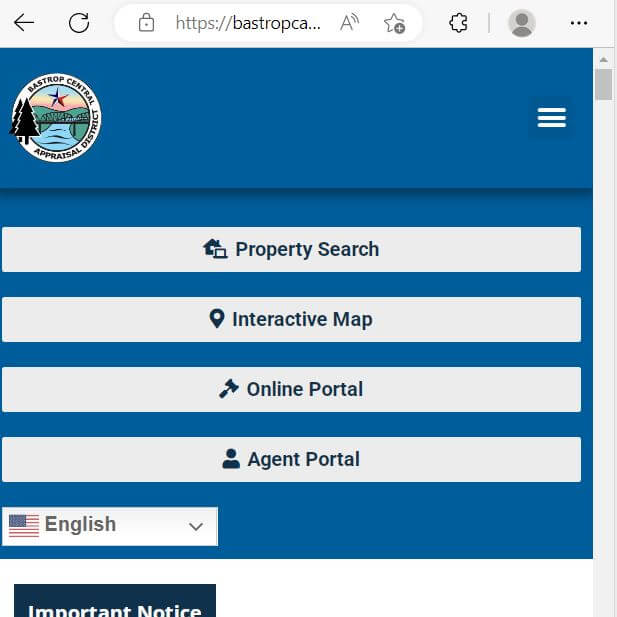
Use the original Bastrop CAD visual to understand the lookup sequence
The existing article image is preserved below. Use it as a visual orientation guide, then reopen the live official portal before relying on a value, exemption, owner or tax-year record.
Check these Bastrop CAD fields before calling, filing or paying
| Attribute | What it tells you | Actionable check |
|---|---|---|
| 1. Property ID | The primary Bastrop CAD property identifier. | Use it on forms, emails, protests and Tax Office searches. |
| 2. Appraisal owner | The owner currently carried for appraisal administration. | Use County Clerk deeds when legal ownership must be proved. |
| 3. Situs address | The physical property location when one is assigned. | Do not confuse it with the owner’s mailing address. |
| 4. Legal description | The lot, block, subdivision, tract or abstract description. | Compare it with the deed, plat and survey. |
| 5. Acreage or land area | The land quantity carried for appraisal purposes. | Verify surveyed acreage before legal or development use. |
| 6. Land value | The portion of market value assigned to the site or acreage. | Review location, size, use, access and land classification. |
| 7. Improvement value | The value assigned to houses, shops, barns and other structures. | Check area, age, class, condition and missing or removed structures. |
| 8. Market and appraised value | CAD’s market opinion and any applicable limited value. | Do not treat either figure as the live tax balance. |
| 9. Exemptions | Homestead, age, disability, veteran or other approved benefits. | Check every taxing unit because taxable values can differ. |
| 10. Taxing units | County, city, school, MUD, ESD, college or other jurisdictions. | Use the full list when estimating future taxes or reviewing rates. |
Know what a Bastrop CAD record proves—and what it does not
| CAD information | Useful for | Does not replace | Correct next step |
|---|---|---|---|
| Owner name | Appraisal notices and exemption administration. | A deed or complete title examination. | Search County Clerk Official Public Records. |
| Legal description | Identifying the subdivision, tract or abstract. | The full recorded deed, plat or survey. | Compare the actual recorded documents. |
| Acreage | Appraisal and land-classification review. | Professional surveyed acreage. | Use a survey for boundaries and conveyances. |
| Market value | Reviewing the January 1 appraisal opinion. | A guaranteed sale price. | Compare relevant market or unequal-appraisal evidence. |
| Exemptions | Checking approved tax relief. | Approval for another owner or tax year. | Confirm the 2026 account and submission proof. |
| Taxing units | Identifying jurisdictions attached to the property. | Current proposed or adopted tax rates. | Use the Truth in Taxation database. |
| Property map | Approximate parcel location and surrounding context. | A legal boundary survey. | Review deed, plat, easements and survey. |
| Value history | Identifying year-to-year changes. | The current Notice of Appraised Value. | Determine whether land, improvements or exemptions changed. |
Fix a missing Bastrop CAD result before assuming the property is absent
| Problem | Likely reason | Practical fix |
|---|---|---|
| Owner search returns nothing | The record may use initials, a spouse, trust, estate, company or previous owner. | Search only the last name or one distinctive entity word. |
| Address search fails | The portal may use another street suffix, city, direction or unit format. | Use only the street number and main street name. |
| New subdivision lot is missing | The account may still be connected to a parent tract or recent plat. | Search the seller, builder, subdivision and parent legal description. |
| Recently purchased property shows the seller | The recorded deed may still be processing into CAD. | Confirm the deed recording and send its reference to deeds@bastropcad.org. |
| Rural land has no street address | The property may be indexed by abstract, tract or legal description. | Use advanced search and the GIS map. |
| Manufactured home is missing | The home may have a separate account or location/ownership issue. | Search the owner and land separately, then contact mobilehome@bastropcad.org. |
| Business account is not on the land record | Business personal property is usually appraised separately. | Search the legal business name, DBA and physical location. |
| CAD and Tax Office records differ | The systems serve different purposes or update at different times. | Match property ID, owner, legal description and tax year. |
Use the Bastrop CAD map without treating it as a survey
Separate market value, appraised value and taxable value
CAD’s opinion of what the property would sell for under normal market conditions as of January 1.
The value after an applicable residence-homestead cap or non-homestead circuit-breaker limitation.
The value after exemptions, used with each taxing unit’s adopted rate to calculate the bill.
A qualifying homestead’s appraised value generally cannot increase by more than 10% annually, excluding new improvements.
Qualifying non-homestead real property valued at $5.32 million or less may receive the temporary 20% limitation.
Qualifying open-space land may be appraised from productivity rather than full market value.
Verify new subdivisions, builders, MUDs and recent construction separately
Search the new lot, parent tract, subdivision and builder when the homeowner name is not yet indexed.
Confirm city limits, Elgin ISD, ACC-Elgin, ESD and any MUD or special-district account.
A mailing address may not establish city limits. Review the complete taxing-unit list.
Several Colony MUD entities appear in Bastrop County. Confirm the exact district attached to the lot.
Check whether the home, garage, pool, shop, porch or other improvement is complete or partially complete as of January 1.
The builder or developer may remain on the account while the deed and parcel setup are processed.
The seller’s exemption does not automatically become the buyer’s exemption. File your own application when eligible.
Do not rely only on the seller’s capped value or mortgage estimate when exemptions and new construction can change.
Review the recorded subdivision plat, utility easements, drainage areas and restrictions before development decisions.
Document qualifying use instead of relying only on acreage
- Confirm the property ID, acreage and legal description.
- Review qualifying-use history and intensity.
- Keep grazing, crop, livestock and lease records.
- Document fences, water, management and production.
- Compare market value and productivity value.
- Ask about rollback exposure before changing use.
- Confirm the land first qualifies for open-space appraisal.
- Prepare a written wildlife-management plan.
- Keep dated activity, cost and contractor records.
- Document habitat, water, food, census and predator-control work.
- Retain photographs and maps.
- Submit required reports to the agricultural department.
Check whether the manufactured home and land are on the same account
Determine whether the home owner also owns the land or leases the home site.
The manufactured home may have a separate property ID from the underlying land.
Confirm the physical location, community, serial information and situs address.
Compare CAD ownership with title, statement-of-ownership and transfer documents.
Verify that the applicant owns and occupies the qualifying residence and submits required documents.
Notify the appropriate agencies and CAD when a home is moved, sold, destroyed or removed.
Document physical damage and declared-disaster timing immediately
Bastrop CAD publishes guidance for property physically damaged in a governor-declared disaster area and for agricultural land affected by a declared drought.
Qualifying damaged property may receive a temporary exemption under Texas Tax Code Section 11.35.
The application is generally due within 105 days after the governor declares the disaster area.
Bastrop CAD states that qualifying improvement damage must reach at least 15%.
Keep dated photographs, insurance records, repair estimates, inspection reports and emergency-management documentation.
Review current state rules when a qualifying residence-homestead improvement is completely destroyed by fire.
A declared drought can affect the normal intensity of agricultural use without automatically ending qualification in certain cases.
Send each Bastrop County property question to the office that controls it
| Your question | Correct starting point | Prepare before contacting |
|---|---|---|
| What is the appraised value? | Bastrop Central Appraisal District | Property ID, tax year and disputed value field. |
| Why is an exemption missing? | Bastrop CAD Exemptions Department | Application, qualification date, ID and filing proof. |
| Is the acreage or mapping wrong? | Bastrop CAD Deeds and Mapping | Deed, survey, plat, legal description and property ID. |
| What is the live tax balance? | Bastrop County Tax Assessor-Collector | Property ID, owner, year and legal description. |
| Did my payment post? | Bastrop County Tax Assessor-Collector | Payment confirmation, amount, date and tax year. |
| Who legally owns the property? | Bastrop County Clerk or title professional | Grantor, grantee, instrument number and legal description. |
| Where is the recorded subdivision plat? | Bastrop County Clerk plat system | Subdivision, phase, lot, block and recording details. |
| Who sets the tax rate? | Each local taxing unit | The complete taxing-unit list from the CAD account. |
| Who handles permits or development? | Applicable city or Bastrop County Development Services | Jurisdiction, parcel, proposed use, floodplain and project details. |
Use the Bastrop CAD email that matches the request
| Issue | Official email | Use it for |
|---|---|---|
| Agent information | agents@bastropcad.org | Appointment and revocation forms or agent inquiries. |
| Agriculture and wildlife | agdept@bastropcad.org | Applications, reports, use questions and land qualification. |
| Change of address | address@bastropcad.org | Mailing-address change requests and supporting forms. |
| Deeds and mapping | deeds@bastropcad.org | Real-property ownership, deed processing and map questions. |
| Exemptions | exemptions@bastropcad.org | Homestead, age, disability, veteran and general exemptions. |
| Manufactured homes | mobilehome@bastropcad.org | Manufactured-home ownership, location and account questions. |
| Protests and PIN requests | protest@bastropcad.org | Protest forms, reschedule requests and written PIN requests. |
| Business renditions | renditions@bastropcad.org | Business personal property renditions and account questions. |
Correct the source of the inaccurate Bastrop County property information
Verify every exemption on the 2026 account
Texas school districts provide a $140,000 general residence-homestead exemption.
School districts provide an additional $60,000 exemption, with possible tax-ceiling and payment protections.
Review the statutory disability qualification and additional school-district exemption.
Use the correct application and current VA documentation for the claimed exemption category.
Review continuation rules for the applicable age, disability, veteran or service-related exemption.
Use current official forms for charitable, religious, public-use and other qualifying property.
Prepare these items before submitting
Apply the 2026 $125,000 exemption without skipping required account work
Furniture, fixtures, machinery, equipment, inventory and other income-producing tangible property.
Review each business location and taxing unit rather than combining unrelated sites automatically.
Aggregation rules may apply when related businesses operate as one unified enterprise.
Identify the owner, lessee, situs and reporting responsibility for leased business assets.
The exemption does not automatically eliminate every rendition or documentation requirement.
Use the official business-closure process and document disposed, sold or relocated assets.
The May 29, 2026 regular protest deadline has passed
Do not assume every remedy is closed
Build evidence around the exact property issue
Bastrop CAD’s 2026 informal-conference guidance states that conferences may occur in person, by telephone or by email. If the owner and appraisal staff reach an agreement, the value is finalised through a settlement and waiver. If they do not agree, the matter proceeds to a formal Appraisal Review Board hearing.
| Account or issue | Useful evidence | Common mistake |
|---|---|---|
| Home or rental property | Comparable sales, photographs, repair estimates, engineer reports, measurements, closing and settlement documents. | Using only an online listing estimate or stating that taxes are high. |
| New construction | Completion dates, permits, construction invoices, photographs and proof of incomplete work as of January 1. | Comparing a completed home with an incomplete structure. |
| Rural or agricultural land | Survey, deed, access limitations, use history, leases, agricultural records and productivity information. | Using unrelated subdivision-lot sales. |
| Wildfire or severe damage | Dated photos, insurance estimates, inspections, repair invoices and emergency-management information. | Submitting undated images without explaining the valuation-date condition. |
| Manufactured home | Ownership and location documents, age, condition, serial information and land-account details. | Protesting the land account when the home has a separate account. |
| Business personal property | Asset list, cost and acquisition year, depreciation schedule, inventory records, disposals and income statements. | Submitting one unsupported asset total. |
Documents identified by Bastrop CAD for informal review
Use the portal for property documents, applications and an existing protest
The official taxpayer portal allows property owners to access property details, communications and supported applications.
Open the taxpayer portalEmail protest@bastropcad.org with the property ID, owner, address and request. Bastrop CAD states that the PIN cannot be given by phone.
Sales information provided for a protest is confidential and should be used only for the allowed appraisal-review purpose.
Move from the appraisal account to the Bastrop County Tax Office
Choose the most convenient Bastrop County Tax Office location
Bastrop, Texas 78602
Phone: (512) 581-7161
Lobby: Monday-Friday, 8:00 AM-4:00 PM
Drive-through: 7:30 AM-4:00 PM
Cedar Creek, Texas 78612
Phone: (512) 581-4270
Monday-Friday, 8:00 AM-4:30 PM
Elgin, Texas 78621
Phone: (512) 581-7146
Monday-Friday, 8:00 AM-4:30 PM
Smithville, Texas 78957
Phone: (512) 581-7114
Monday-Friday, 8:00 AM-4:30 PM
Closed for lunch 12:00-1:00 PM
Use the Bastrop County Clerk for deeds, liens, releases and plats
Register for Bastrop County property fraud alerts
The Bastrop County Clerk links to a property fraud alert service that can notify registered users when a matching name appears in newly recorded documents.
Complete these checks before relying on a Bastrop County property account
Match the property ID, legal description, subdivision, acreage and GIS location.
Search current and delinquent years through the Bastrop County Tax Office.
Review recorded ownership, liens, releases, easements and restrictions with a title professional.
The seller’s homestead exemption, cap and tax ceiling may not transfer to the buyer.
Verify every special district rather than relying only on the city or school district.
Determine whether the current account includes the completed house and all improvements.
Review qualification history, productivity value and potential rollback-tax exposure.
Review repairs, permits, insurance information and the property’s current condition.
Check city limits, county rules, floodplain, access, platting and permit requirements.
Important Bastrop County appraisal and tax dates
Bastrop County appraisal, tax and recorded-property offices
Bastrop, Texas 78602
Mailing: P.O. Drawer 578
Bastrop, Texas 78602
Phone: (512) 303-1930
Chief Appraiser: Faun Cullens
Hours: Monday-Friday, 7:30 AM-4:30 PM.
Use for property search, values, exemptions, mapping, agricultural matters, business renditions and protests.
Bastrop, Texas 78602
Mailing: P.O. Box 579
Bastrop, Texas 78602
Phone: (512) 581-7161
Fax: (512) 581-7167
Email: taxoffice@co.bastrop.tx.us
Tax Assessor-Collector: Ellen Owens
Use for tax statements, balances, payments, receipts, delinquent taxes and vehicle services.
Bastrop, Texas 78602
Mailing: P.O. Box 577
Bastrop, Texas 78602
Phone: (512) 332-7234
Fax: (512) 332-7241
County Clerk: Krista Bartsch
Hours: Monday-Thursday, 8:00 AM-5:00 PM; Friday, 8:00 AM-4:00 PM.
Call to confirm holiday closures, protest-season procedures, required identification, accepted payment and whether the task belongs to CAD, the Tax Office or County Clerk.
Official Bastrop County property resources
Start with district notices, forms, departments and appraisal resources.
Open Bastrop CADSearch appraisal accounts by property ID, owner, address and advanced criteria.
Open property searchReview approximate parcel location and surrounding property context.
Open GIS mapFind homestead, age, disability, veteran and general exemption forms.
Open exemptionsReview open-space, wildlife and land-use forms and guidance.
Open land guidanceUse current rendition, extension, closure and inventory forms.
Open business formsReview normal, late and other available appraisal-protest materials.
Open protest formsAccess supported property applications, documents and protest functions.
Open taxpayer portalReview 2026 valuation reports and available export data.
Open data downloadsSearch statements, balances and property-tax payments.
Search and pay taxesReview taxing units, proposed rates, public meetings and property-specific estimates.
Open tax transparencySearch deeds, liens, releases, restrictions and other Official Public Records.
Search public recordsSearch recorded plats for lots, blocks, roads, easements and dedications.
Search recorded platsRegister for alerts when a matching name appears in a recorded document.
Open fraud alertsReview statewide exemptions, values, renditions, protests and taxpayer rights.
Open Comptroller resourcesHow this Bastrop County guide was rebuilt

Independent review focused on complete property tasks
This version preserves the original Bastrop property-search visual while rebuilding the page around practical workflows for owner and parcel search, new subdivisions, MUDs, rural land, manufactured homes, wildfire damage, exemptions, business property, post-deadline protest questions, tax payments and recorded documents.
Current official resources reviewed include Bastrop Central Appraisal District, the Bastrop County Tax Assessor-Collector, Bastrop County Clerk and Texas Comptroller property-tax guidance.
AppraisalDistrict.org is an independent informational website and is not operated by Bastrop Central Appraisal District, Bastrop County or the Texas Comptroller.
10 common Bastrop County appraisal and property-tax questions
1. What is the official Bastrop County Appraisal District website?
The official website is bastropcad.org. The official district name is Bastrop Central Appraisal District.
2. How do I search Bastrop CAD property records?
Open the official property search. Use the property ID when available, or search by owner, address or advanced criteria.
3. Does Bastrop CAD collect property-tax payments?
No. Bastrop CAD handles appraisal records, values, exemptions, maps and protests. The Bastrop County Tax Assessor-Collector handles bills, payments, receipts and delinquent balances.
4. Where can I pay Bastrop County property taxes online?
Use the official Bastrop County Tax Office portal and select Search and Pay Property Tax.
5. What was the Bastrop CAD protest deadline for 2026?
Bastrop CAD published May 29, 2026 as the regular deadline. That date has passed. Contact protest staff promptly if a limited late filing, notice, exemption or correction remedy may apply.
6. How do I obtain a Bastrop CAD property PIN?
Send a written request to protest@bastropcad.org. Bastrop CAD states that the PIN cannot be provided by telephone.
7. How do I apply for a Bastrop County homestead exemption?
Search the property, complete the current application from the official exemptions page and submit it by an accepted method with the required identification or affidavits.
8. What is the 2026 business personal property exemption?
Qualifying income-producing tangible personal property with a total taxable value of $125,000 or less in a taxing unit is exempt in that taxing unit. Confirm rendition and aggregation requirements with Bastrop CAD.
9. Where can I search Bastrop County deeds, liens and plats?
Use the County Clerk public-record system for deeds and liens and the official plat system for subdivision plats.
10. Where is Bastrop Central Appraisal District located?
The office is at 212 Jackson Street, Bastrop, Texas 78602. The mailing address is P.O. Drawer 578, Bastrop, Texas 78602, and the phone number is (512) 303-1930.