
Route an Armstrong County Property From the CAD Record to the Correct Payment or Legal Document
Start with Armstrong County Appraisal District when you need the property ID, appraisal owner, legal description, land and improvement values, exemptions, map, tax-due indicator or protest information.
Armstrong County has an important local difference: the county Tax Assessor-Collector does not collect property taxes. The official CAD website provides the online payment link, and the CAD office accepts in-person payments. Use the County Clerk—not the appraisal record—when legal ownership, deeds, liens or mineral reservations matter.
Use owner, property ID, address, legal description or advanced criteria.
114 Trice Street, Claude, Texas 79019.
806-331-9479 for values, exemptions, protests and payments.
Monday-Friday, 8 AM-5 PM; lunch closure 12-1 PM.
Vehicle title and registration—not property-tax collection.
806-553-2861 for deeds, liens, releases and plats.
What do you need to accomplish with the Armstrong County account?
Use the property ID, owner or address and confirm the legal description before relying on the result.
Follow the official search stepsReview land classification, productivity value, improvements, school district and groundwater-district assignments.
Use the rural-land routeIndustrial, utility and business assets may be appraised separately from the real estate where they are located.
Review 2026 business rulesIdentify whether the issue is market value, unequal appraisal, property data, classification or exemption status.
Prepare the protest packetVerify the account, year, balance and fee before paying online, in person or through the office drop slot.
Use the local payment workflowRecorded deeds, liens, releases, easements, mineral reservations and plats control legal-document research.
Follow the document workflowSearch Armstrong CAD without opening the wrong owner, parcel or tax year
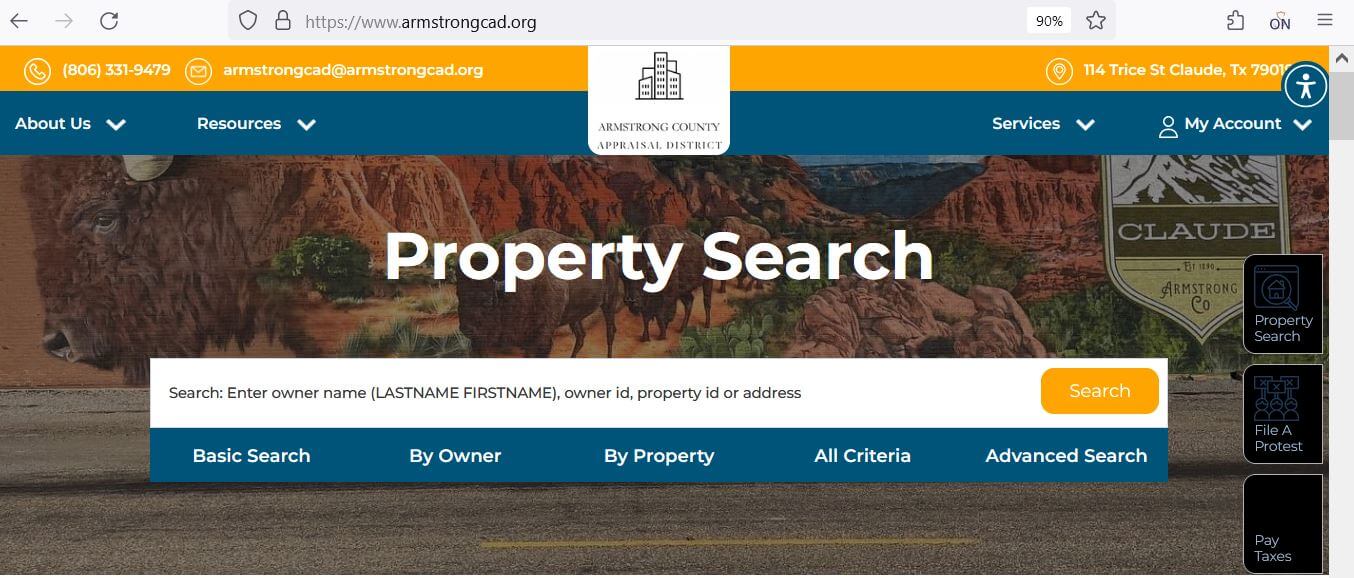
Use the original Armstrong CAD image to identify the search controls
The existing article included the Armstrong CAD search image below. It is retained and now paired with exact instructions explaining which tab to use.
Check these Armstrong CAD fields before calling, protesting or paying
| Attribute | What it answers | Actionable check |
|---|---|---|
| 1. Parcel ID | Which appraisal account did you open? | Save it for CAD calls, forms, protests and payment matching. |
| 2. Account number | What additional account reference is assigned? | Confirm which number the payment processor or office expects. |
| 3. Owner ID | Which owner record is connected to the property? | Use it to locate related accounts, then verify each parcel separately. |
| 4. Property type | Is the result real estate, business, utility, industrial or another account? | Compare values only between the same property type. |
| 5. Geo ID | Which geographic reference is connected to the parcel? | Compare it with the map and legal description. |
| 6. Legal description | Which tract, lot, block, abstract or subdivision is appraised? | Verify it against the deed, plat and survey. |
| 7. Acres | What acreage does CAD carry for appraisal purposes? | Do not treat it as guaranteed surveyed acreage. |
| 8. Market value | What value did CAD assign as of January 1? | Compare land and improvements separately before protesting. |
| 9. Exemptions and limited value | Which benefits or appraisal limitations appear? | Verify the correct year and every taxing-unit taxable value. |
| 10. Base tax due | Does the search grid display a tax-related balance? | Open the CAD-linked payment system and verify the live amount before paying. |
Use a different research route for homes, rural land, business assets and utilities
- Confirm the situs and legal description.
- Review land and improvements separately.
- Check square footage, class and condition.
- Verify homestead and age-related exemptions.
- Search the owner, abstract and legal description.
- Confirm acreage and improvements.
- Compare market and productivity values.
- Keep current agricultural-use evidence.
- Confirm the entity, DBA and physical situs.
- Review furniture, fixtures, inventory and equipment.
- Check the 2026 $125,000 exemption.
- File any required rendition on time.
- Use category and advanced search filters.
- Confirm whether land and assets are separate.
- Review the appraisal contractor and account type.
- Use asset-specific evidence for a protest.
Understand what the Armstrong CAD record proves—and what it does not
| Record field | Useful for | Does not replace | Best next step |
|---|---|---|---|
| Owner shown | Appraisal notices, search and exemption administration. | A deed or complete title examination. | Contact the County Clerk when legal ownership matters. |
| Mailing address | Delivery of notices and CAD correspondence. | The physical property location. | Correct it promptly if notices could be missed. |
| Situs address | Locating a residence, building or business. | A legal description or city jurisdiction check. | Compare the map, legal description and taxing units. |
| Legal description | Identifying the tract, lot, block, survey or abstract. | The complete deed, plat or survey. | Obtain the recorded instrument before a legal transaction. |
| Land value | Understanding the portion assigned to the lot or acreage. | Proof that acreage or land class is correct. | Compare the deed, survey, map and land schedule. |
| Improvement value | Understanding value assigned to houses and other structures. | A physical inspection or measurement. | Document incorrect size, class, age or condition. |
| Market value | Reviewing CAD’s January 1 value opinion. | A guaranteed sale price or current tax payoff. | Compare evidence or use the payment system as appropriate. |
| Tax due | Identifying an account that may have an outstanding amount. | A final payoff or payment receipt. | Verify the year and live total through Armstrong CAD. |
Fix a missing Armstrong CAD result before assuming the account is absent
| Problem | Likely reason | Practical fix |
|---|---|---|
| Owner name returns nothing | The account may use initials, a spouse, estate, trust, company or previous owner. | Search the last name only or one distinctive business word. |
| Owner search shows too many results | The owner has several parcels or the name is common. | Add the property ID, address, abstract or legal description. |
| Full address fails | The portal may use another abbreviation, direction or city format. | Enter only the street number and main street name. |
| Rural property has no street result | The account may be indexed by owner, abstract, survey or legal description. | Use By Property and the interactive map. |
| Recently purchased property shows the seller | The recorded deed may not yet have completed CAD processing. | Confirm the deed with the County Clerk and provide the instrument reference. |
| Tract split is missing | The new parcel or legal-description change may still be processing. | Search the parent tract, prior owner and recorded deed or plat. |
| Business account is not on the land record | Business assets can have a separate personal-property account. | Search the legal entity, DBA, owner ID or category. |
| Tax-due filter hides the property | The selected account may not show a balance in that search view. | Remove the tax-due filter and search again. |
| CAD value and payment amount differ | Appraisal values and collection balances serve different purposes. | Match the property ID, account and tax year before contacting CAD. |
Use the Armstrong CAD interactive map without treating it as a survey
Separate market value, limited value and taxable value
Armstrong CAD’s opinion of what the property would sell for under normal market conditions as of January 1.
The value after an applicable residence-homestead cap, non-homestead circuit breaker or special appraisal.
The value after exemptions is combined with each taxing unit’s adopted rate to calculate the property tax.
A qualifying homestead’s appraised value generally cannot increase by more than 10% per year, excluding new improvements.
Qualifying non-homestead real property valued at $5.32 million or less may receive the temporary 20% circuit-breaker limitation.
Qualifying open-space land may be appraised based on agricultural productivity rather than full market value.
Use local taxing-unit and property-type checks instead of relying on the mailing city
Confirm City of Claude, Claude ISD, county and the groundwater-district lines shown for the property.
A Claude mailing address does not prove city limits. Review the taxing-unit list and parcel location.
Confirm that the Armstrong County parcel is assigned to Groom ISD rather than assuming Claude ISD.
Some Armstrong County property is connected to Clarendon ISD. Verify the account before estimating school taxes.
Use the property record and map to confirm the school-district assignment for southern or adjoining areas.
Armstrong County includes property connected to Panhandle Groundwater Conservation District No. 3 and High Plains Underground Water Conservation District No. 1.
Review acreage, abstract, land use, productivity value and every improvement separately.
Check whether the land, structures, utility assets and business equipment are carried on separate accounts.
Compare CAD ownership with deeds, probate documents, heirship records and the current mailing address.
Send each Armstrong County question to the office that controls the record
| Your question | Correct starting point | Prepare before contacting |
|---|---|---|
| What is the market or appraised value? | Armstrong County Appraisal District | Property ID, tax year and disputed value field. |
| Why is an exemption missing? | Armstrong County Appraisal District | Application, qualification date, identification and filing proof. |
| Where do I pay property taxes? | Armstrong County Appraisal District | Property ID, account, tax year and live amount due. |
| Did my property-tax payment post? | Armstrong County Appraisal District | Receipt, confirmation, date, amount and tax year. |
| Do I need vehicle title or registration help? | Armstrong County Tax Assessor-Collector | Vehicle title, registration, identification and TxDMV forms. |
| Who legally owns the property? | Armstrong County and District Clerk or title professional | Grantor, grantee, date, instrument number and legal description. |
| Where can I obtain a deed, lien or plat? | Armstrong County and District Clerk | Names, date range, document type and property description. |
| Who adopts the property-tax rate? | Each local taxing unit | The complete taxing-unit list from the property account. |
Correct the source of the inaccurate Armstrong County property information
Verify the exemption on the 2026 account before estimating taxes
Texas school districts provide a $140,000 general residence-homestead exemption.
School districts provide an additional $60,000 exemption, with possible tax-ceiling and payment protections.
Review the Social Security disability qualification and additional school-district exemption.
Use the correct state application and current VA documentation for the claimed category.
Review the continuation requirements connected to the applicable homestead or service-related exemption.
Use official forms for charitable, religious, public-use and other qualifying property.
What to prepare for a homestead application
Receive certain homestead notices by email
A qualifying owner-occupied residential property owner may request electronic delivery of notices involving value changes and exemption status. Armstrong CAD provides the request form under Miscellaneous Forms.
Apply the new $125,000 business personal property exemption correctly
Furniture, fixtures, machinery, equipment, inventory and other tangible property used to produce income.
The exemption is evaluated within the applicable taxing unit and can require location-specific review.
Aggregation rules can apply to related entities operating as one unified business enterprise.
Ownership and leasing arrangements can affect which person reports the property and how values are combined.
The exemption does not automatically remove every account, rendition or documentation requirement.
Confirm how the exemption appears for every applicable county, city, school or special-district account.
Business owner action checklist
Document agricultural qualification instead of relying only on acreage
- Confirm the owner, abstract and legal description.
- Review the required qualifying-use history.
- Keep livestock, crop, grazing and lease records.
- Document fences, water, stocking and management practices.
- Compare market value and productivity value.
- Ask about rollback-tax exposure before changing use.
- Confirm that the land first qualifies for open-space appraisal.
- Prepare the required wildlife-management plan.
- Keep dated records of qualifying activities.
- Document habitat, water, food, census and predator-control work.
- Retain photographs, maps, receipts and contractor records.
- Report material use changes to CAD.
File against one clear Armstrong CAD action and support it with matched evidence
| Account type | Useful evidence | Common mistake |
|---|---|---|
| Home or commercial building | Comparable sales, equal-appraisal accounts, photographs, measurements, repair estimates and closing documents. | Arguing only that the tax bill is high. |
| Farm or ranch land | Deed, survey, acreage, land-use history, leases, productivity evidence and classification records. | Using unrelated town-lot sales. |
| Business personal property | Asset schedules, invoices, age, condition, depreciation, disposal proof and rendition records. | Submitting one unsupported asset total. |
| Utility or industrial property | Asset-specific records, ownership, location, depreciation and qualified valuation evidence. | Comparing the account with ordinary residential property. |
Connect Armstrong CAD’s online account and hearing resources
Create or sign in to an Armstrong CAD account and request the unique PIN for the property.
Open Get PinUse the official sign-in page and keep every confirmation connected to the filing.
Open Online ProtestReview available past, future or open-protest information, but follow the written hearing notice.
Open Hearing SearchCheck Armstrong CAD’s published records before requesting a custom file
Use certified-roll files for year-specific bulk research and taxing-unit analysis.
Review the district’s methodology and valuation process before preparing a protest.
Use the plan to understand the district’s property-review and appraisal cycle.
Review board notices, budget hearings, agendas and related district records.
Use historical rates for prior-year research and the transparency database for current proposals.
Read the current hearing and appeal procedures before a formal appraisal-review hearing.
Pay Armstrong County property taxes through the appraisal district’s official route
Mail deadline-sensitive payments and forms early enough to receive a timely postmark
Armstrong CAD published a warning that postal mail may not receive a postmark on the same day it is placed in a mailbox or accepted at a postal location. A payment or filing can therefore appear late even when the sender mailed it close to the deadline.
A February postmark can cause penalty and interest even when the envelope was prepared in January.
Mail several days early or use a delivery method that provides reliable tracking and proof.
Do not wait until the filing deadline when portal, weather or mailing delays could affect timeliness.
Use the county tax office for vehicle services—not Armstrong property-tax payments
- Vehicle registration renewals
- Vehicle title transfers
- Address changes on motor-vehicle records
- Disabled parking placards
- Specialty and non-fee licence plates
- Copies of vehicle-registration receipts
- Property appraisal values
- Exemptions and special valuations
- Property search and maps
- Appraisal protests and ARB routing
- Property-tax online-payment link
- Property-tax payment and receipt questions
Use the Armstrong County Clerk for deeds, liens, releases and plats
Complete these checks before relying on an Armstrong County property account
Match property ID, Geo ID, legal description, abstract, acreage and map location.
Check current and delinquent years through Armstrong CAD’s payment system.
Review deeds, liens, releases, easements, mineral reservations and plats.
The seller’s homestead exemption, appraisal cap or tax ceiling may not transfer.
Review use history, productivity value and possible rollback-tax exposure.
Compare CAD’s house, barn, shop, mobile-home and other improvement details with the property.
Verify Claude, Groom, Clarendon or Happy ISD rather than relying only on the mailing address.
Confirm the Panhandle or High Plains groundwater-district assignment shown for the parcel.
Keep the deed, title policy, survey, closing statement, tax receipt and exemption confirmation.
Important Armstrong County appraisal and property-tax dates
Armstrong County appraisal, payment, vehicle and deed-record offices
Claude, Texas 79019
Mailing: P.O. Box 149
Claude, Texas 79019
Phone: (806) 331-9479
Email: armstrongcad@armstrongcad.org
Chief Appraiser: Marissa Clement
Hours: Monday-Friday, 8:00 AM-5:00 PM; closed for lunch 12:00-1:00 PM.
Use for appraisals, exemptions, maps, protests, PIN access, property-tax balances and payments.
101 Trice Street
Claude, Texas 79019
Mailing: P.O. Box 835
Claude, Texas 79019
Phone: (806) 553-2860, option 3
Fax: (806) 553-5543
Email: tax.assessor@co.armstrong.tx.us
Tax Assessor-Collector: Jamie Craig
Hours: Monday-Friday, 8:00 AM-5:00 PM; open during lunch.
Important: this office does not collect property taxes.
Claude, Texas 79019
Mailing: P.O. Box 309
Claude, Texas 79019
Phone: (806) 553-2861
Fax: (806) 553-5981
Email: tawnee.blodgett@co.armstrong.tx.us
County and District Clerk: Tawnee Blodgett
Hours: Monday-Thursday, 8:00 AM-6:00 PM; closed Friday.
Armstrong CAD states that a payment drop slot is available in the office door.
Do not place cash in the drop slot.
Include the property ID, account number, tax year and contact information with a check or permitted payment.
Call the correct office to verify holiday closures, document requirements, accepted payment and whether an appointment is needed.
Property ID, account, owner ID, tax year, owner name, property address, legal description and a short written explanation of the task.
Official Armstrong County property resources
Start with current notices, office information and property-tax services.
Open Armstrong CADSearch owner, property, address, legal-description, category, acreage and value fields.
Open property searchReview approximate parcel location and surrounding appraisal context.
Open the mapDownload homestead, agricultural, veteran, rendition and electronic-communications forms.
Open formsRegister, sign in and use supported online appraisal-protest services.
Open online protestRequest the unique property PIN used for supported online services.
Request a PINReview available past, future and open-protest information.
Open hearing searchReview appraisal rolls, reports, plans, tax information and district records.
Open records and dataUse the payment processor linked by Armstrong CAD.
Open online paymentUse for motor-vehicle title and registration services—not property-tax collection.
Open county tax officeUse for deeds, liens, releases, plats and other Official Public Records.
Open County ClerkCross-check CAD, tax-office and active taxing-unit information.
Open Armstrong County directoryHow this Armstrong County guide was improved

Independent review focused on complete property-tax tasks
This version preserves both images from the original article while replacing the inaccurate payment instructions and expanding the page into complete workflows for property search, rural land, exemptions, agricultural appraisal, business personal property, protests, online access, payments and recorded documents.
The previous article incorrectly directed property owners to pay the county Tax Assessor-Collector. The official Comptroller directory and Armstrong CAD website show that property-tax collection and online payment are routed through Armstrong CAD.
AppraisalDistrict.org is an independent informational website and is not operated by Armstrong County Appraisal District, Armstrong County or the Texas Comptroller.
10 common Armstrong County appraisal and property-tax questions
1. What is the official Armstrong County Appraisal District website?
The official website is armstrongcad.org. Use it for property search, maps, forms, protests, PIN requests, reports and tax-payment routing.
2. How do I search Armstrong County property records?
Open the official property search, select the correct year and search by property ID when available. You can also use owner ID, owner name, address, Geo ID, legal description, abstract or subdivision.
3. Who collects Armstrong County property taxes?
Armstrong County Appraisal District provides the collection and online-payment route. The county Tax Assessor-Collector does not collect property taxes.
4. Can I pay Armstrong County property taxes online?
Yes. Use the payment link provided by Armstrong CAD. Verify the account, year, total and fee before paying.
5. What is the Armstrong County protest deadline for 2026?
Most protests are due by May 15 or by the 30th day after Armstrong CAD mails the appraisal notice, whichever date is later. The individual notice controls.
6. How do I obtain an Armstrong CAD online account PIN?
Use the official Get Pin page, create or sign in to an account and provide the requested property information.
7. How do I apply for a homestead exemption?
Search the property, download the application from the official forms page, attach the required identification or affidavits and keep proof of submission.
8. What is the 2026 business personal property exemption?
Qualifying income-producing tangible personal property with a taxable value of $125,000 or less in a taxing unit is exempt in that unit. Confirm rendition and aggregation rules with Armstrong CAD.
9. Where can I obtain Armstrong County deeds and liens?
Contact the Armstrong County and District Clerk at (806) 553-2861.
10. Where is Armstrong County Appraisal District located?
Armstrong CAD is at 114 Trice Street, Claude, Texas 79019. Its mailing address is P.O. Box 149, Claude, Texas 79019, and its phone number is (806) 331-9479.