Trace a Shackelford County Property From Frontier Ledger to Final Tax Record
Start with Shackelford County Appraisal District when you need a property ID, geographic ID, appraisal owner, situs address, legal description, ranch acreage, land or improvement value, exemption, protest status or property-tax balance.
Shackelford CAD also collects taxes for most local taxing units. Recorded deeds, liens, plats and probate documents remain with the Shackelford County and District Clerk. This guide shows when to stay with CAD and when to switch systems.
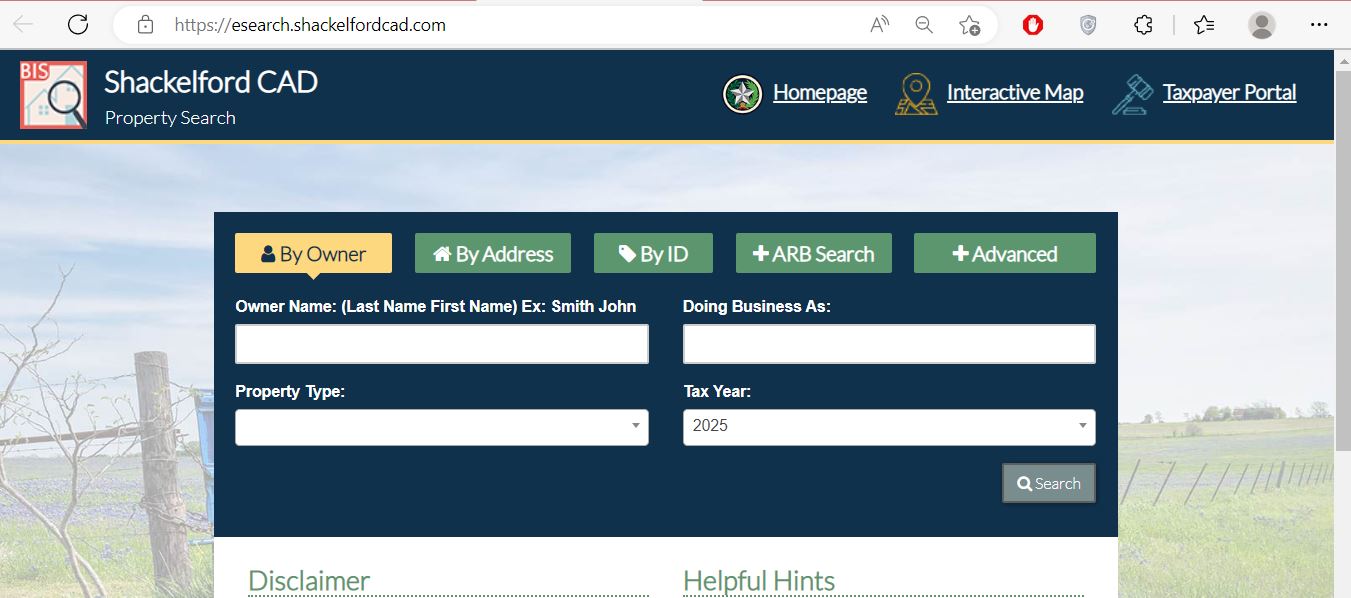
Owner, Address, ID, ARB and Advanced search options.
132 Hill Street, Albany, Texas 76430.
Shackelford CAD collects most local property taxes.
Lueders-Avoca or Clyde ISD taxes may be billed separately.
Local links and procedures reviewed July 30, 2026.
What are you trying to complete with the property record?
Search the owner, address or property ID, then verify the parcel, property type and legal description.
Follow the property-search stepsUse the green Pay Taxes button, review the payment cart and confirm whether another school bill exists.
Review payment instructionsMarket, appraised and taxable value are different, especially with homestead or agricultural appraisal.
Understand the property accountIdentify the exact value, exemption, acreage, improvement or classification issue and preserve the deadline.
Build the evidence fileThe appraisal owner field does not prove clear title or show every deed, lien, release, easement or probate document.
Search recorded documentsSurface land, mineral interests, industrial property, utilities and wind assets may appear in separate accounts.
Review specialised accountsSearch Shackelford CAD without mixing the surface, mineral or business account
Use the Shackelford CAD screenshot as a click-by-click guide
Understand what the Shackelford CAD account proves—and what it does not
| Field | What it identifies | What it does not prove | Best next action |
|---|---|---|---|
| Property ID | The appraisal and collection account used by Shackelford CAD. | That the County Clerk or another school collector uses the same number. | Save it before filing, paying or calling. |
| Geographic ID | A parcel reference connected to mapping and legal-location data. | A professionally surveyed boundary. | Compare it with the map, deed and survey. |
| Owner shown | The person or entity carried for appraisal and tax collection. | Clear title, complete heirship, lien status or mineral ownership. | Search County Clerk records when legal ownership matters. |
| Property type | Real, Personal, Mineral, Auto or Mobile Home classification. | That all related property is contained in one account. | Repeat the search under each relevant property type. |
| Legal description | An abstract, survey, subdivision, lot, block, section or tract reference. | That the abbreviated CAD wording is sufficient for a deed. | Compare the recorded deed and plat. |
| Acreage | The acreage carried for appraisal purposes. | Surveyed, accessible, usable or fenced acreage. | Review the deed and professional survey. |
| Market value | The district’s opinion of value as of January 1. | A guaranteed sale price or final property-tax amount. | Review property facts and comparable evidence. |
| Appraised value | Value after an applicable appraisal limitation or special appraisal. | The taxable value used by every taxing unit. | Continue to exemptions and taxing-unit values. |
| Taxable value | Value remaining after applicable exemptions for a taxing unit. | The live amount currently due. | Review tax-due years and the payment cart. |
| ARB information | Protest status, informal date, formal date or hearing information. | That a hearing date has not been rescheduled. | Compare it with the latest written hearing notice. |
Use the interactive map for ranch tracts and neighbouring accounts
Fix a Shackelford CAD search that returns no result
| Problem | Likely reason | Practical fix |
|---|---|---|
| Owner search returns nothing | The account may use initials, an estate, trust, ranch name, LLC or different name order. | Search only the first or last name, DBA, owner ID or property ID. |
| Too many owner matches | The name is common or the search includes several property types. | Add the property type, address, abstract, subdivision or geographic ID. |
| Address search fails | The official record may use a simplified road name or no normal situs address. | Use only the street name, then switch to owner, ID or Advanced Search. |
| Rural tract is not found | Ranch property may be indexed by abstract, geographic ID, owner or legal description. | Use Advanced Search and the interactive map. |
| Mineral interest is missing | Mineral ownership can be separate from the surface land. | Select Mineral and search the mineral owner or account identifier. |
| Mobile home is missing | The home may have a separate Mobile Home account or different owner. | Select Mobile Home and search the owner or mobile-home park. |
| Business property is missing | Assets may be listed under a DBA, parent company or Personal account. | Select Personal and search business-name variations. |
| Recent buyer still sees seller | The recorded deed may not yet have completed processing into the CAD system. | Confirm recording with the County Clerk and save the instrument reference. |
| A school balance is missing | Lueders-Avoca or Clyde ISD taxes may be collected outside Shackelford CAD. | Check the taxing-unit list and contact the separate school-tax collector. |
| Payment has not posted | The transaction may be processing or may have been applied to another account or year. | Contact the Central Tax Office with the receipt, property ID and tax year. |
Local search tips for Albany, Moran and rural property
Confirm City of Albany, Albany ISD, county, hospital district, exemptions and improvement details.
Check City of Moran, Moran ISD, property type, taxable values and any separate personal-property account.
Use the property ID, geographic ID, abstract, legal description and map instead of relying only on an address.
Expect Shackelford CAD appraisal data but verify whether the school tax is billed separately through Jones County.
Expect Shackelford CAD appraisal data but verify whether the school tax is billed separately through Callahan County.
Search Mineral separately and do not assume the mineral owner is the surface-property owner.
Specialised accounts can include industrial improvements, equipment and personal property appraised through contracted services.
Check whether the home and land are combined or carried in separate Real and Mobile Home accounts.
Compare the appraisal owner with deeds, probate, heirship records and any mineral reservations before filing or selling.
Market value, appraised value and taxable value are not the same
Shackelford CAD’s opinion of normal market value as the property existed on January 1.
The value after an applicable homestead cap, non-homestead limitation or special appraisal.
The value remaining after exemptions for each individual taxing unit.
Why two nearby properties can have different bills
One owner may qualify for homestead, age, disability or veteran benefits that a neighbouring owner does not receive.
A property can fall in Albany, Moran, Lueders-Avoca or Clyde ISD even when the mailing address looks similar.
A homestead cap, agricultural appraisal, mineral interest or business account can change the taxable calculation.
Shackelford CAD appraises more taxing units than it collects
| Taxing unit | Appraised by Shackelford CAD | Collected by Shackelford CAD | Payment note |
|---|---|---|---|
| Shackelford County | Yes | Yes | Review and pay through the Shackelford CAD account. |
| Shackelford County Hospital District | Yes | Yes | Normally included in the CAD collection account. |
| Albany ISD | Yes | Yes | Normally included in the CAD collection account. |
| Moran ISD | Yes | Yes | Normally included in the CAD collection account. |
| City of Albany | Yes | Yes | Appears only when the parcel is inside the applicable city boundary. |
| City of Moran | Yes | Yes | Appears only when the parcel is inside the applicable city boundary. |
| Lueders-Avoca ISD | Yes, for the portion in Shackelford County | No | Expect a separate school-tax bill from the applicable Jones County collector. |
| Clyde ISD | Yes, for the portion in Shackelford County | No | Expect a separate school-tax bill from the applicable Callahan County collector. |
Use Shackelford CAD, the Tax Assessor or County Clerk for the correct task
| Your question | Correct office | What to prepare |
|---|---|---|
| What is the appraised value? | Shackelford CAD | Property ID, tax year and disputed value field. |
| Why is an exemption missing? | Shackelford CAD | Application, identification, qualification date and filing proof. |
| How much property tax is due? | Shackelford CAD Central Tax Office | Property ID, tax year and requested payoff date. |
| Did my payment post? | Shackelford CAD Central Tax Office | Receipt, confirmation, amount, date, property ID and year. |
| Where is my Lueders-Avoca or Clyde school bill? | The applicable school-tax collector outside Shackelford CAD | Property ID, school district and tax year. |
| Who legally owns the property? | County and District Clerk or title professional | Grantor, grantee, date range and legal description. |
| Who handles mineral or industrial value? | Shackelford CAD and its contracted appraisal service | Mineral or industrial property ID, owner, tax year and notice. |
| Who handles vehicle registration or voter registration? | Shackelford County Tax Assessor-Collector | The documents required for the vehicle or voter service. |
| Where can I verify a boundary? | Surveyor plus deed and plat records | Recorded deed, plat, legal description and existing survey. |
Search, pay and verify Shackelford County property taxes
A Shackelford County property can receive more than one tax bill
Can include the county, hospital district, Albany or Moran school district and the applicable city.
Can apply when the parcel is in Lueders-Avoca ISD or Clyde ISD because Shackelford CAD does not collect those school taxes.
Check and file Shackelford County property-tax exemptions
Confirm ownership, principal-residence use and the Texas identification-address requirement.
Review the additional school exemption, tax ceiling and possible instalment or deferral options.
Prepare the required disability evidence and verify whether a school-tax ceiling applies.
Use the correct veteran form and attach the required VA documentation.
Prepare applicable residence-homestead affidavits, death records and available probate or ownership documents.
Religious, charitable, Freeport, solar or wind-device and other exemptions use separate requirements.
Verify open-space appraisal before changing a Shackelford County ranch
Qualifying land can show a full market value and a lower productivity-based appraised value.
Prepare records showing qualifying agricultural use during the required historical period.
Match the property ID, geographic ID, abstract, legal description, map and acreage.
Acreage alone does not establish qualification. Use must satisfy applicable local intensity standards.
Maintain the plan, qualifying practices, maps, photographs, receipts and annual supporting records.
Converting qualifying land to a non-agricultural use can create additional property-tax liability.
Search specialised accounts separately from the surface land
Select Mineral and search the mineral owner rather than relying on the surface-land owner.
One person or estate can have multiple accounts tied to separate leases, interests or geographic areas.
A wind project can include land interests, improvements, equipment and specialised personal-property accounts.
Specialised valuation may involve equipment, operating property and assets extending across several parcels.
Review both the real-property account and any separate industrial business-personal-property account.
Prepare deeds, assignments, probate documents, division orders, asset lists and current operator information.
Official contact route
Call (325) 762-2207 with the property ID, owner, property type, tax year and value notice.
CAD staff can confirm whether the account should remain with the local office or be routed to the contracted appraiser.
Shackelford CAD directs many mineral and industrial appraisal questions to Capitol Appraisal Group at (512) 346-5480.
Mineral division orders: Stephanie Bridges, sbri@cagi.com.
Search and prepare a Shackelford County business-property rendition
A business-personal-property account is separate from the land or building. Select Personal and search the business name, DBA, owner, property ID or location.
Inventory, machinery, equipment, furniture, computers, tools, vehicles and leased assets used to produce income.
Confirm where each asset was located or normally used on January 1.
Keep acquisition dates, original costs, depreciation schedules, leases and disposal records.
Build a Shackelford County protest around one clear appraisal issue
Limited correction and appeal routes may remain
Present the requested correction before the background story
| Hearing stage | What to present | Common mistake |
|---|---|---|
| Opening | Property ID, protest ground and exact requested value or correction. | Starting with a long story before stating the requested result. |
| Property facts | Correct acreage, square footage, condition, use, property type and improvements. | Using unsupported opinions. |
| Market evidence | Comparable sales with clear adjustments for date, size, location and condition. | Providing unrelated sales without analysis. |
| Unequal appraisal | Comparable appraisal accounts using a consistent measure. | Comparing only the neighbour’s tax bill. |
| Special property | Ranch-use history, mineral ownership, production, asset or industrial evidence. | Assuming the surface account proves every interest. |
| Closing | Repeat the exact value, exemption or record change requested. | Ending without asking for a specific decision. |
Correct the Shackelford County system that owns the inaccurate field
Use the Shackelford County Clerk for deeds, liens and plats
Complete these checks before relying on a Shackelford County property record
Match the property ID, geographic ID, legal description, acreage and map location.
Review Real, Mineral, Personal and Mobile Home accounts when the transaction includes more than land.
Confirm the Shackelford CAD balance and any separate Lueders-Avoca or Clyde school bill.
Review deeds, liens, releases, plats, probate and mineral reservations.
The seller’s homestead, age, disability or veteran benefits may not transfer.
A sale can affect the future appraised value even when the current owner has a cap.
Confirm continuing qualification and possible additional tax before changing ranch use.
Do not assume minerals transfer with the surface without reviewing recorded reservations and assignments.
Save the deed, title policy, survey, all tax receipts, closing statement and exemption filing confirmation.
Use Shackelford CAD reports for broader appraisal research
The property search is best for one account. The district’s report and appraisal-roll pages are more useful for mass-appraisal methods, certified values, mineral rolls and downloadable district-wide data.
Review district-wide property categories, values, workload and appraisal activity.
Understand data collection, property characteristics, valuation models and review practices.
Use the latest year shown for broader real and business-property research.
Review mineral-account data separately from the general appraisal roll.
Compare prior adopted tables but use the current truth-in-taxation portal for 2026 decisions.
Property owners can provide verified sale information to help the district review market data.
Important Shackelford County appraisal and tax dates
Shackelford County appraisal, tax and deed offices
Albany, Texas 76430
Mailing: P.O. Box 2247, Albany, Texas 76430-8010
Phone: (325) 762-2207
Fax: (325) 762-2208
Email: chief@shackelfordcad.com
Hours: Monday-Friday, 8:00 AM-5:00 PM; closed noon-1:00 PM.
Interim Chief and Tax Assessor-Collector: Richard Petree
Use for: property search, values, exemptions, protests, agricultural appraisal, most property-tax bills and payments.
Director of Administrations: Vanh Vongphakdy
vvongphakdy@shackelfordcad.com
Appraiser: Adam Ray
aray@shackelfordcad.com
Administrative Assistant: Alicia N. Houston
ahouston@shackelfordcad.com
Use the main office first when unsure which employee or contracted appraiser controls the account.
225 S. Main Street
Albany, Texas 76430
Mailing: P.O. Box 2620, Albany, Texas 76430
Phone: (325) 762-9420
Fax: (325) 762-9421
Email: belinda.perez@shackelfordcounty.org
Tax Assessor-Collector: Edward Miller
Important: This county office does not collect property taxes. Use it for vehicle registration, voter registration and related county services.
225 S. Main Street
Albany, Texas 76430
Mailing: P.O. Box 2109, Albany, Texas 76430
Phone: (325) 762-9415
Fax: (325) 762-9416
County and District Clerk: Cheri Hawkins
Courthouse hours: Monday-Thursday 8:30 AM-noon and 1:00 PM-5:00 PM; Friday 8:30 AM-noon and 1:00 PM-4:00 PM.
Use for: deeds, liens, plats, probate, certified copies and other recorded instruments.
Official Shackelford County property resources
Access official notices, forms, tax information, reports and office contacts.
Open Shackelford CADSearch Owner, Address, ID, ARB information or Advanced criteria.
Search property recordsRegister or sign in to use the account services currently available through the district.
Open taxpayer portalUse the official eProtest service and the access information from the appraisal notice.
Open online protestLocate ranch tracts, adjoining parcels and geographic account information.
Open parcel mapFind homestead, veteran, agricultural, wildlife, rendition and protest forms.
Open Shackelford CAD formsRead the official instructions before adding an account to the Certified Payments cart.
Open payment instructionsReview prior adopted tables and the separate-billing warning for Lueders-Avoca and Clyde ISDs.
Open tax tablesReview current taxing units, proposed rates, public hearings and adopted-rate information.
Open tax noticesReview annual appraisal reports, mass-appraisal reports and district-wide valuation methods.
Open appraisal reportsFind appraisal exports, certified general rolls and separate mineral-roll data.
Open roll downloadsSearch deeds, liens and recorded documents or request a certified copy.
Open County ClerkUse for vehicle registration, voter registration and other county services—not property-tax payment.
Open Tax Assessor-CollectorVerify the chief appraiser, county Tax Assessor and active taxing units.
Open Shackelford County directoryReview protest rights, normal deadlines, protest grounds and ARB information.
Read important updatesHow this Shackelford County guide was rebuilt

Existing images preserved and the complete property journey added
This regenerated version retains the Shackelford CAD property-search screenshot and editor image used in the existing article. It replaces the short general guide with local workflows for ranches, mineral interests, wind property, split school-tax bills, exemptions, protests, payments, deeds and public appraisal data.
The review used Shackelford County Appraisal District, its property search, Central Tax Office instructions, appraisal reports, forms, certified-roll downloads, Shackelford County and District Clerk, county Tax Assessor-Collector and Texas Comptroller resources.
AppraisalDistrict.org is an independent informational website and is not operated by Shackelford CAD, Shackelford County or any Texas government agency.
10 common Shackelford County Appraisal District questions
1. What is the official Shackelford County Appraisal District website?
The official website is shackelfordcad.com. It provides property search, mapping, forms, online protest, tax-payment instructions, reports and local tax information.
2. How do I search Shackelford County property records?
Use the official Shackelford CAD property search. Choose By Owner, By Address, By ID, ARB Search or Advanced and verify the complete account before acting.
3. Does Shackelford CAD collect property taxes?
Yes. Shackelford CAD collects taxes for Shackelford County, the hospital district, Albany ISD, Moran ISD, City of Albany and City of Moran.
4. Why might I receive a separate school tax bill?
Shackelford CAD appraises portions of Lueders-Avoca ISD and Clyde ISD inside the county but does not collect those school taxes. Check for a separate bill through the applicable Jones or Callahan County collector.
5. How can I pay Shackelford County property taxes online?
Search the property, open the correct account and select the green Pay Taxes button. Verify every account and year in the cart, review the Certified Payments fee and save the confirmation.
6. What was the normal Shackelford County protest deadline for 2026?
The normal deadline was May 15, 2026, or 30 days after Shackelford CAD delivered the Notice of Appraised Value, whichever date was later. The individual notice controls.
7. How do I apply for a Shackelford County homestead exemption?
Download the application from Shackelford CAD Forms, complete it, attach the required identification or affidavits and keep proof of submission.
8. Who handles Shackelford County mineral and industrial appraisals?
Start with Shackelford CAD. The district states that much of its mineral, royalty and industrial business-personal-property appraisal work is handled through Capitol Appraisal Group.
9. Where can I search Shackelford County deeds and liens?
Use the Shackelford County and District Clerk and its official Online Records Search. The CAD owner field does not replace a deed or title examination.
10. Can Shackelford CAD acreage and maps be used as a legal survey?
No. Shackelford CAD states that legal descriptions and acreage are for appraisal research and should be verified before legal use. Use recorded documents and a professional survey.