Shelby County, Texas · Property search, timberland, homestead audits, protests and tax payments
Follow a Shelby CAD Account From Piney Woods Parcel Search to the Correct Filing or Payment
Shelby County property records can involve a residence in Center, rural acreage near Joaquin or Timpson, timberland, agricultural property, a mobile home, business equipment or a separate mineral account. The correct search method depends on the property type.
Use Shelby County Appraisal District for appraisal values, exemptions, maps, special appraisal, renditions and protests. Use the collector printed on the tax statement for payments, and use the Shelby County Clerk for deeds, liens, probate records and legal ownership documents.
Property IDOwner IDGeographic IDOwner nameStreet addressAbstract or subdivision
PINEY WOODS PROPERTY ROUTERACCOUNT SCAN
SHELBY PARCEL GRIDLAND · TIMBER · HOME
SHELBY CAD ACCOUNT
PARCEL + USE VERIFIED
SEARCH → VERIFY → SAVE → ACT
The local 2026 protest date was not May 15.
Shelby CAD published June 8, 2026, or 30 days after the appraisal notice was mailed as its 2026 deadline. That date has passed for many accounts, but owners with a later notice, failure-to-receive issue or another statutory late-protest situation should contact the district immediately.
Best search method
Use property ID, owner ID or geographic ID when available.
CAD office
724 Shelbyville Street, Center, Texas 75935.
CAD telephone
Call 936-598-6171 for appraisal questions.
2026 protest date
June 8, 2026, or 30 days after notice mailing.
Official review
Local portals and procedures reviewed July 30, 2026.
2026 local status
Important Shelby CAD changes and warnings to check before filing
Homestead audit letters require a response
Shelby CAD states that 2026 verification letters are being sent for school-district homesteads the district could not independently verify. A recipient must respond or the exemption can enter the cancellation process.
The identification address must match
The district instructs audit recipients to provide a valid Texas driver licence or state identification card showing the physical address of the residence being homesteaded.
A trust transfer requires a new application
Shelby CAD specifically states that an owner who changed ownership of a homestead property into a trust must submit a new exemption application.
Current office hours changed in 2026
Shelby CAD now lists Monday through Thursday, 8:00 AM–4:30 PM, and Friday, 8:00 AM–1:00 PM, excluding holidays.
Certified and preliminary labels currently differ
The Open Records page lists a 2026 Certified Roll and Mineral Roll, while the public search still displays a preliminary-value disclaimer. Ask which roll controls the individual account when accuracy is critical.
Older exemption amounts can be stale
Current Texas guidance lists a $140,000 general school homestead exemption and an additional $60,000 school exemption for qualifying age-65 or disabled homeowners. Do not rely on an older page showing $100,000 and $10,000.
The first sections explain property lookup and account verification. Later sections cover homestead audits, timber and agricultural appraisal, minerals, protests, tax payments and recorded documents.
Official action centre
Use these Shelby County resources for live searches and filings
Shelby CAD homepage
Use for current notices, homestead audits, office hours, mineral guidance and local appraisal resources.
Search Shelby CAD records without selecting the wrong tract or account
Most reliable search order:
property ID first, owner ID or geographic ID second, owner or simplified address third, then abstract, subdivision, mobile home park or other Advanced Search criteria.
Open the official Shelby CAD search
Begin with the appraisal district’s live database rather than a commercial land-record or home-value website.
Open Shelby CAD Property Search
Use the property ID when available
Copy the number from the Notice of Appraised Value, previous property record or tax statement.
Try owner ID or geographic ID
These identifiers can help when one owner has several tracts, mobile homes, businesses or mineral interests.
Search an owner as LASTNAME FIRSTNAME
If the full name fails, use the first or last name alone. Try a spouse, trust, estate or business name where relevant.
Simplify the property address
Enter the street number and principal street name. Remove road type, direction, city, ZIP code and punctuation when needed.
Use Advanced Search for difficult property
Add an abstract, subdivision, mobile home park, property type, DBA, neighborhood, agent ID or tax year.
Open every plausible account
A single owner can have a residence, timber tract, agricultural tract, mobile home, mineral interest or business account.
Verify the property identity
Compare the property ID, owner ID, geographic ID, owner, situs address, legal description, acreage and property type.
Review values and exemptions
Confirm the tax year and check market value, assessed or appraised value, taxable value, special appraisal and exemptions.
Save the account before taking action
Print the record or save a PDF or screenshot showing the property ID, year, values, exemptions and date viewed.
East Texas search tip:
rural tracts near Center, Joaquin, Tenaha, Timpson, Shelbyville and Huxley may be indexed more accurately by property ID, owner, abstract or legal description than by a postal address.
Existing image retained
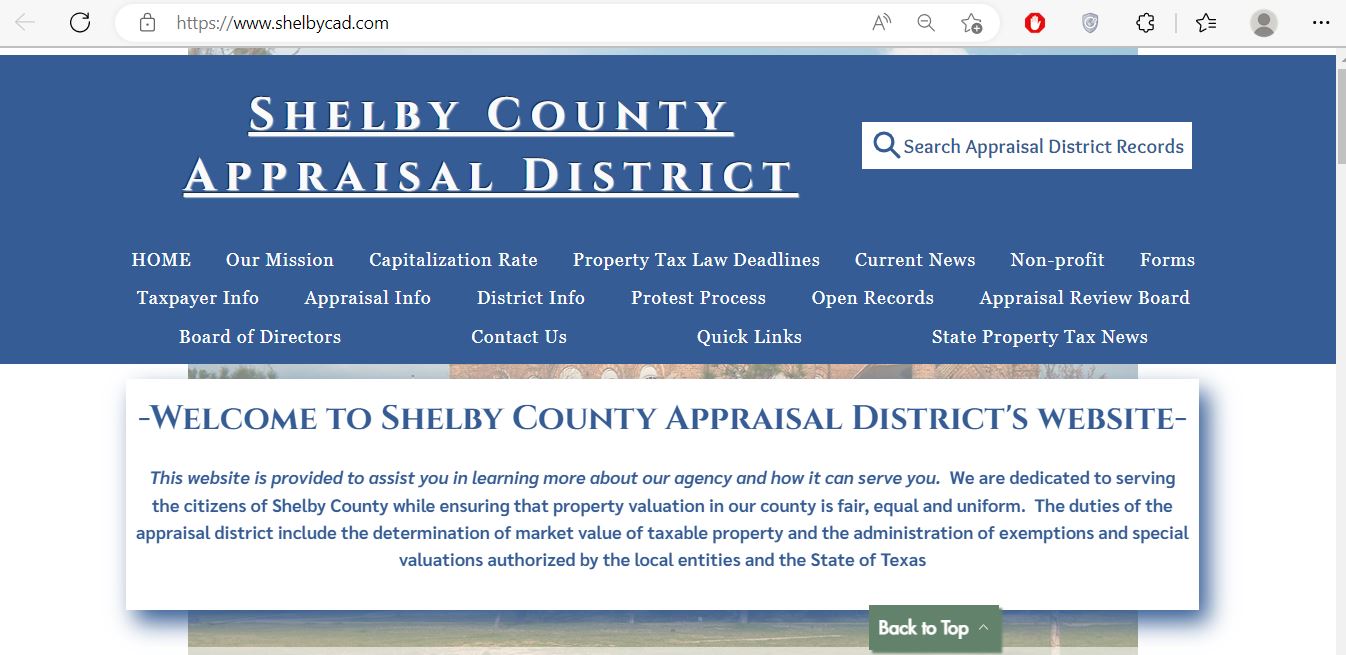
Use the original Shelby CAD screenshot to locate the official search
Existing Shelby CAD image retained from the current article. The white box near the upper-right corner says “Search Appraisal District Records.” Select that box to enter the live appraisal database.
Look at the upper-right area of the blue header
In the screenshot, the search route appears inside the white box with the magnifying-glass symbol.
Select “Search Appraisal District Records”
The button opens Shelby CAD’s separate eSearch system.
On a phone, use the direct search link
The mobile website menu may place the button differently. The direct official address avoids searching through the menu.
Open the live search directly
Do not stop at the homepage
The screenshot shows the district’s welcome page, not an individual property record. Continue into eSearch and open the complete account.
The screenshot is a navigation guide, not a current property record.
Verify every owner, value, exemption, acreage and tax-year detail through the live search.
Advanced search guide
Use Shelby CAD’s less-obvious fields to find rural, mobile-home and business accounts
Choose the strongest search route
Property ID
Best for one exact appraisal account
Owner ID or geographic ID
Useful when several accounts share the same owner
Abstract or subdivision
Useful for rural acreage and platted property
Mobile home park
Useful when a manufactured home is separate from the land
Doing Business As
Useful for commercial and business personal property accounts
Search account
Property ID: save before calling or filing
Property type: real, mobile home, business or mineral
Legal description: match abstract, survey, lot or tract
Acreage: compare with deed and survey
Values: confirm the correct tax year
Protest status: use ARB fields only for the relevant year
Advanced fields currently offered by Shelby CAD eSearch
Field
Best use
Common mistake
Abstract
Rural tracts identified by original survey or abstract.
Searching an abbreviated abstract as though it were a street address.
Subdivision
Platted lots within a named subdivision.
Selecting the subdivision without matching lot, block and owner.
Mobile home park
Manufactured homes maintained separately from land accounts.
Assuming the home and land always have one property ID.
Property type
Narrowing residential, commercial, mobile-home, mineral or personal-property results.
Excluding the account because the wrong type was selected.
Doing Business As
Finding a business known by a trade name rather than its legal entity.
Searching only the owner’s personal name.
Neighborhood
Reviewing appraisal groups and potentially similar properties.
Assuming every property in one neighborhood is directly comparable.
Tax year
Separating 2026 values from prior-year history.
Comparing a prior-year account with a current notice.
Protest or hearing fields
Locating ARB activity when the owner knows the relevant year or status.
Treating an online status as a substitute for the official hearing notice or order.
2026 data verification
Resolve the preliminary-versus-certified label before relying on a value
The public search currently displays a notice that 2026 values are preliminary and subject to change before certification. Shelby CAD’s Open Records page, however, now lists both a 2026 Certified Roll and a 2026 Mineral Appraisal Roll.
Save the live property page
Record the tax year, value, account status and date viewed.
Check the 2026 Certified Roll
Use Shelby CAD’s Open Records page when you need a downloadable roll or bulk-data reference.
Open 2026 roll downloads
Check for a supplemental change
A certified roll can later receive supplemental or correction entries affecting an individual account.
Ask which value controls the transaction
For a closing, tax certificate, legal filing or lender request, identify whether the user needs preliminary, certified, supplemental or current tax-roll information.
The Open Records page also provides GIS parcel coverage dated May 7, 2026, abstract information, roads, railroads, school lines, preliminary roll files and supplemental-roll data.
Parcel-location verification
Use the Shelby CAD interactive map for context—not a legal boundary
Locate the account
Use the property ID, owner, address, legal description or map-navigation tools supported by the system.
Compare roads and adjoining parcels
Check approximate tract shape, road frontage, neighboring accounts, school lines and nearby landmarks.
Match the map to the eSearch account
Confirm the property ID, geographic ID, legal description and acreage.
Use a recorded deed and survey for legal work
Appraisal mapping should not be used to establish a fence line, access easement, timber boundary or ownership interest.
Shelby CAD’s search disclaimer says legal descriptions and acreage are for appraisal-district use and should be independently verified.
Use the County Clerk record, survey and qualified title assistance for legal conclusions.
Property-account decoder
Understand what each Shelby CAD account field does and does not prove
Use the appraisal account to identify the next controlling record
Field
What it helps identify
What it does not prove
Best next action
Property ID
The appraisal account maintained by Shelby CAD.
That every collector or recorded-document system uses the same number.
Use it for CAD questions, forms, protests and tax searches.
Owner ID
An owner record that may connect multiple properties.
That every linked account represents the same legal interest.
Open and verify every separate account.
Geographic ID
A location or parcel reference used by the appraisal system.
A surveyed boundary or insured title.
Compare it with the map, deed and survey.
Owner name
The owner carried in the appraisal record.
Clear title, probate completion or mineral ownership.
Search the County Clerk’s recorded documents.
Situs address
The physical location shown by the appraisal district.
A complete legal description or mailing address.
Compare the account with mapping and recorded documents.
Legal description
A lot, block, subdivision, survey, abstract or tract reference.
A conveyance-ready legal description.
Use the recorded deed or plat for legal work.
Acreage
The acreage carried in the appraisal account.
Surveyed acreage or ownership of every acre shown.
Compare with deed calls, field notes and survey.
Property type
The appraisal category, such as real, business, mobile home or mineral.
That every asset or ownership interest is correctly classified.
Contact CAD with documentation when the type appears wrong.
Market value
CAD’s estimate of market value as of January 1.
A guaranteed sale price or final property-tax amount.
Compare appraisal evidence and property condition.
Assessed or appraised value
The value after an applicable appraisal limitation or special calculation.
The taxable value for every taxing unit.
Continue to exemptions and taxing-unit values.
Taxable value
The value remaining after applicable exemptions.
The live amount due, payment status or penalty.
Use the collector printed on the tax statement.
Protest status
Available appraisal-review activity for the selected year.
That a filing, hearing change or settlement is final.
Keep the filing confirmation, hearing notice and ARB order.
Value calculation
Separate market value, productivity value, assessed value and taxable value
STEP 1Market value
The district’s estimate of what the property would sell for as of January 1.
STEP 2Special appraisal
Qualifying agricultural or timber land may receive productivity-based treatment.
STEP 3Assessed value
A homestead cap or another statutory limitation may affect the value used next.
STEP 4Taxable value
Each taxing unit applies its eligible exemptions before calculating tax.
The market value is not the tax bill.
The final amount depends on taxable value, tax rates, exemptions, tax ceilings, payments, credits, penalty and interest.
Current Texas law provides a $140,000 general school-district residence-homestead exemption. A qualifying owner who is age 65 or older or disabled receives an additional $60,000 school-district exemption, for a potential combined school exemption of $200,000.
Homestead appraisal cap:
the cap can limit the appraised-value increase but does not prevent the market-value field from increasing. New improvements may also be added outside the ordinary cap calculation.
Shelby County property situations
Match the search and evidence strategy to the local property type
Center residence
Check lot, subdivision, living area, year built, condition, homestead exemption and city taxing unit.
Joaquin or Tenaha property
Confirm the school district and tax collector instead of assuming the county office collects every tax.
Timpson or Shelbyville tract
Use the property ID, owner, abstract and legal description when a postal address does not find the parcel.
Timberland
Compare ordinary market value, timber productivity treatment, acreage, stand condition and current land use.
Farm or ranch land
Prepare land-use history, leases, livestock or production records, maps and photographs.
Wildlife management
Document prior qualification, the wildlife plan and the qualifying management practices completed.
Mobile home
Search the owner and mobile-home-park filter and determine whether the home and land have separate accounts.
Mineral interest
Search the mineral account but use deeds, reservations, probate and royalty records for legal ownership.
Business personal property
Search the legal entity and DBA and compare the account with the current rendition and asset list.
Inherited property
Search the deceased owner, estate and heirs and gather probate, heirship and deed records.
Recently purchased property
Keep the deed, closing statement, survey, appraisal, inspection and proof of the property’s condition.
Unaddressed rural parcel
Use the abstract, survey, property ID, geographic ID, road and adjoining-owner information.
Search troubleshooting
Fix common Shelby CAD search and account problems
Try the next search method before assuming the property is missing
Problem
Likely reason
Practical fix
Owner search returns no result
The account may use a spouse, trust, estate, company or different name order.
Try LASTNAME FIRSTNAME, the last name alone or one distinctive business-name word.
Too many owner results
The name is common or the owner has multiple properties.
Add property ID, owner ID, geographic ID, street number or property type.
Address search fails
The account may use a shortened county-road format or no normal situs address.
Search the street name only, then switch to owner, property ID, abstract or map.
Rural tract is difficult to find
The property may be indexed by abstract, survey, subdivision or geographic ID.
Use Advanced Search and compare adjoining owners and map location.
Mobile home does not appear with land
The home and land may be separate accounts or have different owners.
Use the mobile-home-park filter and search both owner names.
Recently recorded deed is not reflected
The ownership change may still be processing.
Confirm recording with the County Clerk and provide the filed instrument information to CAD.
Exemption disappeared
A homestead audit was unanswered, ownership changed, the property entered a trust or eligibility could not be verified.
Locate every letter and contact the exemption department immediately.
Tax amount differs from CAD
The appraisal database and tax-collection ledger update separately.
Use the collector’s live account for balances, payments and receipts.
Tax portal does not show an old year
The County Tax Office directs taxpayers with taxes before 2012 to contact the office.
Call 936-598-4441 and request a current payoff.
Map acreage differs from deed
Appraisal maps and acreage are not legal survey evidence.
Use the recorded deed, field notes and professional survey.
Property-account call script
I am researching tax year [year] for property ID [number], owner ID [number] or geographic ID [number]. The account shows [owner, address or legal description]. I need help with [exact incorrect or missing field]. I have [deed, survey, notice, photographs or filing confirmation]. Which form or staff member should handle this?
Office routing
Send each Shelby County property question to the correct office
The appraisal district, collector and County Clerk maintain different records
Your task
Correct starting point
What to prepare
Search property appraisal details
Shelby County Appraisal District
Property ID, owner, address, legal description and tax year.
Question value or property characteristics
Shelby County Appraisal District
Notice, property record and factual or market evidence.
Respond to a homestead audit
Shelby CAD Exemption Department
Audit letter and matching Texas driver licence or state ID.
Apply for agricultural or timber appraisal
Shelby County Appraisal District
Use history, acreage, maps, production, leases and photographs.
Correct mineral ownership or address
Pritchard and Abbott through Shelby CAD’s mineral route
Filed deed, probate, assignment or other supporting legal records.
File a business rendition
Shelby County Appraisal District
Business account, asset list, cost, dates and physical location.
Pay most county-collected taxes
Shelby County Tax Assessor-Collector
Tax account, tax year, amount and payment method.
Pay Tenaha ISD or San Augustine ISD taxes
Collector printed on the tax statement
The separate statement, account number and collector contact details.
Obtain a deed, lien or probate record
Shelby County Clerk
Grantor, grantee, date range, legal description and instrument number.
Determine clear title
Title company or qualified attorney
Complete deed chain, liens, probate, mineral records and survey.
Account corrections
Correct the exact Shelby County record that contains the error
Incorrect appraisal owner
Confirm the recorded deed, probate order, affidavit or other ownership instrument and provide the filing details requested by CAD.
Incorrect mailing address
Use Shelby CAD’s Change of Address form and verify whether the tax collector also maintains a separate address.
Incorrect acreage
Compare CAD with the deed, field notes, survey and any tract split or combination document.
Incorrect improvement data
Prepare measurements, plans, photographs, demolition records, damage reports or evidence of incomplete construction.
Incorrect agricultural or timber classification
Explain the actual land use and provide qualification history, production records, leases, maps and photographs.
Incorrect tax balance or payment
Contact the collector with the tax account, year, receipt, amount, date and confirmation number.
A correction request does not automatically preserve protest rights.
File a protest by the applicable deadline when the owner disputes a value, exemption decision, special-appraisal decision or another protestable action.
Residence homestead
Prepare a Shelby CAD homestead application using current 2026 rules
Current Texas law provides a $140,000 general school-district homestead exemption. A qualifying owner who is age 65 or older or disabled receives an additional $60,000 school-district exemption.
General residence homestead
Use for the property you own and occupy as your principal residence.
Age 65 or older
Review the additional exemption, school-tax ceiling, installment options and possible tax deferral.
Disabled person
Prepare the required disability evidence and confirm the date the qualification began.
Disabled veteran
Use the appropriate veteran or surviving-spouse form and attach current VA documentation.
Inherited residence
Prepare deed, probate, heirship and occupancy documentation when the applicant is not named in a recorded deed.
Property transferred to a trust
Shelby CAD requires a new exemption application after ownership is changed into a trust.
Property ID and tax year
Owner name and ownership interest
Date the home became the principal residence
Valid Texas driver licence or state ID
Physical and mailing addresses
Age, disability or VA evidence
Deed, trust, probate or heirship records
Copy of the complete application and delivery proof
Download the current residence-homestead application
Shelby CAD’s forms page provides Form 50-114 and related exemption documents.
Open Shelby CAD forms
Enter the ownership and occupancy dates
These dates help determine the qualifying year and whether prorated treatment may apply.
Attach the required identification
Ensure the identification address matches the property or provide the additional affidavit or documentation required by the form.
Include trust or heir-property evidence
A trust transfer, inheritance or ownership not shown in the deed index can require additional documentation.
Email, mail or deliver the application
Shelby CAD currently directs exemption questions and filings to its office and publishes clerk@shelbycad.com for exemption assistance.
Save proof and verify approval
Keep the sent email, attachments, certified-mail receipt or stamped copy and later check the property account.
Do not assume an existing exemption survived a deed, trust or ownership change.
Verify the account after the change and file a new application when required.
2026 homestead verification
Respond correctly to a Shelby CAD homestead audit letter
Shelby CAD states that a response is mandatory for recipients.
Failure to respond to the initial letter can lead to a certified cancellation notice and removal of the homestead exemption.
Read the account and deadline in the letter
Confirm that the letter concerns the correct property and tax year.
Verify that you still own and occupy the residence
The property must remain the applicant’s qualifying principal residence.
Copy a valid Texas driver licence or state ID
Shelby CAD states that the identification address must match the physical address of the residence being homesteaded.
Explain any legitimate address difference
Follow the audit letter and exemption form instructions for exceptions rather than ignoring the mismatch.
Return the response through the instructed method
Preserve the envelope, letter, identification copy and proof of delivery.
Verify the exemption afterward
Search the property account and contact Shelby CAD when the exemption disappears or the audit remains unresolved.
Filing a new homestead application does not cancel or bypass a scheduled audit. Respond to the audit letter itself.
Trust and inherited property
Match the homestead application to the recorded ownership documents
Home transferred to a trust
Submit a new exemption application and include the trust-related ownership information requested by Form 50-114 and Shelby CAD.
Inherited or heir property
Prepare the prior owner’s death certificate, utility record, probate or court information and heir-property affidavits when required.
Recorded deed or transfer document
Trust agreement or qualifying trust information
Death certificate when inherited
Probate order, will or heirship affidavit
Current utility bill
Affidavits from other occupying heirs when required
Texas identification showing the residence
Complete filing and delivery record
An appraisal-district exemption decision does not settle a title dispute.
Use qualified legal or title assistance when ownership, trust authority or heirship is uncertain.
Agriculture, timber and wildlife
Prepare special-appraisal evidence that matches Shelby County land use
Shelby CAD provides separate appraisal manuals for agricultural land, timberland and wildlife management. Qualification depends on Texas law, prior use and local intensity standards—not simply on owning rural acreage or trees.
Agricultural production
Document livestock, hay, crops, poultry-related land use, leases, receipts, expenses and management activity.
Timber production
Prepare timber-management history, stand description, harvest records, reforestation work, maps and photographs.
Wildlife management
Show prior open-space qualification, the management plan and evidence of the required wildlife practices.
Acreage map
Identify total acreage, qualifying acreage, homesite, roads, water, improvements and excluded areas.
Use history
Document the years and intensity of agricultural or timber use rather than describing only the current season.
Change of use
Ask how development, subdivision, cessation of timber production or another use change affects additional tax exposure.
Search the current land account
Confirm the property ID, acreage, legal description and existing special-appraisal status.
Download Form 50-129
Shelby CAD lists April 30 as the normal deadline for the 1-d-1 special-use application.
Open special-use forms
Review the local appraisal manual
Use the agricultural, timber or wildlife guidance linked from Shelby CAD’s official website.
Open Shelby CAD appraisal guidance
Attach land-use evidence
Include maps, leases, receipts, production records, timber documents, photographs and a written use timeline.
Keep proof of filing
Save the complete application and proof that it reached the district by the applicable deadline.
Special appraisal is not a conventional exemption.
It changes how qualifying land is valued. A change from qualifying use can create additional tax consequences.
Mineral accounts
Use Shelby CAD and Pritchard & Abbott for mineral-account research
Shelby CAD directs mineral ownership and address-change questions to Pritchard & Abbott and asks owners to attach filed legal documents supporting the requested change.
Search every possible mineral owner name
Try the current owner, prior owner, estate, trust, company and common name variations.
Separate mineral and surface accounts
The person who owns the land may not own every mineral or royalty interest beneath it.
Match the mineral property ID and legal information
Compare the account with leases, unit descriptions, surveys, production records or division-order information.
Gather filed ownership documents
Use mineral deeds, reservations, royalty deeds, assignments, probate orders and recorded affidavits.
Contact the mineral appraiser
Shelby CAD currently directs mineral ownership and address matters to Jessica Green at Pritchard & Abbott.
Email mineral documentation
Verify the later roll and tax account
Check the 2026 Mineral Appraisal Roll and the appropriate collector after the requested change is processed.
A mineral appraisal account is not a mineral-title opinion.
Use a qualified landman, title company or attorney when the ownership percentage, leasehold, royalty or reservation must be established.
Business personal property
File the Shelby CAD rendition for the correct business account and location
Shelby CAD lists April 15 as the normal business personal property rendition deadline. A written extension request can generally extend the deadline to May 15.
Search the existing business account
Use the legal entity, DBA, owner ID or property ID and confirm the physical business location.
List taxable business assets
Review inventory, machinery, equipment, furniture, computers, supplies, vehicles and leased assets.
Confirm January 1 ownership and situs
Match the legal entity, account, DBA, location and tax year.
Prepare cost and acquisition information
Keep invoices, original cost, acquisition date, condition, disposal and depreciation records.
File and retain proof
Save the signed rendition, asset schedule, extension request and proof of timely delivery.
Review the later appraisal notice
Compare the proposed value with the rendition and file a protest when necessary.
A late rendition can create a 10% penalty based on the taxes imposed on the property.
A business closure or asset sale does not remove the need to report the January 1 facts accurately.
2026 appraisal protest
Use Shelby CAD’s local deadline and the filing method available to the account
Shelby CAD published June 8, 2026, or 30 days after the notice was mailed as the 2026 deadline.
Online filing is currently limited to properties with a homestead exemption.
Save the complete property account
Keep the property ID, legal description, land, improvements, exemptions and value history.
Read the Notice of Appraised Value
Confirm the notice mailing date, proposed value, protest deadline and online filing eligibility.
Identify the exact protest ground
Select market value, unequal appraisal, incorrect property facts, exemption denial, agricultural or timber denial, business property or another CAD action.
Use online filing only when eligible
Homestead accounts can use the Shelby CAD Taxpayer Portal and receive an immediate electronic confirmation.
Open the Taxpayer Portal
Use paper filing for other accounts
Download the Notice of Protest and mail or deliver it to 724 Shelbyville Street, Center, Texas 75935.
Download the protest form
Save proof of filing
Keep the portal confirmation, certified-mail receipt or date-stamped office copy.
Build evidence matched to the issue
Use sales, equal-appraisal accounts, condition photographs, repair estimates, measurements, land-use records or business asset information.
Meet informally with the appraiser
Shelby CAD allows an informal review before the formal ARB hearing.
Document any agreement
Confirm the settled value and understand that accepting an agreement resolves the protest for that tax year.
Continue to the ARB when unresolved
Prepare a short, evidence-based presentation and preserve the final written order.
Recent purchase evidence
Use the closing statement, contract, appraisal, inspection and concessions when the transaction reflects January 1 conditions.
Comparable sales
Choose nearby properties with similar use, size, age, acreage, condition and improvements.
Unequal appraisal accounts
Compare similar Shelby CAD properties and adjust for meaningful differences.
Condition and damage
Use dated photographs, inspection reports, engineering information and repair estimates.
Land-use evidence
Use timber, livestock, crop, lease, production, wildlife and management records.
Incorrect property facts
Use measurements, plans, permits, surveys, deeds and photographs to correct the underlying data.
“My taxes are too high” does not identify an appraisal error.
Shelby CAD appraises property. The taxing units adopt rates, and the collector calculates and collects the bill.
After the normal deadline
Check whether a statutory late-protest or correction route still exists
The ordinary 2026 deadline has passed for many Shelby County accounts. A late filing is not automatically accepted, but Texas law provides limited remedies in specific situations.
Later appraisal notice
A notice mailed later can create a later account-specific deadline. Save the envelope and notice.
Good-cause late protest
The ARB may hear a late protest when the owner proves good cause and files before the appraisal records are approved.
Failure to receive required notice
A property owner may have a remedy when a required notice was not received, subject to payment and delinquency rules.
One-fourth over-appraisal motion
A residence-homestead owner may have a correction route when appraised at least one-fourth above the correct value.
Clerical or multiple-appraisal error
Specific correction motions can apply to clerical errors, multiple appraisals and certain ownership mistakes.
Late exemption filing
Residence homestead and certain veteran exemptions have separate late-filing provisions and should not be confused with a value protest.
Call Shelby CAD immediately
Provide the property ID, notice date, date received and the exact reason the ordinary deadline was missed.
Ask which form applies
Do not label every request a “late protest.” The facts may require a protest, correction motion or exemption application.
Pay the undisputed amount when required
Some post-deadline remedies require timely payment of taxes on the portion of value not in dispute.
Keep written proof
Preserve the request, evidence, delivery record and any ARB determination.
Post-deadline remedies are fact-specific.
Consider a Texas property-tax professional or attorney when a large tax amount, denied hearing or statutory motion is involved.
Appraisal Review Board
Prepare a concise Shelby County ARB hearing presentation
Shelby County’s Appraisal Review Board is independent from the appraisal staff. The official ARB page provides hearing procedures, protest FAQs, taxpayer remedies, arbitration information, agendas and minutes.
Read the hearing date, time and location
Review the current ARB procedures
Request and study the appraisal-district evidence
Prepare one requested value or correction
Number every comparable and photograph
Explain how each exhibit supports the protest ground
Bring or submit complete copies
Keep the written order and appeal instructions
Begin with a one-page summary
List the property ID, noticed value, requested value, protest ground and key evidence.
Correct factual errors first
Square footage, acreage, condition and property type can affect every later comparison.
Present the strongest evidence early
Do not spend most of the hearing on background that does not support the requested result.
Answer questions directly
Separate market-value, unequal-appraisal and eligibility evidence rather than blending unrelated arguments.
Read the final order immediately
Arbitration, SOAH and district-court appeal deadlines can be short.
Follow the collector printed on the Shelby County tax statement
The Shelby County Tax Office does not collect for every active taxing unit.
The Texas Comptroller’s county directory lists Tenaha ISD and San Augustine ISD outside the county office’s consolidated collection list. Confirm the collector shown on the individual statement.
Open the official County Tax Office page
Review current office details, tax-sale information, mailing instructions and the official payment link.
Open Shelby County Tax Office
Open the county tax portal
Search the property and confirm that the county office is the collector for the bill.
Open online tax search
Match the tax account and appraisal property
Compare owner, property location, account, tax year and taxing units.
Review every open year
Check current and delinquent taxes, partial payments, penalty, interest and attorney fees.
Verify payment availability and fees
The payment portal requires JavaScript. Review the live checkout fee before authorizing a card or electronic payment.
Save the receipt and confirmation
Keep the account, year, amount, fee, payment date and transaction reference.
Allow time for the payment to appear
The Tax Office says online records may take a few business days to reflect a payment.
Call for taxes before 2012
The county page directs taxpayers with older taxes to call 936-598-4441.
Shelby County property-tax payment routes
Method
Published or practical instruction
What to retain
Online
Use tax.shelbytaxpayment.com and verify the collector, account, year and fee.
Confirmation, receipt and bank or card record.
Mail
Make payment to Debora Riley, Tax Office, 200 San Augustine St. Box C, Center, TX 75935, and include the account number.
Check copy, envelope record and tracking or mailing receipt.
In person
Visit the Tax Office at 200 San Augustine Street and confirm the current counter hours.
Printed counter receipt.
Separate school collector
Follow the Tenaha ISD or San Augustine ISD collector printed on the statement when applicable.
The separate school statement and payment receipt.
Delinquent payoff
Request the amount through the intended payment date, including penalty, interest and collection fees.
Written payoff and proof of full payment.
Tax-balance call script
I need the current payoff for tax account [number] through [payment date]. Please confirm the property, all open years, collecting units, penalty, interest, attorney fees, accepted payment methods and how I will receive a receipt.
Certificates, tax sales and fraud warnings
Verify special Tax Office requests before sending money or personal information
Tax certificate
The County Tax Office provides a separate Certified Payments route using bureau code 1242857.
Certificate account format
The county instructs requesters to add “TC” after the property account number and provide an email address.
Tax-sale results
The official Tax Office page posts prior tax-sale results, including May 5, 2026.
Property Fraud Alert
The County Tax Office and County Clerk link a fraud-alert service for property-record monitoring.
Collection text messages
The county announced a Linebarger delinquent-account text program in May 2026.
Independent verification
Open the official county page or call 936-598-4441 before using a payment link sent by text or email.
Do not trust a message merely because it contains an owner name or property address.
Verify the sender, account number, callback information and payment destination through the official county website.
Use Shelby County Clerk records for deeds, liens and legal ownership research
The official County Clerk page links Shelby County’s public-record search and Property Fraud Alert. The Clerk’s office is separate from Shelby CAD and the Tax Assessor-Collector.
Select “Search Shelby County Public Records”
The county page links the public-record system used for recorded document research.
Open the public-record search
Search grantor and grantee names
Try current owner, prior owner, spouse, trust, estate, business and common spelling variations.
Filter by document type and date
Review deeds, deeds of trust, releases, liens, assignments, easements, plats and probate-related documents.
Match the legal description
A matching name does not prove that the document affects the same property.
Follow every referenced instrument
Review prior deeds, reservations, releases, probate records and assignments mentioned in the document.
Obtain the correct copy
Ask whether the intended use requires a plain or certified copy.
Shelby County Clerk
124 Austin Street
Center, Texas 75935
Include the parties, record type, approximate date and instrument information when requesting assistance.
The CAD owner field and County Clerk index do not guarantee clear title.
Use a title company or qualified attorney for a complete ownership, lien, easement, probate or mineral-title examination.
Buyer, landowner and heir due diligence
Complete these checks before buying or inheriting Shelby County property
Match the parcel
Compare property ID, geographic ID, legal description, acreage and map location with the contract and deed.
Search every account type
Look for real property, mobile-home, business personal property and mineral accounts.
Check all tax collectors
Confirm county-collected taxes and any separate Tenaha ISD or San Augustine ISD statement.
Review recorded ownership
Search deeds, liens, deeds of trust, releases, probate records and mineral reservations.
Recalculate homestead treatment
The seller’s exemption, appraisal cap and tax ceiling may not transfer to the buyer.
Review timber or agricultural status
Confirm qualification, use history and possible additional tax after a use change.
Separate surface and minerals
Do not assume a land purchase includes every mineral, royalty or leasehold interest.
Check legal access
Review easements, road records, surveys and title evidence rather than relying only on the CAD map.
Compare improvements
Check homes, barns, shops, poultry buildings, mobile homes and other structures against the account.
Review boundaries and acreage
Use a current survey and deed field notes before cutting timber, fencing or dividing the tract.
Check pending protests
Determine who controls an informal agreement, ARB hearing or appeal after a sale or inheritance.
Save closing and estate records
Keep the deed, title policy, survey, tax certificate, closing statement, probate and exemption records.
The seller’s tax bill may not predict the buyer’s future bill.
Ownership changes, lost exemptions, removal of an appraisal cap, new improvements and changed land use can increase taxable value.
2026 action calendar
Important Shelby County appraisal and property-tax dates
Appraisal and qualification date
Most ownership, market value, property condition and land-use questions begin with the property’s status on January 1.
Normal tax-payment deadline
Most prior-year property taxes can be paid without penalty through January 31, subject to weekend, holiday and late-bill rules.
Penalty and interest generally begin
Unpaid taxes generally become delinquent after January 31.
Business rendition deadline
Most business personal property renditions were due April 15.
Agricultural and timber application date
Shelby CAD lists April 30 as the normal deadline for the 1-d-1 special-use application.
2026 appraisal notices mailed
Shelby CAD announced that 2026 appraisal notices were mailed on May 12.
Published 2026 protest deadline
Shelby CAD published June 8, 2026, or 30 days after the notice was mailed.
Informal reviews and ARB hearings
Owners with timely protests proceed through informal appraisal review and formal ARB hearings.
Certified and supplemental roll period
Shelby CAD’s Open Records page now lists the 2026 Certified Roll and Mineral Appraisal Roll.
Tax-rate transparency period
Local entities propose and adopt rates, and the property-tax database receives regular updates.
Tax bills generally begin
Texas law directs tax assessors to mail annual tax bills on or as soon as practical after October 1.
First half of an elected split payment
The first half is due by November 30 when a taxpayer properly elects the split-payment option.
The date on the individual notice, audit letter, hearing notice, tax statement or form controls.
Contact the appropriate office immediately when a document arrived late or a deadline may have been missed.
Verified local contacts
Shelby CAD, Tax Office and County Clerk contact information
Shelby County Appraisal District
724 Shelbyville Street
Center, Texas 75935
Attach filed deeds, probate records or other supporting legal documents.
Call before travelling for a deadline-sensitive filing.
Confirm current holiday hours, required identification, accepted delivery method and whether the question belongs to CAD, the collector or County Clerk.
Existing article images retained
How this Shelby County guide was rebuilt
Independent research with both existing published images preserved
The original Shelby CAD homepage screenshot has been retained in the property-search section and now includes exact click guidance. The existing editor image has also been preserved.
The rebuilt article adds Shelby CAD’s June 8 protest deadline, online-protest limitation, new office hours, 2026 homestead audit, trust-transfer requirement, current Texas exemption amounts, preliminary-versus-certified roll warning, advanced search fields, timber and mineral routing, separate tax collectors, tax-certificate instructions and County Clerk research steps.
AppraisalDistrict.org is an independent informational website and is not operated by Shelby County Appraisal District, Shelby County or any Texas government agency.
Shelby County answers
10 common Shelby County Appraisal District questions
1. What is the official Shelby County Appraisal District website?
The official website is shelbycad.com. Use it for property search, exemptions, forms, agricultural and timber guidance, protests, open records and contact information.
2. How do I search Shelby County property records?
Open Shelby CAD eSearch. Search by property ID, owner ID, geographic ID, owner name or address. Advanced Search supports abstracts, subdivisions, mobile home parks, property types, business names and other filters.
3. What was the Shelby CAD protest deadline for 2026?
Shelby CAD published June 8, 2026, or 30 days after the appraisal notice was mailed. The date applicable to the individual notice controls.
4. Can every Shelby County owner protest online?
No. Shelby CAD currently states that online protest filing is limited to properties with a homestead exemption. Other owners can use the paper Notice of Protest and file by mail or in person.
5. What should I do if I receive a 2026 Shelby CAD homestead audit letter?
Respond by the letter’s deadline. Shelby CAD says the response is mandatory and generally requires a valid Texas driver licence or state ID showing the physical address of the homesteaded residence.
6. Do I need a new homestead application after transferring my home to a trust?
Yes. Shelby CAD states that an owner who changed ownership of the homestead property into a trust must submit a new exemption application.
7. Where do I pay Shelby County property taxes?
Most county-collected accounts can be searched at tax.shelbytaxpayment.com. Follow the collector on the tax statement because Tenaha ISD and San Augustine ISD may use separate collectors.
8. Who handles Shelby County mineral ownership changes?
Shelby CAD directs mineral ownership and address-change questions to Pritchard & Abbott. Include filed deeds, probate documents, assignments or other legal records supporting the requested change.
9. Does the Shelby CAD owner name prove legal ownership?
No. Use Shelby County Clerk records and qualified title assistance for deeds, liens, probate records, mineral reservations and legal ownership conclusions.
10. Where is Shelby County Appraisal District located?
Shelby County Appraisal District is located at 724 Shelbyville Street, Center, Texas 75935. The main telephone number is 936-598-6171.