Galveston County, Texas · Coastal property search, exemptions, protests, tax payments, storm damage and deeds
Navigate Galveston CAD From the Coastal Parcel Search to the Correct Protest, Tax or Deed Record
Galveston Central Appraisal District is the correct starting point for appraisal ownership, property characteristics, market and appraised values, exemptions, agricultural appraisal, business property, maps and appraisal protests.
The Galveston County Tax Office handles tax accounts it collects, but it does not collect for every local government. Coastal owners can receive multiple statements. The County Clerk controls recorded deeds, liens, plats and easements.
Property IDOwner or Owner IDGeographic IDStreet or legal descriptionTax year and property type
COASTAL PARCEL LIGHTHOUSESCANNING
GALVESTON CAD SEARCH2026
REALPERSONALMINERAL
OFFICIAL RECORD ROUTE
PARCEL + VALUE + COLLECTOR MATCHED
SEARCH → VERIFY → FILE OR PAY
2026 disaster-exemption action:
GCAD states that Galveston County was included in the June 15, 2026 disaster declaration related to Tropical Storm Arthur. Qualifying owners must submit Form 50-312 with evidence of damage by September 28, 2026.
GCAD office
9850 Emmett F. Lowry Expressway, Suite A101, Texas City.
Main phone
(409) 935-1980 for appraisal, exemption and protest questions.
Online protest limit
GCAD currently limits online protests to homestead properties.
Tax collection
The county Tax Office collects for only part of the county’s local governments.
Official review
Local links and procedures reviewed July 31, 2026.
Start with the task
Choose the Galveston County property action you need
PROPERTY LOOKUPFind the correct appraisal account
Search by owner, address, Property ID, Owner ID, Geographic ID, subdivision, abstract or advanced fields.
Use the first sections to identify the parcel. Continue to coastal value issues, exemptions, disaster relief, protests, tax payment, recorded deeds or office contacts.
Official appraisal database
Search Galveston CAD without choosing the wrong coastal or mainland parcel
Best search sequence:
use Property ID or Geographic ID when available, simplify owner and address searches, select the correct tax year and property type and save the full account before filing, comparing or paying.
Open the official GCAD property search
Begin at the district’s own portal rather than a commercial property-record website.
Open Galveston CAD Property Search
Use Owner for an individual, trust, estate or company
Enter the last name first when possible. If the complete name fails, use only the first name, last name or one distinctive business word.
Use Address for a known physical location
Enter the street number and name. When no result appears, GCAD recommends trying only the street name.
Use ID for the most precise match
Enter Property ID, Owner ID or Geographic ID from an appraisal notice, tax statement, closing document or prior saved account.
Use Advanced Search for difficult accounts
Available fields include abstract, mobile-home park, property type, DBA, subdivision, condo, neighborhood, tax year, protest status and hearing date.
Choose the correct property type
Search real estate, personal property, mineral interests, mobile homes and other available categories separately.
Open every plausible result
An owner may have separate land, improvement, business, mineral, mobile-home or multiple subdivision-lot accounts.
Verify the complete property record
Match Property ID, Geographic ID, owner, situs, mailing address, legal description, acreage, property type, exemptions and taxing units.
Compare island, peninsula and mainland location carefully
A similar street or subdivision name does not prove that the result is the intended parcel.
Save a dated account copy
Print the record or save a PDF or screenshot before filing an exemption, protest, correction or tax inquiry.
GCAD’s disclaimer matters:
legal descriptions and acreage are provided for appraisal research and should be independently verified before use in deeds, surveys, construction, access or title decisions.
Existing screenshot preserved
Use the original Galveston CAD image to select the strongest search field
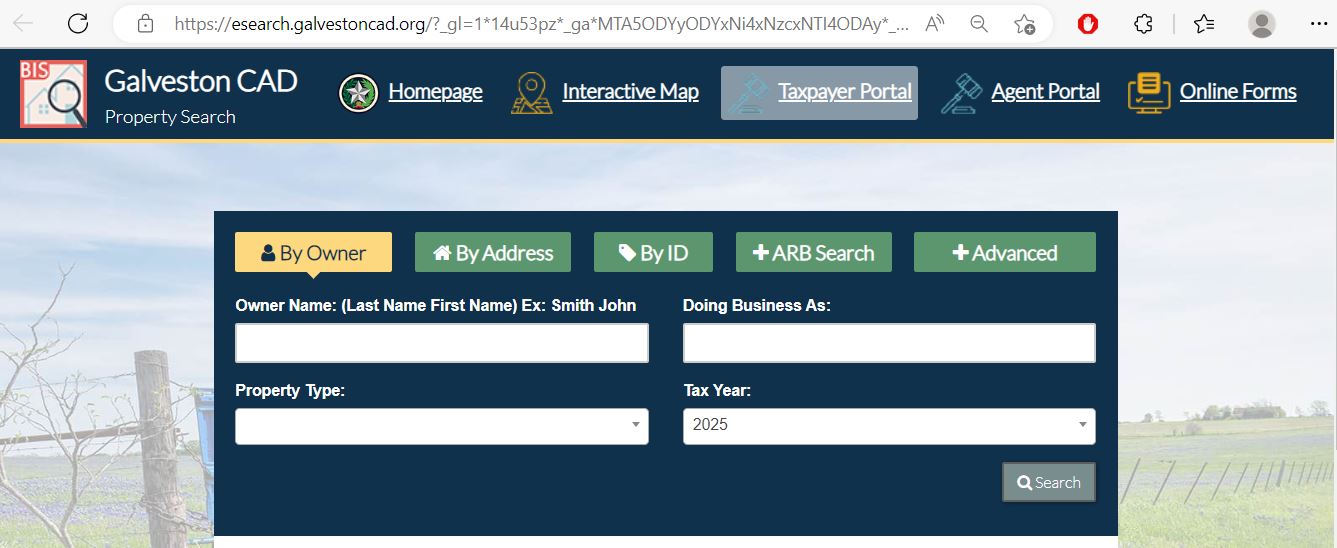
The screenshot below appeared in the previous article and has been retained. It shows the GCAD search tabs and the direct links to the interactive map, taxpayer portal, agent portal and online forms.
Existing Galveston CAD property-search screenshot reused from the previous article. The image shows an earlier selected tax year, so always choose the correct year on the live portal.
By Owner
Use last name first and reduce the query when a trust, estate or company name produces no result.
By Address
Begin with street number and name, then simplify to the street name.
By ID
Use Property ID, Owner ID or Geographic ID for an exact account match.
ARB Search
Use protest-status, hearing-date and board information when those records are available.
Advanced
Filter by abstract, subdivision, condo, neighborhood, DBA, property type or tax year.
Top portal links
Use Interactive Map, Taxpayer Portal and Online Forms for the next official action.
Original portal field guide
Recognise the fields that must match before using a GCAD result
esearch.galvestoncad.org · official appraisal and ARB search
Begin with one reliable detail
OwnerAddressIDARB SearchAdvanced
Property ID · Owner ID · Geographic ID
Subdivision · condo · abstract · neighborhood · street
Tax year · property type · DBA · protest status · hearing date
Open complete property record
Property ID: save it for forms, tax searches and office calls
Geographic ID: compare it with the parcel map
Owner: appraisal ownership, not complete title proof
Legal description: match the correct lot, block, abstract or tract
Values: separate land, improvements, market, appraised and taxable values
Taxing units: identify every possible tax statement and collector
Interactive coastal map
Use GCAD mapping for island, bay, canal, peninsula and mainland parcels
Map research is useful when addresses are duplicated, parcels are vacant, a subdivision has multiple phases or a property’s relationship to water, roads and nearby accounts affects the search.
Search the appraisal account first
Save the Property ID, Geographic ID, subdivision and legal description.
Locate the expected parcel
Use the account identifier or navigate to the island, Bolivar Peninsula, bay community, mainland city or rural area.
Compare surrounding parcels
Review road frontage, water orientation, lot shape, subdivision phase and neighboring property accounts.
Return to the appraisal record
Confirm the map selection and property page use matching identifiers and legal information.
Verify boundaries, flood information and access independently
Use recorded deeds, plats, surveys, title records and official flood resources for legal decisions.
A GCAD map does not establish a surveyed boundary, flood-insurance requirement, beach-access right, easement, buildable area or dune-protection rule.
Coastal due diligence requires separate official records and professional review.
Property-account decoder
Understand what a Galveston CAD record does and does not prove
Use each appraisal field to reach the controlling official record
Field
What it identifies
What it does not prove
Best next action
Property ID
The individual GCAD appraisal account.
That all related lots, improvements, minerals or business assets appear in one account.
Save it and search related accounts separately.
Owner ID
The appraisal system’s owner record and portal credential reference.
Complete title, lien status or heirship.
Use it for portal access and compare Clerk records.
Geographic ID
Geographic indexing associated with the parcel.
A surveyed boundary or legal access.
Compare GIS, deed, plat and survey.
Owner shown
The owner carried for appraisal administration.
Complete ownership, probate status, liens or mineral interests.
Search County Clerk Real Property Records.
Legal description
The lot, block, subdivision, abstract, survey or tract reference.
That abbreviated CAD text is sufficient for conveyance.
Obtain the complete recorded instrument.
Land value
The appraised contribution assigned to the site or acreage.
That water access, restrictions, erosion or flood context was analysed correctly.
Compare similar land sales and parcel characteristics.
Improvement value
The contribution assigned to buildings and other improvements.
That storm damage, condition, elevation or incomplete work is reflected.
Review building details and dated condition evidence.
Market value
GCAD’s January 1 opinion of market value.
A guaranteed sale price or final tax bill.
Compare sales, income, condition and equal-appraisal evidence.
Taxable value
Value after applicable exemptions for a taxing unit.
The balance, payment status or collector.
Open each tax statement and collector account.
Taxing units
County, school, city, MUD, drainage, college and other jurisdictions.
That the Galveston County Tax Office collects every listed tax.
Match every taxing unit with its collector.
Appraisal values
Separate market, appraised and taxable value before filing or estimating taxes
FIRSTMarket value
GCAD’s estimate of what the property would sell for under normal market conditions as of January 1.
THENAppraised value
The value after an applicable residence-homestead or other statutory appraisal limitation.
FINALLYTaxable value
The amount remaining after exemptions. It may differ by school, county, city, MUD or other unit.
Do not estimate the tax bill from market value alone.
The actual amount depends on taxable value, exemptions, ceilings, adopted rates, the collector, delinquency charges and payment history.
Review these coastal property facts before protesting the total
Water relationship
Distinguish beachfront, bayfront, canal-front, water-view, water-access and interior property.
Check foundation type, elevated living area, enclosure, garage and unfinished lower-level space.
Land limitations
Review access, erosion, wetlands, dune restrictions, utilities and buildable area separately.
Rental or commercial use
Compare the correct income, occupancy, property class and market segment.
Exemptions
Confirm that a taxable-value increase is not caused by a removed or missing exemption.
A residence-homestead cap limits appraised value, not market value.
GCAD may still show a higher market-value opinion. New improvements are generally handled separately from the limitation.
Compare like with like.
Island, Bolivar, canal, bayfront, mainland, historic-district, rental and industrial properties can have very different market influences even when they are geographically close.
Search troubleshooting
Fix a Galveston CAD search that returns no result
Change the search field before assuming the account is missing
Problem
Likely reason
Practical fix
Owner name finds nothing
The account may use a spouse, trust, estate, company, initials or prior owner.
Use only the first name, last name or one distinctive company word.
Address search fails
The situs format may differ from postal wording.
Use the street name alone, as recommended by GCAD.
Bolivar or beach parcel has no useful address
The property may be indexed by subdivision, lot, abstract or ID.
Use Property ID, Geographic ID, subdivision and map.
Condo result is unclear
Building, unit and common address formats can vary.
Search the condo name, owner, unit legal description or Property ID.
Mobile home is missing
The home may be separate from land or indexed by a mobile-home park.
Select Mobile Home and use park, owner or Property ID.
Recent buyer is not displayed
The recorded deed may still be processing.
Confirm County Clerk recording and save the instrument number.
Business account is missing
The account may use a DBA, owner or Personal property category.
Search DBA, Owner ID and Personal property separately.
Tax Office portal finds nothing
The account may use another collector or a different account number.
Review the GCAD taxing units and the collector on each statement.
Online protest option is unavailable
GCAD currently limits online protests to homestead properties.
Use the notice instructions for mail or in-person filing.
Prepared GCAD call script
I am researching tax year [year], Property ID [number], Geographic ID [number] and property type [type]. The account shows [owner, value, exemption or property detail]. I need help with [one exact issue]. Please tell me which form, portal or department controls the next step.
Galveston County situations
Use a different workflow for each coastal and mainland property type
Galveston Island residence
Review homestead status, historic or coastal condition, land influence and storm-related improvement details.
Bolivar Peninsula property
Use subdivision, lot, block, Property ID and map rather than relying only on a postal address.
Canal or bayfront property
Distinguish direct frontage, water access, orientation, bulkhead condition and actual utility.
Texas City or La Marque property
Verify city, school, drainage and college-district lines before estimating taxes.
League City or Friendswood property
Confirm county and school boundaries because mailing cities can cross county or district lines.
Dickinson or Santa Fe property
Review county, school, city, drainage and utility-district accounts separately.
Short-term rental
Separate appraisal classification from city licensing, occupancy, insurance and local rental rules.
Commercial or industrial account
Review land, improvements, income, occupancy, business assets and industrial or mineral accounts.
Inherited coastal property
Search the deceased owner, estate and heirs and review recorded probate or heirship documents.
Office routing
Use GCAD, the Tax Office or County Clerk for the correct task
Contact the office that controls the record or action
Your question
Correct starting office
What to prepare
What is the appraised value?
Galveston Central Appraisal District
Property ID, tax year and disputed field.
Why is an exemption missing?
Galveston Central Appraisal District
Application, identification and filing proof.
Can I receive disaster relief?
Galveston Central Appraisal District
Form 50-312, photos, estimates, insurance documents and damage dates.
How do I protest?
GCAD and the Appraisal Review Board
Notice, Owner ID, eFile PIN, deadline and evidence.
How much tax is due?
Collector printed on the current tax statement
Account, tax year and taxing unit.
Did a county-collected payment post?
Galveston County Tax Office
Receipt, account, year, amount and transaction reference.
Who legally owns the property?
Galveston County Clerk or title professional
Grantor, grantee, date range and legal description.
Where is a deed, lien, plat or easement?
County Clerk Real Property Records
Names, document type, date and instrument number.
Is the boundary or buildable area correct?
Surveyor, title professional and relevant local authorities
Deed, plat, survey, flood information and restrictions.
Who adopts the tax rate?
Each local taxing unit
Taxing-unit list and Truth-in-Taxation record.
Account corrections
Correct the Galveston County record that actually contains the error
Appraisal owner is incorrect
Confirm the recorded deed, probate order, heirship document or ownership instrument and provide GCAD with the requested evidence.
Mailing address is incorrect
Use GCAD’s real-property name or address correction form and separately check the Tax Office mailing record.
Legal description or acreage is incorrect
Prepare the recorded deed, plat, survey or metes-and-bounds description.
Building details are incorrect
Use measurements, plans, photographs, permits, inspections and evidence of storm repairs or incomplete work.
Separate parcels should be combined or split
GCAD provides a Property Combine/Split Request Form on its forms page.
Payment balance is incorrect
Contact the applicable collector with the receipt, account, jurisdiction, year and payment date.
A correction and a protest are different remedies.
Use an account correction for inaccurate information. Use a timely protest when challenging value, unequal appraisal, exemption denial or another protestable action.
Homestead and special exemptions
File a Galveston County exemption with the required identification and proof
GCAD accepts residence-homestead applications online, by mail or at the office. The district says it generally acts on an application within 90 days after receiving it.
Find the correct appraisal account
Copy the Property ID, owner, situs address and legal description.
Select the applicable exemption
Review general residence homestead, age 65 or older, disabled person, disabled veteran and surviving-spouse categories.
Prepare the required identification
A Texas driver licence or identification certificate generally must show the residence address, subject to applicable affidavits and exceptions.
Attach category-specific evidence
Age, disability, VA, surviving-spouse, heir-property or manufactured-home claims may require additional documents.
Submit online, by mail or at GCAD
Use the taxpayer portal, current application or office-delivery instructions provided by the district.
Keep proof of delivery
Save the application, attachments, portal confirmation, certified-mail receipt or stamped copy.
Recheck the property account
Confirm the exemption appears for the correct tax year and taxing units after approval.
General homestead
Every Texas school district currently provides a $140,000 residence-homestead exemption.
Age 65 or older
School districts provide an additional $60,000 exemption and an eligible school-tax ceiling.
Disabled person
Requires qualification under the applicable disability standard and supporting evidence.
100% disabled veteran
A qualifying veteran or eligible surviving spouse can receive a total homestead exemption.
Midyear qualification
An eligible owner may receive a prorated homestead exemption after acquiring and occupying the property during the year.
Homestead audit
Respond promptly if GCAD requests a new application, driver licence and verification documents.
A normal homestead application is generally one-time.
A new application can be required after changing the residence, changing ownership or receiving a written request from the chief appraiser.
Apply for the temporary disaster exemption by September 28, 2026
Do not wait for insurance work to finish.
GCAD requires evidence of damage and lists September 28, 2026 as the filing deadline for the temporary exemption connected with the June 15 disaster declaration.
Confirm the property was damaged by the declared event
The exemption applies to qualifying damaged improvements, business personal property and manufactured homes used as dwellings.
Gather required evidence
Include dated photographs, contractor estimates, inspection findings, insurance claims, adjuster reports and a description of unusable areas.
Match the correct appraisal account
Include the Property ID, owner, address, legal description and property type.
Explain the damage level
Describe the physical damage and how it affected normal use, occupancy, production or habitability.
Submit by September 28, 2026
GCAD accepts the completed application by email, mail or in person according to its disaster notice.
Keep the complete filing record
Save the form, evidence, email, mailing receipt or office-stamped copy.
Continue keeping repair records
The temporary exemption lasts until the property is reappraised, so preserve completion dates and post-repair evidence.
Submission route published by GCAD:
email gcad@galvestoncad.org, mail the filing to the Texas City office or deliver it in person.
The exemption amount is not simply the repair cost.
Texas law uses the qualified property value, assigned damage level and portion of the tax year remaining after the disaster declaration.
Agricultural and timber appraisal
Document qualifying land use for open-space or timber appraisal
GCAD’s forms include agricultural 1-d and 1-d-1 applications and state timber-appraisal forms. Acreage, vacant status or rural location alone does not establish qualification.
Select the correct application
Use the filing that matches agricultural, timber or another qualifying special use.
Identify every tract
Match Property ID, Geographic ID, acreage, abstract, survey and legal description.
Separate non-qualifying land
Homesites, commercial areas, storage yards and non-agricultural portions may receive ordinary appraisal treatment.
Document use history
Prepare leases, livestock records, crop records, timber-management documents, maps, receipts and photographs.
Document current intensity
Show that the property is actively devoted to the qualifying use at a level generally accepted for the area.
File by the applicable deadline
April 30 is the normal timely deadline for many special-appraisal applications, subject to extension and late-filing provisions.
Ask about additional taxes before changing use
Development, subdivision, commercial conversion or cessation of qualifying use can create additional-tax consequences.
Coastal conservation, wetlands or vacant status does not automatically equal agricultural qualification.
The land must meet the applicable statutory use and history requirements.
Business personal property
File Galveston County business-property and inventory forms correctly
Businesses generally report taxable tangible personal property used to produce income, including furniture, machinery, equipment, inventory, vessels, aircraft and manufactured-housing inventory.
Find the Personal property account
Search the business owner, DBA, Owner ID or Property ID.
Choose the correct form
GCAD lists business-personal-property, aircraft, watercraft, allocated-property and special-inventory forms.
Open GCAD Rendition Forms
Prepare the asset list
Include descriptions, quantities, acquisition years, original costs, locations and disposal information.
Use the correct January 1 inventory
Report taxable assets owned, managed or controlled on the appraisal date.
File by April 15
The normal deadline for most required business-personal-property renditions is April 15.
Request a timely extension
GCAD provides a Request for Extension to File Rendition form.
Use monthly inventory forms when required
Vehicle, vessel, heavy-equipment and manufactured-housing dealers have specialised declaration and tax-statement duties.
Keep proof of submission
Save the complete form, supporting schedules and delivery confirmation.
A late required rendition can create a 10% penalty based on the taxes imposed on the property.
File a timely rendition or extension request even when some asset details require explanation.
Taxpayer portal
Use the GCAD taxpayer portal for documents and eligible online protests
GCAD’s taxpayer portal was updated July 15, 2026. It provides property details, electronic-communication elections, documents and applications from one account.
Use the Owner ID and eFile PIN
These credentials appear on the Notice of Appraised Value.
Request missing credentials through GCAD
When the notice is unavailable, email gcad@galvestoncad.org with the Property ID and owner information.
Complete the electronic-communication form
The portal says an electronic agreement is required to receive eligible communications electronically.
Confirm online-protest eligibility
GCAD’s current informal-meeting guidance limits online protest filing to properties with a homestead exemption.
Save every portal record
Keep registrations, submitted applications, uploaded evidence, settlement messages and official notices.
A pending portal registration does not extend a filing deadline.
Use another permitted filing method before the deadline if access is not approved in time.
2026 appraisal protest
Choose the correct GCAD filing route before preparing the hearing evidence
General deadline:
most 2026 protests were due May 15, 2026 or 30 days after GCAD mailed the Notice of Appraised Value, whichever applicable date was later. The individual notice controls.
Online filing is not available to every account.
GCAD’s current guidance says only properties with a homestead exemption can protest through the online portal.
Read the complete appraisal notice
Confirm Property ID, Owner ID, eFile PIN, proposed values, exemptions, mailing date and protest deadline.
Save the property record
Keep the legal description, land, improvements, account details, exemptions and value history.
Identify the protest ground
Common issues include market value, unequal appraisal, incorrect property data, exemption denial and agricultural denial.
Check online eligibility
An eligible homestead owner can register through the taxpayer portal using Owner ID and eFile PIN.
Use mail or in-person filing when online filing is unavailable
Submit a written protest or Form 50-132 using the instructions on the notice.
Open GCAD Protest Instructions
File before collecting perfect evidence
Protect the deadline first and continue organising supporting documents after filing.
Keep proof of filing
Save the portal confirmation, certified-mail record, stamped copy or other accepted receipt.
Request GCAD’s evidence in writing
Use the HB 201 form or a letter containing the owner, Property ID, contact information and delivery preference.
Prepare for the informal meeting
Bring or upload the evidence supporting the exact correction requested.
Continue to the ARB when unresolved
The three-member panel hears both sides and issues a decision.
Coastal evidence packet
One-page statement of the requested value or correction
Notice of Appraised Value
Saved GCAD account
Comparable coastal or mainland sales
Dated storm, wind, water or condition photographs
Repair estimates and inspection reports
Survey, map, elevation or access evidence
Rental, income, BPP or land-use records when relevant
GCAD says district hearing evidence is generally sent at least 14 days before the scheduled hearing after a written request.
Review it for incorrect property characteristics, unsuitable comparables and unexplained adjustments.
Missed the normal deadline?
Limited late-protest or correction remedies may exist for failure to receive a required notice, good cause, clerical mistakes, double taxation or substantial errors. Contact GCAD immediately.
Appraisal Review Board
Prepare for the Galveston ARB’s short formal-hearing format
GCAD states that formal hearings usually last approximately 15 to 20 minutes and are heard by panels of three ARB members. A Notice of Final Order generally follows by certified mail.
Read the hearing notice immediately
Confirm date, time, location, participation method and evidence-delivery instructions.
Use the informal meeting first
An appraiser may offer a settlement. The protest continues to the formal hearing when no agreement is reached.
Number every exhibit
Use labels such as Photograph 1, Comparable 2, Estimate 3 and Survey 4.
Prepare a one-minute opening statement
State the Property ID, tax year, disputed issue and requested value or correction.
Lead with the strongest evidence
Begin with the item that directly proves the requested change.
Keep the comparison local and similar
Explain why each comparable matches the island, peninsula, waterfront, mainland or commercial property.
Save the final order
Review the mailing date and any arbitration or district-court deadline immediately.
One reschedule may generally be requested for any reason.
Additional reschedules require ARB approval. Follow the hearing notice and contact GCAD promptly.
Pay county-collected Galveston property taxes through the official account
The official tax portal allows users to search accounts collected by the Galveston County Tax Office using owner name, property address, account number, long account number or fiduciary number.
Search with the strongest account detail
Use account number or long account number when available. Otherwise use owner name or the beginning of the property address.
Open the complete property-tax statement
Confirm account, legal description, site address, market value, exemptions and amount due.
Review current and prior-year balances
The account can show current amount due, prior-year amount, active lawsuits and pending internet payments.
Check every jurisdiction listed
Make sure the county portal contains the taxing units expected for that property.
Add the account to the payment cart
Additional county-collected accounts can be searched and added before checkout.
Review the processing fee
The portal currently lists 2.2% for credit and debit cards and $0.50 for an electronic check.
Save the complete confirmation
Keep the tax amount, fee, total, account, year, date and transaction number.
Reprint the receipt from Payment Information
The account provides payment-history and receipt functions after processing.
Check separate tax statements
The county Tax Office says some owners receive multiple statements because it collects for only part of the county’s local governments.
Current online and telephone payment information
Method
Current portal fee
Important action
Credit card
2.2%
Verify the separate Paymentus charge before submitting.
Debit card
2.2%
Compare the fee with an electronic-check payment.
Electronic check
$0.50
Enter bank details carefully and retain confirmation.
The portal warns that bank bill pay generates a paper check and can take three to five days.
Use the correct mailing address for property-tax payments:
the Tax Office specifically says mailed payments should use 722 21st Street, Galveston, Texas 77550 because the Postal Service does not always recognise the Moody Avenue wording.
Request a dated delinquent payoff.
Penalty, interest, attorney fees and collection costs can change after an older statement was printed.
Confirm whether the county Tax Office collects every jurisdiction on the property
The Galveston County Tax Office states that it collects for nearly half of the local governments in the county. The Texas Comptroller lists the specific consolidated units it serves.
County-collected school districts
The state directory includes Dickinson, Galveston, High Island, La Marque and Hitchcock ISDs.
Other school districts
Clear Creek, Friendswood, Santa Fe, Texas City or another district may use a different collection route.
Cities
The county office collects for several cities, including Galveston, Texas City, League City, Dickinson and Friendswood.
MUD and utility districts
Some districts are county-collected while many active MUDs use another collector.
Drainage and college districts
Collection responsibility depends on the exact unit listed on the property account.
Best rule
Match each taxing unit with the collector and account number printed on its statement.
Open the GCAD property account
Write down every county, school, city, MUD, drainage, college and special-district unit.
Search the county Tax Office portal
Note which jurisdictions appear in the county-collected statement.
Review all paper and electronic statements
Identify any school, MUD or other local account billed separately.
Do not combine unrelated account numbers
Each collector may use a different account number, payment site and receipt.
Save a receipt from every collector
Confirm that each payment posted to the correct year and jurisdiction.
Paying the county statement does not necessarily pay every tax attached to the property.
This is especially important in fast-growing MUD areas and properties served by school districts with separate collectors.
Truth in Taxation
Review proposed rates and meetings without treating an estimate as a bill
Select Search Real Property Records
Use the county-provided search instead of an unrelated commercial property-record website.
Search grantor and grantee names
Try the buyer, seller, spouse, trust, estate, company and spelling variations.
Narrow the recording period
Use the purchase, inheritance, refinance, lien, release, easement or transfer date.
Compare the legal description
Match the lot, block, subdivision, abstract, survey or tract with the GCAD account.
Review the correct document type
Relevant records can include deeds, deeds of trust, liens, releases, easements, plats and assignments.
Request a certified copy when necessary
Use the Clerk’s certified-copy route for court, lender, title, probate or other official use.
Use professional title help for legal conclusions
A public name search does not guarantee clear title or reveal every ownership, easement or lien issue.
Free fraud-monitoring option:
Galveston County’s Property Fraud Alert can notify a subscriber when a document containing a monitored personal or business name is recorded.
The GCAD owner field is not a deed or title report.
Use the recorded instrument and professional title or legal review when ownership matters.
Review deeds, liens, releases, easements, plats and probate-related instruments.
Find every tax collector
Compare the GCAD taxing units with all county, school, city, MUD and special-district statements.
Check current and delinquent taxes
Request dated payoffs and retain receipts from every collector.
Recalculate future taxes
The seller’s homestead, cap, tax ceiling or special appraisal may not continue.
Review flood and storm exposure
Use official flood data, insurance records, inspections and repair history separately from CAD.
Review access and restrictions
Check recorded easements, subdivision restrictions, plats and coastal-development requirements.
Compare improvement details
Verify living area, elevation, lower enclosures, garages, decks, pools and storm repairs.
File the buyer’s exemption
Do not assume the prior owner’s homestead, senior or veteran benefit automatically transfers.
The seller’s current tax bill may not predict the buyer’s future bill.
Ownership changes can affect exemptions, appraisal limitations, tax ceilings, special appraisal and collector responsibility.
2026 action calendar
Important Galveston County appraisal and property-tax dates
Property status and appraisal date
Ownership, use, condition, exemption qualification and market value are generally determined as of January 1.
Business-personal-property rendition
File most required renditions or a timely written extension request.
Many exemption and special-appraisal applications
April 30 is the normal timely filing date for many exemption and agricultural applications.
General 2026 protest deadline
File most protests by May 15 or 30 days after notice mailing, whichever applicable date is later.
Informal reviews and ARB hearings
Unresolved protests move through evidence review, settlement discussion and formal hearing.
2026 disaster declaration date
Galveston County was included in the declaration related to Tropical Storm Arthur.
Temporary disaster-exemption deadline
Submit Form 50-312 and evidence of damage to GCAD by September 28, 2026.
Tax-rate proposal and adoption
Review Truth in Taxation as local governments publish proposed and adopted rates.
Tax statements generally begin
Tax assessors mail statements on or as soon as practical after October 1.
Normal payment deadline in the following year
Most 2026 taxes become delinquent after January 31, 2027, subject to special-account rules.
The individual notice, application, ARB order or tax statement controls.
General dates cannot account for corrected accounts, late notices, disaster provisions, weekends, holidays or special remedies.
Verified local contacts
Galveston County appraisal, tax-payment and land-record offices
Galveston Central Appraisal District
9850 Emmett F. Lowry Expressway
Suite A101
Texas City, Texas 77591
Use the Clerk’s official real-property page for online search and certified-copy options.
Call before travelling for a deadline or hearing.
Confirm holiday closures, ARB lunch procedures, accepted filing methods, document requirements and which branch handles the task.
Official action resources
Use these official pages for the final live action
GCAD homepage
Official announcements, deadlines, disaster notices, contacts and department information.
How this Galveston County guide was expanded and corrected
The original images were preserved and the article was rebuilt around complete coastal-property tasks
This version retains the GCAD search screenshot and editor image from the previous article while replacing the shorter guide with complete property-search, map, exemption, disaster, rendition, protest, ARB, payment and deed-record workflows.
The update adds the September 28, 2026 disaster-exemption deadline, evidence requirements, GCAD’s homestead-only online-protest limitation, the county’s multiple-tax-statement warning and current payment fees.
It also explains coastal evidence, multiple collectors, correct tax-payment mailing instructions, portal credentials, County Clerk fraud alerts and buyer due diligence for island, peninsula, bay, canal and mainland property.
AppraisalDistrict.org is an independent informational website and is not operated by Galveston Central Appraisal District or Galveston County.
Galveston County answers
10 common Galveston Central Appraisal District questions
1. What is the official Galveston Central Appraisal District website?
The official website is galvestoncad.org. Use it for appraisal searches, maps, exemptions, forms, protests, ARB information and district contacts.
2. How do I search Galveston County property records?
Open GCAD Property Search and choose Owner, Address, ID, ARB Search or Advanced. Verify the complete account before relying on it.
3. Why can I not find a Galveston County property by address?
Simplify the search to the street name. For coastal land, condos, mobile homes or new parcels, try owner, Property ID, Geographic ID, subdivision, abstract or map.
4. Can every Galveston County property owner protest online?
No. GCAD’s current informal-meeting guidance says only properties with a homestead exemption can use the online protest process. Other owners should follow mail or in-person instructions.
5. What was the Galveston CAD protest deadline for 2026?
The general deadline was May 15, 2026 or 30 days after GCAD mailed the appraisal notice, whichever applicable date was later. The individual notice controls.
6. How do I apply for a Galveston County homestead exemption?
Use the official homestead page or taxpayer portal, attach the required identification or affidavit and retain proof of submission. GCAD accepts applications online, by mail or at its office.
7. Is there a 2026 Galveston County disaster exemption deadline?
Yes. Qualifying owners affected by the June 15 disaster declaration must submit Form 50-312 and evidence of damage to GCAD by September 28, 2026.
8. Where do I pay Galveston County property taxes?
Use the official county Tax Office portal for accounts collected by that office. Check for additional statements from other collectors.
9. What are the Galveston County online property-tax payment fees?
The official portal currently lists 2.2% for credit and debit cards and $0.50 for electronic checks. Verify the fee displayed during checkout.
10. Where can I search Galveston County deeds and liens?