Find the Right Garza CAD Record Before You File, Protest or Pay
Garza County property records do not all behave like an ordinary house search. A rural tract, mineral account, mobile home, business account or agricultural property may require an account number, abstract, geographic ID, property-type filter or legal description.
This guide shows how to use the official Garza CAD search and map, understand preliminary 2026 values, apply for exemptions, prepare agricultural and business records, file an online appeal, select the correct payment entity and find deeds or liens through the County Clerk.
Owner, Address, ID, ARB and Advanced Search options.
Real, personal, mineral, auto and mobile-home records.
Allisha Belongia is listed by Garza CAD.
806-495-3518 for appraisal-record help.
Official portals and local contacts checked July 28, 2026.
Choose the Garza County search method that fits the record
This browser tool does not transmit an owner name, property address, account number or other property-search information.
Use account, owner, address, subdivision or legal description.
Use owner, abstract, acreage, geographic ID and map context.
Use account, owner, operator or advanced-property filters.
Check mobile-home park, owner and account information.
Use entity name, DBA, agent ID and personal-property type.
Search Garza CAD without opening the wrong account
Use the existing Garza County guide image as orientation
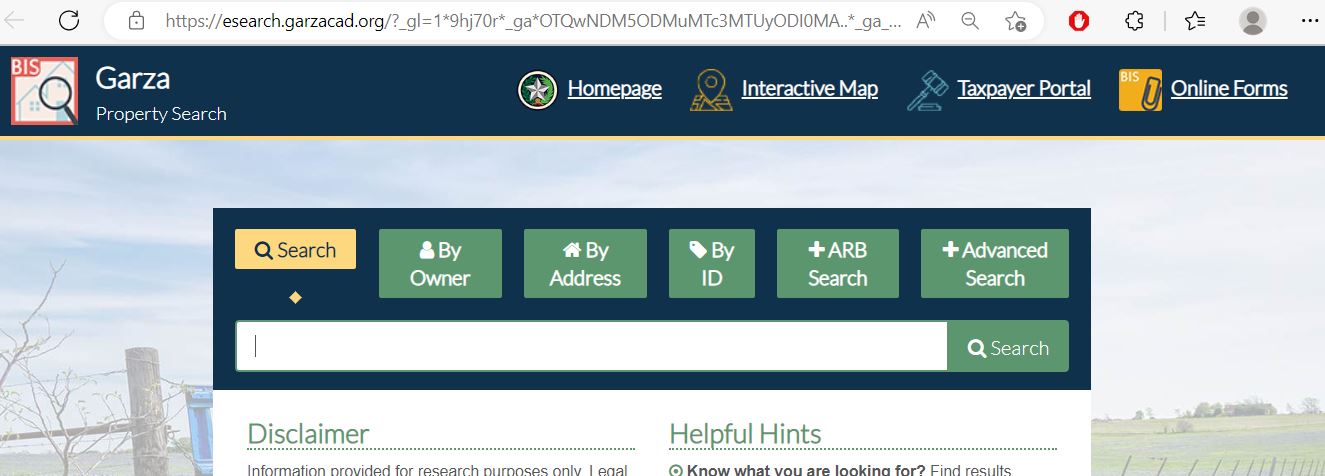
Locate the appraisal account before completing a form, building protest evidence or selecting a payment account.
Real, mineral, mobile-home and personal-property accounts should not be treated as interchangeable.
Keep a dated screenshot or PDF because preliminary values and online records can change.
Understand what the Garza CAD result does—and does not—prove
| Field | What it helps identify | What it does not prove | Best next action |
|---|---|---|---|
| Account number | The appraisal account associated with a property or taxable interest. | That another parcel or mineral account is included. | Save every related account separately. |
| Owner name | The owner currently displayed for appraisal administration. | Complete legal title or every ownership interest. | Check the recorded deed or mineral documents. |
| Property type | Whether the account is real, personal, mineral, mobile-home or another category. | That related accounts use the same category or identifier. | Search each relevant property type. |
| Geographic ID | A location-based identifier useful for parcel and map research. | A surveyed boundary or legal title. | Compare the map, deed and legal description. |
| Legal description | The abstract, survey, lot, block, tract or other abbreviated land description. | That the abbreviated CAD text is sufficient for a deed or legal instrument. | Read the recorded document through the County Clerk. |
| Acreage | The acreage used in the appraisal record. | A surveyed acreage or fence-line location. | Use a deed, plat and survey when accuracy matters. |
| Market value | Garza CAD’s estimated market value for the displayed year. | The taxable value, tax bill or sale price. | Compare appraisal limitations and exemptions. |
| Appraised value | The value after an applicable appraisal limitation or special appraisal treatment. | The market value cannot be disputed. | Review both market and appraised value. |
| Exemptions | Benefits currently applied in the appraisal record. | That every taxing unit applies the same exemption amount. | Review entity-level taxable values and application status. |
| Tax year | The appraisal year being displayed. | That a current-year value has been certified. | Read preliminary or certified status before relying on it. |
What to try when Garza property search returns no result
| Problem | Likely reason | Try this next |
|---|---|---|
| Full owner name fails | Trust, estate, spouse, initials, company suffix or different name order. | Search only the surname, first name or main business word. |
| Street address fails | Rural route, county road, abbreviation or no conventional situs address. | Use only the street name, owner, account, legal description or map. |
| Ranch tract is unclear | The property may be indexed by abstract, survey, legal description or geographic ID. | Use Advanced Search and the interactive map. |
| Mineral record not found | Mineral ownership may be listed under another owner, operator or separate account. | Choose Mineral property type and search owner, account, agent or legal information. |
| Mobile home not found | It may have a separate mobile-home account, park reference or different owner name. | Use Mobile Home property type and the mobile-home-park filter. |
| Business account not found | The account may use a DBA, legal entity, agent or prior business name. | Use Personal property type, DBA and agent-ID fields. |
| New buyer not displayed | The deed or appraisal ownership update may still be processing. | Confirm recording with the County Clerk, then provide the instrument details to CAD. |
| Too many results | The owner has several accounts or the search terms are too broad. | Add property type, street name, abstract, subdivision, geographic ID or tax year. |
Do not use the same search strategy for every Garza County account
Search by account, owner or simplified street address. Verify the situs, legal description, improvements and exemptions.
Use owner, abstract, survey, legal description, geographic ID, acreage and the interactive map.
Choose the mineral property type and check owner, operator, account, agent and legal information.
Use the mobile-home property type, owner, account and mobile-home-park filter where applicable.
Search legal entity, DBA and agent information. Review the account separately from the real-estate parcel.
Search current and former owners, then compare the CAD record with probate, deed and mineral documents.
Use the Garza map for rural context—not legal boundaries
The interactive map is especially useful when a tract is easier to identify by roads, neighbouring parcels, survey context or geographic position than by an ordinary address.
Follow Garza property value from appraisal to an estimated bill
Educational estimate only. Use the entity-specific taxable values and rates from the official tax record and Truth in Taxation database.
Choose the correct Garza CAD application and keep proof
Garza CAD provides a taxpayer portal for property details, electronic communication, documents and applications, plus a public forms library for downloadable Texas property-tax forms.
Prepare account information, ownership and occupancy details, matching identification and any required affidavit.
Use the matching exemption form and include the supporting evidence required by its instructions.
Update the appraisal mailing address promptly so notices, protest information and tax correspondence reach the correct owner.
Document qualifying land use—not merely acreage or ownership
Garza CAD publishes agricultural guidelines, a 1-d-1 open-space application, wildlife-management materials and related special-appraisal forms. Agricultural valuation is based on qualifying use and statutory requirements rather than simply owning rural land.
Document stocking, leases, fencing, water, management activity, sales and periods when the land could not be used normally.
Prepare crop history, production, lease, input, harvest and land-preparation records.
Confirm prior eligibility, submit the required plan and maintain evidence of the qualifying wildlife-management practices.
Build a rendition from an asset list that can be explained
Garza CAD’s forms library includes general personal-property renditions and dealer-inventory forms. A business account can include furniture, machinery, equipment, computers, inventory and other taxable property used to produce income.
Track filing, protest, payment and certification dates separately
Build a Garza CAD protest around the actual appraisal issue
Evidence by Garza County property type
| Property type | Useful evidence | Common weak evidence |
|---|---|---|
| Residence | Condition photos, repair estimates, measurements, inspection findings and similar properties. | Mortgage balance or a general statement that taxes are unaffordable. |
| Rural land | Survey, access, terrain, use, leases, water, fencing, production and comparable land. | A distant listing with different use or access. |
| Agricultural | Use history, production, livestock, leases, expenses, photos and management records. | Acreage ownership without evidence of qualifying use. |
| Mineral | Ownership, operator, production, decline, lease and division-order information. | Surface-land evidence that does not address the mineral account. |
| Business personal property | Asset list, cost, age, condition, disposition and depreciation information. | A total value without an itemised asset explanation. |
Confirm the entity and bureau code before paying
The official CAD website currently lists bureau code 4352446.
Open Garza CAD tax paymentThe official CAD website currently lists bureau code 6531059.
Open Southland ISD paymentThe Texas Comptroller directory lists the Garza County Tax Assessor-Collector as collecting for Garza County and Garza County Health District.
Open County Tax AssessorTrace a missing payment without paying twice
Track proposed and adopted Garza County tax rates
Garza CAD directs property owners to the county Truth in Taxation database. During the rate-adoption season, the database can show property-specific estimates, taxing-unit proposals, adopted rates and notification options.
Use the Garza County Clerk when the CAD owner display is not enough
The Garza County Clerk records and preserves real- and personal-property documents, including deeds, tax liens and UCC records. Use those documents when ownership, lien history or legal description matters.
The Clerk currently publishes $25 for the first page and $4 for each additional page, subject to document-specific rules.
The published records-search fee is $5 per name. Confirm the current total before submitting a request.
The Clerk publishes a $5 certification fee plus $1 for each page or part of a page.
Adjust the workflow to the owner and property
Search by account or street, confirm City of Post and school taxing-unit lines, then verify exemptions and improvements.
Check whether a separate Southland ISD collection route applies before paying.
Save the legal description, acreage, special-appraisal status, land-use history and map before filing.
Search every mineral account and compare ownership, operator, property description, production and tax year.
Confirm whether the home has a separate account and whether land ownership is recorded under another property account.
Use the legal entity, DBA, agent and personal-property account rather than relying on the building’s real-estate record.
Verify the recorded deed, CAD owner display, mailing address, exemption eligibility and every separate account.
Search the deceased owner, estate and heirs, then compare probate and recorded documents with CAD accounts.
Create a table listing each account, legal description, acreage, property type, value and payment status.
Contact the Garza County office that controls the record
Use for property search, values, exemptions, agricultural appraisal, business renditions, maps, property details and protests.
124 E. Main StreetPost, Texas 79356
Mailing:
P.O. Drawer F
Post, TX 79356-0290
806-495-3518
Fax: 806-495-2055
chief@garzacad.org
Hours:
Monday–Thursday: 8:00 AM–5:00 PM
Friday: 8:00 AM–12:00 PM
Allisha Belongia
The chief appraiser administers appraisal-district operations. Value protests are decided through the Appraisal Review Board process rather than by the Tax Assessor-Collector.
Review Garza CAD staffUse for tax bills, payment, receipts and collection questions for the units served by the county office.
300 W. Main StreetPost, Texas 79356
Mailing:
P.O. Box 26
Post, TX 79356
806-495-4448
Fax: 806-990-4035
nancy.wallace@co.garza.tx.us
Hours:
Monday–Thursday: 8:00 AM–4:30 PM
Friday: 8:00 AM–12:00 PM
Use for deeds, tax liens, UCC records, official public documents and certified copies.
Garza County Courthouse, First Floor300 W. Main Street
Post, Texas 79356
Mailing:
P.O. Box 366
Post, TX 79356
806-495-4430
Fax: 806-495-4431
terri.laurence@co.garza.tx.us
Hours:
Monday–Thursday: 8:00 AM–5:00 PM
Friday: 8:00 AM–12:00 PM
Open the exact Garza County resource you need
Owner, address, ID, ARB and advanced appraisal-record search.
Open property searchProperty details, electronic communication, documents, applications and online appeals.
Open taxpayer portalParcel location, rural context and neighbouring-account research.
Open mapHomestead, agricultural, wildlife, rendition, protest and other applications.
Open formsOfficial payment route currently associated with bureau code 4352446.
Open Garza CAD paymentOfficial payment route currently associated with bureau code 6531059.
Open Southland paymentProperty-specific proposed and adopted taxing-unit information.
Open tax databaseCounty Clerk recording, search, copy and fee information.
Open official recordsHow this Garza County guide was rebuilt

The original Garza County guide image and the existing editorial image have been retained. The search walkthrough, property-type routing, form preparation, agricultural guidance, protest workflow, payment bureau-code instructions, County Clerk information and local office details were rebuilt from current official sources.
Reviewed July 28, 2026. Preliminary values, portal labels, tax balances, processing fees, bureau codes, office schedules, forms and filing procedures can change.
Garza County Appraisal District FAQs
What is the official Garza County Appraisal District website?
The official website is garzacad.org. Use it for official property search, maps, forms, taxpayer-portal access, online appeals, appraisal information, office contacts and payment links.
How do I search Garza County property records?
Open Garza Property Search. Search by owner, address or ID, or use Advanced Search for property type, abstract, DBA, subdivision, owner ID, geographic ID, legal description and tax year.
Why does Garza CAD show preliminary 2026 values?
The official property-search portal states that 2026 values are preliminary and may change before certification. Confirm the displayed year and save a dated copy before using the record for a protest, estimate or purchase review.
How do I find rural land when the address search fails?
Search by owner, account, abstract, geographic ID, subdivision or legal description. Use the Garza CAD interactive map for location context, but do not treat the parcel line or displayed acreage as a legal survey.
Can I apply for a Garza County homestead exemption online?
Garza CAD provides a Taxpayer Portal and an official forms page. Homestead applications must include the required identification or other information specified by the application instructions and Texas law.
What is the Garza County property-tax protest deadline?
The ordinary deadline is May 15 or 30 days after the Notice of Appraised Value is delivered, whichever is later. Use the exact deadline printed on the notice.
Where do I file a Garza CAD protest online?
Garza CAD’s former appeal page now directs taxpayers to the Garza Taxpayer Portal. Sign in to review property details, communications and available online appeal functions.
How do I pay Garza County property taxes online?
Start from the official Garza CAD or county page and confirm the collecting entity. Garza CAD currently identifies Garza CAD Taxes with bureau code 4352446 and Southland ISD Taxes with bureau code 6531059. The County Tax Assessor-Collector handles the consolidated units listed for that office.
Who handles Garza County deeds and property liens?
The Garza County Clerk records deeds, tax liens, UCC records and other official real- and personal-property documents. A CAD owner display or map is not a replacement for the recorded deed.
Where is Garza Central Appraisal District located?
Garza Central Appraisal District is at 124 E. Main Street, Post, Texas 79356. Published office hours are Monday through Thursday from 8:00 AM to 5:00 PM and Friday from 8:00 AM to noon. The telephone number is 806-495-3518.