
Navigate Sterling County Property Records From Ranch Gate to Tax Receipt
Sterling CAD’s search is built for more than Sterling City homes. It includes ranch tracts, agricultural land, business property, pipelines, utilities and oil or gas interests that may require a legal description, abstract, geographic ID or lease detail.
Use Sterling County Appraisal District for values, exemptions, maps, special appraisal and protests. Use the Sterling County Tax Assessor-Collector for tax bills and payments, and the County Clerk for deeds, liens and recorded land documents.
Property ID, Owner ID or Geographic ID.
812 4th Street, Sterling City.
609 4th Street, Sterling City.
County, city, school and underground-water district.
2026 search and reports; latest posted certified rolls are 2025.
What do you need from the Sterling County property account?
Use owner, ID, address, legal, abstract, subdivision or lease information.
Follow the official search stepsConfirm acreage, qualifying history, productivity value and wildlife-management evidence.
Prepare land-use proofSearch the owner, estate, company, lease name, lease number or Property ID.
Search mineral accountsPrepare identification, ownership, qualification and supporting documents.
Review exemption stepsRegister, connect the property and preserve every online filing confirmation.
Prepare the protest fileUse the Tax Office for balances and the County Clerk for recorded ownership documents.
Choose the correct officeSearch Sterling CAD using the most specific reliable identifier
Use the Sterling CAD screenshot as a click-and-check guide
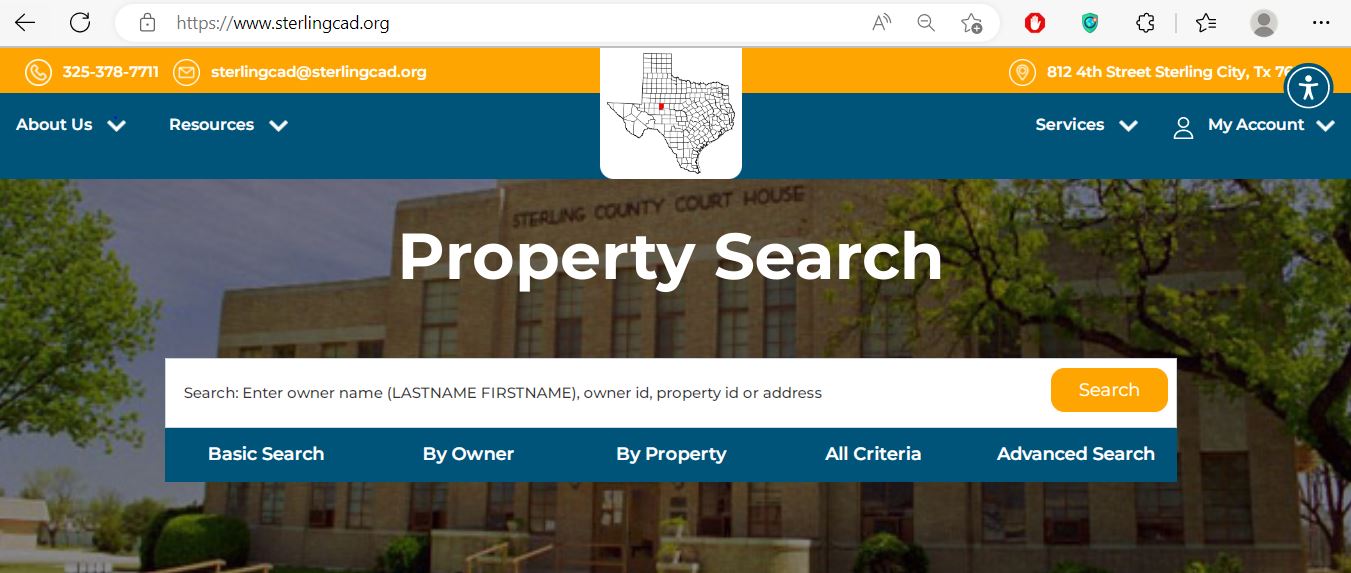
Use an owner name, owner ID, property ID or short address.
Use Geographic ID, legal description, abstract, subdivision or lease data.
Use field, category, acreage or value filters only after a simpler search is too broad.
Use Sterling CAD’s deeper fields for ranch, pipeline and mineral research
Available search routes
| Field | Best use | Common mistake |
|---|---|---|
| Previous Owner | Recently purchased or inherited property. | Searching only the new owner before CAD updates the deed. |
| Volume, Page or File Number | Connecting the appraisal account with a known recorded document. | Treating the CAD deed reference as a complete title search. |
| Abstract, Tract, Lot or Block | Ranches and parcels without dependable street addresses. | Entering the entire deed description in one search field. |
| Lease Name or Number | Oil, gas and other mineral-interest accounts. | Searching a mineral interest under Real property. |
| Category | Narrowing residential, agricultural, commercial, industrial, mineral, utility or business property. | Assuming category alone proves the account is correctly classified. |
| Land Acres or Value Range | Researching potential comparison accounts. | Assuming similar acreage or value automatically makes a property comparable. |
Understand what a Sterling CAD property record can and cannot prove
| Field | What it identifies | What it does not prove | Next action |
|---|---|---|---|
| Property ID | The appraisal account in Sterling CAD. | That the Tax Office uses the identical identifier. | Save it for forms, calls and protests. |
| Geographic ID | A geographic or parcel-related reference. | The surveyed boundary or exact legal acreage. | Compare map, deed and survey. |
| Property Type | Real, Personal or Mineral account classification. | That every related asset is included. | Search all relevant account types. |
| Owner shown | The owner carried for appraisal and notice purposes. | Complete title, probate, lien or mineral ownership. | Use County Clerk records when ownership matters. |
| Legal description | An abbreviated abstract, tract, survey, lot or block. | The complete deed description or access rights. | Read the recorded deed and survey. |
| Lease information | A mineral or industrial account connection. | Mineral title, royalty ownership or payment entitlement. | Review recorded mineral documents. |
| Market value | CAD’s opinion of value as of January 1. | A guaranteed sale price or final tax balance. | Review property facts and value evidence. |
| Productivity value | Special agricultural or open-space valuation when approved. | That the land can change use without tax consequences. | Review use history and rollback exposure. |
| Tax due | A collection-related amount displayed for the selected account or year. | The live checkout total or payment posting. | Verify in the Sterling County Tax portal. |
Register before a protest or electronic-service deadline
Use the Sterling CAD map for context—not legal boundaries
What to do when a Sterling County property does not appear
| Problem | Likely reason | Practical fix |
|---|---|---|
| Owner search returns nothing | The record may use a spouse, estate, trust, company or prior owner. | Search only the surname or one distinctive entity word. |
| Address search fails | A ranch or rural tract may not use a standard situs address. | Search Property ID, Geographic ID, legal, abstract or map. |
| Ranch tract is missing | The property may be indexed by survey, abstract, tract or owner. | Use By Property or All Criteria rather than Basic Search. |
| Mineral account is missing | The search is limited to Real property. | Select Mineral and search the owner, lease name or lease number. |
| Business assets are missing | The assets may use a separate Personal account. | Select Personal and search the legal business or DBA. |
| Property disappears with a filter | “Show only Properties with Tax Due” may be selected. | Turn the tax-due filter off and search again. |
| Recently purchased property shows seller | The deed may not yet be processed into the appraisal record. | Verify recording with the County Clerk and search the seller. |
| 2026 tax bill is not displayed | The tax portal currently lists 2025 and prior years while 2026 rates and statements are not yet complete. | Use the 2026 CAD value for appraisal research and check the Tax Office again after statements are issued. |
Local search tips for Sterling City, ranches and mineral accounts
Confirm whether the account includes Sterling County, Sterling City ISD, the City of Sterling City and the underground-water district.
Separate the residence-homestead portion from the remaining ranch or open-space acreage.
Search by owner, survey, abstract, legal description and Geographic ID rather than street address alone.
Review market value, productivity value, acreage, land class and qualifying-use history separately.
Confirm prior open-space qualification, the wildlife plan and evidence of qualifying management practices.
Search Mineral by owner, estate, company, lease name, lease number and Property ID.
Confirm the property category, company, agent and appraiser before preparing a value question.
Search the deceased owner, estate and heirs and gather deed, probate or heirship documents.
Search both the real-estate location and the separate Personal account for equipment and inventory.
Separate market value, appraised value and taxable value
Sterling CAD’s opinion of value as of January 1 for the selected year.
The value after an applicable appraisal limitation or approved open-space valuation.
The value remaining after exemptions for each taxing unit.
Use Sterling CAD, the Tax Office or County Clerk correctly
| Your question | Correct office | What to prepare |
|---|---|---|
| What is the appraised value? | Sterling CAD | Property ID, tax year and disputed value component. |
| Why is an exemption missing? | Sterling CAD | Application, identification, qualification date and filing proof. |
| Does ranch land qualify for open-space appraisal? | Sterling CAD | Use history, acreage, leases, production evidence and maps. |
| How much property tax is due? | Sterling County Tax Assessor-Collector | Owner, account, property and tax year. |
| Did an online payment post? | Sterling County Tax Office | Confirmation, amount, payment date and year. |
| Who legally owns the property? | Sterling County Clerk or title professional | Grantor, grantee, date range and legal description. |
| Who owns a mineral interest? | County Clerk records and a qualified mineral-title professional | Mineral deeds, reservations, leases, assignments and probate records. |
| Who sets the tax rate? | Each local taxing unit | The jurisdiction list from the appraisal account. |
Correct the official system that contains the error
Confirm the recorded deed or probate document with the County Clerk, then provide Sterling CAD the evidence it requests.
Contact Sterling CAD because appraisal notices and exemption correspondence depend on the CAD mailing record.
Determine whether the issue belongs to CAD, county addressing, the city or the postal service.
Prepare the deed, survey, plat, Property ID and Geographic ID.
Use measurements, photographs, permits, condition evidence, repair records or demolition proof.
Prepare the lease, owner, operator, division-order, recorded-document and account information.
Contact the Tax Office with the receipt, payment confirmation, account, amount and tax year.
Contact the County Clerk or a qualified professional about a correction instrument and recording requirements.
Prepare Sterling CAD exemption documents before submission
For a qualifying principal residence. Match the deed, identification and residence address.
Review the additional exemption, tax ceiling, payment options and possible deferral rights.
Use the form matching the VA disability rating, total disability or surviving-spouse situation.
Use Form 50-129 and prepare land-use history, acreage, lease and production evidence.
Prepare the required management plan and evidence of qualifying practices.
Use the district’s electronic-communications form only after reading the consent terms.
What to prepare
Prove qualifying use—not merely rural ownership
Open-space appraisal is based on qualifying agricultural use and statutory history. A large tract, rural address or a small number of animals does not automatically establish qualification.
Document how the acreage was used during the required historical period and identify interruptions.
Keep herd, grazing, crop, hay, production, sale and expense records.
Prepare written leases, acreage maps, legal descriptions and areas excluded from qualifying use.
Prepare the management plan, annual evidence and proof of qualifying practices.
Review both values because special appraisal affects taxable treatment rather than erasing market value.
Ask how development, subdivision or discontinued agricultural activity could create additional tax.
Search mineral accounts without depending on a surface address
File the rendition even when reviewing the new exemption threshold
Check for a current property-specific deadline before assuming protest rights ended
Evidence packet
Use the Sterling County Tax Office portal for the live collection account
Use the Sterling County Clerk when legal ownership matters
| Item | Published information | Practical action |
|---|---|---|
| First recording page | $26 | Confirm the current total before mailing or presenting a document. |
| Additional recording page | $4 per additional page | Count every page containing recordable material. |
| Office hours Monday-Thursday | 8:00 AM-4:30 PM | Call before travelling for research or recording. |
| Office hours Friday | 8:00 AM-2:00 PM | Do not assume normal late-afternoon Friday access. |
| Foreclosure notices | Linked from the County Clerk and county website | Verify the current notice and legal description before relying. |
Complete these checks before relying on one Sterling County record
Search Real, Personal and Mineral records connected with the property or owner.
Review current and prior balances, payment posting, penalties and receipts.
Review deeds, liens, releases, easements, probate and mineral reservations.
Seller homestead exemptions, tax ceilings and appraisal limitations may not continue.
Confirm county, Sterling City ISD, city and underground-water-district jurisdiction.
Determine whether qualifying use will continue and whether a change can create additional tax.
A surface-property transfer does not automatically include every mineral interest.
Use recorded easements, title records and a professional survey rather than the CAD map.
Keep the deed, title policy, survey, closing statement, tax receipt and exemption confirmation.
Important Sterling County appraisal and tax dates
Sterling County appraisal, tax and recorded-property offices
Sterling City, Texas 76951
Mailing: P.O. Box 28, Sterling City, Texas 76951-0028
Phone: 325-378-7711
Email: sterlingcad@sterlingcad.org
Chief Appraiser: Julie McEntire
Appraisal Clerk: Bonnie Koch
Call before visiting to confirm current lobby hours and holiday closures.
Sterling City, Texas 76951
Mailing: P.O. Box 888, Sterling City, Texas 76951-0888
Phone: 325-378-3041
Fax: 325-378-2266
Email: ellen.clark@co.sterling.tx.us
Tax Assessor-Collector: Ellen Clark
Sterling City, Texas 76951
Mailing: P.O. Box 55, Sterling City, Texas 76951
Phone: 325-378-5191
Fax: 325-378-3111
Email: jerri.mccutchen@co.sterling.tx.us
County Clerk: Jerri McCutchen
Hours: Monday-Thursday, 8:00 AM-4:30 PM; Friday, 8:00 AM-2:00 PM.
Sterling County, Sterling City Independent School District, the City of Sterling City and Sterling County Underground Water Conservation District.
Sterling County appraisal, tax and land-record links
Search Real, Personal and Mineral accounts by owner, ID, address, legal or lease data.
Open official CAD searchResearch remote tracts, roads, surveys and nearby appraisal accounts.
Open interactive mapFind homestead, veteran, rendition, agricultural, wildlife and electronic-delivery forms.
Open Sterling CAD formsCreate an official account before requesting a property PIN.
Register onlineRequest the unique online PIN assigned to the property.
Request Sterling CAD PINSign in and use the official protest service when a valid deadline applies.
Open protest serviceReview open, scheduled or completed appraisal protest information.
Search protest hearingsReview tax rates, depreciation, appraisal rolls, 2026 reports and ARB procedures.
Open Data and RecordsSearch tax accounts, open Tax Summary and continue to online payment.
Open Sterling County Tax SearchReview the elected tax office contact and county-published property-search link.
Open Tax Assessor-Collector pageReview recording fees, hours, foreclosure notices and public-record contacts.
Open County Clerk pageVerify CAD, Tax Office and active taxing-unit information.
Open Texas Comptroller directoryHow this Sterling County guide was rebuilt

Independent research with official task paths
This version preserves the Sterling CAD screenshot and editor image from the previous article while adding property-type filters, mineral and lease searches, tax-due guidance, online PIN steps, hearing lookup, current 2026 reports, ranch evidence, business-property rules, tax-payment instructions and County Clerk routing.
The review used Sterling County Appraisal District, the Sterling County Tax Assessor-Collector, Sterling County Clerk and Texas Comptroller property-tax resources.
AppraisalDistrict.org is an independent informational website and is not operated by Sterling CAD, Sterling County, Pritchard & Abbott or any local taxing unit.
10 common Sterling County Appraisal District questions
1. What is the official Sterling County Appraisal District website?
The official website is sterlingcad.org. Use it for property search, forms, mapping, online protest, account registration and appraisal records.
2. How do I search Sterling County property records?
Select the correct year and search by owner, Owner ID, Property ID or address. Use Geographic ID, legal description, abstract, subdivision, lease name or lease number for difficult accounts.
3. What property types can I search?
Sterling CAD separates Real, Personal and Mineral accounts. Search more than one type when land, business assets, utilities or mineral interests may be separate.
4. Who appraises mineral and industrial property?
Sterling CAD states that Pritchard & Abbott provides appraisal assistance for mineral, utility and industrial accounts and also assists with real-estate and personal-property work.
5. Who collects Sterling County property taxes?
The Sterling County Tax Assessor-Collector collects for Sterling County, Sterling City ISD, the City of Sterling City and the underground-water district.
6. How do I pay property taxes online?
Open sterlingcountytax.org, search for the property, select it and open Tax Summary. Confirm the account, year, amount and fee before paying.
7. What was the normal 2026 protest deadline?
The normal deadline was May 15, 2026, or 30 days after delivery of the appraisal notice, whichever was later. A newer special notice may carry another deadline.
8. How do I file a Sterling CAD protest online?
Register for an account, request the property’s unique PIN, sign in and open the official protest service. Keep the confirmation and evidence copies.
9. Where can I find Sterling County deeds and liens?
Contact the Sterling County Clerk at 609 4th Avenue. Prepare party names, approximate dates, document type and any known volume, page or file number.
10. Is the Sterling CAD map a legal survey?
No. Use it for appraisal research only. Use recorded documents, title research and a professional survey for legal boundaries and access.