Follow a Houston County Parcel From Timber Tract to Verified Tax Account
Start with Houston County Appraisal District when you need the property ID, geographic ID, owner shown for appraisal purposes, legal description, acreage, land class, improvements, value history, exemptions or taxing-unit information.
Houston County has an important local difference: the appraisal district collects taxes for several participating cities and school districts, while the County Tax Assessor-Collector handles Houston County and other listed units. Check the tax statement before choosing a payment portal.
Property ID or geographic ID gives the most precise match.
1512-B E. Loop 304, Crockett, Texas 75835.
936-544-3255, extensions 244, 257 or 277.
Local portals and procedures reviewed July 2026.
What do you need from the Houston County property record?
Use owner, property ID, geographic ID, address, abstract, subdivision or legal description.
Follow the search workflowCompare acreage, market value, agricultural or timber value, category and land-use details.
Review rural property checksHouston CAD collects for several cities and school districts; the County Tax Office collects other units.
Choose the correct payment routeIdentify the exact value or property-data issue and file by the deadline printed on the notice.
Prepare the evidence filePrepare identification, ownership details and qualification evidence before submitting.
Review exemption stepsThe CAD owner field supports tax administration but does not replace County Clerk records.
Verify deeds and liensSearch Houston County appraisal records without selecting the wrong tract
Use the Houston CAD property-search screen shown below
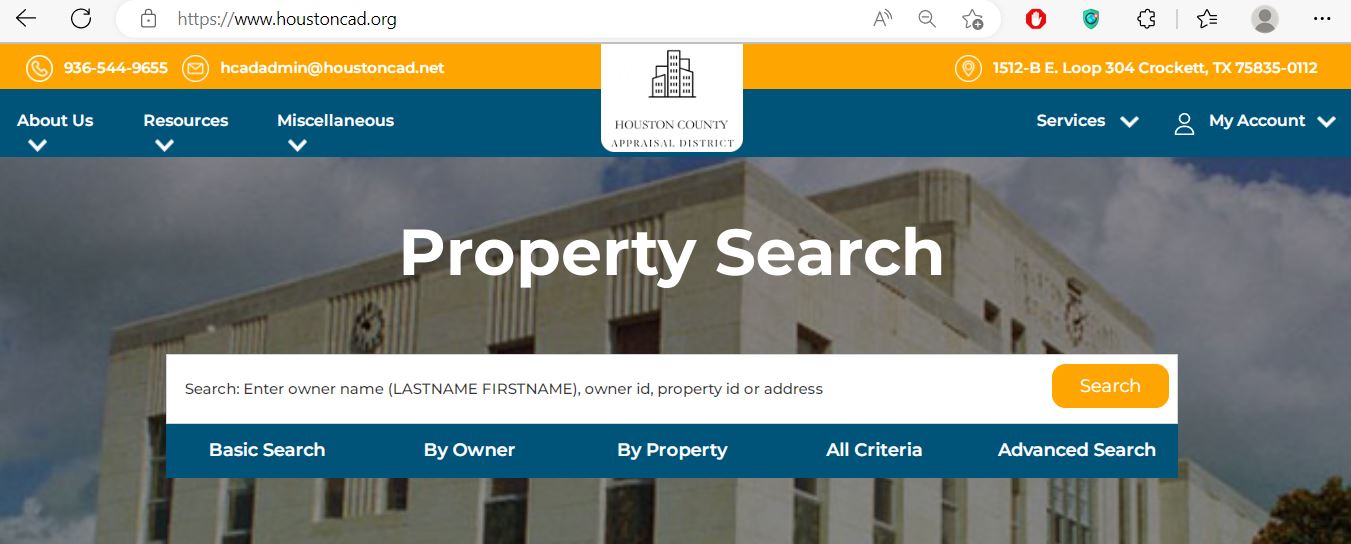
Choose the Houston CAD search field that matches the property type
| Search field | Best use | Practical entry tip |
|---|---|---|
| Property ID | Reopening an exact appraisal account. | Copy it from the appraisal notice, prior account or tax statement. |
| Geographic ID | Matching a parcel to legal or map information. | Enter the identifier exactly as displayed. |
| Owner ID | Locating accounts tied to a known owner identifier. | Do not confuse owner ID with property ID. |
| Owner name | Finding property associated with a person, trust, estate or company. | Use LASTNAME FIRSTNAME or a distinctive business-name word. |
| Address | Homes and properties with a standard situs address. | Begin with street number and street name only. |
| Legal description | Rural tracts, lots, blocks and properties without a reliable address. | Use one distinctive part of the legal description. |
| Abstract | East Texas acreage identified by survey or abstract. | Confirm the abstract number from a deed or prior record. |
| Subdivision | Locating lots within a known subdivision. | Search the subdivision first, then compare lot and block. |
| Lease name or number | Mineral, oil, gas or related lease accounts. | Try a shortened lease name when punctuation differs. |
| Property type | Separating real, personal, mineral or other account categories. | Use it after a broad search produces mixed account types. |
Use the Houston CAD interactive map before relying on an address match
Understand the fields inside a Houston County appraisal account
| Field | What it means | What it does not prove | Next action |
|---|---|---|---|
| Parcel or property ID | The appraisal account identifier. | That every collection system uses the same number. | Save it and compare it with tax statements. |
| Geographic ID | A geographic or legal parcel reference. | A surveyed legal boundary. | Use it with the map and deed. |
| Legal description | The lot, block, abstract, survey, tract or other legal reference carried by CAD. | That the abbreviated description is complete for legal use. | Compare it with the recorded deed or plat. |
| Category code | CAD’s classification of property type or use. | That the classification is correct for every appraisal issue. | Question an incorrect residential, commercial, agricultural or exempt class. |
| Total acres | Acreage used in the appraisal account. | Surveyed acreage or ownership of every mapped area. | Compare deed, survey and CAD land schedules. |
| Owner | The owner carried for appraisal and tax administration. | Clear title or complete ownership history. | Search recorded deeds when legal ownership matters. |
| Exemptions | Benefits applied to the account or taxing unit. | That every taxing unit grants the same benefit. | Review each taxing-unit value line. |
| Improvements | Buildings and other taxable improvements described by CAD. | That area, class, condition or completion is accurate. | Document incorrect characteristics. |
| Roll-value history | Prior appraisal values maintained in the account. | A complete tax-payment or sale history. | Use the tax portal for payments and deeds for transfers. |
| Deed history | Recording references associated with CAD’s ownership processing. | Clear title or the absence of liens. | Verify the original recorded documents. |
Move from market value to the taxable value for each taxing unit
Houston CAD’s opinion of market value as of January 1 for the tax year.
The value after an applicable limitation, such as a homestead appraisal cap.
The value remaining after applicable exemptions for a particular taxing unit.
Fix a Houston CAD property search that returns no result
| Problem | Likely reason | Practical fix |
|---|---|---|
| Owner name returns nothing | The portal uses LASTNAME FIRSTNAME or the account belongs to a trust, estate or company. | Search the last name only or one distinctive entity-name word. |
| Address returns nothing | The road name may be abbreviated, rural or recorded under another city. | Use the street number and primary road name only. |
| Rural land has no situs address | The parcel may be indexed by abstract, survey, legal description or geographic ID. | Use Advanced Search and the recorded deed description. |
| Too many owner results | The name is common or the owner has several accounts. | Add first name, property type, road, property ID or city. |
| Recently purchased property shows the seller | The deed may still be processing into the appraisal roll. | Confirm recording and contact CAD with the instrument information. |
| Mineral account is missing | The account may use a lease name, lease number, operator or separate mineral owner. | Use lease fields and contact CAD or its mineral-appraisal contractor. |
| Wrong acreage appears | The CAD account may reflect an appraisal tract, parent tract or incomplete transfer. | Compare the recorded deed, survey, map and property identifiers. |
| Tax portal does not match CAD | Different offices collect different taxing units or use different account references. | Check the statement and match every taxing unit and property ID. |
Extra checks for timber, agricultural, mineral and rural property
Review timber qualification, land class, productivity value, restricted-use status and whether the required application is current.
Check acreage, qualifying use, intensity standards, land category and productivity appraisal separately from market value.
Confirm the prior qualifying agricultural appraisal, wildlife plan and annual-report requirements.
Houston CAD publishes local bee-valuation guidance. Review acreage and intensity requirements before applying.
Use lease name, lease number, operator and owner details. Mineral, utility and industrial accounts may be appraised by an outside specialist.
Search the deceased owner, estate and heirs, then compare probate documents, deeds and CAD ownership.
Do not assume adjacent parcels are one account. Save every property ID and legal description.
Confirm whether the home and land are one account or separate accounts and verify ownership documentation.
The physical address and appraisal legal description can update on different timelines. Search by parcel identifiers when needed.
Send the question to the office that controls the record
| Need | Correct office | Prepare before contacting |
|---|---|---|
| Property value, exemptions or special appraisal | Houston County Appraisal District | Property ID, tax year, notice and supporting evidence. |
| Incorrect land, improvement or ownership entry | Houston County Appraisal District | Deed, survey, photographs, measurements or correction form. |
| Tax bill for Houston County or county-collected units | Houston County Tax Assessor-Collector | Property ID, owner, tax year and statement. |
| Tax bill for a CAD-collected city or school district | Houston County Appraisal District collection service | Statement, taxing unit and property ID. |
| Recorded deed, lien or official land document | Houston County Clerk | Grantor, grantee, date, legal description or instrument number. |
| Tax rate or budget decision | The individual taxing unit | Taxing-unit name and Truth-in-Taxation information. |
| Boundary survey | Licensed surveyor | Deed, plat, CAD map and known monuments. |
| Clear-title determination | Title company or qualified attorney | Deed chain, liens, probate records and survey. |
Prepare the correct Houston County application and supporting documents
Use the official homestead form and attach the identification or other information required by Texas law and the application.
Review additional exemptions, possible school-tax ceiling and any Tax Office instalment or deferral options.
Use the correct veteran application and attach the required VA documentation.
Review use history, intensity, acreage, application instructions and land-class requirements.
Use the timber qualification guidelines and timberland application published by Houston CAD.
Prepare the wildlife-management plan and any required annual report.
Application preparation checklist
Build a Houston County protest around a clear value or record issue
Practical protest evidence checklist
Confirm which Houston County office collects each taxing unit
Crockett ISD, City of Crockett, Lovelady ISD, City of Lovelady, Kennard ISD, City of Kennard, Latexo ISD, Grapeland ISD and City of Grapeland.
Houston County and other units assigned to the County Tax Assessor-Collector, including county-related districts shown in the official collector directory.
| Payment issue | Published guidance | What to verify |
|---|---|---|
| Credit or debit card | The Tax Office publishes a 2.25% plus £0.25-equivalent transaction charge in its portal wording; the actual transaction is charged in US dollars. | Use the live checkout fee as controlling. |
| E-check | The published e-check fee is $1.50. | Confirm the current fee and bank information before submission. |
| Partial payment | The County Tax Office states that full or partial online payments are accepted. | Confirm remaining balance and future penalty or interest. |
| Tax deferral | The Tax Office instructs deferred-account owners to call for the current balance. | Call extensions 244, 257 or 277 before paying. |
| Delinquent payment plan | Payment arrangements may be available. | Obtain the agreement in writing and follow every due date. |
| Missing bill | Not receiving a statement does not remove the obligation to pay on time. | Search the account and request a replacement statement. |
Use recorded Houston County documents when ownership matters
Verify these records before relying on a Houston County property account
Houston County appraisal and property-tax timeline
Houston County property contacts and office locations
Crockett, Texas 75835-0112
Mailing: P.O. Box 112, Crockett, Texas 75835-0112
Phone: 936-544-9655
Fax: 936-544-8213
Email: hcadadmin@houstoncad.net
Published office hours: Monday-Friday, 8:00 AM-5:00 PM. Call before travelling.
Chief Appraiser: Carey Minter
401 East Goliad Avenue
Crockett, Texas 75835
Mailing: P.O. Box 941, Crockett, Texas 75835
Phone: 936-544-3255
Extensions: 244, 257 or 277
Fax: 936-544-2711
Email: taxoffice@co.houston.tx.us
Hours: Monday-Friday, 8:00 AM-4:30 PM, excluding approved holidays.
Tax Assessor-Collector: Brittani Womack
Use the County Clerk for recorded deeds, liens, releases, plats and certified land records.
Open the official County Clerk pageHouston CAD states that these accounts are appraised for the district by Pritchard & Abbott, Inc.
Begin with Houston CAD and have the property ID, lease name, lease number, operator and tax year ready.
Official Houston County property resources
Search owner, property, address, legal, abstract, subdivision and lease fields.
Open Houston CAD searchConfirm the parcel location and nearby appraisal accounts.
Open the parcel mapFind homestead, protest, correction, rendition, agricultural, timber and wildlife forms.
Open Houston CAD formsRequest the unique PIN used for eligible online property services.
Request a PINReview appraisal rolls, reports, plans and other published records.
Open data and recordsSearch Houston County Tax Office bills, balances, history and online payment.
Open tax searchReview partial payments, delinquency, convenience fees and payment arrangements.
Read Tax Office FAQsFind recorded deeds, liens, releases, plats and certified records.
Open County ClerkHow this Houston County guide was rebuilt

Existing images preserved and official workflows expanded
This regenerated article retains the Houston CAD property-search screenshot and editor image from the existing page while replacing the former brief guide with detailed search routes, screenshot guidance, map verification, field interpretation, rural-property scenarios, exemptions, protests, split tax collection, deed research and troubleshooting.
The official review used Houston County Appraisal District, Houston County Tax Assessor-Collector, Texas Comptroller county-directory information and Houston County government resources.
AppraisalDistrict.org is an independent informational website and is not operated by Houston County Appraisal District or Houston County.
10 common Houston County Appraisal District questions
1. How do I search Houston County Texas property records?
Open Houston County Appraisal District and search by owner name, owner ID, property ID, geographic ID or address. Advanced search supports legal description, abstract, subdivision, lease information and other criteria.
2. How should I enter an owner name in Houston CAD?
The search requests LASTNAME FIRSTNAME. Begin with only the last name when the full name, middle initial or account spelling is uncertain.
3. Why does an address search return no Houston County property?
The account may use a rural address, abbreviated road, different city, legal description or no normal situs address. Try the street number and primary road name, then switch to property ID, geographic ID, abstract, subdivision or owner name.
4. Does Houston County Appraisal District collect property taxes?
Houston CAD states that it collects for several participating cities and school districts. The Houston County Tax Assessor-Collector collects Houston County and other assigned units. Read each tax statement before choosing a payment portal.
5. What is the difference between a property ID and geographic ID?
The property ID identifies the appraisal account. The geographic ID is associated with the parcel’s geographic or legal mapping reference. Save both because they help match CAD, map and tax records.
6. How do I apply for a Houston County homestead exemption?
Download the Residence Homestead Exemption application from the Houston CAD forms page, complete it, attach the required identification and supporting information, and submit it using an accepted filing method.
7. How do I protest a Houston County appraisal value?
Open the full appraisal account, save the Notice of Appraisal, choose the File a Protest option or download the official protest form, identify the exact issue and file by the deadline printed on the notice.
8. Where do I pay Houston County property taxes online?
Use the collector shown on the tax statement. The Houston County Tax Office portal handles county-collected bills, while Houston CAD collects for several participating cities and school districts.
9. Does the Houston CAD owner name prove legal ownership?
No. The CAD owner field supports appraisal and taxation. Use recorded County Clerk deeds and professional title research when legal ownership or lien status matters.
10. Can I use Houston CAD acreage or map lines as a legal boundary?
No. Houston CAD states that legal descriptions and acreage should be verified before legal use. Obtain the recorded deed, plat and a professional survey.