Hockley County Appraisal District Hockley CAD Guide 2026

Hockley County, Texas · Property search, farmland, mineral accounts, exemptions and protests

Trace a Hockley County Parcel From South Plains Field to Verified Tax Record

Start with Hockley County Appraisal District when you need a property ID, geographic ID, appraisal owner, situs address, abstract, subdivision, acreage, land class, improvement details, value history, exemptions or taxing-unit information.

Use the Hockley County Tax Assessor-Collector for the live bill, payment and receipt. Use the County Clerk when you need a recorded deed, lien, release or certified property document.

Property ID Geographic ID Owner last name Street name Abstract or subdivision Mobile-home park
SOUTH PLAINS PARCEL FINDER VERIFYING
SEARCH → MAP → VERIFY → ACT
Hockley CAD does not collect property-tax payments or set tax rates. The appraisal district values property, administers exemptions and handles appraisal protests. The Hockley County Tax Assessor-Collector issues and collects property-tax bills.
Best search detail

Use the property ID or geographic ID when available.

CAD office

1103 Houston Street, Levelland, Texas 79336.

CAD phone

(806) 894-9654

Tax-office phone

(806) 894-4938

Official review

Local portals and procedures reviewed July 2026.

Start with your task

What are you trying to do with the Hockley County property record?

FIND A PROPERTY Search the appraisal account

Use owner, address, property ID, geographic ID, abstract, subdivision or neighbourhood.

Follow the search workflow
CHECK FARM OR RANCH LAND Compare market and productivity value

Review acreage, land class, agricultural value, taxing units and value history.

Review rural-property checks
PAY PROPERTY TAX Open the County Tax Office portal

Confirm the account, tax year, live balance, payment method and receipt.

Use the payment workflow
PROTEST A VALUE Use the taxpayer portal

Save the appraisal account, identify the exact issue and file by the notice deadline.

Prepare a protest
APPLY FOR EXEMPTION File directly with Hockley CAD

Exemption filing is free. Do not pay a third party claiming the CAD charges a fee.

Review exemption steps
VERIFY OWNERSHIP Use recorded County Clerk documents

The CAD owner field supports taxation but does not replace a deed or title search.

Check deeds and liens

Go directly to the Hockley County property task

The early sections solve the search. Later sections cover farmland, minerals, exemptions, protests, tax payments, deeds and corrections.

Existing article image retained

Use the Hockley CAD search screen shown below
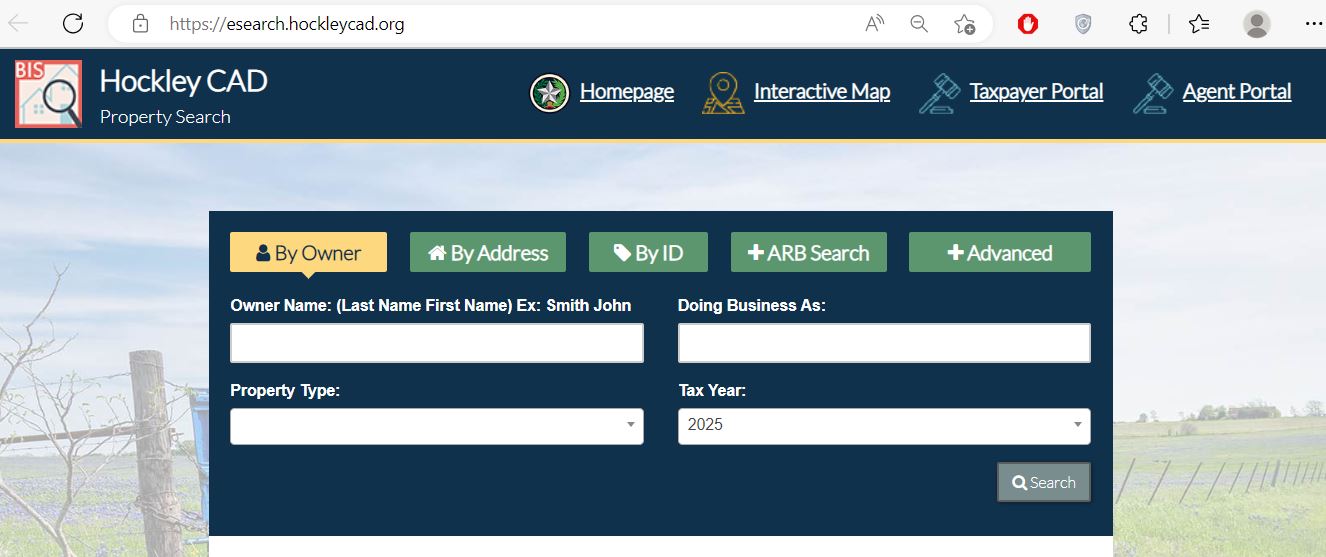
Hockley County Appraisal District property search with By Owner, By Address, By ID, ARB Search and Advanced tabs
This is the search image already used on the existing article. The displayed tax year may change automatically, so always confirm the year before opening or saving a property account.
1 By Owner Search owner name, doing-business-as name and property type.
2 By Address Search street number and street name without unnecessary information.
3 By ID Search property ID, owner ID or geographic ID.
4 ARB Search Search protest status, informal date, hearing date, board members or formal date.
5 Advanced Narrow by abstract, subdivision, mobile-home park, condominium, neighbourhood or agent.
Do not fill every search field at once. One incorrect abbreviation can hide the correct account. Start with one strong field and add another only when the result list is too large.
Advanced search guide

Use Hockley CAD’s specialised fields for difficult property searches

Match the search field to the property situation
Search field Best use Practical tip
Property ID Reopening one exact appraisal account. Copy it from the appraisal notice, prior record or tax statement.
Geographic ID Matching a parcel to its geographic or legal map reference. Enter the number exactly as shown.
Owner ID Finding accounts connected to a known owner identifier. Do not confuse owner ID with property ID.
Abstract Locating rural acreage identified by survey or abstract. Use the abstract information from the deed or prior appraisal record.
Subdivision Locating a lot inside a known subdivision. Compare the result’s lot, block and address.
Mobile-home park Finding manufactured-home accounts associated with a park. Confirm whether the home and land are separate accounts.
Condominium Separating units sharing the same building address. Match unit, property ID and legal description.
Neighbourhood Comparing appraisal accounts within the same valuation area. Useful for equal-appraisal protest research.
Property type Separating real, personal, mineral and other account categories. Apply this filter after a broad owner search.
ARB fields Finding protest schedules, statuses and hearing information. Confirm the year and hearing date before relying on the result.
Interactive map

Verify the Hockley County parcel before relying on an address match

Open the official interactive map Open Hockley CAD Interactive Map
Locate the property using a known identifier Use a property ID, geographic ID, owner, road or surrounding landmark where available.
Compare neighbouring parcels Review tract shape, road frontage, nearby accounts and approximate acreage.
Match the map to the appraisal account Confirm that the property ID and legal description refer to the same parcel.
Use legal records for boundary decisions Obtain the recorded deed, plat and professional survey before building, purchasing or resolving a boundary dispute.
The Hockley CAD portal states that legal descriptions and acreage are for appraisal-district use and should be verified before legal use. A visible GIS boundary is not a guaranteed surveyed boundary.
Property-record decoder

Understand the important fields inside a Hockley CAD account

Use each account field to decide what to verify next
Field What it tells you What it does not prove Next action
Property ID The appraisal account identifier. That every outside system uses the same number. Save it for CAD and Tax Office contact.
Geographic ID A geographic or legal parcel reference. A surveyed boundary. Compare it with the GIS map and deed.
Owner The owner carried for appraisal and tax administration. Clear title or complete ownership history. Search recorded deeds when legal ownership matters.
Legal description The lot, block, abstract, survey, tract or other legal reference. That an abbreviated description is complete for legal use. Compare it with the recorded deed or plat.
Property type How the account is classified for appraisal purposes. That the classification is correct. Question an incorrect real, personal, mineral or exempt category.
Market value CAD’s opinion of market value as of January 1. A guaranteed sale price or final tax bill. Compare sales, condition and equal-appraisal evidence.
Productivity or agricultural value The qualifying special-appraisal value assigned to eligible land. Continued qualification after a use change. Review acreage, use and application status.
Taxable value The value remaining after applicable exemptions. The live tax balance or payment status. Open the County Tax Office portal.
Estimated tax An informational estimate based on displayed values and rates. The final certified bill, penalties or payment total. Verify through the Tax Assessor-Collector.
Deed history Recording references associated with CAD ownership processing. Clear title or absence of liens. Open the recorded County Clerk documents.
Value explanation

Move from market value to the taxable value used by each taxing unit

VALUE 1 Market value

Hockley CAD’s opinion of market value as of January 1 for the tax year.

VALUE 2 Appraised or assessed value

The value after an applicable appraisal limitation or qualifying productivity appraisal.

VALUE 3 Taxable value

The value remaining after exemptions for each city, school, county or special district.

Do not estimate the bill from market value alone. The final amount depends on each taxing unit’s taxable value, adopted rate, exemptions, ceilings, productivity appraisal, penalties and payment history.
Hockley CAD publishes preliminary and certified appraisal rolls, including separate mineral rolls. These reports are useful for broader research but do not replace the live property account or certified tax statement.
Search troubleshooting

Fix a Hockley CAD search that returns no property

Change one search detail at a time
Problem Likely reason Practical fix
Owner name returns no result The portal uses LASTNAME FIRSTNAME or the account belongs to a trust, estate or company. Search only the last name, first name or one distinctive business word.
Full address does not work The portal may use an abbreviated road name or a different municipality. Search only the street name, as recommended by the portal.
Rural tract has no standard address The property may be indexed by abstract, geographic ID or legal description. Use Advanced Search and the deed description.
Too many owner matches The owner has several parcels or the name is common. Add property type, street, abstract, subdivision or geographic ID.
Recently purchased property shows the seller The deed may still be processing into the appraisal system. Confirm recording and contact CAD with the instrument information.
Manufactured home is missing The home and land may have separate accounts or ownership records. Search the mobile-home park, owner, property type and property ID.
Mineral interest does not appear Mineral accounts may be listed separately from surface ownership. Search the owner and property type, then contact CAD with lease or operator details.
Tax portal and CAD do not match The systems serve different purposes or update on different schedules. Compare the property ID, owner, legal description and tax year.
Call script for a difficult search
I am trying to locate property ID [number] or land owned by [name] near [road, abstract or subdivision]. The account should involve approximately [acreage or property type]. Please help me identify the correct appraisal account and explain which document is needed if the owner, acreage or legal description is incorrect.
South Plains property scenarios

Extra checks for farms, minerals, mobile homes and rural land

Dry or irrigated farmland

Compare acreage, land class, market value, productivity value, irrigation characteristics and prior-year history.

Native pasture or ranch land

Check acreage, use classification, agricultural qualification and whether all tracts are included.

Oil and gas interests

Mineral interests can have separate owners and accounts. Review mineral notices and property type rather than searching only the surface parcel.

Utility or industrial property

Hockley CAD contracts with Pritchard & Abbott for designated mineral, utility and industrial appraisal work.

Manufactured home

Confirm whether the home and land are one account or separate accounts and search by mobile-home park when applicable.

Multiple family tracts

Do not assume adjacent land shares one property ID. Save every parcel identifier and legal description.

Property near Levelland

Address search may work, but always confirm the subdivision, neighbourhood, legal description and taxing units.

Anton, Ropesville, Smyer or Sundown

Confirm the city, school district, water district and other taxing jurisdictions attached to the account.

Inherited agricultural land

Verify the recorded ownership, heir or estate documents and continued special-appraisal qualification.

Correct-office routing

Send each Hockley County property question to the right office

Contact the office that controls the disputed information
Need Correct office Prepare first
Property value or appraisal method Hockley County Appraisal District Property ID, tax year, notice and evidence.
Homestead or other exemption Hockley County Appraisal District Application, identification and qualification date.
Agricultural or timber appraisal Hockley County Appraisal District Use history, acreage and supporting land records.
Tax bill, balance or receipt Hockley County Tax Assessor-Collector Property ID, owner, tax year and payment information.
Recorded deed, lien or release Hockley County Clerk Grantor, grantee, date, legal description or instrument number.
Tax-rate or budget question The individual taxing unit Taxing-unit name and Truth-in-Taxation record.
Mineral, utility or industrial appraisal Begin with Hockley CAD Owner, lease, operator, property ID and tax year.
Legal boundary Licensed surveyor Deed, plat, CAD map and known survey information.
Property-record corrections

Correct the system that owns the inaccurate information

Incorrect appraisal owner Confirm the recorded deed or ownership document and send Hockley CAD the evidence it requests.
Incorrect mailing address Use Hockley CAD’s online address-change request and include the property ID, old address and new address.
Incorrect acreage or legal description Compare the recorded deed, survey, GIS map and appraisal account before requesting a correction.
Incorrect building detail Prepare measurements, photographs, plans, condition evidence or other documentation showing the error.
Missing exemption Confirm the filing date, qualification year, required identification and submission proof.
Incorrect tax payment Contact the County Tax Office with the receipt, confirmation, property ID, amount and tax year.
Exemptions and special appraisal

Use the correct Hockley CAD form and keep proof of filing

Exemption filing is free. Hockley CAD publishes a scam alert stating that it will never ask for or charge a fee to file an exemption. Do not respond to anyone claiming a payment is required by the appraisal district.
Residence homestead

Complete the official application and attach the identification and ownership information required by the form.

Over-65 or disabled

Review additional exemptions, school-tax ceiling rules and possible payment or deferral options.

Disabled veteran

Use the appropriate veteran application and attach current VA documentation.

Agricultural appraisal

Use the applicable 1-d or 1-d-1 application and document land use, acreage and qualification history.

Timber appraisal

Use the correct timberland application when the property qualifies under Texas law.

Business personal property

Use the rendition and depreciation materials published by Hockley CAD for taxable business assets.

Application preparation checklist

Property ID and geographic ID
Owner name exactly as shown
Recorded deed or ownership evidence
Texas driver licence or identification when required
Occupancy or qualification date
Age, disability or VA evidence
Agricultural or timber-use documentation
Copy and proof of submission
Mailing address: Hockley County Appraisal District, P.O. Box 1090, Levelland, Texas 79336-1090. Confirm whether the specific form can also be filed electronically, by email or in person.
Appraisal protest

Prepare a Hockley County protest around one clear issue

General filing rule: a Texas appraisal protest is generally due by May 15 or 30 days after the appraisal notice was delivered, whichever is later. Use the deadline printed on the individual notice and current Hockley CAD instructions.
Save the complete property account Keep the property identifiers, legal description, land, improvements, exemptions, values and roll history.
Identify the exact protest reason Examples include market value, unequal appraisal, incorrect property description, exemption denial or special-appraisal denial.
Open the Hockley CAD taxpayer portal The portal allows enrolled taxpayers to access property details, electronic communications, applications and online protest services. Open the Hockley CAD Taxpayer Portal
Use the official Notice of Protest form when needed The Hockley CAD forms page includes the taxpayer protest form and agent forms. Open protest forms
Preserve filing proof Save the portal confirmation, email, certified-mail receipt, fax confirmation or stamped copy.
Prepare evidence tied to the issue Use comparable sales, unequal-appraisal accounts, photographs, repair estimates, measurements, agricultural records or incorrect account data.
Review protest status and hearing information The public property search includes ARB Search fields for protest status, informal dates, hearing dates, board members and formal dates.
Prepare a short ARB presentation State the requested value or correction first and present the strongest evidence in a clear order.

Evidence packet checklist

Notice of Appraised Value
Saved Hockley CAD property account
One-page requested correction
Comparable sales or equal-appraisal evidence
Dated condition photographs
Repair estimates or contractor reports
Survey, acreage or improvement measurements
Agricultural, mineral or business records
A phone call does not protect the filing deadline. Submit a written or electronic protest through an accepted method and keep proof.
Tax bills, payments and receipts

Move from the Hockley CAD appraisal account to the County tax ledger

The appraisal account can show estimated taxes, taxing jurisdictions and taxable values, but the County Tax Assessor-Collector controls the live bill, delinquent balance, payment status and receipt.

Open the official Hockley County tax portal Open Hockley County Property Tax Payments
Search and match the property Compare the owner, property address, property ID, legal description and tax year with the Hockley CAD account.
Review all years and balances Check for current, delinquent or partially paid years before selecting a payment.
Read the checkout fee Convenience and processing fees can change. The amount displayed by the official payment service controls.
Save the receipt Keep the property account, tax year, amount, fee, confirmation number and payment date.
Recheck the account after processing Confirm that the payment posted to the correct property and year.
Hockley County Tax Assessor-Collector
624 Avenue H, Suite 101
Levelland, Texas 79336

Phone: (806) 894-4938

Tax Assessor-Collector: Misty D. Taylor

Before paying online

Confirm the property ID, legal description, tax year, balance, payment fee and whether any delinquent attorney or collection charge applies.

CAD estimated tax is not the payment amount. Use the County Tax Office portal or written statement for the live amount due.
Tax-rate transparency

Use Hockley County Truth in Taxation to follow proposed tax rates

Hockley CAD links to a local property-tax database that shows how proposed and adopted taxing-unit rates can affect an individual property.

Open the Hockley County tax-transparency database Open Hockley County Truth in Taxation
Search the property Match the owner, property ID, address and legal description.
Open the property view Review the taxing units, proposed rates, estimated taxes and contact information.
Subscribe to notifications Hockley CAD instructs users to select the notification option in the property view, enter their information and confirm the email subscription.
Contact the taxing unit about the rate The appraisal district and County Tax Assessor-Collector do not adopt the city, school or special-district tax rates.
Appraised value and tax rate are separate issues. Protest an appraisal-district value through the CAD process. Comment on a proposed tax rate through the governing taxing unit’s budget and hearing process.
Deeds and legal ownership

Use Hockley County Clerk records when ownership or liens matter

Save the CAD deed-history information Record the grantor, grantee, deed date, document type, volume, page or instrument number when available.
Open the Hockley County Clerk page Open Hockley County Clerk
Search the recorded instrument Use grantor, grantee, recording date, legal description or instrument number.
Check liens, releases and related records Do not assume the CAD deed-history section represents a complete title search.
Request the correct copy type Ask whether a plain or certified copy is required for the intended use.
Use a title professional for title conclusions A public search does not guarantee clear title or identify every legal issue.
Hockley County Clerk
802 Houston Street, Suite 213
Levelland, Texas 79336

Phone: (806) 894-3185

Hours: Monday-Friday, 9:00 AM-5:00 PM.

County Clerk: Jennifer Palermo

Property Fraud Alert

The County Clerk publishes a property-fraud-alert resource. Review the current registration instructions on the official Clerk page.

Recently purchased property still shows the seller? Confirm that the deed was recorded, save its instrument information and provide Hockley CAD with the ownership evidence it requests.
Public information requests

Request Hockley CAD records not available through normal property search

Search available online records first Check the property portal, interactive map, forms, appraisal rolls and mineral notices.
Describe the requested record precisely Include the property ID, owner, address, geographic ID, tax year and exact record type.
Submit the official request form The online form asks for the requester’s name, phone, email, property ID when available and message. Open Hockley CAD Records Request
Watch for clarification or cost information A narrow, identifiable request is easier to process than a request for every record connected to a broad topic.
Keep the submission confirmation Save a screenshot or email showing what was requested and when.
Electronic communications

Use the Hockley CAD taxpayer portal for electronic notices and applications

The taxpayer portal allows enrolled owners to review property details, receive approved electronic communications, access documents and manage eligible applications from one account.

Create or sign in to the taxpayer account Open the Hockley CAD Taxpayer Portal
Add the correct property Match the property ID, owner and address before accepting electronic services.
Complete the electronic-communications election Review the consent carefully because an active election may replace mailed delivery for covered communications.
Keep the confirmation email Registration can remain pending until CAD approval. Check spam folders and verify approval before relying on electronic delivery.
Update or rescind the election in writing when needed Follow current CAD instructions rather than assuming deleting an online account cancels the election.
Annual property-tax calendar

Important Hockley County appraisal and tax dates

Ownership, use and value date Most property is appraised based on its ownership, condition, use and market value as of January 1.
Normal business-personal-property rendition deadline File the rendition or a timely extension request under the applicable rules.
Normal application date for many exemptions and special appraisals Review the individual application because late-filing provisions vary.
Normal appraisal-protest deadline File by May 15 or 30 days after notice delivery, whichever is later, unless another deadline applies.
Tax-rate transparency period Local tax databases are updated as taxing units propose and adopt rates.
Tax bills generally begin Search the County Tax Office portal when a statement is missing.
Normal final payment date without penalty Verify the bill when January 31 falls on a weekend, holiday or when the bill was issued late.
The individual notice, form, order or tax statement controls. Verify the exact date for the property and tax year before relying on a general calendar.
Verified local contacts

Hockley County property offices and where to visit

Hockley County Appraisal District
1103 Houston Street
Levelland, Texas 79336-3521
Mailing: P.O. Box 1090, Levelland, Texas 79336-1090

Phone: (806) 894-9654
Fax: (806) 894-9671

Chief Appraiser: Lorie Marquez

Current website hours: Monday-Thursday, 8:00 AM-5:00 PM; published summer Friday hours, 8:00 AM-12:00 PM.

Hockley County Tax Assessor-Collector
624 Avenue H, Suite 101
Levelland, Texas 79336

Phone: (806) 894-4938

Tax Assessor-Collector: Misty D. Taylor

Use this office for bills, balances, tax payments, receipts and delinquent-account questions.

Hockley County Clerk
802 Houston Street, Suite 213
Levelland, Texas 79336

Phone: (806) 894-3185

Hours: Monday-Friday, 9:00 AM-5:00 PM.

Mineral and specialised appraisal

Hockley CAD contracts with Pritchard & Abbott for designated oil and gas, utility, pipeline, railroad and industrial appraisal work.

Start with the CAD and have the owner, lease, operator, property ID and tax year ready.

Call before travelling. Confirm seasonal hours, holiday closures, identification, accepted filing method and whether the service belongs to CAD, the Tax Office or the County Clerk.
Official action links

Official Hockley County property resources

Property search

Search by owner, address, ID, ARB details and advanced property criteria.

Open Hockley CAD search
Interactive map

Confirm parcel location, neighbouring accounts and approximate tract shape.

Open Hockley CAD map
Taxpayer portal

Manage eligible protests, applications, documents and electronic communications.

Open taxpayer portal
Forms

Find homestead, veteran, agricultural, timber, rendition and protest forms.

Open Hockley CAD forms
Tax information

Review preliminary rolls, certified rolls, mineral rolls and appraisal reports.

Open tax information
Tax payments

Search Hockley County bills, balances and online payment options.

Open property-tax payments
Truth in Taxation

Review proposed rates, estimated taxes and taxing-unit contacts.

Open tax transparency
County Clerk

Find deeds, liens, releases, recording fees and property-fraud information.

Open County Clerk
Editorial accountability

How this Hockley County guide was rebuilt

Mahesh Kumar, editor of AppraisalDistrict.org

Existing images retained and official workflows expanded

This regenerated guide preserves the Hockley CAD search screenshot and editor image from the existing article while replacing the earlier brief content with deeper search guidance, map verification, field interpretation, local land scenarios, exemption protection, protest preparation, tax-payment verification, deed research and records-request instructions.

The official review included Hockley County Appraisal District, the Hockley County Tax Assessor-Collector, the Hockley County Clerk, the Hockley CAD taxpayer portal, Truth-in-Taxation database and published appraisal-roll resources.

AppraisalDistrict.org is an independent informational website and is not operated by Hockley County Appraisal District or Hockley County.

Hockley County answers

10 common Hockley County Appraisal District questions

1. How do I search Hockley County property records?

Open the official Hockley CAD property search. Search by owner, address or ID, or use Advanced Search for geographic ID, abstract, subdivision, mobile-home park, condominium, neighbourhood or property type.

2. How should I enter an owner name in Hockley CAD?

Enter the name as LASTNAME FIRSTNAME. When the full name does not work, search only the first or last name and compare the property ID, address and legal description.

3. Why does a Hockley CAD address search return no property?

The portal may use an abbreviated street, rural description or different city. Try only the street name, then search by owner, property ID, geographic ID, abstract or subdivision.

4. Does Hockley County Appraisal District collect property taxes?

No. Hockley CAD values property and handles exemptions and protests. The Hockley County Tax Assessor-Collector handles property-tax bills and payments.

5. How do I apply for a Hockley County homestead exemption?

Download the application from the Hockley CAD forms page, complete the required ownership and identification information, submit it directly to the appraisal district and keep proof of filing.

6. Does Hockley CAD charge a fee to file an exemption?

No. Hockley CAD publishes a scam warning stating that it never asks for or charges a fee to file an exemption.

7. How do I protest a Hockley County appraisal value?

Save the full property account, identify the exact issue, use the taxpayer portal or official Notice of Protest form, file by the deadline on the notice and retain confirmation.

8. Where can I pay Hockley County property taxes online?

Use the official Hockley County tax-payment portal. Confirm the property, year, balance and fee before submitting payment.

9. Does the Hockley CAD owner name prove legal ownership?

No. The CAD owner field supports appraisal and taxation. Use recorded County Clerk documents and professional title research when ownership or lien status matters.

10. Can I use Hockley CAD acreage or map lines as a legal boundary?

No. Hockley CAD states that legal descriptions and acreage should be verified before legal use. Obtain the recorded deed, plat and a professional survey.

Free Appraisal District Property Tax Helper

Search Smarter, Estimate Taxes, Check Exemptions and Prepare for a Protest

Use this free tool before you visit a county appraisal district, property search portal, tax office, or exemption page. It helps you understand property value, taxable value, possible savings, protest value, and the next official step.

Start Property Helper
8 toolsSearch helper, tax estimate, exemption savings, protest prep and more.
For all countiesWorks as a sitewide tool on every appraisal district article.
No loginNo name, email, property ID or private information required.
Mobile-firstBuilt for visitors checking property records from a phone.

What do you need help with today?

Choose your main reason for visiting. The tool will show the best next step and quick estimate.

Homeowners

Use this tool to check your appraisal notice, exemption savings, protest value, and official next step.

Buyers and investors

Use the tax calculator before trusting only the sale price or mortgage estimate.

Property Search Helper

Use this when a county property search portal is confusing. It shows which search method is usually best.

Property Tax Estimate Calculator

Estimate annual property tax using appraised value, assessment ratio, exemptions, and combined tax rate.

Homestead and Exemption Savings

Estimate how much a homestead, senior, disability, veteran, or local exemption may reduce tax.

Appraisal Notice Review

Compare last year value with this year value and see whether the increase deserves closer review.

Property Tax Protest Savings

Estimate possible savings if your appraised value is reduced after protest, correction, evidence review, or appraisal review board hearing.

Property Tax Protest and Exemption Checklist

Use this checklist before you file a protest, apply for exemption, or call the appraisal district.

Useful tip

Before calling, write your property ID, owner name, property address, and question on paper. It saves time.

Common mistake

Do not call the CAD to pay tax bills unless the local article says they collect taxes. In many counties, the tax office collects payment.

Official Resource Finder

Enter county and state to create safe searches for official CAD pages, property search, tax payment, exemptions, maps, forms, and protest help.

CAD vs Tax Office

  • Appraisal District: value, exemptions, ownership records, maps, protest.
  • Tax Office: tax bill, payment, receipt, delinquent balance, penalty.

Best place to use this

Add this tool after the first major content section or before the FAQ area. It gives visitors a reason to interact before leaving the page.

Important estimate note

This tool gives educational estimates only. Final values, exemptions, tax rates, bills, payments, and deadlines must be confirmed with official county sources.

Leave a Comment