
Follow a Gillespie County Parcel From Hill Country Map to Verified Tax Record
Use Gillespie Central Appraisal District to find appraisal records for homes, ranches, rural acreage, business personal property, minerals and mobile homes in Fredericksburg, Harper, Stonewall, Doss and the surrounding Hill Country.
This guide explains which search tab to use, how to confirm the parcel and tax year, what each value means, where to file exemptions or an appraisal protest, and how to pay or verify property taxes through Gillespie CAD’s separate tax-collections service.
830-997-9807 for values, exemptions, records and protests.
830-997-9809 for bills, payments and receipts.
1159 South Milam Street, Fredericksburg, Texas 78624.
Use the property ID, legal description or interactive map.
Local links and procedures reviewed July 2026.
What do you need from Gillespie County property records?
Search by owner, address or property ID, then confirm the property type and selected tax year.
Follow the search workflowMap search is often more useful than a street address for rural acreage, ranch tracts and county-road property.
Use the map safelyVerify the account, year, balance, fees and receipt through the official property-search payment route.
Review payment stepsFind homestead, veteran, agricultural, wildlife, rendition and other current forms.
Prepare the applicationIdentify whether the issue is value, unequal appraisal, land use, property details or a missing exemption.
Build the protest packetThe CAD owner field supports appraisal administration but does not replace the recorded deed or title research.
Find the controlling documentSearch Gillespie CAD by owner, address, property ID or advanced criteria
Use the official Gillespie CAD search screen correctly
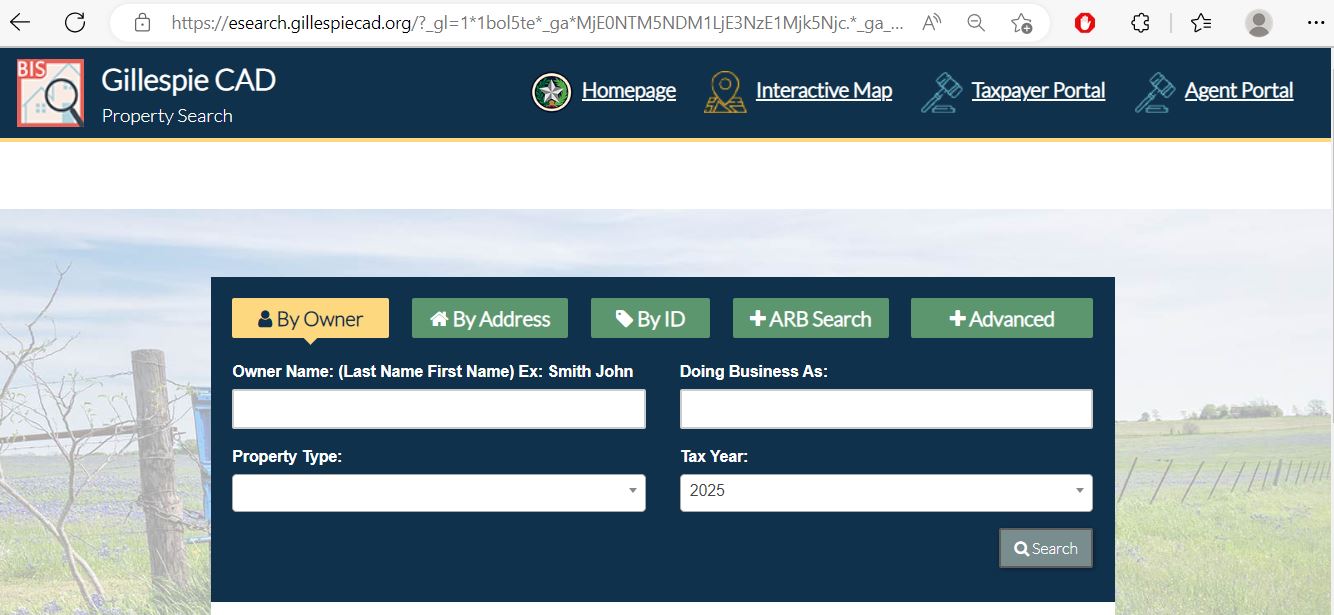
Enter the surname first. Add the first name only when necessary.
Use the street number and main street name without extra words.
Use the property ID from a notice, tax bill or prior CAD record.
Use this specialised route when the account is connected to appraisal-review activity.
Filter by property type, year and other details when a basic search is too broad.
Use the interactive map for ranches, rural tracts and county-road property
Gillespie County includes rural acreage, ranches, agricultural land, vineyards, wildlife properties and tracts where the mailing address does not clearly identify the parcel. The interactive map can help connect the appraisal account to its location.
Understand the Gillespie CAD property record before taking action
| Field | What it helps identify | What it does not prove | Next action |
|---|---|---|---|
| Property ID | The appraisal account used by Gillespie CAD. | That every county or legal-record system uses the same number. | Use it for calls, payments, protests and map matching. |
| Owner shown | The owner carried for appraisal and tax-administration purposes. | Complete legal title or lien status. | Verify deeds through the County Clerk. |
| Property type | Whether the account is real, personal, mineral, auto or mobile-home property. | That the classification is correct for every legal or regulatory purpose. | Contact appraisal staff if the account is misclassified. |
| Situs address | The physical location carried in the appraisal account. | The mailing address, deed description or 911 address. | Compare the map and legal description. |
| Legal description | The lot, block, subdivision, survey, abstract or tract description shown by CAD. | A complete title description or surveyed boundary. | Open the deed and recorded plat. |
| Land details | Acreage, land class, use, market value and possible productivity appraisal information. | Exact surveyed acreage or continued agricultural qualification. | Compare application records, deed acreage and survey documents. |
| Improvement details | Buildings, area, class, age, condition and other appraisal characteristics. | That every structure or square-foot figure is correct. | Document errors with measurements, photographs and plans. |
| Market value | CAD’s opinion of market value as of January 1. | A guaranteed sale price or final tax bill. | Review comparable sales and unequal-appraisal evidence. |
| Taxable value | Value after applicable exemptions and limitations for a taxing entity. | The current amount due or payment status. | Open the tax-collection account. |
| Taxing entities | The county, city, school and special districts attached to the property. | That every displayed tax rate is final for a future year. | Review current tax-rate and truth-in-taxation information. |
Separate market value, appraised value and taxable value
CAD’s opinion of the property’s market value as of January 1 for the tax year.
The value after an applicable appraisal limitation, such as a qualifying homestead limitation.
The amount remaining after exemptions for each taxing entity.
What to do when Gillespie CAD returns no property result
| Problem | Likely reason | Practical fix |
|---|---|---|
| Owner name returns nothing | The account may use a middle initial, trust, estate, business or different name order. | Search only the surname or one distinctive business word. |
| Address search fails | The situs address may differ from the mailing address or use a county-road format. | Use the street number and name only, then switch to property ID or map search. |
| Ranch or acreage is missing | The tract may be indexed by survey, abstract, legal description or owner rather than a normal address. | Use Advanced Search, property ID, legal description or GIS map. |
| Too many results | The owner or street search is too broad. | Add the property type, year, property ID, subdivision or more specific name details. |
| Business account not found | The search may still be set to Real property. | Choose Personal property and verify the tax year. |
| Mobile home not found | The portal may classify it separately from real property. | Choose Mobile Home and search the owner or property ID. |
| Mineral account missing | Mineral interests may be separated from the surface account. | Select Mineral and search the owner or account identifier. |
| Prior owner still appears | The recorded deed may not yet have completed processing into the appraisal system. | Confirm recording with the County Clerk and provide CAD the requested ownership documents. |
| Current values look old | The portal may be set to a prior tax year. | Change the tax-year selector before comparing records. |
Local tips for Fredericksburg homes, ranches, vineyards and rural land
Search the street address, then verify the city, school district, homestead exemption and improvement details.
Use the property ID, legal description and map. A mailing address may not match the tract’s physical location.
Confirm the correct school and water-related taxing entities as well as the parcel and ownership record.
Review market acreage, productivity appraisal, land classes, use history and any rollback-tax exposure separately.
Keep production, management, lease, acreage, planting and operational records when applying for agricultural appraisal.
Confirm prior agricultural qualification, the wildlife plan, annual activities and reporting requirements.
Do not assume a homestead exemption applies when the property is not the owner’s principal residence.
Search under Personal property and verify the business situs, rendered assets and selected year.
Recheck ownership, exemptions, appraisal limitations and the future tax burden because seller benefits may not transfer.
Contact the office that controls the Gillespie County record
| Your question | Correct service | What to prepare |
|---|---|---|
| Why did market value change? | Gillespie CAD appraisal staff | Property ID, tax year, value notice and supporting evidence. |
| Why is an exemption missing? | Gillespie CAD appraisal staff | Application confirmation, ID, qualification date and documents. |
| How much property tax is due? | Gillespie CAD tax collections | Property ID, tax year, owner and balance shown. |
| Did a payment post? | Gillespie CAD tax collections | Receipt, confirmation number, amount and payment date. |
| Who legally owns the property? | Gillespie County Clerk or title professional | Grantor, grantee, date range, legal description and instrument number. |
| Where is the recorded plat? | Gillespie County Clerk | Subdivision, survey, block, lot and recording reference. |
| Is the CAD boundary legally correct? | Surveyor, deed and plat records | Current survey, deed, plat and neighbouring legal descriptions. |
| Who sets the tax rate? | Each taxing entity | The taxing-entity list from the CAD account. |
Use current Gillespie CAD forms instead of an old downloaded copy
Prepare ownership, principal-residence, identification and address-matching information.
Use the appropriate exemption form and required VA or eligibility documentation.
Confirm that the property and event qualify and document the physical damage and timing.
Use the 2026 application and local agricultural-use guidelines.
Prepare the management plan, prior qualification, activities and annual reporting evidence.
List taxable business assets, ownership, location and value information for the correct year.
Application preparation checklist
Prepare stronger evidence for Gillespie County agricultural land
Agricultural appraisal is based on qualifying land use and productivity rather than simply owning acreage. Gillespie CAD publishes local agricultural-use guidelines and a 2026 agricultural appraisal application.
Build a Gillespie County protest around a specific appraisal issue
Evidence packet
Pay Gillespie County property taxes through the official collection route
| Issue | Phone | What to have ready |
|---|---|---|
| Market or appraised value | 830-997-9807 | Property ID, tax year, notice and evidence. |
| Exemption status | 830-997-9807 | Application, confirmation and eligibility documents. |
| Amount due | 830-997-9809 | Property ID, tax year and displayed balance. |
| Payment or receipt | 830-997-9809 | Confirmation, amount, date and payment method. |
Use Gillespie County Clerk records for deeds, liens and plats
The appraisal account is useful for values, exemptions and tax administration. Legal ownership, recorded liens, releases, plats and instrument history are maintained through the Gillespie County Clerk.
Gillespie County appraisal, collections and tax-office contacts
Fredericksburg, Texas 78624
Appraisal: 830-997-9807
Tax collections: 830-997-9809
Email: office@gillcad.org
Chief Appraiser: Scott Fair
Appraisal hours: Monday-Friday, 8:00 AM-5:00 PM.
Collections hours: Monday-Friday, 8:00 AM-4:30 PM.
Fredericksburg, Texas 78624
Mailing: Room 104, Mail Unit 2
830-997-6519
Fax: 830-990-2756
Tax Assessor-Collector: Carol Rode Durst
Hours: Monday-Friday, 8:00 AM-4:00 PM.
Real and personal property tax payments are directed to Gillespie CAD, not this courthouse office.
Official Gillespie County property resources
Property-tax information, contacts, online services, forms and official announcements.
Open Gillespie CADSearch by owner, address, property ID, ARB Search or Advanced Search.
Open property searchLocate rural parcels, ranches, acreage and surrounding appraisal accounts.
Open map searchFile or manage an eligible Gillespie CAD property-tax appeal.
Open online appealsFind exemptions, agricultural, wildlife, rendition, agent and protest forms.
Open formsReview individual and combined taxing-entity rates and tax information.
Open tax ratesCounty vehicle, title, registration and tax-assessor services.
Open county tax officeFind deeds, liens, releases, plats and other recorded property documents.
Open public recordsCross-check appraisal-district and collecting-office information.
Open state directory10 common Gillespie County Appraisal District questions
1. What is the official Gillespie County Appraisal District website?
The official website is gillespiecad.org. Use it for property search, maps, forms, appeals, tax rates, collection information and office contacts.
2. How do I search Gillespie County property by owner name?
Open the official property search, select By Owner and enter the surname first. Add the first name only when necessary, then confirm the property ID, property type, legal description and tax year.
3. Can I search Gillespie CAD by address or property ID?
Yes. The portal includes By Address and By ID tabs. By ID is generally the strongest search route when you have a number from a notice, bill or prior appraisal record.
4. Why can I not find rural property by address?
A rural tract may use a county-road format, mailing address, survey, abstract or legal description that differs from the expected street address. Try the property ID, owner name, Advanced Search or interactive map.
5. Does the Gillespie CAD map prove property boundaries?
No. It helps with appraisal research and parcel context but does not replace a recorded plat, deed, title examination or professional survey.
6. Where can I pay Gillespie County property taxes?
Real-estate and personal-property tax payments are collected through Gillespie Central Appraisal District. Start from the official CAD homepage or property-search portal and call 830-997-9809 for collection questions.
7. What is the Gillespie CAD appraisal phone number?
Call 830-997-9807 for values, exemptions, appraisal records, property details, search issues and protest questions.
8. What is the Gillespie CAD tax-collections phone number?
Call 830-997-9809 for amounts due, payments, receipts, delinquent balances and tax-collection questions.
9. How do I file a Gillespie County property-tax protest?
Use the official online-appeals portal or submit the Notice of Protest form. File by the deadline on the appraisal notice and preserve proof.
10. Where can I find Gillespie County deeds and liens?
Use Gillespie County Clerk official public records for recorded deeds, liens, releases and plats. The CAD owner entry is not a replacement for a deed or title examination.