Use a Hill Country Property Compass to Reach the Correct Appraisal, Tax or Deed Record
Gillespie Central Appraisal District maintains property appraisals and also collects local real-estate and personal-property taxes. This makes the correct workflow different from counties where the elected Tax Assessor-Collector handles property-tax bills.
Use Gillespie CAD for property search, values, exemptions, agricultural and wildlife appraisal, maps, protests, tax balances and payments. Use the County Clerk for deeds, liens, plats and recorded ownership. Use the county Tax Assessor-Collector mainly for vehicles, trailers and boats.
Property search, appraisal values, exemptions, agricultural appraisal, wildlife appraisal, renditions, protests, tax balances, payments and receipts.
Open Gillespie CADVehicle titles, vehicle registration, trailers, boat renewals, farm-vehicle transactions and county occupation-tax services.
Open the county tax officeDeeds, liens, releases, plats, deeds of trust, oil and gas leases, probate-related documents, foreclosures and certified copies.
Open County Clerk(830) 997-9807 for values, exemptions, maps and protests.
(830) 997-9809 for property-tax bills and payments.
1159 S. Milam Street, Fredericksburg.
Property ID, geographic ID, abstract or legal description.
Local portals and procedures reviewed July 2026.
What do you need from the Gillespie County property record?
Use Owner, Address, ID or Advanced Search and verify the legal description before relying on the record.
Follow the search workflowLocate the property in Gillespie CAD, select the correct years and save the payment confirmation.
Use the payment stepsMatch acreage, market value, productivity value, use history and the correct agricultural or wildlife form.
Open rural-land guidanceVerify homestead, age, disability, veteran or other benefits for each listed taxing entity.
Open the exemption centerFile on time, request the district’s evidence and organise proof around one appraisal issue.
Prepare the protestThe CAD owner field is useful for taxation but is not a title report or complete ownership history.
Search recorded documentsSearch Gillespie CAD without confusing a home, ranch tract, business or mobile-home account
Use the Gillespie CAD screenshot as a click-recognition guide
The useful property-search screenshot from the existing article is retained below. The live portal and default tax year can change, so use the numbered markers to identify the important search routes.
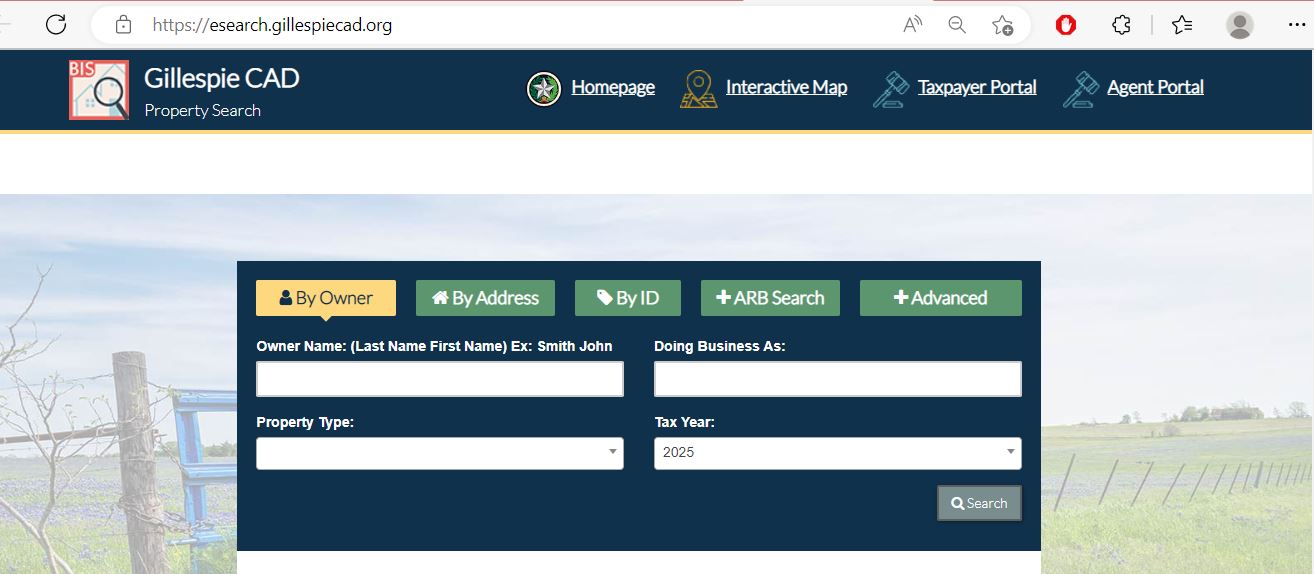
Choose a Gillespie CAD search route from the information you already have
What information is available?
Select the strongest known detail to receive a practical search sequence.
Six-point account verification
Do not continue to payment, protest or deed research until these items match.
Use the field that matches a Fredericksburg, ranch, condo or mobile-home account
| Search field | Best use | What to verify |
|---|---|---|
| Property ID | You copied the exact appraisal number from a notice or tax record. | Owner, legal description and tax year. |
| Owner name | You know an individual, spouse, trust, estate, partnership or company. | Try last name first and search likely entity variations. |
| Street name | The property has a Fredericksburg, Harper or rural situs address. | Use fewer words when the complete address fails. |
| Geographic ID | You are matching an appraisal record to the interactive map. | A geographic ID is not a survey or deed reference. |
| Abstract | Ranch or agricultural land is described by a survey or abstract. | Tract, acreage, deed and map location. |
| Subdivision | The property is a platted lot or developed residential parcel. | Lot, block, phase and legal description. |
| Condo | The account is tied to a condominium project or unit. | Unit, project name, ownership and separate common-interest treatment. |
| Mobile-home park | A manufactured home may be separate from the underlying land. | Home owner, land owner, park and related account. |
| Doing Business As | A winery, lodging business, retailer or other operation uses a DBA. | Legal owner, physical location and personal-property account. |
| Neighborhood | You are researching appraisal groupings or equal-appraisal evidence. | A CAD neighborhood is not necessarily a legal subdivision. |
| ARB fields | You need protest status, informal date, formal date or hearing information. | The written hearing notice controls the appointment. |
Understand what the Gillespie CAD account does and does not prove
| Field | What it identifies | What it does not prove | Next action |
|---|---|---|---|
| Property ID | The account in Gillespie CAD’s appraisal and collection system. | That County Clerk records use the same identifier. | Use it for CAD calls, forms, protests and payments. |
| Owner shown | The person or entity maintained for appraisal and tax administration. | Complete title, lien status or inheritance rights. | Search County Clerk records when legal ownership matters. |
| Situs address | The physical location maintained in the appraisal record. | Mailing address, legal access or exact boundaries. | Compare the map, deed and survey. |
| Legal description | An abbreviated lot, block, survey, abstract, subdivision or tract. | A complete legal description suitable for a deed. | Obtain the recorded instrument or plat. |
| Acreage | The acreage carried for appraisal purposes. | Surveyed or legally guaranteed acreage. | Review field notes and a professional survey. |
| Market value | CAD’s opinion of market value as of January 1. | A guaranteed sale price or final tax amount. | Review sales, condition and equal-appraisal evidence. |
| Appraised value | Value after an applicable limitation or special appraisal. | The value after every exemption. | Continue to each taxing-unit taxable value. |
| Taxable value | The value remaining after applicable exemptions. | That an online payment has posted. | Open the tax-year and payment details. |
| Improvement details | Buildings, area, age, use, class, quality and condition. | Every measurement or characteristic is correct. | Document errors with plans, photos and measurements. |
| Map parcel | Approximate location and surrounding appraisal accounts. | Boundary, easement, access or title. | Use deeds, plats, title evidence and a survey. |
Use Gillespie CAD’s map for Hill Country location context—not legal boundaries
Search tips for Fredericksburg, Harper, Doss, Stonewall and rural Gillespie County
Confirm City of Fredericksburg, Fredericksburg ISD, property characteristics and the residence-homestead exemption.
Compare age, construction, renovation, condition, outbuildings and any locally relevant historic-use restrictions.
Verify Harper ISD, rural situs, abstract, acreage and whether the property has agricultural or wildlife appraisal.
Confirm Doss CCSD, legal description, county road, acreage and surrounding appraisal accounts.
Review Stonewall WCID where applicable, property ID, abstract, improvements and agricultural use.
Search the land, agricultural use, commercial improvements, equipment, inventory and any separate business-personal-property account.
Match the exact tract and review market value, productivity value, qualifying use and annual documentation.
Search the deceased owner, estate, heirs, trust and related tracts, then review probate and recorded documents.
Determine whether the home is included with the land or has a separate account tied to an owner or mobile-home park.
Do not rely on a residential appraisal account alone for a lodging business
Review land, structures, accessory buildings, pools, guest units, condition and use.
Furniture, appliances, equipment and other income-producing assets may require a separate rendition.
CAD appraisal, city or county lodging requirements, hotel-occupancy tax and land-use rules are separate systems.
A residence-homestead exemption depends on ownership and principal-residence use, not merely residential construction.
Keep records showing which part of the property is personally occupied, rented or used by a business.
Do not assume a seller’s exemption, tax estimate, operating permit or appraisal treatment will continue after purchase.
Separate market value, appraised value and taxable value
Gillespie CAD’s opinion of the property’s market value as of January 1 for the tax year.
The value after an applicable homestead limitation or qualifying agricultural or wildlife appraisal.
The value remaining after exemptions. It may differ among the county, city, school and water districts.
| Record item | What to check | Useful evidence |
|---|---|---|
| Land | Acreage, location, access, topography, land class, utilities and special appraisal. | Survey, deed, land sales, access records and use documentation. |
| Improvements | Building area, year, class, quality, condition, guest units and outbuildings. | Plans, measurements, dated photos, inspections and repair estimates. |
| Market value | Comparable sales, location, condition, views, acreage and property type. | Closing documents, adjusted sales and professional reports. |
| Appraised value | Prior value, homestead limitation, new improvements and special appraisal. | Prior property cards, exemption status and construction history. |
| Taxable value | Exemptions and taxable values for each listed unit. | Exemption approval, filing proof and corrected account information. |
Fix common Gillespie CAD search problems before calling
| Problem | Likely reason | Practical fix |
|---|---|---|
| Owner name returns no result | The account may use a spouse, trust, estate, partnership, company or prior owner. | Search the last name or one distinctive entity word. |
| Too many owner results | The owner has multiple homes, lots, ranch tracts or business accounts. | Add property ID, geographic ID, property type, street name or abstract. |
| Complete address fails | The situs may use an abbreviated road, ranch road or rural format. | Use the street name alone. |
| Rural tract has no address | The property may be indexed by owner, abstract, geographic ID or legal description. | Use Advanced Search and the interactive map. |
| New purchase still shows the seller | The deed may be recorded but not yet reflected in the appraisal system. | Confirm recording with the County Clerk and ask CAD what proof is required. |
| Mobile home is missing | The home may be separate from the land or indexed under a park. | Use the mobile-home-park field and search both owners. |
| Exemption is absent | The application may be unfiled, pending, incomplete, denied or attached to another account. | Locate proof of submission and contact CAD with the property ID. |
| Tax amount looks wrong | The wrong property, year, payment status or exemption may be displayed. | Stop before paying and call property-tax collections at 830-997-9809. |
| Payment button does not appear | The result list rather than the complete property page may be open. | Open the full property account and locate the green Pay Taxes button. |
Send each Gillespie County question to the office that controls it
| Your question | Correct starting point | What to prepare |
|---|---|---|
| What is the market or appraised value? | Gillespie CAD appraisal staff | Property ID, tax year and disputed value. |
| Why is an exemption missing? | Gillespie CAD | Application, ID, eligibility date and filing proof. |
| Is agricultural or wildlife appraisal active? | Gillespie CAD | Acreage, use history, leases, photographs and management records. |
| What is the live property-tax balance? | Gillespie CAD property-tax collections | Property ID, owner and tax year. |
| Did a property-tax payment post? | Gillespie CAD property-tax collections | Confirmation, amount, date, property ID and tax year. |
| How do I title or register a vehicle? | Gillespie County Tax Assessor-Collector | Title documents, Form 130-U, insurance, ID and payment. |
| Who legally owns the real estate? | County Clerk or title professional | Grantor, grantee, recording date and legal description. |
| Is there a deed, lien, lease or easement? | Gillespie County Clerk | Names, date range, document type and legal description. |
| What is the exact boundary or acreage? | Surveyor and recorded-property records | Deed, field notes, plat, prior survey and title evidence. |
| Who sets the tax rate? | Each listed taxing unit | The taxing-unit list from the appraisal account. |
Correct the Gillespie County system that owns the inaccurate field
Verify Gillespie County exemptions on the complete property account
Confirm the home is the owner’s principal residence and the exemption appears for the correct account and year.
Review the additional school exemption, school-tax ceiling and possible installment or deferral options.
Check qualification evidence, the additional exemption and any applicable school-tax ceiling.
Use the appropriate veteran or surviving-spouse application and attach required VA evidence.
Review qualifying use, history, acreage, local guidelines and productivity value.
Use the official disaster form when an eligible property is damaged in a declared disaster.
What to prepare before filing
Use the portal for documents, applications and electronic communication
Gillespie CAD’s Taxpayer Portal allows owners to access property details, review documents, manage supported applications and elect electronic communication.
Review ranch, vineyard and wildlife acreage beyond one total value
Confirm property ID, geographic ID, abstract, legal description, acreage and map location.
Qualifying open-space land may have a productivity value substantially below market value.
Use Gillespie CAD’s current agricultural-use guidelines instead of assuming another county’s standards apply.
Residences, tasting rooms, event spaces, lodging or other commercial areas may not receive agricultural treatment.
Keep leases, livestock records, receipts, production evidence, photographs and management records.
A nonqualifying change can create additional taxes. Obtain current guidance before changing use or closing a sale.
Prepare renditions for wineries, lodging, retail and other taxable business assets
File a Gillespie CAD protest around one clear appraisal problem
Evidence packet checklist
Use Gillespie CAD’s 2026 hearing procedures before the formal appointment
Gillespie CAD publishes 2026 Appraisal Review Board hearing procedures in its public-information section. The ARB is separate from appraisal-district management and decides properly filed appraisal disputes.
| Issue | Useful evidence | Weak approach to avoid |
|---|---|---|
| Market value | Adjusted comparable sales, closing records, condition and location differences. | Only objecting to the percentage increase. |
| Unequal appraisal | Similar CAD accounts with comparable characteristics and lower adjusted values. | Comparing different property classes or markets. |
| Condition or improvements | Dated photos, inspections, contractor estimates, plans and measurements. | A general statement that the property needs work. |
| Agricultural or wildlife appraisal | Application, use history, leases, production evidence and management records. | Providing no proof of qualifying use. |
| Exemption | Application, ownership, occupancy, ID and filing confirmation. | Assuming a lender or title company filed it. |
| Business personal property | Asset lists, acquisition dates, disposal proof, inventory and depreciation support. | One unsupported total value. |
Pay Gillespie County property taxes through the appraisal district
Use the correct year when reviewing Gillespie County tax rates
Use Gillespie CAD’s Tax Rates page to compare published current and prior-year entity rates.
During August and September, use the local database to review proposed rates and estimated property taxes.
The live tax account and final statement control the amount due after rates, exemptions and adjustments are applied.
Use the Gillespie County Clerk record system that fits the document period
Use Kofile QuickLink to search historical land-record index books and associated document images.
Open historical land recordsUse the Clerk’s current Public Search portal for real-estate and other official public records.
Open current public records| Service | Published information | Practical step |
|---|---|---|
| Recording first page | $25 per document | Confirm any document-specific additional charges. |
| Additional pages | $4 per additional page | Count every page and leave the requested recording-certificate area. |
| Office transaction | Photo identification is required | Bring valid ID and call before travelling. |
| Current online copies | Real-estate copies can be purchased by credit card through the current search portal | Confirm page count and certification requirement first. |
Verify the live notice before treating a posted sale as available property
Gillespie County Clerk publishes foreclosure and trustee-sale notices filed with the office. A notice can be postponed, cancelled, replaced or affected by legal proceedings.
Complete these checks before buying Gillespie County property
Match property ID, geographic ID, legal description, map, deed and professional survey.
Check current and delinquent years, payment status, penalties and the live payoff through Gillespie CAD.
Use current and historical County Clerk records and professional title review.
The seller’s homestead exemption, appraisal limitation and tax ceiling may not transfer.
Confirm qualifying use and potential additional taxes before changing ownership or use.
Compare CAD building area, age, use, condition, guest houses, barns and commercial spaces.
Search separate business-personal-property records for a winery, lodging business, retailer or venue.
Confirm the county, city, school and water-related entities attached to the parcel.
Do not infer legal access, well rights, septic approval or utility availability from the appraisal map.
Use Gillespie CAD downloads when one property page is not enough
Use the preliminary export carefully because values can change before certification.
Use certified and supplemental files for broader tax-year research.
Review collection-oriented files separately from appraisal-roll data.
Use as a bulk research tool, then verify a live balance before paying or bidding.
GIS software is required, and parcel geometry should not replace a legal survey.
Review current hearing procedures and the personal-property depreciation schedule.
Important Gillespie County appraisal and property-tax dates
Gillespie County appraisal, collection, vehicle and land-record offices
Fredericksburg, Texas 78624
Appraisal: (830) 997-9807
Property-tax collections: (830) 997-9809
Email: office@gillcad.org
Chief Appraiser: Scott Fair
General office hours: Monday-Friday, 8:00 AM-5:00 PM.
Collections hours: Monday-Friday, 8:00 AM-4:30 PM.
Mail Unit 2
Fredericksburg, Texas 78624
Phone: (830) 997-6519
Fax: (830) 990-2756
Tax Assessor-Collector: Carol Rode Durst
Hours: Monday-Friday, 8:00 AM-4:00 PM.
Important: This office does not collect real-estate or personal-property taxes.
Mail Unit 13, Room 109
Fredericksburg, Texas 78624
Phone: (830) 997-6515
Fax: (830) 997-9958
County Clerk: Lindsey Brown
Hours: Monday-Friday, 8:00 AM-4:00 PM; closed county holidays.
Office transactions: Photo identification is required.
Prepare the property ID, owner, legal description, tax year and one clear question.
Call first to confirm holiday closures, required identification, accepted payment and whether the task can be completed online.
Open only the office needed for the task to reduce page weight and unnecessary travel.
Official Gillespie County property resources
Use for official notices, appraisal services, payment access and contact information.
Open Gillespie CADSearch Owner, Address, ID, ARB and Advanced fields, then use the green Pay Taxes button.
Open property searchReview approximate parcel location and neighbouring appraisal accounts.
Open the GIS mapManage supported applications, documents and electronic communication.
Open Taxpayer PortalFile an eligible appraisal appeal and preserve confirmation.
Open Online AppealsFind homestead, veteran, agricultural, wildlife, rendition and protest forms.
Open formsAccess rolls, reports, ARB procedures, depreciation schedules and parcel downloads.
Open public informationReview current and historical taxing-entity rates and worksheets.
Open tax ratesUse for vehicle, trailer and boat services—not real-estate property-tax payment.
Open Tax Assessor-CollectorStart deed, lien, plat, lease, foreclosure and certified-copy research.
Open County ClerkSearch modern real-estate and other County Clerk records.
Open current recordsSearch land-record index books and associated images from 1838 through 1989.
Open historical recordsHow this Gillespie County guide was rebuilt

The useful images from the existing article have been retained
The Gillespie CAD property-search screenshot and editor image remain in the improved article. The surrounding content has been rebuilt around complete local tasks instead of a short collection of links.
The most important correction is the collection route: Gillespie CAD collects real-estate and personal-property taxes, while the elected County Tax Assessor-Collector primarily handles vehicle, trailer and boat services.
Added coverage includes rural and vineyard searches, short-term rentals, agricultural and wildlife evidence, portal registration, online appeals, tax-payment verification, historical land records, current County Clerk records and foreclosure research.
AppraisalDistrict.org is an independent informational website and is not operated by Gillespie Central Appraisal District or Gillespie County.
10 common Gillespie County appraisal, payment and property-search questions
1. What is the official Gillespie County Appraisal District website?
The official website is gillespiecad.org. Use it for appraisal records, forms, maps, online appeals, portal services and property-tax collection.
2. How do I search Gillespie County property records?
Use the official Gillespie CAD property search. Search by Owner, Address or ID, or use Advanced Search for abstract, subdivision, condo, mobile-home park, geographic ID, DBA and other filters.
3. Why does an owner or address search show no result?
The property may use a trust, estate, company, spouse, prior owner, rural address or abbreviated road name. Try the last name only, street name only, property ID, geographic ID, abstract or Advanced Search.
4. Does Gillespie County Tax Assessor-Collector collect property taxes?
No. Gillespie Central Appraisal District collects real-estate and personal-property taxes. The county Tax Assessor-Collector handles vehicles, trailers, boats and related services.
5. How do I pay Gillespie County property taxes online?
Open the official property search, locate the correct property and select the green Pay Taxes button. Confirm the property, tax year, amount and convenience fee before submitting payment.
6. What is the Gillespie County protest deadline for 2026?
Most protests are due by May 15 or the 30th day after Gillespie CAD mails the Notice of Appraised Value, whichever date is later. Use the deadline printed on the individual notice.
7. How do I verify a Gillespie County homestead exemption?
Open the complete Gillespie CAD account and review the exemption and taxable-value fields for each taxing unit. If an exemption is missing, use the official forms page and keep proof of filing.
8. Where can I search Gillespie County deeds and liens?
Use the County Clerk’s current Public Records Search for modern records. Use Kofile QuickLink for land-record index books and associated images from 1838 through 1989.
9. Can I use the Gillespie CAD map as a legal survey?
No. Use the appraisal map for general parcel context only. Obtain the recorded deed, plat, title evidence and professional survey for boundaries, acreage, access and easements.
10. Where is Gillespie Central Appraisal District located?
Gillespie Central Appraisal District is at 1159 S. Milam Street, Fredericksburg, Texas 78624. The appraisal phone is (830) 997-9807, and property-tax collections can be reached at (830) 997-9809.