
Camp County Appraisal District property search, exemptions, protest and tax payment help
Camp County property owners need a practical path because the official Camp CAD website includes property search, interactive map, online forms, online protest, escrow check, tax payment and truth-in-taxation resources in one place. A Pittsburg homeowner may need homestead exemption help, a rural landowner may need agricultural or timber forms, a business may need rendition guidance, and a taxpayer may need to know whether to search the CAD record or use the payment portal. This guide explains what to click, what to verify, and which evidence matters before you file a protest or pay a bill.
Quick navigation for Camp County property owners
How to use Camp County CAD property search
The official Camp CAD property search gives users tabs for By Owner, By Address, By ID, ARB Search and Advanced. It also shows property type filters such as Real, Personal, Mineral, Auto and Mobile Home, plus tax-year options. This is important because not every property in Camp County will be easiest to find by street address.
Camp CAD property search screenshot: fields users should check first
The screenshot below helps users recognise the official Camp CAD property search screen and understand which lookup tabs are available before entering owner, address, ID, ARB or advanced search details.
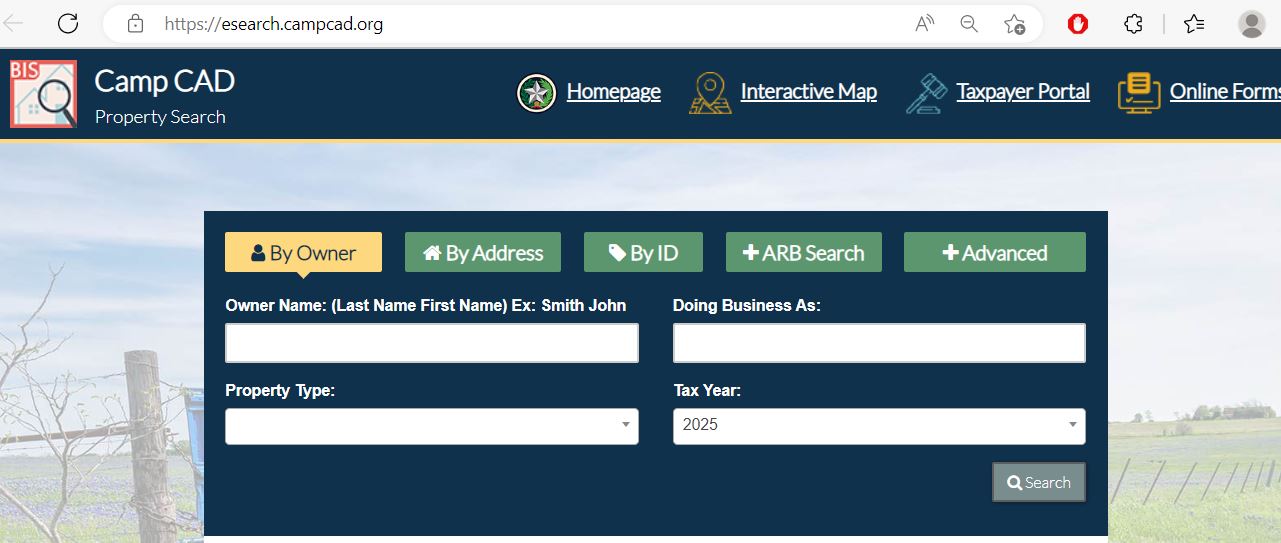
- Where the By Owner tab appears
- How to switch to By Address or By ID
- Where property type and tax year fields appear
- Why Advanced Search can help with rural or business accounts
- Current appraised value
- Current exemption status
- Online protest status
- Tax bill and payment balance
What Camp CAD property record fields mean
A Camp CAD property record may include several identifiers and value fields. Before you call the office, file a protest or pay a tax bill, identify exactly which part of the record you are using.
| Record field | What it means | How to use it |
|---|---|---|
| Property ID | Unique property identifier in the Camp CAD system | Use this for property search, payment lookup, forms, protest and office questions. |
| Owner name | Owner currently shown in appraisal records | Recent sales may not update instantly. Compare with deed or closing documents if needed. |
| Property address | Physical/situs address where available | Useful for homes and businesses, but rural/mineral records may require ID or legal description. |
| Legal description | Abstract, tract, subdivision, lot, block, lease or parcel description | Important for rural land, timber, mineral, deed comparison and map research. |
| Market value | CAD’s opinion of market value for appraisal purposes | Review if the value appears too high or unequal compared with similar property. |
| Property type | Real, Personal, Mineral, Auto or Mobile Home classification in the search system | Use the correct type filter to avoid missing a record. |
| Exemption status | Homestead, disabled veteran, Freeport, disaster, ag/timber or other exemption/special status where applicable | Missing exemptions can affect taxable value, so check this before focusing only on market-value protest. |
How to use the Camp CAD Interactive Map
Camp CAD links to an Interactive Map through the official website and property search portal. A map is useful when the property is easier to understand visually than by mailing address, especially for rural land, timber tracts, mineral accounts, mobile homes, lake-area properties or irregular parcels.
Camp County homestead exemption and online forms
Camp CAD offers online forms for several common taxpayer needs. The official forms page lists address change, ag form, business personal property rendition, disabled veteran’s or survivor’s exemption, Freeport exemption, homestead exemption, disaster-damage exemption and wildlife management annual report.
Agricultural, timber, wildlife and business personal property notes
Camp County includes rural land, timber, wildlife management, agricultural use, mobile homes, mineral accounts and business personal property. These records often need more careful review than a standard house search.
- Ag Form
- Required ag survey attachment
- Wildlife Management Annual Report
- Land-use records and photos
- Lease, livestock or production proof
- Timber Form 50-167
- Timber Survey
- Mail completed timber documents if required
- Keep use and management records
- Ask CAD before changing land use
- Business Personal Property Rendition
- Freeport Exemption if applicable
- Personal property search filter
- Asset lists and depreciation support
- Filing proof and deadline notes
How to file a Camp County appraisal protest
A strong protest focuses on market value, equal-and-uniform comparison, incorrect property data, missing exemption or wrong classification. It should not simply say that taxes are high. Camp CAD provides online protest access and an ARB Search tab in the property search portal.
How to pay Camp County property taxes online
Camp CAD’s official site says it uses Autoagent for automated payments. The payment portal shows Camp Central Appraisal District, TX, 143 Quitman Street, Pittsburg, TX 75686, and phone 903-856-6538. It allows users to find a bill by Property ID, name or address, add the bill to cart, and check out as a guest or with an account.
Camp CAD vs Camp County Tax Assessor-Collector
Camp CAD’s official site provides tax-payment and appraisal services through its website. The county Tax Assessor-Collector is separate and handles other tax-office duties such as vehicle-related services. Use the right office based on your task.
| Need | Correct source | What to do |
|---|---|---|
| Search property value or owner record | Camp CAD | Use official property search for owner, address, Property ID, value, exemptions and tax-year records. |
| Apply for exemption or special form | Camp CAD | Use Camp CAD online forms for homestead, disabled veteran, ag, BPP, Freeport and other forms. |
| File appraisal protest | Camp CAD / ARB process | Use the official online protest route or contact CAD before the deadline. |
| Pay property tax bill | Camp CAD payment portal / Autoagent route | Start from Camp CAD’s official Pay Taxes Online link and verify bill before paying. |
| Vehicle registration or county tax office help | Camp County Tax Assessor-Collector | Use the county tax office for non-appraisal county tax-assessor services. |
Common Camp County CAD mistakes to avoid
| Mistake | Why it hurts | Better action |
|---|---|---|
| Calling the office to make phone payment | Camp CAD says the appraisal office does not take phone payments. | Use the official payment provider route from Camp CAD’s website. |
| Paying when escrow may already pay | You may duplicate a payment your mortgage lender is handling. | Use the escrow check tab or call before paying. |
| Searching only by full address | Rural, mineral, mobile home or personal property accounts may not match street-address search. | Try Property ID, owner name, property type, abstract, ARB search or Advanced Search. |
| Ignoring property type filters | Real, Personal, Mineral, Auto and Mobile Home records may be filtered differently. | Select the correct property type before assuming the record is missing. |
| Filing protest without evidence | Unsupported protests are weaker. | Use comparable sales, photos, repair estimates, maps, appraisal reports or record-error proof. |
| Using map data as legal proof | Search disclaimer says legal descriptions and acreage should be verified before legal use. | Use CAD map for research, then verify legal documents, deed or survey details when needed. |
Camp Central Appraisal District contact details
Use Camp CAD for property search, appraised value, exemptions, ag/timber/wildlife forms, business personal property renditions, tax-payment route, online protest, escrow questions and appraisal-record questions.
| Contact item | Official detail | Best use |
|---|---|---|
| Office name | Camp Central Appraisal District | Use for appraisal, property tax, exemption, protest and official CAD questions. |
| Chief appraiser | Jan Tinsley, RPA, RTA, CTA, CTSA, CCA | Listed on the official Camp CAD contact page. |
| Address | 143 Quitman St., Pittsburg, TX 75686 | Use for office visits, mailing and map directions where accepted. |
| Phone | 903-856-6538 | Use for property search, exemption, forms, tax-payment route and protest questions. |
| Fax | 903-856-6544 | Confirm before faxing deadline-sensitive forms or evidence. |
| j.tinsley@campcad.org | Use for non-urgent written communication where accepted. | |
| Office hours | Monday–Friday, 8:00 AM–4:30 PM | Call before visiting on holidays, weather closures or deadline-heavy days. |
Camp County Tax Assessor-Collector contact
Use the county Tax Assessor-Collector for county tax-assessor services such as vehicle registration and county tax office routing. For property tax payment through Camp CAD, appraisal values, exemptions and protests, use Camp CAD’s official routes.
| Tax office item | Published detail | Use this for |
|---|---|---|
| Tax Assessor-Collector | Missy Huffman | County tax assessor-collector routing and non-CAD office services. |
| Address | 115 Dr. M L King Jr. Ave., Ste. B, Pittsburg, TX 75686 | County tax office visit or mail planning as directed. |
| Phone | 903-856-3391 | County tax assessor-collector office questions. |
| Fax | 903-856-0811 | Fax only when the office instructs you to use it. |
Camp County Appraisal District map
Use this map to plan a visit to Camp CAD in Pittsburg. If you are bringing homestead forms, ag/timber documents, BPP renditions, protest evidence or payment questions, call first to confirm required copies and current office procedures.
Official Camp County property resources
Use these official resources for final confirmation before searching, filing, mailing, protesting, paying or visiting.
Camp Central Appraisal District official website Camp CAD official property search Camp CAD official contact page Camp CAD online forms page Camp CAD online forms portal Camp CAD taxpayer / online protest portal Camp CAD official online payment portal Camp CAD interactive map Camp CAD appraisal and tax information Texas property tax database Texas Comptroller property tax assistance Related guide: Texas property tax exemptions Related guide: Texas property tax protest deadlinesCamp County Appraisal District FAQs
What is the official Camp County Appraisal District website?
The official website is campcad.org. Use it for Camp CAD property search, online forms, pay taxes online, escrow check, interactive map, online protest portal, truth-in-taxation resources and official contact details.
How do I search Camp County CAD property records?
Open the official Camp CAD property search at esearch.campcad.org. You can search by Owner, Address, ID, ARB Search or Advanced, and use property type filters such as Real, Personal, Mineral, Auto and Mobile Home.
What is the Camp CAD phone number?
The Camp Central Appraisal District phone number is 903-856-6538. Use it for property search, exemption, form, protest, escrow and official payment-route questions.
Where is Camp Central Appraisal District located?
Camp CAD is located at 143 Quitman St., Pittsburg, TX 75686. The official contact page lists office hours as Monday through Friday, 8:00 AM to 4:30 PM.
Who is the Camp County chief appraiser?
The official Camp CAD contact page lists Jan Tinsley as Chief Appraiser for Camp Central Appraisal District.
How do I apply for a Camp County homestead exemption?
Search your property record first, then use Camp CAD’s official online forms page and choose Homestead Exemption. Submit all required proof and save your confirmation or copy of the completed form.
Can I file a Camp County appraisal protest online?
Camp CAD provides an online protest portal and the property search includes ARB Search options. Use the instructions on your appraisal notice, portal account or official Camp CAD website and file before the deadline.
How do I pay Camp County property taxes online?
Start from the official Camp CAD website and choose Pay Taxes Online. The payment portal lets users find a bill by Property ID, name or address, add the bill to cart and check out through Autoagent-powered payment processing.
What should escrow homeowners check before paying Camp County taxes?
If your mortgage lender pays through escrow, Camp CAD says not to pay again. Use the escrow check tab on the homepage by entering your Property ID number, or call the office before making a duplicate payment.
What evidence helps in a Camp County appraisal protest?
Helpful evidence includes comparable sales, property-condition photos, repair estimates, closing statements, appraisal reports, ag/timber/wildlife documentation, business personal property support, map screenshots and documents showing property-record errors.
Last editorial check: June 2026. Official details can change without notice; verify your property account, forms, protest deadline, escrow status and payment instructions directly with Camp CAD or the proper Camp County office.

Founded by Mahesh Kumar, AppraisalDistrict.org is built on the belief that public information should be accessible and accurate. We have replaced AI-generated ‘fluff’ and automated scraping with 100% manual human verification. With over 15 years of experience in real estate and digital journalism, we help you find the right data without the frustration of broken links.
Search Smarter, Estimate Taxes, Check Exemptions and Prepare for a Protest
Use this free tool before you visit a county appraisal district, property search portal, tax office, or exemption page. It helps you understand property value, taxable value, possible savings, protest value, and the next official step.
What do you need help with today?
Choose your main reason for visiting. The tool will show the best next step and quick estimate.
Use this tool to check your appraisal notice, exemption savings, protest value, and official next step.
Use the tax calculator before trusting only the sale price or mortgage estimate.
Property Search Helper
Use this when a county property search portal is confusing. It shows which search method is usually best.
Property Tax Estimate Calculator
Estimate annual property tax using appraised value, assessment ratio, exemptions, and combined tax rate.
Homestead and Exemption Savings
Estimate how much a homestead, senior, disability, veteran, or local exemption may reduce tax.
Appraisal Notice Review
Compare last year value with this year value and see whether the increase deserves closer review.
Property Tax Protest Savings
Estimate possible savings if your appraised value is reduced after protest, correction, evidence review, or appraisal review board hearing.
Property Tax Protest and Exemption Checklist
Use this checklist before you file a protest, apply for exemption, or call the appraisal district.
Before calling, write your property ID, owner name, property address, and question on paper. It saves time.
Do not call the CAD to pay tax bills unless the local article says they collect taxes. In many counties, the tax office collects payment.
Official Resource Finder
Enter county and state to create safe searches for official CAD pages, property search, tax payment, exemptions, maps, forms, and protest help.
CAD vs Tax Office
- Appraisal District: value, exemptions, ownership records, maps, protest.
- Tax Office: tax bill, payment, receipt, delinquent balance, penalty.
Best place to use this
Add this tool after the first major content section or before the FAQ area. It gives visitors a reason to interact before leaving the page.
Important estimate note
This tool gives educational estimates only. Final values, exemptions, tax rates, bills, payments, and deadlines must be confirmed with official county sources.