
Trace a Crockett County Property From Surface Parcel to Mineral, Tax and Deed Records
Start with Crockett County Appraisal District when you need a real-estate, mineral or personal-property account, property ID, geographic ID, legal description, abstract, subdivision, lease information, appraisal value, exemption or protest record.
The appraisal account is only one layer. Use the Crockett County Tax Assessor-Collector for the live bill and payment, and use the County Clerk for recorded deeds, liens, leases, releases and other legal property documents.
Use the property ID, owner ID, geographic ID or lease number when available.
905 Avenue D, Ozona, Texas 76943.
909 Avenue D, Ozona, Texas 76943.
Real estate, mineral and personal-property records can be searched separately.
Local portals and procedures reviewed July 31, 2026.
Which Crockett County property task are you completing?
Use the property ID, owner, address, geographic ID, abstract, subdivision or legal description.
Follow the search stepsSelect Mineral and try the owner, lease name, lease number, property ID or legal information.
Use the mineral-account guideFind the owner ID, year and balance before opening the separate Gov-Pay payment form.
Use the payment workflowIdentify whether the issue concerns value, acreage, property type, exemption, mineral interest or another record field.
Prepare the protest fileSearch recorded deeds, liens, oil-and-gas leases, releases and other instruments.
Follow the records workflowReview the deed, title, survey, tax balance, appraisal accounts, access and special appraisal.
Use the due-diligence checklistSearch Crockett County appraisal records without mixing surface, mineral and personal property
Use the Crockett CAD screenshot to choose the correct search path
The original article included the official-site screenshot below. It is preserved and placed inside the search instructions where it helps visitors understand the five available search routes.
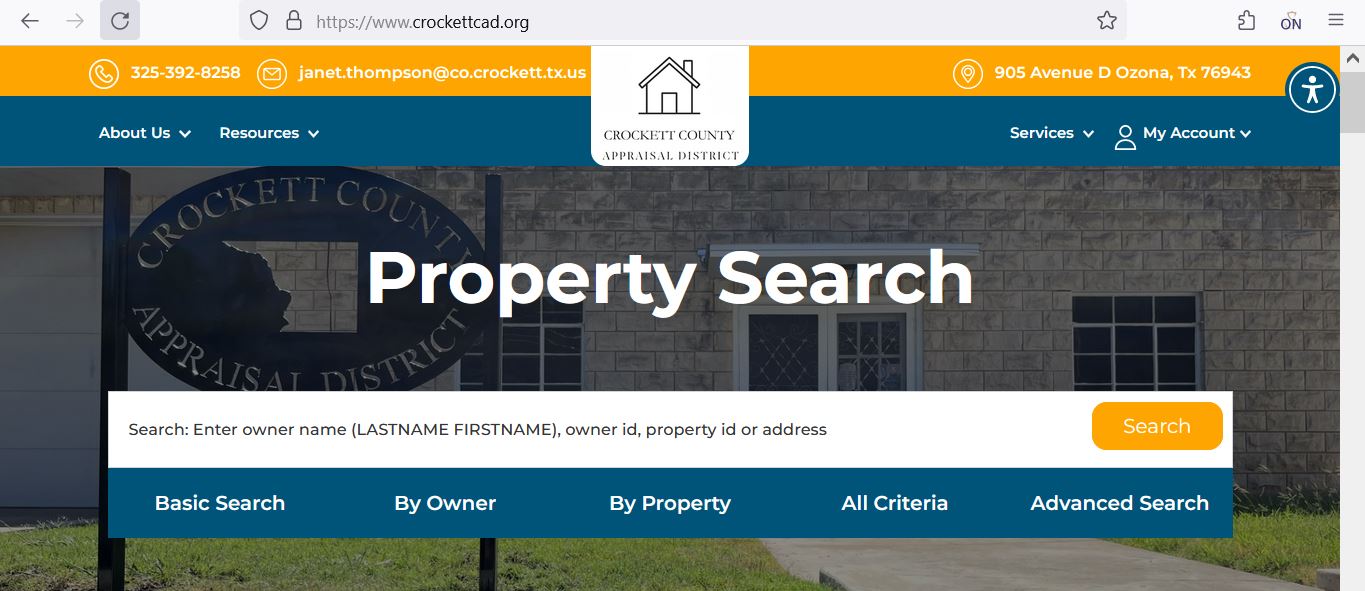
Choose the search field that matches the Crockett County property
| Search option | Use it when | What to verify |
|---|---|---|
| Basic Search | You have an owner name, owner ID, property ID or address. | The tax year and property type before opening the result. |
| By Owner | You need owner name, owner ID, care-of name or mailing-address filters. | The appraisal owner is not automatically proof of legal title. |
| Property ID | You copied the identifier from a notice, prior appraisal account or tax record. | Whether it is a real-estate, mineral or personal-property account. |
| Geographic ID | You are matching an account to the appraisal map or legal description. | Legal boundaries through a deed, plat and professional survey. |
| Abstract | You are searching ranch acreage, an older survey or rural legal description. | Survey name, tract, acreage and recorded deed references. |
| Subdivision | You know the subdivision or addition connected to the parcel. | Lot, block, unit, property ID and map position. |
| Lease name | You are researching a mineral, oil-and-gas or industrial account. | The owner interest, lease number and tax year. |
| Lease number | You have a lease identifier from a statement, division order or prior record. | The producing interest and owner account shown in the result. |
| Land acres | You need to narrow rural or agricultural tracts by approximate size. | CAD acreage is not guaranteed surveyed acreage. |
| Value Search | You are researching a market-value or tax-value range. | Property type and characteristics before comparing accounts. |
Understand the Crockett CAD search-result columns
| Result field | What it identifies | What to do next |
|---|---|---|
| Parcel ID | The appraisal-system identifier associated with the property record. | Save it before contacting Crockett CAD. |
| Sequence | A sequence or component reference within the appraisal data. | Use it only with the surrounding account and property fields. |
| Account | The account reference connected to the appraisal record. | Compare it with tax and notice records. |
| Owner ID | The identifier assigned to the owner in the appraisal or tax system. | Keep it for the Tax Office and Gov-Pay workflow. |
| Property Type | Whether the account is real estate, mineral or personal property. | Do not assume one account includes every property interest. |
| Owner Name | The owner carried for appraisal administration. | Use County Clerk records when legal ownership must be proved. |
| Property Address | The situs or physical property location when available. | Compare it with the legal description and map. |
| Legal | The abbreviated legal description carried by CAD. | Open the recorded deed before legal use. |
| Abstract or Subdivision | The survey, abstract or subdivision connected to the parcel. | Match it with deed, plat and survey records. |
| Lease Name or Number | A mineral or lease-related account reference. | Compare the lease, owner interest and recorded instruments. |
| Acres | The acreage carried for appraisal purposes. | Verify legal acreage with a deed and survey. |
| Market Value | The appraisal district’s market-value determination for the selected year. | Review the full account and value components. |
| Base Tax Due | Tax information displayed with the search data. | Confirm the live balance through the Tax Office before paying. |
Use the Crockett CAD map to locate the parcel without treating it as a survey
Separate Crockett County mineral interests from the surface-property account
| Record | What it may show | What it does not settle |
|---|---|---|
| Surface real-estate account | Land, buildings, acreage, situs, surface owner and appraisal value. | Who owns every mineral or royalty interest. |
| Mineral appraisal account | Owner, lease information, mineral-property type and appraisal data. | Complete legal title or every unrecorded interest. |
| County Clerk instrument | Recorded deed, lease, assignment, reservation, release or related document. | Every title defect without a complete title examination. |
| Tax Office account | Tax balance, payment status, delinquency and receipt information. | The appraisal value or legal ownership dispute. |
Separate market value, appraised value and taxable value
Crockett CAD’s opinion of the property’s market value as of January 1 for the selected appraisal year.
The value after an applicable appraisal limitation, such as a qualifying residence-homestead cap.
The value remaining after exemptions and special treatment for the applicable taxing unit.
Check the three principal Crockett County taxing units
Crockett CAD appraises property for the county’s listed taxing authorities. The exact taxable value and exemption treatment should be reviewed on the individual account.
County taxation supports county services and is collected through the Crockett County Tax Assessor-Collector.
The Crockett County Consolidated Common School District is the local school taxing unit listed by Crockett CAD.
Crockett County Groundwater Conservation District can appear as a separate taxing unit on the property record.
Read the Notice of Appraised Value before filing or calling
Confirm the property ID, owner ID, owner name, property type, address and legal description.
Make sure the notice and online account refer to the same appraisal year.
Review land, improvements, mineral or personal-property components instead of focusing only on the total.
Check homestead, age, disability, veteran, agricultural, wildlife and other expected benefits.
Use the date printed on the notice. A later mailing can create a later account-specific deadline.
Keep the unique PIN or request a replacement before attempting to manage the property online.
Fix common Crockett CAD search problems before contacting the office
| Problem | Likely reason | Practical fix |
|---|---|---|
| Owner name returns nothing | The account may use LASTNAME FIRSTNAME, initials, a trust, estate, company or previous owner. | Search only the surname, then try owner ID or property ID. |
| Too many owner results | The owner has multiple surface, mineral or personal-property accounts. | Add property type, lease, abstract, subdivision or geographic ID. |
| Full address does not work | The record may omit a suffix, direction, city or rural address component. | Use the street number and main street name only. |
| Ranch tract has no normal address | The parcel may be indexed by abstract, legal description or geographic ID. | Use By Property, All Criteria or the interactive map. |
| Mineral interest is missing | The search may still be filtered to Real Estate. | Select Mineral and search the owner, lease name, lease number or property ID. |
| Surface owner differs from mineral owner | The mineral estate may have been severed, reserved, assigned or inherited separately. | Search both account types and review County Clerk instruments. |
| Recently transferred land shows the former owner | The recorded deed may still be processing into the appraisal system. | Confirm recording with the County Clerk and save the instrument number. |
| CAD tax due differs from the Tax Office | The systems can update at different times or serve different purposes. | Use the Tax Office’s live account as the payment source. |
| Tax website defaults to 2025 | The 2026 tax roll or statements may not yet be loaded for collection. | Do not confuse the current 2026 appraisal year with the latest available tax-bill year. |
Send each Crockett County property question to the correct office
| Your question | Correct starting point | What to prepare |
|---|---|---|
| What is the appraised value? | Crockett County Appraisal District | Property ID, property type, tax year and value field. |
| Why is an exemption missing? | Crockett County Appraisal District | Application, proof of qualification, ID and filing confirmation. |
| How is a mineral account valued? | Crockett CAD and its mineral-appraisal contractor | Property ID, owner, lease name, lease number and tax year. |
| How much tax is currently due? | Crockett County Tax Assessor-Collector | Owner ID, owner name, property ID and tax year. |
| Did my online payment post? | Crockett County Tax Assessor-Collector | Gov-Pay confirmation email, amount, date and account. |
| Who legally owns the surface? | Crockett County Clerk or title professional | Grantor, grantee, instrument number and legal description. |
| Who owns a mineral interest? | County Clerk, title professional or attorney | Deed chain, reservations, leases, assignments and releases. |
| Where can I obtain a deed or lease copy? | Crockett County Clerk | Names, date range, document type, instrument number or volume and page. |
| Who sets the tax rates? | Each applicable local taxing unit | The taxing-unit list from the appraisal account. |
Correct the system that controls the inaccurate information
Verify Crockett County exemptions on the complete property account
Exemptions reduce taxable value rather than changing the underlying market value. Check the individual taxing-unit lines before estimating savings.
Confirm the home is the owner’s principal residence and that the exemption appears on the current account.
Review the additional exemption, school-tax ceiling and potential installment or deferral options.
Check the required qualification evidence, exemption and possible school-tax ceiling.
Use the official disabled-veteran form and attach the required VA documentation.
Review land-use history, qualifying use, productivity value and filing status separately.
Use current Texas forms for charitable, religious and other property-specific exemption categories.
Prepare these items before submitting an application
Check agricultural and wildlife appraisal separately from normal exemptions
| Land use | What to verify | Useful evidence |
|---|---|---|
| Livestock or grazing | Actual agricultural use, land-use history and local intensity requirements. | Livestock records, leases, receipts, water records, photographs and management logs. |
| Crop or forage production | Commercial use, acreage, production history and management activity. | Seed, fertilizer, harvest, equipment and sales records. |
| Wildlife management | Prior qualifying appraisal, wildlife plan and required management practices. | Wildlife plan, annual report, activity logs, habitat work and dated photographs. |
| Change to nonqualifying use | The date and extent of a use change that could affect special appraisal. | Development plans, leases, sale documents, construction records and use dates. |
Search and prepare Crockett County business-property records separately
Furniture, machinery, equipment, vehicles, inventory, drilling equipment, tanks, pipeline assets and other property used to produce income may be appraised separately from the land or building.
Prepare a Crockett CAD protest around one clearly defined issue
Build an evidence packet the reviewer can follow quickly
Use Crockett CAD data downloads before requesting a custom record
Crockett CAD publishes annual reports, mass-appraisal reports, reappraisal plans, certified appraisal rolls, mineral-roll downloads, budgets, board agendas and ARB materials.
Real and personal-property rolls are available in geographic, alphabetical and spreadsheet formats for listed years.
Mineral-roll downloads are published separately because mineral accounts differ from surface and personal property.
Use these reports to understand the district’s general appraisal methods for a tax year.
The published 2025-2026 reappraisal plan explains scheduled appraisal work and district planning.
Review district operations, values, workload and other annual information.
Find hearing procedures, agendas, budgets and public-meeting materials.
Confirm the Crockett County tax account before opening Gov-Pay
| Check | Why it matters | Save this proof |
|---|---|---|
| Owner ID | Gov-Pay uses the owner ID to identify the payment. | Tax-search screenshot or printed account. |
| Tax year | A property can have current and delinquent balances for different years. | Tax statement or Tax Office payoff. |
| Payment amount | The payment form requires the amount to be entered correctly. | Current balance and date viewed. |
| Convenience fee | The fee is separate from the tax and is generally nonrefundable. | Checkout screenshot showing subtotal, fee and total. |
| Confirmation email | It documents that the online transaction was submitted. | Email, confirmation number and payment date. |
Use the Crockett County Clerk for authoritative property documents
Complete these checks before buying or inheriting Crockett County property
Match property ID, geographic ID, legal description, abstract, map location and acreage.
Check owner, lease name, lease number and mineral property type separately from the surface.
Search deeds, reservations, assignments, leases, releases, liens and probate documents.
Review every available tax year, payment status and current payoff before closing.
The seller’s homestead, appraisal limitation or special appraisal may not transfer automatically.
Check qualifying use, history, acreage and whether the intended future use will continue to qualify.
Do not rely on appraisal-map boundaries or CAD acreage when access and legal boundaries matter.
Search recorded rights-of-way, pipeline easements, utility easements and road-access documents.
Save the deed, title policy, survey, tax certificate, closing statement and exemption filing proof.
Request electronic delivery without assuming every office is included
Crockett CAD’s forms page includes a Request for Electronic Delivery of Communications with a Tax Official.
Important Crockett County appraisal and payment dates
Crockett County appraisal, tax and recorded-property offices
Ozona, Texas 76943
Mailing: P.O. Box 1569, Ozona, Texas 76943-1569
Phone: (325) 392-8258
Fax: (325) 392-2906
Email: janet.thompson@co.crockett.tx.us
Chief Appraiser: Janet M. Thompson
Monday-Thursday: 8:30 AM-12:00 PM and 1:00 PM-5:00 PM.
Friday: 8:30 AM-12:00 PM and 1:00 PM-4:00 PM.
The office closes at noon on the day before a holiday.
909 Avenue D
Ozona, Texas 76943
Mailing: P.O. Drawer H, Ozona, Texas 76943-2507
Phone: (325) 392-2674
Fax: (325) 392-2906
Email: michelle.medley@co.crockett.tx.us
Tax Assessor-Collector: Michelle M. Medley
Monday-Thursday: 8:00 AM-12:00 PM and 1:00 PM-4:30 PM.
Friday: 8:00 AM-12:00 PM and 1:00 PM-4:00 PM.
The office closes at noon on the day before a holiday.
909 Avenue D
Ozona, Texas 76943
Mailing: P.O. Drawer C, Ozona, Texas 76943
Phone: (325) 392-2022
Fax: (325) 392-3742
Email: ninfa.preddy@co.crockett.tx.us
County Clerk: Ninfa Preddy
Use this office for recorded deeds, liens, leases, releases, plats and authoritative copies.
Prepare the property ID, owner ID, property type, owner name, legal description, lease information and tax year.
Confirm holiday closures, accepted payment, identification, recording requirements and whether an appointment is needed.
Official Crockett County property resources
Search real-estate, mineral and personal-property accounts.
Open property searchLocate a parcel and compare surrounding appraisal-map records.
Open interactive mapDownload homestead, veteran, rendition, agricultural, wildlife and electronic-delivery forms.
Open official formsRegister or sign in to manage an eligible protest online.
Open online protestRequest the unique account PIN needed to connect a property to online services.
Request account PINSearch past, future and open protest-hearing information.
Search protest hearingsDownload certified rolls, mineral data, reports, plans, budgets and meeting records.
Open data and reportsFind owner ID, tax-year balances, paid accounts and delinquent amounts.
Open tax searchSubmit an online tax payment after confirming the owner ID and amount through the Tax Office.
Open Gov-PayReview property-record access, recording requirements and Clerk contact information.
Open County ClerkSearch deed, lien, lease, instrument and legal-description records through the service linked by the Clerk.
Open iDocketCross-check CAD, Tax Office and active taxing-unit information.
Open Crockett County directoryHow this Crockett County guide was rebuilt

Independent research focused on real user tasks
This version preserves the images used in the existing article while replacing the brief link-based content with complete search instructions, screenshot guidance, mineral-account help, map verification, exemptions, special appraisal, protest preparation, tax-payment safeguards and recorded-document research.
Official resources reviewed include Crockett County Appraisal District, Crockett County Tax Assessor-Collector, Crockett County Clerk, Gov-Pay and Texas Comptroller property-tax guidance.
AppraisalDistrict.org is an independent informational website and is not operated by Crockett County Appraisal District or Crockett County government.
10 common Crockett County appraisal and property-search questions
1. What is the official Crockett County Appraisal District website?
The official website is crockettcad.org. It provides property search, maps, forms, online protest, appraisal rolls and contact information.
2. How do I search Crockett County property records?
Open the official Crockett CAD website, select the correct tax year and search by owner name, owner ID, property ID or address. Use By Property or Advanced Search for geographic ID, legal description, abstract, subdivision, lease, acreage and value filters.
3. Can I search Crockett County mineral accounts online?
Yes. Select Mineral as the property type and search the owner, property ID, lease name, lease number, legal description or abstract. A mineral account can be separate from the surface real-estate account.
4. Why does an owner or address search show no result?
The account may use last-name-first formatting, a trust, estate, company, prior owner, rural legal description or separate mineral account. Search the surname or street name alone, then try property ID, geographic ID, abstract or lease information.
5. Does Crockett CAD collect property taxes?
No. Crockett CAD appraises property and administers exemptions and protests. The Crockett County Tax Assessor-Collector handles bills, payments, receipts and delinquent balances.
6. How do I pay Crockett County property taxes online?
First use the Tax Office property search to confirm the owner ID, year and amount. Then open Gov-Pay, enter the information, review the convenience fee and save the confirmation email.
7. How do I verify a Crockett County homestead exemption?
Open the complete appraisal account and review the exemption and taxable-value information. If the exemption is missing, use the official forms page and include the identification and supporting documents required by Crockett CAD.
8. What is the Crockett County protest deadline for 2026?
Most protests are due by May 15 or by the 30th day after Crockett CAD mails the Notice of Appraised Value, whichever is later. The deadline printed on the individual notice controls.
9. Where can I search Crockett County deeds and liens?
Start from the official Crockett County Clerk page. It links to iDocket for property indexes and images. Contact the Clerk for authoritative or certified copies.
10. Where is Crockett County Appraisal District located?
Crockett County Appraisal District is at 905 Avenue D, Ozona, Texas 76943. Its mailing address is P.O. Box 1569, Ozona, Texas 76943-1569, and its phone number is (325) 392-8258.