
Separate the Surface, Mineral and Business Accounts Before Acting on a Crane County Record
Crane County property research is not limited to homes and lots. The official appraisal system includes real property, mineral interests and industrial personal property, with search fields for parcels, accounts, owners, leases, abstracts, subdivisions and legal descriptions.
Start with Crane County Appraisal District to identify the correct account. Continue to the Tax Assessor-Collector for the live tax balance and payment, or to the County Clerk when you need a recorded deed, lien, release, plat or ownership document.
Supports 2026 through historical tax years.
Real, mineral and industrial personal property.
511 W. 8th Street, Crane.
Mon–Thu 8–5; Friday 8–12.
Handled by the County Tax Office.
Handled by the County Clerk.
What kind of Crane County property task are you completing?
Search the address, parcel ID, legal description, abstract or subdivision and confirm the REAL property type.
Follow the search stepsUse owner, account, lease number, lease name, abstract or mineral-property filtering.
Use the mineral workflowReview industrial personal property and rendition records separately from land or mineral interests.
Prepare the rendition fileFile against the correct real, mineral or personal-property account and attach evidence specific to it.
Build the protest packetUse the Tax Assessor-Collector for current balances, online payments, receipts and collection questions.
Use the payment workflowUse County Clerk records for deeds, liens, releases, plats and legal ownership history.
Search official public recordsSearch Crane CAD without mixing a mineral account with the surface property
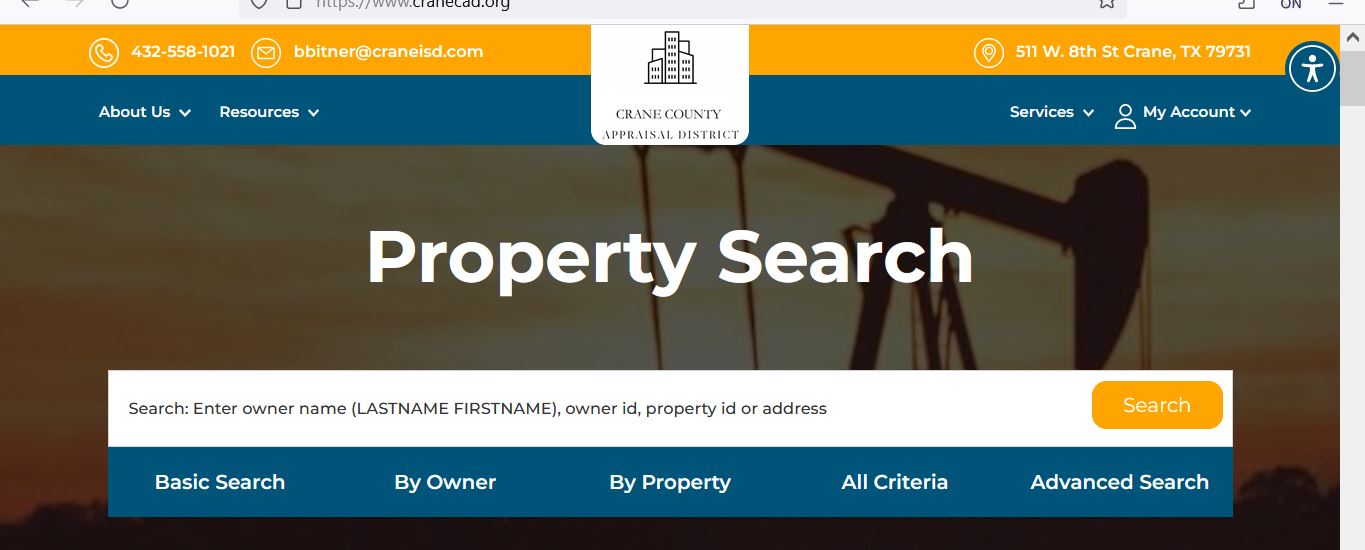
Use the Crane CAD screenshot to choose the correct search method
The image already used on the existing article is preserved below. It shows the official portal’s main search field and five search routes. Use it for navigation only, then reopen the live portal for current records.
Check these Crane County record fields before calling, filing or paying
| Attribute | What it answers | Actionable check |
|---|---|---|
| 1. Parcel ID | Which appraisal account did you open? | Save it for forms, protests, calls and cross-system matching. |
| 2. Property type | Is this real, mineral, industrial or personal property? | Never compare accounts until the property types match. |
| 3. Owner ID | Which owner record is connected to the account? | Use it to find related accounts, but confirm each parcel separately. |
| 4. Geographic ID | Which geographic parcel reference is associated with the property? | Compare it with the interactive map and legal description. |
| 5. Legal description | Which tract, lot, block, abstract or interest is described? | Use the recorded deed or lease documents for legal conclusions. |
| 6. Lease number or name | Which mineral or oil-and-gas lease may be involved? | Match operator, owner and lease documents before disputing value. |
| 7. Total acres | What acreage does CAD carry for appraisal purposes? | Do not treat it as surveyed or guaranteed acreage. |
| 8. Market value | What value has CAD assigned for the selected year? | Compare only with evidence for the same account type and valuation date. |
| 9. Exemptions | Which homestead, age, disability, veteran or other benefits appear? | Confirm the exemption appears for the intended tax year. |
| 10. Base tax due | What tax-related figure appears in the appraisal search grid? | Verify the live balance and payment status with the Tax Office before paying. |
Use a different research workflow for real, mineral and business property
Use for homes, lots, acreage, commercial land and buildings.
- Confirm situs and legal description.
- Review land and improvements separately.
- Check square footage, condition and year built.
- Verify homestead or agricultural status.
- Compare the parcel with the map.
Use for royalty, working or other mineral interests.
- Search owner, account, lease and abstract.
- Match lease number and lease name.
- Separate the mineral account from the surface tract.
- Keep operator and ownership documents.
- Use mineral-specific evidence for a protest.
Use for taxable business assets and oilfield-related equipment.
- Confirm legal entity and DBA.
- Match the asset situs.
- Review inventory, machinery and equipment.
- Keep acquisition and disposal records.
- File the correct rendition on time.
Understand what the Crane CAD details page proves and what it does not
| Section | What it provides | What it does not replace | Next action |
|---|---|---|---|
| Account | Parcel ID, legal description, geographic ID, category, description and acreage. | A deed, title report, survey or mineral-title opinion. | Compare identifiers with maps and recorded documents. |
| Owner | Owner ID, appraisal owner, mailing address, ownership percentage and exemptions. | Proof of complete legal ownership. | Use County Clerk records when title matters. |
| Location | Situs location, neighborhood and map reference when available. | A legally assigned address or surveyed boundary. | Compare the interactive map and legal records. |
| Values | Current appraisal values for the selected year. | The live Tax Office balance or receipt. | Use the Tax Office after reviewing exemptions and taxing units. |
| Improvements | Type, class, condition, effective year, square footage and value. | A physical inspection, permit file or professional measurement. | Document incorrect characteristics with dated evidence. |
| Land | Land type, acres, square feet, dimensions, market value and productivity value. | A survey or agricultural-qualification decision for another year. | Verify acreage, classification and special appraisal. |
| Roll-value history | Prior appraisal values and account history. | The current notice or prove why a value changed. | Compare land, improvements and account changes year by year. |
| Deed history | Recorded-document references carried in the appraisal system. | The County Clerk’s complete official index. | Open the actual instrument through the Clerk. |
Use the Crane CAD interactive map without treating it as a survey
Read Crane County values in the correct order
The appraisal district’s opinion of market value as of January 1 for the selected account and year.
The value after any applicable appraisal limitation or special appraisal treatment.
The value after exemptions is combined with adopted rates; the Tax Office then controls the live amount due.
Review land and improvements, property characteristics, condition and comparable real property.
Use mineral-account documents and evidence rather than residential sales or surface-land comparisons.
Review rendered assets, cost, age, condition, depreciation, disposals and business situs.
Check the Notice of Appraised Value before deciding what to protest
Confirm the parcel ID, owner, property type, legal description and appraisal year.
Separate land, improvements, minerals or business assets instead of focusing only on the total.
Check that every expected homestead, age, disability, veteran or special-use benefit appears.
Look for incorrect acreage, square footage, account type, lease information, class or condition.
Use the date printed on the individual notice rather than relying only on a general calendar.
Keep any owner ID, portal instructions or PIN information provided with the notice.
Fix a missing or confusing Crane CAD result
| Problem | Likely reason | Practical fix |
|---|---|---|
| Owner search returns nothing | The account may use another name order, initials, company, trust, estate or operator. | Search the last name or one distinctive entity word. |
| Address search misses the property | A rural, industrial or mineral account may have no standard situs address. | Use parcel ID, owner, abstract, legal description, lease or account. |
| Only the surface tract appears | The mineral interest is carried under a separate property type or account. | Select Mineral Property and search the owner or lease. |
| Mineral results are too broad | The owner has interests in several leases or abstracts. | Add lease number, lease name, account, abstract or agent. |
| Business assets are not on the real account | Industrial or personal property is appraised separately from land and buildings. | Search the company, DBA, owner ID and PERSONAL or industrial account type. |
| Recently purchased property shows the seller | The recorded deed may still be processing into the appraisal system. | Confirm the deed through the County Clerk and save its instrument number. |
| A tract split is missing | The new parcel or legal change may not yet be reflected publicly. | Search the parent tract and contact CAD with the recorded deed or plat. |
| CAD and tax figures differ | The systems serve different purposes and may update at different times. | Match parcel, account, year and property type, then contact the controlling office. |
| Online protest sign-in fails | The account may not be registered or the PIN has not been requested. | Use the official Request a Pin page and preserve the request confirmation. |
Send the Crane County question to the office that owns the record
| Your question | Correct starting point | What to prepare |
|---|---|---|
| What is the appraised value? | Crane County Appraisal District | Parcel ID, property type, year and disputed value. |
| Why is an exemption missing? | Crane County Appraisal District | Application proof, qualification date, ID and supporting documents. |
| Is this a mineral or surface account? | Crane County Appraisal District | Owner, account, lease, abstract and legal description. |
| What is the live tax balance? | Crane County Tax Assessor-Collector | Account, parcel ID, owner, year and property type. |
| Did my payment post? | Crane County Tax Assessor-Collector | Receipt, confirmation, amount, date and tax year. |
| Who legally owns the surface property? | Crane County Clerk or title professional | Grantor, grantee, recording date, instrument number and legal description. |
| Who owns the minerals? | County Clerk records and a qualified mineral-title professional | Chain of title, reservations, conveyances, leases and probate documents. |
| Where can I obtain a deed, lien or plat? | Crane County Clerk | Names, date range, document type and legal description. |
| Who adopts the tax rate? | Each local taxing unit | The taxing-unit list connected to the property. |
Correct the source of the Crane County property error
Verify Crane County exemptions on the complete account
An exemption can reduce taxable value without changing market value. Open the current-year account and confirm that every expected exemption is visible before estimating taxes.
Confirm ownership, principal-residence use, identification and the correct property account.
Review the additional exemption, school-tax ceiling and possible payment or deferral options.
Prepare the required disability documentation and verify the applicable taxable-value treatment.
Use the correct form and attach current VA documentation for the claimed category.
Review the official heir-property information available through Crane CAD’s Data and Records page.
Use the current Texas forms for charitable, religious, public or other qualifying property.
What Crane CAD says to include with a homestead application
Prepare special-appraisal and rendition records by account type
Crane CAD provides an Application for 1-d-1 Open-Space Agricultural Use Appraisal.
- Confirm acreage and legal description.
- Prepare qualifying-use history.
- Keep leases, receipts, livestock or production records.
- Document wildlife-management activity where applicable.
- Compare market value with productivity value.
- Ask about rollback consequences before changing land use.
Crane CAD provides a Business Personal Rendition of Taxable Property and a General Real Rendition form.
- Confirm the legal entity, DBA and physical situs.
- List machinery, equipment, inventory, furniture and fixtures.
- Keep original costs and acquisition dates.
- Remove disposed or transferred assets with proof.
- Separate leased assets from owned assets.
- Preserve the filing confirmation and extension request.
File a Crane CAD protest against the correct account and value type
Evidence checklist by property type
| Account type | Strong evidence | Common weak evidence |
|---|---|---|
| Residential or commercial real property | Comparable sales, unequal-appraisal accounts, dated photos, repair estimates, measurements and closing documents. | Only stating that the tax bill is high. |
| Land or agricultural property | Survey, deed, acreage records, land-use evidence, leases, productivity records and classification documents. | Comparing unrelated residential lots. |
| Mineral property | Ownership documents, lease information, operator records and relevant valuation evidence. | Surface-property sales with no mineral analysis. |
| Industrial personal property | Asset schedules, invoices, acquisition dates, depreciation, disposal proof, leases and rendition records. | An unlabeled list without costs, dates or asset identity. |
Use Crane CAD’s PIN, protest and hearing-search tools together
Create or sign in to an official account and request the unique property PIN needed for supported online services.
Open Request a PinUse the Crane CAD sign-in page and preserve every confirmation connected to the property account.
Open Online ProtestSearch past or future hearings and open protests by year and available fields.
Open Hearing SearchUse Crane CAD reports before submitting a broad records request
Crane CAD’s Data and Records page includes public information that can answer many appraisal questions without a custom request.
Review the 2026 budget and salary estimates and the current depreciation schedules.
Access prior certified real, personal, mineral and utility roll information.
Review adopted historical rates while waiting for current proposed and adopted rate updates.
Use the 2025–2026 reappraisal plan to understand the district’s appraisal cycle.
Review methodology and valuation reporting for real, personal, mineral or utility property.
Review agendas and minutes for the Appraisal Review Board and Board of Directors.
Move from the appraisal record to the official Crane County tax-payment route
Crane CAD’s search may display tax-related information, but the County Tax Assessor-Collector controls the live collection account, online payment and receipt questions.
Use Crane County Clerk records for deeds, liens, releases and plats
Complete these checks before relying on a Crane County property account
Match parcel ID, Geo ID, legal description, acreage, map and recorded deed.
Review reservations, mineral deeds, leases, probate records and separate appraisal accounts.
Verify real, mineral and personal-property balances rather than assuming one payment covers all accounts.
The seller’s homestead exemption, appraisal limitation or special appraisal may not transfer.
Review productivity value, qualifying-use history and possible rollback exposure.
Compare CAD area, year, class, condition, structures and land details with the actual property.
Determine which equipment or inventory is included in the sale and which personal-property account applies.
Search the County Clerk index and use a title company or lawyer for complete title work.
Keep the deed, title policy, survey, closing statement, mineral documents, tax certificate and exemption proof.
Important Crane County appraisal and property-tax dates
Crane County appraisal, tax and recorded-property offices
Crane, Texas 79731
Phone: (432) 558-1021
Fax: (432) 558-1027
Email: bbitner@craneisd.com
Chief Appraiser: Byron Bitner
Hours: Monday-Thursday 8:00 AM-5:00 PM; Friday 8:00 AM-12:00 PM.
Crane, Texas 79731
Mailing: P.O. Box 878, Crane, Texas 79731
Phone: (432) 558-2622
Fax: (432) 558-1198
Email: judy.crumrine@co.crane.tx.us
Tax Assessor-Collector: Judy Crumrine
Call before visiting to confirm current transaction hours and accepted payment methods.
Crane, Texas 79731
Mailing: P.O. Box 578, Crane, Texas 79731
Phone: (432) 558-3581
Fax: (432) 558-1148
Email: coclerk@co.crane.tx.us
County Clerk: Andrea Flores
Hours: Monday-Thursday 8:00 AM-5:00 PM; Friday 8:00 AM-4:00 PM.
No monetary transactions after 4:30 PM Monday through Thursday.
No monetary transactions after 3:30 PM Friday.
Arrive earlier when ordering copies, recording documents or making a payment.
Use the state-linked local database to review proposed and adopted rate information and subscribe for updates.
Open Crane Tax TransparencyWrite down the parcel ID, account, owner, property type, tax year, address or legal description and exact question.
For mineral accounts, also prepare the lease number, lease name, operator and relevant ownership documents.
Official Crane County property resources
Use for district information, property search, maps, forms, records and online services.
Open Crane CADSearch 2026 and historical real, mineral and personal-property accounts.
Open property searchCheck approximate parcel location and surrounding appraisal context.
Open interactive mapFind homestead, veteran, agricultural, rendition, affidavit and communication forms.
Open Crane CAD formsRegister, sign in and manage supported appraisal-protest activity.
Open online protestRequest the unique online account PIN for a property.
Open PIN requestSearch open, past and future protest-hearing information.
Open hearing searchReview budgets, appraisal rolls, depreciation schedules, plans, reports and meeting records.
Open Data and RecordsUse the County Tax Assessor-Collector page for the official online-payment link.
Open Tax Assessor-CollectorReview local taxing-unit proposals and adopted-rate updates.
Open tax transparencySearch deeds, liens, releases, plats and other Official Public Records.
Open official records searchCross-check CAD, Tax Office and active taxing-unit information.
Open Crane County directoryHow this Crane County guide was rebuilt

Independent research focused on real user tasks
This version preserves the existing Crane CAD property-search image while replacing the earlier short guide with complete workflows for real property, mineral interests, industrial personal property, exemptions, renditions, protests, PIN access, hearing research, tax payments and deed records.
The article uses lightweight scoped CSS, system fonts, one lazy-loaded instructional image, one lazy-loaded map and no JavaScript. It is designed to remain readable on desktop, tablet and narrow mobile screens.
AppraisalDistrict.org is an independent informational website and is not operated by Crane County Appraisal District, Crane County or the Texas Comptroller.
10 common Crane County appraisal and property-search questions
1. What is the official Crane County Appraisal District website?
The official website is cranecad.org. It provides property search, maps, forms, online protests, PIN requests and public reports.
2. How do I search Crane County property records?
Open the official Crane CAD search, choose the property year and account type, then search by parcel ID, owner, address, account, lease or legal description.
3. Can I search Crane County mineral property?
Yes. Select the mineral-property option and search by owner, parcel, account, lease number, lease name, abstract or other available criteria. Do not confuse the mineral interest with the surface real-property account.
4. Does Crane CAD collect property-tax payments?
No. Crane CAD handles appraisal values, exemptions, maps and protests. The Crane County Tax Assessor-Collector handles tax bills, online payments and receipts.
5. What is the Crane County protest deadline for 2026?
Most protests are due by May 15 or 30 days after Crane CAD mails the Notice of Appraised Value, whichever is later. The deadline printed on the individual notice controls.
6. How do I obtain a Crane CAD online protest PIN?
Use the official Request a Pin page. Create or sign in to an account, provide the requested property information and save the confirmation.
7. How do I apply for a Crane County homestead exemption?
Search the property first, download the homestead application from the official forms page, attach the required identification and affidavits, and retain proof of submission.
8. Where can I pay Crane County property taxes online?
Open the official County Tax Assessor-Collector page and select “Click here to pay taxes online.”
9. Where can I search Crane County deeds and liens?
Use the Crane County Official Public Records Search. Compare names, dates, instrument numbers and legal descriptions.
10. Where is Crane County Appraisal District located?
Crane County Appraisal District is at 511 W. 8th Street, Crane, Texas 79731. The phone number is (432) 558-1021.