
Cochran County Appraisal District property search, exemptions, protest and tax office guide
If you own a home, farm, rural tract, business property, mobile home, mineral interest or investment parcel in Cochran County, the Cochran Central Appraisal District record is the first place to verify property details, appraised value, exemptions, ownership information and protest options. This guide explains how to use the official Cochran CAD property search, what to check before calling the office, how homestead and over-65 exemptions work, how to prepare a protest, and when the Cochran County Tax Assessor is the correct office for tax bills and payments.
Quick navigation for Cochran County property owners
How to search Cochran CAD property records online
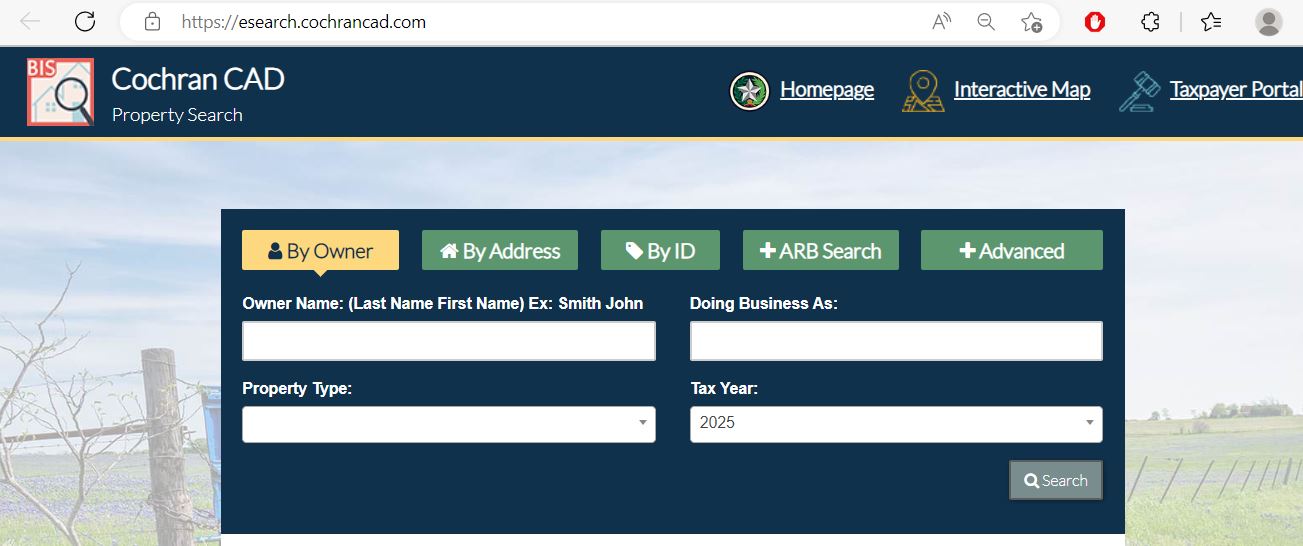
The official Cochran CAD property search portal gives public access to appraisal records and lets users search through common tabs such as owner, address, ID or advanced search. Use the official portal first when you need current appraisal data, exemption status or ownership details.
Cochran CAD property search visual guide
The image below helps you understand the Cochran County Appraisal District search process before entering owner, address, property ID or advanced-search details. Use it as a visual guide only. Always open the live official Cochran CAD search portal to confirm current values, exemptions and account details.
- Understanding where property search starts
- Preparing owner, address or property ID details
- Helping mobile users avoid wrong-entry mistakes
- Explaining the search process before calling Cochran CAD
- Final certified value
- Exact protest deadline
- Current tax balance
- Live exemption approval status
Cochran Central Appraisal District contact details
Use Cochran CAD for property value questions, appraisal records, exemption filing, address or ownership record questions, business personal property renditions, online appeals, protest questions and appraisal review issues.
| Contact item | Official detail | How to use it |
|---|---|---|
| Office name | Cochran Central Appraisal District | Use for appraisal value, property records, exemptions, renditions and protest matters. |
| Chief Appraiser | Ryan Noland, RPA | Listed by Cochran CAD as the chief appraiser. |
| Chief Appraiser email | rnoland@cochrancad.com | Useful for official written questions and document clarification where appropriate. |
| First Deputy | Valeria Garza | Listed by Cochran CAD as first deputy. |
| First Deputy email | vgarza@cochrancad.com | Useful for non-urgent appraisal district communication where appropriate. |
| Phone | 806-266-5584 | Call with property ID, owner name, property address and tax year ready. |
| Physical / mailing address | 109 SE 1st St, Morton, TX 79346 | Use for office visits, forms, homestead applications, mail and hand-delivery where accepted. |
| Hours | Monday–Thursday 8:00 AM–4:30 PM; Friday 8:00 AM–2:00 PM | Do not wait until Friday afternoon because the office closes earlier on Friday. |
What you can verify on a Cochran CAD property record
A Cochran CAD property record can help homeowners, landowners, business owners, buyers, agents and heirs understand what the appraisal district has on file before filing a form, asking for a correction or preparing a protest.
| Record item | What it means | What to check carefully |
|---|---|---|
| Property ID / account | Unique Cochran CAD identifier for the property record | Use it for forms, phone calls, protest documents, exemption questions and tax office lookup. |
| Owner name | Owner currently shown in appraisal records | Recent sales, inheritance, trusts, business names or mailing changes may need document review. |
| Situs/property address | Physical property address when available | Rural property may rely more on legal description than street address. |
| Legal description | Abstract, survey, lot, block, tract or subdivision identity | Very important for farms, rural tracts, inherited land and split properties. |
| Market value | CAD’s opinion of market value for the appraisal year | Compare against similar sales, property condition, land class, improvements and location. |
| Land value | Value assigned to the land portion | Check acreage, agricultural use, access, productivity, land class and legal description. |
| Improvement value | Value assigned to buildings or structures | Check square footage, condition, year built, barns, shops, mobile homes or other structures. |
| Exemption status | Homestead, over-65, disability, disabled veteran or other exemption status | Missing exemptions can affect taxable value and should be corrected early. |
Cochran CAD homestead, over-65, disability and veteran exemption help
Cochran CAD says homestead applicants may apply in person between January 1 and April 30, and may also return the application and required documents by email, fax or mail. The official FAQ also states there is never a fee to apply for any exemption.
Farm, rural land and agricultural appraisal in Cochran County
Cochran County has many rural, agricultural and land-based properties. For farm, pasture, open-space or rural tract questions, the legal description, acreage, land use and appraisal classification may be more important than the street address.
- Farm and pasture land
- Open-space appraisal questions
- Inherited or split acreage
- Rural land purchases
- Land-use questions after ownership change
- Property ID and legal description
- Acreage and land-use history
- Lease, crop, grazing or production records
- Maps, deed records or survey details
- Prior-year appraisal records if available
- Assuming ag value transfers automatically
- Missing filing or protest deadlines
- Ignoring rollback-tax questions after land-use change
- Not keeping land-use proof
- Using tax office for appraisal qualification questions
How to prepare a Cochran CAD appraisal protest
Cochran CAD’s FAQ explains that if you disagree with the value, you should file a formal protest, and the protest deadline is 30 days from the date of the Notice of Appraised Value or May 15, whichever is later. You should also check that applicable exemptions are on the account.
Evidence checklist for Cochran County appraisal review
The best protest evidence is clear, specific and tied to your exact property. A general complaint that taxes are high is weaker than proof that the CAD value, land class, property details or exemption status is wrong.
- Recent comparable sales
- Photos of condition or damage
- Repair estimates or invoices
- Closing statement or recent purchase price
- Wrong square footage or structure proof
- Land-use records
- Crop, grazing or lease records
- Legal description or acreage documents
- Business asset list and cost records
- Rendition backup documents
- Only saying taxes are high
- Unlabeled screenshots
- Old sales from another market period
- Comps from a different property type
- Photos without date or explanation
Business personal property renditions in Cochran County
Cochran CAD’s FAQ explains that a person who owns tangible personal property used for producing income must file a rendition report annually. It also states the deadline is on or before April 1, with possible written extensions under Texas Property Tax Code rules.
- Business name and mailing address
- Property ID/account number if already assigned
- Asset list, equipment and furniture details
- Inventory, machinery, computers and fixtures
- Original cost and acquisition year records
- Ignoring a rendition form
- Missing the April 1 deadline
- Not requesting an extension in writing when needed
- Leaving out mailing address or phone details
- Failing to report business sold, closed or moved before January 1
Cochran CAD vs Cochran County Tax Assessor
This distinction matters. Cochran CAD determines appraisal value and handles exemptions/protests. The tax assessor side handles tax-related information and tax transparency contacts. The official CAD website states that the county tax assessor does not determine property values or tax rates.
| Your need | Correct office | What to do |
|---|---|---|
| Search appraised value | Cochran CAD | Use the official Cochran CAD property search portal. |
| Apply for homestead or exemption | Cochran CAD | Use official file downloads or contact CAD with required ID documents. |
| File appraisal protest | Cochran CAD / ARB process | File by the deadline and keep proof of submission. |
| Tax transparency or tax assessor contact | Cochran County Tax Assessor | Use the tax assessor contact listed below. |
| Tax bill, payment or receipt question | County tax office / official county resources | Contact the county tax assessor/collector side, not the appraisal district value office. |
Address: Room 101 Courthouse, 100 North Main Street, Morton, TX 79346
Phone: 806-266-5171
Fax: 806-266-5629
Email: dixie.mendoza@co.cochran.tx.us
Official Cochran CAD forms, file downloads and online request tools
Cochran CAD provides file downloads, electronic request tools and online appeal access from its official website. Use official forms and official contact routes rather than copying old PDFs from unrelated sites.
- Residence homestead exemption
- Over-65 exemption support
- Disability exemption support
- Disabled veteran exemption support
- Confidentiality request where legally eligible
- Rural land records
- Legal description questions
- Land-use evidence
- Maps or account clarification
- Ownership and mailing record review
- Business personal property rendition
- Notice of protest support
- Evidence packet preparation
- Online appeals
- Written complaint/contact route
Practical local tips for Cochran County property owners
These tips are designed for real Cochran County users who want to avoid wrong-office calls, missed deadlines and weak protest submissions.
- Check exemption status after buying, moving or changing mailing address.
- Save your property ID from the search portal.
- Keep ID documents ready for homestead filing.
- Keep proof of every exemption and protest submission.
- Review legal description and acreage carefully.
- Do not rely only on street address search for rural land.
- Keep lease, crop, grazing or land-use records.
- Confirm appraisal classification before protesting.
- File rendition before the deadline.
- Keep asset lists and cost records organised.
- Report business sold, closed or moved when applicable.
- Call early if you need an extension or clarification.
Official property tax protest video resources
I did not embed a random YouTube video because a strong official Cochran CAD YouTube video was not clearly verified. To keep the post clean and avoid risky schema, this article keeps structured data limited to FAQPage only. Use the official Texas Comptroller protest videos below when preparing for an Appraisal Review Board hearing.
How to Present Your Case at Appraisal Review Board Hearing for Small Businesses
Cochran Central Appraisal District office map
Use this map for visiting Cochran CAD in Morton, Texas. If you are bringing an exemption form, protest form, rendition, ID copy or evidence packet, confirm the accepted filing method before travelling.
Official resources used for this Cochran CAD guide
Use these official pages for final confirmation before searching, filing, protesting, paying, mailing documents or visiting.
Cochran Central Appraisal District official website Official Cochran CAD property search Official Cochran CAD contact page Official Cochran CAD FAQ and appraisal process page Official Cochran CAD file downloads Official Cochran CAD electronic request page Official Cochran County website Texas property tax transparency database Texas Comptroller property tax resourcesCochran County Appraisal District FAQs
What is the official Cochran County Appraisal District website?
The official Cochran Central Appraisal District website is cochrancad.com. Use it for property search, file downloads, online appeals, electronic requests, contact details and official appraisal district information.
How do I search Cochran CAD property records online?
Use the official Cochran CAD property search portal at esearch.cochrancad.com. Search by owner, address, property ID or advanced search depending on the information you already have.
What is the Cochran CAD phone number?
The official Cochran Central Appraisal District phone number is 806-266-5584. Call during office hours with your property ID, owner name, address and tax year ready.
Where is Cochran Central Appraisal District located?
Cochran CAD is located at 109 SE 1st St, Morton, TX 79346. Use this address for office visits and official correspondence where accepted.
What are Cochran CAD office hours?
Cochran CAD lists office hours as Monday through Thursday 8:00 AM to 4:30 PM and Friday 8:00 AM to 2:00 PM. Check the official site before visiting near holidays or deadlines.
Does Cochran CAD collect property tax payments?
No. Cochran CAD handles appraisal value, property records, exemptions, renditions and protests. The county tax assessor side handles tax-related payment and tax transparency questions.
How do I apply for a Cochran County homestead exemption?
Search your property record first, then use official Cochran CAD file downloads or contact the office. Cochran CAD says applications may be submitted in person, by email, fax or mail, and applicants must provide required ID documentation.
How do I protest my Cochran CAD appraised value?
Read your Notice of Appraised Value, confirm the deadline, save your property record, and file a formal protest to preserve your right to an ARB hearing. Attach evidence such as comparable sales, condition photos, repair estimates or property-detail corrections.
What is the Cochran CAD protest deadline?
Cochran CAD’s FAQ states the protest deadline is 30 days from the date of the Notice of Appraised Value or May 15, whichever is later. Always confirm your exact deadline on your official notice.
What evidence helps in a Cochran County appraisal protest?
Helpful evidence includes comparable sales, property-condition photos, repair estimates, wrong square footage proof, land-use records, business rendition backup, closing statements, appraisals and documents showing a CAD record error.
Last editorial check: June 2026. Official details can change without notice; verify your exact property account, exemption status, protest deadline, rendition deadline, evidence instructions and tax payment status directly with Cochran CAD or Cochran County before taking action.

Founded by Mahesh Kumar, AppraisalDistrict.org is built on the belief that public information should be accessible and accurate. We have replaced AI-generated ‘fluff’ and automated scraping with 100% manual human verification. With over 15 years of experience in real estate and digital journalism, we help you find the right data without the frustration of broken links.
Search Smarter, Estimate Taxes, Check Exemptions and Prepare for a Protest
Use this free tool before you visit a county appraisal district, property search portal, tax office, or exemption page. It helps you understand property value, taxable value, possible savings, protest value, and the next official step.
What do you need help with today?
Choose your main reason for visiting. The tool will show the best next step and quick estimate.
Use this tool to check your appraisal notice, exemption savings, protest value, and official next step.
Use the tax calculator before trusting only the sale price or mortgage estimate.
Property Search Helper
Use this when a county property search portal is confusing. It shows which search method is usually best.
Property Tax Estimate Calculator
Estimate annual property tax using appraised value, assessment ratio, exemptions, and combined tax rate.
Homestead and Exemption Savings
Estimate how much a homestead, senior, disability, veteran, or local exemption may reduce tax.
Appraisal Notice Review
Compare last year value with this year value and see whether the increase deserves closer review.
Property Tax Protest Savings
Estimate possible savings if your appraised value is reduced after protest, correction, evidence review, or appraisal review board hearing.
Property Tax Protest and Exemption Checklist
Use this checklist before you file a protest, apply for exemption, or call the appraisal district.
Before calling, write your property ID, owner name, property address, and question on paper. It saves time.
Do not call the CAD to pay tax bills unless the local article says they collect taxes. In many counties, the tax office collects payment.
Official Resource Finder
Enter county and state to create safe searches for official CAD pages, property search, tax payment, exemptions, maps, forms, and protest help.
CAD vs Tax Office
- Appraisal District: value, exemptions, ownership records, maps, protest.
- Tax Office: tax bill, payment, receipt, delinquent balance, penalty.
Best place to use this
Add this tool after the first major content section or before the FAQ area. It gives visitors a reason to interact before leaving the page.
Important estimate note
This tool gives educational estimates only. Final values, exemptions, tax rates, bills, payments, and deadlines must be confirmed with official county sources.