
Move a Camp County Property Through Search, Verification, Tax Payment and Recorded Ownership
Camp Central Appraisal District combines appraisal and property-tax collection services. Use its official search for values, exemptions, land details and account identification, then continue to online forms, the protest portal, the escrow check or the tax-payment provider.
Deeds, liens, releases and legal ownership history remain with the Camp County Clerk. Vehicle registration, voter registration and boat-related county services go to the separate County Tax Assessor-Collector.
Camp CAD handles both appraisal and local property-tax collection.
143 Quitman Street, Pittsburg, Texas 75686.
Monday-Friday, 8:00 AM-4:30 PM.
Links and local procedures checked July 31, 2026.
What do you need from the Camp County property record?
Use the Property ID, owner, address, abstract, subdivision or Advanced Search.
Follow the search workflowCheck the property, tax year, amount, payment fee and escrow status.
Use the payment checklistPrepare identification and qualification evidence and save the confirmation.
Review exemption stepsSeparate market value, unequal appraisal, property data, exemption and land-use issues.
Prepare the protest recordSearch deeds, liens, releases, probate documents and recorded legal descriptions.
Open the deed-record routeReview taxes, survey, access, subdivision, 911 address, flood and septic authority.
Use the due-diligence checklistSearch Camp CAD without missing rural, timber or special-property accounts
Use the Camp CAD screenshot to choose the correct search tab
The official-search screenshot already published in the existing article is preserved below. It helps users recognise the portal, but its displayed tax year and account data should not be treated as current.
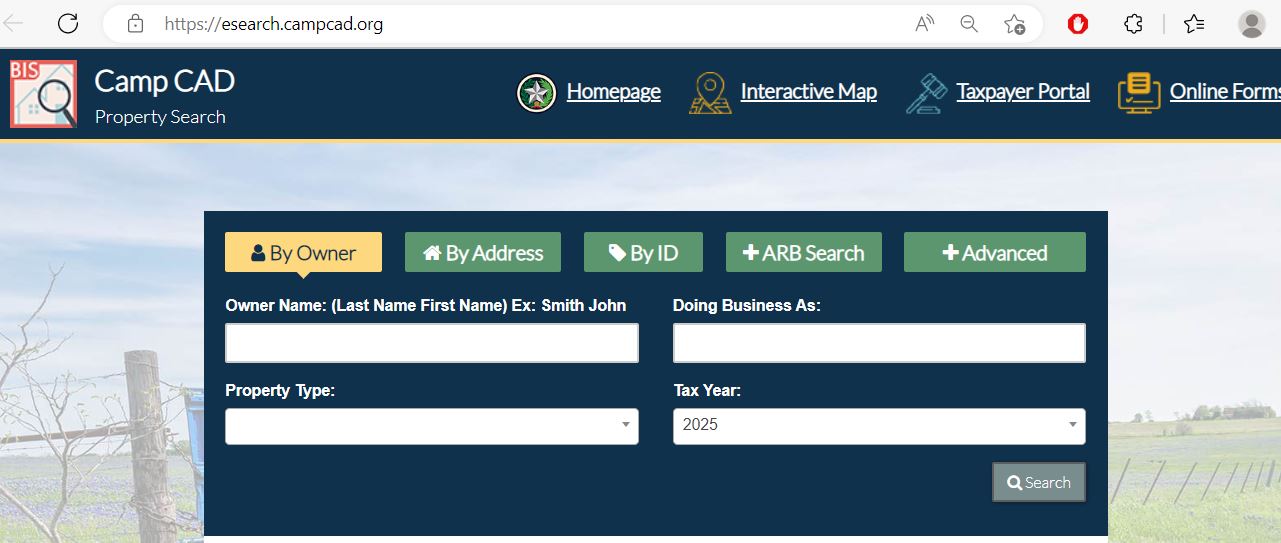
Choose the Camp CAD search field that matches the property
| Search field | Best use | Important check |
|---|---|---|
| Owner name | Find a person, trust, estate, ranch, timber company or business. | Try the last name or one entity word before adding details. |
| Doing Business As | Find a business, shop, contractor or trade name. | A DBA does not establish legal ownership. |
| Property ID | Reopen a known appraisal or tax account. | Confirm the property type and tax year after opening it. |
| Address | Find a residence, store, office or other addressed property. | Remove the suffix and city when the complete address fails. |
| Abstract | Find rural acreage described by an original survey. | Compare the survey, tract and acreage with the deed. |
| Subdivision | Find a property in a named development or recorded plat. | Match the lot, block, phase and legal description. |
| Property type | Separate Real, Personal, Mineral, Auto and Mobile Home records. | One owner or location can have several related accounts. |
| ARB Search | Research protest status, informal dates, hearing dates and formal-review information. | The written ARB notice controls the hearing schedule. |
| Advanced Search | Narrow a large result list by property type, subdivision or other fields. | Add one filter at a time so the search does not become too restrictive. |
Understand what each Camp CAD field does and does not establish
| Field | What it identifies | What it does not prove | Next action |
|---|---|---|---|
| Property ID | The Camp CAD appraisal and collection account. | That the County Clerk uses the same identifier. | Use it for CAD forms, payments, calls and protests. |
| Owner shown | The owner carried for appraisal and tax administration. | Complete title, lien priority or ownership history. | Search County Clerk records. |
| Situs address | The physical location shown on the appraisal account. | The mailing address, legal access or boundary. | Compare the map, deed and 911 address. |
| Legal description | An abbreviated abstract, survey, tract, lot, block or subdivision reference. | A complete deed-quality legal description. | Open the recorded deed, plat and survey. |
| Acreage | The acreage carried for appraisal purposes. | Professionally surveyed or guaranteed acreage. | Verify the deed and survey. |
| Market value | Camp CAD’s opinion of market value as of January 1. | A guaranteed sale price or final tax bill. | Compare sales, condition and equal-appraisal evidence. |
| Appraised value | Value after an applicable appraisal limitation or special appraisal. | The taxable value for every taxing unit. | Review exemption and taxing-unit details. |
| Exemption | Homestead, veteran, disaster, Freeport or another benefit. | Every taxing unit grants an identical reduction. | Review each taxable-value line. |
| Ag, timber or wildlife status | Special valuation or management treatment carried by CAD. | Qualification will continue after a sale or use change. | Review the application, survey and use evidence. |
| Tax balance | The amount shown in the collection system for selected years. | That escrow or a recent payment is not still processing. | Check escrow, payment history and receipt status. |
Use the Camp CAD map for parcel orientation, timber context and adjoining accounts
Fix common Camp CAD search failures before calling the office
| Problem | Likely reason | Practical fix |
|---|---|---|
| Owner search returns nothing | The account may use initials, a spouse, trust, estate, company or prior owner. | Search only the last name or one distinctive entity word. |
| Full address fails | The account may use a different direction, suffix, city or rural-address format. | Search only the street number and main street name or the street name alone. |
| Rural tract has no standard address | The record may be indexed by owner, Property ID, abstract or legal description. | Use Advanced Search and confirm the parcel on the map. |
| Timber account is difficult to locate | The land may be carried under a rural real-property account rather than a separate timber label. | Search the owner, Property ID, abstract and legal description. |
| Mineral interest does not appear | Mineral accounts are separate from surface real property. | Select Mineral and search owner, Property ID or abstract information. |
| Manufactured home is missing | The home and land may be separate or listed under Mobile Home. | Change the property type and search the owner and location again. |
| Business account is missing | The account may use a DBA, legal entity or individual owner. | Search the DBA, company and owner separately under Personal. |
| New owner is not displayed | The recorded deed may still be processing into the appraisal system. | Confirm recording with the County Clerk and save the instrument details. |
| Payment balance looks wrong | The wrong year may be open, escrow may be pending or a recent payment may not have posted. | Check all years, escrow status and the payment confirmation before paying again. |
Local search guidance for Pittsburg, Rocky Mound, timberland and lake-area property
Check City of Pittsburg, Pittsburg ISD, Camp County and Northeast Texas Community College taxing-unit lines.
Verify the city, school district and county treatment rather than assuming Pittsburg taxing units apply.
Some Camp County property can be served by Gilmer ISD. Use the taxing units shown on the individual account.
Review acreage, timber application, timber survey, management evidence and any change of use.
Confirm agricultural use, required survey attachment, leases, livestock, fencing, water and production evidence.
Keep the wildlife plan, annual report, activities, photographs and receipts connected to each tract.
Check the deed, survey, access, flood risk, restrictions, septic authority and shoreline rights separately from CAD value.
Search Mineral separately and verify legal ownership through deeds, assignments, leases or probate records.
Determine whether the home and land are assessed together or under separate real and mobile-home accounts.
Send each Camp County property question to the correct office
| Your question | Correct starting point | What to prepare |
|---|---|---|
| What is the appraised value? | Camp Central Appraisal District | Property ID, tax year and disputed value field. |
| Why is an exemption missing? | Camp Central Appraisal District | Application, identification and qualification evidence. |
| Is ag or timber treatment active? | Camp Central Appraisal District | Property ID, acreage, survey, application and use records. |
| How much property tax is due? | Camp CAD collection and payment system | Property ID, owner and every relevant tax year. |
| Did my payment or escrow payment post? | Camp CAD collection staff | Confirmation, escrow details, amount, date and tax year. |
| Who legally owns the property? | Camp County Clerk or title professional | Grantor, grantee, date range, instrument and legal description. |
| Where can I find a deed or lien? | Camp County Clerk | Names, document type, recording period and property description. |
| Where do I register a vehicle? | Camp County Tax Assessor-Collector | Vehicle, title, insurance and identification documents. |
| How do I obtain a rural 911 address? | Camp County 911 Coordinator through the County Judge’s office | Parcel, legal description, entrance location and owner details. |
| How do I submit a subdivision plat? | Camp County Commissioners Court and County Clerk | Current county requirements, plat copies, approvals and filing documents. |
Correct the Camp County system that owns the inaccurate field
Separate market value, appraised value and taxable value
Camp CAD’s opinion of the property’s market value as of January 1.
The applicable value after a homestead limitation or qualifying agricultural, timber or wildlife appraisal.
The value remaining after exemptions for each county, city, school or college taxing unit.
Search the property before filing a Camp County exemption
Confirm the property is the owner’s principal residence and the exemption appears for the correct year.
Review the additional exemption, school-tax ceiling, instalment option and possible tax deferral.
Prepare qualification evidence and review additional exemption, ceiling and deferral treatment.
Use the official online form and attach the required VA or survivor documentation.
Use the property-damaged-by-disaster application when an officially declared disaster and statutory requirements apply.
Businesses claiming eligible inventory treatment should use the official form and maintain movement records.
What to prepare before filing
Follow Camp CAD’s local survey requirements for special land appraisal
Prepare acreage, prior use, current operation, livestock or crop records and the required Camp CAD survey.
Complete Texas Form 50-167 and include the Camp CAD timber survey using the district’s current mailing instructions.
Maintain the wildlife plan, annual report, qualifying activities, photographs and receipts.
Keep the lease, operator information, activity records, receipts and proof of qualifying intensity.
Do not assume the seller’s agricultural, timber or wildlife treatment continues automatically after closing.
Ask about additional taxes before changing qualifying land to residential, commercial or another nonqualifying use.
Search special property types separately from the surface tract
Select Mineral and search the owner, Property ID, abstract, lease or other available identifiers.
A mineral account does not prove ownership of the land surface or every mineral interest.
Select Mobile Home and search the owner, physical location and Property ID.
Determine whether the manufactured home and land are assessed together or under separate accounts.
Mineral and manufactured-home ownership may differ from the owner displayed on the surface-land account.
Use County Clerk deeds, assignments, leases, affidavits and probate records when ownership matters.
Match the Camp County business account to the correct DBA and January 1 location
Try the legal entity, DBA, individual owner, agent and Property ID.
Check where the assets were located or used on January 1 of the tax year.
Compare inventory, furniture, machinery, equipment and other income-producing property.
Keep invoices, asset lists, depreciation schedules, disposal records and photographs.
The normal Texas rendition deadline is April 15, subject to timely extension rules.
Eligible inventory owners should document acquisition, location and movement outside Texas.
Build a Camp County protest around one account and one specific issue
Camp County protest evidence checklist
Use Camp CAD’s portal for documents, applications and electronic delivery
Pay Camp County property taxes through Camp CAD’s official provider
Check whether the mortgage company is already paying the tax bill
Act before a Camp County tax balance becomes harder to resolve
Provide the confirmation, Property ID, tax year, payment date, amount and payment method.
Check escrow and recent payment history before submitting a second transaction.
Qualifying senior, disabled and certain veteran homeowners may have statutory instalment options.
Some qualifying homestead owners may be able to postpone collection while the property remains eligible.
Ask Camp CAD for a current payoff and available arrangements before assuming an online amount is complete.
Request the official certificate or payoff required by the title company, lender or closing professional.
Use the Camp County Clerk when legal ownership matters
Verify title, redemption and tax status before bidding or buying
Use the official tax-sale page and confirm whether the listing is current, struck off, redeemed, withdrawn or sold.
Review all years, property types, taxing units and related personal, mineral or mobile-home accounts.
Review deeds, liens, releases, probate matters, restrictions and recorded legal descriptions.
A tax-sale listing does not guarantee a public road, usable entrance, utilities or possession.
Redemption periods and procedures depend on the property and sale. Obtain qualified legal advice.
Verify boundaries, acreage, easements and improvements with a deed, survey and site inspection.
Complete these checks before buying or dividing Camp County property
Match the Property ID, legal description, abstract, map, deed, plat and survey.
Review current, delinquent and partially paid balances and confirm escrow activity.
Use the County Clerk’s official records and a title professional for a complete examination.
The seller’s homestead exemption, tax ceiling or appraisal limitation may not continue.
Special appraisal may require a new application, survey, use evidence or continued qualification.
Confirm the county, city, school and Northeast Texas Community College treatment.
Determine whether permits and planning come from the City of Pittsburg or unincorporated Camp County.
Review current Commissioners Court submission requirements before dividing or replatting land.
Confirm the addressing and permitting authority before building, installing utilities or operating an OSSF.
Check every local unit attached to the Camp County property
County and road-and-bridge taxes can appear with city, school and college taxes.
Applies to property inside the city’s taxable boundaries.
Use the individual account to determine whether this city tax applies.
Many county properties are served by Pittsburg Independent School District.
Some Camp County property can fall within Gilmer Independent School District.
NTCC can appear as a separate taxing unit on applicable Camp County accounts.
Important Camp County property dates
Camp County appraisal, collection, deed and county-service offices
Pittsburg, Texas 75686
Phone: (903) 856-6538
Fax: (903) 856-6544
Email: j.tinsley@campcad.org
Chief Appraiser: Jan Tinsley
Hours: Monday-Friday, 8:00 AM-4:30 PM.
Deputy Chief Appraiser: Berta Fuentes
Administrative Assistant and Bookkeeper: Chekita Royal
Collection Clerk: Markeyla Bolton
Deputy II: Rosalia Flores
Begin with the main number and request the department connected to the issue.
Pittsburg, Texas 75686
Phone: (903) 856-3391
Fax: (903) 856-0811
Tax Assessor-Collector: Missy Huffman
Hours: Monday-Friday, 8:00 AM-4:30 PM.
Use for vehicle, voter, boat and other non-property-tax services.
Pittsburg, Texas 75686
Phone: (903) 856-2731
Fax: (903) 856-6112
Email: sandra.knight@co.camp.tx.us
County Clerk: Sandra Knight
Monday-Thursday: 8:00 AM-12:00 PM and 1:00 PM-5:00 PM.
Friday: 8:00 AM-12:00 PM and 1:00 PM-4:30 PM.
126 Church Street, Room 303
Pittsburg, Texas 75686
Phone: (903) 856-3845
Fax: (903) 856-2309
Use for rural addressing and county routing questions.
Prepare the Property ID, owner name, address, legal description, tax year and exact task.
Call to confirm holiday closures, required copies, accepted payment and whether the service can be completed online or by mail.
Official Camp County property resources
Use for current alerts, property search, payments, escrow, forms and protest links.
Open Camp CADSearch by owner, address, ID, ARB information or Advanced filters.
Open property searchLocate parcels and compare surrounding appraisal-map context.
Open mapReview available forms and the special ag and timber survey requirements.
Review online formsFile supported address, exemption, rendition, ag and wildlife forms.
Open forms portalAccess property details, electronic communication, applications and protest tools.
Open Taxpayer PortalSearch bills by Property ID, name or address and review the payment cart.
Open payment portalCheck mortgage-lender payment activity before paying the bill directly.
Open escrow checkReview property-specific proposed rates, estimates, hearings and adopted-rate information.
Open tax-rate databaseUse for official public-record search, deeds, liens and recorded property documents.
Open County ClerkUse for vehicle registration, voter registration and other non-property-tax services.
Open Tax AssessorCross-check appraisal, county-tax-office and taxing-unit information.
Open Camp County directoryHow this Camp County guide was rebuilt and reviewed

Independent review of appraisal, collection, deed and county-service systems
This version preserves the Camp CAD property-search screenshot and editor image from the existing article while adding complete search steps, field explanations, escrow safeguards, provider-payment instructions, agricultural and timber survey requirements, protest preparation, deed research, tax-sale warnings and buyer checks.
Official resources reviewed include Camp Central Appraisal District, its property search, map, forms, Taxpayer Portal, payment provider, escrow information, Camp County Tax Assessor-Collector, Camp County Clerk, Camp County Commissioners Court and Texas Comptroller property-tax resources.
AppraisalDistrict.org is an independent informational website and is not operated by Camp Central Appraisal District, Camp County or any local taxing unit.
10 common Camp CAD property-search questions
1. What is the official Camp County Appraisal District website?
The official Camp Central Appraisal District website is campcad.org. It provides property search, maps, forms, protests, tax payments, escrow checks, tax-rate information and contacts.
2. How do I search Camp County property records?
Open the official Camp CAD search. Choose By Owner, By Address, By ID, ARB Search or Advanced and verify the property type, legal description and tax year.
3. Why does a Camp CAD address search return no result?
The account may use a different street suffix, direction, city or rural-address format. Search only the main street name, then try the owner, Property ID, abstract, subdivision or another property type.
4. Does Camp CAD collect property taxes?
Yes. Camp CAD states that all Camp County taxing units contract with the appraisal district for property-tax collection. The County Tax Assessor-Collector handles vehicle, voter and other services.
5. How do I pay Camp County property taxes online?
Start from Camp CAD’s official website or use the official online payment portal. Search the bill, review every tax year and fee, and save the confirmation.
6. Can I pay Camp County property taxes by phone?
Automated provider phone payment is available at 903-494-6650. Camp CAD states that the appraisal office itself does not take phone payments.
7. What should an escrow homeowner check before paying?
Use the official Escrow Check with the Property ID or call Camp CAD. Do not pay again when the mortgage lender is already paying.
8. What is the normal Camp County appraisal protest deadline?
The normal deadline is May 15 or the 30th day after the Notice of Appraised Value was delivered, whichever is later. The individual notice controls.
9. Where can I search Camp County deeds and liens?
Open the Camp County Clerk page and select Official Public Record Search. Compare the document parties, date, type and legal description.
10. Where is Camp Central Appraisal District located?
Camp CAD is at 143 Quitman Street, Pittsburg, Texas 75686. Its main phone number is (903) 856-6538, and its listed hours are Monday-Friday, 8:00 AM-4:30 PM.