
Dispatch a Bell County Property to the Correct Search, Tax, Protest or Deed Record
Bell County uses separate routes for current appraisal records and prior-year tax information. Start with the 2026 search for current values and appraisal notices, then switch to Prior Years and Taxes when you need payment history, an older account or a current tax balance.
Bell CAD also collects property taxes. The Bell County Tax Assessor-Collector handles vehicle titles and registration instead, while the County Clerk maintains deeds, liens and other recorded property documents.
Use Bell CAD’s separate 2026 Property Search.
Use Prior Years and Taxes for collection research.
Belton, Killeen and Temple provide in-person service.
Monday-Friday, 8:00 AM-4:45 PM.
Links and current procedures checked July 31, 2026.
What do you need from the Bell County property record?
Review the current owner, appraisal notice, value, exemption and property characteristics.
Follow the current-year workflowVerify the property, year, balance, fee and payment confirmation.
Use the payment stepsPrepare identification and qualification evidence and keep the filing confirmation.
Review exemption requirementsSeparate value, equality, square footage, condition, exemption and classification issues.
Prepare the protest recordSearch deeds, liens, releases, plats and legal ownership history.
Open the official-record routeReview MUD, water, school, college, city, septic, subdivision and access issues.
Use the due-diligence checklistSearch the current Bell CAD account without entering too much information
Use 2026 Property Search for appraisal and Prior Years and Taxes for collection
Use for current appraisal values, appraisal notices, owner information, property characteristics, exemptions and ARB-related research.
Open the 2026 searchUse for older appraisal years, tax balances, payment history, delinquent amounts and the Pay Taxes shopping-cart route.
Open prior years and taxesUse the Bell CAD screenshot to choose the correct lookup tab
The image already used in the existing article is preserved below. It shows the core owner, address, ID, ARB and Advanced search choices. Use it for orientation, then reopen the live 2026 portal.
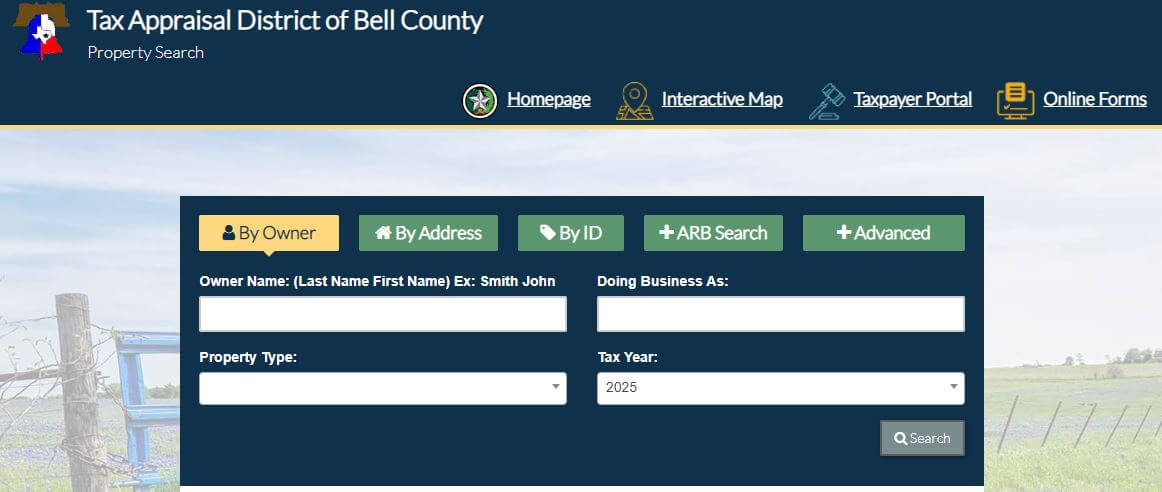
Choose the Bell CAD field that fits the property
| Search field | Use it when | Important check |
|---|---|---|
| Owner name | You know the person, trust, estate or business shown on the account. | Try only the last name and common spelling variations. |
| Property ID | You have an appraisal notice, tax statement or prior property page. | Confirm the property type and year after opening it. |
| Address | You know the physical location of a residence or building. | Remove apartment information and suffixes when no result appears. |
| Abstract | A rural tract is described by a survey or abstract rather than a standard address. | Match the tract, survey and acreage with the deed. |
| Subdivision | The property is in a named residential or commercial development. | Confirm the lot, block, phase and legal description. |
| Mobile-home park | A manufactured home may be indexed through a named park. | The home and land may have separate accounts. |
| Condo | The property is an individually assessed condominium unit. | Confirm unit, building and common-area treatment. |
| Property type | You need to separate Real, Personal, Mineral, Auto or Mobile Home records. | Search every relevant type before assuming the list is complete. |
| Status | You need to distinguish paid and unpaid records in a supported search. | Verify the payment in the tax detail, not only the result label. |
| Neighborhood | You are researching comparable or equal-appraisal accounts. | A CAD neighborhood is not automatically the correct sales market. |
Understand what each Bell CAD field does and does not establish
| Field | What it identifies | What it does not prove | Best next action |
|---|---|---|---|
| Property ID | The Bell CAD appraisal and collection account. | That another county system uses the same identifier. | Use it for payments, forms, calls and protests. |
| Owner shown | The owner carried for appraisal and taxation. | Complete title, liens or deed history. | Search Bell County Clerk records. |
| Situs address | The physical property location shown by CAD. | The owner’s mailing address or legal boundary. | Compare it with the map, deed and addressing record. |
| Legal description | An abbreviated lot, block, survey, abstract or tract reference. | A complete deed-quality legal description. | Open the recorded deed and plat. |
| Improvement | A house, building or other structure attached to the land. | That a new renovation was necessarily completed that year. | Review improvement details, area, age and condition. |
| Market value | CAD’s opinion of market value as of January 1. | A guaranteed selling price or final tax amount. | Compare sales, condition and equal-appraisal evidence. |
| Assessed value | Value after an applicable appraisal limitation. | The final taxable value for every taxing unit. | Review exemptions and each taxing-unit line. |
| Homestead cap | The applicable limitation on annual assessed-value growth. | Market value is frozen or cannot increase. | Compare market value, assessed value and prior year. |
| Exemption code | A homestead, senior, disability, veteran or other benefit. | Every taxing unit grants the same reduction. | Review the exemption code guide and taxable values. |
| Paid or unpaid | A payment-status indicator in the supported tax search. | The exact posting date or allocation without detail. | Open the tax-year detail and keep the receipt. |
Use Bell CAD’s map to verify location and surrounding property context
Fix common Bell CAD search failures before contacting staff
| Problem | Likely reason | Practical fix |
|---|---|---|
| Owner search returns nothing | The account may use initials, a spouse, trust, estate, company or prior owner. | Search only the last name or one distinctive entity word. |
| Too many owner matches | The name is common or the owner has several accounts. | Add the street name, property type, subdivision or property ID. |
| Full address fails | The account may omit an apartment, direction, suffix, city or ZIP code. | Use only the street number and main street name. |
| Fort Cavazos-area address is confusing | The mailing city, military installation and taxable off-post property location may differ. | Search the owner, property ID or surrounding civilian street address. |
| New subdivision lot is missing | The lot may still be part of a parent account or recently created plat. | Search the subdivision, developer, parent tract and recorded plat. |
| Manufactured home is missing | The home may be separate from the land or indexed through a mobile-home park. | Select Mobile Home and search the owner, park and property ID. |
| Business account does not appear | The account may use a DBA, legal entity or individual owner. | Search the legal name, DBA and owner separately. |
| Recently purchased home shows the seller | The recorded deed may still be processing into the appraisal system. | Confirm recording through the County Clerk and contact mapping with the deed details. |
| Payment does not appear | The payment may still be processing or may have been applied to another account or year. | Use the confirmation number and contact customer service. |
Local search guidance for Killeen, Temple, Belton and growing communities
Check the city, Killeen ISD, county, Central Texas College and any applicable water or special-district lines.
Review City of Temple, Temple ISD, Temple College and any health, bioscience or water-district treatment.
Verify City of Belton, Belton ISD, county and any applicable MUD, water or college district.
Confirm the correct city boundary, school district and off-post account rather than relying on the postal city alone.
Check subdivision status, MUD or water district, school district, new improvements and county-development requirements.
Confirm the applicable city, school, watershed, water and emergency-service taxing units.
Review water access, floodplain, easements, private restrictions, septic and parcel boundaries separately from CAD value.
Search by owner, property ID, abstract and map; then verify agricultural treatment, access, survey and improvements.
Identify every MUD or special district before estimating taxes from only the county, city and school rates.
Send each Bell County property question to the office that controls it
| Your question | Correct starting point | What to prepare |
|---|---|---|
| What is the current appraised value? | Bell CAD 2026 Property Search | Property ID, owner, legal description and tax year. |
| Why is property information incorrect? | Bell CAD appraisal or mapping | Property page, photographs, deed, survey or measurements. |
| Why is an exemption missing? | Bell CAD exemption department | Application, Texas ID and qualification documents. |
| What property tax is due? | Bell CAD Prior Years and Taxes | Property ID, owner and every relevant tax year. |
| Did my property-tax payment post? | Bell CAD customer service | Confirmation number, amount, date, account and year. |
| Who legally owns the property? | Bell County Clerk or title professional | Grantor, grantee, document date and legal description. |
| Where can I obtain a deed or lien? | Bell County Clerk official records search | Names, subdivision, document type, date and document number. |
| Where do I register a vehicle? | Bell County Tax Assessor-Collector | Vehicle title, registration, insurance and identification documents. |
| Do I need a septic or development permit? | The city or Bell County authority with jurisdiction | Parcel, legal description, project plan, utility and site information. |
| Who adopts the property-tax rate? | Each local taxing unit | The complete taxing-unit list attached to the property. |
Send Bell CAD the evidence connected to the incorrect field
Separate market value, assessed value and taxable value
Bell CAD’s opinion of what the property would sell for under normal conditions as of January 1.
The applicable value after a homestead or other statutory appraisal limitation.
The value remaining after exemptions and adjustments for each taxing unit.
Use Bell CAD’s official forms instead of paying an unnecessary filing service
Confirm the home is the owner’s principal residence and the exemption appears for the correct year.
Review the additional exemption, school-tax ceiling, instalment options and possible tax deferral.
Prepare the Social Security documentation described by Bell CAD and review possible ceiling or deferral treatment.
Use a current or recently received VA award letter and the application matching the disability category.
Review the separate requirements for senior, disabled-veteran, armed-services and first-responder surviving spouses.
Use the district’s exemption information and code guide for business, charitable and property-specific applications.
What to prepare before filing
Verify special appraisal, land use and every rural account
Prepare acreage, land-use history, current operation, leases and evidence of qualifying intensity.
Keep the wildlife plan, practices, annual activity records, photographs and receipts organised.
Do not assume the seller’s special appraisal automatically transfers after the deed changes.
Verify every property ID, abstract, acreage amount and legal description included in the operation.
Review houses, barns, shops, mobile homes and other improvements separately from land value.
Ask about additional taxes before converting qualifying land to residential, commercial or another nonqualifying use.
Match the Bell County business account to its owner, DBA and January 1 location
Try the legal entity, DBA, individual owner, agent and property ID.
Check where the assets were located or used on January 1.
Compare inventory, machinery, equipment, furniture and other income-producing property.
Use invoices, purchase orders, accounting ledgers, freight and setup costs.
Bell CAD lists April 15 as the regular rendition deadline and provides a dedicated rendition email route.
Bell CAD warns that a late rendition can result in a penalty equal to 10% of the taxes ultimately imposed.
Use Bell CAD’s owner protest portal and focus on a specific appraisal issue
Evidence checklist for Bell County property types
Use Bell CAD’s portal for property details, documents and electronic delivery
Pay Bell County property taxes through Bell CAD’s official collection system
| Payment route | Published fee or instruction | What to keep |
|---|---|---|
| Credit or debit card | 2.15%, with a $2 minimum fee. | Confirmation, account, year, amount and fee. |
| Visa debit card | 1%, with a $2 minimum fee. | Payment receipt and posting screenshot. |
| Electronic check | $0.50 per transaction. | Confirmation and bank-processing record. |
| Phone payment | Call 866-539-2020 and use Bureau Code 8627308. | Representative confirmation number. |
| In person | Bell CAD lists check, cash or money order at all locations with no fee. | Dated office receipt. |
| Belton drop box | Available outside the Belton office for after-hours payments. | A copy of the payment and delivery evidence; do not leave cash unless expressly authorised. |
Review Bell CAD payment options before ignoring a tax balance
Qualifying senior, disabled and certain veteran homeowners may be able to pay eligible homestead taxes in four instalments.
Some age-65-or-older or disabled homeowners may qualify to defer collection while the property remains an eligible homestead.
Bell CAD provides information about instalment agreements for qualifying delinquent residence-homestead taxes.
Ask whether a partial payment will be accepted and how remaining penalty, interest and collection costs will continue.
Provide the confirmation number, account, year, amount and date before making a duplicate payment.
Use Bell CAD’s official delinquent-tax-sale information and obtain legal advice when a suit or sale affects the property.
Use the Bell County Clerk’s official records search when title matters
Check more than the Bell CAD market value before closing
Match the property ID, legal description, map, recorded deed, plat and survey.
Check current, delinquent and partially paid balances and obtain an exact closing payoff.
Use official Clerk records and a title professional for a complete ownership examination.
The seller’s homestead exemption, cap or tax ceiling may not continue for the buyer.
Check MUD, water, watershed, college, emergency-service and other taxing-unit lines.
Compare CAD area, age, condition, construction status and accessory buildings with the property.
Determine whether permits come from Belton, Killeen, Temple, another city or unincorporated Bell County.
For unsewered property, confirm the permitting authority, system records, water source and maintenance requirements.
Review drainage, flood maps, road frontage, easements and legal access separately from the appraisal map.
Identify every local unit attached to the Bell County account
Possible units include Belton, Killeen, Temple, Harker Heights, Nolanville, Troy, Rogers, Salado and others.
Bell County includes numerous school districts and cross-county school boundaries.
Bell County MUDs and River Farm MUD can add a separate tax line to qualifying property.
Central Texas College District or Temple Junior College District may appear by location.
Water-control, groundwater and watershed districts may affect rural or developing property.
County ESD and other specialised local units can appear on the property-specific account.
Important Bell County property dates
Bell CAD offices and specialised email routes
Belton, Texas 76513
Phone: (254) 939-5841
Mailing: P.O. Box 390, Belton, Texas 76513
Hours: Monday-Friday, 8:00 AM-4:45 PM.
Main office, property-tax payments, appraisal questions and 24/7 exterior payment drop box.
Killeen, Texas 76541
Phone: (254) 634-9752
Hours: Monday-Friday, 8:00 AM-4:45 PM.
Useful for Killeen, Harker Heights, Nolanville and Fort Cavazos-area owners.
Temple, Texas 76501
Phone: (254) 771-1108
Hours: Monday-Friday, 8:00 AM-4:45 PM.
Useful for Temple, Troy, Rogers, Holland and eastern Bell County property questions.
Belton, Texas 76513
Phone: (254) 933-5318
Mailing: P.O. Box 669, Belton, Texas 76513
Tax Assessor-Collector: Shay Luedeke
This office handles vehicle services and does not collect property taxes.
County Clerk: Shelley Coston
Use the official online records search for deeds, liens, releases, subdivisions and document-number research.
General and payment questions:
customerservice@bellcad.org
Protests only:
protest@bellcad.org
Mapping and deeds:
mapping@bellcad.org
Renditions:
renditions@bellcad.org
Official Bell County appraisal, tax and property-record resources
Use for current notices, payments, exemptions, protest information and office updates.
Open Bell CADUse for current appraisal records, notices, values and property details.
Open 2026 searchUse for historical accounts, tax balances, payment history and online checkout.
Open tax searchLocate parcels and review surrounding appraisal-map context.
Open mapFile address changes, homestead applications and other supported forms.
Open formsManage property details, documents, applications and electronic communications.
Open portalUse the account ID and PIN from the appraisal notice.
Open owner protestUse only when filing as an authorised property-tax agent.
Open agent protestReview shopping-cart steps, phone payment, bureau code and vendor fees.
Open payment guideFind office locations and specialised email routing.
Open contact pageSearch deeds, liens, releases, subdivisions and document numbers.
Search official recordsCross-check CAD, tax assessor and active taxing-unit information.
Open Bell County directoryHow this Bell County guide was rebuilt and checked

Independent review of Bell County appraisal, collection and deed systems
This version preserves the Bell CAD search screenshot and editor image from the existing article while adding separate current-year and tax-search instructions, field explanations, payment fees, phone-payment details, portal steps, email routing, late-protest warnings, local taxing-unit scenarios and official deed research.
Official resources reviewed include the Tax Appraisal District of Bell County, Bell CAD’s property and tax searches, Taxpayer Portal, payment guide, protest procedures, Texas Comptroller county directory, TxDMV and the Bell County Clerk official records system.
AppraisalDistrict.org is an independent informational website and is not operated by Bell CAD, Bell County or any local taxing unit.
10 common Bell CAD property-search questions
1. What is the official Bell County Appraisal District website?
The official Tax Appraisal District of Bell County website is bellcad.org. It provides current appraisal search, prior-year taxes, maps, forms, protests, payments and office details.
2. How do I search Bell County property records?
Use the official 2026 Property Search. Search by owner, address, property ID or Advanced Search and verify the legal description, property type and year.
3. Why does a Bell CAD address search return no result?
The record may use a different suffix, direction, apartment format or city. Remove punctuation, unit information, city and ZIP code, then search only the street number and main street name or the street name alone.
4. Does Bell CAD collect property taxes?
Yes. Bell CAD provides property-tax collection and payment services. The Bell County Tax Assessor-Collector does not collect property taxes and primarily handles vehicle services.
5. How do I pay Bell County property taxes online?
Open Prior Years and Taxes, find the correct account, select Pay Taxes, verify the shopping cart and complete checkout. Save the confirmation number.
6. What is the normal Bell County appraisal protest deadline?
The usual deadline is May 15 or the 30th day after the appraisal notice was delivered, whichever is later. The deadline printed on the individual notice controls.
7. Can I still file after the normal protest deadline?
A late protest may be considered only in limited circumstances and generally before the ARB approves the appraisal records. Good cause, missing-notice and statutory correction remedies have different requirements.
8. Is a Bell County homestead exemption free to file?
Yes. Bell CAD states that filing is free. Use the official online forms and keep proof of submission.
9. Where can I search Bell County deeds and liens?
Use the Bell County Clerk official records search. Search by grantor or grantee, subdivision, document type, document number or date range.
10. Where are Bell CAD offices located?
Bell CAD lists offices at 411 East Central Avenue in Belton, 301 Priest Drive in Killeen and 205 East Central Avenue in Temple. All three locations list hours from 8:00 AM to 4:45 PM, Monday through Friday.