
Trace the Correct Parmer CAD Account From High Plains Acreage to the Tax Balance
Parmer County appraisal records cover Bovina, Farwell, Friona, Lazbuddie and rural High Plains property where an ordinary street address may not identify the correct tract. The official search separates real property, business personal property, mineral interests, auto-related accounts and mobile homes.
Use this guide to search the property, verify acreage and taxing units, understand agricultural appraisal, review dairy or business assets, file an exemption or protest, pay through the CAD collection system and obtain recorded documents from the County Clerk.
305 Third Street, Bovina, Texas 79009.
Jill D. Timms.
Real, Personal, Mineral, Auto and Mobile Home.
The elected county Tax Office does not collect property taxes; start with Parmer CAD.
Which Parmer County account or action do you need?
Use the owner, address, Property ID or Geographic ID and verify the subdivision and exemptions.
Follow the search workflowReview each land segment, homesite, market value, productivity value and agricultural qualification.
Review agricultural appraisalReal property, business assets, inventory and special equipment may use separate accounts and forms.
Review business-property stepsA mobile home or mineral interest can remain hidden when the portal is left on Real property.
Choose the correct typeFile by the notice deadline and build the case around a specific property or exemption issue.
Prepare the protestParmer CAD handles the property-tax starting point; the County Clerk maintains recorded deeds and liens.
Route the task correctlySearch Parmer CAD using the strongest identifier available
Use the Parmer CAD search image to identify the correct controls
The current article contains a relevant Parmer County Appraisal District image, so it is retained below. Use it as a recognition guide; the live search portal remains the source for current accounts and balances.
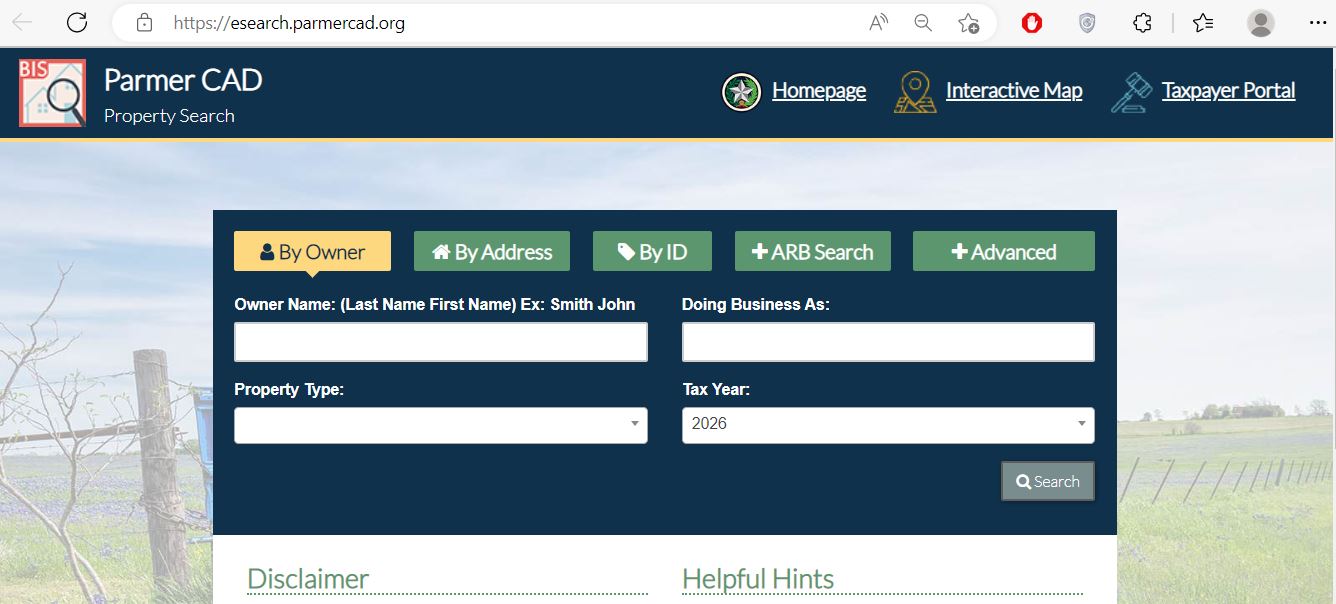
Use Owner, Address, ID or Advanced rather than entering every detail into one search.
Select Real, Personal, Mineral, Auto or Mobile Home before concluding that no account exists.
Use 2026 for the current appraisal record or select a prior year for historical research.
Try abstract, subdivision, Geographic ID, neighbourhood or property type when the address fails.
Verify acreage, legal description, values, exemptions, taxing units and tax status before acting.
Parmer CAD separates five searchable property types
Homes, city lots, agricultural land, commercial real estate, dairies, feedlots and other real property.
Search with: owner, address, Property ID, Geographic ID, abstract or subdivision.
Income-producing furniture, equipment, machinery, inventory, leased assets and other taxable business property.
Search with: business name, DBA, owner, situs or Property ID.
Oil, gas or other mineral accounts that may not match the surface owner or street address.
Search with: mineral owner, Property ID, Geographic ID or available legal information.
This property type generally relates to taxable dealer inventory or business accounts, not an ordinary privately owned vehicle.
Search with: dealer or business name, owner or Property ID.
Mobile-home accounts that may use an owner, park, Property ID or situs different from the land account.
Search with: owner, Property ID, mobile-home park or Advanced Search.
Search fields include protest status, informal date, formal date, hearing date and board members.
Use for: appraisal-review research rather than a normal owner lookup.
Check these 10 Parmer CAD fields before relying on a record
The appraisal-account identifier. Save it for forms, calls, protests, maps and payments.
A geographic parcel reference that helps match the account to map and land-location information.
The owner entry used for appraisal administration. It is not a complete deed or title history.
Confirm Real, Personal, Mineral, Auto or Mobile Home before comparing value or ownership.
The physical location can differ from the owner’s mailing address, postal city or rural emergency address.
Review the abstract, survey, section, tract, subdivision, lot, block, condominium or park information.
Check land segments, total acres, homesite, buildings, barns, dairy structures, feedlot improvements and other assets.
Market value and the value after an applicable cap or special appraisal can differ.
Review homestead, age, disability, veteran, agricultural or other approved treatment separately.
Confirm the appraisal year and every county, city, school, hospital, road, college or water district attached to the property.
Use the interactive map for county roads, sections and rural tracts
Map search is especially useful for irrigated cropland, dryland farms, dairy sites, cattle-feeding property, wind-energy parcels, divided tracts and property without a normal street address.
Fix a Parmer CAD search that returns no account
| Problem | Likely reason | Best next search |
|---|---|---|
| Owner name returns nothing | The record may use a spouse, estate, trust, business, dairy name or different name order. | Use the first or last name alone, DBA, Owner ID or Property ID. |
| Rural address is missing | The tract may be indexed by abstract, section, survey or legal description. | Use Property ID, Geographic ID, abstract or map. |
| Farm has several results | The owner may have separate tracts, homesite, business, mineral or mobile-home accounts. | Match each Property ID, legal description and acreage. |
| Dairy or feedlot account is missing | The business name, real estate and equipment can be stored separately. | Search the owner, DBA, Real property and Personal property. |
| Mobile home does not appear | The search remains set to Real or the home is indexed by park or owner. | Select Mobile Home and try the park, owner or Property ID. |
| Mineral account does not appear | The mineral owner differs from the surface owner or the search remains on Real. | Select Mineral and try owner, Property ID or Geographic ID. |
| New owner is not shown | The recorded deed may still be processing or the wrong tax year is selected. | Confirm County Clerk recording and contact CAD with the instrument details. |
| Tax balance does not appear | The appraisal result may need to be opened before tax information or payment options appear. | Open the full account and confirm the tax year and taxing entities. |
| Too many results appear | The owner or street search is broad. | Add property type, subdivision, abstract, Geographic ID or tax year. |
Search tips for Bovina, Farwell, Friona and rural Parmer County
Search the street name or Property ID, then verify the city, school district, legal description and exemptions.
Confirm the parcel is in Texas and match the Geographic ID, taxing units and legal description near the New Mexico line.
Review city, school, hospital and county-related taxing units separately rather than assuming one combined rate.
Use abstract, Geographic ID, acreage and map when a postal address does not match the appraisal record.
Review land class, total acreage, irrigated acreage, improvements, productivity value and water-district jurisdiction.
Confirm the land-use classification and avoid comparing it directly with irrigated cropland without adjustments.
Separate land, buildings, milking facilities, feed systems, equipment and business-personal-property accounts.
Review real-property improvements, equipment, inventory treatment and the correct January 1 business account.
Confirm whether land, improvements, equipment, lease interests and specialised appraisal accounts are listed separately.
Read market, appraised and taxable value in the correct order
The appraisal district’s opinion of market value for the January 1 appraisal date.
The value after an applicable appraisal limitation or agricultural-use treatment.
The amount remaining for an individual taxing unit after applicable exemptions.
| Account component | What to inspect | Useful evidence |
|---|---|---|
| Residence | Square footage, age, class, condition, additions, garage and completion. | Measurements, photographs, plans, repair estimates and comparable sales. |
| Agricultural land | Acreage, land class, irrigation, homesite, productivity value and qualifying use. | Survey, map, crop or livestock records, leases and comparable land sales. |
| Dairy or feedlot real property | Buildings, pens, concrete, lagoons, feed storage, utilities and physical condition. | Plans, photographs, repair estimates, cost records and operational layout. |
| Business personal property | Machinery, equipment, furniture, vehicles, leased assets, inventory and depreciation. | Rendition, asset register, invoices, disposal records and photographs. |
| Mobile home | Make, model, year, size, condition, location and ownership. | State ownership documents, serial details, photographs and bill of sale. |
Review irrigated, dryland and grazing property separately
Agricultural appraisal is based on qualifying use and productivity rather than simply owning rural acreage. The account can continue to display a separate market value even when qualifying land receives a lower productivity value.
Connect the wildlife plan to qualifying open-space acreage
Separate business assets from the underlying real estate
Parmer County’s agricultural economy can create separate real-estate and business-personal-property accounts for dairies, feed manufacturing, cattle operations, retail businesses, equipment, vehicles and special inventory.
| Operation | Possible separate property | What to verify |
|---|---|---|
| Dairy | Land, barns, milking structures, tanks, pumps, equipment and vehicles. | Which assets are real property and which belong on the rendition. |
| Feed manufacturing | Plant, storage, machinery, scales, inventory, office equipment and vehicles. | Ownership, January 1 location, cost and acquisition year. |
| Cattle feeding | Land improvements, pens, equipment, feed systems, vehicles and inventory treatment. | Account type and whether leased assets are included. |
| Wind-energy site | Land interest, improvements, equipment, leasehold and specialised accounts. | Owner, operator, asset account and taxing jurisdictions. |
| Dealer inventory | Motor vehicle, heavy equipment or manufactured-housing special inventory. | Declaration, monthly statements and escrow-tax requirements. |
Search mobile homes and mineral interests independently
- Select Mobile Home as the property type.
- Search the owner, Property ID or mobile-home park.
- Compare the land account and home account.
- Verify make, model, year, size, condition and state ownership documents.
- Check whether the home owner and land owner are different.
- Select Mineral as the property type.
- Search the mineral owner, Property ID or Geographic ID.
- Confirm the tax year and account identity.
- Compare with recorded mineral deeds, leases, assignments or probate records.
- Do not assume the surface owner controls the mineral interest.
Route appraisal, property-tax, vehicle and deed questions correctly
| Your question | Correct starting point | Prepare |
|---|---|---|
| What is the property’s appraised value? | Parmer County Appraisal District | Property ID, Geographic ID, property type, tax year and disputed field. |
| Why is an exemption or agricultural appraisal missing? | Parmer County Appraisal District | Application, qualification date, evidence and submission confirmation. |
| How much property tax is due? | Parmer CAD property-search and collection portal | Property ID, owner, tax year, taxing units and intended payment date. |
| Did my property-tax payment post? | Parmer CAD collection staff | Receipt, confirmation, account, tax year, amount and date. |
| I need vehicle registration or title service | Parmer County Tax Assessor-Collector | Valid identification and vehicle documents. |
| Who legally owns the property? | Parmer County Clerk or title professional | Grantor, grantee, recording period and legal description. |
| Where can I obtain a deed or lien copy? | Parmer County Clerk | Names, instrument type, date range and copy type. |
| Is the acreage or boundary legally correct? | Licensed surveyor and title professional | Deed, plat, prior survey and CAD map. |
Correct the system responsible for the inaccurate field
Use the official Parmer CAD form that matches the qualification
Confirm ownership, principal-residence use, Property ID and identification requirements.
Review the additional homestead exemption, school-tax ceiling, instalment and deferral rules.
Use the official veteran or survivor form and attach the required VA documentation.
Prepare acreage, land-use history, leases, maps, production evidence and wildlife records.
Use the correct personal-property rendition, dealer declaration or monthly inventory statement.
The forms library includes charitable, religious, cemetery, solar, wind, Freeport, vehicle and other applications.
Build a Parmer CAD protest around one specific account problem
| Property | Useful evidence | Common mistake |
|---|---|---|
| Residence | Comparable sales, measurements, photographs, repair estimates and property-detail corrections. | Comparing only unadjusted sale prices. |
| Irrigated or dryland farm | Survey, acreage, irrigation status, land class, crop records, leases and comparable land sales. | Treating all acreage as identical. |
| Dairy or feedlot | Facility layout, construction, condition, functional issues, equipment lists and income-related documents when relevant. | Mixing real-estate improvements with movable business assets. |
| Business personal property | Asset register, invoices, acquisition dates, disposal records, condition and rendition. | Submitting only a requested total value. |
| Mobile home or mineral | Ownership documents, account identifiers, serial or lease information and property-specific records. | Using the surface land account as the only proof. |
Prepare for a formal Parmer County ARB hearing
Use electronic communication only after matching the property
Parmer CAD links a taxpayer portal and a request for electronic communications under Texas Tax Code Section 1.085.
Use Parmer CAD as the local property-tax collection starting point
Do not treat one Parmer County rate as the rate for every property
A property can be connected to county, city, school, hospital, farm-to-market-road, college and groundwater-conservation taxing units. The exact combination depends on the parcel.
Parmer County and the applicable farm-to-market-road account can appear separately.
City of Bovina, City of Farwell and City of Friona apply only to property within the appropriate jurisdiction.
Bovina, Farwell, Friona, Lazbuddie and certain overlapping school districts can appear depending on location.
Parmer County, Farwell or Muleshoe-area hospital districts can apply based on the parcel.
High Plains Underground Water Conservation District Number 1 can appear on qualifying property.
Amarillo College can appear on accounts within the applicable boundary.
Use the Parmer County Clerk for deeds, liens and certified copies
| Service | Published fee | Practical note |
|---|---|---|
| Plain copy | $1 per page | Confirm page count before requesting mailed copies. |
| Certified copy | $1 per page plus $5 certification | Ask whether the receiving party requires certification. |
| Recording first page | $26 | Additional pages increase the total. |
| Each additional recording page | $4 | Confirm the document’s final page count. |
| Posting fee | $4 per document | Ask whether it applies to the intended filing. |
| Lien search | $10 | A Clerk search is not necessarily a complete professional title examination. |
Susie Spring
401 Third StreetFarwell, Texas 79325
Mailing: P.O. Box 356, Farwell, Texas 79325
Phone: (806) 481-3691
Fax: (806) 481-9548
Email: Susie.spring@parmercounty.texas.gov
Monday-Thursday: 8:30 AM-5:00 PM
Friday: 8:30 AM-3:00 PM
Call before travelling for recording, copy, certification, identification or lien-search requirements.
Complete these checks before relying on a Parmer County account
Use Parmer CAD reports for countywide appraisal context
Provides information about district operations and the appraisal base.
Explains appraisal methods, property classifications and valuation procedures.
Describes planned inspection, appraisal and review activities for the cycle.
Provide broader information about exemptions appearing on the appraisal roll.
Useful for historical comparison, not as a substitute for a current adopted 2026 rate.
The CAD site publishes worksheets for cities, schools, hospitals, county and water-related units.
Important Parmer County appraisal and tax dates
Parmer County appraisal, vehicle and deed offices
Bovina, Texas 79009
Mailing: P.O. Box 56, Bovina, Texas 79009
Phone: (806) 251-1405
Fax: (806) 251-1121
Email: pcad@parmercad.org
Hours: Monday-Friday, 8:30 AM-4:00 PM.
Chief Appraiser: Jill D. Timms
Chairman: Luis Godinez
Secretary: Kathryn Goddard
Members: Tom Alger and Mike Beauchamp
Use the formal protest process for a value or exemption dispute rather than contacting an ARB member outside the hearing process.
Awyna Sanchez
401 Third StreetFarwell, Texas 79325
Mailing: P.O. Drawer G, Farwell, Texas 79325
Phone: (806) 481-3845
Fax: (806) 481-9548
Email: awyna.sanchez@parmercounty.texas.gov
This office handles vehicle-title and registration services; the state directory says it does not collect property taxes.
Monday-Thursday:
8:30 AM-12:00 PM
12:30 PM-5:00 PM
Friday:
8:30 AM-12:00 PM
1:00 PM-3:00 PM
Doors close 15 minutes before the published closing time.
Susie Spring
401 Third StreetFarwell, Texas 79325
Mailing: P.O. Box 356, Farwell, Texas 79325
Phone: (806) 481-3691
Fax: (806) 481-9548
Email: Susie.spring@parmercounty.texas.gov
Use the state directory to cross-check CAD, Tax Assessor-Collector and active taxing-unit information.
Open Parmer County directoryOfficial Parmer County property resources
Official notices, forms, tax information, reports and office contacts.
Open Parmer CADSearch appraisal accounts and continue to tax-balance and payment information.
Open property searchLocate rural parcels, abstracts, subdivisions and surrounding property.
Open parcel mapFile or manage an eligible appraisal protest electronically.
Open eProtestRequest supported electronic communication and manage available property services.
Open taxpayer portalDownload exemption, agricultural, wildlife, rendition, protest and special-inventory forms.
Open forms libraryReview adopted rates, historical rates and entity worksheets.
Open tax informationReview proposed tax rates and estimated property-tax information during rate season.
Open tax-rate databaseReview annual reports, mass appraisal reports, reappraisal plans and rate history.
Open public informationRequest deeds, liens, certified copies and other recorded instruments.
Open County ClerkUse for vehicle title, registration and related Tax Assessor-Collector services.
Open county Tax OfficeVerify CAD, Tax Assessor-Collector and taxing-unit contact information.
Open Texas directory10 common Parmer County appraisal questions
1. What is the official Parmer County Appraisal District website?
The official website is parmercad.org. Use it for property search, tax information, forms, online protests, maps and office contacts.
2. How do I search Parmer County property records?
Open Parmer CAD Property Search and search by owner, address, Property ID, Geographic ID or Advanced Search.
3. Why does a Parmer CAD address search return no result?
Try only the street name, owner, Property ID, Geographic ID, abstract, subdivision or interactive map. Rural and specialised accounts may not use a normal street address.
4. What property types can I search in Parmer CAD?
The official portal includes Real, Personal, Mineral, Auto and Mobile Home property types. Select the correct type before deciding that the account is missing.
5. Who collects Parmer County property taxes?
The Texas Comptroller directory states that the elected Parmer County Tax Assessor-Collector does not collect property taxes. Start with Parmer CAD’s official Property Search and Pay Taxes portal.
6. How do I pay Parmer County property taxes online?
Open esearch.parmercad.org, locate the correct account, review the tax year and balance, follow the payment option and save the receipt.
7. What is the Parmer CAD protest deadline?
Most protests are due by May 15 or 30 days after delivery of the Notice of Appraised Value, whichever is later. Follow the date printed on the notice.
8. How do I search Parmer County agricultural or rural property?
Select Real property and search by Property ID, Geographic ID, owner, abstract, subdivision or map. Review total acreage, homesite, market value, productivity value and qualification separately.
9. Where can I get a Parmer County deed or lien copy?
Contact the Parmer County Clerk at 401 Third Street in Farwell. Published fees include $1 per copy page, $5 certification and a $10 lien search.
10. Where is Parmer County Appraisal District located?
Parmer CAD is at 305 Third Street, Bovina, Texas 79009. The phone number is (806) 251-1405, and published hours are Monday-Friday from 8:30 AM to 4:00 PM.