
Match the Montgomery County Appraisal Account With the Deed, Tax Bill and Parcel
Montgomery County property research can involve a fast-growing subdivision, a Lake Conroe home, a Woodlands-area account, rural acreage, timberland, a business property or land affected by several special taxing districts.
This guide shows how to search Montgomery Central Appraisal District, verify the correct record, interpret values and exemptions, fix a missing result, prepare a protest, pay through the Tax Office and check deeds, liens and property-fraud alerts through the County Clerk.
Search MCAD by account number, address or owner name.
109 Gladstell Street, Conroe, Texas 77301.
936-756-3354 and inquiries@mcad-tx.org.
400 N. San Jacinto Street, Conroe; 936-539-7897.
Local contacts and 2026 procedures reviewed July 28, 2026.
What do you need from the Montgomery County property record?
This helper operates in the browser and does not collect an owner name, address, account number, protest evidence or payment information.
Find the appraisal account, property characteristics, value history, exemptions and taxing units.
Follow the search stepsSearch the recorded instrument rather than relying only on the MCAD owner display.
Search official recordsLocate the amount due, prior-year balance, payment history and receipt.
Review payment stepsUse the correct homestead, over-65, disability, veteran, agricultural or timber form.
Review eligibility and filingIdentify whether the problem is value, unequal appraisal, incorrect data, exemption or classification.
Build an evidence fileSearch the seller, buyer, address, builder, subdivision and parent tract when updates are incomplete.
Follow the new-owner workflowSearch Montgomery CAD by account, address or owner
Prepare the strongest identifiers
Use the MCAD screenshot to understand the search controls
The image already published on the existing article has been retained because it shows the official MCAD search layout: the search-method selector, compound-text field, appraisal-year selector and result columns.
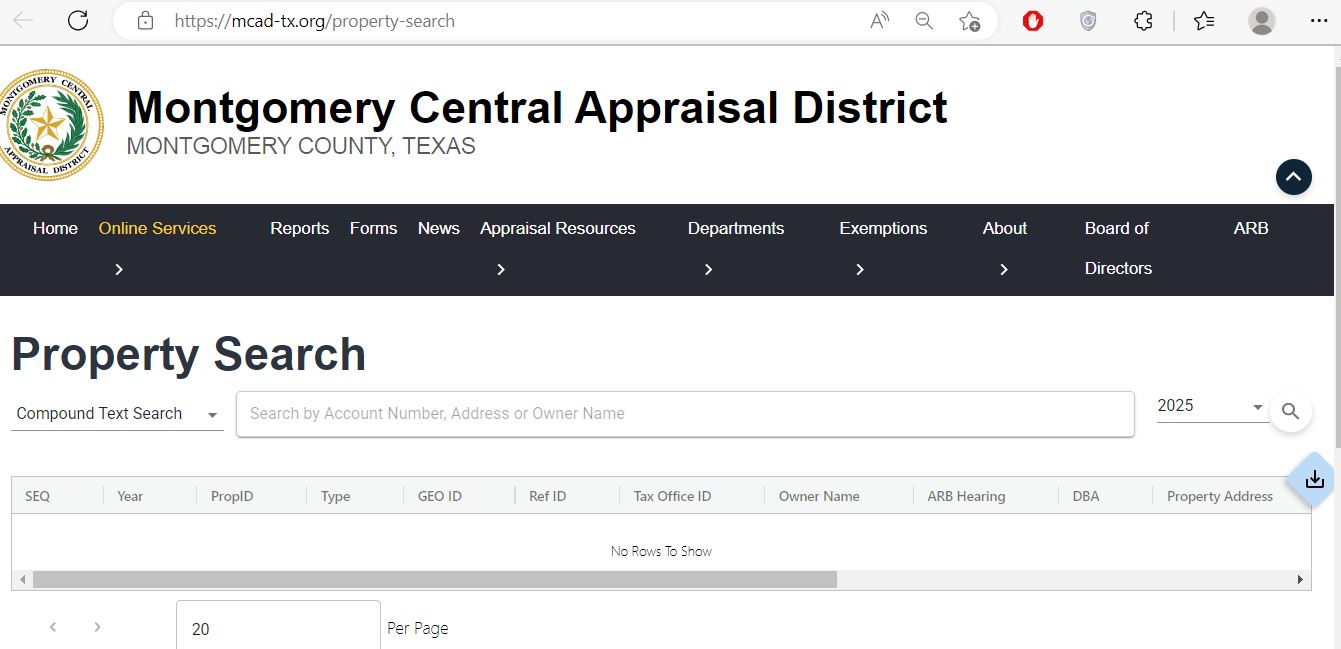
Understand what each Montgomery appraisal field means
| Field | What it helps identify | What it does not prove | Best next action |
|---|---|---|---|
| Property or account ID | The MCAD appraisal account used for values, exemptions and protests. | That the Tax Office or County Clerk uses the same number. | Save it and compare the Tax Office CAD reference. |
| Owner name | The owner currently displayed for appraisal administration. | Complete legal title or the absence of liens or other interests. | Check the County Clerk deed record. |
| Situs address | The physical or assigned location connected to the appraisal account. | The complete legal description or surveyed boundary. | Compare the legal description and parcel map. |
| Legal description | Subdivision, section, lot, block, reserve, abstract, tract or acreage. | That the abbreviated MCAD wording contains every deed provision. | Match it with the recorded deed or plat. |
| Market value | MCAD’s estimate of open-market value as of January 1. | The sale price, mortgage appraisal or final tax amount. | Review characteristics and protest evidence. |
| Appraised value | The value after an applicable appraisal limitation or cap. | That the market value is correct or cannot be protested. | Compare market and appraised values separately. |
| Land and improvement value | How MCAD allocates value between land and buildings or other improvements. | That square footage, condition, class or features are accurate. | Document incorrect property characteristics. |
| Exemptions | Homestead, over-65, disability, veteran or another approved exemption. | The same exemption amount applies to every taxing unit. | Review unit-specific taxable values. |
| Taxing units | County, city, school, township, MUD, ESD and other jurisdictions. | The amount currently due. | Open the Tax Office statement and rate details. |
| ARB hearing | A hearing or protest-related field connected to the appraisal account. | That a hearing date or outcome is final without the official notice. | Review the ARB notice and contact the ARB section. |
Fix the most common Montgomery CAD search problems
| Search problem | Likely reason | What to try next |
|---|---|---|
| Complete address returns nothing | Street suffix, directional, unit, punctuation or new-address formatting may differ. | Use the street number and main street name only. |
| Owner name returns nothing | The account may use a trust, spouse, estate, company, seller or builder name. | Search the surname or main entity word and try prior owners. |
| New subdivision home is missing | The parent tract, lot creation, deed or appraisal-account setup may still be processing. | Search the builder, seller, subdivision, parent tract and closing documents. |
| One street address has several results | A condominium, commercial site, reserve, adjacent lot or business account may have separate IDs. | Match the legal description, property type and account number. |
| Lake or rural property has no useful address | The account may be indexed primarily by legal description, owner, abstract or acreage. | Use the owner, account number, legal description and map. |
| Buyer name is not displayed | The deed or MCAD ownership update may still be processing. | Confirm the instrument with the County Clerk, then contact MCAD. |
| Tax portal and MCAD values differ | Different years, certified-value timing, exemptions, caps or update schedules may apply. | Match the account, year, CAD reference and legal description. |
| Parcel map and deed seem different | GIS boundaries are approximate or a split, combination or plat update is pending. | Use the deed, plat and survey, then ask MCAD or County GIS about the map. |
Follow a Montgomery County appraisal from January 1 to the tax statement
MCAD’s estimate of open-market value as of January 1 for the appraisal year.
A qualifying residence homestead’s appraised value generally cannot increase by more than 10% annually, plus qualifying new improvements.
Qualifying non-homestead real property valued at $5.32 million or less may receive the temporary 20% limitation under state rules.
The value remaining for each taxing unit after applicable exemptions and adjustments.
Use maps to verify location without treating them as a survey
Visual research is especially useful for rural acreage, Lake Conroe property, new subdivisions, commercial reserves, road-access questions and parcels near municipal, school or special-district boundaries.
Check the legal lot, waterfront or reserve relationship, flood information and any separate improvement or common-area account.
Compare the final plat, lot and block, parent tract and builder records when the map or account is still changing.
Use abstract, survey, tract, road access and acreage information rather than relying only on a rural mailing address.
File the correct MCAD exemption and verify that it was applied
An exemption is not complete merely because a form was downloaded or submitted. The owner should retain proof of filing, respond to any MCAD request and later confirm that the exemption appears on the correct account and tax year.
| Owner situation | Starting point | Preparation checklist |
|---|---|---|
| Primary residence | Residence Homestead Exemption Application | Account number, ownership, occupancy and required identification. |
| Age 65 or older | Age-65 residence-homestead section or related form | Age evidence, ownership, residence information and account number. |
| Disabled owner | Disabled-person residence-homestead section | Qualifying disability evidence under the form instructions. |
| Disabled veteran or survivor | Veteran exemption application | VA or military documentation, ownership and residence information. |
| Heir property | Homestead application plus heir-property affidavits when applicable | Ownership history, heir information and supporting affidavits. |
Prepare land-use evidence for Montgomery County rural property
Montgomery County includes ranch, pasture, timber, wildlife-management and other open-space land. Special appraisal depends on qualifying use and history—not merely rural location, acreage or ownership.
Texas requires appraisal districts to use a 10% capitalization rate for qualifying agricultural or open-space land in 2026.
The Texas Comptroller lists the 2026 timberland capitalization rate as 7.77%.
Wildlife use generally builds on prior qualifying open-space appraisal and requires an appropriate management plan and activities.
Evidence to organise before filing or protesting
Build a Montgomery County protest around a specific, provable issue
“My taxes are too high” is not a complete valuation argument because MCAD does not set the tax rate. Identify whether the problem is market value, unequal appraisal, incorrect property data, an exemption decision, ownership, classification, business property or special appraisal.
Evidence checklist
Use the closing statement, sale date, financing appraisal and evidence showing whether the transaction was arms-length.
Use dated photographs, contractor estimates and an explanation of how the defect affected value on January 1.
Compare similarly situated properties and explain important differences rather than submitting only a list of lower values.
Move from the MCAD account to the official Montgomery County tax portal
The Tax Office portal supports searches by owner name, property address, account number, CAD reference number and fiduciary number for accounts collected by the Montgomery County Tax Office.
Compare the Tax Office payment history with the servicer’s disbursement record before making a second payment.
The portal permits multiple accounts to be added to a payment cart. Verify each account and amount separately.
The county publishes payment-plan information for eligible current accounts. Contact the Tax Office before assuming a plan is automatic.
Use the Montgomery County Clerk for recorded property documents
The County Clerk’s Recording Division maintains deeds, deeds of trust, liens, releases, assignments, powers of attorney, affidavits, plats, foreclosure notices and other recorded public documents. The Clerk states that its records date to 1838.
Plain copies requested from the office are listed at $1 per page.
The Clerk lists $1 per page plus $5 certification for each complete document set.
The linked fee sheet lists $25 for the first real-property page and $4 for each additional page. Verify before filing.
What to do after buying a Montgomery County property
Check more than the seller’s current Montgomery County tax bill
Review township, school, MUD and other special-district entries rather than assuming all Woodlands postal addresses have the same taxing units.
Check waterfront or common-area relationships, flood information, separate lots, deed restrictions and special districts.
Confirm new subdivision, MUD, ESD, road, utility and school-district information before estimating the future tax burden.
Use a different record strategy for each Montgomery County property type
Search by address, then verify the city, school district and any special-district entries before estimating taxes.
Confirm The Woodlands Township, school district, MUD and other taxing units shown for the exact parcel.
Match the legal unit and account rather than relying only on the shared building or community address.
Use owner, legal description, abstract, survey and acreage when the rural address is incomplete.
Compare the land-only prior year with the completed improvement value and first full-year tax statement.
Search the builder, seller, buyer and parent tract when the new lot account is not yet easy to locate.
Separate market value from productivity value and organise use-history evidence before filing or protesting.
Check whether the real estate and business personal property are maintained under separate accounts.
Review probate, heirship and deed records before requesting an MCAD ownership change or homestead treatment.
Contact the Montgomery County office that controls the record
Use for property search, values, characteristics, exemptions, account corrections, agricultural and timber appraisal, protests and ARB-related appraisal questions.
109 Gladstell StreetConroe, Texas 77301-4236
Mailing: P.O. Box 2233, Conroe, TX 77305-2233
936-756-3354
Fax: 936-539-8695
inquiries@mcad-tx.org
Chief Appraiser: Sherry Hunter
Taxpayer Liaison: Ric Metts
Use for statements, balances, payments, receipts, delinquent taxes, payment plans and collection questions.
400 N. San Jacinto StreetConroe, Texas 77301-2823
Tax Assessor-Collector: Tammy McRae
Open official Tax Office informationUse for deeds, deeds of trust, liens, releases, assignments, affidavits, plats, certified copies and Property Alert.
Main Office210 West Davis
Conroe, Texas 77301
County Clerk: L. Brandon Steinmann
Main-office hours: Monday–Friday, 8:00 AM–5:00 PM.
East County Annex: 21130 Legion Road, New Caney.
South County Annex: 1520 Lake Front Circle, The Woodlands.
Real-property document recording is performed at the Conroe office. Check the live locations page before travelling.
Open the exact Montgomery County property resource you need
Find appraisal accounts, owner displays, values, exemptions and property details.
Open property searchDownload exemption, protest, rendition, agricultural, timber and correction forms.
Open MCAD formsReview residence-homestead eligibility, filing and homeowner guidance.
Open homestead helpFind protest, hearing and ARB information.
Open ARB resourcesSearch statements, balances, payments, prior years and receipts.
Open Tax Office portalSearch deeds, liens, releases, plats and other recorded instruments.
Open official recordsReview official county maps, layers and open-data resources.
Open county GISReview proposed rates, notices and account-specific estimated-tax information.
Open tax transparencyCross-check appraisal-district contacts and active taxing units.
Open Montgomery directoryHow this Montgomery County guide was improved
The useful MCAD property-search screenshot already published on the article was retained and paired with practical field guidance.
The guide now separates appraisal, tax, deed, GIS, exemption, protest and fraud-monitoring tasks.
Current officials, contacts, tax-search options, payment fees, exemption amounts, value limits and County Clerk procedures were checked.
Montgomery County Appraisal District FAQs
What is the official Montgomery Central Appraisal District website?
The official website is mcad-tx.org. Use it for appraisal records, property search, forms, exemptions, notices, appraisal resources and Appraisal Review Board information.
How do I search Montgomery County property records?
Open the official MCAD property search, select the correct year and search by account number, property address or owner name. Verify the account number, situs address, owner, legal description and property characteristics before relying on the result.
Why can I not find a recently purchased Montgomery County home?
The deed, new subdivision account or MCAD owner update may still be processing. Search the property address, seller, buyer, builder and account number, confirm the deed with the County Clerk and contact MCAD if the records remain inconsistent.
Does MCAD collect Montgomery County property taxes?
No. MCAD appraises property and processes exemptions and protests. The Montgomery County Tax Office issues statements, maintains balances, accepts payments and provides receipts for the accounts it collects.
Where can I pay Montgomery County property taxes online?
Use the official Montgomery County Tax Office portal. Search by owner, address, account, CAD reference or fiduciary number, verify the tax year and amount, then save the confirmation and posted receipt.
How do I apply for a Montgomery County homestead exemption?
Use the MCAD homestead-exemption page or forms library. Prepare the account number, ownership and occupancy details and required identification. Retain proof of filing and later verify the exemption on the account.
What is the Montgomery County appraisal protest deadline?
The normal Texas deadline is May 15 or 30 days after MCAD mails the Notice of Appraised Value, whichever is later. Use the account-specific date printed on the official notice and preserve proof of timely filing.
Where can I find Montgomery County deeds and liens?
Use the Montgomery County Clerk Official Records Search for deeds, deeds of trust, liens, releases, plats, assignments and other recorded real-property documents.
Can the MCAD or county GIS map prove a legal boundary?
No. Appraisal and county GIS maps are research tools and can show approximate locations. Use a recorded deed, plat and licensed survey when legal boundary, acreage, easement or encroachment accuracy matters.
What should a Montgomery County buyer verify before closing?
Verify the MCAD account and characteristics, recorded deed and liens, tax balances, seller exemptions, taxing jurisdictions, MUD or special-district obligations, parcel location, flood information, survey and title commitment. Do not estimate future taxes solely from the seller’s current bill.