
Cross the Right Record Bridge From Maverick CAD to the Correct Tax Office
Maverick County property owners may need several official systems to complete one tax task. Maverick County Appraisal District controls appraisal values, exemptions, property characteristics and protests, but it does not replace every local tax-collection office.
County and hospital taxes, City of Eagle Pass taxes and Eagle Pass ISD taxes can follow separate payment routes. This guide helps you locate the property, verify the account, understand the values and continue to the exact office that controls the bill, receipt, deed or correction.
2243 North Veterans Boulevard, Eagle Pass.
830-773-0255 for value, exemption and protest help.
The Texas Comptroller directory lists Raul Fuentes.
Monday–Friday, 8:00 AM–5:00 PM; confirm holidays first.
Local portals and contacts checked July 28, 2026.
What are you trying to do with the Maverick County property?
Search by account, address or owner and confirm the correct property and year.
Follow the search stepsSeparate county, hospital, city and school taxes before assuming the account is fully paid.
Use the tax office routerUse Maverick CAD for homestead, senior, disability, veteran and agricultural applications.
Prepare an exemption filingMatch evidence to the exact value, property characteristic or exemption problem.
Build a protest fileUse the County Clerk for recorded documents rather than treating the CAD record as title proof.
Find recorded property documentsChoose the correct property type because these accounts may not search like a normal house.
Choose the account categorySelect your situation before opening a payment or records portal
The route finder runs in your browser and does not collect an owner name, address, property ID, email or payment information.
Search the property without opening the wrong account
Prepare these details before opening the search
Use the Maverick CAD screenshot as a field-by-field visual guide
The original article included a useful image of the Maverick CAD search interface. It is retained here beside the instructions it supports rather than being used as an isolated decorative image.
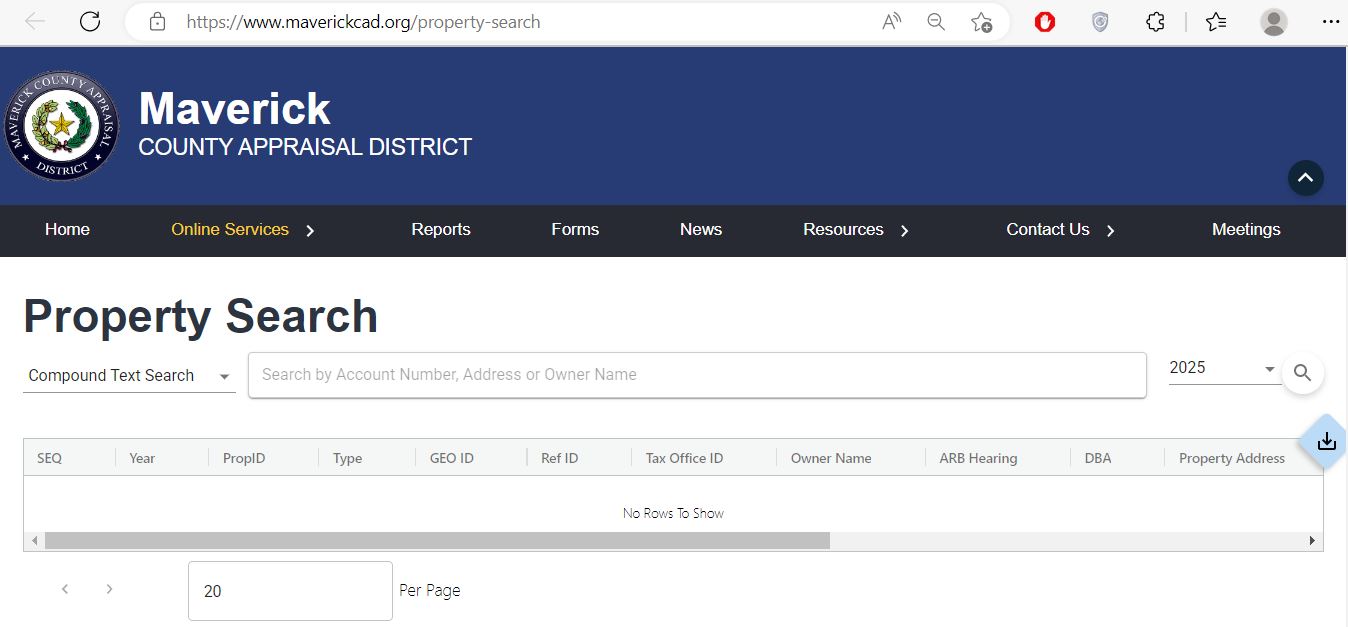
Enter an account number, address or owner name. Start with the fewest words needed to identify the property.
Choose the year connected to the appraisal notice, tax bill, sale, exemption or protest being researched.
Compare property ID, type, geographic ID, owner name, hearing information, DBA and property address.
Understand what each Maverick property field proves—and what it does not
| Record field | What it identifies | What it does not prove | Best next action |
|---|---|---|---|
| Property ID | The appraisal account connected to the property or taxable asset. | A County Clerk document number or legal title. | Save it for CAD, tax and protest questions. |
| Owner name | The owner currently displayed for appraisal administration. | Complete ownership, lien status or title quality. | Check the recorded deed when legal ownership matters. |
| Situs address | The physical or assigned property location. | The surveyed boundary or complete legal description. | Compare the map, legal description and deed. |
| Geographic ID | A location-based identifier used by the appraisal system. | That the parcel has not been split, combined or renumbered. | Use it to narrow map or advanced searches. |
| Property type | Real, personal, mineral, mobile-home or another account category. | That related land, improvements or business assets share one account. | Search each relevant account type separately. |
| Market value | The CAD estimate of value as of January 1. | The sale price, taxable value or amount due. | Review property facts and comparable evidence. |
| Appraised or limited value | The value after an applicable appraisal limitation. | That market value is accurate or cannot be protested. | Compare market and limited values separately. |
| Taxable value | The value remaining after exemptions for a taxing unit. | The final tax without that unit’s adopted rate. | Match it with the correct tax office and statement. |
| Legal description | The abbreviated subdivision, lot, block, abstract or tract description. | A complete deed description or surveyed boundary. | Verify it through the County Clerk and survey records. |
| ARB hearing or protest status | Whether protest-related information is associated with the account. | That a deadline, hearing or settlement is still active. | Confirm directly with Maverick CAD. |
Fix a missing, duplicate or confusing Maverick property result
| Problem | Likely reason | What to try |
|---|---|---|
| Full address returns nothing | The portal may abbreviate or omit the suffix, direction, city or ZIP code. | Enter only the street number and main street name. |
| Owner name returns nothing | The record may use surname-first order, initials, a spouse, trust, estate or company name. | Use only the surname or main business word. |
| Too many matches | The name or street term is too broad. | Add property type, subdivision, geographic ID or account number. |
| Mobile home does not appear | The mobile home can have a separate account or park-based description. | Select Mobile Home and search owner, park, serial details or property ID. |
| Mineral account is missing | Mineral interests are not normally located through a residential street address. | Select Mineral and use owner, property ID, lease or geographic information. |
| New owner is not shown | The deed or appraisal ownership update may still be processing. | Confirm the deed recording and provide the instrument number to CAD. |
| Tax amount looks incomplete | The system may show only one taxing unit or collection office. | Check county, city and school tax accounts separately. |
| Acreage appears incorrect | CAD acreage is used for appraisal administration and can differ from deed or survey information. | Compare the deed, plat and survey before requesting correction. |
Choose the property category before searching or filing a form
Homes, land, commercial buildings and most permanently attached improvements.
Search with: account, address, owner, subdivision, abstract or geographic ID.
Income-producing furniture, equipment, machinery, inventory and other taxable business assets.
Prepare: asset list, acquisition dates, original costs and business location.
Oil, gas or other mineral interests that can have separate accounts from the surface estate.
Search with: owner, property ID, lease, operator or geographic details.
A manufactured home can have a different account from the underlying land.
Verify: owner, park, serial or label information and land ownership.
Dealer inventory and certain specialised accounts follow separate appraisal, reporting and payment rules.
Do not use: a normal residential search workflow without confirming the account type.
This is a special appraisal based on qualifying use rather than merely owning rural acreage.
Prepare: land-use history, maps, leases, production evidence and acreage details.
Use the Maverick County Taxpayer Portal for electronic communication
Maverick County now provides a taxpayer portal where property owners can create an account and request electronic delivery of eligible tax communications. This portal is separate from the public property search and payment cart.
Apply through Maverick CAD and verify the taxable-value change
Exemptions are appraisal district matters even when the benefit reduces taxes owed to a city, county, school district or hospital district. The chief appraiser determines whether the property and applicant qualify.
For a qualifying principal residence. Prepare the address-matching identification and occupancy information required by the form.
Can create additional exemptions, a school-tax ceiling and possible installment rights when qualifications are met.
Requires the proof described by the official application and can interact with tax-ceiling and payment provisions.
The exemption level depends on the qualifying disability or surviving-spouse category and supporting documentation.
Prepare land-use history and supporting records. Rural location or acreage by itself does not guarantee special appraisal.
Freeport, goods-in-transit and other business benefits have specialised qualification, documentation and filing rules.
Turn the Maverick CAD record into a focused evidence packet
By late July 2026, the ordinary deadline has passed for many properties, but a later notice can create a later deadline. Texas law also provides limited late-protest and correction remedies for specific situations.
Evidence checklist
Separate county, city and school property tax payments
| Need or taxing unit | Correct office | Official route | What to verify |
|---|---|---|---|
| Appraised value, exemptions or protest | Maverick County Appraisal District | maverickcad.org | Property ID, year, property type and owner. |
| Maverick County tax | Maverick County Tax Assessor-Collector | Maverick Tax Property Search | County taxing-unit line, year and balance. |
| Maverick County Hospital District tax | Maverick County Tax Assessor-Collector | Maverick Tax Property Search | Hospital-district line and payment status. |
| City of Eagle Pass tax | City of Eagle Pass Tax Office | City Submit page → Tax Payments | Property is inside city limits and city tax year. |
| Eagle Pass ISD tax | Eagle Pass ISD Tax Office | EPISD Property Search | School-district account, year and balance. |
| Deed, lien or plat | Maverick County Clerk | County Clerk services and land-record request | Names, instrument number, date and legal description. |
Pay county and hospital taxes
Pay City of Eagle Pass taxes
Pay Eagle Pass ISD taxes
Estimate county, city, school and hospital taxes separately
Enter the taxable value and adopted rate shown for each taxing unit. Different exemptions or tax ceilings can produce different taxable values for the same property, so the calculator provides separate inputs for every major local unit.
Educational estimate only. It does not include every tax ceiling, installment adjustment, supplemental bill, omitted-property tax, rollback tax, penalty, interest, attorney fee, collection cost or payment-processor fee.
Track the deadlines that affect value, exemptions, protests and payment
Use the County Clerk when the appraisal record is not legal proof
Maverick CAD’s owner and legal-description fields support appraisal administration. Recorded deeds, liens, releases, plats and other legal property documents are County Clerk records.
County Clerk: Sara Montemayor
500 Quarry Street, Suite 2Eagle Pass, Texas 78852
- Recorded deeds
- Liens and releases
- Land-record requests
- Certified property documents
- Recorded plats and instruments
Adjust the workflow to the property and its location
Check county, hospital, city and EPISD tax accounts. Save separate receipts where separate systems are used.
Confirm that no city-tax line applies, while still checking county, hospital and school taxes.
Use owner, property ID, abstract, subdivision or geographic ID when a normal street address is unavailable.
Separate market value from qualifying agricultural appraisal and preserve land-use evidence.
Search the home account and land account separately when ownership is divided.
Use the Mineral property type and verify that the account represents the intended ownership interest and year.
Review rendition requirements, asset details, business location and any exemption or penalty issues.
Do not assume the seller’s exemption, appraisal limit or tax ceiling will continue for the buyer.
Search the deceased owner and estate names, then verify probate and deed documents before requesting a CAD ownership update.
Contact the office that controls the property decision or payment
Use for property records, appraisal values, exemptions, property characteristics, special appraisal and protests.
2243 North Veterans BoulevardEagle Pass, Texas 78853-4236
Mailing: P.O. Box 2628, Eagle Pass, TX 78853-2628
830-773-0255
Fax: 830-773-8652
admin@maverickcad.org
Chief Appraiser: Raul Fuentes
Hours: Monday–Friday, 8:00 AM–5:00 PM
Use for county and hospital-district tax statements, balances, payments, receipts and collection questions.
1823 South Veterans BoulevardEagle Pass, Texas 78852-6477
Tax Assessor-Collector: Ruben Montemayor
830-773-9273
Fax: 830-773-6378
ruben.montemayor@co.maverick.tx.us
Use for City of Eagle Pass property tax statements, city balances, city receipts and city collection questions.
100 South MonroeEagle Pass, Texas 78852
Tax Assessor-Collector: Maria Galvan, RTA
830-773-1111
Fax: 830-773-9170
Use for school-district property tax statements, payments, receipts and EPISD account questions.
Tax Assessor-Collector: Rolando Martinez
830-773-3826
Call before visiting to confirm the current tax-office location and public hours.
Use for deeds, liens, releases, land-record requests and certified recorded documents.
500 Quarry Street, Suite 2Eagle Pass, Texas 78852
County Clerk: Sara Montemayor
830-206-8292
smontemayor@co.maverick.tx.us
- Save the property ID and year.
- Identify the taxing unit or property task.
- Bring the notice, statement or receipt.
- Confirm holiday closures.
- Ask whether an appointment is necessary.
Open the exact Maverick County property resource you need
District notices, forms, reports, resources, contact information and property-search access.
Open Maverick CADSearch the current appraisal database using an account number, address or owner name.
Open property searchHomestead, exemption, rendition, agricultural, correction and protest forms.
Open CAD formsAdvanced property search, county and hospital balances and the green Pay Taxes workflow.
Open tax property searchCreate an owner account and request eligible electronic tax communications.
Open Taxpayer PortalUse the official Eagle Pass page to open the current city tax-payment provider.
Open city payment routeSearch, review and pay Eagle Pass Independent School District property taxes.
Open EPISD tax searchLand-record requests, certified copies and other official County Clerk services.
Open county servicesCross-check CAD, tax assessor, chief appraiser and collecting-unit information.
Open Maverick directoryRelated AppraisalDistrict.org guides
How this Maverick County guide was improved
The original Maverick CAD screenshot remains in the article and is now paired with direct field-by-field instructions.
The rebuilt guide distinguishes county, hospital, city and school tax accounts instead of treating one tax portal as the complete answer.
Maverick CAD, Maverick County, City of Eagle Pass, Eagle Pass ISD and Texas Comptroller resources were checked.
Maverick County Appraisal District FAQs
What is the official Maverick County Appraisal District website?
The official website is maverickcad.org. Use it for the property search, appraisal information, forms, reports, exemption material, district notices and contact information.
How do I search Maverick County property records?
Open the Maverick CAD property search and enter an account number, owner name or shortened street address. Select the correct year and verify the property ID, owner, situs address, legal description, property type, geographic ID and acreage before using the result.
What is the difference between Maverick CAD and the tax offices?
Maverick CAD appraises property, maintains appraisal records, processes exemptions and handles protests. The Maverick County Tax Office collects county and hospital-district taxes. The City of Eagle Pass Tax Office collects city taxes, and the Eagle Pass ISD Tax Office collects school-district taxes.
Where do I pay Maverick County and hospital district property taxes?
Search the official Maverick Tax Property Search, open the correct property and use the green Pay Taxes button. Verify the property, year, taxing unit and balance before paying, then save the confirmation and receipt.
Where do I pay City of Eagle Pass property taxes?
Use the City of Eagle Pass official Submit page and choose Tax Payments. The city tax office is located at 100 South Monroe in Eagle Pass and can be reached at 830-773-1111.
Where do I pay Eagle Pass ISD property taxes?
Use the official Eagle Pass ISD Property Search. Locate the correct account, verify the school-tax year and balance, select the green Pay Taxes button and save the receipt.
How do I apply for a Maverick County homestead exemption?
Locate the correct appraisal account, open the official Maverick CAD forms page and complete the residence homestead application. Prepare ownership and occupancy information plus the identification required by the form. Keep proof of submission and verify the exemption on the property record after processing.
What is the Maverick County property tax protest deadline?
The usual Texas protest deadline is May 15 or 30 days after the appraisal district mails the Notice of Appraised Value, whichever is later. The deadline printed on the Maverick CAD notice controls.
Why did I receive a tax bill after selling a Maverick County property?
The January 1 owner may remain personally liable for the year’s property taxes, and the deed or appraisal ownership update may still be processing. Check the closing documents, confirm the deed with the County Clerk and give the recorded instrument information to Maverick CAD.
Can I use Maverick CAD acreage or parcel information as a legal survey?
No. The official property systems state that legal descriptions and acreage are provided for appraisal and research purposes and should be verified before legal use. Use the recorded deed, plat, title records and a licensed surveyor when legal accuracy matters.