
McCulloch CAD Property Search, Pay Taxes Online, Exemptions and Protest Help
McCulloch County property owners usually need one of five things: search a property record, check an appraised value, pay the tax bill, file an exemption, or protest a value. The confusing part is that the county tax assessor does not collect property taxes, and the official CAD site has a specific instruction for online payments.
This guide explains the safest route. Use McCulloch County Appraisal District for property search, appraisal values, exemptions, special valuations, protest resources, maps, reports and property tax collection workflow. Use the McCulloch County Tax Assessor-Collector for vehicle title/registration and county assessor-collector services.
Quick Answer for McCulloch County Property Owners
McCulloch CAD is the official starting point for appraisal records, property search, online protest, forms, interactive map, records/data/reports, tax transparency and property-tax collection workflow for participating local taxing units.
The official CAD site says: do not create an account to pay taxes online. Search for your property, select the property, then click the Tax Summary button. The Texas Comptroller also notes that the McCulloch County Tax Assessor-Collector does not collect property taxes.
Official McCulloch CAD and County Resources
Use official links first when value, exemption, tax-year, tax-due status, payment, protest deadline or legal-description questions matter. This protects you from outdated directories and third-party pages that may not match the live CAD record.
| Need | Official Resource | Use It For |
|---|---|---|
| CAD homepage | McCulloch County Appraisal District | Property search, forms, online protest, interactive map, records/data/reports, view protest hearings, tax transparency and contact information. |
| Property search / tax summary | McCulloch CAD Property Search | Owner, field, category and value searches; tax due filter; tax-year filter; property type filter; tax summary payment route. |
| Interactive map | McCulloch CAD Interactive Map | Parcel location, rural tract context, nearby property review and map-based research. |
| Forms | McCulloch CAD Forms | Homestead, exemption, rendition, special valuation, protest-related and property-owner forms. |
| Online protest | McCulloch CAD Online Protest | File a protest online when your account and appraisal notice allow electronic filing. |
| Useful links | McCulloch CAD Useful Links | Texas Comptroller, Texas Legislature, appraisal district offices, manufactured housing search and related property-tax resources. |
| Tax assessor-collector | McCulloch County Tax Assessor-Collector | Vehicle title transfers, motor vehicle registration, county fees and assessor-collector office services. |
| State verification | Texas Comptroller McCulloch Directory | Cross-check CAD address, chief appraiser, phone, email, taxing units, tax assessor and collecting-unit note. |
How to Search McCulloch County Property Records
McCulloch CAD’s official search supports owner criteria, field search, category search and value search. You can also filter by tax year, tax-due status and property type such as Minerals, Personal Property and Real Estate.
Open the official McCulloch CAD site
Go to mccullochcad.org. Start from the official CAD search instead of a paid property-data website when you need current appraisal or tax-summary information.
Use owner criteria when you know the owner
Search by owner ID, owner name in LASTNAME FIRSTNAME format, care of, street name, city, state or ZIP when owner details are your strongest information.
Use field search for legal or deed clues
Field search includes previous owner, current owner, street name, legal description, volume/page, deed date, file number, abstract number, tract, lot, block and survey.
Use category and property type filters
Category search can separate residential, agricultural, commercial, industrial, mineral, utility, pipeline, business personal property, exempt property and other appraisal categories.
Open the full record before taking action
Review owner name, property ID, address, legal description, appraised value, tax value, land acres, category, property type, tax year and whether taxes are shown as due.
Visual Step: McCulloch CAD Search Screen
The current article already includes a McCulloch County Appraisal District image. I reused it here inside the property-search workflow so it helps readers understand the official search process.
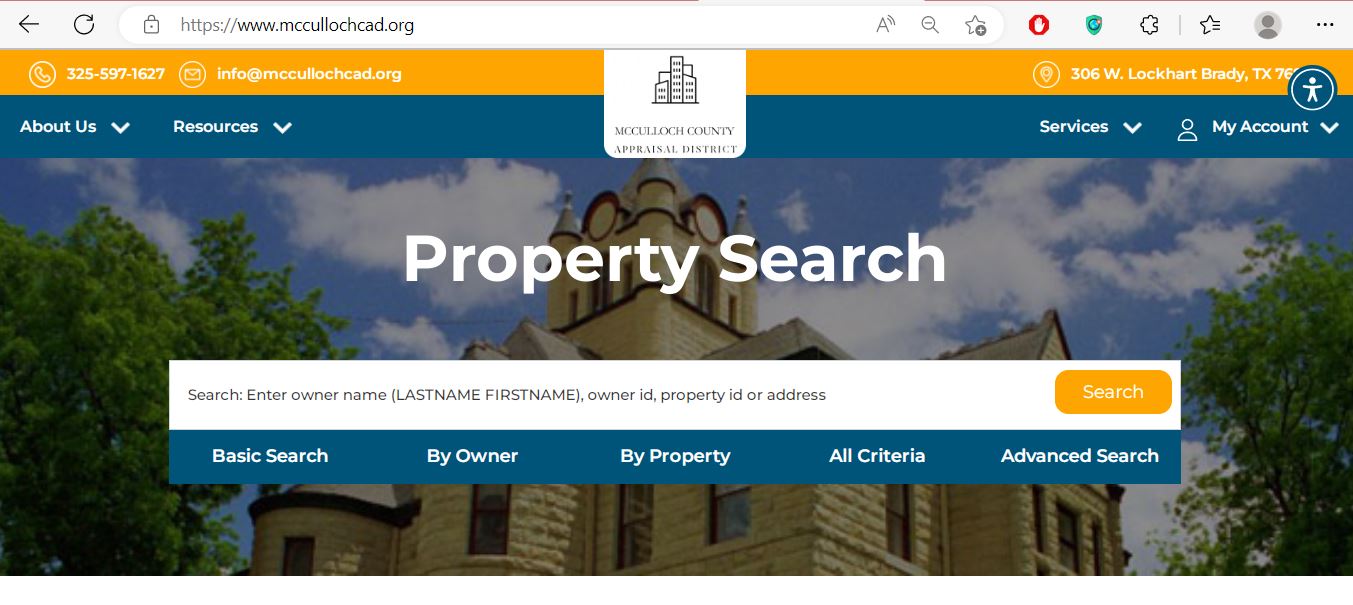
Practical image note: This image is only a visual guide. Open the live official record, select the correct property and use the Tax Summary button for payment details. Do not rely on screenshots alone for legal description, acreage or final tax-bill decisions.
McCulloch CAD 2026 Action Finder
Choose your situation and this helper will point you to the correct official route. It does not collect personal information.
McCulloch County Property Tax Payment: Do Not Create an Account
McCulloch CAD’s official site gives a very clear payment instruction: do not create an account to pay taxes online. Search for your property, select the correct property and click the Tax Summary button.
Search the property first
Open McCulloch CAD, search by owner, property ID, street name, legal description or another available field.
Select the exact property
Match owner name, property address, legal description, tax year and property type. Do not pay only because a similar name appears.
Click the Tax Summary button
Follow the official CAD instruction and use the Tax Summary button after selecting the property. Do not create an account unless the official office specifically instructs you to do so for another purpose.
Save payment proof
Keep the receipt, confirmation number, amount paid, tax year, payment date and screenshot. This helps if the online balance does not update immediately.
Payment safety warning: Do not pay from random ads, text-message links, email links or unofficial payment pages. Start from the official CAD website and follow the property search to Tax Summary route.
McCulloch CAD Forms: Homestead, Exemptions, Rendition and Property Changes
Use official McCulloch CAD forms for appraisal-related filings. This is important for homestead, over-65, disability, disabled veteran, agricultural/open-space, business personal property, rendition and protest-related documents.
| Your Situation | Likely Starting Point | What to Prepare |
|---|---|---|
| You own and occupy the home as your main residence | Residence homestead exemption | Property ID, owner details, property address, Texas driver license or state ID and correct tax year. |
| You are over 65, disabled, disabled veteran or surviving spouse | Matching exemption application | Proof documents, ownership information, ID and any required veteran/disability documentation. |
| You own ag, ranch or open-space land | Ag/open-space or special valuation form | Land-use history, acreage, maps, leases, production records, photos and supporting proof. |
| You own business personal property | Rendition form | Asset list, equipment, inventory, acquisition cost, business location, owner details and tax-year information. |
| CAD record has wrong details | Contact CAD with proof | Current record screenshot, deed/closing document, photos, survey, repair proof, or legal/supporting documents. |
Filing tip: Keep proof of every submission. Save screenshots, email confirmations, mailed tracking, stamped copies, portal receipts or payment confirmations.
How to Prepare a McCulloch CAD Protest
A protest should explain the exact appraisal issue. “My taxes are high” is not enough. Focus on market value, unequal appraisal, wrong property details, missing exemption, agricultural classification, business personal property value, mineral classification or condition problems.
Read the appraisal notice first
Check property ID, market value, tax value, property type, category, exemption status, protest instructions and protest deadline.
Compare the official CAD record
Review owner name, property ID, legal description, land acres, category code, improvements, property type, value history and any tax-due indicator.
Gather evidence that matches your issue
Evidence may include comparable sales, photos, repair estimates, closing statement, independent appraisal, land-use records, business asset list, mineral account documents or proof of incorrect CAD details.
Use the official online protest route if available
McCulloch CAD links to Online Protest from its official site. Follow the instructions on your notice and keep submission confirmation, screenshots or mailing proof.
Deadline warning: Always follow the protest deadline printed on your official Notice of Appraised Value or confirmed directly by McCulloch CAD. Evidence is useful only if the protest is filed on time.
Mineral, Utility, Industrial, Real Estate and Personal Property Notes
McCulloch CAD’s official site explains that different property groups are appraised through different workflows. Mineral, utility and industrial accounts are appraised for the district by Pritchard & Abbott. Real estate accounts are appraised by West Valuation and Consulting, LLC. Personal property is appraised locally by the district.
- Minerals
- Personal Property
- Real Estate
- Agricultural land
- Commercial and industrial property
- Utilities, pipelines and exempt property
- Final deed proof
- Legal survey
- Guaranteed acreage
- Mineral title proof
- Boundary or fence-line decision
- Probate or lien verification
Practical note: If your issue involves mineral ownership, deeds, liens, probate, legal acreage, title or boundaries, CAD records are not enough. Confirm with the proper records office, title company, surveyor or attorney.
McCulloch CAD vs Tax Assessor-Collector vs County Clerk
“Property records” can mean appraisal records, tax collection records or recorded legal documents. Use this table before calling.
| Your Question | Best Starting Point | Reason |
|---|---|---|
| What is my appraised value? | McCulloch CAD | The appraisal district determines market value and administers exemptions and special valuations. |
| Where do I search owner, field, category or value? | McCulloch CAD Property Search | The official search supports owner criteria, field search, category search and value search. |
| Where do I pay property taxes? | McCulloch CAD Tax Summary | The official CAD site says to search the property, select it and click Tax Summary to pay online. |
| Where do I file homestead, ag, rendition or protest forms? | McCulloch CAD Forms / Online Protest | Exemptions, special valuations, renditions and appraisal protests are CAD matters. |
| Where do I get vehicle title or registration help? | McCulloch County Tax Assessor-Collector | The county tax assessor-collector processes motor vehicle title transfers, registration and related state/county fees. |
| Where do I get deeds, liens, plats or probate records? | County Clerk / records office | Recorded legal documents are separate from CAD appraisal records and tax summary screens. |
Common McCulloch CAD Search Problems and Fixes
| Problem | Likely Reason | Try This |
|---|---|---|
| Owner name not found | Wrong name format, trust, estate, company, spouse name, initials or different spelling. | Use LASTNAME FIRSTNAME, last name only, owner ID, current owner field or previous owner field. |
| Address search fails | Rural address, street formatting, road suffix, legal-description property or situs/mailing mismatch. | Use street name only, property ID, legal description, abstract number, tract, lot, block or survey. |
| Too many results appear | Search term is too broad. | Use tax year, property type, category code, value search, land acres, abstract or field search to narrow results. |
| Payment page asks for account creation | You may be using the wrong route. | Return to the official CAD site, search the property, select it and click Tax Summary as the official notice says. |
| Mineral or utility record is hard to match | Mineral/utility/industrial accounts may use legal descriptions, abstract data, account IDs or owner/entity names. | Use Minerals property type, category search, legal description, abstract number, owner ID or contact CAD with supporting documents. |
Documents to Keep Ready Before Calling
A prepared call saves time, especially during appraisal notice, protest, exemption and payment periods.
- Owner name shown on the CAD record
- Property ID, account number or owner ID
- Legal description, abstract number, tract, lot, block or survey
- Property type: minerals, personal property or real estate
- Tax year you are asking about
- Appraisal notice, photos, maps, sales proof or exemption documents
- Property ID and owner name
- Tax year and amount due
- Tax Summary screenshot
- Payment confirmation if already paid
- Receipt or payment vendor confirmation
- Short written note explaining the issue
McCulloch CAD Phone Number, Tax Assessor-Collector and Map
Brady, TX 76825-4113
Phone: 325-597-1627
Fax: 325-597-2408
Email: info@mccullochcad.org
Chief Appraiser: Zane Brandenberger
302 W. Commerce
Brady, TX 76825
Phone: 325-597-7607
Fax: 325-597-8306
Email: scampos@co.mcculloch.tx.us
Office Hours: Monday-Thursday 8:00 AM-4:50 PM; Friday 8:00 AM-3:00 PM
No title work after 4:30 PM
Important office note: Use McCulloch CAD for appraisal records, property-tax search, tax summary payment route, exemptions and protests. Use the Tax Assessor-Collector for vehicle title, vehicle registration and county assessor-collector office services.
McCulloch County Appraisal District FAQs
What is the official McCulloch County Appraisal District website?
The official website is mccullochcad.org. Use it for property search, forms, online protest, interactive map, records/data/reports, protest hearings, useful links and tax transparency.
How do I search McCulloch County property records?
Use the official McCulloch CAD property search. It supports owner criteria, field search, category search, value search, tax-year filters, tax-due filters and property type filters such as Minerals, Personal Property and Real Estate.
Where is McCulloch County Appraisal District located?
McCulloch County Appraisal District is located at 306 W. Lockhart St., Brady, Texas 76825-4113.
What is the McCulloch CAD phone number?
The McCulloch CAD phone number is 325-597-1627. The fax number is 325-597-2408 and the official email listed by the Texas Comptroller is info@mccullochcad.org.
Who is the McCulloch CAD chief appraiser?
The Texas Comptroller directory lists Zane Brandenberger as Chief Appraiser for McCulloch County Appraisal District.
Can I pay McCulloch County property taxes online?
Yes. The official CAD site says not to create an account to pay taxes online. Search for the property, select the property and click the Tax Summary button.
Does the McCulloch County Tax Assessor-Collector collect property taxes?
The Texas Comptroller says the McCulloch County Tax Assessor-Collector does not collect property taxes. When the county tax assessor does not collect, the appraisal district may be responsible for collecting some or all local property taxes.
Can I file a McCulloch CAD protest online?
McCulloch CAD links to Online Protest from the official website. Follow the instructions and deadline printed on your official Notice of Appraised Value.
Who appraises mineral and industrial accounts for McCulloch CAD?
The official McCulloch CAD site says mineral, utility and industrial accounts are appraised by Pritchard & Abbott, real estate accounts by West Valuation and Consulting, LLC, and personal property locally by the district.
Is AppraisalDistrict.org the official McCulloch CAD website?
No. AppraisalDistrict.org is an independent informational guide. Always verify values, payments, forms, deadlines, maps and procedures with McCulloch CAD, McCulloch County offices or Texas Comptroller resources.
Independent Guide and Verification Notice
AppraisalDistrict.org is not the official McCulloch County Appraisal District website. This page is an independent guide created to help property owners find official resources faster and understand which office handles which task.
Always confirm property values, exemptions, protest deadlines, tax due, payment status, forms, mineral/personal/real property records, legal descriptions, map data and office procedures directly with McCulloch CAD, McCulloch County offices or Texas Comptroller resources before taking action.

Founded by Mahesh Kumar, AppraisalDistrict.org is built on the belief that public information should be accessible and accurate. We have replaced AI-generated ‘fluff’ and automated scraping with 100% manual human verification. With over 15 years of experience in real estate and digital journalism, we help you find the right data without the frustration of broken links.
Search Smarter, Estimate Taxes, Check Exemptions and Prepare for a Protest
Use this free tool before you visit a county appraisal district, property search portal, tax office, or exemption page. It helps you understand property value, taxable value, possible savings, protest value, and the next official step.
What do you need help with today?
Choose your main reason for visiting. The tool will show the best next step and quick estimate.
Use this tool to check your appraisal notice, exemption savings, protest value, and official next step.
Use the tax calculator before trusting only the sale price or mortgage estimate.
Property Search Helper
Use this when a county property search portal is confusing. It shows which search method is usually best.
Property Tax Estimate Calculator
Estimate annual property tax using appraised value, assessment ratio, exemptions, and combined tax rate.
Homestead and Exemption Savings
Estimate how much a homestead, senior, disability, veteran, or local exemption may reduce tax.
Appraisal Notice Review
Compare last year value with this year value and see whether the increase deserves closer review.
Property Tax Protest Savings
Estimate possible savings if your appraised value is reduced after protest, correction, evidence review, or appraisal review board hearing.
Property Tax Protest and Exemption Checklist
Use this checklist before you file a protest, apply for exemption, or call the appraisal district.
Before calling, write your property ID, owner name, property address, and question on paper. It saves time.
Do not call the CAD to pay tax bills unless the local article says they collect taxes. In many counties, the tax office collects payment.
Official Resource Finder
Enter county and state to create safe searches for official CAD pages, property search, tax payment, exemptions, maps, forms, and protest help.
CAD vs Tax Office
- Appraisal District: value, exemptions, ownership records, maps, protest.
- Tax Office: tax bill, payment, receipt, delinquent balance, penalty.
Best place to use this
Add this tool after the first major content section or before the FAQ area. It gives visitors a reason to interact before leaving the page.
Important estimate note
This tool gives educational estimates only. Final values, exemptions, tax rates, bills, payments, and deadlines must be confirmed with official county sources.