
Match the Madison County Parcel Before You Search, Protest or Pay
Use Madison County Appraisal District for appraisal values, property characteristics, owner lookup, maps, exemptions, agricultural appraisal, business personal property, mineral accounts, notices and protests.
Use the Madison County Tax Office for property-tax balances, payments and receipts. Use the County Clerk when you need a recorded deed, lien, release, plat or property-fraud alert.
Property ID or geographic ID is usually the strongest match.
808 State Street, Madisonville, Texas 77864.
May 15 or 30 days after notice mailing, whichever is later.
$140,000 for a qualifying principal residence.
Local links and procedures reviewed July 2026.
What do you need from the Madison County property record?
Confirm the situs, legal description, improvements, exemptions and taxing units.
Follow the property-search workflowCounty-road and acreage records may not search like a normal city address.
Use the rural-land checklistReview land use, acreage, application status and supporting production records.
Prepare the agricultural fileReal, personal, mineral, auto and mobile-home accounts can appear separately.
Search specialised accountsFocus on value, equality, acreage, condition, exemption, classification or ownership.
Build a focused evidence packetUse the Tax Office for payment and County Clerk records for legal ownership.
Choose the controlling officeSelect your task and open the correct Madison County service
Search by owner, address, ID or advanced criteria and verify the complete appraisal account.
Open official property searchUse the saved Madison County image as a starting point—not the final record
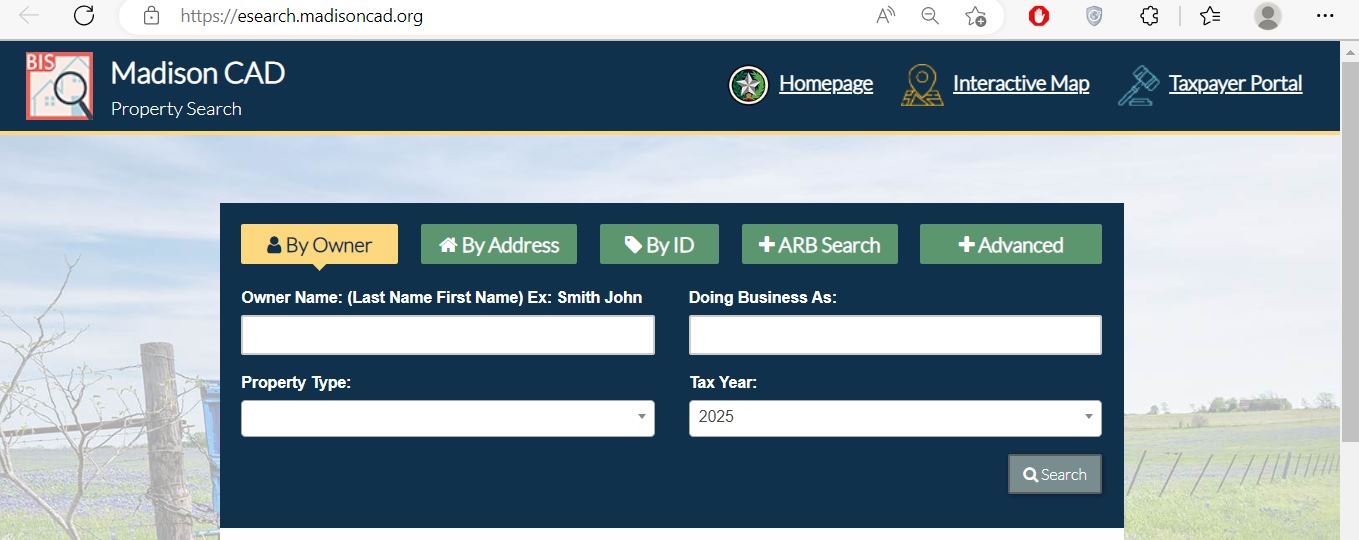
Search Madison County property records step by step
Choose the strongest Madison CAD search field
| Search field | Best use | What to enter | Common mistake |
|---|---|---|---|
| Owner name | Person, trust, estate or business lookup. | Last name first or one distinctive entity word. | Entering punctuation or a complete name that differs from the CAD format. |
| Doing Business As | Find a business using a trade name. | The DBA or one distinctive business-name word. | Searching only the legal entity name. |
| Street number and name | Homes, city lots and addressed commercial property. | Street number or street name without unnecessary suffixes. | Entering a complete mailing address with city, state and ZIP. |
| Property ID | Open one specific appraisal account. | The number shown on the CAD record or appraisal notice. | Using a separate Tax Office account number. |
| Owner ID | Find accounts associated with one appraisal owner record. | The owner identifier shown by CAD. | Assuming it is the parcel or payment account. |
| Geographic ID | Parcel, map, rural and legal-description research. | The geographic reference from the appraisal account. | Treating the ID as a surveyed boundary description. |
| Abstract | Ranch, agricultural and older rural-property records. | The abstract name or number. | Expecting every tract to have a normal street address. |
| Subdivision or condo | Platted lots, phases and condominium accounts. | The official subdivision or condominium name. | Selecting a similar phase without checking lot and block. |
| Property type | Separate Real, Personal, Mineral, Auto and Mobile Home accounts. | Choose the category matching the property. | Opening the surface account when searching a mineral interest. |
| ARB Search | Research protest status, dates, agent or hearing information. | Available protest or hearing criteria. | Using ARB Search for an ordinary property lookup. |
Fix a missing, duplicated or confusing Madison CAD result
| Problem | Likely reason | Practical fix |
|---|---|---|
| Owner search returns nothing | The account may use a trust, estate, spouse, company, initials or different name order. | Use only the first or last name, then narrow with ID or address. |
| Address search fails | Street suffix, direction, county-road format or mailing/situs difference. | Use only the street name, then try owner, ID, abstract or map. |
| Too many accounts appear | The owner may have several real, personal, mineral or mobile-home accounts. | Add property type, geographic ID, abstract, subdivision or tax year. |
| Recently purchased property shows the seller | The recorded deed may still be processing into the appraisal system. | Confirm the deed recording and provide its instrument details to CAD. |
| Rural tract has no useful address | The account may be indexed by abstract, owner, legal description or geographic ID. | Use Advanced Search and the interactive map. |
| Mobile home cannot be found | The home may have a separate account or park-based search route. | Select Mobile Home and use owner, property ID or mobile-home park. |
| CAD value differs from the tax bill | Market, appraised and taxable values differ, and tax systems add rates, payments and penalties. | Use CAD for value questions and the Tax Office for collection questions. |
| Exemption does not appear | The filing may be pending, incomplete, denied or applied to another year. | Find the submission proof and contact CAD with the property ID and year. |
Search Madison County acreage when the mailing address is not enough
Choose the property type before comparing owners or values
Search the owner, property type, property ID, geographic information and tax year separately from the surface estate.
Use owner, DBA, situs and property type to locate business furniture, inventory, machinery or equipment.
Search owner, property ID, mobile-home park and property type instead of relying only on the land address.
| Field | Why it matters | What it does not prove |
|---|---|---|
| Property type | Separates real, personal, mineral, auto and mobile-home accounts. | Complete legal ownership or title. |
| Property ID | Identifies the individual appraisal account. | That another related account does not exist. |
| Owner or DBA | Shows the owner carried for appraisal administration. | Clear title, lease rights or every fractional interest. |
| Tax year | Values and ownership details may change each year. | Future value or future production. |
| Geographic or legal information | Connects the account to a location, tract or appraisal area. | A surveyed boundary or mineral-title conclusion. |
Use the Madison CAD map for location context—not legal boundaries
- Locate rural or county-road property
- Compare nearby appraisal parcels
- Confirm subdivision or abstract context
- Identify the likely property-search result
- Review general parcel shape
- Legal boundary lines
- Recorded easements
- Legal access
- Survey acreage
- Mineral ownership
- Title disputes
Use the portal for property documents and electronic communications
Madison CAD’s Taxpayer Portal provides access to enrolled property details, electronic communication choices, important documents and supported applications from one account.
Understand market, appraised and taxable value before protesting
CAD’s opinion of what the property would sell for under normal conditions as of January 1.
The value after an applicable homestead cap, circuit breaker or special appraisal.
The value remaining after exemptions for a particular taxing unit.
| Value or field | What it explains | Practical next step |
|---|---|---|
| Land market value | CAD’s market appraisal of the land before a productivity appraisal. | Check acreage, land class, access and comparable land sales. |
| Improvement value | The appraised contribution of houses, buildings and other improvements. | Check size, class, condition, age and completion percentage. |
| Productivity value | A special appraisal for qualifying agricultural, wildlife or open-space land. | Verify qualifying use, acreage and application status. |
| Appraised value | The value after an applicable limitation or special appraisal. | Compare it with market value and the prior-year appraised value. |
| Taxable value | The amount remaining after unit-specific exemptions. | Use the Tax Office account for the official bill. |
Apply the school exemption and local exemptions to the correct taxing units
Prepare ownership, principal-residence occupancy and required Texas identification information.
Review the additional school exemption, tax ceiling, instalments and possible deferral.
Prepare qualifying disability documentation and verify the applicable school and local relief.
Use the application matching the disability rating, unemployability or surviving-spouse category.
Prepare ownership affidavits, death records, probate documents and principal-residence evidence.
Check Madison CAD’s entity-specific exemption page because city, county and school relief can differ.
Homestead filing checklist
Use 2025 adopted rates only as historical planning inputs
| Taxing entity | 2025 adopted rate | How to use it |
|---|---|---|
| City of Madisonville | $0.693900 | Apply only when the property is inside the applicable city taxing boundary. |
| City of Normangee | $0.206824 | Apply only to property within the applicable Normangee city jurisdiction. |
| Madison County | $0.500000 | Multiply the county taxable value by the rate divided by 100. |
| Madisonville CISD | $0.855200 | Apply to the school taxable value after applicable school exemptions. |
| Normangee ISD | $1.146900 | Confirm the property lies in this school district before calculating. |
| North Zulch ISD | $0.895100 | Apply to the unit-specific taxable value shown for the property. |
Document qualifying use instead of relying on a rural address or acreage alone
Open-space agricultural or wildlife appraisal is based on qualifying land use and productive capacity. It is not a fixed-dollar exemption and is not automatically granted because the property is rural.
Document livestock, grazing, crops, hay, beekeeping or another qualifying local use.
Prepare the wildlife-management plan, prior qualifying use and annual activity records.
Retain leases, payment records, stocking information and evidence of actual agricultural activity.
Evidence to collect before filing
Use the 2026 depreciation schedule with a complete asset list
Businesses generally render taxable inventory, furniture, fixtures, machinery, equipment and other income-producing personal property owned or managed on January 1.
| Rendition item | What to organise | Why it matters |
|---|---|---|
| Business identity | Legal name, DBA, owner, mailing address and physical situs. | Connects the rendition to the correct account. |
| Asset list | Equipment, machinery, furniture, fixtures, tools and taxable vehicles. | Supports classification and valuation. |
| Acquisition history | Original cost, purchase year and disposal information. | Helps apply depreciation and verify current ownership. |
| Inventory | Applicable quantities, values and supporting records. | Inventory can materially affect taxable value. |
| Leased property | Owner, lessee, contract and physical location. | Helps prevent duplicate or omitted reporting. |
| Supporting evidence | Fixed-asset schedule, invoices, photographs and prior renditions. | Supports questions, corrections and protests. |
File by the notice deadline, preserve proof and then organise the evidence
Evidence ideas by property type
Comparable sales, dated photographs, repair estimates, measurements and incorrect feature evidence.
Land sales, access, terrain, water, fencing, land class, deed acreage and survey evidence.
Ownership interest, production, reserves, pricing assumptions and specialist appraisal evidence.
Rent roll, leases, expenses, vacancy, condition and income-capitalisation information.
Asset cost, age, condition, disposal records, obsolescence and depreciation.
Similarly situated accounts with important differences identified and adjusted.
Prepare the formal hearing before the appointment date
The ARB hears unresolved appraisal protests and issues a written order for the property and tax year.
Lead with the requested result and strongest property-specific evidence.
Save the written order immediately because later arbitration, SOAH or court deadlines can be short.
ARB hearing checklist
Use Madison CAD, the Tax Office or County Clerk correctly
| Your question | Best official office | What to prepare |
|---|---|---|
| Why did the value change? | Madison CAD | Property ID, tax year, notice and disputed property details. |
| Is my exemption active? | Madison CAD | Application confirmation, identification and qualification date. |
| Does my land have agricultural appraisal? | Madison CAD | Acreage, land-use history, application and production evidence. |
| How much tax is due? | Madison County Tax Office | Tax account, property ID, owner, year and bill. |
| Did my payment post? | Madison County Tax Office | Receipt, confirmation number, amount, date and account. |
| Who legally owns the property? | Madison County Clerk or title professional | Grantor, grantee, legal description and recording period. |
| Where is the legal boundary? | Recorded deed, plat and licensed surveyor | Current deed, prior survey and title documents. |
| Who owns the minerals? | County Clerk, attorney or mineral-title professional | Mineral deeds, reservations, assignments, probate and leases. |
Move from the appraisal account to the Madison County tax ledger
| Issue | General rule | Action |
|---|---|---|
| Tax bill | Property-tax statements are generally due upon receipt. | Search the Tax Office account if no statement arrives. |
| Normal payment date | January 31 is the usual deadline when the bill was timely mailed. | Use the date printed on the official statement. |
| 2026 tax-year weekend | January 31, 2027 is Sunday, so the next-business-day rule generally makes Monday, February 1 the timely date. | Retain payment proof and confirm the Tax Office’s instructions. |
| Late original bill | A bill mailed after January 10 may receive a later delinquency date. | Follow the date printed on the actual bill. |
| Missing statement | Not receiving a bill does not normally cancel the tax, lien, penalty or interest. | Keep the CAD mailing address current and check the account independently. |
| Delinquent payoff | Penalty, interest and collection fees change over time. | Request the live payoff instead of calculating from an old bill. |
Use Madison County Clerk records for legal document history
| Requirement | Published information | Practical action |
|---|---|---|
| Document condition | Documents must be prepared, signed and notarised before presentation. | The Clerk cannot prepare a deed or provide legal advice. |
| Original or certified copy | The office accepts original or certified documents for recording, not ordinary copies. | Confirm that the document is recordable before travelling. |
| Photo identification | Effective December 4, 2025, a person presenting a real-property document in person must provide photo identification. | Bring current government-issued photo ID. |
| Recording cutoff | Official Public Records recording ends at 3:30 PM each business day. | Arrive well before the cutoff for deadline-sensitive documents. |
| Mailed documents | A self-addressed stamped envelope is required to return the recorded document. | Confirm the fee and return address before mailing. |
| Legal conclusions | The Clerk records documents but does not determine clear title or legal ownership. | Use an attorney or title company for title conclusions. |
Use Madison CAD reports when one property page is not enough
Review district activity, tax-base information and appraisal operations.
Review the district’s appraisal models, methods, schedules and sales analysis.
Understand appraisal cycles, field review, data collection and property-class procedures.
Use the published depreciation schedule when preparing business-property evidence.
Review separate notice sets and confirm whether a newer tax-year posting is available.
Review exemption, rendition, productivity-appraisal and protest information together.
Important Madison County appraisal and tax dates
Madison CAD, Tax Office and County Clerk details
Madisonville, Texas 77864
Mailing: P.O. Box 1328, Madisonville, Texas 77864
Phone: (936) 348-2783
Fax: (936) 348-6188
Email: madisoncad@madisoncad.org
Hours: Monday-Friday, 8:00 AM-4:30 PM.
Chief Appraiser: Randy Dudley
Karen M. Lane
101 W. Main Street, Room 102Madisonville, Texas 77864
Mailing: P.O. Box 417, Madisonville, Texas 77864
Phone: (936) 348-2654
Fax: (936) 348-2655
Email: karen.lane@madisoncountytx.org
Hours: Monday-Friday, 8:00 AM-4:30 PM.
Adrian Lawson
103 W. Trinity Street, Suite 104Madisonville, Texas 77864
Phone: (936) 241-6210
Fax: (936) 241-6211
Hours: Monday-Friday, 8:00 AM-12:30 PM and 1:30-4:30 PM.
Official Public Records recording ends at 3:30 PM.
Use the portal to connect property details, review documents, manage supported applications and request electronic communications.
Open Madison CAD Taxpayer PortalMadison County property resources
Official district notices, tax information, forms, reports and contact details.
Open Madison CADSearch owner, address, ID, abstract, subdivision, property type and ARB details.
Open property searchAccess property details, documents, applications and electronic communications.
Open taxpayer portalReview parcel location and nearby appraisal-property context.
Open interactive mapFile or manage an eligible appraisal protest and retain confirmation.
Open Online ProtestDownload exemption, agricultural, wildlife, rendition, protest and miscellaneous forms.
Open forms libraryReview annual, mass-appraisal and reappraisal-plan documents.
Open CAD reportsFind the official tax balance, payment history and online-payment route.
Open tax searchSearch deeds, liens, releases, plats and property-document history.
Open County ClerkHow this Madison County guide was rebuilt

Existing images preserved with deeper official-source workflows
This regenerated article preserves the Madison County property-search and editor images while replacing the earlier short guide with detailed search-field instructions, rural-land guidance, mineral and mobile-home research, 2026 portal help, exemptions, business rendition, protest evidence, tax-payment verification, recorded-document research and property-fraud protection.
Official resources reviewed include Madison County Appraisal District, its property search, Taxpayer Portal, forms, calendar, reports, mineral and industrial notice page, Madison County Tax Office, Madison County Clerk and Texas Comptroller property-tax information.
AppraisalDistrict.org is an independent informational website and is not operated by Madison County Appraisal District or Madison County.
10 common Madison County Appraisal District questions
1. What is the official Madison County Appraisal District website?
The official website is madisoncad.org. Use it for property search, maps, forms, reports, exemptions, electronic communications and protest resources.
2. How do I search Madison County property records?
Open the official Madison CAD property search. Search by owner, address, ID or Advanced Search.
3. Why does an owner or address search return no result?
Try only the owner’s first or last name or only the street name. Rural land, trusts, estates, businesses and mobile homes may require property ID, geographic ID, abstract, subdivision or map search.
4. Can I search Madison County mineral property?
Yes. Select Mineral under property type and compare the owner, property ID, geographic ID, legal information and tax year. The mineral account can be separate from the surface estate.
5. Can I file a Madison County property-tax protest online?
Madison CAD provides an official Online Protest portal. Available functions can depend on the property account and appraisal notice.
6. What is the Madison County protest deadline for 2026?
Most protests are due by May 15 or 30 days after Madison CAD mails the Notice of Appraised Value, whichever is later. Use the deadline printed on the individual notice.
7. What is the 2026 Texas school homestead exemption?
A qualifying residence homestead receives a $140,000 school-district exemption. A qualifying age-65 or disabled homeowner receives an additional $60,000 school exemption.
8. Where do I pay Madison County property taxes?
Use the Madison County Tax Office property-search portal. Confirm the account, owner, tax year, units, balance and checkout fee before paying.
9. Does the owner shown by Madison CAD prove legal ownership?
No. Use the Madison County Clerk’s real-property records for recorded deeds, liens, releases, plats and legal document history.
10. Where is Madison County Appraisal District located?
The office is at 808 State Street, Madisonville, Texas 77864. The published phone number is (936) 348-2783, and published hours are 8:00 AM-4:30 PM, Monday-Friday.