Follow a Hemphill County Property From Search Result to the Right Official Action
Use Hemphill County Appraisal District when you need an owner record, property ID, appraisal value, exemption, interactive map, mineral account, business personal property account, agricultural application or property-tax protest.
Use the Hemphill County Tax Assessor-Collector for tax statements, amounts due, payments, receipts and delinquent balances. Use the County Clerk when you need a recorded deed, lien, plat, probate document or legal property record.
Use the property ID or owner ID when available.
Filter Real, Mineral or Personal property accounts.
102 N. 5th Street, Canadian, Texas 79014.
Call 806-323-8022 for appraisal questions.
Local resources reviewed July 2026.
What do you need from the Hemphill County property record?
Use the search tab that matches the information you have, then confirm the tax year and property category.
Follow the property-search stepsMineral accounts may use owner IDs, property IDs or legal descriptions rather than normal street addresses.
Search mineral accountsConfirm the account, tax year, balance, payment route and receipt with the Hemphill County Tax Assessor-Collector.
Review the tax-payment routePrepare the property ID, ownership details, identification and supporting qualification documents.
Choose the correct applicationSeparate market value, unequal appraisal, property-description, exemption, agricultural and mineral issues.
Prepare a focused protestA CAD owner record does not replace a deed, title search, probate record or professional survey.
Check County Clerk recordsSearch Hemphill County appraisal records using the strongest available detail
Use the Hemphill CAD search image as a field-by-field guide
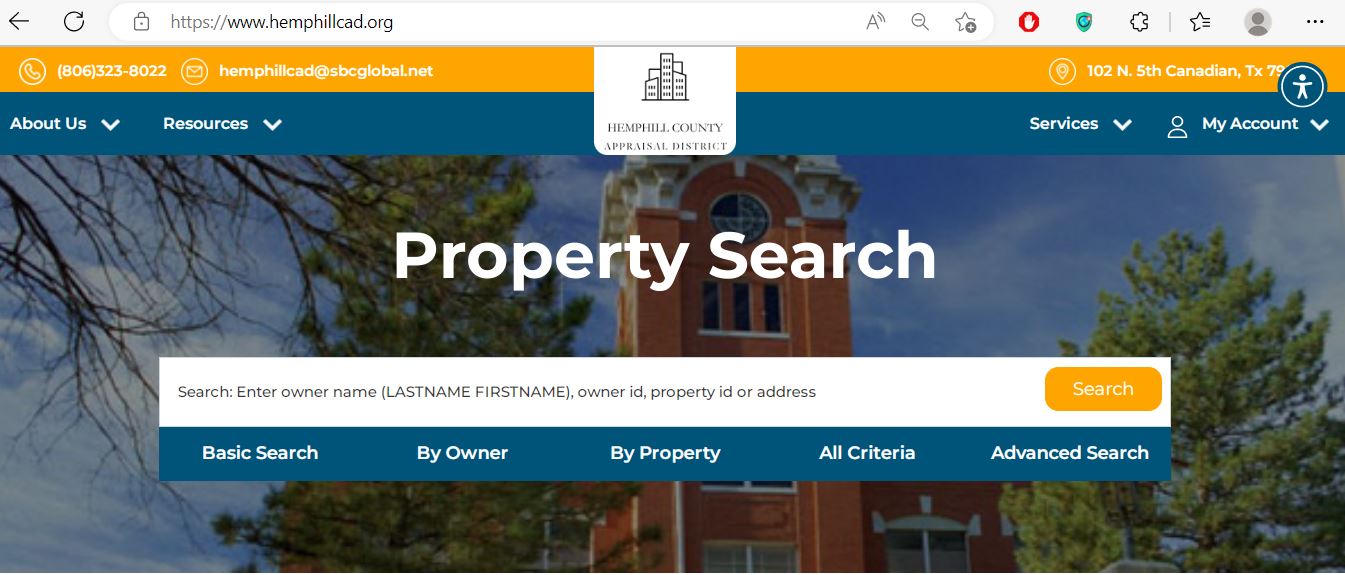
Enter an owner name in LASTNAME FIRSTNAME format, owner ID, property ID or simplified address.
Use this for the quickest broad search when you have one reliable keyword or identifier.
Use this when researching a person, trust, estate, company or mineral-interest owner.
Use this for an account, property ID, address or known property detail.
Combine search details when one broad field returns too many properties.
Use additional filters for broader ownership, mineral, business or land research.
Use the interactive map for rural land and parcel context
Understand what the Hemphill CAD record does—and does not—prove
| Field | What it helps identify | What it does not prove | Best next step |
|---|---|---|---|
| Property ID | The appraisal account maintained by Hemphill CAD. | That every county system uses the same identifier. | Save it for CAD, protest and tax-office questions. |
| Owner ID | An owner record that may connect several real, mineral or personal property accounts. | That every account belongs to the same legal estate or transaction. | Open and verify each account separately. |
| Owner name | The owner carried in the appraisal system. | Current legal title, lien status or mineral ownership. | Use County Clerk and title records when ownership matters. |
| Property type | Whether the account is classified as Real, Mineral or Personal property. | That every asset or interest is correctly classified. | Contact CAD with documentation when the category appears incorrect. |
| Legal description | The appraisal system’s subdivision, tract, survey, abstract or mineral description. | A complete deed description, surveyed boundary or mineral title. | Compare it with recorded documents. |
| Land details | Acreage, land class, use and appraisal characteristics shown by CAD. | Surveyed acreage or continued agricultural qualification. | Verify acreage and use evidence. |
| Improvements | Buildings and other improvements used in appraisal. | That area, condition, age, class or completion is correct. | Document factual errors with measurements and photographs. |
| Market value | CAD’s market-value opinion as of January 1. | A guaranteed sale price or final tax bill. | Compare sales, condition and equal-appraisal evidence. |
| Appraised value | The value after an applicable appraisal limitation. | The taxable value for every taxing unit. | Continue to exemptions and taxable value. |
| Tax-due indicator | A search-system indication that tax may be due. | The live payoff, penalties or payment status. | Confirm with the Tax Assessor-Collector. |
Choose Real, Mineral or Personal property before interpreting the result
Real property
Land, homes, ranch tracts, commercial buildings and other real-estate improvements.
Best search details: property ID, owner, address, legal description or map location.
Mineral property
Mineral interests can appear as separate accounts and may not share a normal street address with the surface estate.
Best search details: owner ID, property ID, owner name, lease, operator or legal description where available.
Personal property
Business equipment, machinery, inventory and other taxable personal property can have a separate account.
Best search details: business or entity name, owner ID, property ID and situs information.
Separate market value, appraised value and taxable value
Hemphill CAD’s opinion of market value as of January 1 for the tax year.
The value after an applicable limitation, special appraisal or statutory calculation.
The remaining value after applicable exemptions for each taxing unit.
Fix common Hemphill CAD search problems
| Problem | Likely reason | What to try |
|---|---|---|
| Owner name returns nothing | The portal may use LASTNAME FIRSTNAME, a spouse, trust, estate, company or different spelling. | Use the last name only, entity name, owner ID or Advanced Search. |
| Address search fails | Rural land, mineral accounts and legal-description parcels may not have a normal situs address. | Search by property ID, owner ID, owner name or legal description. |
| Too many results | The keyword is broad or the owner has several account types. | Add tax year, property type, address, owner ID or property ID. |
| Mineral account cannot be matched | The account may use an entity, lease, operator, division-order owner or legal description. | Filter Mineral and search owner ID, property ID or a shorter name. |
| Business account is missing | The record may be classified as Personal property and indexed under a legal business name. | Filter Personal and search the entity name or property ID. |
| Recently purchased property shows the seller | The deed may still be processing into the appraisal system. | Confirm recording with the County Clerk and provide CAD the instrument information. |
| Tax-due information is unclear | CAD search and tax-collection records serve different purposes. | Contact the Hemphill County Tax Assessor-Collector for the live balance. |
| Map acreage looks wrong | The map is an appraisal tool and may not display a legal surveyed boundary. | Compare the deed, plat or survey and contact CAD about an appraisal-record error. |
Send each Hemphill County property question to the correct office
| Your task | Correct starting point | What to prepare |
|---|---|---|
| Search owner, property ID or value | Hemphill CAD | Owner, ID, address, property type and year. |
| Correct land or improvement details | Hemphill CAD | Measurements, photographs, survey or other evidence. |
| Apply for an exemption | Hemphill CAD | Application, ID, ownership and qualification evidence. |
| Apply for agricultural appraisal | Hemphill CAD | Land-use history, acreage, production, leases, maps and evidence. |
| File a property protest | Hemphill CAD / Appraisal Review Board | Notice, account, evidence and timely filing proof. |
| Pay or verify property taxes | Hemphill County Tax Assessor-Collector | Account, owner, year, amount and payment details. |
| Obtain a deed, lien or probate record | Hemphill County Clerk | Names, dates, legal description and instrument number. |
| Determine legal title or mineral ownership | Title professional or qualified attorney | Recorded chain of title, probate and mineral documents. |
Correct the specific system that contains the error
Use Hemphill CAD forms for homestead and other exemption requests
Hemphill CAD’s forms page provides exemption information, a residence-homestead application, agricultural forms, personal-property rendition forms and access to additional Texas Comptroller forms.
Use this for a qualifying principal residence. Confirm ownership, occupancy and identification requirements.
Review the additional exemption, school-tax ceiling and any available instalment options.
Prepare the required disability evidence and verify qualification dates.
Use the application matching the veteran or surviving-spouse category and attach the required documentation.
Heir-property and inherited-home situations may require additional ownership affidavits or supporting records.
Religious, charitable, public-use and other exemptions have separate eligibility and evidence requirements.
Prepare these items before filing
Prepare a Hemphill County agricultural appraisal application with land-use evidence
Hemphill CAD provides the Application for 1-d-1 Open-Space Agricultural Use Appraisal. Qualification depends on statutory requirements and the property’s agricultural use—not simply on owning rural acreage.
Document the agricultural activities carried out on the property and the relevant time period.
Identify the tract, total acreage, excluded areas, improvements and the acreage used for qualifying activity.
Prepare stocking, sales, receipts, leases, photographs, management records or other production evidence.
When applicable, prepare the wildlife plan, prior agricultural qualification and evidence of required practices.
Report changes promptly and ask how they may affect continued qualification or additional tax exposure.
Keep the completed form, attachments, delivery evidence and any correspondence requesting more information.
Match a Hemphill County rendition to the correct Personal property account
Build a Hemphill CAD protest around the exact disputed issue
Evidence checklist by dispute type
| Issue | Useful evidence | Common mistake |
|---|---|---|
| Residential or commercial market value | Comparable sales, closing statement, appraisal, photographs and repair estimates. | Using properties that are not similar in size, location, use or condition. |
| Unequal appraisal | Comparable CAD accounts with similar property characteristics and adjusted values. | Comparing only sale prices rather than appraisal treatment. |
| Ranch or agricultural land | Land-use history, leases, production, stocking, maps, photographs and management records. | Arguing only that the land is outside the city or undeveloped. |
| Mineral value | Ownership details, production, decline, operator records and relevant economic information. | Assuming the surface tract and mineral account are the same property interest. |
| Business personal property | Asset list, acquisition date, cost, depreciation, disposal and condition records. | Submitting totals without identifying the individual assets. |
| Incorrect property facts | Measurements, survey, plans, dated photographs, permits and written explanation. | Challenging the total value without first correcting the factual input. |
Prepare for a Hemphill County Appraisal Review Board hearing
Use the Hemphill County Tax Office for the live amount due
Use Hemphill County Clerk records for deeds, liens, plats and probate
The owner shown in a CAD account is useful for appraisal research but is not a complete title determination. Recorded county documents are needed when legal ownership, liens, probate or conveyance history matters.
Search grantor, grantee, recording date, instrument information and legal description.
Review recorded lien and release documents rather than relying on the appraisal account.
Use recorded plats and surveys for subdivision and legal-boundary research.
Inherited property may require probate, heirship or estate documents before CAD ownership changes.
Mineral deeds, reservations, assignments and probate records can differ from surface ownership.
Ask the County Clerk which copy type is required for the intended filing or transaction.
Check these records before buying or inheriting Hemphill County property
Match the appraisal account with the deed, legal description and map location.
A property owner may have separate Real, Mineral and Personal property accounts.
Ask the Tax Office about current and delinquent taxes before closing or distributing an estate.
A seller’s homestead, age exemption, ceiling or appraisal limitation may not transfer to the buyer.
Determine whether the land is qualified and whether a change in use could create additional tax.
Do not assume purchase of the surface includes every mineral interest shown in CAD records.
Check CAD area, age, class, condition and improvements against the physical property.
Review deeds, liens, easements, probate documents and releases with appropriate professional help.
Keep the deed, title policy, survey, tax certificate, closing statement and exemption confirmation.
Important Texas property-tax dates for Hemphill County owners
Hemphill County Appraisal District and Tax Office details
Canadian, Texas 79014-2212
Phone: 806-323-8022
Fax: 806-323-8430
Email: hemphillcad@sbcglobal.net
Published hours: Monday-Friday, 8:00 AM-5:00 PM.
Chief Appraiser listed by the current guide: Pam Scates.
Canadian, Texas 79014
Mailing: P.O. Box 959, Canadian, Texas 79014
Phone: 806-323-6661
Fax: 806-323-9745
Email: chris@hemphillco.com
Published hours: Monday-Friday, 8:00 AM-5:00 PM.
Tax Assessor-Collector: Chris Jackson.
Complete Hemphill County property action centre
Start here for appraisal district announcements, services and office information.
Open official Hemphill CADSearch owner, owner ID, property ID, address and property type.
Search property recordsReview approximate parcel location and surrounding appraisal context.
Open interactive mapDownload homestead, agricultural, rendition and other property-tax forms.
Open forms libraryUse the official electronic route when the account and notice qualify.
Open Online ProtestReview public appraisal data and reports made available by the district.
Open records and reportsReview hearing information provided through the appraisal district website.
View protest hearingsVerify tax statements, payments, receipts and collection questions.
Open the Tax OfficeResearch deeds, liens, plats, probate documents and recorded records.
Open County Clerk informationHow this Hemphill County guide was rebuilt

Independent research with the original article image preserved
This version retains the Hemphill CAD search image already published in the existing article and places it inside a practical search walkthrough. The article has been rebuilt to explain property types, account fields, maps, exemptions, agricultural appraisal, renditions, protests, taxes, deeds and local troubleshooting.
Official resources reviewed include Hemphill County Appraisal District, Hemphill County Tax Assessor-Collector, Hemphill County government and the Texas Comptroller property-tax directory and forms.
AppraisalDistrict.org is an independent informational website and is not operated by Hemphill County Appraisal District or Hemphill County.
10 common Hemphill County Appraisal District questions
1. What is the official Hemphill County Appraisal District website?
The official website is hemphillcad.org. It provides property search, forms, online protest access, an interactive map, appraisal reports and district contact information.
2. How do I search Hemphill County property records?
Open the official property search and choose Basic Search, By Owner, By Property, All Criteria or Advanced Search. Search by owner name, owner ID, property ID or address, then select the correct year and property type.
3. Can I search Hemphill County mineral property records?
Yes. Select the Mineral property filter. Mineral accounts may be easier to locate using the owner name, owner ID, property ID, entity name or legal description than a street address.
4. Where do I pay Hemphill County property taxes?
Contact the Hemphill County Tax Assessor-Collector. The Tax Office handles tax statements, amounts due, payments, receipts and delinquent collection questions.
5. Can I file a Hemphill CAD protest online?
Hemphill CAD provides an Online Protest service. Follow the instructions and deadline on the Notice of Appraised Value and save proof of filing.
6. What should I do when owner search returns no result?
Try LASTNAME FIRSTNAME format, the last name only, a spouse, trust, estate or company name, owner ID, property ID or Advanced Search. Also confirm whether the account is Real, Mineral or Personal property.
7. Does a Hemphill CAD owner record prove legal ownership?
No. The CAD owner field is maintained for appraisal and tax administration. Use recorded County Clerk documents and qualified title assistance when legal ownership or mineral title must be established.
8. Where is Hemphill County Appraisal District located?
Hemphill County Appraisal District is located at 102 N. 5th Street, Canadian, Texas 79014-2212.
9. What is the Hemphill CAD phone number?
The published telephone number is 806-323-8022. Call before visiting to confirm office hours and document requirements.
10. Which taxing units does the Hemphill County Tax Office collect for?
The county states that its Tax Office collects ad valorem taxes for Hemphill County, Hemphill County Road and Bridge, Canadian ISD, the City of Canadian, Hemphill County Hospital and Hemphill County Underground Water District.