
Route a Gray County Property From Panhandle Parcel Search to the Correct Final Office
Gray CAD’s records cover Pampa homes, Lefors and McLean property, rural acreage, agricultural land, manufactured homes, businesses, oil and gas interests, pipelines, compressors, utilities and renewable-energy projects.
Use Gray County Appraisal District for appraisal values, exemptions, maps and protests. Use the Gray County Tax Assessor-Collector for participating tax bills and payments, and use the County Clerk for deeds, liens, easements and recorded land documents.
Property ID, Owner ID or Geographic ID.
815 N. Sumner Street, Pampa.
Monday-Friday, 8:00 AM-5:00 PM.
Latest posted certified roll is currently 2025.
Use the county-linked Gray Property Tax Payments portal.
What do you need from the Gray County property account?
Use an owner, address, property ID, geographic ID, abstract, subdivision or neighborhood.
Follow the official search stepsCompare market value, productivity value, qualifying use, acreage and land history.
Prepare the land-use fileSearch mineral, pipeline, utility, wind, solar and industrial accounts separately from the surface tract.
Review energy-property guidancePrepare identification, ownership, qualification evidence and submission proof.
Review exemption stepsCheck portal availability, preserve the filing deadline and save every confirmation.
Prepare a protestUse the Tax Office for participating bills and the County Clerk for recorded documents.
Choose the correct officeSearch Gray CAD without overloading the first query
Use the Gray CAD screenshot to choose the correct search route
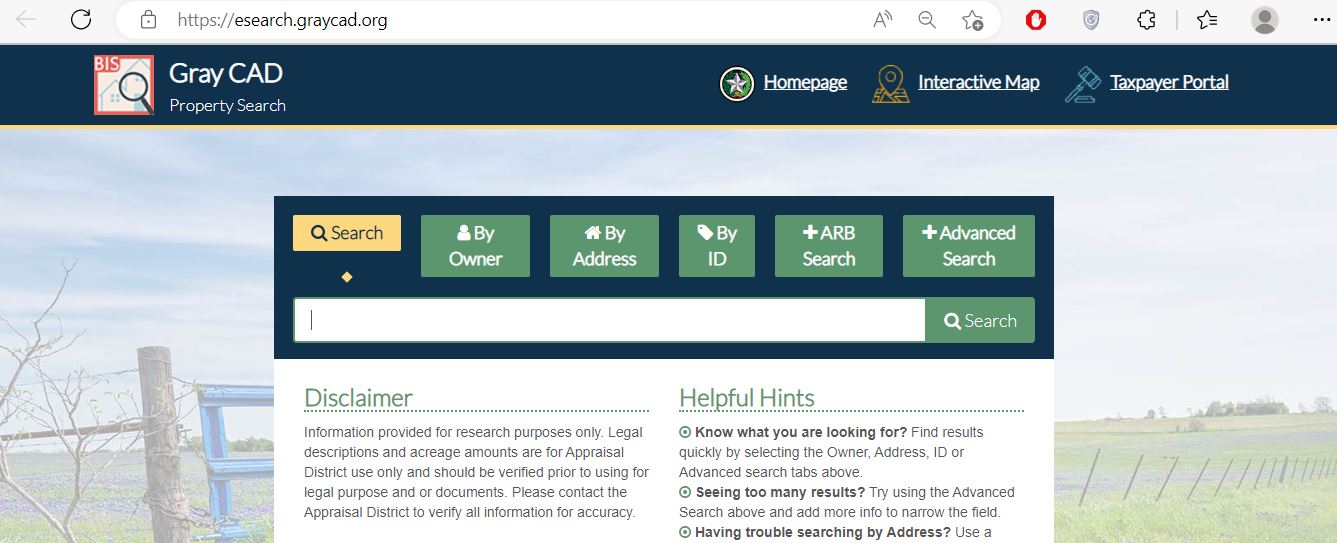
Start with only part of the name and check trusts, estates, companies and prior owners.
Use the Property ID or another exact account identifier for the cleanest result.
Use abstract, subdivision, mobile-home park, neighborhood, DBA, tax year or hearing information.
Use Gray CAD’s deeper fields for rural, manufactured-home and business searches
Search routes available
| Field | Best use | Common mistake |
|---|---|---|
| Abstract | Rural acreage and tracts without a dependable street address. | Entering a complete deed description instead of one abstract clue. |
| Subdivision | Pampa additions, platted lots and rural residential developments. | Assuming the postal address matches the appraisal subdivision name. |
| MobileHomePark | Manufactured homes sharing a park or common address. | Searching only the landowner instead of the home owner. |
| Neighborhood | Reviewing appraisal groupings and potential comparison accounts. | Assuming all properties in one neighborhood are physically comparable. |
| Doing Business As | Finding a business-personal-property account when the legal entity differs. | Searching only the building owner. |
| Hearing Date or Board Members | Locating or reviewing an ARB-related account. | Using hearing fields for an ordinary property search. |
Understand what the Gray CAD record can and cannot prove
| Field | What it identifies | What it does not prove | Next action |
|---|---|---|---|
| Property ID | The appraisal account in Gray CAD. | That every county or tax system uses the same account number. | Save it for forms, protests and office contact. |
| Geographic ID | A geographic or parcel-related reference. | A surveyed boundary or legal acreage. | Compare the map, deed and survey. |
| Owner shown | The owner carried for appraisal and notice purposes. | Clear title, probate status or every ownership interest. | Search County Clerk records when title matters. |
| Property address | The physical location used in the appraisal system. | Mailing address, legal access or exact boundary. | Compare the map and legal description. |
| Legal description | An abbreviated lot, block, abstract, tract or subdivision reference. | The complete recorded deed description. | Review the deed, plat and survey. |
| Acreage | Acreage carried for appraisal purposes. | Surveyed acreage or ownership of adjoining land. | Compare recorded and survey evidence. |
| Market value | Gray CAD’s opinion of market value as of January 1. | A guaranteed sale price or final tax amount. | Review property facts, condition and sales evidence. |
| Appraised value | Value after an applicable cap, limitation or special appraisal. | That every exemption is correctly applied. | Review exemptions and taxable values by unit. |
| Tax information | Tax-related data displayed with the appraisal account. | The live amount due or payment posting. | Verify through the Tax Office payment system. |
Do not label every 2026 search value as certified
Useful for reviewing a notice, exemption, correction or protest, but it can be subject to change.
A countywide roll approved for tax-rate and billing processes, subject to lawful later corrections or supplements.
A later account change that can occur after the original roll certification.
Use the new Gray CAD portal, but prepare an outage fallback
Use the Gray CAD map to locate ranch, city and energy property
What to do when Gray CAD shows no matching property
| Problem | Likely reason | Practical fix |
|---|---|---|
| Owner is not found | The account may use a spouse, trust, estate, business, initials or previous owner. | Search only the surname or one distinctive company word. |
| Address search fails | The situs address may use a shortened road, highway, rural route or legal description. | Search only the main street name or use the map. |
| Rural land is missing | The tract may be indexed by abstract, owner or Geographic ID. | Use Advanced Search and the abstract field. |
| Manufactured home is missing | The home may be separate from the land or listed under another owner. | Use MobileHomePark, owner, address and property-type fields. |
| Business account is missing | The assets may use a DBA or separate personal-property account. | Search the legal entity, DBA, owner and physical location. |
| Mineral or utility account is missing | The account may not use the surface owner or street address. | Search the company, operator, agent, Property ID or prior statement. |
| Recently purchased property shows seller | The deed may not yet be processed into the appraisal ownership record. | Search the seller and verify the deed through the County Clerk. |
| Tax amount differs from CAD | The appraisal system is not the live tax-collection ledger. | Use the Gray County Tax Office payment portal and match the year. |
Local search tips for Pampa, Lefors, McLean and county-line property
Check Gray County, Pampa ISD, City of Pampa, Clarendon College and groundwater-district entries.
Confirm Lefors ISD, City of Lefors and the exact county and special-district jurisdictions.
Verify McLean ISD, City of McLean and whether the property is near a county or school boundary.
Use the map and school-district account rather than assuming a Pampa mailing address controls jurisdiction.
Confirm whether the parcel lies in Gray County and identify the correct school-tax collector.
County-line school districts can require separate collection research outside the Gray County Tax Office.
Search by owner, abstract and Geographic ID and review productivity value separately from market value.
Search the landowner, project entity, utility account, business assets and any separate improvement accounts.
Use the mineral owner, company, operator or account information rather than surface address alone.
Do not confuse market value, appraised value and taxable value
Gray CAD’s opinion of the property’s market value as of January 1.
The value after an applicable homestead cap, circuit-breaker limit or special appraisal.
The value remaining after exemptions for each taxing unit.
Use Gray CAD, the Tax Office or County Clerk correctly
| Your question | Correct office | What to prepare |
|---|---|---|
| What is my appraised value? | Gray CAD | Property ID, year and disputed value component. |
| Why is my exemption missing? | Gray CAD | Application, identification, qualification date and filing proof. |
| Does my land qualify for agricultural appraisal? | Gray CAD | Use history, acreage, leases, production records and maps. |
| How much participating tax is due? | Gray County Tax Assessor-Collector | Owner, tax account, property and tax year. |
| Who collects an out-of-county school tax? | The school district or collector shown on the tax statement | Property ID, district name and tax year. |
| Did my payment post? | The collecting tax office | Confirmation, amount, method, account and year. |
| Who legally owns the property? | Gray County Clerk or title professional | Grantor, grantee, date range and legal description. |
| Who owns minerals or an easement? | County Clerk records and qualified title professional | Mineral deeds, reservations, easements, leases and assignments. |
Correct the official system that contains the error
Verify the deed or probate record with the County Clerk, then provide Gray CAD the requested ownership evidence.
Contact Gray CAD because appraisal notices and exemption correspondence depend on its mailing record.
Determine whether the issue belongs to CAD, county addressing, a city or the postal service.
Prepare the deed, plat, survey, abstract, Property ID and Geographic ID.
Use measurements, photographs, permits, repair estimates, plans or demolition evidence.
Prepare use history, leases, livestock or crop records, maps and dated photographs.
Prepare owner, operator, project, lease, equipment, interest and account information.
Contact the collecting Tax Office with the payment confirmation, amount, account and year.
Use Gray CAD’s form library and preserve the submission record
For a qualifying principal residence. Match the deed, identification and residence address.
Review the additional school exemption, tax ceiling, instalment options and possible deferral rights.
Use the form matching the VA rating, total disability or surviving-spouse situation.
Use the applicable 1-D-1, timber or wildlife form and prepare land-use evidence.
Use the official exemption application and document the qualifying device and property use.
The library includes Freeport, goods-in-transit, vehicle, pollution-control, charitable and disaster forms.
What to prepare before filing
Prepare proof of qualifying use rather than relying on acreage alone
Agricultural or wildlife appraisal depends on qualifying use, intensity and history. A rural address, large tract or occasional livestock does not automatically establish eligibility.
Document the type of agricultural activity, acreage and years of qualifying use.
Keep livestock, grazing, crop, hay, feed, sales and expense records.
Prepare written leases, land-use maps, legal descriptions and excluded acreage.
Prepare the wildlife-management plan, annual report and evidence of qualifying practices.
Review both values because special appraisal changes taxable treatment rather than removing market value.
Ask how development, energy construction, subdivision or discontinued agriculture could create additional tax.
Search the land, equipment and ownership interests as separate accounts
Search the mineral owner, estate, company, operator or Property ID rather than the surface address alone.
Confirm the company, asset type, location, account year and appraisal contractor.
Search the landowner, project company, turbine or improvement account, utility account and business assets.
Separate qualifying owner-installed devices from a utility-scale commercial generation facility.
Review whether the landowner, lessee or project entity owns each improvement or piece of equipment.
Use County Clerk records for mineral reservations, pipeline easements, leases and recorded agreements.
Evidence for an energy-property question
Compare the rendition with Gray CAD’s 2026 depreciation schedule
Verify the declaration date before using Gray CAD’s wildfire form
Gray CAD continues to publish temporary-disaster-exemption information connected with the February 26-27 wildfires. The form can apply to qualifying property in a governor-declared disaster area when the property sustained at least 15% damage.
The temporary exemption generally requires at least 15% physical damage to qualifying property.
The application and supporting evidence are normally due by the 105th day after the governor’s disaster declaration.
Gray CAD lists P.O. Box 836, Pampa, Texas 79066 and info@graycad.org.
Protect the filing deadline when the online portal is unavailable
Evidence packet
Pay Gray County property taxes through the county-linked portal
Use the Gray County Clerk’s index as a guide to the official document
| Item | Published rule | What to do |
|---|---|---|
| Office hours | Monday-Thursday, 8:00 AM-5:00 PM; Friday, 8:00 AM-1:30 PM | Avoid planning a Friday-afternoon recording or research visit. |
| Clerk-conducted searches | The office does not perform searches unless authorised by statute | Use the public portal or a title researcher. |
| Name searching | Search all possible spelling variations | Try initials, former names, trusts and business variations. |
| Online database | The online database is not the official repository and may contain redactions | Obtain the official record for a legal or closing decision. |
| In-person recording | Valid identification is required for Official Public Records filings | Bring an accepted government-issued ID. |
| Checks | Checks must include the maker’s date of birth, driver-licence number and phone number | Call before mailing a check if privacy or payment questions arise. |
Complete these checks before relying on one Gray County record
Search land, improvements, manufactured homes, business assets, utilities and mineral records.
Confirm Gray County and any school district that uses a separate collector.
Check current and delinquent balances, payment posting, penalties and receipts.
Review deeds, liens, releases, easements, mineral reservations and probate records.
Seller homestead exemptions, tax ceilings and appraisal limitations may not continue.
Determine whether qualifying use will continue and whether development creates additional tax.
Identify turbine, solar, pipeline, access and substation rights affecting the property.
A surface transfer does not automatically include all minerals or royalties.
Use recorded easements, title records and a professional survey rather than the CAD map.
Important Gray County appraisal and property-tax dates
Gray County appraisal, tax and recorded-property offices
Pampa, Texas 79065-5232
Mailing: P.O. Box 836, Pampa, Texas 79066-0836
Phone: 806-665-0791
Fax: 806-665-1213
Email: info@graycad.org
Hours: Monday-Friday, 8:00 AM-5:00 PM.
Chief Appraiser: Tyson Paronto
205 N. Russell Street, Room 101
Pampa, Texas 79065
Mailing: P.O. Box 382, Pampa, Texas 79066
Phone: 806-669-8018
Email: christie.johnson@graycch.com
Tax-bill delivery: property.taxgrayco@graycch.com
Tax Assessor-Collector: Christie Johnson
Confirm current property-tax counter hours before travelling.
205 N. Russell Street, Room 200
Pampa, Texas 79065
Mailing: P.O. Box 1902, Pampa, Texas 79066-1902
Phone: 806-669-8004
Fax: 806-669-8054
Email: deborah.laramore@graycch.com
County Clerk: Dee Dee Laramore
Hours: Monday-Thursday, 8:00 AM-5:00 PM; Friday, 8:00 AM-1:30 PM.
Gray County; Groom, White Deer, Lefors, McLean, Pampa, Grandview-Hopkins, Miami, Wheeler and Fort Elliott school districts; the cities of Lefors, McLean and Pampa; Panhandle Groundwater Conservation District No. 3; and Clarendon College.
Gray County appraisal, tax and property-record links
Access notices, reports, forms, tax information, contacts and official portal links.
Open Gray County Appraisal DistrictSearch by owner, address, ID, abstract, subdivision, neighborhood or other advanced fields.
Open Gray CAD eSearchResearch parcel context, roads, adjoining accounts and rural tracts.
Open Gray CAD mapAccess property details, electronic communication, documents and eligible applications.
Open taxpayer portalFind homestead, agricultural, wildlife, protest, disaster, rendition and energy-device forms.
Open Gray CAD formsReview annual reports, reappraisal plans, certified values and certified rolls.
Open Gray CAD reportsReview the ARB’s role and current district-published member information.
Open ARB informationReview proposed and adopted tax-rate information and subscribe to updates.
Open Gray tax transparencySearch the county-collected account, verify the year and continue to payment.
Open Gray property-tax paymentsReview payment links, drop-box instructions and electronic tax-bill delivery.
Open Tax Assessor-Collector pageReview office hours, recording rules, identification requirements and Clerk contacts.
Open Gray County ClerkSearch deeds, liens, easements, plats and other recorded documents.
Open public records searchHow this Gray County guide was rebuilt

Independent research with official task paths
This version preserves the Gray CAD screenshot and editor image while replacing the outdated eProtest workflow, explaining the current portal warning, adding advanced search fields, separating county-collected and separately collected taxes, and expanding agricultural, energy, disaster, business, Clerk-record and buyer guidance.
The review used Gray County Appraisal District, the Gray County Tax Assessor-Collector, Gray County Clerk, the official payment and public-record systems, and current Texas Comptroller property-tax guidance.
AppraisalDistrict.org is an independent informational website and is not operated by Gray CAD, Gray County, any taxing unit or an appraisal contractor.
10 common Gray County Appraisal District questions
1. What is the official Gray County Appraisal District website?
The official website is graycad.org. Use it for property search, maps, forms, reports, tax information and taxpayer-portal access.
2. How do I search Gray County property records?
Open Gray CAD eSearch and choose Owner, Address, ID, ARB Search or Advanced Search. Use the Property ID when available.
3. What advanced search fields are available?
Advanced Search includes owner, Owner ID, Property ID, Geographic ID, street, abstract, subdivision, condominium, mobile-home park, neighborhood, DBA, agent, property type, tax year and ARB fields.
4. Are the 2026 Gray County appraisal values certified?
The property search can display 2026 information, but Gray CAD’s reports page currently lists 2025 as the latest posted certified values and certified roll. Check the individual account status.
5. Who collects Gray County property taxes?
The Gray County Tax Assessor-Collector collects for Gray County and participating local units. Some school districts crossing into the county may use another collector, so verify the tax statement.
6. How do I pay Gray County property taxes online?
Use Gray Property Tax Payments, verify the account and year, review the processing fee and save the confirmation.
7. What was the normal 2026 protest deadline?
The normal deadline was May 15, 2026, or the 30th day after notice delivery, whichever was later. A newer corrected, supplemental or denial notice can carry another deadline.
8. Where did the old Gray CAD eProtest portal move?
The old eProtest page now directs users to portal.graycad.org. Because Gray CAD reports possible technical difficulties, preserve deadlines with another accepted filing method when necessary.
9. Where can I search Gray County deeds and liens?
Use the Gray County Clerk Public Records Search, accept the disclaimer and search all reasonable name variations.
10. Is the Gray CAD interactive map a legal survey?
No. Gray CAD states that acreage and legal descriptions should be independently verified before legal use. Use recorded documents and a professional survey.