
Track a Knox County Property From Rolling Plains Parcel to Tax Receipt
Knox County Appraisal District is more than a value lookup. Its official systems connect property owners with appraisal records, parcel maps, exemption forms, agricultural guidance, online protests, electronic notices, truth-in-taxation information and most local property-tax payments.
This guide shows exactly which search tab to use, how to verify a result, what each value means, why a payment may exclude Seymour ISD or Crowell ISD, and when the County and District Clerk—not Knox CAD—holds the controlling ownership record.
100 W. Cedar Street, Benjamin, Texas 79505.
940-459-3891 for appraisal, exemption, protest and collection help.
Mitzi Welch is listed by Knox CAD and the Texas Comptroller.
Owner, address, ID, ARB and advanced-search options.
Local portals and procedures checked July 28, 2026.
What do you need from Knox County Appraisal District?
Use owner, address or property ID search, then verify the year and legal description.
Follow the search walkthroughUse the interactive GIS map as a location aid, not as a survey or title product.
Use the map safelyVerify whether Knox CAD, Baylor CAD or Foard CAD collects the school-tax portion.
Review payment routingPrepare identification and eligibility evidence before filing the correct Knox CAD form.
Prepare an exemption applicationFile before the notice deadline and organise evidence around the exact disputed issue.
Build a protest fileUse the County and District Clerk for recorded deeds, liens, releases and plats.
Review the deed workflowChoose a task before opening a portal or payment screen
This helper runs locally in your browser and does not collect an owner name, property address, property ID, email or payment details.
Search the correct property and tax year
Prepare these details first
Recognise the official Knox CAD search screen
The original article contained a useful property-search screenshot. It is retained below and now paired with exact instructions for each visible search route.
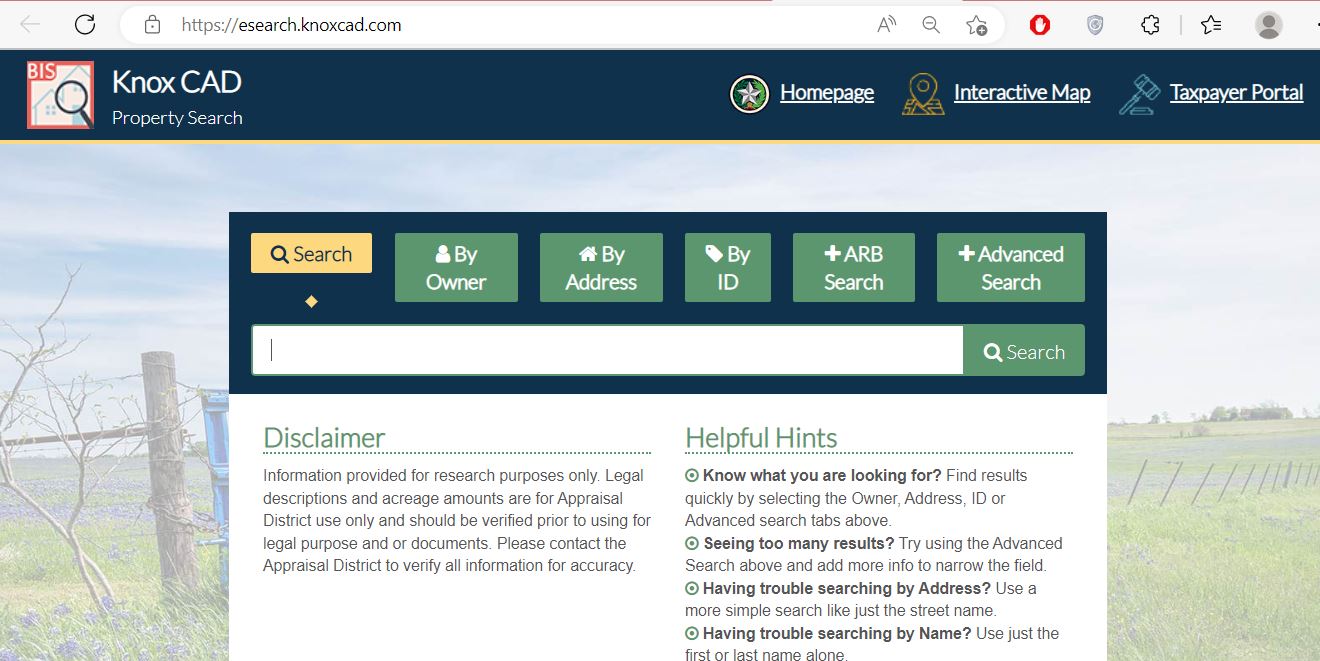
Use the broad compound search when you have a recognisable owner, address or account detail.
Enter a surname or a shortened business name. Avoid punctuation and unnecessary trust or company wording.
Start with the main street name. Add the street number only when necessary to narrow the results.
Use the property ID from a tax statement, appraisal notice, prior record or saved account page.
Use the hearing-related search for available protest or appraisal review board information.
Filter by property type, abstract, subdivision, neighborhood, geographic ID, owner ID, DBA or paid status.
Understand what the search result proves—and what it does not
| Record field | What it helps identify | What it does not prove | Next action |
|---|---|---|---|
| Property ID | The appraisal and collection account within the Knox CAD system. | A County Clerk instrument number or complete title. | Save it for CAD, tax, exemption and protest communication. |
| Owner name | The owner currently displayed for appraisal administration. | Complete legal ownership, lien priority or title quality. | Review the recorded deed when ownership is material. |
| Situs address | The physical or assigned location connected to the account. | The complete legal description or surveyed boundary. | Compare the legal description and map. |
| Legal description | The abbreviated lot, block, subdivision, abstract or tract description. | That the abbreviation contains every deed call or exception. | Match it with the Clerk’s recorded document. |
| Geographic ID | A location-based identifier that can help narrow land and map searches. | That a split, combination or ownership update is complete. | Use it with Advanced Search and GIS. |
| Market value | The district’s estimate of value as of January 1 for the selected year. | The sale price, mortgage appraisal or final tax amount. | Review comparable evidence and property characteristics. |
| Appraised or limited value | The value after an applicable appraisal limitation. | That market value is correct or cannot be protested. | Compare market and limited values separately. |
| Taxable value | The value remaining after exemptions for a taxing unit. | The amount due without the adopted rate and payment history. | Match it to the current tax statement. |
| Property type | Real, personal, mineral, auto or mobile-home classification. | That every related asset or parcel is included in one account. | Search each relevant account type. |
| Paid or unpaid status | The status displayed for the selected Knox CAD account and year. | That Seymour ISD, Crowell ISD or a separate account was paid. | Compare all taxing units and receipts. |
Fix a missing, duplicate or confusing result
| Problem | Likely reason | What to try next |
|---|---|---|
| Complete address returns nothing | The portal may abbreviate or omit the suffix, direction, city or ZIP code. | Search only the main street name, as Knox CAD recommends. |
| Complete owner name returns nothing | The record may use initials, surname-first order, spouse, estate, trust or business wording. | Use only the first or last name. |
| Too many results | The name or street term is too broad. | Use Advanced Search and add property type, subdivision, abstract or geographic ID. |
| Rural land has no useful address | The account may be indexed mainly by owner, abstract, legal description or geographic ID. | Use owner search, Advanced Search and GIS together. |
| Mobile home is missing | The home can have a separate account from the land or be indexed by a park. | Select Mobile Home and search the park, owner or property ID. |
| Mineral account is missing | Mineral interests do not normally use the surface property’s street address. | Select Mineral and search owner, property ID or geographic details. |
| New owner is not displayed | The recorded deed or CAD ownership update may still be processing. | Confirm recording with the Clerk and send the instrument details to Knox CAD. |
| Tax account appears paid but another bill arrived | A school-tax portion or separate account may be collected elsewhere. | Check Seymour ISD or Crowell ISD and search all property IDs. |
Use the parcel map as a location and comparison aid
The interactive map is particularly useful for rural acreage, abstract land, properties without conventional street addresses, neighboring parcels and multi-account ownership.
Choose the correct property type before searching
Homes, commercial buildings, vacant land, farm and ranch improvements and permanently attached structures.
Best search: property ID, address, owner, subdivision or abstract.
Income-producing furniture, equipment, machinery, inventory and other taxable business assets.
Best search: owner, DBA, property ID and business location.
Oil, gas or other mineral interests that can be separate from surface ownership.
Best search: owner, property ID and geographic information.
A manufactured home can have a separate property ID from the land on which it is located.
Best search: owner, mobile-home park and property ID.
Special inventory or taxable vehicle accounts can follow separate reporting and payment requirements.
Best search: DBA, owner and property ID.
Land receiving open-space appraisal still has a market value and a separate productivity or special-appraisal value.
Best search: owner, abstract, geographic ID and legal description.
Use the 2026 Knox CAD Taxpayer Portal for documents and applications
Knox CAD’s Taxpayer Portal allows an owner to access property details, opt into electronic communication, review documents and manage supported applications from one account.
File through Knox CAD and verify the result afterward
For a home owned and used as the applicant’s principal residence. One person cannot claim two principal-residence homesteads in the same year.
Can provide an additional exemption and a school-tax ceiling. Turning 65 does not eliminate every property tax.
The applicant—not merely a family member—must meet the ownership, residence and disability requirements.
The benefit depends on the qualifying disability or surviving-spouse category and the required documentation.
Knox CAD explains that a late homestead application may be filed no later than one year after the taxes become delinquent.
Check January 1 ownership, recent purchase status, verification mail and whether a new application was required.
Prepare evidence for open-space or agricultural appraisal
Knox CAD publishes an agricultural 1-d-1 application, local agricultural guidance, wildlife-management material and an agricultural advisory committee. Special appraisal is based on qualifying land use rather than merely owning acreage.
| Question | Why it matters | Evidence to prepare |
|---|---|---|
| Was the land used principally for agriculture? | The use must be more than incidental or recreational. | Production, grazing, lease, crop and operational records. |
| Has the qualifying use existed for the required history? | Open-space qualification includes historical-use requirements. | Prior records, leases, photographs and owner statements. |
| Does the intensity meet local standards? | The operation should be typical for the land and local agricultural area. | Stocking, crop, acreage, management and local practice details. |
| Did the use change? | A change from qualifying use can create additional tax consequences. | Dates, acreage affected and current use. |
| Is wildlife management claimed? | Wildlife use must follow a qualifying plan and statutory activities. | Plan, maps, activity records and annual report. |
Separate business assets from the real-estate account
Knox CAD appraises business personal property and publishes rendition forms plus annual depreciation information. Equipment and inventory can have a separate property ID from the building or land.
Prepare asset descriptions, original costs, acquisition years, locations and ownership information.
Motor-vehicle, heavy-equipment, manufactured-housing and vessel inventory use specialised declarations and monthly statements.
Knox CAD publishes a 2026 business personal property depreciation table for current appraisal reference.
File before the deadline, then organise the evidence
Knox CAD’s FAQ states that notices are typically mailed in mid-April and that website values are updated after notices are mailed. By late July 2026, the ordinary deadline has passed for many accounts, but later notices and limited correction remedies can create different dates.
Evidence checklist
Confirm the collecting unit before paying
| Taxing unit or task | Start with | What to verify | Important warning |
|---|---|---|---|
| Knox County | Knox CAD property search and payment cart | Property ID, tax year, county line and balance. | Search every related property account. |
| Benjamin, Goree, Knox City or Munday city tax | Knox CAD property search | City taxing unit and jurisdiction. | A mailing address does not always prove city limits. |
| Benjamin, Munday or Knox City-O’Brien school tax | Knox CAD property search | Correct school district, year and taxable value. | Do not assume the owner’s mailing city determines the school district. |
| Seymour ISD | Current statement and Baylor CAD | Seymour ISD account and collector. | Knox CAD states it does not collect this portion. |
| Crowell ISD | Current statement and Foard CAD | Crowell ISD account and collector. | Knox CAD states it does not collect this portion. |
| Hospital, drainage, groundwater or water authority | Knox CAD property search | Each special-district line and balance. | Different properties can have different special districts. |
Pay an account collected through Knox CAD
Estimate taxable value, annual tax and exemption savings
Enter the combined tax rate from the current statement or Truth in Taxation page. A combined rate must include the taxing units that apply to the specific property.
Educational estimate only. The official bill can include different taxable values, local exemptions, tax ceilings, special assessments, separate school collection, supplements, penalties, interest, attorney fees or processor charges.
Separate the appraisal value from the tax-rate decision
Track appraisal, filing, rate and payment deadlines
Use the County and District Clerk when the CAD record is not enough
Knox CAD’s owner display and legal-description summary support appraisal and tax administration. The Knox County and District Clerk maintains recorded deeds, liens, releases, plats and other official property documents.
Clerk: Jeannie Clark
Knox County Courthouse, First Floor100 W. Cedar Street
Benjamin, Texas 79505
Mailing: P.O. Box 196, Benjamin, TX 79505-0196
940-459-2441
Fax: 940-459-2005
- Recorded deeds
- Liens and releases
- Property plats
- Certified recorded documents
- Instrument and recording information
Adjust the workflow to the property’s location and use
Check Benjamin city, Benjamin ISD, county, hospital and any applicable special-district lines before paying.
Verify City of Knox City and Knox City-O’Brien CISD taxing units and search for multiple adjoining accounts.
Review City of Munday, Munday CISD, county, hospital and business personal property accounts separately.
Confirm the city line, school district and parcel location rather than relying only on the mailing address.
Use Knox CAD for appraisal information but confirm the separate Seymour ISD collector before treating the tax account as paid.
Use Knox CAD for the Knox County parcel and verify the Crowell ISD tax through the collector shown on the school statement.
Search by owner, abstract and geographic ID; separate market value from agricultural productivity value.
Select Mineral property type and do not assume the mineral account follows the surface owner or street address.
Verify deed recording, apply for the buyer’s exemptions and estimate taxes without benefits that belonged only to the seller.
Contact the office that controls the action
Use for property search, values, exemptions, maps, appraisal records, agricultural appraisal, business personal property, protests, electronic communication and Knox CAD-collected taxes.
100 W. Cedar StreetBenjamin, Texas 79505-9998
Mailing: P.O. Box 47, Benjamin, TX 79505-0047
940-459-3891
knoxcad@yahoo.com
Chief Appraiser: Mitzi Welch
Hours: Monday–Thursday 9:00 AM–5:00 PM; Friday 9:00 AM–4:30 PM; closed 12:00 PM–1:00 PM.
Use for county tax-office questions, official collector confirmation and matters assigned to the Tax Assessor-Collector.
Tax Assessor-Collector: Penny Eaton
Knox County Courthouse100 W. Cedar Street
Benjamin, Texas 79505
Use for recorded deeds, liens, releases, plats and certified property documents.
Clerk: Jeannie Clark
Courthouse, First Floor100 W. Cedar Street
Benjamin, Texas 79505
- Write down the property ID.
- Confirm the tax year.
- Identify the disputed value or taxing unit.
- Bring the notice, statement or receipt.
- Check holiday closures and lunch hours.
Open the exact Knox County property resource you need
District notices, contacts, appraisal information, forms and official portal links.
Open Knox CADSearch by owner, address, property ID, ARB information or advanced filters.
Open property searchLocate parcels, rural tracts, adjacent properties and geographic context.
Open GIS mapAccess supported property details, electronic communication, documents and applications.
Open taxpayer portalStart or manage an available online appraisal protest.
Open online protestReview available protest and appraisal review board information.
Open protest databaseHomestead, agricultural, rendition, deferral, confidentiality and protest forms.
Open formsReview property-specific taxing units, proposed rates and notification registration.
Open tax transparencyAdopted rates, annual reports, certified totals, reappraisal plan and appraisal data.
Open publicationsRelated AppraisalDistrict.org guides
How this Knox County article was improved

The Knox CAD property-search screenshot now appears beside a field-by-field walkthrough, while the editorial photograph remains in this review section.
The previous short article was expanded with current office hours, the 2026 taxpayer portal, interactive map guidance, advanced-search troubleshooting, agricultural and business-property workflows, tax-collector exceptions, a practical calculator, truth-in-taxation steps, deed routing and exactly 10 task-specific answers.
Official-source review completed July 28, 2026. Live values, tax balances, adopted rates, payment fees, portal providers, forms, staff, office hours and collection assignments can change.
Knox County Appraisal District FAQs
What is the official Knox County Appraisal District website?
The official website is knoxcad.com. It provides links to the property search, interactive map, taxpayer portal, online protest system, forms, exemption information, publications, tax-rate information and district contacts.
How do I search Knox County property records?
Open Knox CAD Property Search and search by owner, address or property ID. Use Advanced Search for property type, subdivision, abstract, neighborhood, geographic ID or paid and unpaid status. Verify the property and tax year before relying on the result.
Can I pay Knox County property taxes through Knox CAD?
Knox CAD’s official website states that it collects for its listed taxing units except Seymour ISD and Crowell ISD. Locate the property in the official search and use the green Pay Taxes button when available. Verify every taxing unit and save the payment receipt.
Where do I pay Seymour ISD or Crowell ISD property taxes?
Knox CAD states that it does not collect Seymour ISD or Crowell ISD taxes. Contact the collector shown on the current school-tax statement. Baylor County Appraisal District is the official appraisal-district resource for Seymour ISD, while Foard County Appraisal District is the official resource for Crowell ISD.
How do I apply for a Knox County homestead exemption?
Locate the correct property account, open the Knox CAD forms page and complete the residence homestead application. Knox CAD states that the application must include a copy of the applicant’s driver license or other information required by the Texas Property Tax Code. Keep proof of filing and verify the exemption after processing.
What is the Knox County property tax protest deadline?
The usual deadline is May 15 or 30 days after the appraisal district mails the Notice of Appraised Value, whichever is later. The deadline printed on the notice controls. File through Knox CAD’s online protest system or submit a written protest using the district’s instructions.
What can I do if Knox CAD property search returns no result?
Use only the main street name for an address search or only the first or last name for an owner search. Try the property ID, Advanced Search, subdivision, abstract, property type or geographic ID. Call Knox CAD at 940-459-3891 when the property still cannot be identified.
Can I use the Knox CAD map as a legal survey?
No. The official property search states that legal descriptions and acreage are for appraisal-district use and should be verified before being used for legal purposes or documents. Use recorded deeds, plats and a licensed survey when legal boundary accuracy matters.
Who corrects an ownership record in Knox County?
First confirm that the deed was recorded with the Knox County and District Clerk. Then provide the recorded instrument information and property ID to Knox CAD when its appraisal ownership display has not updated.
When are Knox County property taxes due?
Property taxes are normally due upon receipt, with January 31 generally being the last day to pay without penalty and interest. Most unpaid taxes become delinquent on February 1. Verify the current statement because delayed bills and special payment provisions can create different deadlines.