Verify Your Kinney County Parcel Before You Pay, File or Protest
Start with Kinney County Appraisal District when you need a property ID, owner display, appraisal value, exemption, parcel map, ranch account, business property, agricultural record, tax balance or protest instructions.
This guide explains how to search Brackettville, Spofford, Fort Clark Springs-area lots, rural acreage and border tracts—and how to continue to the County Clerk when a recorded deed or land instrument controls the answer.
412 South Ann Street, Brackettville, Texas 78832.
Todd L. Tate, RPA, RTA/C.
Search and payment links begin through Kinney CAD.
8:00 AM–12:00 PM and 1:00 PM–5:00 PM.
Local resources checked July 28, 2026.
What do you need to do with the property?
This helper operates inside the visitor’s browser and does not request or transmit an owner name, address, property ID, PIN, payment information or email address.
Use the property ID first and verify the owner, legal description, property type, acreage and tax year.
Follow the search workflowReview every tax year, taxing unit, balance, fee and payment confirmation.
Use the payment safeguardsUse owner, abstract, subdivision, geographic ID, acreage and parcel-map context.
Build a tract worksheetUse the CAD parcel for tax research and County Clerk documents for legal ownership or restrictions.
Review Fort Clark stepsFocus on market value, equality, acreage, condition, improvements, exemptions or land classification.
Prepare a protest fileUse the County Clerk’s index, then provide recording details to Kinney CAD when needed.
Follow the deed workflowKinney CAD property-search visual reference
The Kinney County Appraisal District search image already published on the original page has been retained. Use it to recognise the owner, address, ID and Advanced Search workflow, then rely on the live portal because fields, values, tax years and payment actions can change.
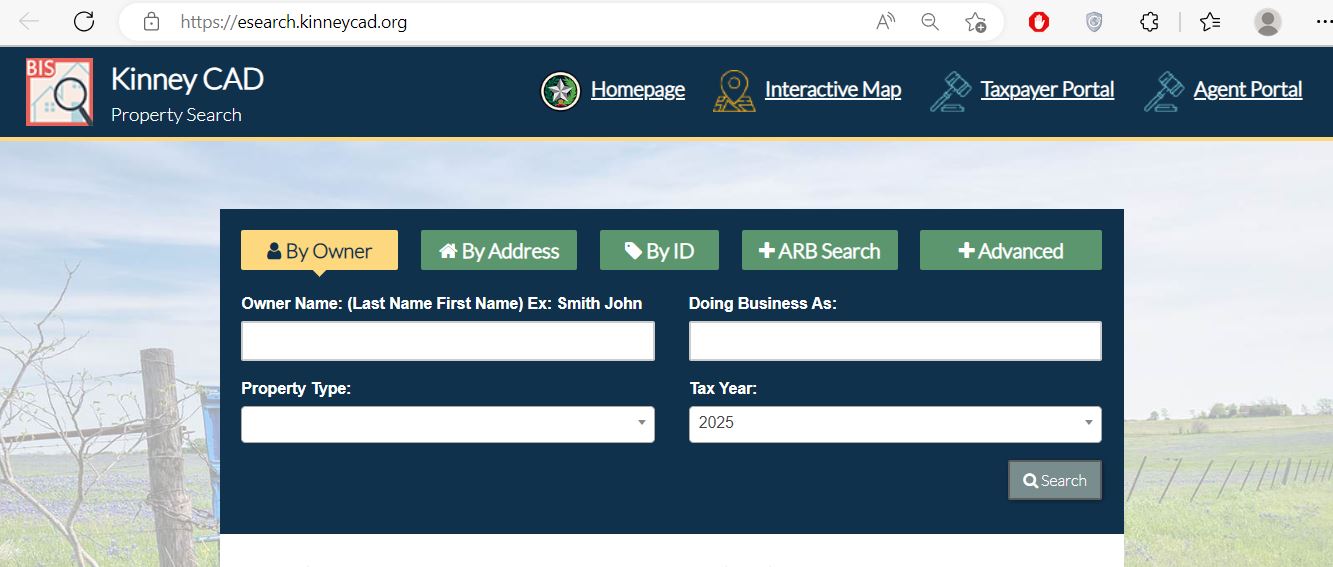
Enter the owner as LASTNAME FIRSTNAME. Shorten the name when no result appears.
Start with the street name or street number and main street name.
Use the property ID from a notice, statement or saved appraisal record.
Use abstract, subdivision, property type, geographic ID, neighbourhood or business name.
Confirm the displayed year before comparing ownership, values, exemptions or balances.
Separate real estate, business personal property, mineral and mobile-home records.
Verify the property ID, owner, legal description, acreage, taxing units and values.
Print the property card or save a PDF before paying, filing or protesting.
Search Kinney CAD without selecting the wrong account
Prepare these details first
Choose the field that matches the information you have
| Information available | Best search | How to enter it | What to verify |
|---|---|---|---|
| Exact property ID | By ID | Enter the complete property ID. | Owner, legal description, property type and year. |
| Owner surname | By Owner | Use LASTNAME FIRSTNAME or only the surname. | Property ID, address, acreage and legal description. |
| Street location | By Address | Start with the main street name. | Owner, community, property type and account. |
| Ranch or rural tract | Advanced | Use owner, abstract, subdivision, geographic ID or acreage clues. | All related tracts, improvements and map location. |
| Fort Clark lot | Address, subdivision or owner | Search the owner and distinctive subdivision or unit wording. | Lot, unit, legal description, Fort Clark MUD and owner. |
| Business name | Advanced | Use Doing Business As and the personal-property type. | Equipment account versus land or building account. |
| Mobile home | Advanced | Select the mobile-home property type or search the park. | Home owner, land owner and separate property IDs. |
| Protest status | Advanced or online appeal | Use the property ID, protest status or notice information. | Property, tax year, deadline, hearing date and status. |
Understand what each Kinney CAD field can and cannot prove
| Record field | What it helps identify | What it does not prove | Next action |
|---|---|---|---|
| Property ID | The appraisal and collection account assigned to the property. | That every adjoining tract or related asset is included. | Search related land, mobile-home and business accounts. |
| Owner display | The owner currently shown for appraisal administration. | Complete legal title or authority to sell. | Verify the recorded deed through the County Clerk. |
| Situs address | The physical or assigned property location. | The mailing address, legal access or surveyed boundary. | Compare the deed, parcel map and survey. |
| Legal description | Lot, block, subdivision, abstract, survey or tract. | That shortened CAD wording includes every deed provision. | Match it with the recorded instrument. |
| Acreage | The land amount used by the appraisal system. | Surveyed acreage or exact usable land. | Use the deed and an appropriate survey for legal use. |
| Market value | The district’s estimated market value for the displayed year. | Sale price, loan value or final property-tax amount. | Review property characteristics and comparable evidence. |
| Appraised value | The value after an applicable appraisal limitation. | That the underlying market value is correct. | Compare market, appraised and taxable values separately. |
| Taxable value | The value remaining for a taxing unit after exemptions. | The current amount due without the collection details. | Review the balance and payment history. |
| Exemptions | Homestead, senior, disability, veteran or another approved exemption. | That every taxing unit grants the same amount. | Compare each taxing unit’s taxable value. |
| Property type | Real, personal, mineral or mobile-home classification. | Zoning, deed title, covenant status or agricultural qualification. | Search all relevant account types separately. |
| Improvement details | Building type, size, age, class and appraisal characteristics. | Exact measurement, current condition or code compliance. | Document errors with photographs and measurements. |
| Taxing units | County, school, city, MUD and groundwater entities tied to the account. | That every Kinney County rate applies. | Use only the units shown on the specific property. |
What to do when Kinney CAD returns no result
| Problem | Likely reason | What to try next |
|---|---|---|
| Full owner name returns nothing | The record may use initials, an estate, trust, company or another name format. | Search only the first or last name. |
| Complete address returns nothing | The road may be abbreviated or the situs address may differ from the mailing address. | Search only the main street or road name. |
| Ranch has no normal address | The tract may be indexed by owner, abstract, subdivision or geographic ID. | Use Advanced Search and the parcel map. |
| Fort Clark lot is difficult to identify | The account may use unit, lot, block or subdivision wording instead of the familiar mailing address. | Search the owner, subdivision and legal description separately. |
| New buyer is not shown | The deed or appraisal ownership update may still be processing. | Confirm recording with the County Clerk, then contact CAD. |
| Business equipment appears but land does not | Personal property and real estate use separate accounts. | Search the business, owner and address under separate property types. |
| Mobile home appears under another owner | The home and underlying land may have different ownership. | Search the home, park, owner and land account separately. |
| Tax amount changed after viewing | A payment, correction, penalty or updated calculation may have posted. | Save a dated screenshot and contact CAD collection staff. |
Use Kinney CAD GIS for approximate parcel context
Send the question to the office that controls the record
| Your question | Correct starting office | Why |
|---|---|---|
| What is my market or appraised value? | Kinney CAD | The district maintains appraisal values and property characteristics. |
| Where do I file an exemption? | Kinney CAD | The chief appraiser determines exemption and special-appraisal qualification. |
| How do I protest the appraisal? | Kinney CAD and the ARB | The district receives protests and the independent ARB hears unresolved disputes. |
| Where do I find and pay property taxes? | Kinney CAD search and payment access | The county Tax Assessor-Collector does not collect property taxes. |
| Where do I obtain a deed, lien or easement? | Kinney County Clerk | The Clerk maintains official recorded instruments. |
| Where do I title or register a vehicle? | County Tax Assessor-Collector | The elected county office handles motor-vehicle services. |
| Does the parcel map prove my boundary? | Surveyor or title professional | Appraisal GIS is not a legal survey or title determination. |
Follow the value from January 1 appraisal to the final bill
The district’s estimate of the property’s market value as of January 1 for the displayed year.
A qualifying appraisal limitation or agricultural appraisal can create a value below market value.
The value remaining for a specific taxing unit after applicable exemptions and limitations.
Verify the account and every taxing unit before paying
Use only the entities shown on the specific property account
The Texas Comptroller directory lists six active Kinney County taxing units. A property does not automatically pay every rate listed below.
| Taxing unit | Where it may apply | What to verify |
|---|---|---|
| Kinney County | Applicable county property | Taxable value, adopted rate and balance for the selected year. |
| Brackett Independent School District | Property within the school district | School taxable value and approved homestead exemption. |
| City of Brackettville | Property inside the municipal boundary | Do not apply the city rate to rural property outside the city. |
| City of Spofford | Property inside Spofford’s municipal boundary | Use the appraisal account rather than the mailing address alone. |
| Fort Clark MUD | Qualifying property within the MUD | Confirm that Fort Clark MUD appears on the account. |
| Kinney County Groundwater Conservation District | Property within the groundwater district | Check the tax account and Truth in Taxation database. |
Estimate annual tax and possible protest savings
Enter the combined rate for the taxing units listed on the specific property. Do not add every Kinney County rate.
Educational estimate only. It does not replace an official bill, predict a protest outcome or account for different exemptions used by different taxing units.
File the correct form and verify approval on the account
For an owner occupying the property as a principal residence and meeting the statutory requirements.
May provide the additional school exemption and a school-tax ceiling when eligibility rules are met.
Use the application matching the veteran’s disability rating, service circumstances and applicant relationship.
Review the new border-security infrastructure exemption carefully
The exemption applies to the amount of appraised value arising from qualifying border-security infrastructure or related improvements—not automatically to the full ranch, home, commercial parcel or border tract.
Build a tract-by-tract Kinney County property worksheet
Rural holdings can involve several surface tracts, a separate homesite, agricultural productivity value, ranch improvements, hunting operations, mobile homes, business assets, easements and border-security improvements under different records.
Search the owner, property ID, abstract, subdivision, geographic ID and legal-description wording.
Create one worksheet row for every property ID and match each account to its deed acreage.
Compare houses, barns, sheds, wells and other improvements with the CAD size, age and condition.
Search the County Clerk record and determine whether the easement affects appraisal or a specialised exemption.
Determine whether the home and land share an owner and whether separate appraisal accounts exist.
Recalculate without seller-specific exemptions or agricultural appraisal when the buyer’s future use may not qualify.
Prove qualifying land use—not ranch acreage alone
Kinney CAD publishes Agricultural Appraisal 1-d and 1-d-1 forms. The 1-d-1 open-space route is the more common special-appraisal framework for qualifying Texas ranch and agricultural land.
Separate appraisal, MUD, deed and restriction research
A Fort Clark Springs-area property can involve a CAD lot record, Fort Clark MUD taxation, recorded deed documents, easements and private restrictions. These are separate records and should not be treated as interchangeable.
Separate taxable business assets from the real-estate account
Land and attached improvements such as offices, shops, storage buildings and permanent site work.
Equipment, machinery, furniture, technology, inventory and other income-producing tangible assets.
Dealer inventory and manufactured-housing inventory can require separate declarations or tax statements.
The building owner, equipment lessor and operating business may have different appraisal responsibilities.
File on time and organise evidence around one clear issue
As of July 28, 2026, the ordinary deadline has passed for many accounts. A later-mailed notice, failure-to-receive-notice claim or limited statutory correction remedy may create another deadline depending on the facts.
Use the Kinney County Clerk for the controlling instrument
Rick Alvarado
501 South Ann StreetP.O. Box 9
Brackettville, Texas 78832
830-563-2521, extension 3
Fax: 830-563-2644
clerk.ralvarado@co.kinney.tx.us
Prepare the current and previous owner names, approximate recording date, document type, property description and any instrument reference shown by CAD.
Adjust the workflow to the property’s location and account type
Verify the City of Brackettville, Brackett ISD, county and groundwater-district entries shown on the account.
Confirm City of Spofford taxation only when the city appears on the specific property record.
Match the subdivision, unit, lot and block and verify whether Fort Clark MUD appears.
Search every property ID and compare CAD acreage with the deed and survey.
Review the recorded instrument and determine whether Form 50-847 may apply to qualifying added value.
Use the account rather than the mailing address to verify the groundwater taxing unit.
Search the deceased owner, estate, heirs, deed history and every related property ID.
Check whether the home, underlying land and tax account have the same owner.
Confirm deed recording, CAD ownership, mailing address and future taxes without seller-specific exemptions.
Contact the office responsible for the property issue
Brackettville, Texas 78832
Mailing: P.O. Box 1377, Brackettville, TX 78832-1377
830-563-2323
Fax: 830-563-9292
kinneycad@sbcglobal.net
Hours: Monday–Friday, 8:00 AM–12:00 PM and 1:00 PM–5:00 PM.
Chief Appraiser: Todd L. Tate
Gene Slate — Tax Collector/Appraiser
Steven DeGeorge — Tax Collector/Appraiser
Allison Sanchez — Tax Collector/Appraiser
Lori Jonas — Part-Time/Collector
Martha Pena-Padron
522 South Ellen StreetP.O. Box 1220
Brackettville, Texas 78832
830-563-2688
Fax: 830-563-9563
kinneycotac@gmail.com
Use for vehicle title, registration and other county tax-assessor services—not property-tax collection.
Rick Alvarado
501 South Ann StreetP.O. Box 9
Brackettville, Texas 78832
830-563-2521, extension 3
Fax: 830-563-2644
clerk.ralvarado@co.kinney.tx.us
Open the exact Kinney County resource you need
Start with the official appraisal-district website.
Open Kinney CADSearch owners, addresses, IDs, Advanced fields and available tax information.
Open property searchResearch approximate parcel locations, roads and neighbouring accounts.
Open parcel mapUse the official electronic appraisal-protest service.
Open online appealsFind homestead, veteran, agricultural, rendition and protest forms.
Open official formsReview proposed and adopted tax-rate information for local units.
Open Truth in TaxationFind deeds, liens, easements, foreclosure notices and land-index information.
Open County ClerkSearch available electronic deed books and registers of instruments.
Open Kofile QuickLinkHow this Kinney County guide was rebuilt

The earlier summary was replaced with a task-based guide using the live property search, official interactive map, current forms, online appeals, Truth in Taxation database, CAD collection staff, county Tax Assessor-Collector, County Clerk and Kofile land-index access.
Official resources reviewed July 28, 2026. Values, balances, tax rates, payment fees, forms, deadlines, personnel, office hours and portal layouts can change after publication.
Kinney County Appraisal District FAQs
What is the official Kinney County Appraisal District property search?
Use esearch.kinneycad.org. It provides Owner, Address, ID and Advanced Search options and access to available property-tax information.
How should I search a Kinney County owner name?
Use last-name-first-name format. If the complete name fails, search only the first or last name and verify each possible match with the property ID, address, legal description, acreage and property type.
Who collects Kinney County property taxes?
The Texas Comptroller states that the elected county Tax Assessor-Collector does not collect property taxes. Kinney CAD provides property-search and payment access and lists tax-collection staff. Verify the property, year, taxing units and live amount before paying.
Does the Kinney CAD map prove a legal property boundary?
No. Kinney CAD states that legal descriptions and acreage are appraisal-district research information and should be verified before legal use. Use the deed, plat and an appropriate survey for boundary decisions.
What is the Kinney County appraisal protest deadline?
Most protests are due May 15 or 30 days after Kinney CAD mails the Notice of Appraised Value, whichever is later. Use the exact deadline printed on the notice.
How do I apply for a Kinney County homestead exemption?
Use Kinney CAD’s Homestead Exemption form or current Texas Form 50-114. Include the required identification and supporting documents, keep proof of filing and verify approval on the property account.
Is there a border-security infrastructure exemption in Kinney County?
Yes, for qualifying property. Texas Tax Code Section 11.38 took effect January 1, 2026. Form 50-847 applies to the value arising from qualifying border-security infrastructure installed under a qualifying government agreement or recorded easement. It does not automatically exempt the entire property.
How do I apply for agricultural or wildlife appraisal in Kinney County?
Use the applicable 1-d or 1-d-1 application and provide evidence of qualifying current and historical agricultural use. Rural location, ranch acreage or wildlife presence alone does not establish qualification.
What is the 2026 Texas business-personal-property exemption?
If the personal property’s total taxable value is $125,000 or less in a taxing unit, the property is exempt in that unit. Business owners should still verify rendition and account requirements with Kinney CAD.
Where can I search Kinney County deeds and land records?
The County Clerk provides Kofile QuickLink access to electronic deed books covering 1873–2000 and electronic registers covering 1956–2017. Contact the Clerk for complete, newer or certified records.