Verify the High Plains Property Account Before You File, Protest or Pay
Hansford CAD is the starting point for appraised values, owner displays, legal descriptions, agricultural valuation, exemptions, business property, mineral accounts, maps and appraisal protests.
The Hansford County Tax Assessor-Collector handles tax bills and payments for the consolidated taxing units it serves. Other cities or school districts may issue separate instructions, so match the taxing unit and collector before sending money.
Owner, property, all-criteria and advanced search options.
Real estate, personal property and mineral accounts.
Certified real and personal appraisal rolls are published.
Monday–Friday, 8:30 AM–5:00 PM.
Official portals and contacts checked July 28, 2026.
Choose the Hansford County property task you need to complete
This browser tool does not request, store or transmit an owner name, property identifier, lease number or tax information.
Use Hansford CAD and verify the account identifiers, property type, year and legal description.
Follow the search walkthroughUse the legal description, abstract, Geographic ID and interactive map when no standard address exists.
Use rural search stepsSelect the correct property type and search by owner, lease, legal description or identifier.
Research mineral accountsConfirm that the Hansford County Tax Office collects the exact taxing-unit bill before paying.
Follow payment stepsSave the full property record and build evidence around a specific appraisal error.
Prepare the protest fileContact the County Clerk when appraisal data is not sufficient to establish legal ownership.
Review deed-search stepsSearch by Property ID first, then verify the complete account
Prepare these search details
Use the Hansford CAD search interface without missing hidden fields
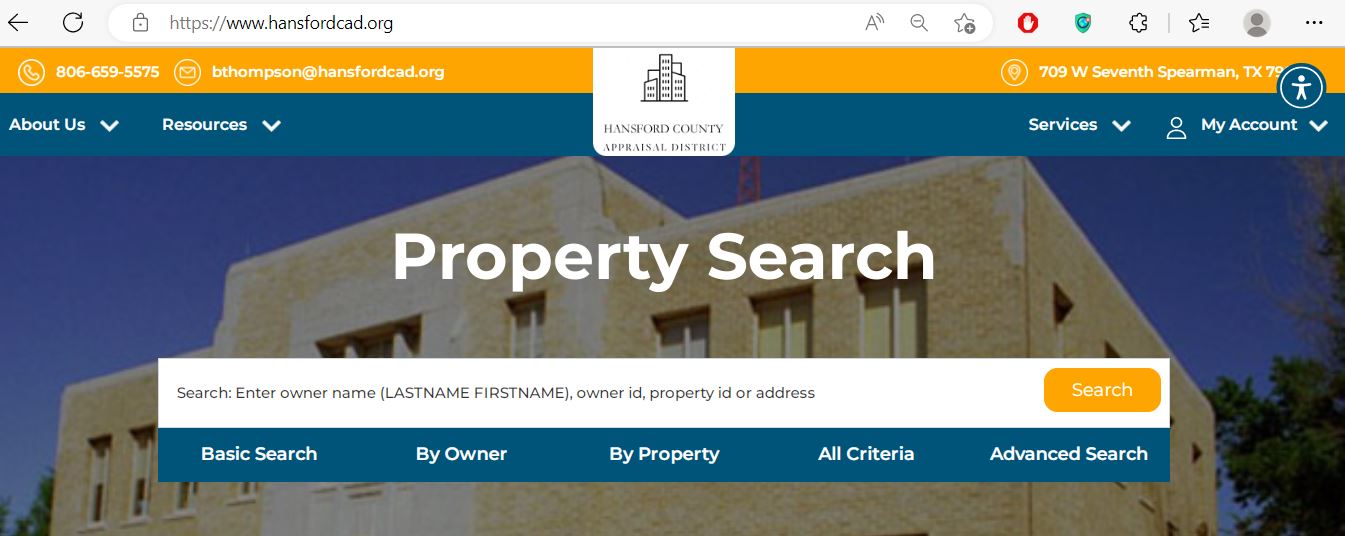
Use Basic, Owner, Property or Advanced according to the information you already have.
Enter LASTNAME FIRSTNAME or begin with the surname only.
Real, mineral and personal-property accounts may be separate.
Do not compare a current notice with an older appraisal record.
Do not rely only on the summary row or first visible mobile column.
Understand what each Hansford CAD field can confirm
| Field | What it helps identify | What it does not prove | Best next action |
|---|---|---|---|
| Property ID or account | The appraisal account maintained by Hansford CAD. | A deed instrument or payment confirmation. | Use it on calls, forms, protests and tax searches. |
| Geographic ID | A parcel or geographic reference connected to the account. | A surveyed boundary or exact legal acreage. | Compare it with the map, deed and legal description. |
| Owner name | The owner displayed for appraisal administration. | Complete legal title or the absence of liens and other interests. | Contact the County Clerk for recorded documents. |
| Property address | The physical location associated with the account. | The legal description or boundary of a rural tract. | Match it with the map and recorded deed. |
| Legal description | The lot, block, subdivision, abstract, survey or tract. | That abbreviated appraisal text is sufficient for legal use. | Obtain the deed, plat or survey. |
| Lease name or number | A mineral, utility or industrial account. | Mineral title, royalty ownership or payment entitlement. | Compare with recorded leases, assignments and division orders. |
| Market value | The district’s January 1 estimate of market value. | The sale price, mortgage appraisal or tax amount due. | Review appraisal data and protest evidence. |
| Appraised value | The value after an applicable cap or special appraisal. | That the market value cannot be challenged. | Compare market, appraised and taxable values. |
| Taxable value | The amount remaining for a taxing unit after exemptions. | The final bill without the adopted tax rate. | Match it with the collector’s tax statement. |
| Base tax due | A tax-due indicator associated with the account and selected year. | The current payoff, penalties, collection status or receipt posting. | Verify the live balance through the correct collector. |
Fix an owner, rural-property or mineral search that returns nothing
| Problem | Likely reason | Best correction |
|---|---|---|
| Full owner name fails | The record may use surname-first order, initials, a spouse, trust, estate or business. | Search the surname only, then narrow by property type or location. |
| Street address fails | A rural road, highway, mailing address or property location may use different formatting. | Search the street name only or use Property ID, legal description or map. |
| Farm or ranch has no address | The tract may be indexed mainly by owner, abstract, subdivision or Geographic ID. | Use Advanced Search and the interactive map. |
| Mineral account is missing | The search may be restricted to real estate or use a different lease or owner name. | Select mineral property and search the lease, abstract, owner or Property ID. |
| Business account is missing | Business personal property can use an entity, DBA, agent or separate account. | Select personal property and search the business or owner name. |
| New owner is not displayed | The deed or CAD ownership update may still be processing. | Confirm recording with the County Clerk, then give CAD the instrument information. |
| Too many results appear | The owner controls several surface, mineral or business accounts. | Add a Property ID, abstract, lease, subdivision or property type. |
| Tax balance looks wrong | The selected year, collecting unit, penalty status or payment posting may differ. | Verify through the official tax portal or call the Tax Assessor-Collector. |
| Protest information is missing | The wrong protest year or filter may be selected. | Use the official Protest Hearing Search and check open, future and past hearings. |
Confirm whether the Hansford County Tax Office collects the bill
| Taxing unit | Appraisal office | Collection starting point | What to verify |
|---|---|---|---|
| Hansford County | Hansford CAD | Hansford County Tax Assessor-Collector | Account number, tax year, base tax, penalty and receipt. |
| Spearman ISD | Hansford CAD | Hansford County Tax Assessor-Collector | School account and correct payment year. |
| Palo Duro River Water District | Hansford CAD and participating county districts | Hansford County Tax Assessor-Collector for served accounts | The district appears on the exact property statement. |
| North Plains Underground Water Conservation District | Hansford CAD and other participating districts | Hansford County Tax Assessor-Collector for served accounts | The property lies inside the applicable district boundary. |
| Hansford County Hospital District | Hansford CAD | Hansford County Tax Assessor-Collector | Taxable value, exemption and current balance. |
| City of Spearman | Hansford CAD | Follow the collector shown on the city statement | Do not assume the county portal includes the city bill. |
| City of Gruver | Hansford CAD | Follow the collector shown on the city statement | City account, payment address and tax year. |
| Gruver ISD, Pringle-Morse CISD or Texhoma ISD | Hansford CAD for property in Hansford County | Follow the individual district statement | Cross-county and separate collection arrangements can apply. |
Search the correct account before submitting a Hansford County payment
Hansford County Tax Office, P.O. Box 367, Spearman, TX 79081-0367. Include identifying information and keep tracking or a cheque copy.
Do not immediately pay twice. Call with the account, amount, date, payment method and confirmation.
Compare the tax portal with the mortgage servicer’s disbursement before making a possible duplicate payment.
Follow the Hansford County value from appraisal to tax bill
The district’s estimate of the property’s market value as of January 1.
The value after an applicable appraisal limitation or special appraisal.
The value remaining for a taxing unit after applicable exemptions.
The collector applies each adopted rate and adds applicable penalty or interest.
Use the correct Hansford CAD form and retain proof of filing
Confirm ownership, principal residence, identification and the correct property account.
Hansford CAD records both market value and agricultural-use value for qualifying land.
Business personal property used to produce income may require an annual rendition.
Build the protest around a specific, documented appraisal issue
Hansford CAD published 2026 ARB hearing information and certified 2026 real and personal appraisal rolls. By late July, the ordinary deadline has passed for many accounts, although specific late-protest or correction remedies may remain available.
Evidence checklist
Use the map for farm and ranch context—not legal boundary proof
The interactive map is especially useful for properties near Spearman, Gruver, Morse, Pringle, county roads, farms, ranches, water-district boundaries and tracts without a normal city address.
Search contracted accounts separately from the surface property
Hansford CAD states that mineral, utility and industrial accounts are appraised for the district by Pritchard & Abbott, while real estate and personal-property accounts are appraised locally.
Use the exact taxing-unit stack attached to the property
Hansford CAD currently publishes 2025 rates and site-displayed combined totals. Use them as a starting point only; the property’s exact taxing units, taxable values and exemptions control the estimate.
| Taxing unit | Displayed rate | When it may apply | Important check |
|---|---|---|---|
| Hansford County | 0.338441 | County taxable property. | This is not the complete combined rate. |
| Special Road | 0.115981 | When shown on the property’s taxing-unit stack. | Review the taxable value and exemption. |
| Palo Duro Water District | 0.014121 | Property inside the district. | Do not confuse it with a utility-service bill. |
| North Plains Water | 0.031909 | Property inside the conservation district. | Confirm the district boundary. |
| Hansford County Hospital District | 0.500000 | Property in the hospital district. | This line is separate from the county rate. |
| City of Gruver | 0.277000 | Property inside Gruver city limits. | Do not apply it to unincorporated property. |
| City of Spearman | 0.469711 | Property inside Spearman city limits. | Verify whether the city uses a separate collector. |
Hansford County tax-rate estimator
Use the County Clerk when the CAD owner display is not enough
Hansford CAD’s owner field is maintained for appraisal administration. The County Clerk is the correct starting point for recorded deeds, liens, plats, oil-and-gas instruments and other official public records.
Spearman, Texas 79081
Phone: 806-659-4110
Fax: 806-659-4168
Email: clerk@hansfordcountytx.com
County Clerk: Janet Torres
- Current and previous owner names
- Approximate recording date
- Instrument, volume or page number
- Legal description or abstract
- Document type: deed, lien, release, plat or lease
- Whether a certified copy is needed
Adjust the lookup to the Hansford County property type
Verify Spearman ISD, City of Spearman, county, hospital and applicable water-district lines before estimating the combined bill.
Confirm Gruver ISD and City of Gruver rather than using a Spearman property as the rate example.
Check Pringle-Morse CISD, rural taxing units and the collector printed on each statement.
Texhoma ISD crosses county lines. Match the exact property, county and collector before paying.
Review market value, agricultural-use value, water-district boundaries, land class and current agricultural activity.
Search the contracted account separately and use the lease, Property ID, legal description and correct tax year.
The home can be real estate or personal property depending on land ownership and title or Statement of Location status.
Search the business, entity or owner and review equipment, inventory and rendition records separately from the real estate.
Search the deceased owner, estate and heirs, then compare probate and recorded documents with each appraisal account.
Contact the Hansford County office that controls the issue
Use for values, records, exemptions, agricultural appraisal, maps, property data, forms, PINs and protests.
709 W. Seventh AvenueSpearman, Texas 79081
Phone: 806-659-5575
Fax: 806-659-5109
Email: bthompson@hansfordcad.org
Chief Appraiser: Brandi Thompson
Deputy Chief Appraiser: Mary Silva
Hours: Monday–Friday, 8:30 AM–5:00 PM
Use for bills, balances, county-consolidated tax payments, receipts, penalties and payment status.
221 Main StreetSpearman, Texas 79081
Mailing: P.O. Box 367, Spearman, TX 79081-0367
Phone: 806-659-4120
Fax: 806-659-4124
Email: linda.cummings@co.hansford.tx.us
Tax Assessor-Collector: Linda Cummings
Use for deeds, liens, plats, leases, recorded ownership documents and certified copies.
15 Northwest CourtSpearman, Texas 79081
Phone: 806-659-4110
Fax: 806-659-4168
Email: clerk@hansfordcountytx.com
- Property ID, account or Geographic ID
- Owner, business, estate or lease name
- Legal description or property address
- Appraisal or tax year
- Notice, form, deed or tax statement
- Payment confirmation when applicable
Open the exact Hansford County property resource
Property tools, current notices, rates, contact details and district resources.
Open Hansford CADSearch owner, address, ID, legal, subdivision, abstract, lease and property type.
Search official recordsLocate rural tracts, parcels, nearby accounts and appraisal-map context.
Open Hansford CAD mapDownload homestead, veteran, agricultural and business rendition forms.
Open official formsAccess the district’s electronic protest route when the account is eligible.
Open Online ProtestCreate or sign in to an account and request the property’s online PIN.
Request PINReview rates, reports, ARB procedures, certified rolls and public data.
Open data and recordsSearch consolidated property-tax accounts, balances and payment status.
Open Online TaxesContact the official records office for deeds, liens, plats and certified documents.
Open County ClerkRelated AppraisalDistrict.org guides
How this Hansford County guide was rebuilt

The original Hansford CAD search image now appears beside a practical search guide, while the existing editorial image remains in this review section. The article was rebuilt around current Hansford CAD search fields, 2026 records, rate information, tax collection, PIN access, forms, maps and protest resources.
Last reviewed July 28, 2026. Property data, tax balances, collector arrangements, rates, forms, protest procedures, staff and office schedules can change after publication.
Hansford County Appraisal District FAQs
What is the official Hansford County Appraisal District website?
The official website is hansfordcad.org. Use it for appraisal records, property search, maps, forms, reports, online protest access, PIN requests and office information.
How do I search Hansford County property records?
Use the official Hansford CAD property search. Search by Property ID, Geographic ID, owner, address, legal description, abstract, subdivision, lease number or lease name.
What owner-name format should I use?
Hansford CAD labels the owner-name field LASTNAME FIRSTNAME. Begin with the surname only when the full name does not return the expected account.
Who collects Hansford County property taxes?
The Texas Comptroller lists the Hansford County Tax Assessor-Collector as the consolidated collector for Hansford County, Spearman ISD, Palo Duro River Water District, North Plains Underground Water Conservation District and Hansford County Hospital District. Other taxing units may have separate payment instructions.
How do I pay Hansford County property taxes online?
Use the official Hansford County Online Taxes portal. Search the account, verify the property and tax year, review the live fee and save the payment confirmation.
How do I apply for a Hansford County homestead exemption?
Locate the correct property account and download the official Hansford CAD homestead form. Prepare the required identification and ownership evidence, submit it to the district and keep proof of filing.
What is the Hansford CAD protest deadline?
Most Texas appraisal protests are due May 15 or 30 days after the appraisal district mails the Notice of Appraised Value, whichever is later. The deadline associated with the official notice controls.
How do I find a Hansford County mineral property account?
Select the mineral property type and search by owner, Property ID, Geographic ID, legal description, abstract, lease name or lease number. Hansford CAD states that mineral, utility and industrial accounts are appraised by Pritchard & Abbott.
Where can I obtain a Hansford County deed or lien record?
Contact the Hansford County Clerk at 15 Northwest Court in Spearman. Confirm search, copy and certification procedures before submitting payment.
Is the Hansford CAD interactive map a legal survey?
No. The map is useful for appraisal research, parcel location and rural-property context, but it is not a deed, title opinion, boundary guarantee or legal survey.